<?xml version="1.0" encoding="utf-8"?><?xml-stylesheet type="text/xsl" href="atom.xsl"?>
<feed xmlns="http://www.w3.org/2005/Atom">
    <id>https://rcloneview.com/support/ko/blog</id>
    <title>RcloneView Support Center Blog</title>
    <updated>2026-08-02T00:00:00.000Z</updated>
    <generator>https://github.com/jpmonette/feed</generator>
    <link rel="alternate" href="https://rcloneview.com/support/ko/blog"/>
    <subtitle>RcloneView Support Center Blog</subtitle>
    <icon>https://rcloneview.com/support/ko/img/favicon-32x32.png</icon>
    <entry>
        <title type="html"><![CDATA[macOS 데스크탑, 문서 폴더가 비어 보이는 문제 해결 — RcloneView 권한 수정]]></title>
        <id>https://rcloneview.com/support/ko/blog/fix-macos-empty-folders-permissions-rcloneview</id>
        <link href="https://rcloneview.com/support/ko/blog/fix-macos-empty-folders-permissions-rcloneview"/>
        <updated>2026-08-02T00:00:00.000Z</updated>
        <summary type="html"><![CDATA[macOS에서 RcloneView가 데스크탑, 문서, 다운로드 폴더를 비어있는 것으로 표시하는 문제를 해결하세요. 올바른 개인정보 보호 권한을 부여하고 전체 파일 접근을 복원합니다.]]></summary>
        <content type="html"><![CDATA[<blockquote>
<p>RcloneView가 Mac의 데스크탑, 문서, 또는 다운로드 폴더를 비어있는 것으로 표시한다면, 이는 거의 항상 아직 부여되지 않은 macOS 개인정보 보호 권한 때문이지 동기화 문제가 아닙니다.</p>
</blockquote>
<p>Catalina 이후 macOS는 데스크탑, 문서, 다운로드 폴더를 개인정보 보호 및 보안 권한 뒤에 잠급니다. 동기화 소스로 로컬 폴더를 탐색할 때의 RcloneView를 포함하여 이를 읽으려는 모든 앱은 명시적으로 승인받아야 합니다. 처음으로 로컬-클라우드 백업 작업을 설정하는 사용자들은 종종 이 문제를 겪습니다: 폴더 트리는 로드되지만, 파일이 디스크에 명확히 존재함에도 파일 목록은 비어있는 상태로 유지됩니다. RcloneView는 90개 이상의 클라우드 제공업체에 연결하고 동기화하지만, 이 특정 문제는 전적으로 macOS 측면에 있으며 2분이면 해결되는 수정 사항입니다.</p>
<section class="rv-cta" aria-labelledby="rv-cta-title"><style>
:root{
  --rv-bg:#0b1020; --rv-card:#0f1428; --rv-text:#e9eefb; --rv-muted:#9fb0d1;
  --rv-accent:#7cc3ff; --rv-accent-2:#a8ffcf; --rv-ring:rgba(124,195,255,.4);
}
@media (prefers-color-scheme: light){
  :root{
    --rv-bg:#f7f9fe; --rv-card:#fff; --rv-text:#1a2234; --rv-muted:#5a6b89;
    --rv-accent:#0d6efd; --rv-accent-2:#22c55e; --rv-ring:rgba(13,110,253,.25);
  }
}
.rv-cta{margin:2.5rem auto; padding:clamp(1rem,2vw,1.25rem); max-width:1000px;
  background:
    radial-gradient(1200px 300px at 20% -20%, rgba(124,195,255,.15), transparent 60%),
    radial-gradient(800px 250px at 90% 120%, rgba(168,255,207,.12), transparent 60%);
  border-radius:1.25rem;}
.rv-cta__card{display:grid; grid-template-columns:1.1fr 1fr; gap:1.5rem;
  padding:clamp(1rem,2.5vw,1.5rem); background:var(--rv-card);
  border:1px solid rgba(124,195,255,.18); border-radius:1.25rem;
  box-shadow:0 10px 30px rgba(0,0,0,.18), inset 0 0 0 1px rgba(255,255,255,.02);
  color:var(--rv-text);}
@media (max-width:860px){.rv-cta__card{grid-template-columns:1fr;}}
.rv-cta__media{border-radius:1rem; overflow:hidden;
  background:linear-gradient(180deg, rgba(124,195,255,.15), rgba(168,255,207,.1));
  display:flex; align-items:center; justify-content:center;}
.rv-cta__media img{
  max-width:97%;
  height:auto;
  display:block;
  object-fit:contain; /* 수정됨: cover → contain */
}
.rv-cta__body h2{margin:0 0 .5rem 0; font-size:clamp(1.4rem,2.4vw,2rem); line-height:1.2; letter-spacing:-.01em;}
.rv-cta__subtitle{margin:0 0 .9rem 0; color:var(--rv-muted); font-size:clamp(.96rem,1.2vw,1.02rem);}
.rv-cta__bullets{margin:.6rem 0 1rem 0; padding-left:1.1rem;}
.rv-cta__bullets li{margin:.25rem 0;}
.rv-cta__badges{display:flex; gap:.5rem; flex-wrap:wrap; margin:.8rem 0 1rem 0;}
.rv-badge{font-size:.82rem; padding:.3rem .55rem; border-radius:999px;
  background:rgba(124,195,255,.15); border:1px solid rgba(124,195,255,.35); color:var(--rv-text);}
.rv-button{display:inline-flex; align-items:center; justify-content:center; gap:.5rem;
  padding:.75rem 1.05rem; border-radius:.8rem;
  background:linear-gradient(92deg, var(--rv-accent), var(--rv-accent-2)); color:#0b1020;
  font-weight:700; text-decoration:none; box-shadow:0 8px 24px var(--rv-ring);
  transform:translateZ(0); transition:transform .15s ease, box-shadow .15s ease, opacity .2s ease;}
.rv-button:hover{transform:translateY(-1px); box-shadow:0 12px 28px var(--rv-ring);}
.rv-cta__fineprint{margin:.6rem 0 0 0; font-size:.82rem; color:var(--rv-muted);}
.rv-logos{display:grid; grid-template-columns:repeat(5, minmax(0,1fr)); gap:.5rem;}
@media (max-width:720px){.rv-logos{grid-template-columns:repeat(3, minmax(0,1fr));}}
.rv-logo{display:inline-flex; align-items:center; justify-content:center;
  padding:.55rem .6rem; border-radius:.6rem; background:rgba(124,195,255,.10);
  border:1px dashed rgba(124,195,255,.25); color:var(--rv-text); font-size:.82rem; white-space:nowrap;}
</style><div class="rv-cta__card"><div class="rv-cta__media"><img src="https://rcloneview.com/support/ko/img/rcloneview-preview.png" alt="RcloneView 앱 미리보기" loading="lazy"></div><div class="rv-cta__body"><h2 id="rv-cta-title">모든 클라우드를 한 곳에서 관리하고 동기화하세요</h2><p class="rv-cta__subtitle">RcloneView는 rclone의 크로스플랫폼 GUI입니다. 폴더를 비교하고, 파일을 전송·동기화하고, 깔끔한 시각적 인터페이스로 멀티 클라우드 워크플로를 자동화하세요.</p><ul class="rv-cta__bullets" role="list"><li>원클릭 작업: 복사 · 동기화 · 비교</li><li>안정적인 자동화를 위한 스케줄러와 작업 이력</li><li>Google Drive, OneDrive, Dropbox, S3, WebDAV, SFTP 등 지원</li></ul><div class="rv-cta__badges" aria-label="Supported platforms"><span class="rv-badge">Windows</span><span class="rv-badge">macOS</span><span class="rv-badge">Linux</span></div><a href="https://rcloneview.com/src/download.html" target="_blank" rel="noopener" class="rv-button" aria-label="RcloneView 다운로드">무료로 시작하기 →</a><p class="rv-cta__fineprint">핵심 기능은 무료. Plus로 자동화 기능 이용 가능.</p></div></div></section>
<h2 class="anchor anchorWithStickyNavbar_LWe7" id="폴더가-비어-보이는-이유">폴더가 비어 보이는 이유<a href="https://rcloneview.com/support/ko/blog/fix-macos-empty-folders-permissions-rcloneview#%ED%8F%B4%EB%8D%94%EA%B0%80-%EB%B9%84%EC%96%B4-%EB%B3%B4%EC%9D%B4%EB%8A%94-%EC%9D%B4%EC%9C%A0" class="hash-link" aria-label="폴더가 비어 보이는 이유에 대한 직접 링크" title="폴더가 비어 보이는 이유에 대한 직접 링크">​</a></h2>
<p>macOS는 데스크탑, 문서, 다운로드를 보호된 위치로 취급합니다. 앱이 이 중 하나를 처음 읽으려고 시도할 때 권한 프롬프트가 표시되며, 초기 설정 중 실수로 발생하기 쉬운 이 프롬프트가 닫히거나 거부되면 앱은 오류 대신 조용히 빈 목록을 받습니다. RcloneView의 탐색기(Explorer) 패널은 폴더 자체를 보여주고 경우에 따라 정확한 파일 수까지 표시하지만, OS가 파일 시스템 계층에서 콘텐츠를 보류하고 있기 때문에 근본적인 파일 목록은 비어있는 상태로 유지됩니다.</p>
<p>이것은 클라우드 리모트 문제와는 별개입니다. Google Drive나 Dropbox 리모트도 비어 보인다면, 그것은 다른 문제입니다 — 이 수정 사항은 동기화 소스나 대상으로 사용되는 로컬 macOS 폴더에만 특정하게 적용됩니다.</p>
<img src="https://rcloneview.com/support/images/en/howto/rcloneview-basic/compare-display-select.png" alt="RcloneView folder view affected by macOS privacy permissions" class="img-large img-center">
<h2 class="anchor anchorWithStickyNavbar_LWe7" id="올바른-권한-부여하기">올바른 권한 부여하기<a href="https://rcloneview.com/support/ko/blog/fix-macos-empty-folders-permissions-rcloneview#%EC%98%AC%EB%B0%94%EB%A5%B8-%EA%B6%8C%ED%95%9C-%EB%B6%80%EC%97%AC%ED%95%98%EA%B8%B0" class="hash-link" aria-label="올바른 권한 부여하기에 대한 직접 링크" title="올바른 권한 부여하기에 대한 직접 링크">​</a></h2>
<p>시스템 설정 &gt; 개인정보 보호 및 보안 &gt; 파일과 폴더를 열고, 목록에서 RcloneView를 찾아 데스크탑 폴더, 문서 폴더, 다운로드 폴더 토글을 개별적으로 활성화하세요. RcloneView가 목록에 아직 나타나지 않는다면, 앱에서 해당 폴더 중 하나로 먼저 탐색하여 권한 프롬프트를 트리거하세요 — macOS는 접근을 시도한 앱만 목록에 표시합니다.</p>
<p>지속적인 문제가 있거나 세 개의 보호된 폴더 외부 위치(외장 드라이브, 네트워크 공유)에서 동기화하는 경우, 동일한 개인정보 보호 및 보안 패널에서 전체 디스크 접근 권한을 부여하는 것이 더 철저한 해결책입니다. 이는 데스크탑, 문서, 다운로드 그리고 OS가 제한할 수 있는 다른 모든 위치를 포함합니다.</p>
<img src="https://rcloneview.com/support/images/en/blog/new-remote.png" alt="Granting macOS Files and Folders permission to RcloneView" class="img-large img-center">
<p>이러한 권한을 변경한 후에는 RcloneView를 창만 닫는 것이 아니라 완전히 재시작해야 합니다. macOS는 앱의 파일 접근을 실행 시점에만 재평가하므로, 폴더 콘텐츠가 올바르게 나타나기 전에 완전 종료 후 재실행이 필요합니다.</p>
<h2 class="anchor anchorWithStickyNavbar_LWe7" id="수정-확인-및-동기화-구축하기">수정 확인 및 동기화 구축하기<a href="https://rcloneview.com/support/ko/blog/fix-macos-empty-folders-permissions-rcloneview#%EC%88%98%EC%A0%95-%ED%99%95%EC%9D%B8-%EB%B0%8F-%EB%8F%99%EA%B8%B0%ED%99%94-%EA%B5%AC%EC%B6%95%ED%95%98%EA%B8%B0" class="hash-link" aria-label="수정 확인 및 동기화 구축하기에 대한 직접 링크" title="수정 확인 및 동기화 구축하기에 대한 직접 링크">​</a></h2>
<p>재시작 후, 이전에 비어있던 폴더로 다시 탐색하세요 — 파일 및 폴더 수가 이제 하단 요약에 정상적으로 표시되어야 합니다. 실제 동기화 작업을 실행하기 전에, 의도한 클라우드 대상에 대해 폴더 비교(Folder Compare)를 사용하여 RcloneView가 로컬 측에서 볼 수 있어야 할 모든 것을 이제 볼 수 있는지 확인하세요. 이는 불완전한 백업으로 이어지기 전에 남아있는 접근 문제를 발견합니다.</p>
<p>권한이 정상 작동하는 것이 확인되면, 평소대로 동기화 작업을 구축하세요: 로컬 폴더를 소스로, 클라우드 리모트를 대상으로 설정하고, 전송될 내용을 미리보기 위해 먼저 드라이 런(Dry Run)을 활성화하세요.</p>
<img src="https://rcloneview.com/support/images/en/howto/rcloneview-advanced/create-job-schedule.png" alt="Building a local-to-cloud sync job after fixing macOS permissions" class="img-large img-center">
<h2 class="anchor anchorWithStickyNavbar_LWe7" id="시작하기">시작하기<a href="https://rcloneview.com/support/ko/blog/fix-macos-empty-folders-permissions-rcloneview#%EC%8B%9C%EC%9E%91%ED%95%98%EA%B8%B0" class="hash-link" aria-label="시작하기에 대한 직접 링크" title="시작하기에 대한 직접 링크">​</a></h2>
<ol>
<li><a href="https://rcloneview.com/src/download.html" target="_blank" rel="noopener noreferrer">rcloneview.com</a>에서 <strong>RcloneView를 다운로드</strong>하세요.</li>
<li>시스템 설정 &gt; 개인정보 보호 및 보안 &gt; 파일과 폴더를 여세요.</li>
<li>RcloneView에 대해 데스크탑, 문서, 다운로드 접근을 활성화하거나 전체 디스크 접근을 부여하세요.</li>
<li>RcloneView를 완전히 종료했다가 다시 실행한 후, 폴더 콘텐츠가 올바르게 로드되는지 확인하세요.</li>
</ol>
<p>이 권한 모델은 macOS에서 사용자 데이터를 보호하기 위해 존재하며, 한 번 부여되면 RcloneView는 이후 모든 동기화 작업에 대해 로컬 파일에 완전하고 중단 없는 접근을 유지합니다.</p>
<hr>
<p><strong>관련 가이드:</strong></p>
<ul>
<li><a href="https://rcloneview.com/support/blog/fix-macos-too-many-open-files-rcloneview" target="_blank" rel="noopener noreferrer">RcloneView로 macOS "너무 많은 파일 열림" 오류 해결하기</a></li>
<li><a href="https://rcloneview.com/support/blog/rcloneview-macos-sequoia-cloud-sync" target="_blank" rel="noopener noreferrer">macOS Sequoia에서의 RcloneView — 클라우드 스토리지 동기화</a></li>
<li><a href="https://rcloneview.com/support/blog/fix-cloud-sync-missing-files-after-transfer-rcloneview" target="_blank" rel="noopener noreferrer">전송 후 클라우드 동기화에서 파일이 누락되는 문제 해결 — RcloneView</a></li>
</ul>
<section class="py-12 px-4 bg-white rounded-xl shadow-md text-center"><h2 class="text-2xl font-semibold mb-6">지원 클라우드 제공업체</h2><div class="grid grid-cols-2 sm:grid-cols-3 md:grid-cols-4 lg:grid-cols-6 gap-x-4 gap-y-3 justify-items-center leading-none"><div class="flex items-center justify-center h-[48px] overflow-hidden"><img src="https://rcloneview.com/support/icons/cloud-icons/local-files.png" alt="Local Files" title="Local Files" loading="lazy" class="h-full object-contain" style="margin:0"></div><div class="flex items-center justify-center h-[48px] overflow-hidden"><img src="https://rcloneview.com/support/icons/cloud-icons/webdav.png" alt="WebDAV" title="WebDAV" loading="lazy" class="h-full object-contain" style="margin:0"></div><div class="flex items-center justify-center h-[48px] overflow-hidden"><img src="https://rcloneview.com/support/icons/cloud-icons/ftp.png" alt="FTP" title="FTP" loading="lazy" class="h-full object-contain" style="margin:0"></div><div class="flex items-center justify-center h-[48px] overflow-hidden"><img src="https://rcloneview.com/support/icons/cloud-icons/sftp.png" alt="SFTP" title="SFTP" loading="lazy" class="h-full object-contain" style="margin:0"></div><div class="flex items-center justify-center h-[48px] overflow-hidden"><img src="https://rcloneview.com/support/icons/cloud-icons/http.png" alt="HTTP" title="HTTP" loading="lazy" class="h-full object-contain" style="margin:0"></div><div class="flex items-center justify-center h-[48px] overflow-hidden"><img src="https://rcloneview.com/support/icons/cloud-icons/smb-cifs.png" alt="SMB / CIFS" title="SMB / CIFS" loading="lazy" class="h-full object-contain" style="margin:0"></div><div class="flex items-center justify-center h-[48px] overflow-hidden"><img src="https://rcloneview.com/support/icons/cloud-icons/google-drive.png" alt="Google Drive" title="Google Drive" loading="lazy" class="h-full object-contain" style="margin:0"></div><div class="flex items-center justify-center h-[48px] overflow-hidden"><img src="https://rcloneview.com/support/icons/cloud-icons/google-photo.png" alt="Google Photos" title="Google Photos" loading="lazy" class="h-full object-contain" style="margin:0"></div><div class="flex items-center justify-center h-[48px] overflow-hidden"><img src="https://rcloneview.com/support/icons/cloud-icons/google-cloud-storage.png" alt="Google Cloud Storage" title="Google Cloud Storage" loading="lazy" class="h-full object-contain" style="margin:0"></div><div class="flex items-center justify-center h-[48px] overflow-hidden"><img src="https://rcloneview.com/support/icons/cloud-icons/onedrive.png" alt="OneDrive" title="OneDrive" loading="lazy" class="h-full object-contain" style="margin:0"></div><div class="flex items-center justify-center h-[48px] overflow-hidden"><img src="https://rcloneview.com/support/icons/cloud-icons/dropbox.png" alt="Dropbox" title="Dropbox" loading="lazy" class="h-full object-contain" style="margin:0"></div><div class="flex items-center justify-center h-[48px] overflow-hidden"><img src="https://rcloneview.com/support/icons/cloud-icons/box.png" alt="Box" title="Box" loading="lazy" class="h-full object-contain" style="margin:0"></div><div class="flex items-center justify-center h-[48px] overflow-hidden"><img src="https://rcloneview.com/support/icons/cloud-icons/ms-blob-storage.png" alt="MS Azure Blob" title="MS Azure Blob" loading="lazy" class="h-full object-contain" style="margin:0"></div><div class="flex items-center justify-center h-[48px] overflow-hidden"><img src="https://rcloneview.com/support/icons/cloud-icons/ms-file-storage.png" alt="MS File Storage" title="MS File Storage" loading="lazy" class="h-full object-contain" style="margin:0"></div><div class="flex items-center justify-center h-[48px] overflow-hidden"><img src="https://rcloneview.com/support/icons/cloud-icons/s3-compatible.png" alt="S3 Compatible" title="S3 Compatible" loading="lazy" class="h-full object-contain" style="margin:0"></div><div class="flex items-center justify-center h-[48px] overflow-hidden"><img src="https://rcloneview.com/support/icons/cloud-icons/aws-s3.png" alt="Amazon S3" title="Amazon S3" loading="lazy" class="h-full object-contain" style="margin:0"></div><div class="flex items-center justify-center h-[48px] overflow-hidden"><img src="https://rcloneview.com/support/icons/cloud-icons/pcloud.png" alt="pCloud" title="pCloud" loading="lazy" class="h-full object-contain" style="margin:0"></div><div class="flex items-center justify-center h-[48px] overflow-hidden"><img src="https://rcloneview.com/support/icons/cloud-icons/wasabi.png" alt="Wasabi" title="Wasabi" loading="lazy" class="h-full object-contain" style="margin:0"></div><div class="flex items-center justify-center h-[48px] overflow-hidden"><img src="https://rcloneview.com/support/icons/cloud-icons/mega.png" alt="Mega" title="Mega" loading="lazy" class="h-full object-contain" style="margin:0"></div><div class="flex items-center justify-center h-[48px] overflow-hidden"><img src="https://rcloneview.com/support/icons/cloud-icons/backblaze.png" alt="Backblaze B2" title="Backblaze B2" loading="lazy" class="h-full object-contain" style="margin:0"></div><div class="flex items-center justify-center h-[48px] overflow-hidden"><img src="https://rcloneview.com/support/icons/cloud-icons/cloudflare-r2.png" alt="Cloudflare R2" title="Cloudflare R2" loading="lazy" class="h-full object-contain" style="margin:0"></div><div class="flex items-center justify-center h-[48px] overflow-hidden"><img src="https://rcloneview.com/support/icons/cloud-icons/alibaba-oss.png" alt="Alibaba OSS" title="Alibaba OSS" loading="lazy" class="h-full object-contain" style="margin:0"></div><div class="flex items-center justify-center h-[48px] overflow-hidden"><img src="https://rcloneview.com/support/icons/cloud-icons/ceph.png" alt="Ceph" title="Ceph" loading="lazy" class="h-full object-contain" style="margin:0"></div><div class="flex items-center justify-center h-[48px] overflow-hidden"><img src="https://rcloneview.com/support/icons/cloud-icons/swift.png" alt="Swift (OpenStack)" title="Swift (OpenStack)" loading="lazy" class="h-full object-contain" style="margin:0"></div><div class="flex items-center justify-center h-[48px] overflow-hidden"><img src="https://rcloneview.com/support/icons/cloud-icons/ibm-object-storage.png" alt="IBM Cloud Object Storage" title="IBM Cloud Object Storage" loading="lazy" class="h-full object-contain" style="margin:0"></div><div class="flex items-center justify-center h-[48px] overflow-hidden"><img src="https://rcloneview.com/support/icons/cloud-icons/oracle-object-storage.png" alt="Oracle Cloud Object Storage" title="Oracle Cloud Object Storage" loading="lazy" class="h-full object-contain" style="margin:0"></div><div class="flex items-center justify-center h-[48px] overflow-hidden"><img src="https://rcloneview.com/support/icons/cloud-icons/idrive-e2.png" alt="IDrive e2" title="IDrive e2" loading="lazy" class="h-full object-contain" style="margin:0"></div><div class="flex items-center justify-center h-[48px] overflow-hidden"><img src="https://rcloneview.com/support/icons/cloud-icons/minio.png" alt="MinIO" title="MinIO" loading="lazy" class="h-full object-contain" style="margin:0"></div><div class="flex items-center justify-center h-[48px] overflow-hidden"><img src="https://rcloneview.com/support/icons/cloud-icons/storj.png" alt="Storj" title="Storj" loading="lazy" class="h-full object-contain" style="margin:0"></div><div class="flex items-center justify-center h-[48px] overflow-hidden"><img src="https://rcloneview.com/support/icons/cloud-icons/digital-ocean.png" alt="DigitalOcean Spaces" title="DigitalOcean Spaces" loading="lazy" class="h-full object-contain" style="margin:0"></div></div><div class="mt-6"><a href="https://rclone.org/#providers" class="transition font-medium" target="_blank" rel="noopener noreferrer">전체 제공업체 보기 →</a></div><div class="mt-8"><a href="https://rcloneview.com/src/download.html" class="inline-block bg-blue-600 text-white font-medium px-6 py-3 rounded-lg shadow hover:bg-blue-700 transition">클라우드 연결하기 →</a></div></section>]]></content>
        <author>
            <name>Robin</name>
            <uri>https://rcloneview.com</uri>
        </author>
        <category label="RcloneView" term="RcloneView"/>
        <category label="문제 해결" term="문제 해결"/>
        <category label="팁" term="팁"/>
        <category label="macOS" term="macOS"/>
    </entry>
    <entry>
        <title type="html"><![CDATA[Storj를 Backblaze B2로 동기화 — RcloneView로 클라우드 백업하기]]></title>
        <id>https://rcloneview.com/support/ko/blog/sync-storj-to-backblaze-b2-rcloneview</id>
        <link href="https://rcloneview.com/support/ko/blog/sync-storj-to-backblaze-b2-rcloneview"/>
        <updated>2026-08-02T00:00:00.000Z</updated>
        <summary type="html"><![CDATA[RcloneView로 Storj 분산 스토리지의 파일을 Backblaze B2로 동기화하세요. S3 호환 데이터의 중복 오프네트워크 사본을 유지합니다.]]></summary>
        <content type="html"><![CDATA[<blockquote>
<p>RcloneView로 Storj 분산 스토리지 데이터의 중복된 중앙 집중식 사본을 Backblaze B2에 유지하세요 — 하나의 작업으로, 매우 다른 두 스토리지 아키텍처를 다룹니다.</p>
</blockquote>
<p>Storj는 암호화된 파일 조각을 독립적인 노드 네트워크에 분산시키며, 이는 검열 저항성과 비용 면에서 훌륭하지만, 팀들이 보호의 두 번째 계층으로 기존의 중앙 호스팅 백업을 원하는 경우가 많다는 것을 의미하기도 합니다. Backblaze B2는 이 역할을 잘 수행합니다: 간단한 검색이 가능한 표준 S3 호환 버킷입니다. RcloneView는 S3 호환 리모트 지원을 통해 두 곳 모두에 연결하고 로컬 스테이징 드라이브 없이 직접 데이터를 이동시킵니다.</p>
<section class="rv-cta" aria-labelledby="rv-cta-title"><style>
:root{
  --rv-bg:#0b1020; --rv-card:#0f1428; --rv-text:#e9eefb; --rv-muted:#9fb0d1;
  --rv-accent:#7cc3ff; --rv-accent-2:#a8ffcf; --rv-ring:rgba(124,195,255,.4);
}
@media (prefers-color-scheme: light){
  :root{
    --rv-bg:#f7f9fe; --rv-card:#fff; --rv-text:#1a2234; --rv-muted:#5a6b89;
    --rv-accent:#0d6efd; --rv-accent-2:#22c55e; --rv-ring:rgba(13,110,253,.25);
  }
}
.rv-cta{margin:2.5rem auto; padding:clamp(1rem,2vw,1.25rem); max-width:1000px;
  background:
    radial-gradient(1200px 300px at 20% -20%, rgba(124,195,255,.15), transparent 60%),
    radial-gradient(800px 250px at 90% 120%, rgba(168,255,207,.12), transparent 60%);
  border-radius:1.25rem;}
.rv-cta__card{display:grid; grid-template-columns:1.1fr 1fr; gap:1.5rem;
  padding:clamp(1rem,2.5vw,1.5rem); background:var(--rv-card);
  border:1px solid rgba(124,195,255,.18); border-radius:1.25rem;
  box-shadow:0 10px 30px rgba(0,0,0,.18), inset 0 0 0 1px rgba(255,255,255,.02);
  color:var(--rv-text);}
@media (max-width:860px){.rv-cta__card{grid-template-columns:1fr;}}
.rv-cta__media{border-radius:1rem; overflow:hidden;
  background:linear-gradient(180deg, rgba(124,195,255,.15), rgba(168,255,207,.1));
  display:flex; align-items:center; justify-content:center;}
.rv-cta__media img{
  max-width:97%;
  height:auto;
  display:block;
  object-fit:contain; /* 수정됨: cover → contain */
}
.rv-cta__body h2{margin:0 0 .5rem 0; font-size:clamp(1.4rem,2.4vw,2rem); line-height:1.2; letter-spacing:-.01em;}
.rv-cta__subtitle{margin:0 0 .9rem 0; color:var(--rv-muted); font-size:clamp(.96rem,1.2vw,1.02rem);}
.rv-cta__bullets{margin:.6rem 0 1rem 0; padding-left:1.1rem;}
.rv-cta__bullets li{margin:.25rem 0;}
.rv-cta__badges{display:flex; gap:.5rem; flex-wrap:wrap; margin:.8rem 0 1rem 0;}
.rv-badge{font-size:.82rem; padding:.3rem .55rem; border-radius:999px;
  background:rgba(124,195,255,.15); border:1px solid rgba(124,195,255,.35); color:var(--rv-text);}
.rv-button{display:inline-flex; align-items:center; justify-content:center; gap:.5rem;
  padding:.75rem 1.05rem; border-radius:.8rem;
  background:linear-gradient(92deg, var(--rv-accent), var(--rv-accent-2)); color:#0b1020;
  font-weight:700; text-decoration:none; box-shadow:0 8px 24px var(--rv-ring);
  transform:translateZ(0); transition:transform .15s ease, box-shadow .15s ease, opacity .2s ease;}
.rv-button:hover{transform:translateY(-1px); box-shadow:0 12px 28px var(--rv-ring);}
.rv-cta__fineprint{margin:.6rem 0 0 0; font-size:.82rem; color:var(--rv-muted);}
.rv-logos{display:grid; grid-template-columns:repeat(5, minmax(0,1fr)); gap:.5rem;}
@media (max-width:720px){.rv-logos{grid-template-columns:repeat(3, minmax(0,1fr));}}
.rv-logo{display:inline-flex; align-items:center; justify-content:center;
  padding:.55rem .6rem; border-radius:.6rem; background:rgba(124,195,255,.10);
  border:1px dashed rgba(124,195,255,.25); color:var(--rv-text); font-size:.82rem; white-space:nowrap;}
</style><div class="rv-cta__card"><div class="rv-cta__media"><img src="https://rcloneview.com/support/ko/img/rcloneview-preview.png" alt="RcloneView 앱 미리보기" loading="lazy"></div><div class="rv-cta__body"><h2 id="rv-cta-title">모든 클라우드를 한 곳에서 관리하고 동기화하세요</h2><p class="rv-cta__subtitle">RcloneView는 rclone의 크로스플랫폼 GUI입니다. 폴더를 비교하고, 파일을 전송·동기화하고, 깔끔한 시각적 인터페이스로 멀티 클라우드 워크플로를 자동화하세요.</p><ul class="rv-cta__bullets" role="list"><li>원클릭 작업: 복사 · 동기화 · 비교</li><li>안정적인 자동화를 위한 스케줄러와 작업 이력</li><li>Google Drive, OneDrive, Dropbox, S3, WebDAV, SFTP 등 지원</li></ul><div class="rv-cta__badges" aria-label="Supported platforms"><span class="rv-badge">Windows</span><span class="rv-badge">macOS</span><span class="rv-badge">Linux</span></div><a href="https://rcloneview.com/src/download.html" target="_blank" rel="noopener" class="rv-button" aria-label="RcloneView 다운로드">무료로 시작하기 →</a><p class="rv-cta__fineprint">핵심 기능은 무료. Plus로 자동화 기능 이용 가능.</p></div></div></section>
<h2 class="anchor anchorWithStickyNavbar_LWe7" id="storj와-backblaze-b2-연결하기">Storj와 Backblaze B2 연결하기<a href="https://rcloneview.com/support/ko/blog/sync-storj-to-backblaze-b2-rcloneview#storj%EC%99%80-backblaze-b2-%EC%97%B0%EA%B2%B0%ED%95%98%EA%B8%B0" class="hash-link" aria-label="Storj와 Backblaze B2 연결하기에 대한 직접 링크" title="Storj와 Backblaze B2 연결하기에 대한 직접 링크">​</a></h2>
<p>프로젝트 구성 방식에 따라 S3 호환 게이트웨이 엔드포인트와 액세스 그랜트를 사용하거나 네이티브 Storj 액세스 키 쌍을 사용하여 RcloneView에 Storj를 리모트로 추가하세요. B2 콘솔의 Application Key ID와 Application Key를 사용하여 Backblaze B2를 별도로 추가하세요. 두 리모트는 이제 탐색기(Explorer) 패널에서 나란히 탐색 가능한 파일 트리로 표시되므로, 동기화 작업을 구축하기 전에 버킷 구조와 객체 수를 확인할 수 있습니다.</p>
<p>RcloneView는 Windows, macOS, Linux의 하나의 창에서 90개 이상의 제공업체를 마운트하고 동기화하므로, Storj와 B2에 사용하는 동일한 인터페이스로 스택에 이미 있는 다른 클라우드도 처리할 수 있습니다.</p>
<img src="https://rcloneview.com/support/images/en/blog/new-remote.png" alt="Adding Storj and Backblaze B2 remotes in RcloneView" class="img-large img-center">
<h2 class="anchor anchorWithStickyNavbar_LWe7" id="동기화-작업-구축하기">동기화 작업 구축하기<a href="https://rcloneview.com/support/ko/blog/sync-storj-to-backblaze-b2-rcloneview#%EB%8F%99%EA%B8%B0%ED%99%94-%EC%9E%91%EC%97%85-%EA%B5%AC%EC%B6%95%ED%95%98%EA%B8%B0" class="hash-link" aria-label="동기화 작업 구축하기에 대한 직접 링크" title="동기화 작업 구축하기에 대한 직접 링크">​</a></h2>
<p>Storj 버킷을 소스로, Backblaze B2 버킷을 대상으로 하는 단방향 동기화 작업을 생성하세요 — "대상만 수정"을 선택하면 B2를 Storj로 다시 쓰지 않는 순수한 미러로 유지할 수 있습니다. 고급 설정(Advanced Settings) 단계에서 체크섬 비교를 활성화하여 파일이 단순히 수정 시간이 아닌 해시와 크기로 매칭되도록 하세요. 이는 객체 메타데이터가 두 개의 서로 다른 스토리지 백엔드에서 다르게 동작할 때 중요합니다.</p>
<p>Storj에 4TB의 샤딩된 비디오 촬영 영상을 보유한 연구 그룹처럼 분산된 데이터셋을 아카이빙하는 팀의 경우, 필터링(Filtering) 단계를 사용하면 파일 연령이나 확장자별로 첫 실행 범위를 지정할 수 있어, 전체 전송을 진행하기 전에 하위 집합으로 파이프라인을 검증할 수 있습니다. 초기 동기화가 완료되면 예약된 재실행은 새롭거나 변경된 객체만 이동합니다.</p>
<img src="https://rcloneview.com/support/images/en/blog/cloud-to-cloud-transfer-default.png" alt="Syncing a Storj bucket to Backblaze B2 with RcloneView" class="img-large img-center">
<p>먼저 드라이 런(Dry Run)을 실행하세요. 아무것도 전송하지 않고 복사될 모든 객체를 나열해 주므로, 서로 다른 가격 및 검색 특성을 가진 두 제공업체 간에 데이터를 이동하기 전에 범위를 확인하는 가장 안전한 방법입니다.</p>
<h2 class="anchor anchorWithStickyNavbar_LWe7" id="전송-모니터링-및-검증하기">전송 모니터링 및 검증하기<a href="https://rcloneview.com/support/ko/blog/sync-storj-to-backblaze-b2-rcloneview#%EC%A0%84%EC%86%A1-%EB%AA%A8%EB%8B%88%ED%84%B0%EB%A7%81-%EB%B0%8F-%EA%B2%80%EC%A6%9D%ED%95%98%EA%B8%B0" class="hash-link" aria-label="전송 모니터링 및 검증하기에 대한 직접 링크" title="전송 모니터링 및 검증하기에 대한 직접 링크">​</a></h2>
<p>하단 정보 뷰(Info View)의 전송(Transferring) 탭에서 진행 상황을 추적하세요 — 파일 수, 전송 속도, 완료 비율이 동기화가 실행되는 동안 실시간으로 업데이트됩니다. 완료되면 Storj 소스와 B2 대상 간에 폴더 비교(Folder Compare)를 열어 모든 객체가 도착했고 크기가 일치하는지 확인하세요. 이를 통해 어느 쪽에서든 네트워크 문제로 인해 도중에 실패한 객체를 발견할 수 있습니다.</p>
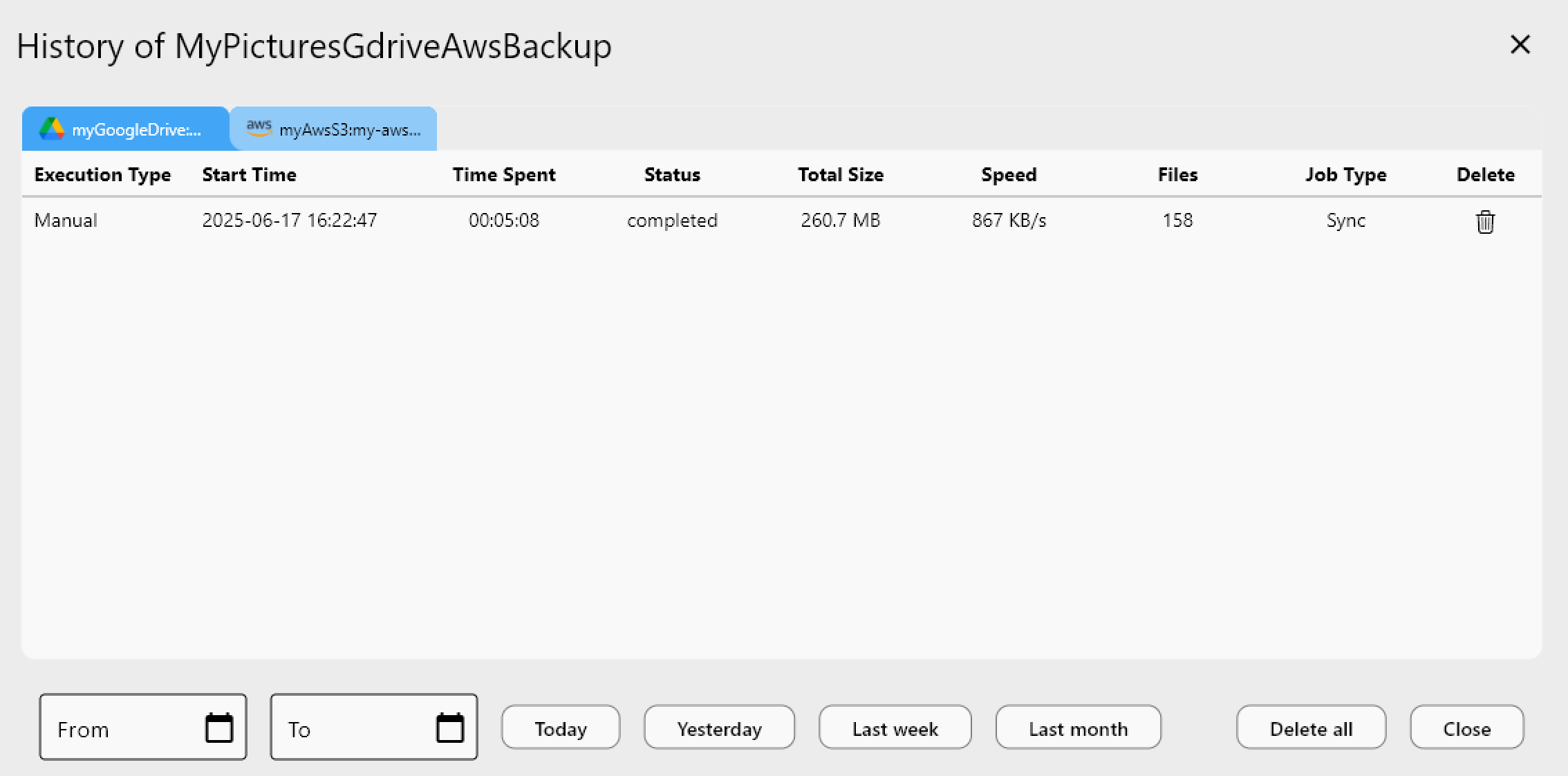
<p>작업 기록(Job History)은 각 동기화 실행의 기간, 이동된 총 데이터, 상태를 포함한 영구 기록을 보관하므로, B2 백업이 Storj와 마지막으로 최신 상태를 유지한 정확한 시점을 보여주는 감사 추적을 갖게 됩니다.</p>
<img src="https://rcloneview.com/support/images/en/howto/rcloneview-basic/job-history.png" alt="Reviewing Storj to Backblaze B2 sync job history in RcloneView" class="img-large img-center">
<h2 class="anchor anchorWithStickyNavbar_LWe7" id="시작하기">시작하기<a href="https://rcloneview.com/support/ko/blog/sync-storj-to-backblaze-b2-rcloneview#%EC%8B%9C%EC%9E%91%ED%95%98%EA%B8%B0" class="hash-link" aria-label="시작하기에 대한 직접 링크" title="시작하기에 대한 직접 링크">​</a></h2>
<ol>
<li><a href="https://rcloneview.com/src/download.html" target="_blank" rel="noopener noreferrer">rcloneview.com</a>에서 <strong>RcloneView를 다운로드</strong>하세요.</li>
<li>S3 호환 엔드포인트와 액세스 자격 증명을 사용하여 Storj를 리모트로 추가하세요.</li>
<li>Application Key ID와 Application Key를 사용하여 Backblaze B2를 추가하세요.</li>
<li>단방향 동기화 작업을 구축하고, 드라이 런을 실행한 다음, 실행하여 Storj를 B2로 미러링하세요.</li>
</ol>
<p>분산 스토리지 데이터의 두 번째 중앙 호스팅 사본은 대부분의 백업 전략에서 발생하기 쉬운 격차를 메워주며, RcloneView는 이를 수작업이 아닌 예약된 GUI 기반 루틴으로 유지하는 것을 가능하게 합니다.</p>
<hr>
<p><strong>관련 가이드:</strong></p>
<ul>
<li><a href="https://rcloneview.com/support/blog/manage-storj-decentralized-cloud-sync-rcloneview" target="_blank" rel="noopener noreferrer">RcloneView로 Storj 분산 클라우드 동기화 관리하기</a></li>
<li><a href="https://rcloneview.com/support/blog/migrate-backblaze-b2-to-wasabi-rcloneview" target="_blank" rel="noopener noreferrer">RcloneView로 Backblaze B2를 Wasabi로 마이그레이션하기</a></li>
<li><a href="https://rcloneview.com/support/blog/fix-storj-upload-errors-rcloneview" target="_blank" rel="noopener noreferrer">RcloneView로 Storj 업로드 오류 해결하기</a></li>
</ul>
<section class="py-12 px-4 bg-white rounded-xl shadow-md text-center"><h2 class="text-2xl font-semibold mb-6">지원 클라우드 제공업체</h2><div class="grid grid-cols-2 sm:grid-cols-3 md:grid-cols-4 lg:grid-cols-6 gap-x-4 gap-y-3 justify-items-center leading-none"><div class="flex items-center justify-center h-[48px] overflow-hidden"><img src="https://rcloneview.com/support/icons/cloud-icons/local-files.png" alt="Local Files" title="Local Files" loading="lazy" class="h-full object-contain" style="margin:0"></div><div class="flex items-center justify-center h-[48px] overflow-hidden"><img src="https://rcloneview.com/support/icons/cloud-icons/webdav.png" alt="WebDAV" title="WebDAV" loading="lazy" class="h-full object-contain" style="margin:0"></div><div class="flex items-center justify-center h-[48px] overflow-hidden"><img src="https://rcloneview.com/support/icons/cloud-icons/ftp.png" alt="FTP" title="FTP" loading="lazy" class="h-full object-contain" style="margin:0"></div><div class="flex items-center justify-center h-[48px] overflow-hidden"><img src="https://rcloneview.com/support/icons/cloud-icons/sftp.png" alt="SFTP" title="SFTP" loading="lazy" class="h-full object-contain" style="margin:0"></div><div class="flex items-center justify-center h-[48px] overflow-hidden"><img src="https://rcloneview.com/support/icons/cloud-icons/http.png" alt="HTTP" title="HTTP" loading="lazy" class="h-full object-contain" style="margin:0"></div><div class="flex items-center justify-center h-[48px] overflow-hidden"><img src="https://rcloneview.com/support/icons/cloud-icons/smb-cifs.png" alt="SMB / CIFS" title="SMB / CIFS" loading="lazy" class="h-full object-contain" style="margin:0"></div><div class="flex items-center justify-center h-[48px] overflow-hidden"><img src="https://rcloneview.com/support/icons/cloud-icons/google-drive.png" alt="Google Drive" title="Google Drive" loading="lazy" class="h-full object-contain" style="margin:0"></div><div class="flex items-center justify-center h-[48px] overflow-hidden"><img src="https://rcloneview.com/support/icons/cloud-icons/google-photo.png" alt="Google Photos" title="Google Photos" loading="lazy" class="h-full object-contain" style="margin:0"></div><div class="flex items-center justify-center h-[48px] overflow-hidden"><img src="https://rcloneview.com/support/icons/cloud-icons/google-cloud-storage.png" alt="Google Cloud Storage" title="Google Cloud Storage" loading="lazy" class="h-full object-contain" style="margin:0"></div><div class="flex items-center justify-center h-[48px] overflow-hidden"><img src="https://rcloneview.com/support/icons/cloud-icons/onedrive.png" alt="OneDrive" title="OneDrive" loading="lazy" class="h-full object-contain" style="margin:0"></div><div class="flex items-center justify-center h-[48px] overflow-hidden"><img src="https://rcloneview.com/support/icons/cloud-icons/dropbox.png" alt="Dropbox" title="Dropbox" loading="lazy" class="h-full object-contain" style="margin:0"></div><div class="flex items-center justify-center h-[48px] overflow-hidden"><img src="https://rcloneview.com/support/icons/cloud-icons/box.png" alt="Box" title="Box" loading="lazy" class="h-full object-contain" style="margin:0"></div><div class="flex items-center justify-center h-[48px] overflow-hidden"><img src="https://rcloneview.com/support/icons/cloud-icons/ms-blob-storage.png" alt="MS Azure Blob" title="MS Azure Blob" loading="lazy" class="h-full object-contain" style="margin:0"></div><div class="flex items-center justify-center h-[48px] overflow-hidden"><img src="https://rcloneview.com/support/icons/cloud-icons/ms-file-storage.png" alt="MS File Storage" title="MS File Storage" loading="lazy" class="h-full object-contain" style="margin:0"></div><div class="flex items-center justify-center h-[48px] overflow-hidden"><img src="https://rcloneview.com/support/icons/cloud-icons/s3-compatible.png" alt="S3 Compatible" title="S3 Compatible" loading="lazy" class="h-full object-contain" style="margin:0"></div><div class="flex items-center justify-center h-[48px] overflow-hidden"><img src="https://rcloneview.com/support/icons/cloud-icons/aws-s3.png" alt="Amazon S3" title="Amazon S3" loading="lazy" class="h-full object-contain" style="margin:0"></div><div class="flex items-center justify-center h-[48px] overflow-hidden"><img src="https://rcloneview.com/support/icons/cloud-icons/pcloud.png" alt="pCloud" title="pCloud" loading="lazy" class="h-full object-contain" style="margin:0"></div><div class="flex items-center justify-center h-[48px] overflow-hidden"><img src="https://rcloneview.com/support/icons/cloud-icons/wasabi.png" alt="Wasabi" title="Wasabi" loading="lazy" class="h-full object-contain" style="margin:0"></div><div class="flex items-center justify-center h-[48px] overflow-hidden"><img src="https://rcloneview.com/support/icons/cloud-icons/mega.png" alt="Mega" title="Mega" loading="lazy" class="h-full object-contain" style="margin:0"></div><div class="flex items-center justify-center h-[48px] overflow-hidden"><img src="https://rcloneview.com/support/icons/cloud-icons/backblaze.png" alt="Backblaze B2" title="Backblaze B2" loading="lazy" class="h-full object-contain" style="margin:0"></div><div class="flex items-center justify-center h-[48px] overflow-hidden"><img src="https://rcloneview.com/support/icons/cloud-icons/cloudflare-r2.png" alt="Cloudflare R2" title="Cloudflare R2" loading="lazy" class="h-full object-contain" style="margin:0"></div><div class="flex items-center justify-center h-[48px] overflow-hidden"><img src="https://rcloneview.com/support/icons/cloud-icons/alibaba-oss.png" alt="Alibaba OSS" title="Alibaba OSS" loading="lazy" class="h-full object-contain" style="margin:0"></div><div class="flex items-center justify-center h-[48px] overflow-hidden"><img src="https://rcloneview.com/support/icons/cloud-icons/ceph.png" alt="Ceph" title="Ceph" loading="lazy" class="h-full object-contain" style="margin:0"></div><div class="flex items-center justify-center h-[48px] overflow-hidden"><img src="https://rcloneview.com/support/icons/cloud-icons/swift.png" alt="Swift (OpenStack)" title="Swift (OpenStack)" loading="lazy" class="h-full object-contain" style="margin:0"></div><div class="flex items-center justify-center h-[48px] overflow-hidden"><img src="https://rcloneview.com/support/icons/cloud-icons/ibm-object-storage.png" alt="IBM Cloud Object Storage" title="IBM Cloud Object Storage" loading="lazy" class="h-full object-contain" style="margin:0"></div><div class="flex items-center justify-center h-[48px] overflow-hidden"><img src="https://rcloneview.com/support/icons/cloud-icons/oracle-object-storage.png" alt="Oracle Cloud Object Storage" title="Oracle Cloud Object Storage" loading="lazy" class="h-full object-contain" style="margin:0"></div><div class="flex items-center justify-center h-[48px] overflow-hidden"><img src="https://rcloneview.com/support/icons/cloud-icons/idrive-e2.png" alt="IDrive e2" title="IDrive e2" loading="lazy" class="h-full object-contain" style="margin:0"></div><div class="flex items-center justify-center h-[48px] overflow-hidden"><img src="https://rcloneview.com/support/icons/cloud-icons/minio.png" alt="MinIO" title="MinIO" loading="lazy" class="h-full object-contain" style="margin:0"></div><div class="flex items-center justify-center h-[48px] overflow-hidden"><img src="https://rcloneview.com/support/icons/cloud-icons/storj.png" alt="Storj" title="Storj" loading="lazy" class="h-full object-contain" style="margin:0"></div><div class="flex items-center justify-center h-[48px] overflow-hidden"><img src="https://rcloneview.com/support/icons/cloud-icons/digital-ocean.png" alt="DigitalOcean Spaces" title="DigitalOcean Spaces" loading="lazy" class="h-full object-contain" style="margin:0"></div></div><div class="mt-6"><a href="https://rclone.org/#providers" class="transition font-medium" target="_blank" rel="noopener noreferrer">전체 제공업체 보기 →</a></div><div class="mt-8"><a href="https://rcloneview.com/src/download.html" class="inline-block bg-blue-600 text-white font-medium px-6 py-3 rounded-lg shadow hover:bg-blue-700 transition">클라우드 연결하기 →</a></div></section>]]></content>
        <author>
            <name>Alex</name>
            <uri>https://rcloneview.com</uri>
        </author>
        <category label="RcloneView" term="RcloneView"/>
        <category label="Storj" term="Storj"/>
        <category label="Backblaze B2" term="Backblaze B2"/>
        <category label="클라우드 간 전송" term="클라우드 간 전송"/>
        <category label="동기화" term="동기화"/>
    </entry>
    <entry>
        <title type="html"><![CDATA[박물관과 아카이브를 위한 클라우드 스토리지 — RcloneView로 디지털 보존하기]]></title>
        <id>https://rcloneview.com/support/ko/blog/cloud-storage-museums-archives-rcloneview</id>
        <link href="https://rcloneview.com/support/ko/blog/cloud-storage-museums-archives-rcloneview"/>
        <updated>2026-08-01T00:00:00.000Z</updated>
        <summary type="html"><![CDATA[디지털화된 컬렉션, 아카이브 마스터 파일, 보존용 사본을 RcloneView의 체크섬 검증 동기화로 여러 클라우드 제공업체에 걸쳐 관리하세요.]]></summary>
        <content type="html"><![CDATA[<blockquote>
<p>디지털화된 컬렉션은 단순한 백업 이상을 필요로 합니다 — RcloneView는 아카이브 마스터 파일을 검증하고 독립적인 여러 클라우드 제공업체에 미러링된 상태로 유지합니다.</p>
</blockquote>
<p>박물관 디지털화 프로젝트는 스캔 파일이 하드 드라이브에 저장된다고 끝나는 것이 아닙니다. 회화의 고해상도 TIFF 파일, 구술사 녹음, 스캔된 필사본 페이지는 수십 년간 보존되어야 하며, 이는 최소한 지리적으로 분리된 사본 하나와, 나중에 파일이 조용히 손상되지 않았음을 증명할 방법이 필요하다는 뜻입니다. 아카이브와 소규모 박물관의 IT 팀은 전용 디지털 자산 관리 플랫폼에 쓸 예산이 거의 없는 경우가 많아서, RcloneView가 그 역할을 대신합니다 — 보존용 마스터 파일을 클라우드 스토리지로 전송하고, 무결성을 검증하며, 수작업 스크립트 없이 작업용 사본을 동기화 상태로 유지하는 데스크톱 GUI입니다.</p>
<section class="rv-cta" aria-labelledby="rv-cta-title"><style>
:root{
  --rv-bg:#0b1020; --rv-card:#0f1428; --rv-text:#e9eefb; --rv-muted:#9fb0d1;
  --rv-accent:#7cc3ff; --rv-accent-2:#a8ffcf; --rv-ring:rgba(124,195,255,.4);
}
@media (prefers-color-scheme: light){
  :root{
    --rv-bg:#f7f9fe; --rv-card:#fff; --rv-text:#1a2234; --rv-muted:#5a6b89;
    --rv-accent:#0d6efd; --rv-accent-2:#22c55e; --rv-ring:rgba(13,110,253,.25);
  }
}
.rv-cta{margin:2.5rem auto; padding:clamp(1rem,2vw,1.25rem); max-width:1000px;
  background:
    radial-gradient(1200px 300px at 20% -20%, rgba(124,195,255,.15), transparent 60%),
    radial-gradient(800px 250px at 90% 120%, rgba(168,255,207,.12), transparent 60%);
  border-radius:1.25rem;}
.rv-cta__card{display:grid; grid-template-columns:1.1fr 1fr; gap:1.5rem;
  padding:clamp(1rem,2.5vw,1.5rem); background:var(--rv-card);
  border:1px solid rgba(124,195,255,.18); border-radius:1.25rem;
  box-shadow:0 10px 30px rgba(0,0,0,.18), inset 0 0 0 1px rgba(255,255,255,.02);
  color:var(--rv-text);}
@media (max-width:860px){.rv-cta__card{grid-template-columns:1fr;}}
.rv-cta__media{border-radius:1rem; overflow:hidden;
  background:linear-gradient(180deg, rgba(124,195,255,.15), rgba(168,255,207,.1));
  display:flex; align-items:center; justify-content:center;}
.rv-cta__media img{
  max-width:97%;
  height:auto;
  display:block;
  object-fit:contain; /* 수정됨: cover → contain */
}
.rv-cta__body h2{margin:0 0 .5rem 0; font-size:clamp(1.4rem,2.4vw,2rem); line-height:1.2; letter-spacing:-.01em;}
.rv-cta__subtitle{margin:0 0 .9rem 0; color:var(--rv-muted); font-size:clamp(.96rem,1.2vw,1.02rem);}
.rv-cta__bullets{margin:.6rem 0 1rem 0; padding-left:1.1rem;}
.rv-cta__bullets li{margin:.25rem 0;}
.rv-cta__badges{display:flex; gap:.5rem; flex-wrap:wrap; margin:.8rem 0 1rem 0;}
.rv-badge{font-size:.82rem; padding:.3rem .55rem; border-radius:999px;
  background:rgba(124,195,255,.15); border:1px solid rgba(124,195,255,.35); color:var(--rv-text);}
.rv-button{display:inline-flex; align-items:center; justify-content:center; gap:.5rem;
  padding:.75rem 1.05rem; border-radius:.8rem;
  background:linear-gradient(92deg, var(--rv-accent), var(--rv-accent-2)); color:#0b1020;
  font-weight:700; text-decoration:none; box-shadow:0 8px 24px var(--rv-ring);
  transform:translateZ(0); transition:transform .15s ease, box-shadow .15s ease, opacity .2s ease;}
.rv-button:hover{transform:translateY(-1px); box-shadow:0 12px 28px var(--rv-ring);}
.rv-cta__fineprint{margin:.6rem 0 0 0; font-size:.82rem; color:var(--rv-muted);}
.rv-logos{display:grid; grid-template-columns:repeat(5, minmax(0,1fr)); gap:.5rem;}
@media (max-width:720px){.rv-logos{grid-template-columns:repeat(3, minmax(0,1fr));}}
.rv-logo{display:inline-flex; align-items:center; justify-content:center;
  padding:.55rem .6rem; border-radius:.6rem; background:rgba(124,195,255,.10);
  border:1px dashed rgba(124,195,255,.25); color:var(--rv-text); font-size:.82rem; white-space:nowrap;}
</style><div class="rv-cta__card"><div class="rv-cta__media"><img src="https://rcloneview.com/support/ko/img/rcloneview-preview.png" alt="RcloneView 앱 미리보기" loading="lazy"></div><div class="rv-cta__body"><h2 id="rv-cta-title">모든 클라우드를 한 곳에서 관리하고 동기화하세요</h2><p class="rv-cta__subtitle">RcloneView는 rclone의 크로스플랫폼 GUI입니다. 폴더를 비교하고, 파일을 전송·동기화하고, 깔끔한 시각적 인터페이스로 멀티 클라우드 워크플로를 자동화하세요.</p><ul class="rv-cta__bullets" role="list"><li>원클릭 작업: 복사 · 동기화 · 비교</li><li>안정적인 자동화를 위한 스케줄러와 작업 이력</li><li>Google Drive, OneDrive, Dropbox, S3, WebDAV, SFTP 등 지원</li></ul><div class="rv-cta__badges" aria-label="Supported platforms"><span class="rv-badge">Windows</span><span class="rv-badge">macOS</span><span class="rv-badge">Linux</span></div><a href="https://rcloneview.com/src/download.html" target="_blank" rel="noopener" class="rv-button" aria-label="RcloneView 다운로드">무료로 시작하기 →</a><p class="rv-cta__fineprint">핵심 기능은 무료. Plus로 자동화 기능 이용 가능.</p></div></div></section>
<h2 class="anchor anchorWithStickyNavbar_LWe7" id="독립적인-제공업체-간에-아카이브-마스터-파일-저장하기">독립적인 제공업체 간에 아카이브 마스터 파일 저장하기<a href="https://rcloneview.com/support/ko/blog/cloud-storage-museums-archives-rcloneview#%EB%8F%85%EB%A6%BD%EC%A0%81%EC%9D%B8-%EC%A0%9C%EA%B3%B5%EC%97%85%EC%B2%B4-%EA%B0%84%EC%97%90-%EC%95%84%EC%B9%B4%EC%9D%B4%EB%B8%8C-%EB%A7%88%EC%8A%A4%ED%84%B0-%ED%8C%8C%EC%9D%BC-%EC%A0%80%EC%9E%A5%ED%95%98%EA%B8%B0" class="hash-link" aria-label="독립적인 제공업체 간에 아카이브 마스터 파일 저장하기에 대한 직접 링크" title="독립적인 제공업체 간에 아카이브 마스터 파일 저장하기에 대한 직접 링크">​</a></h2>
<p>표준 보존 관행은 마스터 파일 사본을 최소 두 개의 다른 스토리지 시스템에 보관하는 것이며, 단일 벤더 장애나 계정 문제로 두 사본이 동시에 사라지지 않도록 가능하면 서로 다른 제공업체를 이용하는 것이 이상적입니다. RcloneView는 소규모 아카이브 팀도 이를 실현할 수 있게 해줍니다. Amazon S3나 Backblaze B2를 마스터 파일의 콜드 스토리지 대상으로 연결하고, Google Drive나 Wasabi 같은 두 번째 제공업체를 독립적인 미러로 연결한 뒤, 하나의 소스 폴더에서 두 대상 모두로 새 디지털화 배치를 전송하는 1<!-- -->:N<!-- --> 동기화 작업을 실행하면 됩니다. Amazon S3, Azure, Backblaze B2는 FREE 라이선스에서도 완전한 읽기/쓰기가 가능하므로, 스토리지 비용 외에는 추가 비용 없이 두 제공업체 보존 전략을 구현할 수 있습니다.</p>
<img src="https://rcloneview.com/support/images/en/blog/cloud-to-cloud-transfer-default.png" alt="Syncing digitized archive files to two cloud providers with RcloneView" class="img-large img-center">
<p>동기화 작업의 고급 설정에서 체크섬 비교를 활성화하면 파일이 단순한 타임스탬프 일치가 아니라 해시와 크기로 검증됩니다 — 스캔 작업용 컴퓨터의 시계가 어긋나거나 동일한 수정 날짜로 다른 내용의 파일이 다시 저장되는 경우 중요한 부분입니다.</p>
<h2 class="anchor anchorWithStickyNavbar_LWe7" id="명령줄-없이-무결성-검증하기">명령줄 없이 무결성 검증하기<a href="https://rcloneview.com/support/ko/blog/cloud-storage-museums-archives-rcloneview#%EB%AA%85%EB%A0%B9%EC%A4%84-%EC%97%86%EC%9D%B4-%EB%AC%B4%EA%B2%B0%EC%84%B1-%EA%B2%80%EC%A6%9D%ED%95%98%EA%B8%B0" class="hash-link" aria-label="명령줄 없이 무결성 검증하기에 대한 직접 링크" title="명령줄 없이 무결성 검증하기에 대한 직접 링크">​</a></h2>
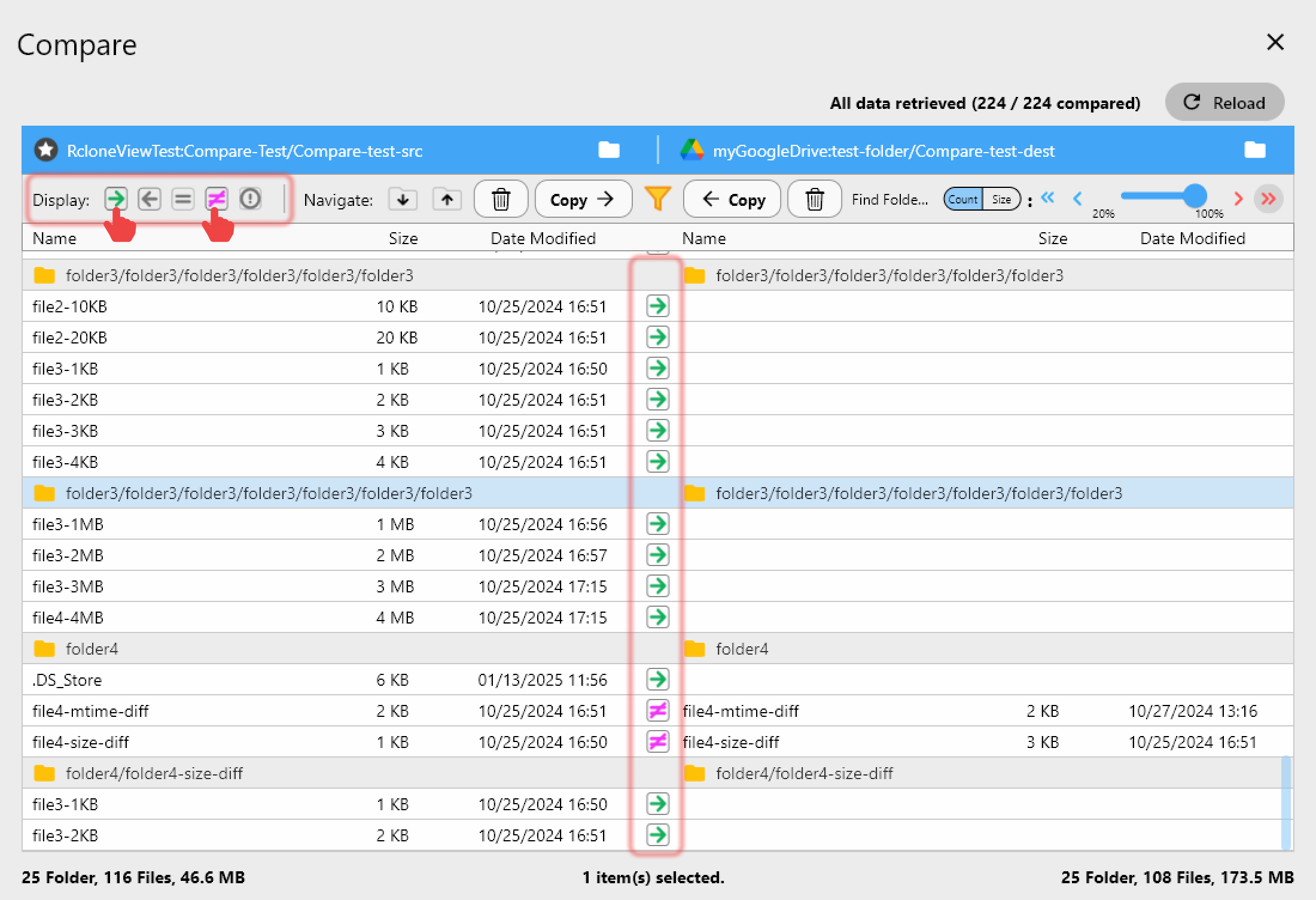
<p>비트 부패와 조용한 손상은 모든 장기 아카이브에 있어 눈에 띄지 않는 위협입니다. RcloneView의 Folder Compare 도구를 사용하면 아키비스트가 서로 다른 리모트에 있는 동일 컬렉션 — 예를 들어 기본 S3 버킷과 Backblaze 미러 — 을 두 패널로 비교하여 크기와 해시별로 파일 단위 차이를 확인할 수 있습니다. "Show different files" 필터는 어떤 항목이 동기화 상태에서 벗어났는지 정확히 보여주므로, 분기별 무결성 점검이 체크섬 로그를 일일이 분석하는 대신 5분짜리 시각적 검토로 바뀝니다.</p>
<img src="https://rcloneview.com/support/images/en/howto/rcloneview-basic/compare-display-select.png" alt="Comparing archival collection integrity between two cloud storage remotes" class="img-large img-center">
<p>새 디지털화 배치를 처음 검토할 때는 Dry Run이 실제로 전송이 이루어지기 전에 어떤 파일이 복사되거나 표시될지 미리 보여줍니다 — 필사본 폴더 하나가 수백 기가바이트에 이를 수 있고 실수를 되돌리는 비용이 클 때 유용합니다.</p>
<h2 class="anchor anchorWithStickyNavbar_LWe7" id="스캔-작업용-컴퓨터에서-수집-일정-예약하기">스캔 작업용 컴퓨터에서 수집 일정 예약하기<a href="https://rcloneview.com/support/ko/blog/cloud-storage-museums-archives-rcloneview#%EC%8A%A4%EC%BA%94-%EC%9E%91%EC%97%85%EC%9A%A9-%EC%BB%B4%ED%93%A8%ED%84%B0%EC%97%90%EC%84%9C-%EC%88%98%EC%A7%91-%EC%9D%BC%EC%A0%95-%EC%98%88%EC%95%BD%ED%95%98%EA%B8%B0" class="hash-link" aria-label="스캔 작업용 컴퓨터에서 수집 일정 예약하기에 대한 직접 링크" title="스캔 작업용 컴퓨터에서 수집 일정 예약하기에 대한 직접 링크">​</a></h2>
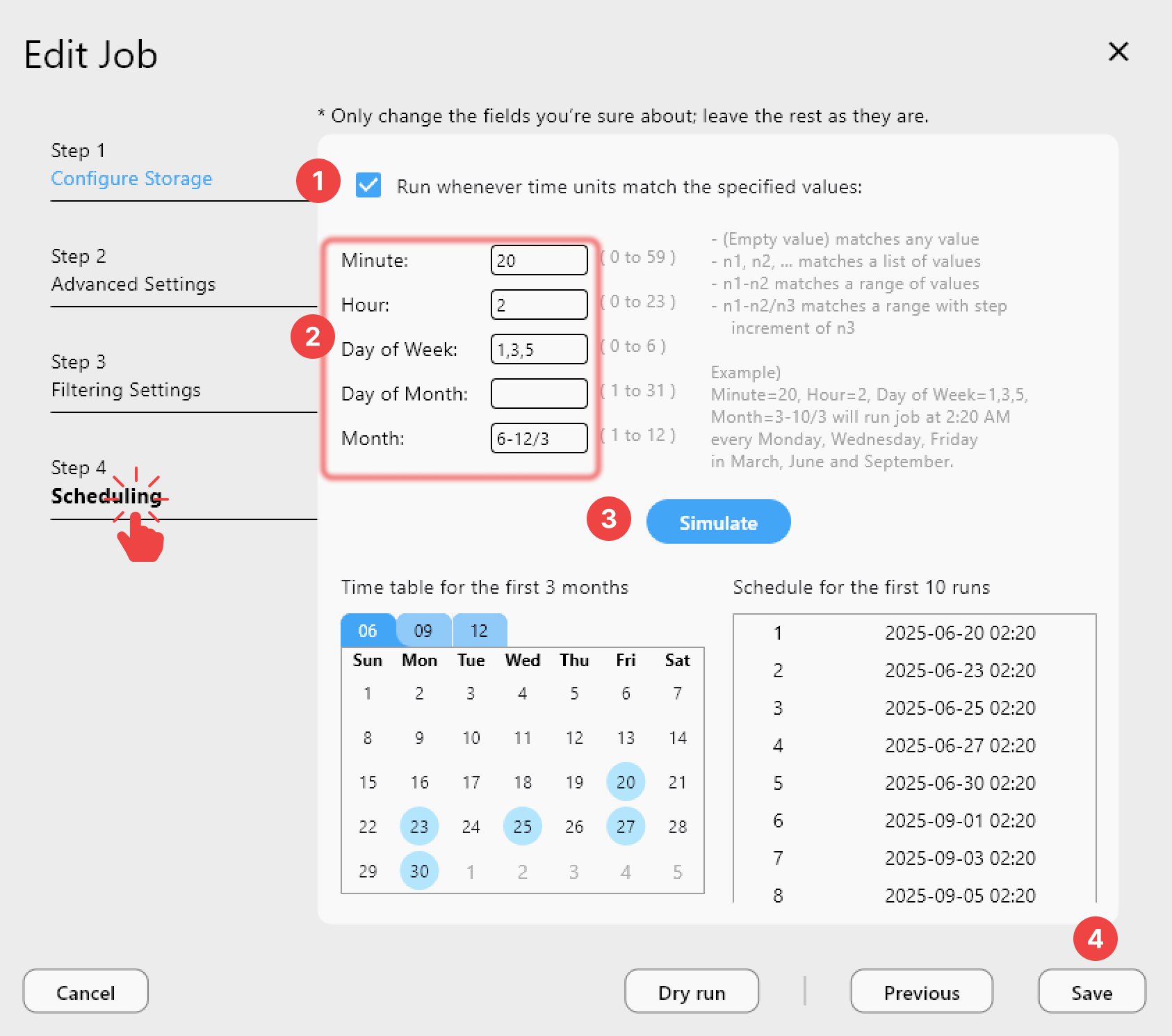
<p>디지털화 작업은 한 주에 슬라이드 한 묶음을 스캔하고, 다음 주에 오디오 릴을 전송하는 식으로 몰아서 진행되는 경우가 많습니다. 매 작업 세션 후 수동으로 업로드하는 것을 기억하는 대신, PLUS 라이선스를 사용하는 아카이브 팀은 크론탭 방식의 일정을 설정하여 로컬 수집 폴더의 새 파일을 매일 밤 자동으로 클라우드 스토리지와 동기화할 수 있으며, Job History가 수납 기록을 위해 정확히 무엇이 언제 전송되었는지 기록을 남겨 줍니다.</p>
<img src="https://rcloneview.com/support/images/en/howto/rcloneview-advanced/create-job-schedule.png" alt="Scheduling automated archive ingest sync in RcloneView" class="img-large img-center">
<h2 class="anchor anchorWithStickyNavbar_LWe7" id="시작하기">시작하기<a href="https://rcloneview.com/support/ko/blog/cloud-storage-museums-archives-rcloneview#%EC%8B%9C%EC%9E%91%ED%95%98%EA%B8%B0" class="hash-link" aria-label="시작하��기에 대한 직접 링크" title="시작하기에 대한 직접 링크">​</a></h2>
<ol>
<li><a href="https://rcloneview.com/src/download.html" target="_blank" rel="noopener noreferrer">rcloneview.com</a>에서 <strong>RcloneView를 다운로드</strong>합니다.</li>
<li>기본 아카이브 스토리지 리모트(S3, Backblaze B2 등)와 이중화를 위한 두 번째 제공업체를 연결합니다.</li>
<li>디지털화 수집 폴더에 대해 체크섬 검증을 활성화한 1<!-- -->:N<!-- --> 동기화 작업을 설정합니다.</li>
<li>기본 사본과 미러 사본 사이의 드리프트를 잡아내기 위해 Folder Compare를 정기적으로 실행합니다.</li>
</ol>
<p>스캔에 쓴 디지털화 예산은 절반에 불과합니다 — RcloneView는 그 파일들이 10년 후에도 여전히 읽을 수 있게끔 만드는, 눈에 덜 띄는 나머지 절반을 담당합니다.</p>
<hr>
<p><strong>관련 가이드:</strong></p>
<ul>
<li><a href="https://rcloneview.com/support/blog/checksum-verified-cloud-migrations-rcloneview" target="_blank" rel="noopener noreferrer">RcloneView로 체크섬 검증 클라우드 마이그레이션하기 (Drive, Dropbox, S3, R2)</a></li>
<li><a href="https://rcloneview.com/support/blog/sync-internet-archive-cloud-backup-rcloneview" target="_blank" rel="noopener noreferrer">RcloneView로 Internet Archive 컬렉션 업로드 및 관리하는 방법</a></li>
<li><a href="https://rcloneview.com/support/blog/cloud-storage-research-academia-rcloneview" target="_blank" rel="noopener noreferrer">연구자를 위한 클라우드 스토리지 — RcloneView로 데이터셋, 논문, 실험실 데이터 관리하기</a></li>
</ul>
<section class="py-12 px-4 bg-white rounded-xl shadow-md text-center"><h2 class="text-2xl font-semibold mb-6">지원 클라우드 제공업체</h2><div class="grid grid-cols-2 sm:grid-cols-3 md:grid-cols-4 lg:grid-cols-6 gap-x-4 gap-y-3 justify-items-center leading-none"><div class="flex items-center justify-center h-[48px] overflow-hidden"><img src="https://rcloneview.com/support/icons/cloud-icons/local-files.png" alt="Local Files" title="Local Files" loading="lazy" class="h-full object-contain" style="margin:0"></div><div class="flex items-center justify-center h-[48px] overflow-hidden"><img src="https://rcloneview.com/support/icons/cloud-icons/webdav.png" alt="WebDAV" title="WebDAV" loading="lazy" class="h-full object-contain" style="margin:0"></div><div class="flex items-center justify-center h-[48px] overflow-hidden"><img src="https://rcloneview.com/support/icons/cloud-icons/ftp.png" alt="FTP" title="FTP" loading="lazy" class="h-full object-contain" style="margin:0"></div><div class="flex items-center justify-center h-[48px] overflow-hidden"><img src="https://rcloneview.com/support/icons/cloud-icons/sftp.png" alt="SFTP" title="SFTP" loading="lazy" class="h-full object-contain" style="margin:0"></div><div class="flex items-center justify-center h-[48px] overflow-hidden"><img src="https://rcloneview.com/support/icons/cloud-icons/http.png" alt="HTTP" title="HTTP" loading="lazy" class="h-full object-contain" style="margin:0"></div><div class="flex items-center justify-center h-[48px] overflow-hidden"><img src="https://rcloneview.com/support/icons/cloud-icons/smb-cifs.png" alt="SMB / CIFS" title="SMB / CIFS" loading="lazy" class="h-full object-contain" style="margin:0"></div><div class="flex items-center justify-center h-[48px] overflow-hidden"><img src="https://rcloneview.com/support/icons/cloud-icons/google-drive.png" alt="Google Drive" title="Google Drive" loading="lazy" class="h-full object-contain" style="margin:0"></div><div class="flex items-center justify-center h-[48px] overflow-hidden"><img src="https://rcloneview.com/support/icons/cloud-icons/google-photo.png" alt="Google Photos" title="Google Photos" loading="lazy" class="h-full object-contain" style="margin:0"></div><div class="flex items-center justify-center h-[48px] overflow-hidden"><img src="https://rcloneview.com/support/icons/cloud-icons/google-cloud-storage.png" alt="Google Cloud Storage" title="Google Cloud Storage" loading="lazy" class="h-full object-contain" style="margin:0"></div><div class="flex items-center justify-center h-[48px] overflow-hidden"><img src="https://rcloneview.com/support/icons/cloud-icons/onedrive.png" alt="OneDrive" title="OneDrive" loading="lazy" class="h-full object-contain" style="margin:0"></div><div class="flex items-center justify-center h-[48px] overflow-hidden"><img src="https://rcloneview.com/support/icons/cloud-icons/dropbox.png" alt="Dropbox" title="Dropbox" loading="lazy" class="h-full object-contain" style="margin:0"></div><div class="flex items-center justify-center h-[48px] overflow-hidden"><img src="https://rcloneview.com/support/icons/cloud-icons/box.png" alt="Box" title="Box" loading="lazy" class="h-full object-contain" style="margin:0"></div><div class="flex items-center justify-center h-[48px] overflow-hidden"><img src="https://rcloneview.com/support/icons/cloud-icons/ms-blob-storage.png" alt="MS Azure Blob" title="MS Azure Blob" loading="lazy" class="h-full object-contain" style="margin:0"></div><div class="flex items-center justify-center h-[48px] overflow-hidden"><img src="https://rcloneview.com/support/icons/cloud-icons/ms-file-storage.png" alt="MS File Storage" title="MS File Storage" loading="lazy" class="h-full object-contain" style="margin:0"></div><div class="flex items-center justify-center h-[48px] overflow-hidden"><img src="https://rcloneview.com/support/icons/cloud-icons/s3-compatible.png" alt="S3 Compatible" title="S3 Compatible" loading="lazy" class="h-full object-contain" style="margin:0"></div><div class="flex items-center justify-center h-[48px] overflow-hidden"><img src="https://rcloneview.com/support/icons/cloud-icons/aws-s3.png" alt="Amazon S3" title="Amazon S3" loading="lazy" class="h-full object-contain" style="margin:0"></div><div class="flex items-center justify-center h-[48px] overflow-hidden"><img src="https://rcloneview.com/support/icons/cloud-icons/pcloud.png" alt="pCloud" title="pCloud" loading="lazy" class="h-full object-contain" style="margin:0"></div><div class="flex items-center justify-center h-[48px] overflow-hidden"><img src="https://rcloneview.com/support/icons/cloud-icons/wasabi.png" alt="Wasabi" title="Wasabi" loading="lazy" class="h-full object-contain" style="margin:0"></div><div class="flex items-center justify-center h-[48px] overflow-hidden"><img src="https://rcloneview.com/support/icons/cloud-icons/mega.png" alt="Mega" title="Mega" loading="lazy" class="h-full object-contain" style="margin:0"></div><div class="flex items-center justify-center h-[48px] overflow-hidden"><img src="https://rcloneview.com/support/icons/cloud-icons/backblaze.png" alt="Backblaze B2" title="Backblaze B2" loading="lazy" class="h-full object-contain" style="margin:0"></div><div class="flex items-center justify-center h-[48px] overflow-hidden"><img src="https://rcloneview.com/support/icons/cloud-icons/cloudflare-r2.png" alt="Cloudflare R2" title="Cloudflare R2" loading="lazy" class="h-full object-contain" style="margin:0"></div><div class="flex items-center justify-center h-[48px] overflow-hidden"><img src="https://rcloneview.com/support/icons/cloud-icons/alibaba-oss.png" alt="Alibaba OSS" title="Alibaba OSS" loading="lazy" class="h-full object-contain" style="margin:0"></div><div class="flex items-center justify-center h-[48px] overflow-hidden"><img src="https://rcloneview.com/support/icons/cloud-icons/ceph.png" alt="Ceph" title="Ceph" loading="lazy" class="h-full object-contain" style="margin:0"></div><div class="flex items-center justify-center h-[48px] overflow-hidden"><img src="https://rcloneview.com/support/icons/cloud-icons/swift.png" alt="Swift (OpenStack)" title="Swift (OpenStack)" loading="lazy" class="h-full object-contain" style="margin:0"></div><div class="flex items-center justify-center h-[48px] overflow-hidden"><img src="https://rcloneview.com/support/icons/cloud-icons/ibm-object-storage.png" alt="IBM Cloud Object Storage" title="IBM Cloud Object Storage" loading="lazy" class="h-full object-contain" style="margin:0"></div><div class="flex items-center justify-center h-[48px] overflow-hidden"><img src="https://rcloneview.com/support/icons/cloud-icons/oracle-object-storage.png" alt="Oracle Cloud Object Storage" title="Oracle Cloud Object Storage" loading="lazy" class="h-full object-contain" style="margin:0"></div><div class="flex items-center justify-center h-[48px] overflow-hidden"><img src="https://rcloneview.com/support/icons/cloud-icons/idrive-e2.png" alt="IDrive e2" title="IDrive e2" loading="lazy" class="h-full object-contain" style="margin:0"></div><div class="flex items-center justify-center h-[48px] overflow-hidden"><img src="https://rcloneview.com/support/icons/cloud-icons/minio.png" alt="MinIO" title="MinIO" loading="lazy" class="h-full object-contain" style="margin:0"></div><div class="flex items-center justify-center h-[48px] overflow-hidden"><img src="https://rcloneview.com/support/icons/cloud-icons/storj.png" alt="Storj" title="Storj" loading="lazy" class="h-full object-contain" style="margin:0"></div><div class="flex items-center justify-center h-[48px] overflow-hidden"><img src="https://rcloneview.com/support/icons/cloud-icons/digital-ocean.png" alt="DigitalOcean Spaces" title="DigitalOcean Spaces" loading="lazy" class="h-full object-contain" style="margin:0"></div></div><div class="mt-6"><a href="https://rclone.org/#providers" class="transition font-medium" target="_blank" rel="noopener noreferrer">전체 제공업체 보기 →</a></div><div class="mt-8"><a href="https://rcloneview.com/src/download.html" class="inline-block bg-blue-600 text-white font-medium px-6 py-3 rounded-lg shadow hover:bg-blue-700 transition">클라우드 연결하기 →</a></div></section>]]></content>
        <author>
            <name>Morgan</name>
            <uri>https://rcloneview.com</uri>
        </author>
        <category label="RcloneView" term="RcloneView"/>
        <category label="클라우드 스토리지" term="클라우드 스토리지"/>
        <category label="산업" term="산업"/>
        <category label="백업" term="백업"/>
        <category label="디지털 보존" term="디지털 보존"/>
    </entry>
    <entry>
        <title type="html"><![CDATA[Leviia 오브젝트 스토리지 관리하기 — RcloneView로 파일 동기화 및 백업하기]]></title>
        <id>https://rcloneview.com/support/ko/blog/manage-leviia-cloud-sync-backup-rcloneview</id>
        <link href="https://rcloneview.com/support/ko/blog/manage-leviia-cloud-sync-backup-rcloneview"/>
        <updated>2026-08-01T00:00:00.000Z</updated>
        <summary type="html"><![CDATA[Leviia의 S3 호환 오브젝트 스토리지를 RcloneView에 연결하여 드래그 앤 드롭 파일 관리, 예약 백업, 클라우드 간 동기화를 이용하세요.]]></summary>
        <content type="html"><![CDATA[<blockquote>
<p>다른 모든 클라우드에 사용하는 것과 동일한 창에서 Leviia의 S3 호환 오브젝트 스토리지를 탐색하고, 동기화하고, 백업하세요.</p>
</blockquote>
<p>Leviia는 유럽에서 호스팅되는 S3 호환 오브젝트 스토리지를 제공하며, 이미 S3와 잘 맞는 도구 생태계를 포기하지 않으면서도 데이터 상주 보장을 원하는 팀에게 흔한 선택지입니다. 단점은 S3 호환 제공업체가 자체적으로 완성도 높은 데스크톱 클라이언트를 제공하는 경우가 드물어, 사용자가 업로드를 스크립트로 작성하거나 순수 CLI를 다뤄야 한다는 점입니다. RcloneView는 Leviia를 다른 리모트와 똑같이 취급하여 이 불편함을 없애줍니다 — 완전한 파일 탐색, 드래그 앤 드롭 전송, 예약 동기화 작업까지, 명령어 없이 가능합니다.</p>
<section class="rv-cta" aria-labelledby="rv-cta-title"><style>
:root{
  --rv-bg:#0b1020; --rv-card:#0f1428; --rv-text:#e9eefb; --rv-muted:#9fb0d1;
  --rv-accent:#7cc3ff; --rv-accent-2:#a8ffcf; --rv-ring:rgba(124,195,255,.4);
}
@media (prefers-color-scheme: light){
  :root{
    --rv-bg:#f7f9fe; --rv-card:#fff; --rv-text:#1a2234; --rv-muted:#5a6b89;
    --rv-accent:#0d6efd; --rv-accent-2:#22c55e; --rv-ring:rgba(13,110,253,.25);
  }
}
.rv-cta{margin:2.5rem auto; padding:clamp(1rem,2vw,1.25rem); max-width:1000px;
  background:
    radial-gradient(1200px 300px at 20% -20%, rgba(124,195,255,.15), transparent 60%),
    radial-gradient(800px 250px at 90% 120%, rgba(168,255,207,.12), transparent 60%);
  border-radius:1.25rem;}
.rv-cta__card{display:grid; grid-template-columns:1.1fr 1fr; gap:1.5rem;
  padding:clamp(1rem,2.5vw,1.5rem); background:var(--rv-card);
  border:1px solid rgba(124,195,255,.18); border-radius:1.25rem;
  box-shadow:0 10px 30px rgba(0,0,0,.18), inset 0 0 0 1px rgba(255,255,255,.02);
  color:var(--rv-text);}
@media (max-width:860px){.rv-cta__card{grid-template-columns:1fr;}}
.rv-cta__media{border-radius:1rem; overflow:hidden;
  background:linear-gradient(180deg, rgba(124,195,255,.15), rgba(168,255,207,.1));
  display:flex; align-items:center; justify-content:center;}
.rv-cta__media img{
  max-width:97%;
  height:auto;
  display:block;
  object-fit:contain; /* 수정됨: cover → contain */
}
.rv-cta__body h2{margin:0 0 .5rem 0; font-size:clamp(1.4rem,2.4vw,2rem); line-height:1.2; letter-spacing:-.01em;}
.rv-cta__subtitle{margin:0 0 .9rem 0; color:var(--rv-muted); font-size:clamp(.96rem,1.2vw,1.02rem);}
.rv-cta__bullets{margin:.6rem 0 1rem 0; padding-left:1.1rem;}
.rv-cta__bullets li{margin:.25rem 0;}
.rv-cta__badges{display:flex; gap:.5rem; flex-wrap:wrap; margin:.8rem 0 1rem 0;}
.rv-badge{font-size:.82rem; padding:.3rem .55rem; border-radius:999px;
  background:rgba(124,195,255,.15); border:1px solid rgba(124,195,255,.35); color:var(--rv-text);}
.rv-button{display:inline-flex; align-items:center; justify-content:center; gap:.5rem;
  padding:.75rem 1.05rem; border-radius:.8rem;
  background:linear-gradient(92deg, var(--rv-accent), var(--rv-accent-2)); color:#0b1020;
  font-weight:700; text-decoration:none; box-shadow:0 8px 24px var(--rv-ring);
  transform:translateZ(0); transition:transform .15s ease, box-shadow .15s ease, opacity .2s ease;}
.rv-button:hover{transform:translateY(-1px); box-shadow:0 12px 28px var(--rv-ring);}
.rv-cta__fineprint{margin:.6rem 0 0 0; font-size:.82rem; color:var(--rv-muted);}
.rv-logos{display:grid; grid-template-columns:repeat(5, minmax(0,1fr)); gap:.5rem;}
@media (max-width:720px){.rv-logos{grid-template-columns:repeat(3, minmax(0,1fr));}}
.rv-logo{display:inline-flex; align-items:center; justify-content:center;
  padding:.55rem .6rem; border-radius:.6rem; background:rgba(124,195,255,.10);
  border:1px dashed rgba(124,195,255,.25); color:var(--rv-text); font-size:.82rem; white-space:nowrap;}
</style><div class="rv-cta__card"><div class="rv-cta__media"><img src="https://rcloneview.com/support/ko/img/rcloneview-preview.png" alt="RcloneView 앱 미리보기" loading="lazy"></div><div class="rv-cta__body"><h2 id="rv-cta-title">모든 클라우드를 한 곳에서 관리하고 동기화하세요</h2><p class="rv-cta__subtitle">RcloneView는 rclone의 크로스플랫폼 GUI입니다. 폴더를 비교하고, 파일을 전송·동기화하고, 깔끔한 시각적 인터페이스로 멀티 클라우드 워크플로를 자동화하세요.</p><ul class="rv-cta__bullets" role="list"><li>원클릭 작업: 복사 · 동기화 · 비교</li><li>안정적인 자동화를 위한 스케줄러와 작업 이력</li><li>Google Drive, OneDrive, Dropbox, S3, WebDAV, SFTP 등 지원</li></ul><div class="rv-cta__badges" aria-label="Supported platforms"><span class="rv-badge">Windows</span><span class="rv-badge">macOS</span><span class="rv-badge">Linux</span></div><a href="https://rcloneview.com/src/download.html" target="_blank" rel="noopener" class="rv-button" aria-label="RcloneView 다운로드">무료로 시작하기 →</a><p class="rv-cta__fineprint">핵심 기능은 무료. Plus로 자동화 기능 이용 가능.</p></div></div></section>
<h2 class="anchor anchorWithStickyNavbar_LWe7" id="leviia-버킷-연결하기">Leviia 버킷 연결하기<a href="https://rcloneview.com/support/ko/blog/manage-leviia-cloud-sync-backup-rcloneview#leviia-%EB%B2%84%ED%82%B7-%EC%97%B0%EA%B2%B0%ED%95%98%EA%B8%B0" class="hash-link" aria-label="Leviia 버킷 연결하기에 대한 직접 링크" title="Leviia 버킷 연결하기에 대한 직접 링크">​</a></h2>
<p>Leviia는 S3 프로토콜을 사용하므로, Amazon S3나 Wasabi를 추가할 때와 같은 방식으로 RcloneView에 추가할 수 있습니다. 새 리모트를 만들고, S3 호환 제공업체 옵션을 선택한 뒤, 계정 지역에 맞는 Access Key, Secret Key, Leviia 엔드포인트 URL을 입력하면 됩니다. 저장하고 나면 버킷이 Explorer 패널에 일반 탭으로 표시되어 바로 탐색하고 전송할 수 있습니다.</p>
<img src="https://rcloneview.com/support/images/en/blog/new-remote.png" alt="Adding a Leviia object storage remote in RcloneView" class="img-large img-center">
<p>RcloneView는 한 창에서 90개 이상의 제공업체를 마운트하고 동기화하며 Windows, macOS, Linux에서 모두 동작하므로, Leviia 버킷도 도구를 바꾸지 않고 관리하는 다른 모든 클라우드 계정과 나란히 놓입니다.</p>
<h2 class="anchor anchorWithStickyNavbar_LWe7" id="leviia-스토리지-탐색-및-정리하기">Leviia 스토리지 탐색 및 정리하기<a href="https://rcloneview.com/support/ko/blog/manage-leviia-cloud-sync-backup-rcloneview#leviia-%EC%8A%A4%ED%86%A0%EB%A6%AC%EC%A7%80-%ED%83%90%EC%83%89-%EB%B0%8F-%EC%A0%95%EB%A6%AC%ED%95%98%EA%B8%B0" class="hash-link" aria-label="Leviia 스토리지 탐색 및 정리하기에 대한 직접 링크" title="Leviia 스토리지 탐색 및 정리하기에 대한 직접 링크">​</a></h2>
<p>연결하고 나면 Leviia 버킷은 Explorer에서 로컬 폴더와 똑같이 동작합니다. 이름, 유형, 수정 날짜, 크기별로 정렬하고, 이미지가 가득한 버킷은 썸네일 보기로 전환하며, Get Size를 사용해 특정 폴더가 어느 정도 용량을 차지하는지 확인한 뒤 다른 곳으로 보관할지 결정할 수 있습니다. Ctrl+Click 또는 Shift+Click을 사용한 다중 선택으로 스크립트 반복문 없이 대량 다운로드와 삭제를 처리합니다.</p>
<img src="https://rcloneview.com/support/images/en/howto/rcloneview-basic/compare-display-select.png" alt="Browsing Leviia bucket contents in RcloneView" class="img-large img-center">
<h2 class="anchor anchorWithStickyNavbar_LWe7" id="leviia로-백업하고-leviia에서-백업하기">Leviia로 백업하고 Leviia에서 백업하기<a href="https://rcloneview.com/support/ko/blog/manage-leviia-cloud-sync-backup-rcloneview#leviia%EB%A1%9C-%EB%B0%B1%EC%97%85%ED%95%98%EA%B3%A0-leviia%EC%97%90%EC%84%9C-%EB%B0%B1%EC%97%85%ED%95%98%EA%B8%B0" class="hash-link" aria-label="Leviia로 백업하고 Leviia에서 백업하기에 대한 직접 링크" title="Leviia로 백업하고 Leviia에서 백업하기에 대한 직접 링크">​</a></h2>
<p>반복적인 백업을 위해서는 Leviia를 소스나 대상으로 하는 동기화 작업을 설정하세요. 4단계 마법사는 동시 전송 수, 타임스탬프뿐 아니라 해시와 크기로 파일을 비교하는 체크섬 검증, 보관하고 싶지 않은 파일 유형을 제외하는 필터링 규칙을 다룹니다. 프로덕션 데이터가 있는 버킷을 대상으로 동기화 작업을 실행하기 전에는 Dry Run을 먼저 실행하여 무엇이 복사되거나 삭제될지 미리 확인하는 것이 좋습니다.</p>
<img src="https://rcloneview.com/support/images/en/howto/rcloneview-advanced/create-job-schedule.png" alt="Scheduling a Leviia backup job in RcloneView" class="img-large img-center">
<h2 class="anchor anchorWithStickyNavbar_LWe7" id="시작하기">시작하기<a href="https://rcloneview.com/support/ko/blog/manage-leviia-cloud-sync-backup-rcloneview#%EC%8B%9C%EC%9E%91%ED%95%98%EA%B8%B0" class="hash-link" aria-label="시작하기에 대한 직접 링크" title="시작하기에 대한 직접 링크">​</a></h2>
<ol>
<li><a href="https://rcloneview.com/src/download.html" target="_blank" rel="noopener noreferrer">rcloneview.com</a>에서 <strong>RcloneView를 다운로드</strong>합니다.</li>
<li>새 리모트를 만들고 S3 호환 제공업체 유형을 선택합니다.</li>
<li>Leviia의 Access Key, Secret Key, 엔드포인트 URL을 입력합니다.</li>
<li>Leviia와 다른 클라우드 리모트 사이에 파일을 이동할 Sync 또는 Copy 작업을 설정합니다.</li>
</ol>
<p>Leviia가 RcloneView에 연결되고 나면, 오브젝트 스토리지 관리는 더 이상 스크립트 작성이 필요한 일이 아니라 일상적인 파일 작업의 일부가 됩니다.</p>
<hr>
<p><strong>관련 가이드:</strong></p>
<ul>
<li><a href="https://rcloneview.com/support/blog/manage-ceph-object-storage-s3-rcloneview" target="_blank" rel="noopener noreferrer">RcloneView로 Ceph 오브젝트 스토리지 관리하기 — Ceph 클러스터를 위한 S3 호환 GUI</a></li>
<li><a href="https://rcloneview.com/support/blog/manage-scaleway-object-storage-cloud-sync-rcloneview" target="_blank" rel="noopener noreferrer">Scaleway 오브젝트 스토리지 관리하기 — RcloneView로 클라우드 동기화 및 백업하기</a></li>
<li><a href="https://rcloneview.com/support/blog/manage-ionos-object-storage-cloud-sync-rcloneview" target="_blank" rel="noopener noreferrer">IONOS 오브젝트 스토리지 관리하기 — RcloneView로 파일 동기화 및 백업하기</a></li>
</ul>
<section class="py-12 px-4 bg-white rounded-xl shadow-md text-center"><h2 class="text-2xl font-semibold mb-6">지원 클라우드 제공업체</h2><div class="grid grid-cols-2 sm:grid-cols-3 md:grid-cols-4 lg:grid-cols-6 gap-x-4 gap-y-3 justify-items-center leading-none"><div class="flex items-center justify-center h-[48px] overflow-hidden"><img src="https://rcloneview.com/support/icons/cloud-icons/local-files.png" alt="Local Files" title="Local Files" loading="lazy" class="h-full object-contain" style="margin:0"></div><div class="flex items-center justify-center h-[48px] overflow-hidden"><img src="https://rcloneview.com/support/icons/cloud-icons/webdav.png" alt="WebDAV" title="WebDAV" loading="lazy" class="h-full object-contain" style="margin:0"></div><div class="flex items-center justify-center h-[48px] overflow-hidden"><img src="https://rcloneview.com/support/icons/cloud-icons/ftp.png" alt="FTP" title="FTP" loading="lazy" class="h-full object-contain" style="margin:0"></div><div class="flex items-center justify-center h-[48px] overflow-hidden"><img src="https://rcloneview.com/support/icons/cloud-icons/sftp.png" alt="SFTP" title="SFTP" loading="lazy" class="h-full object-contain" style="margin:0"></div><div class="flex items-center justify-center h-[48px] overflow-hidden"><img src="https://rcloneview.com/support/icons/cloud-icons/http.png" alt="HTTP" title="HTTP" loading="lazy" class="h-full object-contain" style="margin:0"></div><div class="flex items-center justify-center h-[48px] overflow-hidden"><img src="https://rcloneview.com/support/icons/cloud-icons/smb-cifs.png" alt="SMB / CIFS" title="SMB / CIFS" loading="lazy" class="h-full object-contain" style="margin:0"></div><div class="flex items-center justify-center h-[48px] overflow-hidden"><img src="https://rcloneview.com/support/icons/cloud-icons/google-drive.png" alt="Google Drive" title="Google Drive" loading="lazy" class="h-full object-contain" style="margin:0"></div><div class="flex items-center justify-center h-[48px] overflow-hidden"><img src="https://rcloneview.com/support/icons/cloud-icons/google-photo.png" alt="Google Photos" title="Google Photos" loading="lazy" class="h-full object-contain" style="margin:0"></div><div class="flex items-center justify-center h-[48px] overflow-hidden"><img src="https://rcloneview.com/support/icons/cloud-icons/google-cloud-storage.png" alt="Google Cloud Storage" title="Google Cloud Storage" loading="lazy" class="h-full object-contain" style="margin:0"></div><div class="flex items-center justify-center h-[48px] overflow-hidden"><img src="https://rcloneview.com/support/icons/cloud-icons/onedrive.png" alt="OneDrive" title="OneDrive" loading="lazy" class="h-full object-contain" style="margin:0"></div><div class="flex items-center justify-center h-[48px] overflow-hidden"><img src="https://rcloneview.com/support/icons/cloud-icons/dropbox.png" alt="Dropbox" title="Dropbox" loading="lazy" class="h-full object-contain" style="margin:0"></div><div class="flex items-center justify-center h-[48px] overflow-hidden"><img src="https://rcloneview.com/support/icons/cloud-icons/box.png" alt="Box" title="Box" loading="lazy" class="h-full object-contain" style="margin:0"></div><div class="flex items-center justify-center h-[48px] overflow-hidden"><img src="https://rcloneview.com/support/icons/cloud-icons/ms-blob-storage.png" alt="MS Azure Blob" title="MS Azure Blob" loading="lazy" class="h-full object-contain" style="margin:0"></div><div class="flex items-center justify-center h-[48px] overflow-hidden"><img src="https://rcloneview.com/support/icons/cloud-icons/ms-file-storage.png" alt="MS File Storage" title="MS File Storage" loading="lazy" class="h-full object-contain" style="margin:0"></div><div class="flex items-center justify-center h-[48px] overflow-hidden"><img src="https://rcloneview.com/support/icons/cloud-icons/s3-compatible.png" alt="S3 Compatible" title="S3 Compatible" loading="lazy" class="h-full object-contain" style="margin:0"></div><div class="flex items-center justify-center h-[48px] overflow-hidden"><img src="https://rcloneview.com/support/icons/cloud-icons/aws-s3.png" alt="Amazon S3" title="Amazon S3" loading="lazy" class="h-full object-contain" style="margin:0"></div><div class="flex items-center justify-center h-[48px] overflow-hidden"><img src="https://rcloneview.com/support/icons/cloud-icons/pcloud.png" alt="pCloud" title="pCloud" loading="lazy" class="h-full object-contain" style="margin:0"></div><div class="flex items-center justify-center h-[48px] overflow-hidden"><img src="https://rcloneview.com/support/icons/cloud-icons/wasabi.png" alt="Wasabi" title="Wasabi" loading="lazy" class="h-full object-contain" style="margin:0"></div><div class="flex items-center justify-center h-[48px] overflow-hidden"><img src="https://rcloneview.com/support/icons/cloud-icons/mega.png" alt="Mega" title="Mega" loading="lazy" class="h-full object-contain" style="margin:0"></div><div class="flex items-center justify-center h-[48px] overflow-hidden"><img src="https://rcloneview.com/support/icons/cloud-icons/backblaze.png" alt="Backblaze B2" title="Backblaze B2" loading="lazy" class="h-full object-contain" style="margin:0"></div><div class="flex items-center justify-center h-[48px] overflow-hidden"><img src="https://rcloneview.com/support/icons/cloud-icons/cloudflare-r2.png" alt="Cloudflare R2" title="Cloudflare R2" loading="lazy" class="h-full object-contain" style="margin:0"></div><div class="flex items-center justify-center h-[48px] overflow-hidden"><img src="https://rcloneview.com/support/icons/cloud-icons/alibaba-oss.png" alt="Alibaba OSS" title="Alibaba OSS" loading="lazy" class="h-full object-contain" style="margin:0"></div><div class="flex items-center justify-center h-[48px] overflow-hidden"><img src="https://rcloneview.com/support/icons/cloud-icons/ceph.png" alt="Ceph" title="Ceph" loading="lazy" class="h-full object-contain" style="margin:0"></div><div class="flex items-center justify-center h-[48px] overflow-hidden"><img src="https://rcloneview.com/support/icons/cloud-icons/swift.png" alt="Swift (OpenStack)" title="Swift (OpenStack)" loading="lazy" class="h-full object-contain" style="margin:0"></div><div class="flex items-center justify-center h-[48px] overflow-hidden"><img src="https://rcloneview.com/support/icons/cloud-icons/ibm-object-storage.png" alt="IBM Cloud Object Storage" title="IBM Cloud Object Storage" loading="lazy" class="h-full object-contain" style="margin:0"></div><div class="flex items-center justify-center h-[48px] overflow-hidden"><img src="https://rcloneview.com/support/icons/cloud-icons/oracle-object-storage.png" alt="Oracle Cloud Object Storage" title="Oracle Cloud Object Storage" loading="lazy" class="h-full object-contain" style="margin:0"></div><div class="flex items-center justify-center h-[48px] overflow-hidden"><img src="https://rcloneview.com/support/icons/cloud-icons/idrive-e2.png" alt="IDrive e2" title="IDrive e2" loading="lazy" class="h-full object-contain" style="margin:0"></div><div class="flex items-center justify-center h-[48px] overflow-hidden"><img src="https://rcloneview.com/support/icons/cloud-icons/minio.png" alt="MinIO" title="MinIO" loading="lazy" class="h-full object-contain" style="margin:0"></div><div class="flex items-center justify-center h-[48px] overflow-hidden"><img src="https://rcloneview.com/support/icons/cloud-icons/storj.png" alt="Storj" title="Storj" loading="lazy" class="h-full object-contain" style="margin:0"></div><div class="flex items-center justify-center h-[48px] overflow-hidden"><img src="https://rcloneview.com/support/icons/cloud-icons/digital-ocean.png" alt="DigitalOcean Spaces" title="DigitalOcean Spaces" loading="lazy" class="h-full object-contain" style="margin:0"></div></div><div class="mt-6"><a href="https://rclone.org/#providers" class="transition font-medium" target="_blank" rel="noopener noreferrer">전체 제공업체 보기 →</a></div><div class="mt-8"><a href="https://rcloneview.com/src/download.html" class="inline-block bg-blue-600 text-white font-medium px-6 py-3 rounded-lg shadow hover:bg-blue-700 transition">클라우드 연결하기 →</a></div></section>]]></content>
        <author>
            <name>Casey</name>
            <uri>https://rcloneview.com</uri>
        </author>
        <category label="RcloneView" term="RcloneView"/>
        <category label="S3 호환" term="S3 호환"/>
        <category label="오브젝트 스토리지" term="오브젝트 스토리지"/>
        <category label="클라우드 스토리지" term="클라우드 스토리지"/>
        <category label="백업" term="백업"/>
    </entry>
    <entry>
        <title type="html"><![CDATA[StackPath 오브젝트 스토리지 관리하기 — RcloneView로 파일 동기화 및 백업하기]]></title>
        <id>https://rcloneview.com/support/ko/blog/manage-stackpath-cloud-sync-backup-rcloneview</id>
        <link href="https://rcloneview.com/support/ko/blog/manage-stackpath-cloud-sync-backup-rcloneview"/>
        <updated>2026-07-26T00:00:00.000Z</updated>
        <summary type="html"><![CDATA[StackPath 오브젝트 스토리지를 RcloneView에 연결하여 드래그 앤 드롭 파일 관리, 예약 백업, 크로스 클라우드 동기화를 이용하세요.]]></summary>
        <content type="html"><![CDATA[<blockquote>
<p>다른 모든 클라우드에 사용하는 것과 같은 창에서 StackPath의 S3 호환 오브젝트 스토리지를 탐색하고, 동기화하고, 백업하세요.</p>
</blockquote>
<p>StackPath 오브젝트 스토리지는 S3 호환 API를 제공하므로 rclone 기반 도구와는 잘 어울리지만, 전용 데스크톱 GUI가 딸려 오는 경우는 드뭅니다. 팀들은 결국 업로드를 스크립팅하거나 버킷 안에 무엇이 있는지 확인하기 위해 별도의 CLI 세션을 이리저리 오가게 됩니다. RcloneView는 StackPath를 다른 리모트와 동일하게 취급함으로써 이 간극을 메웁니다 — 명령어를 한 줄도 작성하지 않고도 완전한 파일 탐색, 드래그 앤 드롭 전송, 예약된 작업을 제공합니다.</p>
<section class="rv-cta" aria-labelledby="rv-cta-title"><style>
:root{
  --rv-bg:#0b1020; --rv-card:#0f1428; --rv-text:#e9eefb; --rv-muted:#9fb0d1;
  --rv-accent:#7cc3ff; --rv-accent-2:#a8ffcf; --rv-ring:rgba(124,195,255,.4);
}
@media (prefers-color-scheme: light){
  :root{
    --rv-bg:#f7f9fe; --rv-card:#fff; --rv-text:#1a2234; --rv-muted:#5a6b89;
    --rv-accent:#0d6efd; --rv-accent-2:#22c55e; --rv-ring:rgba(13,110,253,.25);
  }
}
.rv-cta{margin:2.5rem auto; padding:clamp(1rem,2vw,1.25rem); max-width:1000px;
  background:
    radial-gradient(1200px 300px at 20% -20%, rgba(124,195,255,.15), transparent 60%),
    radial-gradient(800px 250px at 90% 120%, rgba(168,255,207,.12), transparent 60%);
  border-radius:1.25rem;}
.rv-cta__card{display:grid; grid-template-columns:1.1fr 1fr; gap:1.5rem;
  padding:clamp(1rem,2.5vw,1.5rem); background:var(--rv-card);
  border:1px solid rgba(124,195,255,.18); border-radius:1.25rem;
  box-shadow:0 10px 30px rgba(0,0,0,.18), inset 0 0 0 1px rgba(255,255,255,.02);
  color:var(--rv-text);}
@media (max-width:860px){.rv-cta__card{grid-template-columns:1fr;}}
.rv-cta__media{border-radius:1rem; overflow:hidden;
  background:linear-gradient(180deg, rgba(124,195,255,.15), rgba(168,255,207,.1));
  display:flex; align-items:center; justify-content:center;}
.rv-cta__media img{
  max-width:97%;
  height:auto;
  display:block;
  object-fit:contain; /* 수정됨: cover → contain */
}
.rv-cta__body h2{margin:0 0 .5rem 0; font-size:clamp(1.4rem,2.4vw,2rem); line-height:1.2; letter-spacing:-.01em;}
.rv-cta__subtitle{margin:0 0 .9rem 0; color:var(--rv-muted); font-size:clamp(.96rem,1.2vw,1.02rem);}
.rv-cta__bullets{margin:.6rem 0 1rem 0; padding-left:1.1rem;}
.rv-cta__bullets li{margin:.25rem 0;}
.rv-cta__badges{display:flex; gap:.5rem; flex-wrap:wrap; margin:.8rem 0 1rem 0;}
.rv-badge{font-size:.82rem; padding:.3rem .55rem; border-radius:999px;
  background:rgba(124,195,255,.15); border:1px solid rgba(124,195,255,.35); color:var(--rv-text);}
.rv-button{display:inline-flex; align-items:center; justify-content:center; gap:.5rem;
  padding:.75rem 1.05rem; border-radius:.8rem;
  background:linear-gradient(92deg, var(--rv-accent), var(--rv-accent-2)); color:#0b1020;
  font-weight:700; text-decoration:none; box-shadow:0 8px 24px var(--rv-ring);
  transform:translateZ(0); transition:transform .15s ease, box-shadow .15s ease, opacity .2s ease;}
.rv-button:hover{transform:translateY(-1px); box-shadow:0 12px 28px var(--rv-ring);}
.rv-cta__fineprint{margin:.6rem 0 0 0; font-size:.82rem; color:var(--rv-muted);}
.rv-logos{display:grid; grid-template-columns:repeat(5, minmax(0,1fr)); gap:.5rem;}
@media (max-width:720px){.rv-logos{grid-template-columns:repeat(3, minmax(0,1fr));}}
.rv-logo{display:inline-flex; align-items:center; justify-content:center;
  padding:.55rem .6rem; border-radius:.6rem; background:rgba(124,195,255,.10);
  border:1px dashed rgba(124,195,255,.25); color:var(--rv-text); font-size:.82rem; white-space:nowrap;}
</style><div class="rv-cta__card"><div class="rv-cta__media"><img src="https://rcloneview.com/support/ko/img/rcloneview-preview.png" alt="RcloneView 앱 미리보기" loading="lazy"></div><div class="rv-cta__body"><h2 id="rv-cta-title">모든 클라우드를 한 곳에서 관리하고 동기화하세요</h2><p class="rv-cta__subtitle">RcloneView는 rclone의 크로스플랫폼 GUI입니다. 폴더를 비교하고, 파일을 전송·동기화하고, 깔끔한 시각적 인터페이스로 멀티 클라우드 워크플로를 자동화하세요.</p><ul class="rv-cta__bullets" role="list"><li>원클릭 작업: 복사 · 동기화 · 비교</li><li>안정적인 자동화를 위한 스케줄러와 작업 이력</li><li>Google Drive, OneDrive, Dropbox, S3, WebDAV, SFTP 등 지원</li></ul><div class="rv-cta__badges" aria-label="Supported platforms"><span class="rv-badge">Windows</span><span class="rv-badge">macOS</span><span class="rv-badge">Linux</span></div><a href="https://rcloneview.com/src/download.html" target="_blank" rel="noopener" class="rv-button" aria-label="RcloneView 다운로드">무료로 시작하기 →</a><p class="rv-cta__fineprint">핵심 기능은 무료. Plus로 자동화 기능 이용 가능.</p></div></div></section>
<h2 class="anchor anchorWithStickyNavbar_LWe7" id="stackpath-버킷-연결하기">StackPath 버킷 연결하기<a href="https://rcloneview.com/support/ko/blog/manage-stackpath-cloud-sync-backup-rcloneview#stackpath-%EB%B2%84%ED%82%B7-%EC%97%B0%EA%B2%B0%ED%95%98%EA%B8%B0" class="hash-link" aria-label="StackPath 버킷 연결하기에 대한 직접 링크" title="StackPath 버킷 연결하기에 대한 직접 링크">​</a></h2>
<p>StackPath는 S3 프로토콜을 사용하므로, Amazon S3나 Wasabi를 추가할 때와 같은 방식으로 RcloneView에 추가할 수 있습니다: 새 리모트를 만들고, S3 호환 제공업체 옵션을 선택한 뒤, 액세스 키, 시크릿 키, 그리고 해당 지역의 StackPath 엔드포인트 URL을 입력하세요. 연결되면 버킷은 Explorer 패널에 일반 탭으로 나타납니다 — 별도의 자격 증명 파일도, 연결이 제대로 되었는지 확인하기 위한 터미널도 필요 없습니다.</p>
<p>FREE 라이선스에서도 S3, Azure, Backblaze B2를 완전한 읽기/쓰기 권한으로 연결할 수 있으므로, StackPath를 다른 S3 호환 계정과 함께 사용해도 파일 이동을 시작하기 위해 업그레이드할 필요가 없습니다.</p>
<img src="https://rcloneview.com/support/images/en/blog/new-remote.png" alt="Adding a StackPath object storage remote in RcloneView" class="img-large img-center">
<h2 class="anchor anchorWithStickyNavbar_LWe7" id="매일-파일-탐색하고-관리하기">매일 파일 탐색하고 관리하기<a href="https://rcloneview.com/support/ko/blog/manage-stackpath-cloud-sync-backup-rcloneview#%EB%A7%A4%EC%9D%BC-%ED%8C%8C%EC%9D%BC-%ED%83%90%EC%83%89%ED%95%98%EA%B3%A0-%EA%B4%80%EB%A6%AC%ED%95%98%EA%B8%B0" class="hash-link" aria-label="매일 파일 탐색하고 관리하기에 대한 직접 링크" title="매일 파일 탐색하고 관리하기에 대한 직접 링크">​</a></h2>
<p>리모트가 설정되고 나면 StackPath 버킷은 RcloneView의 Explorer에서 로컬 폴더와 완전히 똑같이 동작합니다. 이름, 유형, 수정 날짜, 크기별로 정렬할 수 있고, 이미지가 많은 버킷은 썸네일 보기로 전환할 수 있으며, 다른 곳으로 아카이브할지 결정하기 전에 Get Size로 자산 폴더가 차지하는 용량을 확인할 수 있습니다. Ctrl+클릭이나 Shift+클릭을 이용한 다중 선택은 로컬 드라이브에서와 동일하게 작동하므로, 대량 삭제나 대량 다운로드도 스크립트를 짜는 대신 몇 초 만에 끝낼 수 있습니다.</p>
<img src="https://rcloneview.com/support/images/en/howto/rcloneview-basic/compare-display-select.png" alt="Comparing StackPath bucket contents in RcloneView" class="img-large img-center">
<h2 class="anchor anchorWithStickyNavbar_LWe7" id="stackpath로에서-백업하기">StackPath로/에서 백업하기<a href="https://rcloneview.com/support/ko/blog/manage-stackpath-cloud-sync-backup-rcloneview#stackpath%EB%A1%9C%EC%97%90%EC%84%9C-%EB%B0%B1%EC%97%85%ED%95%98%EA%B8%B0" class="hash-link" aria-label="StackPath로/에서 백업하기에 대한 직접 링크" title="StackPath로/에서 백업하기에 대한 직접 링크">​</a></h2>
<p>정기적인 백업을 위해서는 StackPath를 소스 또는 대상으로 하는 Sync 작업을 설정하세요. 4단계 마법사를 통해 동시 전송 수를 구성하고, 타임스탬프가 아니라 해시로 파일을 비교하도록 체크섬 검증을 활성화하며, 보관할 필요가 없는 파일 유형을 제외하는 필터를 적용할 수 있습니다. 전송을 확정하기 전에 먼저 Dry Run을 실행하여 정확히 무엇이 복사되거나 삭제될지 미리 확인하세요 — 버킷에 프로덕션 자산이 들어 있을 때 유용한 안전장치입니다.</p>
<img src="https://rcloneview.com/support/images/en/howto/rcloneview-advanced/create-job-schedule.png" alt="Scheduling a StackPath backup job in RcloneView" class="img-large img-center">
<h2 class="anchor anchorWithStickyNavbar_LWe7" id="시작하기">시작하기<a href="https://rcloneview.com/support/ko/blog/manage-stackpath-cloud-sync-backup-rcloneview#%EC%8B%9C%EC%9E%91%ED%95%98%EA%B8%B0" class="hash-link" aria-label="시작하기에 대한 직접 링크" title="시작하기에 대한 직접 링크">​</a></h2>
<ol>
<li><a href="https://rcloneview.com/src/download.html" target="_blank" rel="noopener noreferrer">rcloneview.com</a>에서 <strong>RcloneView를 다운로드</strong>합니다.</li>
<li>새 리모트를 만들고 S3 호환 제공업체 유형을 선택합니다.</li>
<li>StackPath 액세스 키, 시크릿 키, 엔드포인트를 입력합니다.</li>
<li>Sync 또는 Copy 작업을 설정하여 StackPath와 다른 리모트 간에 파일을 이동합니다.</li>
</ol>
<p>StackPath가 RcloneView에 연결되고 나면, 오브젝트 스토리지 관리는 더 이상 스크립팅 작업이 아니라 평소 파일 작업 흐름의 일부가 됩니다.</p>
<hr>
<p><strong>관련 가이드:</strong></p>
<ul>
<li><a href="https://rcloneview.com/support/blog/manage-ceph-object-storage-s3-rcloneview" target="_blank" rel="noopener noreferrer">Ceph 오브젝트 스토리지 관리하기 — RcloneView로 파일 동기화 및 백업하기</a></li>
<li><a href="https://rcloneview.com/support/blog/manage-scaleway-object-storage-cloud-sync-rcloneview" target="_blank" rel="noopener noreferrer">Scaleway 오브젝트 스토리지 관리하기 — RcloneView로 파일 동기화 및 백업하기</a></li>
<li><a href="https://rcloneview.com/support/blog/fix-s3-access-denied-permission-errors-rcloneview" target="_blank" rel="noopener noreferrer">S3 액세스 거부 문제 해결 — RcloneView로 권한 오류 고치기</a></li>
</ul>
<section class="py-12 px-4 bg-white rounded-xl shadow-md text-center"><h2 class="text-2xl font-semibold mb-6">지원 클라우드 제공업체</h2><div class="grid grid-cols-2 sm:grid-cols-3 md:grid-cols-4 lg:grid-cols-6 gap-x-4 gap-y-3 justify-items-center leading-none"><div class="flex items-center justify-center h-[48px] overflow-hidden"><img src="https://rcloneview.com/support/icons/cloud-icons/local-files.png" alt="Local Files" title="Local Files" loading="lazy" class="h-full object-contain" style="margin:0"></div><div class="flex items-center justify-center h-[48px] overflow-hidden"><img src="https://rcloneview.com/support/icons/cloud-icons/webdav.png" alt="WebDAV" title="WebDAV" loading="lazy" class="h-full object-contain" style="margin:0"></div><div class="flex items-center justify-center h-[48px] overflow-hidden"><img src="https://rcloneview.com/support/icons/cloud-icons/ftp.png" alt="FTP" title="FTP" loading="lazy" class="h-full object-contain" style="margin:0"></div><div class="flex items-center justify-center h-[48px] overflow-hidden"><img src="https://rcloneview.com/support/icons/cloud-icons/sftp.png" alt="SFTP" title="SFTP" loading="lazy" class="h-full object-contain" style="margin:0"></div><div class="flex items-center justify-center h-[48px] overflow-hidden"><img src="https://rcloneview.com/support/icons/cloud-icons/http.png" alt="HTTP" title="HTTP" loading="lazy" class="h-full object-contain" style="margin:0"></div><div class="flex items-center justify-center h-[48px] overflow-hidden"><img src="https://rcloneview.com/support/icons/cloud-icons/smb-cifs.png" alt="SMB / CIFS" title="SMB / CIFS" loading="lazy" class="h-full object-contain" style="margin:0"></div><div class="flex items-center justify-center h-[48px] overflow-hidden"><img src="https://rcloneview.com/support/icons/cloud-icons/google-drive.png" alt="Google Drive" title="Google Drive" loading="lazy" class="h-full object-contain" style="margin:0"></div><div class="flex items-center justify-center h-[48px] overflow-hidden"><img src="https://rcloneview.com/support/icons/cloud-icons/google-photo.png" alt="Google Photos" title="Google Photos" loading="lazy" class="h-full object-contain" style="margin:0"></div><div class="flex items-center justify-center h-[48px] overflow-hidden"><img src="https://rcloneview.com/support/icons/cloud-icons/google-cloud-storage.png" alt="Google Cloud Storage" title="Google Cloud Storage" loading="lazy" class="h-full object-contain" style="margin:0"></div><div class="flex items-center justify-center h-[48px] overflow-hidden"><img src="https://rcloneview.com/support/icons/cloud-icons/onedrive.png" alt="OneDrive" title="OneDrive" loading="lazy" class="h-full object-contain" style="margin:0"></div><div class="flex items-center justify-center h-[48px] overflow-hidden"><img src="https://rcloneview.com/support/icons/cloud-icons/dropbox.png" alt="Dropbox" title="Dropbox" loading="lazy" class="h-full object-contain" style="margin:0"></div><div class="flex items-center justify-center h-[48px] overflow-hidden"><img src="https://rcloneview.com/support/icons/cloud-icons/box.png" alt="Box" title="Box" loading="lazy" class="h-full object-contain" style="margin:0"></div><div class="flex items-center justify-center h-[48px] overflow-hidden"><img src="https://rcloneview.com/support/icons/cloud-icons/ms-blob-storage.png" alt="MS Azure Blob" title="MS Azure Blob" loading="lazy" class="h-full object-contain" style="margin:0"></div><div class="flex items-center justify-center h-[48px] overflow-hidden"><img src="https://rcloneview.com/support/icons/cloud-icons/ms-file-storage.png" alt="MS File Storage" title="MS File Storage" loading="lazy" class="h-full object-contain" style="margin:0"></div><div class="flex items-center justify-center h-[48px] overflow-hidden"><img src="https://rcloneview.com/support/icons/cloud-icons/s3-compatible.png" alt="S3 Compatible" title="S3 Compatible" loading="lazy" class="h-full object-contain" style="margin:0"></div><div class="flex items-center justify-center h-[48px] overflow-hidden"><img src="https://rcloneview.com/support/icons/cloud-icons/aws-s3.png" alt="Amazon S3" title="Amazon S3" loading="lazy" class="h-full object-contain" style="margin:0"></div><div class="flex items-center justify-center h-[48px] overflow-hidden"><img src="https://rcloneview.com/support/icons/cloud-icons/pcloud.png" alt="pCloud" title="pCloud" loading="lazy" class="h-full object-contain" style="margin:0"></div><div class="flex items-center justify-center h-[48px] overflow-hidden"><img src="https://rcloneview.com/support/icons/cloud-icons/wasabi.png" alt="Wasabi" title="Wasabi" loading="lazy" class="h-full object-contain" style="margin:0"></div><div class="flex items-center justify-center h-[48px] overflow-hidden"><img src="https://rcloneview.com/support/icons/cloud-icons/mega.png" alt="Mega" title="Mega" loading="lazy" class="h-full object-contain" style="margin:0"></div><div class="flex items-center justify-center h-[48px] overflow-hidden"><img src="https://rcloneview.com/support/icons/cloud-icons/backblaze.png" alt="Backblaze B2" title="Backblaze B2" loading="lazy" class="h-full object-contain" style="margin:0"></div><div class="flex items-center justify-center h-[48px] overflow-hidden"><img src="https://rcloneview.com/support/icons/cloud-icons/cloudflare-r2.png" alt="Cloudflare R2" title="Cloudflare R2" loading="lazy" class="h-full object-contain" style="margin:0"></div><div class="flex items-center justify-center h-[48px] overflow-hidden"><img src="https://rcloneview.com/support/icons/cloud-icons/alibaba-oss.png" alt="Alibaba OSS" title="Alibaba OSS" loading="lazy" class="h-full object-contain" style="margin:0"></div><div class="flex items-center justify-center h-[48px] overflow-hidden"><img src="https://rcloneview.com/support/icons/cloud-icons/ceph.png" alt="Ceph" title="Ceph" loading="lazy" class="h-full object-contain" style="margin:0"></div><div class="flex items-center justify-center h-[48px] overflow-hidden"><img src="https://rcloneview.com/support/icons/cloud-icons/swift.png" alt="Swift (OpenStack)" title="Swift (OpenStack)" loading="lazy" class="h-full object-contain" style="margin:0"></div><div class="flex items-center justify-center h-[48px] overflow-hidden"><img src="https://rcloneview.com/support/icons/cloud-icons/ibm-object-storage.png" alt="IBM Cloud Object Storage" title="IBM Cloud Object Storage" loading="lazy" class="h-full object-contain" style="margin:0"></div><div class="flex items-center justify-center h-[48px] overflow-hidden"><img src="https://rcloneview.com/support/icons/cloud-icons/oracle-object-storage.png" alt="Oracle Cloud Object Storage" title="Oracle Cloud Object Storage" loading="lazy" class="h-full object-contain" style="margin:0"></div><div class="flex items-center justify-center h-[48px] overflow-hidden"><img src="https://rcloneview.com/support/icons/cloud-icons/idrive-e2.png" alt="IDrive e2" title="IDrive e2" loading="lazy" class="h-full object-contain" style="margin:0"></div><div class="flex items-center justify-center h-[48px] overflow-hidden"><img src="https://rcloneview.com/support/icons/cloud-icons/minio.png" alt="MinIO" title="MinIO" loading="lazy" class="h-full object-contain" style="margin:0"></div><div class="flex items-center justify-center h-[48px] overflow-hidden"><img src="https://rcloneview.com/support/icons/cloud-icons/storj.png" alt="Storj" title="Storj" loading="lazy" class="h-full object-contain" style="margin:0"></div><div class="flex items-center justify-center h-[48px] overflow-hidden"><img src="https://rcloneview.com/support/icons/cloud-icons/digital-ocean.png" alt="DigitalOcean Spaces" title="DigitalOcean Spaces" loading="lazy" class="h-full object-contain" style="margin:0"></div></div><div class="mt-6"><a href="https://rclone.org/#providers" class="transition font-medium" target="_blank" rel="noopener noreferrer">전체 제공업체 보기 →</a></div><div class="mt-8"><a href="https://rcloneview.com/src/download.html" class="inline-block bg-blue-600 text-white font-medium px-6 py-3 rounded-lg shadow hover:bg-blue-700 transition">클라우드 연결하기 →</a></div></section>]]></content>
        <author>
            <name>Jay</name>
            <uri>https://rcloneview.com</uri>
        </author>
        <category label="RcloneView" term="RcloneView"/>
        <category label="오브젝트 스토리지" term="오브젝트 스토리지"/>
        <category label="S3 호환" term="S3 호환"/>
        <category label="클라우드 스토리지" term="클라우드 스토리지"/>
        <category label="백업" term="백업"/>
    </entry>
    <entry>
        <title type="html"><![CDATA[pCloud에서 Proton Drive로 마이그레이션하기 — RcloneView로 파일 전송하기]]></title>
        <id>https://rcloneview.com/support/ko/blog/migrate-pcloud-to-proton-drive-rcloneview</id>
        <link href="https://rcloneview.com/support/ko/blog/migrate-pcloud-to-proton-drive-rcloneview"/>
        <updated>2026-07-26T00:00:00.000Z</updated>
        <summary type="html"><![CDATA[RcloneView로 pCloud의 파일을 로컬 다운로드 단계 없이 Proton Drive로 직접 이동하고, Dry Run 미리보기와 체크섬 검증까지 활용하세요.]]></summary>
        <content type="html"><![CDATA[<blockquote>
<p>모든 것을 먼저 로컬 하드 드라이브로 우회시키지 않고, 두 개의 프라이버시 중심 클라우드 제공업체 간에 파일을 직접 이동하세요.</p>

</blockquote>
<p>pCloud에서 Proton Drive로 전환하는 사용자들은 대개 같은 이유로 그렇게 합니다: 프라이버시를 우선하는 제공업체와 연결된 종단 간 암호화 스토리지를 원하기 때문입니다. 문제는 두 서비스가 서로 직접 통신하지 않는다는 점이라, 기본적인 방법은 pCloud에서 모든 것을 다운로드한 뒤 Proton Drive에 다시 업로드하는 것입니다 — 느릴 뿐 아니라 별다른 이유 없이 로컬 디스크 사용량을 두 배로 늘립니다. RcloneView는 두 리모트를 한 창에서 연결하여 클라우드 간에 직접 전송합니다.</p>
<section class="rv-cta" aria-labelledby="rv-cta-title"><style>
:root{
  --rv-bg:#0b1020; --rv-card:#0f1428; --rv-text:#e9eefb; --rv-muted:#9fb0d1;
  --rv-accent:#7cc3ff; --rv-accent-2:#a8ffcf; --rv-ring:rgba(124,195,255,.4);
}
@media (prefers-color-scheme: light){
  :root{
    --rv-bg:#f7f9fe; --rv-card:#fff; --rv-text:#1a2234; --rv-muted:#5a6b89;
    --rv-accent:#0d6efd; --rv-accent-2:#22c55e; --rv-ring:rgba(13,110,253,.25);
  }
}
.rv-cta{margin:2.5rem auto; padding:clamp(1rem,2vw,1.25rem); max-width:1000px;
  background:
    radial-gradient(1200px 300px at 20% -20%, rgba(124,195,255,.15), transparent 60%),
    radial-gradient(800px 250px at 90% 120%, rgba(168,255,207,.12), transparent 60%);
  border-radius:1.25rem;}
.rv-cta__card{display:grid; grid-template-columns:1.1fr 1fr; gap:1.5rem;
  padding:clamp(1rem,2.5vw,1.5rem); background:var(--rv-card);
  border:1px solid rgba(124,195,255,.18); border-radius:1.25rem;
  box-shadow:0 10px 30px rgba(0,0,0,.18), inset 0 0 0 1px rgba(255,255,255,.02);
  color:var(--rv-text);}
@media (max-width:860px){.rv-cta__card{grid-template-columns:1fr;}}
.rv-cta__media{border-radius:1rem; overflow:hidden;
  background:linear-gradient(180deg, rgba(124,195,255,.15), rgba(168,255,207,.1));
  display:flex; align-items:center; justify-content:center;}
.rv-cta__media img{
  max-width:97%;
  height:auto;
  display:block;
  object-fit:contain; /* 수정됨: cover → contain */
}
.rv-cta__body h2{margin:0 0 .5rem 0; font-size:clamp(1.4rem,2.4vw,2rem); line-height:1.2; letter-spacing:-.01em;}
.rv-cta__subtitle{margin:0 0 .9rem 0; color:var(--rv-muted); font-size:clamp(.96rem,1.2vw,1.02rem);}
.rv-cta__bullets{margin:.6rem 0 1rem 0; padding-left:1.1rem;}
.rv-cta__bullets li{margin:.25rem 0;}
.rv-cta__badges{display:flex; gap:.5rem; flex-wrap:wrap; margin:.8rem 0 1rem 0;}
.rv-badge{font-size:.82rem; padding:.3rem .55rem; border-radius:999px;
  background:rgba(124,195,255,.15); border:1px solid rgba(124,195,255,.35); color:var(--rv-text);}
.rv-button{display:inline-flex; align-items:center; justify-content:center; gap:.5rem;
  padding:.75rem 1.05rem; border-radius:.8rem;
  background:linear-gradient(92deg, var(--rv-accent), var(--rv-accent-2)); color:#0b1020;
  font-weight:700; text-decoration:none; box-shadow:0 8px 24px var(--rv-ring);
  transform:translateZ(0); transition:transform .15s ease, box-shadow .15s ease, opacity .2s ease;}
.rv-button:hover{transform:translateY(-1px); box-shadow:0 12px 28px var(--rv-ring);}
.rv-cta__fineprint{margin:.6rem 0 0 0; font-size:.82rem; color:var(--rv-muted);}
.rv-logos{display:grid; grid-template-columns:repeat(5, minmax(0,1fr)); gap:.5rem;}
@media (max-width:720px){.rv-logos{grid-template-columns:repeat(3, minmax(0,1fr));}}
.rv-logo{display:inline-flex; align-items:center; justify-content:center;
  padding:.55rem .6rem; border-radius:.6rem; background:rgba(124,195,255,.10);
  border:1px dashed rgba(124,195,255,.25); color:var(--rv-text); font-size:.82rem; white-space:nowrap;}
</style><div class="rv-cta__card"><div class="rv-cta__media"><img src="https://rcloneview.com/support/ko/img/rcloneview-preview.png" alt="RcloneView 앱 미리보기" loading="lazy"></div><div class="rv-cta__body"><h2 id="rv-cta-title">모든 클라우드를 한 곳에서 관리하고 동기화하세요</h2><p class="rv-cta__subtitle">RcloneView는 rclone의 크로스플랫폼 GUI입니다. 폴더를 비교하고, 파일을 전송·동기화하고, 깔끔한 시각적 인터페이스로 멀티 클라우드 워크플로를 자동화하세요.</p><ul class="rv-cta__bullets" role="list"><li>원클릭 작업: 복사 · 동기화 · 비교</li><li>안정적인 자동화를 위한 스케줄러와 작업 이력</li><li>Google Drive, OneDrive, Dropbox, S3, WebDAV, SFTP 등 지원</li></ul><div class="rv-cta__badges" aria-label="Supported platforms"><span class="rv-badge">Windows</span><span class="rv-badge">macOS</span><span class="rv-badge">Linux</span></div><a href="https://rcloneview.com/src/download.html" target="_blank" rel="noopener" class="rv-button" aria-label="RcloneView 다운로드">무료로 시작하기 →</a><p class="rv-cta__fineprint">핵심 기능은 무료. Plus로 자동화 기능 이용 가능.</p></div></div></section>
<h2 class="anchor anchorWithStickyNavbar_LWe7" id="두-리모트-연결하기">두 리모트 연결하기<a href="https://rcloneview.com/support/ko/blog/migrate-pcloud-to-proton-drive-rcloneview#%EB%91%90-%EB%A6%AC%EB%AA%A8%ED%8A%B8-%EC%97%B0%EA%B2%B0%ED%95%98%EA%B8%B0" class="hash-link" aria-label="두 리모트 연결하기에 대한 직접 링크" title="두 리모트 연결하기에 대한 직접 링크">​</a></h2>
<p>먼저 pCloud를 추가하세요 — OAuth 기반 리모트이므로 브라우저 창이 열려 로그인하면 RcloneView가 자동으로 연결됩니다. 별도의 API 키를 복사할 필요가 없습니다. Proton Drive는 계정 이메일과 비밀번호가 필요하며, 활성화되어 있다면 선택적으로 2단계 인증도 사용할 수 있습니다. 두 리모트가 모두 설정되면 Explorer 패널에 별도의 탭으로 표시되며, 무언가를 이동하기 전에 분할 패널 뷰에서 한쪽에 하나씩 열어 소스 폴더와 대상 폴더를 나란히 확인할 수 있습니다.</p>
<img src="https://rcloneview.com/support/images/en/blog/new-remote.png" alt="Connecting pCloud and Proton Drive as remotes in RcloneView" class="img-large img-center">
<h2 class="anchor anchorWithStickyNavbar_LWe7" id="클라우드-간-파일-전송하기">클라우드 간 파일 전송하기<a href="https://rcloneview.com/support/ko/blog/migrate-pcloud-to-proton-drive-rcloneview#%ED%81%B4%EB%9D%BC%EC%9A%B0%EB%93%9C-%EA%B0%84-%ED%8C%8C%EC%9D%BC-%EC%A0%84%EC%86%A1%ED%95%98%EA%B8%B0" class="hash-link" aria-label="클라우드 간 파일 전송하기에 대한 직접 링크" title="클라우드 간 파일 전송하기에 대한 직접 링크">​</a></h2>
<p>RcloneView는 한 창에서 90개 이상의 제공업체를 마운트하고 동기화하며, Windows, macOS, Linux에서 모두 동작하므로, pCloud에서 Proton Drive로의 전송도 다른 제공업체 간 이동과 똑같은 방식으로 진행됩니다. 소규모의 일회성 전송이라면 두 패널 사이로 드래그 앤 드롭하면 됩니다 — RcloneView는 이것이 서로 다른 리모트 간의 작업임을 인식하여 이동이 아니라 복사를 수행합니다. 전체 계정 마이그레이션의 경우에는 대신 Copy 또는 Sync 작업을 설정하면 진행률 추적, 재시도 로직, 그리고 정확히 무엇이 전송되었는지에 대한 기록을 얻을 수 있습니다.</p>
<img src="https://rcloneview.com/support/images/en/blog/cloud-to-cloud-transfer-default.png" alt="Transferring files from pCloud to Proton Drive in RcloneView" class="img-large img-center">
<h2 class="anchor anchorWithStickyNavbar_LWe7" id="마이그레이션이-깔끔하게-완료되었는지-확인하기">마이그레이션이 깔끔하게 완료되었는지 확인하기<a href="https://rcloneview.com/support/ko/blog/migrate-pcloud-to-proton-drive-rcloneview#%EB%A7%88%EC%9D%B4%EA%B7%B8%EB%A0%88%EC%9D%B4%EC%85%98%EC%9D%B4-%EA%B9%94%EB%81%94%ED%95%98%EA%B2%8C-%EC%99%84%EB%A3%8C%EB%90%98%EC%97%88%EB%8A%94%EC%A7%80-%ED%99%95%EC%9D%B8%ED%95%98%EA%B8%B0" class="hash-link" aria-label="마이그레이션이 깔끔하게 완료되었는지 확인하기에 대한 직접 링크" title="마이그레이션이 깔끔하게 완료되었는지 확인하기에 대한 직접 링크">​</a></h2>
<p>pCloud를 정리하기 전에 소스와 대상 사이에서 Folder Compare를 실행하세요. 왼쪽에만 있는 파일, 오른쪽에만 있는 파일, 크기가 다른 파일을 표시해주므로, 이전 요금제를 해지하기 전에 전송되지 않은 항목을 놓치지 않고 확인할 수 있습니다. 대규모 라이브러리의 경우 동기화 설정에서 체크섬 비교를 활성화하면 파일 크기가 아니라 해시로 검증됩니다 — 파일 처리 방식이 서로 다른 두 제공업체 사이를 이동할 때 특히 중요합니다.</p>
<img src="https://rcloneview.com/support/images/en/howto/rcloneview-basic/job-history.png" alt="Reviewing migration job history in RcloneView" class="img-large img-center">
<h2 class="anchor anchorWithStickyNavbar_LWe7" id="시작하기">시작하기<a href="https://rcloneview.com/support/ko/blog/migrate-pcloud-to-proton-drive-rcloneview#%EC%8B%9C%EC%9E%91%ED%95%98%EA%B8%B0" class="hash-link" aria-label="시작하기에 대한 직접 링크" title="시작하기에 대한 직접 링크">​</a></h2>
<ol>
<li><a href="https://rcloneview.com/src/download.html" target="_blank" rel="noopener noreferrer">rcloneview.com</a>에서 <strong>RcloneView를 다운로드</strong>합니다.</li>
<li>pCloud를 리모트로 추가하고 브라우저 OAuth로 로그인합니다.</li>
<li>계정 이메일과 비밀번호로 Proton Drive를 리모트로 추가합니다.</li>
<li>Dry Run을 실행한 뒤 두 리모트 사이에서 Copy 또는 Sync 작업을 실행합니다.</li>
</ol>
<p>전송이 완료되면 Folder Compare로 검증함으로써 아무것도 남기지 않고 이전 계정을 정리할 수 있다는 확신을 얻을 수 있습니다.</p>
<hr>
<p><strong>관련 가이드:</strong></p>
<ul>
<li><a href="https://rcloneview.com/support/blog/manage-pcloud-cloud-sync-backup-rcloneview" target="_blank" rel="noopener noreferrer">pCloud 스토리지 관리하기 — RcloneView로 파일 동기화 및 백업하기</a></li>
<li><a href="https://rcloneview.com/support/blog/manage-proton-drive-cloud-sync-rcloneview" target="_blank" rel="noopener noreferrer">Proton Drive 스토리지 관리하기 — RcloneView로 파일 동기화하기</a></li>
<li><a href="https://rcloneview.com/support/blog/migrate-pcloud-to-onedrive-rcloneview" target="_blank" rel="noopener noreferrer">pCloud에서 OneDrive로 마이그레이션하기 — RcloneView로 파일 전송하기</a></li>
</ul>
<section class="py-12 px-4 bg-white rounded-xl shadow-md text-center"><h2 class="text-2xl font-semibold mb-6">지원 클라우드 제공업체</h2><div class="grid grid-cols-2 sm:grid-cols-3 md:grid-cols-4 lg:grid-cols-6 gap-x-4 gap-y-3 justify-items-center leading-none"><div class="flex items-center justify-center h-[48px] overflow-hidden"><img src="https://rcloneview.com/support/icons/cloud-icons/local-files.png" alt="Local Files" title="Local Files" loading="lazy" class="h-full object-contain" style="margin:0"></div><div class="flex items-center justify-center h-[48px] overflow-hidden"><img src="https://rcloneview.com/support/icons/cloud-icons/webdav.png" alt="WebDAV" title="WebDAV" loading="lazy" class="h-full object-contain" style="margin:0"></div><div class="flex items-center justify-center h-[48px] overflow-hidden"><img src="https://rcloneview.com/support/icons/cloud-icons/ftp.png" alt="FTP" title="FTP" loading="lazy" class="h-full object-contain" style="margin:0"></div><div class="flex items-center justify-center h-[48px] overflow-hidden"><img src="https://rcloneview.com/support/icons/cloud-icons/sftp.png" alt="SFTP" title="SFTP" loading="lazy" class="h-full object-contain" style="margin:0"></div><div class="flex items-center justify-center h-[48px] overflow-hidden"><img src="https://rcloneview.com/support/icons/cloud-icons/http.png" alt="HTTP" title="HTTP" loading="lazy" class="h-full object-contain" style="margin:0"></div><div class="flex items-center justify-center h-[48px] overflow-hidden"><img src="https://rcloneview.com/support/icons/cloud-icons/smb-cifs.png" alt="SMB / CIFS" title="SMB / CIFS" loading="lazy" class="h-full object-contain" style="margin:0"></div><div class="flex items-center justify-center h-[48px] overflow-hidden"><img src="https://rcloneview.com/support/icons/cloud-icons/google-drive.png" alt="Google Drive" title="Google Drive" loading="lazy" class="h-full object-contain" style="margin:0"></div><div class="flex items-center justify-center h-[48px] overflow-hidden"><img src="https://rcloneview.com/support/icons/cloud-icons/google-photo.png" alt="Google Photos" title="Google Photos" loading="lazy" class="h-full object-contain" style="margin:0"></div><div class="flex items-center justify-center h-[48px] overflow-hidden"><img src="https://rcloneview.com/support/icons/cloud-icons/google-cloud-storage.png" alt="Google Cloud Storage" title="Google Cloud Storage" loading="lazy" class="h-full object-contain" style="margin:0"></div><div class="flex items-center justify-center h-[48px] overflow-hidden"><img src="https://rcloneview.com/support/icons/cloud-icons/onedrive.png" alt="OneDrive" title="OneDrive" loading="lazy" class="h-full object-contain" style="margin:0"></div><div class="flex items-center justify-center h-[48px] overflow-hidden"><img src="https://rcloneview.com/support/icons/cloud-icons/dropbox.png" alt="Dropbox" title="Dropbox" loading="lazy" class="h-full object-contain" style="margin:0"></div><div class="flex items-center justify-center h-[48px] overflow-hidden"><img src="https://rcloneview.com/support/icons/cloud-icons/box.png" alt="Box" title="Box" loading="lazy" class="h-full object-contain" style="margin:0"></div><div class="flex items-center justify-center h-[48px] overflow-hidden"><img src="https://rcloneview.com/support/icons/cloud-icons/ms-blob-storage.png" alt="MS Azure Blob" title="MS Azure Blob" loading="lazy" class="h-full object-contain" style="margin:0"></div><div class="flex items-center justify-center h-[48px] overflow-hidden"><img src="https://rcloneview.com/support/icons/cloud-icons/ms-file-storage.png" alt="MS File Storage" title="MS File Storage" loading="lazy" class="h-full object-contain" style="margin:0"></div><div class="flex items-center justify-center h-[48px] overflow-hidden"><img src="https://rcloneview.com/support/icons/cloud-icons/s3-compatible.png" alt="S3 Compatible" title="S3 Compatible" loading="lazy" class="h-full object-contain" style="margin:0"></div><div class="flex items-center justify-center h-[48px] overflow-hidden"><img src="https://rcloneview.com/support/icons/cloud-icons/aws-s3.png" alt="Amazon S3" title="Amazon S3" loading="lazy" class="h-full object-contain" style="margin:0"></div><div class="flex items-center justify-center h-[48px] overflow-hidden"><img src="https://rcloneview.com/support/icons/cloud-icons/pcloud.png" alt="pCloud" title="pCloud" loading="lazy" class="h-full object-contain" style="margin:0"></div><div class="flex items-center justify-center h-[48px] overflow-hidden"><img src="https://rcloneview.com/support/icons/cloud-icons/wasabi.png" alt="Wasabi" title="Wasabi" loading="lazy" class="h-full object-contain" style="margin:0"></div><div class="flex items-center justify-center h-[48px] overflow-hidden"><img src="https://rcloneview.com/support/icons/cloud-icons/mega.png" alt="Mega" title="Mega" loading="lazy" class="h-full object-contain" style="margin:0"></div><div class="flex items-center justify-center h-[48px] overflow-hidden"><img src="https://rcloneview.com/support/icons/cloud-icons/backblaze.png" alt="Backblaze B2" title="Backblaze B2" loading="lazy" class="h-full object-contain" style="margin:0"></div><div class="flex items-center justify-center h-[48px] overflow-hidden"><img src="https://rcloneview.com/support/icons/cloud-icons/cloudflare-r2.png" alt="Cloudflare R2" title="Cloudflare R2" loading="lazy" class="h-full object-contain" style="margin:0"></div><div class="flex items-center justify-center h-[48px] overflow-hidden"><img src="https://rcloneview.com/support/icons/cloud-icons/alibaba-oss.png" alt="Alibaba OSS" title="Alibaba OSS" loading="lazy" class="h-full object-contain" style="margin:0"></div><div class="flex items-center justify-center h-[48px] overflow-hidden"><img src="https://rcloneview.com/support/icons/cloud-icons/ceph.png" alt="Ceph" title="Ceph" loading="lazy" class="h-full object-contain" style="margin:0"></div><div class="flex items-center justify-center h-[48px] overflow-hidden"><img src="https://rcloneview.com/support/icons/cloud-icons/swift.png" alt="Swift (OpenStack)" title="Swift (OpenStack)" loading="lazy" class="h-full object-contain" style="margin:0"></div><div class="flex items-center justify-center h-[48px] overflow-hidden"><img src="https://rcloneview.com/support/icons/cloud-icons/ibm-object-storage.png" alt="IBM Cloud Object Storage" title="IBM Cloud Object Storage" loading="lazy" class="h-full object-contain" style="margin:0"></div><div class="flex items-center justify-center h-[48px] overflow-hidden"><img src="https://rcloneview.com/support/icons/cloud-icons/oracle-object-storage.png" alt="Oracle Cloud Object Storage" title="Oracle Cloud Object Storage" loading="lazy" class="h-full object-contain" style="margin:0"></div><div class="flex items-center justify-center h-[48px] overflow-hidden"><img src="https://rcloneview.com/support/icons/cloud-icons/idrive-e2.png" alt="IDrive e2" title="IDrive e2" loading="lazy" class="h-full object-contain" style="margin:0"></div><div class="flex items-center justify-center h-[48px] overflow-hidden"><img src="https://rcloneview.com/support/icons/cloud-icons/minio.png" alt="MinIO" title="MinIO" loading="lazy" class="h-full object-contain" style="margin:0"></div><div class="flex items-center justify-center h-[48px] overflow-hidden"><img src="https://rcloneview.com/support/icons/cloud-icons/storj.png" alt="Storj" title="Storj" loading="lazy" class="h-full object-contain" style="margin:0"></div><div class="flex items-center justify-center h-[48px] overflow-hidden"><img src="https://rcloneview.com/support/icons/cloud-icons/digital-ocean.png" alt="DigitalOcean Spaces" title="DigitalOcean Spaces" loading="lazy" class="h-full object-contain" style="margin:0"></div></div><div class="mt-6"><a href="https://rclone.org/#providers" class="transition font-medium" target="_blank" rel="noopener noreferrer">전체 제공업체 보기 →</a></div><div class="mt-8"><a href="https://rcloneview.com/src/download.html" class="inline-block bg-blue-600 text-white font-medium px-6 py-3 rounded-lg shadow hover:bg-blue-700 transition">클라우드 연결하기 →</a></div></section>]]></content>
        <author>
            <name>Steve</name>
            <uri>https://rcloneview.com</uri>
        </author>
        <category label="RcloneView" term="RcloneView"/>
        <category label="pCloud" term="pCloud"/>
        <category label="Proton Drive" term="Proton Drive"/>
        <category label="클라우드 간 전송" term="클라우드 간 전송"/>
        <category label="마이그레이션" term="마이그레이션"/>
    </entry>
    <entry>
        <title type="html"><![CDATA[VFS 캐시 디스크 가득 참 오류 해결하기 — RcloneView로 마운트 캐시 관리하기]]></title>
        <id>https://rcloneview.com/support/ko/blog/fix-vfs-cache-disk-full-errors-rcloneview</id>
        <link href="https://rcloneview.com/support/ko/blog/fix-vfs-cache-disk-full-errors-rcloneview"/>
        <updated>2026-07-25T00:00:00.000Z</updated>
        <summary type="html"><![CDATA[마운트된 클라우드 드라이브가 로컬 디스크를 가득 채우는 이유와 RcloneView의 캐시 설정을 사용해 VFS 캐시 디스크 가득 참 오류를 해결하는 방법을 알아보세요.]]></summary>
        <content type="html"><![CDATA[<blockquote>
<p>마운트된 클라우드 드라이브가 로컬 디스크를 가득 채운다면 대부분 캐시 모드가 작업 방식보다 높게 설정되어 있기 때문입니다 — RcloneView에서 이를 진단하고 해결하는 방법을 알아봅니다.</p>
</blockquote>
<p>클라우드 스토리지를 로컬 드라이브로 마운트하면 읽기와 쓰기를 빠르고 안정적으로 만들기 위해 VFS(Virtual File System) 캐시를 사용하지만, 이 캐시는 로컬 디스크에 저장되며 잘못 설정할 경우 조용히 수 기가바이트를 소비할 수 있습니다. 마운트가 쓰기를 거부하거나 클라우드 스토리지에는 여유 공간이 충분한데도 운영체제가 디스크 가득 참을 보고한다면, 원인은 리모트가 아니라 거의 항상 VFS 캐시입니다. RcloneView는 마운트 구성 화면에서 관련 캐시 설정을 모두 직접 노출하므로, rclone 설정 파일을 손으로 편집하지 않고도 이 문제를 해결할 수 있습니다.</p>
<section class="rv-cta" aria-labelledby="rv-cta-title"><style>
:root{
  --rv-bg:#0b1020; --rv-card:#0f1428; --rv-text:#e9eefb; --rv-muted:#9fb0d1;
  --rv-accent:#7cc3ff; --rv-accent-2:#a8ffcf; --rv-ring:rgba(124,195,255,.4);
}
@media (prefers-color-scheme: light){
  :root{
    --rv-bg:#f7f9fe; --rv-card:#fff; --rv-text:#1a2234; --rv-muted:#5a6b89;
    --rv-accent:#0d6efd; --rv-accent-2:#22c55e; --rv-ring:rgba(13,110,253,.25);
  }
}
.rv-cta{margin:2.5rem auto; padding:clamp(1rem,2vw,1.25rem); max-width:1000px;
  background:
    radial-gradient(1200px 300px at 20% -20%, rgba(124,195,255,.15), transparent 60%),
    radial-gradient(800px 250px at 90% 120%, rgba(168,255,207,.12), transparent 60%);
  border-radius:1.25rem;}
.rv-cta__card{display:grid; grid-template-columns:1.1fr 1fr; gap:1.5rem;
  padding:clamp(1rem,2.5vw,1.5rem); background:var(--rv-card);
  border:1px solid rgba(124,195,255,.18); border-radius:1.25rem;
  box-shadow:0 10px 30px rgba(0,0,0,.18), inset 0 0 0 1px rgba(255,255,255,.02);
  color:var(--rv-text);}
@media (max-width:860px){.rv-cta__card{grid-template-columns:1fr;}}
.rv-cta__media{border-radius:1rem; overflow:hidden;
  background:linear-gradient(180deg, rgba(124,195,255,.15), rgba(168,255,207,.1));
  display:flex; align-items:center; justify-content:center;}
.rv-cta__media img{
  max-width:97%;
  height:auto;
  display:block;
  object-fit:contain; /* 수정됨: cover → contain */
}
.rv-cta__body h2{margin:0 0 .5rem 0; font-size:clamp(1.4rem,2.4vw,2rem); line-height:1.2; letter-spacing:-.01em;}
.rv-cta__subtitle{margin:0 0 .9rem 0; color:var(--rv-muted); font-size:clamp(.96rem,1.2vw,1.02rem);}
.rv-cta__bullets{margin:.6rem 0 1rem 0; padding-left:1.1rem;}
.rv-cta__bullets li{margin:.25rem 0;}
.rv-cta__badges{display:flex; gap:.5rem; flex-wrap:wrap; margin:.8rem 0 1rem 0;}
.rv-badge{font-size:.82rem; padding:.3rem .55rem; border-radius:999px;
  background:rgba(124,195,255,.15); border:1px solid rgba(124,195,255,.35); color:var(--rv-text);}
.rv-button{display:inline-flex; align-items:center; justify-content:center; gap:.5rem;
  padding:.75rem 1.05rem; border-radius:.8rem;
  background:linear-gradient(92deg, var(--rv-accent), var(--rv-accent-2)); color:#0b1020;
  font-weight:700; text-decoration:none; box-shadow:0 8px 24px var(--rv-ring);
  transform:translateZ(0); transition:transform .15s ease, box-shadow .15s ease, opacity .2s ease;}
.rv-button:hover{transform:translateY(-1px); box-shadow:0 12px 28px var(--rv-ring);}
.rv-cta__fineprint{margin:.6rem 0 0 0; font-size:.82rem; color:var(--rv-muted);}
.rv-logos{display:grid; grid-template-columns:repeat(5, minmax(0,1fr)); gap:.5rem;}
@media (max-width:720px){.rv-logos{grid-template-columns:repeat(3, minmax(0,1fr));}}
.rv-logo{display:inline-flex; align-items:center; justify-content:center;
  padding:.55rem .6rem; border-radius:.6rem; background:rgba(124,195,255,.10);
  border:1px dashed rgba(124,195,255,.25); color:var(--rv-text); font-size:.82rem; white-space:nowrap;}
</style><div class="rv-cta__card"><div class="rv-cta__media"><img src="https://rcloneview.com/support/ko/img/rcloneview-preview.png" alt="RcloneView 앱 미리보기" loading="lazy"></div><div class="rv-cta__body"><h2 id="rv-cta-title">모든 클라우드를 한 곳에서 관리하고 동기화하세요</h2><p class="rv-cta__subtitle">RcloneView는 rclone의 크로스플랫폼 GUI입니다. 폴더를 비교하고, 파일을 전송·동기화하고, 깔끔한 시각적 인터페이스로 멀티 클라우드 워크플로를 자동화하세요.</p><ul class="rv-cta__bullets" role="list"><li>원클릭 작업: 복사 · 동기화 · 비교</li><li>안정적인 자동화를 위한 스케줄러와 작업 이력</li><li>Google Drive, OneDrive, Dropbox, S3, WebDAV, SFTP 등 지원</li></ul><div class="rv-cta__badges" aria-label="Supported platforms"><span class="rv-badge">Windows</span><span class="rv-badge">macOS</span><span class="rv-badge">Linux</span></div><a href="https://rcloneview.com/src/download.html" target="_blank" rel="noopener" class="rv-button" aria-label="RcloneView 다운로드">무료로 시작하기 →</a><p class="rv-cta__fineprint">핵심 기능은 무료. Plus로 자동화 기능 이용 가능.</p></div></div></section>
<h2 class="anchor anchorWithStickyNavbar_LWe7" id="vfs-캐시가-로컬-디스크를-채우는-이유">VFS 캐시가 로컬 디스크를 채우는 이유<a href="https://rcloneview.com/support/ko/blog/fix-vfs-cache-disk-full-errors-rcloneview#vfs-%EC%BA%90%EC%8B%9C%EA%B0%80-%EB%A1%9C%EC%BB%AC-%EB%94%94%EC%8A%A4%ED%81%AC%EB%A5%BC-%EC%B1%84%EC%9A%B0%EB%8A%94-%EC%9D%B4%EC%9C%A0" class="hash-link" aria-label="VFS 캐시가 로컬 디스크를 채우는 이유에 대한 직접 링크" title="VFS 캐시가 로컬 디스크를 채우는 이유에 대한 직접 링크">​</a></h2>
<p>RcloneView의 마운트 옵션에는 off, minimal, writes(기본값), full의 네 가지 캐시 모드가 있습니다. "writes" 모드에서는 수정한 파일이 업로드가 끝날 때까지 로컬에 캐시됩니다. "full" 모드에서는 단순히 읽기 위해 연 파일도 로컬에 캐시되어 네트워크를 다시 거치지 않고도 재읽기가 가능합니다 — 성능에는 좋지만, 마운트를 통해 접근하는 대규모 미디어 라이브러리나 데이터셋이 드라이브를 조용히 가득 채울 수 있다는 뜻이기도 합니다.</p>
<img src="https://rcloneview.com/support/images/en/blog/new-remote.png" alt="Mount configuration screen showing VFS cache mode options in RcloneView" class="img-large img-center">
<p>클라우드 스토리지 자체의 사용량 통계가 아니라 RcloneView 캐시 디렉터리가 위치한 드라이브에서 디스크 공간이 사라지는 것을 보고 있다면, 가장 먼저 확인해야 할 설정이 바로 이것입니다.</p>
<h2 class="anchor anchorWithStickyNavbar_LWe7" id="올바른-캐시-모드-선택하기">올바른 캐시 모드 선택하기<a href="https://rcloneview.com/support/ko/blog/fix-vfs-cache-disk-full-errors-rcloneview#%EC%98%AC%EB%B0%94%EB%A5%B8-%EC%BA%90%EC%8B%9C-%EB%AA%A8%EB%93%9C-%EC%84%A0%ED%83%9D%ED%95%98%EA%B8%B0" class="hash-link" aria-label="올바른 캐시 모드 선택하기에 대한 직접 링크" title="올바른 캐시 모드 선택하기에 대한 직접 링크">​</a></h2>
<p>대부분의 일상적인 사용에는 "writes" 모드가 적절한 균형점입니다. 실제로 수정 중인 항목만 캐시하여 디스크 사용량을 현재 작업 범위 안으로 제한합니다. "full" 모드는 마운트에서 직접 영상 편집을 하는 경우처럼 대용량 파일을 오프라인으로 다시 읽어야 하는 상황을 위해 남겨 두고, 해당 작업이 끝나면 "writes"나 "minimal"로 되돌리세요. "minimal" 모드는 캐시를 가장 적게 사용하므로 디스크 공간이 부족할 때 가장 안전한 선택입니다.</p>
<img src="https://rcloneview.com/support/images/en/blog/cloud-to-cloud-transfer-default.png" alt="Comparing writes and full VFS cache modes for a cloud mount" class="img-large img-center">
<p>RcloneView는 하나의 창에서 Windows, macOS, Linux 전반에 걸쳐 90개 이상의 제공업체를 마운트하고 동기화하므로, 마운트한 리모트가 무엇이든 동일한 캐시 설정이 적용됩니다.</p>
<h2 class="anchor anchorWithStickyNavbar_LWe7" id="캐시-최대-크기와-최대-유효-기간-설정하기">캐시 최대 크기와 최대 유효 기간 설정하기<a href="https://rcloneview.com/support/ko/blog/fix-vfs-cache-disk-full-errors-rcloneview#%EC%BA%90%EC%8B%9C-%EC%B5%9C%EB%8C%80-%ED%81%AC%EA%B8%B0%EC%99%80-%EC%B5%9C%EB%8C%80-%EC%9C%A0%ED%9A%A8-%EA%B8%B0%EA%B0%84-%EC%84%A4%EC%A0%95%ED%95%98%EA%B8%B0" class="hash-link" aria-label="캐시 최대 크기와 최대 유효 기간 설정하기에 대한 직접 링크" title="캐시 최대 크기와 최대 유효 기간 설정하기에 대한 직접 링크">​</a></h2>
<p>캐시 모드 자체 외에도, RcloneView는 캐시 최대 크기(바이트 단위, 무제한은 -1)와 캐시된 데이터가 삭제되기 전까지 유효한 기간을 제어하는 캐시 최대 유효 기간으로 캐시를 제한할 수 있게 해줍니다. 여유 디스크 공간보다 확실히 낮은 구체적인 최대 크기를 설정하면 "full" 모드에서도 한 번의 대규모 읽기 세션이 드라이브 전체를 소비하는 일을 막을 수 있습니다. 다른 곳에서 자주 변경되는 파일을 다룬다면 더 짧은 최대 유효 기간과 함께 사용하세요.</p>
<img src="https://rcloneview.com/support/images/en/howto/rcloneview-advanced/create-job-schedule.png" alt="Setting cache max size and cache max age for a mount in RcloneView" class="img-large img-center">
<h2 class="anchor anchorWithStickyNavbar_LWe7" id="이미-가득-찬-캐시-정리하기">이미 가득 찬 캐시 정리하기<a href="https://rcloneview.com/support/ko/blog/fix-vfs-cache-disk-full-errors-rcloneview#%EC%9D%B4%EB%AF%B8-%EA%B0%80%EB%93%9D-%EC%B0%AC-%EC%BA%90%EC%8B%9C-%EC%A0%95%EB%A6%AC%ED%95%98%EA%B8%B0" class="hash-link" aria-label="이미 가득 찬 캐시 정리하기에 대한 직접 링크" title="이미 가득 찬 캐시 정리하기에 대한 직접 링크">​</a></h2>
<p>캐시가 가득 차서 마운트가 이미 쓰기를 거부하고 있다면, Mount Manager에서 마운트를 해제하여 캐시된 데이터를 해제한 다음, 작업을 재개하기 전에 더 낮은 캐시 모드나 명시적인 최대 크기로 다시 마운트하세요. 미리 Debug 수준 로깅을 활성화한 뒤 Log 탭을 확인하면 네트워크나 권한 오류가 아니라 캐시 제거가 실제 원인이었는지 확인할 수 있습니다.</p>
<img src="https://rcloneview.com/support/images/en/howto/rcloneview-basic/mount-from-mount-manager.png" alt="Unmounting and re-mounting a cloud drive from Mount Manager after a cache disk full error" class="img-large img-center">
<h2 class="anchor anchorWithStickyNavbar_LWe7" id="시작하기">시작하기<a href="https://rcloneview.com/support/ko/blog/fix-vfs-cache-disk-full-errors-rcloneview#%EC%8B%9C%EC%9E%91%ED%95%98%EA%B8%B0" class="hash-link" aria-label="시작하기에 대한 직접 링크" title="시작하기에 대한 직접 링크">​</a></h2>
<ol>
<li><a href="https://rcloneview.com/src/download.html" target="_blank" rel="noopener noreferrer">rcloneview.com</a>에서 <strong>RcloneView를 다운로드</strong>합니다.</li>
<li>Mount Manager를 열고 해당 마운트의 설정을 편집합니다.</li>
<li>캐시 모드를 "writes" 또는 "minimal"로 전환하고, 구체적인 캐시 최대 크기를 설정합니다.</li>
<li>새 제한을 적용하려면 마운트를 해제한 뒤 다시 마운트하고, 평소 사용 중 디스크 사용량을 모니터링합니다.</li>
</ol>
<p>캐시 모드와 크기 설정을 몇 분만 조정하면 예측할 수 없던 디스크 가득 참 오류가 정확히 예상대로 동작하는 마운트로 바뀝니다.</p>
<hr>
<p><strong>관련 가이드:</strong></p>
<ul>
<li><a href="https://rcloneview.com/support/blog/vfs-cache-mount-performance-rcloneview" target="_blank" rel="noopener noreferrer">RcloneView의 VFS 캐시와 마운트 성능</a></li>
<li><a href="https://rcloneview.com/support/blog/plex-vfs-cache-rcloneview" target="_blank" rel="noopener noreferrer">RcloneView의 VFS 캐시 튜닝으로 Plex 버퍼링 해결하기</a></li>
<li><a href="https://rcloneview.com/support/blog/fix-cloud-mount-disconnect-drops-rcloneview" target="_blank" rel="noopener noreferrer">RcloneView로 클라우드 마운트 연결 끊김 해결하기</a></li>
</ul>
<section class="py-12 px-4 bg-white rounded-xl shadow-md text-center"><h2 class="text-2xl font-semibold mb-6">지원 클라우드 제공업체</h2><div class="grid grid-cols-2 sm:grid-cols-3 md:grid-cols-4 lg:grid-cols-6 gap-x-4 gap-y-3 justify-items-center leading-none"><div class="flex items-center justify-center h-[48px] overflow-hidden"><img src="https://rcloneview.com/support/icons/cloud-icons/local-files.png" alt="Local Files" title="Local Files" loading="lazy" class="h-full object-contain" style="margin:0"></div><div class="flex items-center justify-center h-[48px] overflow-hidden"><img src="https://rcloneview.com/support/icons/cloud-icons/webdav.png" alt="WebDAV" title="WebDAV" loading="lazy" class="h-full object-contain" style="margin:0"></div><div class="flex items-center justify-center h-[48px] overflow-hidden"><img src="https://rcloneview.com/support/icons/cloud-icons/ftp.png" alt="FTP" title="FTP" loading="lazy" class="h-full object-contain" style="margin:0"></div><div class="flex items-center justify-center h-[48px] overflow-hidden"><img src="https://rcloneview.com/support/icons/cloud-icons/sftp.png" alt="SFTP" title="SFTP" loading="lazy" class="h-full object-contain" style="margin:0"></div><div class="flex items-center justify-center h-[48px] overflow-hidden"><img src="https://rcloneview.com/support/icons/cloud-icons/http.png" alt="HTTP" title="HTTP" loading="lazy" class="h-full object-contain" style="margin:0"></div><div class="flex items-center justify-center h-[48px] overflow-hidden"><img src="https://rcloneview.com/support/icons/cloud-icons/smb-cifs.png" alt="SMB / CIFS" title="SMB / CIFS" loading="lazy" class="h-full object-contain" style="margin:0"></div><div class="flex items-center justify-center h-[48px] overflow-hidden"><img src="https://rcloneview.com/support/icons/cloud-icons/google-drive.png" alt="Google Drive" title="Google Drive" loading="lazy" class="h-full object-contain" style="margin:0"></div><div class="flex items-center justify-center h-[48px] overflow-hidden"><img src="https://rcloneview.com/support/icons/cloud-icons/google-photo.png" alt="Google Photos" title="Google Photos" loading="lazy" class="h-full object-contain" style="margin:0"></div><div class="flex items-center justify-center h-[48px] overflow-hidden"><img src="https://rcloneview.com/support/icons/cloud-icons/google-cloud-storage.png" alt="Google Cloud Storage" title="Google Cloud Storage" loading="lazy" class="h-full object-contain" style="margin:0"></div><div class="flex items-center justify-center h-[48px] overflow-hidden"><img src="https://rcloneview.com/support/icons/cloud-icons/onedrive.png" alt="OneDrive" title="OneDrive" loading="lazy" class="h-full object-contain" style="margin:0"></div><div class="flex items-center justify-center h-[48px] overflow-hidden"><img src="https://rcloneview.com/support/icons/cloud-icons/dropbox.png" alt="Dropbox" title="Dropbox" loading="lazy" class="h-full object-contain" style="margin:0"></div><div class="flex items-center justify-center h-[48px] overflow-hidden"><img src="https://rcloneview.com/support/icons/cloud-icons/box.png" alt="Box" title="Box" loading="lazy" class="h-full object-contain" style="margin:0"></div><div class="flex items-center justify-center h-[48px] overflow-hidden"><img src="https://rcloneview.com/support/icons/cloud-icons/ms-blob-storage.png" alt="MS Azure Blob" title="MS Azure Blob" loading="lazy" class="h-full object-contain" style="margin:0"></div><div class="flex items-center justify-center h-[48px] overflow-hidden"><img src="https://rcloneview.com/support/icons/cloud-icons/ms-file-storage.png" alt="MS File Storage" title="MS File Storage" loading="lazy" class="h-full object-contain" style="margin:0"></div><div class="flex items-center justify-center h-[48px] overflow-hidden"><img src="https://rcloneview.com/support/icons/cloud-icons/s3-compatible.png" alt="S3 Compatible" title="S3 Compatible" loading="lazy" class="h-full object-contain" style="margin:0"></div><div class="flex items-center justify-center h-[48px] overflow-hidden"><img src="https://rcloneview.com/support/icons/cloud-icons/aws-s3.png" alt="Amazon S3" title="Amazon S3" loading="lazy" class="h-full object-contain" style="margin:0"></div><div class="flex items-center justify-center h-[48px] overflow-hidden"><img src="https://rcloneview.com/support/icons/cloud-icons/pcloud.png" alt="pCloud" title="pCloud" loading="lazy" class="h-full object-contain" style="margin:0"></div><div class="flex items-center justify-center h-[48px] overflow-hidden"><img src="https://rcloneview.com/support/icons/cloud-icons/wasabi.png" alt="Wasabi" title="Wasabi" loading="lazy" class="h-full object-contain" style="margin:0"></div><div class="flex items-center justify-center h-[48px] overflow-hidden"><img src="https://rcloneview.com/support/icons/cloud-icons/mega.png" alt="Mega" title="Mega" loading="lazy" class="h-full object-contain" style="margin:0"></div><div class="flex items-center justify-center h-[48px] overflow-hidden"><img src="https://rcloneview.com/support/icons/cloud-icons/backblaze.png" alt="Backblaze B2" title="Backblaze B2" loading="lazy" class="h-full object-contain" style="margin:0"></div><div class="flex items-center justify-center h-[48px] overflow-hidden"><img src="https://rcloneview.com/support/icons/cloud-icons/cloudflare-r2.png" alt="Cloudflare R2" title="Cloudflare R2" loading="lazy" class="h-full object-contain" style="margin:0"></div><div class="flex items-center justify-center h-[48px] overflow-hidden"><img src="https://rcloneview.com/support/icons/cloud-icons/alibaba-oss.png" alt="Alibaba OSS" title="Alibaba OSS" loading="lazy" class="h-full object-contain" style="margin:0"></div><div class="flex items-center justify-center h-[48px] overflow-hidden"><img src="https://rcloneview.com/support/icons/cloud-icons/ceph.png" alt="Ceph" title="Ceph" loading="lazy" class="h-full object-contain" style="margin:0"></div><div class="flex items-center justify-center h-[48px] overflow-hidden"><img src="https://rcloneview.com/support/icons/cloud-icons/swift.png" alt="Swift (OpenStack)" title="Swift (OpenStack)" loading="lazy" class="h-full object-contain" style="margin:0"></div><div class="flex items-center justify-center h-[48px] overflow-hidden"><img src="https://rcloneview.com/support/icons/cloud-icons/ibm-object-storage.png" alt="IBM Cloud Object Storage" title="IBM Cloud Object Storage" loading="lazy" class="h-full object-contain" style="margin:0"></div><div class="flex items-center justify-center h-[48px] overflow-hidden"><img src="https://rcloneview.com/support/icons/cloud-icons/oracle-object-storage.png" alt="Oracle Cloud Object Storage" title="Oracle Cloud Object Storage" loading="lazy" class="h-full object-contain" style="margin:0"></div><div class="flex items-center justify-center h-[48px] overflow-hidden"><img src="https://rcloneview.com/support/icons/cloud-icons/idrive-e2.png" alt="IDrive e2" title="IDrive e2" loading="lazy" class="h-full object-contain" style="margin:0"></div><div class="flex items-center justify-center h-[48px] overflow-hidden"><img src="https://rcloneview.com/support/icons/cloud-icons/minio.png" alt="MinIO" title="MinIO" loading="lazy" class="h-full object-contain" style="margin:0"></div><div class="flex items-center justify-center h-[48px] overflow-hidden"><img src="https://rcloneview.com/support/icons/cloud-icons/storj.png" alt="Storj" title="Storj" loading="lazy" class="h-full object-contain" style="margin:0"></div><div class="flex items-center justify-center h-[48px] overflow-hidden"><img src="https://rcloneview.com/support/icons/cloud-icons/digital-ocean.png" alt="DigitalOcean Spaces" title="DigitalOcean Spaces" loading="lazy" class="h-full object-contain" style="margin:0"></div></div><div class="mt-6"><a href="https://rclone.org/#providers" class="transition font-medium" target="_blank" rel="noopener noreferrer">전체 제공업체 보기 →</a></div><div class="mt-8"><a href="https://rcloneview.com/src/download.html" class="inline-block bg-blue-600 text-white font-medium px-6 py-3 rounded-lg shadow hover:bg-blue-700 transition">클라우드 연결하기 →</a></div></section>]]></content>
        <author>
            <name>Robin</name>
            <uri>https://rcloneview.com</uri>
        </author>
        <category label="RcloneView" term="RcloneView"/>
        <category label="문제 해결" term="문제 해결"/>
        <category label="팁" term="팁"/>
        <category label="마운트" term="마운트"/>
        <category label="VFS" term="VFS"/>
    </entry>
    <entry>
        <title type="html"><![CDATA[SeaweedFS 스토리지 관리하기 — RcloneView로 파일 동기화 및 백업하기]]></title>
        <id>https://rcloneview.com/support/ko/blog/manage-seaweedfs-cloud-sync-backup-rcloneview</id>
        <link href="https://rcloneview.com/support/ko/blog/manage-seaweedfs-cloud-sync-backup-rcloneview"/>
        <updated>2026-07-25T00:00:00.000Z</updated>
        <summary type="html"><![CDATA[자체 호스팅 SeaweedFS 오브젝트 스토리지를 RcloneView에 연결하여 CLI 없이 크로스 플랫폼 마운트, 동기화, 백업을 수행하세요.]]></summary>
        <content type="html"><![CDATA[<blockquote>
<p>터미널을 건드리지 않고도 자체 호스팅 SeaweedFS 클러스터를 마운트 가능한 드라이브이자 최상급 동기화 대상으로 바꿔보세요.</p>
</blockquote>
<p>SeaweedFS는 S3 호환 게이트웨이를 제공하는 빠른 분산 스토리지 시스템으로, 퍼블릭 클라우드 비용 대신 자체 하드웨어에 오브젝트 스토리지를 두고 싶은 팀들에게 인기 있는 선택지입니다. 문제는 대부분의 SeaweedFS 배포가 전적으로 설정 파일과 CLI 명령으로만 관리된다는 점입니다. RcloneView는 SeaweedFS 게이트웨이를 다른 S3 호환 리모트와 동일하게 취급함으로써 이 간극을 메워, 기존 클러스터 위에 시각적 파일 브라우저, 드래그 앤 드롭 전송, 예약 백업 기능을 제공합니다.</p>
<section class="rv-cta" aria-labelledby="rv-cta-title"><style>
:root{
  --rv-bg:#0b1020; --rv-card:#0f1428; --rv-text:#e9eefb; --rv-muted:#9fb0d1;
  --rv-accent:#7cc3ff; --rv-accent-2:#a8ffcf; --rv-ring:rgba(124,195,255,.4);
}
@media (prefers-color-scheme: light){
  :root{
    --rv-bg:#f7f9fe; --rv-card:#fff; --rv-text:#1a2234; --rv-muted:#5a6b89;
    --rv-accent:#0d6efd; --rv-accent-2:#22c55e; --rv-ring:rgba(13,110,253,.25);
  }
}
.rv-cta{margin:2.5rem auto; padding:clamp(1rem,2vw,1.25rem); max-width:1000px;
  background:
    radial-gradient(1200px 300px at 20% -20%, rgba(124,195,255,.15), transparent 60%),
    radial-gradient(800px 250px at 90% 120%, rgba(168,255,207,.12), transparent 60%);
  border-radius:1.25rem;}
.rv-cta__card{display:grid; grid-template-columns:1.1fr 1fr; gap:1.5rem;
  padding:clamp(1rem,2.5vw,1.5rem); background:var(--rv-card);
  border:1px solid rgba(124,195,255,.18); border-radius:1.25rem;
  box-shadow:0 10px 30px rgba(0,0,0,.18), inset 0 0 0 1px rgba(255,255,255,.02);
  color:var(--rv-text);}
@media (max-width:860px){.rv-cta__card{grid-template-columns:1fr;}}
.rv-cta__media{border-radius:1rem; overflow:hidden;
  background:linear-gradient(180deg, rgba(124,195,255,.15), rgba(168,255,207,.1));
  display:flex; align-items:center; justify-content:center;}
.rv-cta__media img{
  max-width:97%;
  height:auto;
  display:block;
  object-fit:contain; /* 수정됨: cover → contain */
}
.rv-cta__body h2{margin:0 0 .5rem 0; font-size:clamp(1.4rem,2.4vw,2rem); line-height:1.2; letter-spacing:-.01em;}
.rv-cta__subtitle{margin:0 0 .9rem 0; color:var(--rv-muted); font-size:clamp(.96rem,1.2vw,1.02rem);}
.rv-cta__bullets{margin:.6rem 0 1rem 0; padding-left:1.1rem;}
.rv-cta__bullets li{margin:.25rem 0;}
.rv-cta__badges{display:flex; gap:.5rem; flex-wrap:wrap; margin:.8rem 0 1rem 0;}
.rv-badge{font-size:.82rem; padding:.3rem .55rem; border-radius:999px;
  background:rgba(124,195,255,.15); border:1px solid rgba(124,195,255,.35); color:var(--rv-text);}
.rv-button{display:inline-flex; align-items:center; justify-content:center; gap:.5rem;
  padding:.75rem 1.05rem; border-radius:.8rem;
  background:linear-gradient(92deg, var(--rv-accent), var(--rv-accent-2)); color:#0b1020;
  font-weight:700; text-decoration:none; box-shadow:0 8px 24px var(--rv-ring);
  transform:translateZ(0); transition:transform .15s ease, box-shadow .15s ease, opacity .2s ease;}
.rv-button:hover{transform:translateY(-1px); box-shadow:0 12px 28px var(--rv-ring);}
.rv-cta__fineprint{margin:.6rem 0 0 0; font-size:.82rem; color:var(--rv-muted);}
.rv-logos{display:grid; grid-template-columns:repeat(5, minmax(0,1fr)); gap:.5rem;}
@media (max-width:720px){.rv-logos{grid-template-columns:repeat(3, minmax(0,1fr));}}
.rv-logo{display:inline-flex; align-items:center; justify-content:center;
  padding:.55rem .6rem; border-radius:.6rem; background:rgba(124,195,255,.10);
  border:1px dashed rgba(124,195,255,.25); color:var(--rv-text); font-size:.82rem; white-space:nowrap;}
</style><div class="rv-cta__card"><div class="rv-cta__media"><img src="https://rcloneview.com/support/ko/img/rcloneview-preview.png" alt="RcloneView 앱 미리보기" loading="lazy"></div><div class="rv-cta__body"><h2 id="rv-cta-title">모든 클라우드를 한 곳에서 관리하고 동기화하세요</h2><p class="rv-cta__subtitle">RcloneView는 rclone의 크로스플랫폼 GUI입니다. 폴더를 비교하고, 파일을 전송·동기화하고, 깔끔한 시각적 인터페이스로 멀티 클라우드 워크플로를 자동화하세요.</p><ul class="rv-cta__bullets" role="list"><li>원클릭 작업: 복사 · 동기화 · 비교</li><li>안정적인 자동화를 위한 스케줄러와 작업 이력</li><li>Google Drive, OneDrive, Dropbox, S3, WebDAV, SFTP 등 지원</li></ul><div class="rv-cta__badges" aria-label="Supported platforms"><span class="rv-badge">Windows</span><span class="rv-badge">macOS</span><span class="rv-badge">Linux</span></div><a href="https://rcloneview.com/src/download.html" target="_blank" rel="noopener" class="rv-button" aria-label="RcloneView 다운로드">무료로 시작하기 →</a><p class="rv-cta__fineprint">핵심 기능은 무료. Plus로 자동화 기능 이용 가능.</p></div></div></section>
<h2 class="anchor anchorWithStickyNavbar_LWe7" id="seaweedfs를-s3-호환-리모트로-연결하기">SeaweedFS를 S3 호환 리모트로 연결하기<a href="https://rcloneview.com/support/ko/blog/manage-seaweedfs-cloud-sync-backup-rcloneview#seaweedfs%EB%A5%BC-s3-%ED%98%B8%ED%99%98-%EB%A6%AC%EB%AA%A8%ED%8A%B8%EB%A1%9C-%EC%97%B0%EA%B2%B0%ED%95%98%EA%B8%B0" class="hash-link" aria-label="SeaweedFS를 S3 호환 리모트로 연결하기에 대한 직접 링크" title="SeaweedFS를 S3 호환 리모트로 연결하기에 대한 직접 링크">​</a></h2>
<p>SeaweedFS의 S3 게이트웨이는 Amazon S3와 동일한 프로토콜을 사용하므로, RcloneView는 다른 S3 호환 제공업체에 연결할 때와 같은 방식으로 연결합니다: 액세스 키 ID, 시크릿 액세스 키, 그리고 게이트웨이 주소와 포트를 가리키는 사용자 지정 엔드포인트입니다. Remote 탭 &gt; New Remote를 열고 S3 호환 옵션을 선택한 뒤 클러스터 게이트웨이 URL을 엔드포인트로 입력하세요. RcloneView는 로컬 RC API를 통해 통신하는 내장 rclone 인스턴스와 함께 제공되므로, 별도의 바이너리나 손으로 편집해야 하는 설정 파일이 필요 없습니다 — UI에 입력하는 자격 증명이 필요한 설정의 전부입니다.</p>
<img src="https://rcloneview.com/support/images/en/blog/new-remote.png" alt="Creating a new S3-compatible remote for a self-hosted SeaweedFS gateway in RcloneView" class="img-large img-center">
<p>이 워크플로는 SeaweedFS 클러스터가 홈 서버에서 실행되든, 코로케이션 랙에서 실행되든, 직접 관리하는 클라우드 VM에서 실행되든 동일하게 적용됩니다 — RcloneView는 게이트웨이가 S3 API 호출에 응답하기만 하면 됩니다.</p>
<h2 class="anchor anchorWithStickyNavbar_LWe7" id="seaweedfs와-다른-클라우드-간-데이터-동기화-및-백업하기">SeaweedFS와 다른 클라우드 간 데이터 동기화 및 백업하기<a href="https://rcloneview.com/support/ko/blog/manage-seaweedfs-cloud-sync-backup-rcloneview#seaweedfs%EC%99%80-%EB%8B%A4%EB%A5%B8-%ED%81%B4%EB%9D%BC%EC%9A%B0%EB%93%9C-%EA%B0%84-%EB%8D%B0%EC%9D%B4%ED%84%B0-%EB%8F%99%EA%B8%B0%ED%99%94-%EB%B0%8F-%EB%B0%B1%EC%97%85%ED%95%98%EA%B8%B0" class="hash-link" aria-label="SeaweedFS와 다른 클라우드 간 데이터 동기화 및 백업하기에 대한 직접 링크" title="SeaweedFS와 다른 클라우드 간 데이터 동기화 및 백업하기에 대한 직접 링크">​</a></h2>
<p>일단 연결되면 SeaweedFS는 RcloneView Explorer의 다른 패널과 똑같이 동작하므로, 같은 창 안에서 Google Drive, OneDrive, Backblaze B2, 또는 로컬 디스크와 파일을 드래그하여 주고받을 수 있습니다. 지속적인 보호를 위해 4단계 Sync 마법사를 사용하면 SeaweedFS 버킷에서 두 번째 리모트로 향하는 단방향 작업을 구성하고, 임시 파일을 제외할 필터를 추가하며, 실제로 무엇이 복사되거나 삭제될지 미리 보기 위해 먼저 Dry Run을 실행할 수 있습니다.</p>
<img src="https://rcloneview.com/support/images/en/blog/cloud-to-cloud-transfer-default.png" alt="Syncing files between a SeaweedFS bucket and another cloud remote in RcloneView" class="img-large img-center">
<p>마운트 전용 도구와 달리, RcloneView는 FREE 라이선스에서도 SeaweedFS와 다른 지원 제공업체 간의 동기화와 폴더 비교를 함께 수행합니다.</p>
<h2 class="anchor anchorWithStickyNavbar_LWe7" id="seaweedfs를-로컬-드라이브로-마운트하기">SeaweedFS를 로컬 드라이브로 마운트하기<a href="https://rcloneview.com/support/ko/blog/manage-seaweedfs-cloud-sync-backup-rcloneview#seaweedfs%EB%A5%BC-%EB%A1%9C%EC%BB%AC-%EB%93%9C%EB%9D%BC%EC%9D%B4%EB%B8%8C%EB%A1%9C-%EB%A7%88%EC%9A%B4%ED%8A%B8%ED%95%98%EA%B8%B0" class="hash-link" aria-label="SeaweedFS를 로컬 드라이브로 마운트하기에 대한 직접 링크" title="SeaweedFS를 로컬 드라이브로 마운트하기에 대한 직접 링크">​</a></h2>
<p>네이티브 애플리케이션이 파일을 직접 읽고 쓰는 워크플로가 필요하다면, Mount Manager를 통해 SeaweedFS 버킷을 Windows, macOS, Linux에서 로컬 드라이브로 연결할 수 있습니다. 응답성과 안전성의 균형을 위해서는 VFS 캐시 모드를 "writes"로 설정하고, 최근 사용한 파일에 오프라인으로 접근해야 한다면 "full"로 설정하세요.</p>
<img src="https://rcloneview.com/support/images/en/howto/rcloneview-basic/mount-from-mount-manager.png" alt="Mounting a SeaweedFS remote as a local drive from Mount Manager" class="img-large img-center">
<h2 class="anchor anchorWithStickyNavbar_LWe7" id="전송-및-작업-기록-모니터링하기">전송 및 작업 기록 모니터링하기<a href="https://rcloneview.com/support/ko/blog/manage-seaweedfs-cloud-sync-backup-rcloneview#%EC%A0%84%EC%86%A1-%EB%B0%8F-%EC%9E%91%EC%97%85-%EA%B8%B0%EB%A1%9D-%EB%AA%A8%EB%8B%88%ED%84%B0%EB%A7%81%ED%95%98%EA%B8%B0" class="hash-link" aria-label="전송 및 작업 기록 모니터링하기에 대한 직접 링크" title="전송 및 작업 기록 모니터링하기에 대한 직접 링크">​</a></h2>
<p>SeaweedFS 리모트에 대한 모든 동기화 또는 복사 작업은 실시간 진행률, 속도, 파일 수와 함께 Transferring 탭에 표시되며, 완료된 각 실행은 기간, 총 용량, 상태와 함께 Job History에 기록됩니다. 이 기록 덕분에 예약된 백업이 실제로 실행되었는지 필요할 때 바로 확인할 수 있습니다.</p>
<img src="https://rcloneview.com/support/images/en/howto/rcloneview-basic/job-history.png" alt="Job History showing completed sync runs against a SeaweedFS remote" class="img-large img-center">
<h2 class="anchor anchorWithStickyNavbar_LWe7" id="시작하기">시작하기<a href="https://rcloneview.com/support/ko/blog/manage-seaweedfs-cloud-sync-backup-rcloneview#%EC%8B%9C%EC%9E%91%ED%95%98%EA%B8%B0" class="hash-link" aria-label="시작하기에 대한 직접 링크" title="시작하기에 대한 직접 링크">​</a></h2>
<ol>
<li><a href="https://rcloneview.com/src/download.html" target="_blank" rel="noopener noreferrer">rcloneview.com</a>에서 <strong>RcloneView를 다운로드</strong>합니다.</li>
<li>SeaweedFS 게이트웨이의 액세스 키, 시크릿 키, 엔드포인트 URL을 준비합니다.</li>
<li>RcloneView에서 새 S3 호환 리모트를 만들고 연결을 테스트합니다.</li>
<li>동기화 작업이나 마운트를 설정해 SeaweedFS와 다른 리모트 간 데이터 이동을 시작합니다.</li>
</ol>
<p>자체 호스팅 스토리지가 명령줄 전용일 필요는 없습니다 — 제대로 된 GUI만 있으면 SeaweedFS도 상용 클라우드만큼 다루기 쉬워집니다.</p>
<hr>
<p><strong>관련 가이드:</strong></p>
<ul>
<li><a href="https://rcloneview.com/support/blog/manage-minio-self-hosted-cloud-sync-rcloneview" target="_blank" rel="noopener noreferrer">MinIO 자체 호스팅 스토리지 관리하기 — RcloneView로 클라우드 동기화 및 백업하기</a></li>
<li><a href="https://rcloneview.com/support/blog/centralize-s3-wasabi-r2-with-rcloneview" target="_blank" rel="noopener noreferrer">RcloneView로 S3, Wasabi, R2를 하나로 통합하기</a></li>
<li><a href="https://rcloneview.com/support/blog/vfs-cache-mount-performance-rcloneview" target="_blank" rel="noopener noreferrer">RcloneView의 VFS 캐시와 마운트 성능</a></li>
</ul>
<section class="py-12 px-4 bg-white rounded-xl shadow-md text-center"><h2 class="text-2xl font-semibold mb-6">지원 클라우드 제공업체</h2><div class="grid grid-cols-2 sm:grid-cols-3 md:grid-cols-4 lg:grid-cols-6 gap-x-4 gap-y-3 justify-items-center leading-none"><div class="flex items-center justify-center h-[48px] overflow-hidden"><img src="https://rcloneview.com/support/icons/cloud-icons/local-files.png" alt="Local Files" title="Local Files" loading="lazy" class="h-full object-contain" style="margin:0"></div><div class="flex items-center justify-center h-[48px] overflow-hidden"><img src="https://rcloneview.com/support/icons/cloud-icons/webdav.png" alt="WebDAV" title="WebDAV" loading="lazy" class="h-full object-contain" style="margin:0"></div><div class="flex items-center justify-center h-[48px] overflow-hidden"><img src="https://rcloneview.com/support/icons/cloud-icons/ftp.png" alt="FTP" title="FTP" loading="lazy" class="h-full object-contain" style="margin:0"></div><div class="flex items-center justify-center h-[48px] overflow-hidden"><img src="https://rcloneview.com/support/icons/cloud-icons/sftp.png" alt="SFTP" title="SFTP" loading="lazy" class="h-full object-contain" style="margin:0"></div><div class="flex items-center justify-center h-[48px] overflow-hidden"><img src="https://rcloneview.com/support/icons/cloud-icons/http.png" alt="HTTP" title="HTTP" loading="lazy" class="h-full object-contain" style="margin:0"></div><div class="flex items-center justify-center h-[48px] overflow-hidden"><img src="https://rcloneview.com/support/icons/cloud-icons/smb-cifs.png" alt="SMB / CIFS" title="SMB / CIFS" loading="lazy" class="h-full object-contain" style="margin:0"></div><div class="flex items-center justify-center h-[48px] overflow-hidden"><img src="https://rcloneview.com/support/icons/cloud-icons/google-drive.png" alt="Google Drive" title="Google Drive" loading="lazy" class="h-full object-contain" style="margin:0"></div><div class="flex items-center justify-center h-[48px] overflow-hidden"><img src="https://rcloneview.com/support/icons/cloud-icons/google-photo.png" alt="Google Photos" title="Google Photos" loading="lazy" class="h-full object-contain" style="margin:0"></div><div class="flex items-center justify-center h-[48px] overflow-hidden"><img src="https://rcloneview.com/support/icons/cloud-icons/google-cloud-storage.png" alt="Google Cloud Storage" title="Google Cloud Storage" loading="lazy" class="h-full object-contain" style="margin:0"></div><div class="flex items-center justify-center h-[48px] overflow-hidden"><img src="https://rcloneview.com/support/icons/cloud-icons/onedrive.png" alt="OneDrive" title="OneDrive" loading="lazy" class="h-full object-contain" style="margin:0"></div><div class="flex items-center justify-center h-[48px] overflow-hidden"><img src="https://rcloneview.com/support/icons/cloud-icons/dropbox.png" alt="Dropbox" title="Dropbox" loading="lazy" class="h-full object-contain" style="margin:0"></div><div class="flex items-center justify-center h-[48px] overflow-hidden"><img src="https://rcloneview.com/support/icons/cloud-icons/box.png" alt="Box" title="Box" loading="lazy" class="h-full object-contain" style="margin:0"></div><div class="flex items-center justify-center h-[48px] overflow-hidden"><img src="https://rcloneview.com/support/icons/cloud-icons/ms-blob-storage.png" alt="MS Azure Blob" title="MS Azure Blob" loading="lazy" class="h-full object-contain" style="margin:0"></div><div class="flex items-center justify-center h-[48px] overflow-hidden"><img src="https://rcloneview.com/support/icons/cloud-icons/ms-file-storage.png" alt="MS File Storage" title="MS File Storage" loading="lazy" class="h-full object-contain" style="margin:0"></div><div class="flex items-center justify-center h-[48px] overflow-hidden"><img src="https://rcloneview.com/support/icons/cloud-icons/s3-compatible.png" alt="S3 Compatible" title="S3 Compatible" loading="lazy" class="h-full object-contain" style="margin:0"></div><div class="flex items-center justify-center h-[48px] overflow-hidden"><img src="https://rcloneview.com/support/icons/cloud-icons/aws-s3.png" alt="Amazon S3" title="Amazon S3" loading="lazy" class="h-full object-contain" style="margin:0"></div><div class="flex items-center justify-center h-[48px] overflow-hidden"><img src="https://rcloneview.com/support/icons/cloud-icons/pcloud.png" alt="pCloud" title="pCloud" loading="lazy" class="h-full object-contain" style="margin:0"></div><div class="flex items-center justify-center h-[48px] overflow-hidden"><img src="https://rcloneview.com/support/icons/cloud-icons/wasabi.png" alt="Wasabi" title="Wasabi" loading="lazy" class="h-full object-contain" style="margin:0"></div><div class="flex items-center justify-center h-[48px] overflow-hidden"><img src="https://rcloneview.com/support/icons/cloud-icons/mega.png" alt="Mega" title="Mega" loading="lazy" class="h-full object-contain" style="margin:0"></div><div class="flex items-center justify-center h-[48px] overflow-hidden"><img src="https://rcloneview.com/support/icons/cloud-icons/backblaze.png" alt="Backblaze B2" title="Backblaze B2" loading="lazy" class="h-full object-contain" style="margin:0"></div><div class="flex items-center justify-center h-[48px] overflow-hidden"><img src="https://rcloneview.com/support/icons/cloud-icons/cloudflare-r2.png" alt="Cloudflare R2" title="Cloudflare R2" loading="lazy" class="h-full object-contain" style="margin:0"></div><div class="flex items-center justify-center h-[48px] overflow-hidden"><img src="https://rcloneview.com/support/icons/cloud-icons/alibaba-oss.png" alt="Alibaba OSS" title="Alibaba OSS" loading="lazy" class="h-full object-contain" style="margin:0"></div><div class="flex items-center justify-center h-[48px] overflow-hidden"><img src="https://rcloneview.com/support/icons/cloud-icons/ceph.png" alt="Ceph" title="Ceph" loading="lazy" class="h-full object-contain" style="margin:0"></div><div class="flex items-center justify-center h-[48px] overflow-hidden"><img src="https://rcloneview.com/support/icons/cloud-icons/swift.png" alt="Swift (OpenStack)" title="Swift (OpenStack)" loading="lazy" class="h-full object-contain" style="margin:0"></div><div class="flex items-center justify-center h-[48px] overflow-hidden"><img src="https://rcloneview.com/support/icons/cloud-icons/ibm-object-storage.png" alt="IBM Cloud Object Storage" title="IBM Cloud Object Storage" loading="lazy" class="h-full object-contain" style="margin:0"></div><div class="flex items-center justify-center h-[48px] overflow-hidden"><img src="https://rcloneview.com/support/icons/cloud-icons/oracle-object-storage.png" alt="Oracle Cloud Object Storage" title="Oracle Cloud Object Storage" loading="lazy" class="h-full object-contain" style="margin:0"></div><div class="flex items-center justify-center h-[48px] overflow-hidden"><img src="https://rcloneview.com/support/icons/cloud-icons/idrive-e2.png" alt="IDrive e2" title="IDrive e2" loading="lazy" class="h-full object-contain" style="margin:0"></div><div class="flex items-center justify-center h-[48px] overflow-hidden"><img src="https://rcloneview.com/support/icons/cloud-icons/minio.png" alt="MinIO" title="MinIO" loading="lazy" class="h-full object-contain" style="margin:0"></div><div class="flex items-center justify-center h-[48px] overflow-hidden"><img src="https://rcloneview.com/support/icons/cloud-icons/storj.png" alt="Storj" title="Storj" loading="lazy" class="h-full object-contain" style="margin:0"></div><div class="flex items-center justify-center h-[48px] overflow-hidden"><img src="https://rcloneview.com/support/icons/cloud-icons/digital-ocean.png" alt="DigitalOcean Spaces" title="DigitalOcean Spaces" loading="lazy" class="h-full object-contain" style="margin:0"></div></div><div class="mt-6"><a href="https://rclone.org/#providers" class="transition font-medium" target="_blank" rel="noopener noreferrer">전체 제공업체 보기 →</a></div><div class="mt-8"><a href="https://rcloneview.com/src/download.html" class="inline-block bg-blue-600 text-white font-medium px-6 py-3 rounded-lg shadow hover:bg-blue-700 transition">클라우드 연결하기 →</a></div></section>]]></content>
        <author>
            <name>Alex</name>
            <uri>https://rcloneview.com</uri>
        </author>
        <category label="RcloneView" term="RcloneView"/>
        <category label="S3 호환" term="S3 호환"/>
        <category label="오브젝트 스토리지" term="오브젝트 스토리지"/>
        <category label="셀프 호스팅" term="셀프 호스팅"/>
        <category label="클라우드 동기화" term="클라우드 동기화"/>
    </entry>
    <entry>
        <title type="html"><![CDATA[Koofr 동기화 오류 수정 — RcloneView로 문제 해결하기]]></title>
        <id>https://rcloneview.com/support/ko/blog/fix-koofr-sync-errors-rcloneview</id>
        <link href="https://rcloneview.com/support/ko/blog/fix-koofr-sync-errors-rcloneview"/>
        <updated>2026-07-24T00:00:00.000Z</updated>
        <summary type="html"><![CDATA[RcloneView에서 로그인 실패부터 용량 초과, 멈춘 전송까지 흔한 Koofr 동기화 오류를 명확한 단계별 해결 방법으로 수정하세요.]]></summary>
        <content type="html"><![CDATA[<blockquote>
<p>Koofr 동기화 작업이 멈추거나, 인증에 실패하거나, 파일을 조용히 건너뛰나요? <strong>RcloneView</strong>는 문제를 신속하게 진단하고 해결할 수 있는 가시성과 제어 기능을 제공합니다.</p>
</blockquote>
<p>Koofr는 훌륭한 유럽 클라우드 스토리지 옵션이지만, 다른 제공업체와 마찬가지로 동기화 작업에서 인증 문제, 용량 제한, 전송 오류가 발생하여 무엇이 잘못되었는지 궁금해질 수 있습니다. RcloneView의 Job History, Log 탭, Dry Run 도구를 사용하면 추측하는 대신 원인을 손쉽게 찾아낼 수 있습니다. 이 가이드는 가장 흔한 Koofr 동기화 오류와 RcloneView 내에서 각각을 수정하는 방법을 안내합니다.</p>
<section class="rv-cta" aria-labelledby="rv-cta-title"><style>
:root{
  --rv-bg:#0b1020; --rv-card:#0f1428; --rv-text:#e9eefb; --rv-muted:#9fb0d1;
  --rv-accent:#7cc3ff; --rv-accent-2:#a8ffcf; --rv-ring:rgba(124,195,255,.4);
}
@media (prefers-color-scheme: light){
  :root{
    --rv-bg:#f7f9fe; --rv-card:#fff; --rv-text:#1a2234; --rv-muted:#5a6b89;
    --rv-accent:#0d6efd; --rv-accent-2:#22c55e; --rv-ring:rgba(13,110,253,.25);
  }
}
.rv-cta{margin:2.5rem auto; padding:clamp(1rem,2vw,1.25rem); max-width:1000px;
  background:
    radial-gradient(1200px 300px at 20% -20%, rgba(124,195,255,.15), transparent 60%),
    radial-gradient(800px 250px at 90% 120%, rgba(168,255,207,.12), transparent 60%);
  border-radius:1.25rem;}
.rv-cta__card{display:grid; grid-template-columns:1.1fr 1fr; gap:1.5rem;
  padding:clamp(1rem,2.5vw,1.5rem); background:var(--rv-card);
  border:1px solid rgba(124,195,255,.18); border-radius:1.25rem;
  box-shadow:0 10px 30px rgba(0,0,0,.18), inset 0 0 0 1px rgba(255,255,255,.02);
  color:var(--rv-text);}
@media (max-width:860px){.rv-cta__card{grid-template-columns:1fr;}}
.rv-cta__media{border-radius:1rem; overflow:hidden;
  background:linear-gradient(180deg, rgba(124,195,255,.15), rgba(168,255,207,.1));
  display:flex; align-items:center; justify-content:center;}
.rv-cta__media img{
  max-width:97%;
  height:auto;
  display:block;
  object-fit:contain; /* 수정됨: cover → contain */
}
.rv-cta__body h2{margin:0 0 .5rem 0; font-size:clamp(1.4rem,2.4vw,2rem); line-height:1.2; letter-spacing:-.01em;}
.rv-cta__subtitle{margin:0 0 .9rem 0; color:var(--rv-muted); font-size:clamp(.96rem,1.2vw,1.02rem);}
.rv-cta__bullets{margin:.6rem 0 1rem 0; padding-left:1.1rem;}
.rv-cta__bullets li{margin:.25rem 0;}
.rv-cta__badges{display:flex; gap:.5rem; flex-wrap:wrap; margin:.8rem 0 1rem 0;}
.rv-badge{font-size:.82rem; padding:.3rem .55rem; border-radius:999px;
  background:rgba(124,195,255,.15); border:1px solid rgba(124,195,255,.35); color:var(--rv-text);}
.rv-button{display:inline-flex; align-items:center; justify-content:center; gap:.5rem;
  padding:.75rem 1.05rem; border-radius:.8rem;
  background:linear-gradient(92deg, var(--rv-accent), var(--rv-accent-2)); color:#0b1020;
  font-weight:700; text-decoration:none; box-shadow:0 8px 24px var(--rv-ring);
  transform:translateZ(0); transition:transform .15s ease, box-shadow .15s ease, opacity .2s ease;}
.rv-button:hover{transform:translateY(-1px); box-shadow:0 12px 28px var(--rv-ring);}
.rv-cta__fineprint{margin:.6rem 0 0 0; font-size:.82rem; color:var(--rv-muted);}
.rv-logos{display:grid; grid-template-columns:repeat(5, minmax(0,1fr)); gap:.5rem;}
@media (max-width:720px){.rv-logos{grid-template-columns:repeat(3, minmax(0,1fr));}}
.rv-logo{display:inline-flex; align-items:center; justify-content:center;
  padding:.55rem .6rem; border-radius:.6rem; background:rgba(124,195,255,.10);
  border:1px dashed rgba(124,195,255,.25); color:var(--rv-text); font-size:.82rem; white-space:nowrap;}
</style><div class="rv-cta__card"><div class="rv-cta__media"><img src="https://rcloneview.com/support/ko/img/rcloneview-preview.png" alt="RcloneView 앱 미리보기" loading="lazy"></div><div class="rv-cta__body"><h2 id="rv-cta-title">모든 클라우드를 한 곳에서 관리하고 동기화하세요</h2><p class="rv-cta__subtitle">RcloneView는 rclone의 크로스플랫폼 GUI입니다. 폴더를 비교하고, 파일을 전송·동기화하고, 깔끔한 시각적 인터페이스로 멀티 클라우드 워크플로를 자동화하세요.</p><ul class="rv-cta__bullets" role="list"><li>원클릭 작업: 복사 · 동기화 · 비교</li><li>안정적인 자동화를 위한 스케줄러와 작업 이력</li><li>Google Drive, OneDrive, Dropbox, S3, WebDAV, SFTP 등 지원</li></ul><div class="rv-cta__badges" aria-label="Supported platforms"><span class="rv-badge">Windows</span><span class="rv-badge">macOS</span><span class="rv-badge">Linux</span></div><a href="https://rcloneview.com/src/download.html" target="_blank" rel="noopener" class="rv-button" aria-label="RcloneView 다운로드">무료로 시작하기 →</a><p class="rv-cta__fineprint">핵심 기능은 무료. Plus로 자동화 기능 이용 가능.</p></div></div></section>
<h2 class="anchor anchorWithStickyNavbar_LWe7" id="로그인-또는-연결-실패">로그인 또는 연결 실패<a href="https://rcloneview.com/support/ko/blog/fix-koofr-sync-errors-rcloneview#%EB%A1%9C%EA%B7%B8%EC%9D%B8-%EB%98%90%EB%8A%94-%EC%97%B0%EA%B2%B0-%EC%8B%A4%ED%8C%A8" class="hash-link" aria-label="로그인 또는 연결 실패에 대한 직접 링크" title="로그인 또는 연결 실패에 대한 직접 링크">​</a></h2>
<p>Koofr 리모트가 갑자기 연결되지 않는다면, 저장된 자격 증명이 만료되었거나 Koofr 계정 측에서 취소되었을 수 있으며, 또는 Koofr에서 변경한 비밀번호가 RcloneView에 반영되지 않았을 수 있습니다.</p>
<p><strong>수정 방법:</strong></p>
<p>Remote Manager를 열고 Koofr 리모트를 선택한 뒤 자격 증명을 다시 입력하여 연결을 새로 고치세요. 리모트가 계속 연결에 실패하면, 손상된 리모트를 수정하는 대신 삭제한 후 New Remote 마법사를 통해 새 리모트로 다시 추가하세요 — 깨끗하게 재인증하면 대부분의 오래된 세션 문제가 해결됩니다.</p>
<img src="https://rcloneview.com/support/images/en/blog/new-remote.png" alt="Adding a new Koofr remote in RcloneView" class="img-large img-center">
<h2 class="anchor anchorWithStickyNavbar_LWe7" id="동기화-작업이-중간에-실패함">동기화 작업이 중간에 실패함<a href="https://rcloneview.com/support/ko/blog/fix-koofr-sync-errors-rcloneview#%EB%8F%99%EA%B8%B0%ED%99%94-%EC%9E%91%EC%97%85%EC%9D%B4-%EC%A4%91%EA%B0%84%EC%97%90-%EC%8B%A4%ED%8C%A8%ED%95%A8" class="hash-link" aria-label="동기화 작업이 중간에 실패함에 대한 직접 링크" title="동기화 작업이 중간에 실패함에 대한 직접 링크">​</a></h2>
<p>일부 파일을 복사한 후 멈추거나 Job History에 "Errored" 상태로 표시되는 작업은 대개 일시적인 네트워크 문제, 속도 제한, 또는 나머지 배치를 막고 있는 문제 파일(유효하지 않은 문자, 비정상적으로 긴 경로, 0바이트 잠금 파일) 하나 때문일 수 있습니다.</p>
<p><strong>수정 방법:</strong></p>
<p>Job History를 열고 "Errored"로 필터링하여 정확히 어떤 실행이 언제 실패했는지 확인하세요. 작업 마법사 2단계에서 "Retry entire sync if fails" 횟수를 늘리세요 — 기본값 3은 대부분의 일시적인 네트워크 문제를 자동으로 처리합니다. 동일한 파일이 계속 실패한다면, 3단계에서 사용자 지정 필터 규칙을 사용해 일시적으로 제외하고 나머지 동기화가 깔끔하게 완료되는지 확인하세요.</p>
<img src="https://rcloneview.com/support/images/en/howto/rcloneview-advanced/create-job-schedule.png" alt="Adjusting retry and advanced sync settings in RcloneView" class="img-large img-center">
<h2 class="anchor anchorWithStickyNavbar_LWe7" id="스토리지-용량-초과">스토리지 용량 초과<a href="https://rcloneview.com/support/ko/blog/fix-koofr-sync-errors-rcloneview#%EC%8A%A4%ED%86%A0%EB%A6%AC%EC%A7%80-%EC%9A%A9%EB%9F%89-%EC%B4%88%EA%B3%BC" class="hash-link" aria-label="스토리지 용량 초과에 대한 직접 링크" title="스토리지 용량 초과에 대한 ��직접 링크">​</a></h2>
<p>Koofr로의 업로드가 뚜렷한 오류 없이 동기화 중간에 멈춘다면, 계정이 스토리지 한도에 도달했는지 확인하세요. Koofr는 대부분의 제공업체와 마찬가지로 용량이 가득 차면 새로운 쓰기를 단순히 거부합니다.</p>
<p><strong>수정 방법:</strong></p>
<p>내장된 Rclone Terminal 탭에서 <code>rclone about "koofr:"</code>를 실행하여 용량 대비 현재 사용량을 확인하세요. 공간이 부족하다면 Folder Compare의 크기 변화 탐색 도구를 사용해 공간을 확보하거나 Koofr 요금제를 업그레이드하기 전에 가장 많은 공간을 차지하는 폴더를 찾으세요.</p>
<h2 class="anchor anchorWithStickyNavbar_LWe7" id="동기화-후-파일이-일치하지-않음">동기화 후 파일이 일치하지 않음<a href="https://rcloneview.com/support/ko/blog/fix-koofr-sync-errors-rcloneview#%EB%8F%99%EA%B8%B0%ED%99%94-%ED%9B%84-%ED%8C%8C%EC%9D%BC%EC%9D%B4-%EC%9D%BC%EC%B9%98%ED%95%98%EC%A7%80-%EC%95%8A%EC%9D%8C" class="hash-link" aria-label="동기화 후 파일이 일치하지 않음에 대한 직접 링크" title="동기화 후 파일이 일치하지 않음에 대한 직접 링크">​</a></h2>
<p>파일이 복사된 것처럼 보이지만 Koofr에서 소스와 다른 크기나 타임스탬프를 보인다면, 이는 대개 Koofr 자체의 버그가 아니라 동기화 방향이나 타이밍 문제입니다.</p>
<p><strong>수정 방법:</strong></p>
<p>실제 동기화 전에 Dry Run을 실행하여 정확히 무엇이 복사되거나 삭제될지 미리 확인하세요 — 이렇게 하면 데이터가 영향을 받기 전에 방향 실수를 잡아낼 수 있습니다. 그런 다음 소스와 Koofr 리모트 간에 Folder Compare를 사용해 양쪽이 일치하는지 확인하세요. RcloneView의 동기화와 Folder Compare 도구는 모두 FREE 라이선스에서 사용할 수 있으므로 앱을 벗어나지 않고도 결과를 확인할 수 있습니다.</p>
<img src="https://rcloneview.com/support/images/en/howto/rcloneview-basic/compare-display-select.png" alt="Comparing source and Koofr folders in RcloneView" class="img-large img-center">
<h2 class="anchor anchorWithStickyNavbar_LWe7" id="시작하기">시작하기<a href="https://rcloneview.com/support/ko/blog/fix-koofr-sync-errors-rcloneview#%EC%8B%9C%EC%9E%91%ED%95%98%EA%B8%B0" class="hash-link" aria-label="시작하기에 대한 직접 링크" title="시작하기에 대한 직접 링크">​</a></h2>
<ol>
<li><a href="https://rcloneview.com/src/download.html" target="_blank" rel="noopener noreferrer">rcloneview.com</a>에서 <strong>RcloneView를 다운로드</strong>합니다.</li>
<li>인증이 실패하는 경우 만료된 리모트를 수정하는 대신 Koofr 리모트를 다시 추가합니다.</li>
<li>정확한 실패 지점을 확인하려면 Job History를 확인하고 그에 따라 재시도 또는 필터 설정을 조정합니다.</li>
<li>수정 후 Dry Run과 Folder Compare를 실행하여 이후 동기화가 깨끗한지 확인합니다.</li>
</ol>
<p>Job History 먼저, 그다음 Dry Run, 그다음 Compare — 이 작은 진단 루틴은 명령줄 없이도 대부분의 Koofr 동기화 문제를 해결합니다.</p>
<hr>
<p><strong>관련 가이드:</strong></p>
<ul>
<li><a href="https://rcloneview.com/support/blog/manage-koofr-cloud-sync-backup-rcloneview" target="_blank" rel="noopener noreferrer">Koofr 스토리지 관리 — RcloneView로 파일 동기화 및 백업하기</a></li>
<li><a href="https://rcloneview.com/support/blog/koofr-multi-cloud-hub-google-drive-onedrive-dropbox-rcloneview" target="_blank" rel="noopener noreferrer">RcloneView를 사용한 Koofr 멀티 클라우드 허브</a></li>
<li><a href="https://rcloneview.com/support/blog/migrate-koofr-to-google-drive-rcloneview" target="_blank" rel="noopener noreferrer">RcloneView로 Koofr에서 Google Drive로 마이그레이션하기</a></li>
</ul>
<section class="py-12 px-4 bg-white rounded-xl shadow-md text-center"><h2 class="text-2xl font-semibold mb-6">지원 클라우드 제공업체</h2><div class="grid grid-cols-2 sm:grid-cols-3 md:grid-cols-4 lg:grid-cols-6 gap-x-4 gap-y-3 justify-items-center leading-none"><div class="flex items-center justify-center h-[48px] overflow-hidden"><img src="https://rcloneview.com/support/icons/cloud-icons/local-files.png" alt="Local Files" title="Local Files" loading="lazy" class="h-full object-contain" style="margin:0"></div><div class="flex items-center justify-center h-[48px] overflow-hidden"><img src="https://rcloneview.com/support/icons/cloud-icons/webdav.png" alt="WebDAV" title="WebDAV" loading="lazy" class="h-full object-contain" style="margin:0"></div><div class="flex items-center justify-center h-[48px] overflow-hidden"><img src="https://rcloneview.com/support/icons/cloud-icons/ftp.png" alt="FTP" title="FTP" loading="lazy" class="h-full object-contain" style="margin:0"></div><div class="flex items-center justify-center h-[48px] overflow-hidden"><img src="https://rcloneview.com/support/icons/cloud-icons/sftp.png" alt="SFTP" title="SFTP" loading="lazy" class="h-full object-contain" style="margin:0"></div><div class="flex items-center justify-center h-[48px] overflow-hidden"><img src="https://rcloneview.com/support/icons/cloud-icons/http.png" alt="HTTP" title="HTTP" loading="lazy" class="h-full object-contain" style="margin:0"></div><div class="flex items-center justify-center h-[48px] overflow-hidden"><img src="https://rcloneview.com/support/icons/cloud-icons/smb-cifs.png" alt="SMB / CIFS" title="SMB / CIFS" loading="lazy" class="h-full object-contain" style="margin:0"></div><div class="flex items-center justify-center h-[48px] overflow-hidden"><img src="https://rcloneview.com/support/icons/cloud-icons/google-drive.png" alt="Google Drive" title="Google Drive" loading="lazy" class="h-full object-contain" style="margin:0"></div><div class="flex items-center justify-center h-[48px] overflow-hidden"><img src="https://rcloneview.com/support/icons/cloud-icons/google-photo.png" alt="Google Photos" title="Google Photos" loading="lazy" class="h-full object-contain" style="margin:0"></div><div class="flex items-center justify-center h-[48px] overflow-hidden"><img src="https://rcloneview.com/support/icons/cloud-icons/google-cloud-storage.png" alt="Google Cloud Storage" title="Google Cloud Storage" loading="lazy" class="h-full object-contain" style="margin:0"></div><div class="flex items-center justify-center h-[48px] overflow-hidden"><img src="https://rcloneview.com/support/icons/cloud-icons/onedrive.png" alt="OneDrive" title="OneDrive" loading="lazy" class="h-full object-contain" style="margin:0"></div><div class="flex items-center justify-center h-[48px] overflow-hidden"><img src="https://rcloneview.com/support/icons/cloud-icons/dropbox.png" alt="Dropbox" title="Dropbox" loading="lazy" class="h-full object-contain" style="margin:0"></div><div class="flex items-center justify-center h-[48px] overflow-hidden"><img src="https://rcloneview.com/support/icons/cloud-icons/box.png" alt="Box" title="Box" loading="lazy" class="h-full object-contain" style="margin:0"></div><div class="flex items-center justify-center h-[48px] overflow-hidden"><img src="https://rcloneview.com/support/icons/cloud-icons/ms-blob-storage.png" alt="MS Azure Blob" title="MS Azure Blob" loading="lazy" class="h-full object-contain" style="margin:0"></div><div class="flex items-center justify-center h-[48px] overflow-hidden"><img src="https://rcloneview.com/support/icons/cloud-icons/ms-file-storage.png" alt="MS File Storage" title="MS File Storage" loading="lazy" class="h-full object-contain" style="margin:0"></div><div class="flex items-center justify-center h-[48px] overflow-hidden"><img src="https://rcloneview.com/support/icons/cloud-icons/s3-compatible.png" alt="S3 Compatible" title="S3 Compatible" loading="lazy" class="h-full object-contain" style="margin:0"></div><div class="flex items-center justify-center h-[48px] overflow-hidden"><img src="https://rcloneview.com/support/icons/cloud-icons/aws-s3.png" alt="Amazon S3" title="Amazon S3" loading="lazy" class="h-full object-contain" style="margin:0"></div><div class="flex items-center justify-center h-[48px] overflow-hidden"><img src="https://rcloneview.com/support/icons/cloud-icons/pcloud.png" alt="pCloud" title="pCloud" loading="lazy" class="h-full object-contain" style="margin:0"></div><div class="flex items-center justify-center h-[48px] overflow-hidden"><img src="https://rcloneview.com/support/icons/cloud-icons/wasabi.png" alt="Wasabi" title="Wasabi" loading="lazy" class="h-full object-contain" style="margin:0"></div><div class="flex items-center justify-center h-[48px] overflow-hidden"><img src="https://rcloneview.com/support/icons/cloud-icons/mega.png" alt="Mega" title="Mega" loading="lazy" class="h-full object-contain" style="margin:0"></div><div class="flex items-center justify-center h-[48px] overflow-hidden"><img src="https://rcloneview.com/support/icons/cloud-icons/backblaze.png" alt="Backblaze B2" title="Backblaze B2" loading="lazy" class="h-full object-contain" style="margin:0"></div><div class="flex items-center justify-center h-[48px] overflow-hidden"><img src="https://rcloneview.com/support/icons/cloud-icons/cloudflare-r2.png" alt="Cloudflare R2" title="Cloudflare R2" loading="lazy" class="h-full object-contain" style="margin:0"></div><div class="flex items-center justify-center h-[48px] overflow-hidden"><img src="https://rcloneview.com/support/icons/cloud-icons/alibaba-oss.png" alt="Alibaba OSS" title="Alibaba OSS" loading="lazy" class="h-full object-contain" style="margin:0"></div><div class="flex items-center justify-center h-[48px] overflow-hidden"><img src="https://rcloneview.com/support/icons/cloud-icons/ceph.png" alt="Ceph" title="Ceph" loading="lazy" class="h-full object-contain" style="margin:0"></div><div class="flex items-center justify-center h-[48px] overflow-hidden"><img src="https://rcloneview.com/support/icons/cloud-icons/swift.png" alt="Swift (OpenStack)" title="Swift (OpenStack)" loading="lazy" class="h-full object-contain" style="margin:0"></div><div class="flex items-center justify-center h-[48px] overflow-hidden"><img src="https://rcloneview.com/support/icons/cloud-icons/ibm-object-storage.png" alt="IBM Cloud Object Storage" title="IBM Cloud Object Storage" loading="lazy" class="h-full object-contain" style="margin:0"></div><div class="flex items-center justify-center h-[48px] overflow-hidden"><img src="https://rcloneview.com/support/icons/cloud-icons/oracle-object-storage.png" alt="Oracle Cloud Object Storage" title="Oracle Cloud Object Storage" loading="lazy" class="h-full object-contain" style="margin:0"></div><div class="flex items-center justify-center h-[48px] overflow-hidden"><img src="https://rcloneview.com/support/icons/cloud-icons/idrive-e2.png" alt="IDrive e2" title="IDrive e2" loading="lazy" class="h-full object-contain" style="margin:0"></div><div class="flex items-center justify-center h-[48px] overflow-hidden"><img src="https://rcloneview.com/support/icons/cloud-icons/minio.png" alt="MinIO" title="MinIO" loading="lazy" class="h-full object-contain" style="margin:0"></div><div class="flex items-center justify-center h-[48px] overflow-hidden"><img src="https://rcloneview.com/support/icons/cloud-icons/storj.png" alt="Storj" title="Storj" loading="lazy" class="h-full object-contain" style="margin:0"></div><div class="flex items-center justify-center h-[48px] overflow-hidden"><img src="https://rcloneview.com/support/icons/cloud-icons/digital-ocean.png" alt="DigitalOcean Spaces" title="DigitalOcean Spaces" loading="lazy" class="h-full object-contain" style="margin:0"></div></div><div class="mt-6"><a href="https://rclone.org/#providers" class="transition font-medium" target="_blank" rel="noopener noreferrer">전체 제공업체 보기 →</a></div><div class="mt-8"><a href="https://rcloneview.com/src/download.html" class="inline-block bg-blue-600 text-white font-medium px-6 py-3 rounded-lg shadow hover:bg-blue-700 transition">클라우드 연결하기 →</a></div></section>]]></content>
        <author>
            <name>Morgan</name>
            <uri>https://rcloneview.com</uri>
        </author>
        <category label="RcloneView" term="RcloneView"/>
        <category label="Koofr" term="Koofr"/>
        <category label="문제 해결" term="문제 해결"/>
        <category label="팁" term="팁"/>
        <category label="클라우드 동기화" term="클라우드 동기화"/>
    </entry>
    <entry>
        <title type="html"><![CDATA[Memory 리모트 — RcloneView의 RAM 기반 임시 스토리지]]></title>
        <id>https://rcloneview.com/support/ko/blog/memory-remote-ram-temp-storage-rcloneview</id>
        <link href="https://rcloneview.com/support/ko/blog/memory-remote-ram-temp-storage-rcloneview"/>
        <updated>2026-07-24T00:00:00.000Z</updated>
        <summary type="html"><![CDATA[RcloneView의 Memory 가상 리모트가 빠른 테스트, 스테이징, 일회성 클라우드 워크플로를 위해 RAM 기반 임시 스토리지를 어떻게 사용하는지 알아보세요.]]></summary>
        <content type="html"><![CDATA[<blockquote>
<p>닫는 즉시 사라지는 임시 작업 공간이 필요하신가요? RcloneView의 <strong>Memory</strong> 가상 리모트는 디스크를 건드리지 않고 동기화 작업을 테스트하고 전송을 준비할 수 있는 RAM 기반 스토리지를 제공합니다.</p>
</blockquote>
<p>RcloneView의 가상 리모트인 Alias, Crypt, Cache, Chunker, Combine, Union, Hasher, Compress 중에서 Memory는 독보적입니다: 세션이 유지되는 동안 데이터를 전적으로 RAM에 저장하며, 디스크에는 아무것도 기록되지 않고 종료 시 아무것도 남지 않습니다. 이러한 특성 덕분에 동기화 구성 테스트, 필터 규칙 검증, 실제 클라우드 대상에 도달하기 전 소규모 전송 준비 작업에 실용적인 도구가 됩니다. 이 가이드는 RcloneView 내에서 이를 언제, 어떻게 사용하는지 다룹니다.</p>
<section class="rv-cta" aria-labelledby="rv-cta-title"><style>
:root{
  --rv-bg:#0b1020; --rv-card:#0f1428; --rv-text:#e9eefb; --rv-muted:#9fb0d1;
  --rv-accent:#7cc3ff; --rv-accent-2:#a8ffcf; --rv-ring:rgba(124,195,255,.4);
}
@media (prefers-color-scheme: light){
  :root{
    --rv-bg:#f7f9fe; --rv-card:#fff; --rv-text:#1a2234; --rv-muted:#5a6b89;
    --rv-accent:#0d6efd; --rv-accent-2:#22c55e; --rv-ring:rgba(13,110,253,.25);
  }
}
.rv-cta{margin:2.5rem auto; padding:clamp(1rem,2vw,1.25rem); max-width:1000px;
  background:
    radial-gradient(1200px 300px at 20% -20%, rgba(124,195,255,.15), transparent 60%),
    radial-gradient(800px 250px at 90% 120%, rgba(168,255,207,.12), transparent 60%);
  border-radius:1.25rem;}
.rv-cta__card{display:grid; grid-template-columns:1.1fr 1fr; gap:1.5rem;
  padding:clamp(1rem,2.5vw,1.5rem); background:var(--rv-card);
  border:1px solid rgba(124,195,255,.18); border-radius:1.25rem;
  box-shadow:0 10px 30px rgba(0,0,0,.18), inset 0 0 0 1px rgba(255,255,255,.02);
  color:var(--rv-text);}
@media (max-width:860px){.rv-cta__card{grid-template-columns:1fr;}}
.rv-cta__media{border-radius:1rem; overflow:hidden;
  background:linear-gradient(180deg, rgba(124,195,255,.15), rgba(168,255,207,.1));
  display:flex; align-items:center; justify-content:center;}
.rv-cta__media img{
  max-width:97%;
  height:auto;
  display:block;
  object-fit:contain; /* 수정됨: cover → contain */
}
.rv-cta__body h2{margin:0 0 .5rem 0; font-size:clamp(1.4rem,2.4vw,2rem); line-height:1.2; letter-spacing:-.01em;}
.rv-cta__subtitle{margin:0 0 .9rem 0; color:var(--rv-muted); font-size:clamp(.96rem,1.2vw,1.02rem);}
.rv-cta__bullets{margin:.6rem 0 1rem 0; padding-left:1.1rem;}
.rv-cta__bullets li{margin:.25rem 0;}
.rv-cta__badges{display:flex; gap:.5rem; flex-wrap:wrap; margin:.8rem 0 1rem 0;}
.rv-badge{font-size:.82rem; padding:.3rem .55rem; border-radius:999px;
  background:rgba(124,195,255,.15); border:1px solid rgba(124,195,255,.35); color:var(--rv-text);}
.rv-button{display:inline-flex; align-items:center; justify-content:center; gap:.5rem;
  padding:.75rem 1.05rem; border-radius:.8rem;
  background:linear-gradient(92deg, var(--rv-accent), var(--rv-accent-2)); color:#0b1020;
  font-weight:700; text-decoration:none; box-shadow:0 8px 24px var(--rv-ring);
  transform:translateZ(0); transition:transform .15s ease, box-shadow .15s ease, opacity .2s ease;}
.rv-button:hover{transform:translateY(-1px); box-shadow:0 12px 28px var(--rv-ring);}
.rv-cta__fineprint{margin:.6rem 0 0 0; font-size:.82rem; color:var(--rv-muted);}
.rv-logos{display:grid; grid-template-columns:repeat(5, minmax(0,1fr)); gap:.5rem;}
@media (max-width:720px){.rv-logos{grid-template-columns:repeat(3, minmax(0,1fr));}}
.rv-logo{display:inline-flex; align-items:center; justify-content:center;
  padding:.55rem .6rem; border-radius:.6rem; background:rgba(124,195,255,.10);
  border:1px dashed rgba(124,195,255,.25); color:var(--rv-text); font-size:.82rem; white-space:nowrap;}
</style><div class="rv-cta__card"><div class="rv-cta__media"><img src="https://rcloneview.com/support/ko/img/rcloneview-preview.png" alt="RcloneView 앱 미리보기" loading="lazy"></div><div class="rv-cta__body"><h2 id="rv-cta-title">모든 클라우드를 한 곳에서 관리하고 동기화하세요</h2><p class="rv-cta__subtitle">RcloneView는 rclone의 크로스플랫폼 GUI입니다. 폴더를 비교하고, 파일을 전송·동기화하고, 깔끔한 시각적 인터페이스로 멀티 클라우드 워크플로를 자동화하세요.</p><ul class="rv-cta__bullets" role="list"><li>원클릭 작업: 복사 · 동기화 · 비교</li><li>안정적인 자동화를 위한 스케줄러와 작업 이력</li><li>Google Drive, OneDrive, Dropbox, S3, WebDAV, SFTP 등 지원</li></ul><div class="rv-cta__badges" aria-label="Supported platforms"><span class="rv-badge">Windows</span><span class="rv-badge">macOS</span><span class="rv-badge">Linux</span></div><a href="https://rcloneview.com/src/download.html" target="_blank" rel="noopener" class="rv-button" aria-label="RcloneView 다운로드">무료로 시작하기 →</a><p class="rv-cta__fineprint">핵심 기능은 무료. Plus로 자동화 기능 이용 가능.</p></div></div></section>
<h2 class="anchor anchorWithStickyNavbar_LWe7" id="memory-리모트의-용도">Memory 리모트의 용도<a href="https://rcloneview.com/support/ko/blog/memory-remote-ram-temp-storage-rcloneview#memory-%EB%A6%AC%EB%AA%A8%ED%8A%B8%EC%9D%98-%EC%9A%A9%EB%8F%84" class="hash-link" aria-label="Memory 리모트의 용도에 대한 직접 링크" title="Memory 리모트의 용도에 대한 직접 링크">​</a></h2>
<p>기존 경로에 대한 바로가기인 Alias나 기존 리모트를 암호화하는 Crypt와 달리, Memory는 실행 중인 rclone 프로세스의 메모리 안에서만 존재하는 독립적인 스토리지 백엔드입니다. 여기에 복사된 모든 것은 내장된 rclone 인스턴스가 재시작되거나 앱이 종료되는 즉시 사라집니다. 이러한 일시적이고 흔적을 남기지 않는 특성이야말로 일상적인 저장용도가 아닌 특정 워크플로 집합에서 유용하게 만드는 요소입니다.</p>
<p>RcloneView는 하나의 창에서 Windows, macOS, Linux에 걸쳐 90개 이상의 제공업체를 마운트하고 동기화합니다 — Memory 리모트는 동일한 Remote Manager에 있는 또 하나의 항목일 뿐이며, 실제 클라우드 연결과 동일한 방식으로 구성하고 사용합니다.</p>
<img src="https://rcloneview.com/support/images/en/blog/cloud-to-cloud-transfer-default.png" alt="Configuring a transfer job in RcloneView" class="img-large img-center">
<h2 class="anchor anchorWithStickyNavbar_LWe7" id="동기화-작업을-안전하게-테스트하기">동기화 작업을 안전하게 테스트하기<a href="https://rcloneview.com/support/ko/blog/memory-remote-ram-temp-storage-rcloneview#%EB%8F%99%EA%B8%B0%ED%99%94-%EC%9E%91%EC%97%85%EC%9D%84-%EC%95%88%EC%A0%84%ED%95%98%EA%B2%8C-%ED%85%8C%EC%8A%A4%ED%8A%B8%ED%95%98%EA%B8%B0" class="hash-link" aria-label="동기화 작업을 안전하게 테스트하기에 대한 직접 링크" title="동기화 작업을 안전하게 테스트하기에 대한 직접 링크">​</a></h2>
<p>새로운 동기화 작업을 프로덕션 클라우드 스토리지에 연결하기 전에, Memory 리모트를 만들어 먼저 그 작업을 실행해볼 수 있습니다. 이렇게 하면 대상 쪽의 실제 데이터를 위험에 빠뜨리지 않고도 소스 선택, 필터 규칙, 폴더 구조가 예상대로 작동하는지 확인할 수 있습니다. Dry Run과 결합하면 시뮬레이션된 미리보기와 비용이 들지 않고 흔적도 남기지 않는 실제 테스트 복사라는 두 겹의 안전장치를 갖추게 됩니다.</p>
<img src="https://rcloneview.com/support/images/en/howto/rcloneview-basic/job-run-click.png" alt="Running a test sync job in RcloneView" class="img-large img-center">
<h2 class="anchor anchorWithStickyNavbar_LWe7" id="제공업체-간-전송-준비하기">제공업체 간 전송 준비하기<a href="https://rcloneview.com/support/ko/blog/memory-remote-ram-temp-storage-rcloneview#%EC%A0%9C%EA%B3%B5%EC%97%85%EC%B2%B4-%EA%B0%84-%EC%A0%84%EC%86%A1-%EC%A4%80%EB%B9%84%ED%95%98%EA%B8%B0" class="hash-link" aria-label="제공업체 간 전송 준비하기에 대한 직접 링크" title="제공업체 간 전송 준비하기에 대한 직접 링크">​</a></h2>
<p>직접 전송이 효율적이지 않은 두 클라우드 제공업체 간에 파일을 옮길 때, Memory 리모트는 소규모 배치를 위한 빠른 중간 경유지 역할을 할 수 있습니다 — 다단계 배치 작업을 실제로 예약하기 전에 검증할 때 유용합니다. Memory는 디스크 I/O 오버헤드가 없기 때문에 소규모 스테이징 전송이 빠르게 완료되어 배치 시퀀스를 신속하게 반복 작업할 수 있습니다.</p>
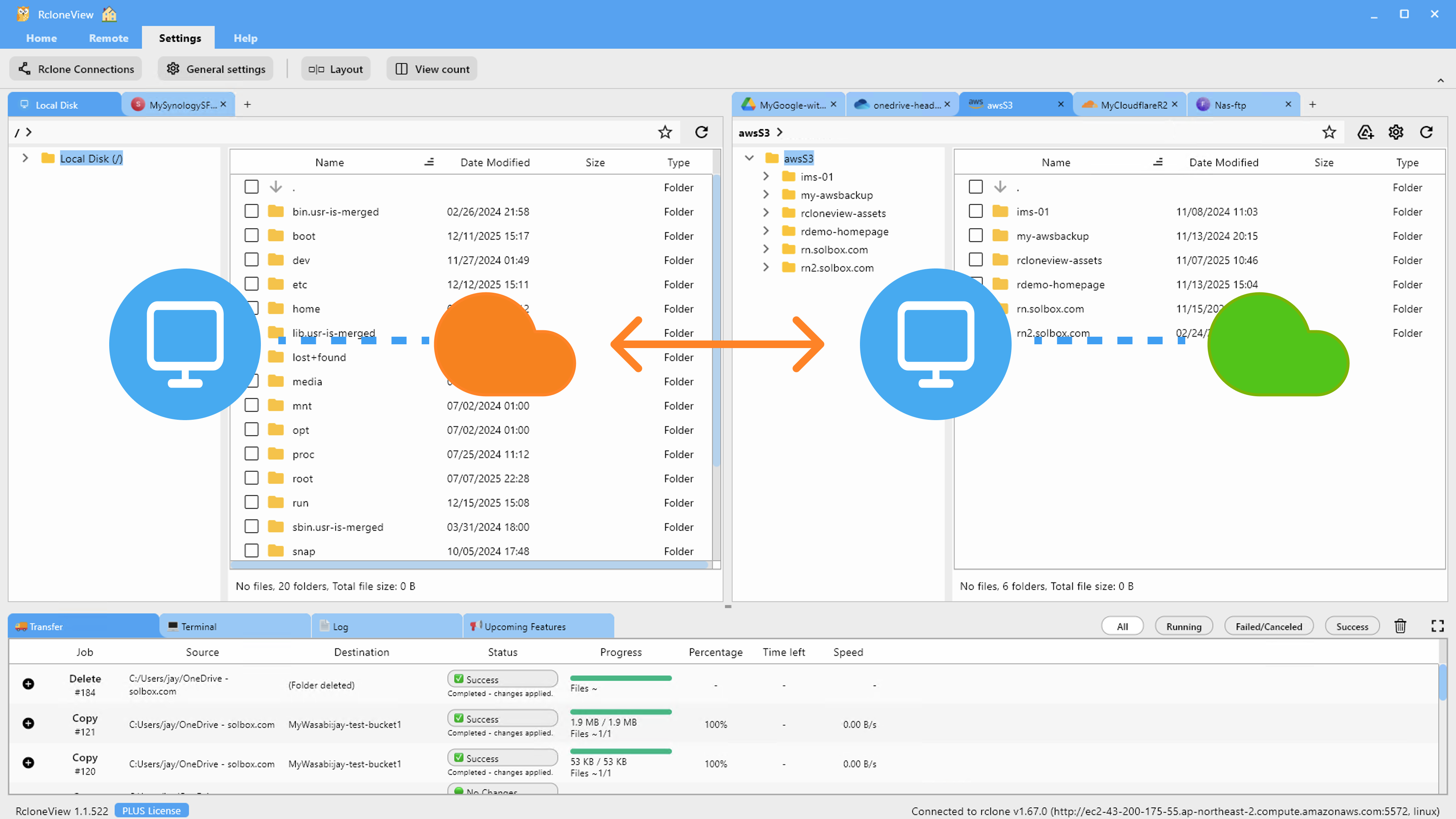
<img src="https://rcloneview.com/support/images/en/howto/rcloneview-basic/mount-from-mount-manager.png" alt="Managing remotes in RcloneView's Mount Manager" class="img-large img-center">
<h2 class="anchor anchorWithStickyNavbar_LWe7" id="memory-리모트-설정하기">Memory 리모트 설정하기<a href="https://rcloneview.com/support/ko/blog/memory-remote-ram-temp-storage-rcloneview#memory-%EB%A6%AC%EB%AA%A8%ED%8A%B8-%EC%84%A4%EC%A0%95%ED%95%98%EA%B8%B0" class="hash-link" aria-label="Memory 리모트 설정하기에 대한 직접 링크" title="Memory 리모트 설정하기에 대한 직접 링크">​</a></h2>
<p>Memory 리모트를 추가하는 과정은 RcloneView의 다른 연결과 동일한 New Remote 흐름을 따릅니다.</p>
<p><strong>설정 방법:</strong></p>
<ol>
<li>Remote 탭을 열고 <strong>New Remote</strong>를 클릭합니다.</li>
<li>가상 리모트 유형 목록에서 <strong>Memory</strong>를 선택합니다.</li>
<li>저장합니다 — 스토리지가 실행 중인 rclone 프로세스에 전적으로 로컬이므로 자격 증명이나 구성이 필요하지 않습니다.</li>
<li>일반 리모트처럼 Sync, Copy, 또는 배치 작업에서 소스나 대상으로 사용합니다.</li>
</ol>
<img src="https://rcloneview.com/support/images/en/tutorials/wasabi-drag-and-drop.png" alt="Dragging files into a remote in RcloneView" class="img-large img-center">
<h2 class="anchor anchorWithStickyNavbar_LWe7" id="사용하지-말아야-할-때">사용하지 말아야 할 때<a href="https://rcloneview.com/support/ko/blog/memory-remote-ram-temp-storage-rcloneview#%EC%82%AC%EC%9A%A9%ED%95%98%EC%A7%80-%EB%A7%90%EC%95%84%EC%95%BC-%ED%95%A0-%EB%95%8C" class="hash-link" aria-label="사용하지 말아야 할 때에 대한 직접 링크" title="사용하지 말아야 할 때에 대한 직접 링크">​</a></h2>
<p>Memory 스토리지는 백업 대상이 아니며 보관해야 하는 것은 절대 저장해서는 안 됩니다 — rclone이나 앱을 재시작하면 완전히 지워집니다. 또한 사용 가능한 시스템 RAM에 제한되므로 대규모 전송이 아닌 소규모 테스트 배치에만 실용적입니다.</p>
<h2 class="anchor anchorWithStickyNavbar_LWe7" id="시작하기">시작하기<a href="https://rcloneview.com/support/ko/blog/memory-remote-ram-temp-storage-rcloneview#%EC%8B%9C%EC%9E%91%ED%95%98%EA%B8%B0" class="hash-link" aria-label="시작하기에 대한 직접 링크" title="시작하기에 대한 직접 링크">​</a></h2>
<ol>
<li><a href="https://rcloneview.com/src/download.html" target="_blank" rel="noopener noreferrer">rcloneview.com</a>에서 <strong>RcloneView를 다운로드</strong>합니다.</li>
<li>New Remote의 Virtual Remotes 섹션에서 Memory 리모트를 추가합니다.</li>
<li>실제 대상에 대해 동일한 작업을 실행하기 전에 테스트 동기화 작업을 여기에 지정합니다.</li>
<li>Job History를 사용해 테스트가 예상대로 작동했는지 확인한 뒤 실제 클라우드 리모트로 교체합니다.</li>
</ol>
<p>일회성 RAM 기반 리모트는 작은 추가 기능이지만, 새로운 워크플로를 구축할 때 "Dry Run으로 시뮬레이션"과 "프로덕션에 반영" 사이의 실질적인 간극을 메워줍니다.</p>
<hr>
<p><strong>관련 가이드:</strong></p>
<ul>
<li><a href="https://rcloneview.com/support/blog/virtual-remotes-combine-union-alias-rcloneview" target="_blank" rel="noopener noreferrer">Virtual Remotes — RcloneView의 Combine, Union, Alias</a></li>
<li><a href="https://rcloneview.com/support/blog/alias-remote-shortcut-paths-rcloneview" target="_blank" rel="noopener noreferrer">Alias 리모트 — RcloneView의 바로가기 경로</a></li>
<li><a href="https://rcloneview.com/support/blog/encrypt-cloud-backups-crypt-remote-guide-rcloneview" target="_blank" rel="noopener noreferrer">클라우드 백업 암호화 — RcloneView의 Crypt 리모트 가이드</a></li>
</ul>
<section class="py-12 px-4 bg-white rounded-xl shadow-md text-center"><h2 class="text-2xl font-semibold mb-6">지원 클라우드 제공업체</h2><div class="grid grid-cols-2 sm:grid-cols-3 md:grid-cols-4 lg:grid-cols-6 gap-x-4 gap-y-3 justify-items-center leading-none"><div class="flex items-center justify-center h-[48px] overflow-hidden"><img src="https://rcloneview.com/support/icons/cloud-icons/local-files.png" alt="Local Files" title="Local Files" loading="lazy" class="h-full object-contain" style="margin:0"></div><div class="flex items-center justify-center h-[48px] overflow-hidden"><img src="https://rcloneview.com/support/icons/cloud-icons/webdav.png" alt="WebDAV" title="WebDAV" loading="lazy" class="h-full object-contain" style="margin:0"></div><div class="flex items-center justify-center h-[48px] overflow-hidden"><img src="https://rcloneview.com/support/icons/cloud-icons/ftp.png" alt="FTP" title="FTP" loading="lazy" class="h-full object-contain" style="margin:0"></div><div class="flex items-center justify-center h-[48px] overflow-hidden"><img src="https://rcloneview.com/support/icons/cloud-icons/sftp.png" alt="SFTP" title="SFTP" loading="lazy" class="h-full object-contain" style="margin:0"></div><div class="flex items-center justify-center h-[48px] overflow-hidden"><img src="https://rcloneview.com/support/icons/cloud-icons/http.png" alt="HTTP" title="HTTP" loading="lazy" class="h-full object-contain" style="margin:0"></div><div class="flex items-center justify-center h-[48px] overflow-hidden"><img src="https://rcloneview.com/support/icons/cloud-icons/smb-cifs.png" alt="SMB / CIFS" title="SMB / CIFS" loading="lazy" class="h-full object-contain" style="margin:0"></div><div class="flex items-center justify-center h-[48px] overflow-hidden"><img src="https://rcloneview.com/support/icons/cloud-icons/google-drive.png" alt="Google Drive" title="Google Drive" loading="lazy" class="h-full object-contain" style="margin:0"></div><div class="flex items-center justify-center h-[48px] overflow-hidden"><img src="https://rcloneview.com/support/icons/cloud-icons/google-photo.png" alt="Google Photos" title="Google Photos" loading="lazy" class="h-full object-contain" style="margin:0"></div><div class="flex items-center justify-center h-[48px] overflow-hidden"><img src="https://rcloneview.com/support/icons/cloud-icons/google-cloud-storage.png" alt="Google Cloud Storage" title="Google Cloud Storage" loading="lazy" class="h-full object-contain" style="margin:0"></div><div class="flex items-center justify-center h-[48px] overflow-hidden"><img src="https://rcloneview.com/support/icons/cloud-icons/onedrive.png" alt="OneDrive" title="OneDrive" loading="lazy" class="h-full object-contain" style="margin:0"></div><div class="flex items-center justify-center h-[48px] overflow-hidden"><img src="https://rcloneview.com/support/icons/cloud-icons/dropbox.png" alt="Dropbox" title="Dropbox" loading="lazy" class="h-full object-contain" style="margin:0"></div><div class="flex items-center justify-center h-[48px] overflow-hidden"><img src="https://rcloneview.com/support/icons/cloud-icons/box.png" alt="Box" title="Box" loading="lazy" class="h-full object-contain" style="margin:0"></div><div class="flex items-center justify-center h-[48px] overflow-hidden"><img src="https://rcloneview.com/support/icons/cloud-icons/ms-blob-storage.png" alt="MS Azure Blob" title="MS Azure Blob" loading="lazy" class="h-full object-contain" style="margin:0"></div><div class="flex items-center justify-center h-[48px] overflow-hidden"><img src="https://rcloneview.com/support/icons/cloud-icons/ms-file-storage.png" alt="MS File Storage" title="MS File Storage" loading="lazy" class="h-full object-contain" style="margin:0"></div><div class="flex items-center justify-center h-[48px] overflow-hidden"><img src="https://rcloneview.com/support/icons/cloud-icons/s3-compatible.png" alt="S3 Compatible" title="S3 Compatible" loading="lazy" class="h-full object-contain" style="margin:0"></div><div class="flex items-center justify-center h-[48px] overflow-hidden"><img src="https://rcloneview.com/support/icons/cloud-icons/aws-s3.png" alt="Amazon S3" title="Amazon S3" loading="lazy" class="h-full object-contain" style="margin:0"></div><div class="flex items-center justify-center h-[48px] overflow-hidden"><img src="https://rcloneview.com/support/icons/cloud-icons/pcloud.png" alt="pCloud" title="pCloud" loading="lazy" class="h-full object-contain" style="margin:0"></div><div class="flex items-center justify-center h-[48px] overflow-hidden"><img src="https://rcloneview.com/support/icons/cloud-icons/wasabi.png" alt="Wasabi" title="Wasabi" loading="lazy" class="h-full object-contain" style="margin:0"></div><div class="flex items-center justify-center h-[48px] overflow-hidden"><img src="https://rcloneview.com/support/icons/cloud-icons/mega.png" alt="Mega" title="Mega" loading="lazy" class="h-full object-contain" style="margin:0"></div><div class="flex items-center justify-center h-[48px] overflow-hidden"><img src="https://rcloneview.com/support/icons/cloud-icons/backblaze.png" alt="Backblaze B2" title="Backblaze B2" loading="lazy" class="h-full object-contain" style="margin:0"></div><div class="flex items-center justify-center h-[48px] overflow-hidden"><img src="https://rcloneview.com/support/icons/cloud-icons/cloudflare-r2.png" alt="Cloudflare R2" title="Cloudflare R2" loading="lazy" class="h-full object-contain" style="margin:0"></div><div class="flex items-center justify-center h-[48px] overflow-hidden"><img src="https://rcloneview.com/support/icons/cloud-icons/alibaba-oss.png" alt="Alibaba OSS" title="Alibaba OSS" loading="lazy" class="h-full object-contain" style="margin:0"></div><div class="flex items-center justify-center h-[48px] overflow-hidden"><img src="https://rcloneview.com/support/icons/cloud-icons/ceph.png" alt="Ceph" title="Ceph" loading="lazy" class="h-full object-contain" style="margin:0"></div><div class="flex items-center justify-center h-[48px] overflow-hidden"><img src="https://rcloneview.com/support/icons/cloud-icons/swift.png" alt="Swift (OpenStack)" title="Swift (OpenStack)" loading="lazy" class="h-full object-contain" style="margin:0"></div><div class="flex items-center justify-center h-[48px] overflow-hidden"><img src="https://rcloneview.com/support/icons/cloud-icons/ibm-object-storage.png" alt="IBM Cloud Object Storage" title="IBM Cloud Object Storage" loading="lazy" class="h-full object-contain" style="margin:0"></div><div class="flex items-center justify-center h-[48px] overflow-hidden"><img src="https://rcloneview.com/support/icons/cloud-icons/oracle-object-storage.png" alt="Oracle Cloud Object Storage" title="Oracle Cloud Object Storage" loading="lazy" class="h-full object-contain" style="margin:0"></div><div class="flex items-center justify-center h-[48px] overflow-hidden"><img src="https://rcloneview.com/support/icons/cloud-icons/idrive-e2.png" alt="IDrive e2" title="IDrive e2" loading="lazy" class="h-full object-contain" style="margin:0"></div><div class="flex items-center justify-center h-[48px] overflow-hidden"><img src="https://rcloneview.com/support/icons/cloud-icons/minio.png" alt="MinIO" title="MinIO" loading="lazy" class="h-full object-contain" style="margin:0"></div><div class="flex items-center justify-center h-[48px] overflow-hidden"><img src="https://rcloneview.com/support/icons/cloud-icons/storj.png" alt="Storj" title="Storj" loading="lazy" class="h-full object-contain" style="margin:0"></div><div class="flex items-center justify-center h-[48px] overflow-hidden"><img src="https://rcloneview.com/support/icons/cloud-icons/digital-ocean.png" alt="DigitalOcean Spaces" title="DigitalOcean Spaces" loading="lazy" class="h-full object-contain" style="margin:0"></div></div><div class="mt-6"><a href="https://rclone.org/#providers" class="transition font-medium" target="_blank" rel="noopener noreferrer">전체 제공업체 보기 →</a></div><div class="mt-8"><a href="https://rcloneview.com/src/download.html" class="inline-block bg-blue-600 text-white font-medium px-6 py-3 rounded-lg shadow hover:bg-blue-700 transition">클라우드 연결하기 →</a></div></section>]]></content>
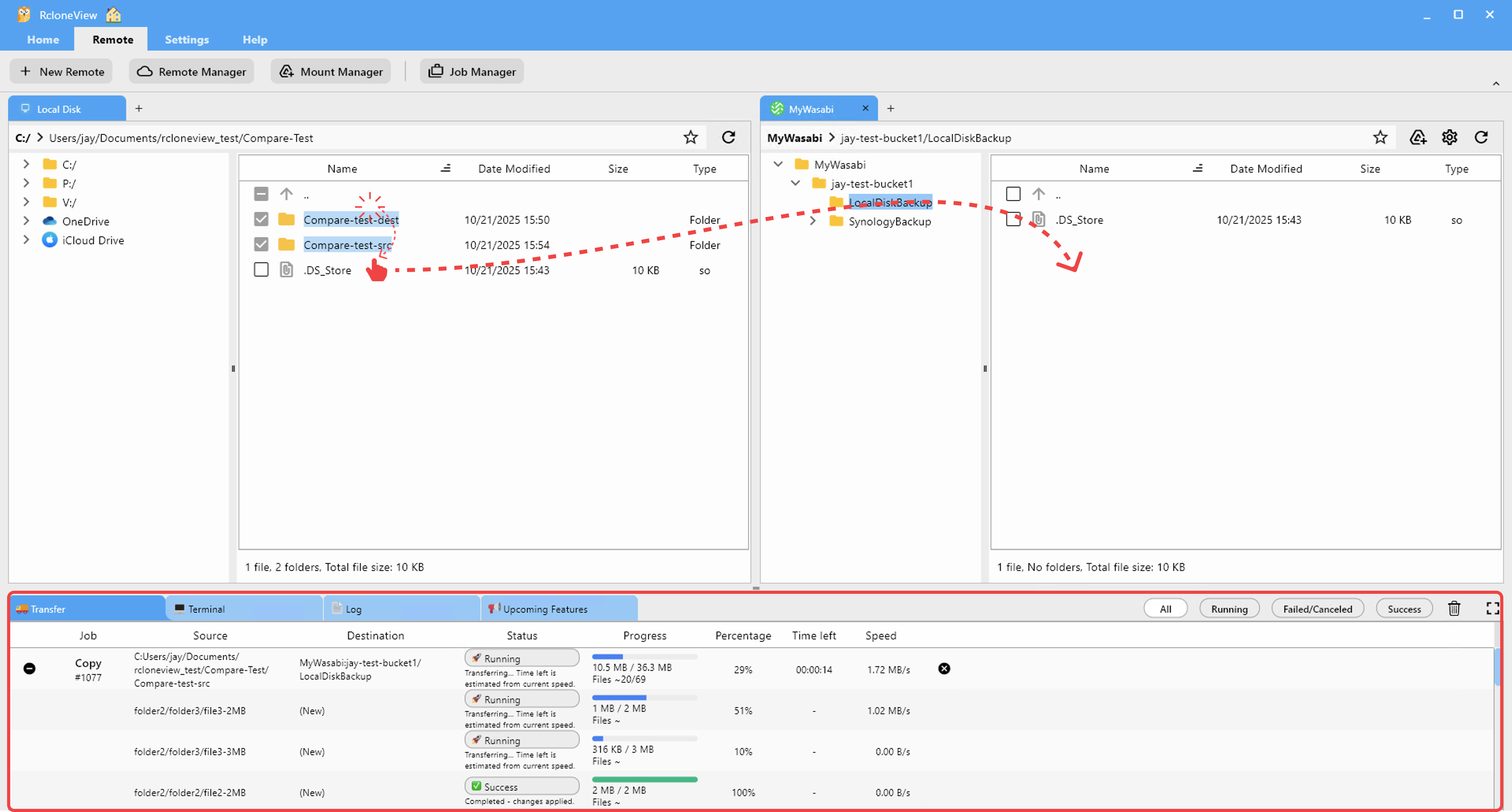
        <author>
            <name>Casey</name>
            <uri>https://rcloneview.com</uri>
        </author>
        <category label="RcloneView" term="RcloneView"/>
        <category label="기능" term="기능"/>
        <category label="가이드" term="가이드"/>
        <category label="팁" term="팁"/>
        <category label="클라우드 스토리지" term="클라우드 스토리지"/>
    </entry>
    <entry>
        <title type="html"><![CDATA[인테리어 디자인 회사를 위한 클라우드 스토리지 — RcloneView로 렌더링과 무드보드 정리하기]]></title>
        <id>https://rcloneview.com/support/ko/blog/cloud-storage-interior-design-firms-rcloneview</id>
        <link href="https://rcloneview.com/support/ko/blog/cloud-storage-interior-design-firms-rcloneview"/>
        <updated>2026-07-23T00:00:00.000Z</updated>
        <summary type="html"><![CDATA[RcloneView로 여러 클라우드에 흩어진 3D 렌더링, 무드보드, 벤더 카탈로그를 관리하세요. 인테리어 디자이너를 위한 무료 크로스플랫폼 동기화 및 마운트 도구입니다.]]></summary>
        <content type="html"><![CDATA[<blockquote>
<p>하나의 주거 프로젝트만으로도 수백 개의 고해상도 렌더링, 벤더 사양서, 무드보드 이미지가 클라이언트나 벤더가 사용하는 여러 클라우드에 흩어질 수 있습니다 — RcloneView는 이를 하나의 정리된 화면으로 모아줍니다.</p>
</blockquote>
<p>인테리어 디자인 스튜디오는 사방에서 밀려드는 파일을 다뤄야 합니다: 프리랜서 비주얼라이저의 Dropbox에 있는 3D 렌더링, 벤더의 Box 계정에 있는 가구 사양 PDF, Google Drive에 있는 클라이언트 무드보드, 그리고 그날그날 열려 있던 앱에 업로드된 현장 사진까지. 다섯 개의 주거 프로젝트를 동시에 진행하는 부티크 스튜디오라면 각기 다른 폴더 구조를 가진 별도의 클라우드 계정을 십여 개나 운영하면서도 이들을 한눈에 볼 방법이 없는 경우가 흔합니다. RcloneView는 하나의 데스크톱 앱에서 이 모든 계정에 연결해, 디자이너가 프로바이더마다 브라우저 탭을 열지 않고도 프로젝트 파일을 탐색하고 비교하고 통합할 수 있게 해줍니다.</p>
<section class="rv-cta" aria-labelledby="rv-cta-title"><style>
:root{
  --rv-bg:#0b1020; --rv-card:#0f1428; --rv-text:#e9eefb; --rv-muted:#9fb0d1;
  --rv-accent:#7cc3ff; --rv-accent-2:#a8ffcf; --rv-ring:rgba(124,195,255,.4);
}
@media (prefers-color-scheme: light){
  :root{
    --rv-bg:#f7f9fe; --rv-card:#fff; --rv-text:#1a2234; --rv-muted:#5a6b89;
    --rv-accent:#0d6efd; --rv-accent-2:#22c55e; --rv-ring:rgba(13,110,253,.25);
  }
}
.rv-cta{margin:2.5rem auto; padding:clamp(1rem,2vw,1.25rem); max-width:1000px;
  background:
    radial-gradient(1200px 300px at 20% -20%, rgba(124,195,255,.15), transparent 60%),
    radial-gradient(800px 250px at 90% 120%, rgba(168,255,207,.12), transparent 60%);
  border-radius:1.25rem;}
.rv-cta__card{display:grid; grid-template-columns:1.1fr 1fr; gap:1.5rem;
  padding:clamp(1rem,2.5vw,1.5rem); background:var(--rv-card);
  border:1px solid rgba(124,195,255,.18); border-radius:1.25rem;
  box-shadow:0 10px 30px rgba(0,0,0,.18), inset 0 0 0 1px rgba(255,255,255,.02);
  color:var(--rv-text);}
@media (max-width:860px){.rv-cta__card{grid-template-columns:1fr;}}
.rv-cta__media{border-radius:1rem; overflow:hidden;
  background:linear-gradient(180deg, rgba(124,195,255,.15), rgba(168,255,207,.1));
  display:flex; align-items:center; justify-content:center;}
.rv-cta__media img{
  max-width:97%;
  height:auto;
  display:block;
  object-fit:contain; /* 수정됨: cover → contain */
}
.rv-cta__body h2{margin:0 0 .5rem 0; font-size:clamp(1.4rem,2.4vw,2rem); line-height:1.2; letter-spacing:-.01em;}
.rv-cta__subtitle{margin:0 0 .9rem 0; color:var(--rv-muted); font-size:clamp(.96rem,1.2vw,1.02rem);}
.rv-cta__bullets{margin:.6rem 0 1rem 0; padding-left:1.1rem;}
.rv-cta__bullets li{margin:.25rem 0;}
.rv-cta__badges{display:flex; gap:.5rem; flex-wrap:wrap; margin:.8rem 0 1rem 0;}
.rv-badge{font-size:.82rem; padding:.3rem .55rem; border-radius:999px;
  background:rgba(124,195,255,.15); border:1px solid rgba(124,195,255,.35); color:var(--rv-text);}
.rv-button{display:inline-flex; align-items:center; justify-content:center; gap:.5rem;
  padding:.75rem 1.05rem; border-radius:.8rem;
  background:linear-gradient(92deg, var(--rv-accent), var(--rv-accent-2)); color:#0b1020;
  font-weight:700; text-decoration:none; box-shadow:0 8px 24px var(--rv-ring);
  transform:translateZ(0); transition:transform .15s ease, box-shadow .15s ease, opacity .2s ease;}
.rv-button:hover{transform:translateY(-1px); box-shadow:0 12px 28px var(--rv-ring);}
.rv-cta__fineprint{margin:.6rem 0 0 0; font-size:.82rem; color:var(--rv-muted);}
.rv-logos{display:grid; grid-template-columns:repeat(5, minmax(0,1fr)); gap:.5rem;}
@media (max-width:720px){.rv-logos{grid-template-columns:repeat(3, minmax(0,1fr));}}
.rv-logo{display:inline-flex; align-items:center; justify-content:center;
  padding:.55rem .6rem; border-radius:.6rem; background:rgba(124,195,255,.10);
  border:1px dashed rgba(124,195,255,.25); color:var(--rv-text); font-size:.82rem; white-space:nowrap;}
</style><div class="rv-cta__card"><div class="rv-cta__media"><img src="https://rcloneview.com/support/ko/img/rcloneview-preview.png" alt="RcloneView 앱 미리보기" loading="lazy"></div><div class="rv-cta__body"><h2 id="rv-cta-title">모든 클라우드를 한 곳에서 관리하고 동기화하세요</h2><p class="rv-cta__subtitle">RcloneView는 rclone의 크로스플랫폼 GUI입니다. 폴더를 비교하고, 파일을 전송·동기화하고, 깔끔한 시각적 인터페이스로 멀티 클라우드 워크플로를 자동화하세요.</p><ul class="rv-cta__bullets" role="list"><li>원클릭 작업: 복사 · 동기화 · 비교</li><li>안정적인 자동화를 위한 스케줄러와 작업 이력</li><li>Google Drive, OneDrive, Dropbox, S3, WebDAV, SFTP 등 지원</li></ul><div class="rv-cta__badges" aria-label="Supported platforms"><span class="rv-badge">Windows</span><span class="rv-badge">macOS</span><span class="rv-badge">Linux</span></div><a href="https://rcloneview.com/src/download.html" target="_blank" rel="noopener" class="rv-button" aria-label="RcloneView 다운로드">무료로 시작하기 →</a><p class="rv-cta__fineprint">핵심 기능은 무료. Plus로 자동화 기능 이용 가능.</p></div></div></section>
<h2 class="anchor anchorWithStickyNavbar_LWe7" id="여러-클라우드에-흩어진-렌더링과-벤더-파일-통합하기">여러 클라우드에 흩어진 렌더링과 벤더 파일 통합하기<a href="https://rcloneview.com/support/ko/blog/cloud-storage-interior-design-firms-rcloneview#%EC%97%AC%EB%9F%AC-%ED%81%B4%EB%9D%BC%EC%9A%B0%EB%93%9C%EC%97%90-%ED%9D%A9%EC%96%B4%EC%A7%84-%EB%A0%8C%EB%8D%94%EB%A7%81%EA%B3%BC-%EB%B2%A4%EB%8D%94-%ED%8C%8C%EC%9D%BC-%ED%86%B5%ED%95%A9%ED%95%98%EA%B8%B0" class="hash-link" aria-label="여러 클라우드에 흩어진 렌더링과 벤더 파일 통합하기에 대한 직접 링크" title="여러 클라우드에 흩어진 렌더링과 벤더 파일 통합하기에 대한 직접 링크">​</a></h2>
<p>3D 렌더링 소프트웨어는 렌더링 서비스가 설정된 클라우드 폴더로 결과물을 바로 출력하는 경우가 많은데, 많은 프리랜서 비주얼라이저에게는 스튜디오의 계정이 아니라 자신의 Dropbox나 Google Drive를 의미합니다. 모든 협업자에게 공유 계정으로 재업로드하도록 요청하는 대신, RcloneView는 비주얼라이저의 리모트와 스튜디오의 기본 스토리지를 같은 창 안의 별도 탭으로 연결해, 파일을 나란히 검토하고 드래그 앤 드롭으로 스튜디오의 마스터 프로젝트 폴더에 복사할 수 있게 합니다. RcloneView는 하나의 창에서 90개 이상의 프로바이더를 마운트하고 동기화하며, Windows, macOS, Linux에서 모두 동작하므로 스튜디오가 사무실에서는 Mac을, 현장에서는 Windows 노트북을 쓰더라도 동일한 워크플로가 유지됩니다.</p>
<img src="https://rcloneview.com/support/images/en/blog/new-remote.png" alt="RcloneView에서 인테리어 디자인 프로젝트를 위해 여러 클라우드 계정을 연결하는 모습" class="img-large img-center">
<p>타일 사양서, 원단 스와치, 조명 컷시트 같은 벤더 카탈로그는 바쁜 스튜디오의 프로젝트 아카이브에 빠르게 쌓입니다. RcloneView의 썸네일 보기 모드는 제품 이미지 폴더를 한눈에 훑어볼 수 있는 시각적 그리드로 바꿔주므로, 파일명 목록을 하나씩 넘겨보는 것보다 특정 원단 스와치를 훨씬 빠르게 찾을 수 있습니다.</p>
<h2 class="anchor anchorWithStickyNavbar_LWe7" id="여러-기기에서-프로젝트-아카이브-동기화-유지하기">여러 기기에서 프로젝트 아카이브 동기화 유지하기<a href="https://rcloneview.com/support/ko/blog/cloud-storage-interior-design-firms-rcloneview#%EC%97%AC%EB%9F%AC-%EA%B8%B0%EA%B8%B0%EC%97%90%EC%84%9C-%ED%94%84%EB%A1%9C%EC%A0%9D%ED%8A%B8-%EC%95%84%EC%B9%B4%EC%9D%B4%EB%B8%8C-%EB%8F%99%EA%B8%B0%ED%99%94-%EC%9C%A0%EC%A7%80%ED%95%98%EA%B8%B0" class="hash-link" aria-label="여러 기기에서 프로젝트 아카이브 동기화 유지하기에 대한 직접 링크" title="여러 기기에서 프로젝트 아카이브 동기화 유지하기에 대한 직접 링크">​</a></h2>
<p>클라이언트 현장에서 노트북으로 작업하다가 스튜디오로 돌아와 데스크톱으로 작업을 이어가려는 디자이너에게는, 파일을 일일이 복사하지 않고도 동일한 프로젝트 폴더가 양쪽에서 준비되어 있어야 합니다. RcloneView의 동기화(Sync) 작업은 이를 자동으로 처리합니다: 스튜디오의 클라우드 리모트에 있는 프로젝트 폴더를 대상으로 작업을 지정하고, 현장 방문을 떠나기 전에 실행하면, 노트북의 로컬 사본이 변경된 내용을 그대로 반영합니다. 참고 이미지와 PDF만 현장에서 필요하다면, 동기화 마법사 3단계의 필터링 규칙으로 용량이 큰 네이티브 디자인 파일 형식을 제외할 수 있습니다.</p>
<img src="https://rcloneview.com/support/images/en/blog/cloud-to-cloud-transfer-default.png" alt="RcloneView로 스튜디오와 노트북 간에 인테리어 디자인 프로젝트 폴더를 동기화하는 모습" class="img-large img-center">
<p>완료된 프로젝트는 향후 작업에서 참고할 수 있도록 계속 접근 가능해야 하지만, 활성 클라우드 스토리지에 무한정 남아 있을 필요는 없습니다. PLUS 라이선스에서 제공되는 예약 동기화 작업을 이용하면 완료된 프로젝트 폴더를 Backblaze B2나 Wasabi 같은 저비용 오브젝트 스토리지 리모트로 정기적으로 아카이브해, 주 작업 공간을 현재 진행 중인 작업에 집중시킬 수 있습니다.</p>
<h2 class="anchor anchorWithStickyNavbar_LWe7" id="클라이언트에게-전달하기-전-리비전-비교하기">클라이언트에게 전달하기 전 리비전 비교하기<a href="https://rcloneview.com/support/ko/blog/cloud-storage-interior-design-firms-rcloneview#%ED%81%B4%EB%9D%BC%EC%9D%B4%EC%96%B8%ED%8A%B8%EC%97%90%EA%B2%8C-%EC%A0%84%EB%8B%AC%ED%95%98%EA%B8%B0-%EC%A0%84-%EB%A6%AC%EB%B9%84%EC%A0%84-%EB%B9%84%EA%B5%90%ED%95%98%EA%B8%B0" class="hash-link" aria-label="클라이언트에게 전달하기 전 리비전 비교하기에 대한 직접 링크" title="클라이언트에게 전달하기 전 리비전 비교하기에 대한 직접 링크">​</a></h2>
<p>디자인 리비전은 빠르게 진행되며, 어떤 렌더링 세트가 실제로 승인되었는지 놓치기 쉽습니다. RcloneView의 폴더 비교(Folder Compare) 도구는 예를 들어 이번 주 렌더링 패스와 지난주 렌더링 패스처럼 두 폴더를 나란히 배치해, 어떤 파일이 변경되었는지, 추가되었는지, 또는 어느 한쪽에 없는지를 정확히 표시해 줍니다. 덕분에 링크를 공유하기 전에 클라이언트에게 전달할 폴더에 최신 승인 세트만 들어 있는지 손쉽게 확인할 수 있습니다.</p>
<img src="https://rcloneview.com/support/images/en/howto/rcloneview-basic/compare-display-select.png" alt="RcloneView에서 두 렌더링 리비전 폴더를 비교하는 모습" class="img-large img-center">
<h2 class="anchor anchorWithStickyNavbar_LWe7" id="시작하기">시작하기<a href="https://rcloneview.com/support/ko/blog/cloud-storage-interior-design-firms-rcloneview#%EC%8B%9C%EC%9E%91%ED%95%98%EA%B8%B0" class="hash-link" aria-label="시작하기에 대한 직접 링크" title="시작하기에 대한 직접 링크">​</a></h2>
<ol>
<li><a href="https://rcloneview.com/src/download.html" target="_blank" rel="noopener noreferrer">rcloneview.com</a>에서 <strong>RcloneView를 다운로드</strong>하세요.</li>
<li>프로젝트에 관련된 각 클라우드 계정을 연결하세요 — 스튜디오의 기본 스토리지와 벤더 또는 협업자의 리모트까지 포함해서요.</li>
<li>썸네일 보기를 사용해 파일명이 아니라 시각적으로 렌더링 세트와 벤더 카탈로그를 탐색하세요.</li>
<li>동기화 작업을 설정해 스튜디오 아카이브와 모바일 작업 사본이 자동으로 일치하도록 유지하세요.</li>
</ol>
<p>모든 프로젝트 파일을 하나의 창에서 접근할 수 있게 되면, 디자인 스튜디오는 올바른 클라우드 계정을 찾는 데 시간을 덜 쓰고 클라이언트에게 실제로 중요한 작업에 더 많은 시간을 쓸 수 있습니다.</p>
<hr>
<p><strong>관련 가이드:</strong></p>
<ul>
<li><a href="https://rcloneview.com/support/blog/cloud-storage-architecture-firms-rcloneview" target="_blank" rel="noopener noreferrer">건축 회사를 위한 클라우드 스토리지 — RcloneView로 CAD 및 BIM 파일 관리하기</a></li>
<li><a href="https://rcloneview.com/support/blog/cloud-storage-creative-agencies-rcloneview" target="_blank" rel="noopener noreferrer">크리에이티브 에이전시를 위한 클라우드 스토리지 — RcloneView로 자산 관리하기</a></li>
<li><a href="https://rcloneview.com/support/blog/cloud-storage-graphic-designers-rcloneview" target="_blank" rel="noopener noreferrer">그래픽 디자이너를 위한 클라우드 스토리지 — RcloneView로 디자인 파일 관리 및 백업하기</a></li>
</ul>
<section class="py-12 px-4 bg-white rounded-xl shadow-md text-center"><h2 class="text-2xl font-semibold mb-6">지원 클라우드 제공업체</h2><div class="grid grid-cols-2 sm:grid-cols-3 md:grid-cols-4 lg:grid-cols-6 gap-x-4 gap-y-3 justify-items-center leading-none"><div class="flex items-center justify-center h-[48px] overflow-hidden"><img src="https://rcloneview.com/support/icons/cloud-icons/local-files.png" alt="Local Files" title="Local Files" loading="lazy" class="h-full object-contain" style="margin:0"></div><div class="flex items-center justify-center h-[48px] overflow-hidden"><img src="https://rcloneview.com/support/icons/cloud-icons/webdav.png" alt="WebDAV" title="WebDAV" loading="lazy" class="h-full object-contain" style="margin:0"></div><div class="flex items-center justify-center h-[48px] overflow-hidden"><img src="https://rcloneview.com/support/icons/cloud-icons/ftp.png" alt="FTP" title="FTP" loading="lazy" class="h-full object-contain" style="margin:0"></div><div class="flex items-center justify-center h-[48px] overflow-hidden"><img src="https://rcloneview.com/support/icons/cloud-icons/sftp.png" alt="SFTP" title="SFTP" loading="lazy" class="h-full object-contain" style="margin:0"></div><div class="flex items-center justify-center h-[48px] overflow-hidden"><img src="https://rcloneview.com/support/icons/cloud-icons/http.png" alt="HTTP" title="HTTP" loading="lazy" class="h-full object-contain" style="margin:0"></div><div class="flex items-center justify-center h-[48px] overflow-hidden"><img src="https://rcloneview.com/support/icons/cloud-icons/smb-cifs.png" alt="SMB / CIFS" title="SMB / CIFS" loading="lazy" class="h-full object-contain" style="margin:0"></div><div class="flex items-center justify-center h-[48px] overflow-hidden"><img src="https://rcloneview.com/support/icons/cloud-icons/google-drive.png" alt="Google Drive" title="Google Drive" loading="lazy" class="h-full object-contain" style="margin:0"></div><div class="flex items-center justify-center h-[48px] overflow-hidden"><img src="https://rcloneview.com/support/icons/cloud-icons/google-photo.png" alt="Google Photos" title="Google Photos" loading="lazy" class="h-full object-contain" style="margin:0"></div><div class="flex items-center justify-center h-[48px] overflow-hidden"><img src="https://rcloneview.com/support/icons/cloud-icons/google-cloud-storage.png" alt="Google Cloud Storage" title="Google Cloud Storage" loading="lazy" class="h-full object-contain" style="margin:0"></div><div class="flex items-center justify-center h-[48px] overflow-hidden"><img src="https://rcloneview.com/support/icons/cloud-icons/onedrive.png" alt="OneDrive" title="OneDrive" loading="lazy" class="h-full object-contain" style="margin:0"></div><div class="flex items-center justify-center h-[48px] overflow-hidden"><img src="https://rcloneview.com/support/icons/cloud-icons/dropbox.png" alt="Dropbox" title="Dropbox" loading="lazy" class="h-full object-contain" style="margin:0"></div><div class="flex items-center justify-center h-[48px] overflow-hidden"><img src="https://rcloneview.com/support/icons/cloud-icons/box.png" alt="Box" title="Box" loading="lazy" class="h-full object-contain" style="margin:0"></div><div class="flex items-center justify-center h-[48px] overflow-hidden"><img src="https://rcloneview.com/support/icons/cloud-icons/ms-blob-storage.png" alt="MS Azure Blob" title="MS Azure Blob" loading="lazy" class="h-full object-contain" style="margin:0"></div><div class="flex items-center justify-center h-[48px] overflow-hidden"><img src="https://rcloneview.com/support/icons/cloud-icons/ms-file-storage.png" alt="MS File Storage" title="MS File Storage" loading="lazy" class="h-full object-contain" style="margin:0"></div><div class="flex items-center justify-center h-[48px] overflow-hidden"><img src="https://rcloneview.com/support/icons/cloud-icons/s3-compatible.png" alt="S3 Compatible" title="S3 Compatible" loading="lazy" class="h-full object-contain" style="margin:0"></div><div class="flex items-center justify-center h-[48px] overflow-hidden"><img src="https://rcloneview.com/support/icons/cloud-icons/aws-s3.png" alt="Amazon S3" title="Amazon S3" loading="lazy" class="h-full object-contain" style="margin:0"></div><div class="flex items-center justify-center h-[48px] overflow-hidden"><img src="https://rcloneview.com/support/icons/cloud-icons/pcloud.png" alt="pCloud" title="pCloud" loading="lazy" class="h-full object-contain" style="margin:0"></div><div class="flex items-center justify-center h-[48px] overflow-hidden"><img src="https://rcloneview.com/support/icons/cloud-icons/wasabi.png" alt="Wasabi" title="Wasabi" loading="lazy" class="h-full object-contain" style="margin:0"></div><div class="flex items-center justify-center h-[48px] overflow-hidden"><img src="https://rcloneview.com/support/icons/cloud-icons/mega.png" alt="Mega" title="Mega" loading="lazy" class="h-full object-contain" style="margin:0"></div><div class="flex items-center justify-center h-[48px] overflow-hidden"><img src="https://rcloneview.com/support/icons/cloud-icons/backblaze.png" alt="Backblaze B2" title="Backblaze B2" loading="lazy" class="h-full object-contain" style="margin:0"></div><div class="flex items-center justify-center h-[48px] overflow-hidden"><img src="https://rcloneview.com/support/icons/cloud-icons/cloudflare-r2.png" alt="Cloudflare R2" title="Cloudflare R2" loading="lazy" class="h-full object-contain" style="margin:0"></div><div class="flex items-center justify-center h-[48px] overflow-hidden"><img src="https://rcloneview.com/support/icons/cloud-icons/alibaba-oss.png" alt="Alibaba OSS" title="Alibaba OSS" loading="lazy" class="h-full object-contain" style="margin:0"></div><div class="flex items-center justify-center h-[48px] overflow-hidden"><img src="https://rcloneview.com/support/icons/cloud-icons/ceph.png" alt="Ceph" title="Ceph" loading="lazy" class="h-full object-contain" style="margin:0"></div><div class="flex items-center justify-center h-[48px] overflow-hidden"><img src="https://rcloneview.com/support/icons/cloud-icons/swift.png" alt="Swift (OpenStack)" title="Swift (OpenStack)" loading="lazy" class="h-full object-contain" style="margin:0"></div><div class="flex items-center justify-center h-[48px] overflow-hidden"><img src="https://rcloneview.com/support/icons/cloud-icons/ibm-object-storage.png" alt="IBM Cloud Object Storage" title="IBM Cloud Object Storage" loading="lazy" class="h-full object-contain" style="margin:0"></div><div class="flex items-center justify-center h-[48px] overflow-hidden"><img src="https://rcloneview.com/support/icons/cloud-icons/oracle-object-storage.png" alt="Oracle Cloud Object Storage" title="Oracle Cloud Object Storage" loading="lazy" class="h-full object-contain" style="margin:0"></div><div class="flex items-center justify-center h-[48px] overflow-hidden"><img src="https://rcloneview.com/support/icons/cloud-icons/idrive-e2.png" alt="IDrive e2" title="IDrive e2" loading="lazy" class="h-full object-contain" style="margin:0"></div><div class="flex items-center justify-center h-[48px] overflow-hidden"><img src="https://rcloneview.com/support/icons/cloud-icons/minio.png" alt="MinIO" title="MinIO" loading="lazy" class="h-full object-contain" style="margin:0"></div><div class="flex items-center justify-center h-[48px] overflow-hidden"><img src="https://rcloneview.com/support/icons/cloud-icons/storj.png" alt="Storj" title="Storj" loading="lazy" class="h-full object-contain" style="margin:0"></div><div class="flex items-center justify-center h-[48px] overflow-hidden"><img src="https://rcloneview.com/support/icons/cloud-icons/digital-ocean.png" alt="DigitalOcean Spaces" title="DigitalOcean Spaces" loading="lazy" class="h-full object-contain" style="margin:0"></div></div><div class="mt-6"><a href="https://rclone.org/#providers" class="transition font-medium" target="_blank" rel="noopener noreferrer">전체 제공업체 보기 →</a></div><div class="mt-8"><a href="https://rcloneview.com/src/download.html" class="inline-block bg-blue-600 text-white font-medium px-6 py-3 rounded-lg shadow hover:bg-blue-700 transition">클라우드 연결하기 →</a></div></section>]]></content>
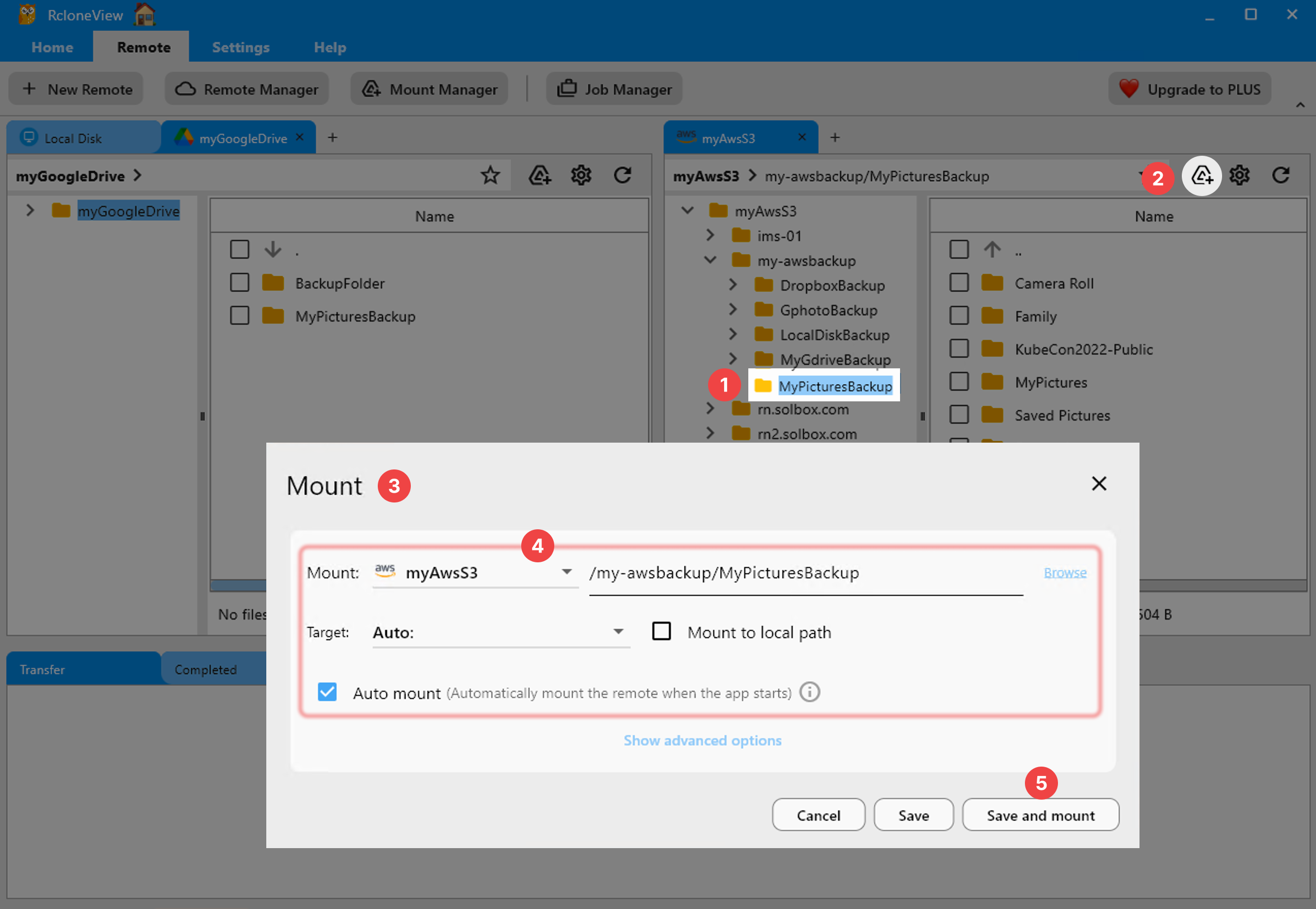
        <author>
            <name>Tayson</name>
            <uri>https://rcloneview.com</uri>
        </author>
        <category label="RcloneView" term="RcloneView"/>
        <category label="클라우드 스토리지" term="클라우드 스토리지"/>
        <category label="산업" term="산업"/>
        <category label="백업" term="백업"/>
        <category label="가이드" term="가이드"/>
    </entry>
    <entry>
        <title type="html"><![CDATA[Windows 10에서 RcloneView 사용하기 — 클라우드 스토리지 동기화 및 백업]]></title>
        <id>https://rcloneview.com/support/ko/blog/rcloneview-windows-10-cloud-sync</id>
        <link href="https://rcloneview.com/support/ko/blog/rcloneview-windows-10-cloud-sync"/>
        <updated>2026-07-23T00:00:00.000Z</updated>
        <summary type="html"><![CDATA[Windows 10에서 RcloneView를 설치하고 실행하여 90개 이상의 클라우드 스토리지 프로바이더를 하나의 데스크톱 앱에서 마운트, 동기화, 백업하세요.]]></summary>
        <content type="html"><![CDATA[<blockquote>
<p>Windows 11이 출시된 지 몇 년이 지난 지금도 Windows 10은 수백만 대의 데스크톱에서 매일 사용되고 있으며, RcloneView는 동일한 마운트, 동기화, 백업 기능을 그대로 지원하며 부족한 기능 없이 완전하게 동작합니다.</p>
</blockquote>
<p>여전히 많은 기업과 가정 사용자들이 선택에 의해서든, 하드웨어 제약 때문이든, 아니면 단순히 업그레이드가 우선순위가 아니었든 Windows 10을 사용하고 있습니다. RcloneView는 Windows 10을 레거시로 취급하지 않습니다 — 설치 프로그램, 마운트 드라이버, 전체 기능 세트가 Windows 11 빌드와 동일하게 동작하므로, 여러 Windows 버전을 혼용하는 스튜디오라도 오래된 기기에서 기능이 부족해지는 일이 없습니다. RcloneView는 하나의 창에서 90개 이상의 프로바이더를 마운트하고 동기화하며, 지원되는 어떤 Windows 버전에 설치되어 있든 FREE 라이선스로 이용할 수 있습니다.</p>
<section class="rv-cta" aria-labelledby="rv-cta-title"><style>
:root{
  --rv-bg:#0b1020; --rv-card:#0f1428; --rv-text:#e9eefb; --rv-muted:#9fb0d1;
  --rv-accent:#7cc3ff; --rv-accent-2:#a8ffcf; --rv-ring:rgba(124,195,255,.4);
}
@media (prefers-color-scheme: light){
  :root{
    --rv-bg:#f7f9fe; --rv-card:#fff; --rv-text:#1a2234; --rv-muted:#5a6b89;
    --rv-accent:#0d6efd; --rv-accent-2:#22c55e; --rv-ring:rgba(13,110,253,.25);
  }
}
.rv-cta{margin:2.5rem auto; padding:clamp(1rem,2vw,1.25rem); max-width:1000px;
  background:
    radial-gradient(1200px 300px at 20% -20%, rgba(124,195,255,.15), transparent 60%),
    radial-gradient(800px 250px at 90% 120%, rgba(168,255,207,.12), transparent 60%);
  border-radius:1.25rem;}
.rv-cta__card{display:grid; grid-template-columns:1.1fr 1fr; gap:1.5rem;
  padding:clamp(1rem,2.5vw,1.5rem); background:var(--rv-card);
  border:1px solid rgba(124,195,255,.18); border-radius:1.25rem;
  box-shadow:0 10px 30px rgba(0,0,0,.18), inset 0 0 0 1px rgba(255,255,255,.02);
  color:var(--rv-text);}
@media (max-width:860px){.rv-cta__card{grid-template-columns:1fr;}}
.rv-cta__media{border-radius:1rem; overflow:hidden;
  background:linear-gradient(180deg, rgba(124,195,255,.15), rgba(168,255,207,.1));
  display:flex; align-items:center; justify-content:center;}
.rv-cta__media img{
  max-width:97%;
  height:auto;
  display:block;
  object-fit:contain; /* 수정됨: cover → contain */
}
.rv-cta__body h2{margin:0 0 .5rem 0; font-size:clamp(1.4rem,2.4vw,2rem); line-height:1.2; letter-spacing:-.01em;}
.rv-cta__subtitle{margin:0 0 .9rem 0; color:var(--rv-muted); font-size:clamp(.96rem,1.2vw,1.02rem);}
.rv-cta__bullets{margin:.6rem 0 1rem 0; padding-left:1.1rem;}
.rv-cta__bullets li{margin:.25rem 0;}
.rv-cta__badges{display:flex; gap:.5rem; flex-wrap:wrap; margin:.8rem 0 1rem 0;}
.rv-badge{font-size:.82rem; padding:.3rem .55rem; border-radius:999px;
  background:rgba(124,195,255,.15); border:1px solid rgba(124,195,255,.35); color:var(--rv-text);}
.rv-button{display:inline-flex; align-items:center; justify-content:center; gap:.5rem;
  padding:.75rem 1.05rem; border-radius:.8rem;
  background:linear-gradient(92deg, var(--rv-accent), var(--rv-accent-2)); color:#0b1020;
  font-weight:700; text-decoration:none; box-shadow:0 8px 24px var(--rv-ring);
  transform:translateZ(0); transition:transform .15s ease, box-shadow .15s ease, opacity .2s ease;}
.rv-button:hover{transform:translateY(-1px); box-shadow:0 12px 28px var(--rv-ring);}
.rv-cta__fineprint{margin:.6rem 0 0 0; font-size:.82rem; color:var(--rv-muted);}
.rv-logos{display:grid; grid-template-columns:repeat(5, minmax(0,1fr)); gap:.5rem;}
@media (max-width:720px){.rv-logos{grid-template-columns:repeat(3, minmax(0,1fr));}}
.rv-logo{display:inline-flex; align-items:center; justify-content:center;
  padding:.55rem .6rem; border-radius:.6rem; background:rgba(124,195,255,.10);
  border:1px dashed rgba(124,195,255,.25); color:var(--rv-text); font-size:.82rem; white-space:nowrap;}
</style><div class="rv-cta__card"><div class="rv-cta__media"><img src="https://rcloneview.com/support/ko/img/rcloneview-preview.png" alt="RcloneView 앱 미리보기" loading="lazy"></div><div class="rv-cta__body"><h2 id="rv-cta-title">모든 클라우드를 한 곳에서 관리하고 동기화하세요</h2><p class="rv-cta__subtitle">RcloneView는 rclone의 크로스플랫폼 GUI입니다. 폴더를 비교하고, 파일을 전송·동기화하고, 깔끔한 시각적 인터페이스로 멀티 클라우드 워크플로를 자동화하세요.</p><ul class="rv-cta__bullets" role="list"><li>원클릭 작업: 복사 · 동기화 · 비교</li><li>안정적인 자동화를 위한 스케줄러와 작업 이력</li><li>Google Drive, OneDrive, Dropbox, S3, WebDAV, SFTP 등 지원</li></ul><div class="rv-cta__badges" aria-label="Supported platforms"><span class="rv-badge">Windows</span><span class="rv-badge">macOS</span><span class="rv-badge">Linux</span></div><a href="https://rcloneview.com/src/download.html" target="_blank" rel="noopener" class="rv-button" aria-label="RcloneView 다운로드">무료로 시작하기 →</a><p class="rv-cta__fineprint">핵심 기능은 무료. Plus로 자동화 기능 이용 가능.</p></div></div></section>
<h2 class="anchor anchorWithStickyNavbar_LWe7" id="windows-10에-rcloneview-설치하기">Windows 10에 RcloneView 설치하기<a href="https://rcloneview.com/support/ko/blog/rcloneview-windows-10-cloud-sync#windows-10%EC%97%90-rcloneview-%EC%84%A4%EC%B9%98%ED%95%98%EA%B8%B0" class="hash-link" aria-label="Windows 10에 RcloneView 설치하기에 대한 직접 링크" title="Windows 10에 RcloneView 설치하기에 대한 직접 링크">​</a></h2>
<p>Windows용 RcloneView는 x86-64 아키텍처용으로 빌드된 단일 Inno Setup 설치 프로그램(<code>setup_rclone_view-{version}.exe</code>)으로 제공되며, rcloneview.com 공식 다운로드 페이지에서만 받을 수 있습니다 — Windows Store 목록이나 패키지 매니저를 통한 배포는 없습니다. 설치 전에는 해당 기기에 Visual C++ 2015-2022 재배포 가능 패키지가 있는지 확인하세요. 대부분의 Windows 10 시스템에는 다른 소프트웨어로 인해 이미 설치되어 있지만, 새로 설치했거나 최소 구성인 경우 별도로 추가해야 할 수 있습니다. RcloneView 자체의 시스템 요구 사항은 Windows Vista를 실질적인 최소 기준으로 명시하고 있으므로, 완전히 업데이트된 Windows 10 설치 환경이라면 여유롭게 그 기준을 충족합니다.</p>
<img src="https://rcloneview.com/support/images/en/blog/new-remote.png" alt="Windows 10 데스크톱에 RcloneView 설치하기" class="img-large img-center">
<p>설치가 완료되면 RcloneView는 내장된 rclone 바이너리와 함께 제공되므로, 클라우드 계정 연결을 시작하기 위해 별도로 rclone을 설치하거나 설정할 필요가 없습니다. 앱은 로컬 루프백 주소를 통해 내장 rclone 인스턴스와 통신하며, 창 하단의 푸터 바에서 실행 중인 rclone 버전과 연결 상태를 확인할 수 있습니다.</p>
<h2 class="anchor anchorWithStickyNavbar_LWe7" id="windows-10에서-클라우드-드라이브-마운트하기">Windows 10에서 클라우드 드라이브 마운트하기<a href="https://rcloneview.com/support/ko/blog/rcloneview-windows-10-cloud-sync#windows-10%EC%97%90%EC%84%9C-%ED%81%B4%EB%9D%BC%EC%9A%B0%EB%93%9C-%EB%93%9C%EB%9D%BC%EC%9D%B4%EB%B8%8C-%EB%A7%88%EC%9A%B4%ED%8A%B8%ED%95%98%EA%B8%B0" class="hash-link" aria-label="Windows 10에서 클라우드 드라이브 마운트하기에 대한 직접 링크" title="Windows 10에서 클라우드 드라이브 마운트하기에 대한 직접 링크">​</a></h2>
<p>Windows 10의 파일 탐색기는 RcloneView 마운트를 물리적 드라이브 문자와 동일하게 취급합니다. Mount Manager에서든 리모트 패널 툴바에서 직접 하든, 폴더를 선택하고 Mount를 선택하면 드라이브 문자가 할당되어(자동 또는 수동 선택) 일반 로컬 디스크처럼 탐색할 수 있게 됩니다. Windows의 기본 마운트 방식은 cmount이며, 읽기 전용 모드, 네트워크 드라이브 표시, VFS 캐시 모드(off, minimal, writes, full) 같은 옵션들이 Windows 11에서와 완전히 동일하게 제공됩니다 — 이전 OS라고 해서 기능이 축소되지 않습니다.</p>
<img src="https://rcloneview.com/support/images/en/howto/rcloneview-basic/mount-from-mount-manager.png" alt="Windows 10에서 클라우드 리모트를 드라이브 문자로 마운트하기" class="img-large img-center">
<h2 class="anchor anchorWithStickyNavbar_LWe7" id="windows-작업-스케줄러-없이-백업-예약하기">Windows 작업 스케줄러 없이 백업 예약하기<a href="https://rcloneview.com/support/ko/blog/rcloneview-windows-10-cloud-sync#windows-%EC%9E%91%EC%97%85-%EC%8A%A4%EC%BC%80%EC%A4%84%EB%9F%AC-%EC%97%86%EC%9D%B4-%EB%B0%B1%EC%97%85-%EC%98%88%EC%95%BD%ED%95%98%EA%B8%B0" class="hash-link" aria-label="Windows 작업 스케줄러 없이 백업 예약하기에 대한 직접 링크" title="Windows 작업 스케줄러 없이 백업 예약하기에 대한 직접 링크">​</a></h2>
<p>Windows 작업 스케줄러와 rclone 명령줄 플래그를 별도로 설정하는 대신, RcloneView의 Job Manager는 가이드형 마법사를 통해 동기화, 복사, 백업 작업을 구성합니다: 소스와 대상을 선택하고, 전송 및 재시도 설정을 지정하고, 파일 크기·기간·유형에 따른 필터를 적용하고, PLUS 라이선스에서는 앱 안에서 바로 크론탭 방식의 예약을 추가할 수 있습니다. Job History는 이후 모든 실행에 대한 상태, 전송 크기, 소요 시간을 계속 기록하므로, 작업 스케줄러의 이벤트 로그를 뒤지는 것보다 감사하기가 쉽습니다.</p>
<img src="https://rcloneview.com/support/images/en/howto/rcloneview-advanced/create-job-schedule.png" alt="Windows 10에서 RcloneView로 백업 작업 예약하기" class="img-large img-center">
<p>Windows 10 사용자에게 특별히 언급할 만한 한 가지 유의 사항이 있습니다: RcloneView의 인앱 자동 업데이트는 현재 macOS의 Sparkle을 통해서만 동작합니다. Windows 10을 포함한 Windows에서는 업데이트 확인 시 자동 설치 대신 다운로드 페이지로 연결되므로, 주기적으로 설치 프로그램을 다시 받아 앱을 최신 상태로 유지해야 합니다.</p>
<h2 class="anchor anchorWithStickyNavbar_LWe7" id="시작하기">시작하기<a href="https://rcloneview.com/support/ko/blog/rcloneview-windows-10-cloud-sync#%EC%8B%9C%EC%9E%91%ED%95%98%EF%BF%BD%EA%B8%B0" class="hash-link" aria-label="시작하기에 대한 직접 링크" title="시작하기에 대한 직접 링크">​</a></h2>
<ol>
<li><a href="https://rcloneview.com/src/download.html" target="_blank" rel="noopener noreferrer">rcloneview.com</a>에서 Windows용 <strong>RcloneView를 다운로드</strong>하세요.</li>
<li>설치 프로그램을 실행하고 VC++ 2015-2022 재배포 가능 패키지가 있는지 확인하세요.</li>
<li>Remote 탭 &gt; New Remote를 통해 클라우드 리모트를 추가하세요 — OAuth 프로바이더는 자동으로 브라우저 로그인 창을 엽니다.</li>
<li>리모트를 드라이브 문자로 마운트하거나 Job Manager에서 첫 Sync 작업을 설정하세요.</li>
</ol>
<p>Windows 10 기기라고 해서 멀티 클라우드 워크플로에서 소외될 필요는 없습니다 — RcloneView는 다른 지원 플랫폼과 동일한 마운트, 동기화, 백업 도구 세트를 그대로 제공합니다.</p>
<hr>
<p><strong>관련 가이드:</strong></p>
<ul>
<li><a href="https://rcloneview.com/support/blog/rcloneview-windows-11-cloud-sync-backup" target="_blank" rel="noopener noreferrer">Windows 11에서 RcloneView 사용하기 — 클라우드 스토리지 동기화 및 백업</a></li>
<li><a href="https://rcloneview.com/support/blog/rcloneview-on-windows-server-cloud-backup-rcloneview" target="_blank" rel="noopener noreferrer">Windows Server에서 RcloneView로 자동 클라우드 백업하는 방법</a></li>
<li><a href="https://rcloneview.com/support/blog/fix-mount-drive-letter-conflict-windows-rcloneview" target="_blank" rel="noopener noreferrer">마운트 드라이브 문자 충돌 해결 — RcloneView로 진행하는 Windows 클라우드 스토리지 문제 해결</a></li>
</ul>
<section class="py-12 px-4 bg-white rounded-xl shadow-md text-center"><h2 class="text-2xl font-semibold mb-6">지원 클라우드 제공업체</h2><div class="grid grid-cols-2 sm:grid-cols-3 md:grid-cols-4 lg:grid-cols-6 gap-x-4 gap-y-3 justify-items-center leading-none"><div class="flex items-center justify-center h-[48px] overflow-hidden"><img src="https://rcloneview.com/support/icons/cloud-icons/local-files.png" alt="Local Files" title="Local Files" loading="lazy" class="h-full object-contain" style="margin:0"></div><div class="flex items-center justify-center h-[48px] overflow-hidden"><img src="https://rcloneview.com/support/icons/cloud-icons/webdav.png" alt="WebDAV" title="WebDAV" loading="lazy" class="h-full object-contain" style="margin:0"></div><div class="flex items-center justify-center h-[48px] overflow-hidden"><img src="https://rcloneview.com/support/icons/cloud-icons/ftp.png" alt="FTP" title="FTP" loading="lazy" class="h-full object-contain" style="margin:0"></div><div class="flex items-center justify-center h-[48px] overflow-hidden"><img src="https://rcloneview.com/support/icons/cloud-icons/sftp.png" alt="SFTP" title="SFTP" loading="lazy" class="h-full object-contain" style="margin:0"></div><div class="flex items-center justify-center h-[48px] overflow-hidden"><img src="https://rcloneview.com/support/icons/cloud-icons/http.png" alt="HTTP" title="HTTP" loading="lazy" class="h-full object-contain" style="margin:0"></div><div class="flex items-center justify-center h-[48px] overflow-hidden"><img src="https://rcloneview.com/support/icons/cloud-icons/smb-cifs.png" alt="SMB / CIFS" title="SMB / CIFS" loading="lazy" class="h-full object-contain" style="margin:0"></div><div class="flex items-center justify-center h-[48px] overflow-hidden"><img src="https://rcloneview.com/support/icons/cloud-icons/google-drive.png" alt="Google Drive" title="Google Drive" loading="lazy" class="h-full object-contain" style="margin:0"></div><div class="flex items-center justify-center h-[48px] overflow-hidden"><img src="https://rcloneview.com/support/icons/cloud-icons/google-photo.png" alt="Google Photos" title="Google Photos" loading="lazy" class="h-full object-contain" style="margin:0"></div><div class="flex items-center justify-center h-[48px] overflow-hidden"><img src="https://rcloneview.com/support/icons/cloud-icons/google-cloud-storage.png" alt="Google Cloud Storage" title="Google Cloud Storage" loading="lazy" class="h-full object-contain" style="margin:0"></div><div class="flex items-center justify-center h-[48px] overflow-hidden"><img src="https://rcloneview.com/support/icons/cloud-icons/onedrive.png" alt="OneDrive" title="OneDrive" loading="lazy" class="h-full object-contain" style="margin:0"></div><div class="flex items-center justify-center h-[48px] overflow-hidden"><img src="https://rcloneview.com/support/icons/cloud-icons/dropbox.png" alt="Dropbox" title="Dropbox" loading="lazy" class="h-full object-contain" style="margin:0"></div><div class="flex items-center justify-center h-[48px] overflow-hidden"><img src="https://rcloneview.com/support/icons/cloud-icons/box.png" alt="Box" title="Box" loading="lazy" class="h-full object-contain" style="margin:0"></div><div class="flex items-center justify-center h-[48px] overflow-hidden"><img src="https://rcloneview.com/support/icons/cloud-icons/ms-blob-storage.png" alt="MS Azure Blob" title="MS Azure Blob" loading="lazy" class="h-full object-contain" style="margin:0"></div><div class="flex items-center justify-center h-[48px] overflow-hidden"><img src="https://rcloneview.com/support/icons/cloud-icons/ms-file-storage.png" alt="MS File Storage" title="MS File Storage" loading="lazy" class="h-full object-contain" style="margin:0"></div><div class="flex items-center justify-center h-[48px] overflow-hidden"><img src="https://rcloneview.com/support/icons/cloud-icons/s3-compatible.png" alt="S3 Compatible" title="S3 Compatible" loading="lazy" class="h-full object-contain" style="margin:0"></div><div class="flex items-center justify-center h-[48px] overflow-hidden"><img src="https://rcloneview.com/support/icons/cloud-icons/aws-s3.png" alt="Amazon S3" title="Amazon S3" loading="lazy" class="h-full object-contain" style="margin:0"></div><div class="flex items-center justify-center h-[48px] overflow-hidden"><img src="https://rcloneview.com/support/icons/cloud-icons/pcloud.png" alt="pCloud" title="pCloud" loading="lazy" class="h-full object-contain" style="margin:0"></div><div class="flex items-center justify-center h-[48px] overflow-hidden"><img src="https://rcloneview.com/support/icons/cloud-icons/wasabi.png" alt="Wasabi" title="Wasabi" loading="lazy" class="h-full object-contain" style="margin:0"></div><div class="flex items-center justify-center h-[48px] overflow-hidden"><img src="https://rcloneview.com/support/icons/cloud-icons/mega.png" alt="Mega" title="Mega" loading="lazy" class="h-full object-contain" style="margin:0"></div><div class="flex items-center justify-center h-[48px] overflow-hidden"><img src="https://rcloneview.com/support/icons/cloud-icons/backblaze.png" alt="Backblaze B2" title="Backblaze B2" loading="lazy" class="h-full object-contain" style="margin:0"></div><div class="flex items-center justify-center h-[48px] overflow-hidden"><img src="https://rcloneview.com/support/icons/cloud-icons/cloudflare-r2.png" alt="Cloudflare R2" title="Cloudflare R2" loading="lazy" class="h-full object-contain" style="margin:0"></div><div class="flex items-center justify-center h-[48px] overflow-hidden"><img src="https://rcloneview.com/support/icons/cloud-icons/alibaba-oss.png" alt="Alibaba OSS" title="Alibaba OSS" loading="lazy" class="h-full object-contain" style="margin:0"></div><div class="flex items-center justify-center h-[48px] overflow-hidden"><img src="https://rcloneview.com/support/icons/cloud-icons/ceph.png" alt="Ceph" title="Ceph" loading="lazy" class="h-full object-contain" style="margin:0"></div><div class="flex items-center justify-center h-[48px] overflow-hidden"><img src="https://rcloneview.com/support/icons/cloud-icons/swift.png" alt="Swift (OpenStack)" title="Swift (OpenStack)" loading="lazy" class="h-full object-contain" style="margin:0"></div><div class="flex items-center justify-center h-[48px] overflow-hidden"><img src="https://rcloneview.com/support/icons/cloud-icons/ibm-object-storage.png" alt="IBM Cloud Object Storage" title="IBM Cloud Object Storage" loading="lazy" class="h-full object-contain" style="margin:0"></div><div class="flex items-center justify-center h-[48px] overflow-hidden"><img src="https://rcloneview.com/support/icons/cloud-icons/oracle-object-storage.png" alt="Oracle Cloud Object Storage" title="Oracle Cloud Object Storage" loading="lazy" class="h-full object-contain" style="margin:0"></div><div class="flex items-center justify-center h-[48px] overflow-hidden"><img src="https://rcloneview.com/support/icons/cloud-icons/idrive-e2.png" alt="IDrive e2" title="IDrive e2" loading="lazy" class="h-full object-contain" style="margin:0"></div><div class="flex items-center justify-center h-[48px] overflow-hidden"><img src="https://rcloneview.com/support/icons/cloud-icons/minio.png" alt="MinIO" title="MinIO" loading="lazy" class="h-full object-contain" style="margin:0"></div><div class="flex items-center justify-center h-[48px] overflow-hidden"><img src="https://rcloneview.com/support/icons/cloud-icons/storj.png" alt="Storj" title="Storj" loading="lazy" class="h-full object-contain" style="margin:0"></div><div class="flex items-center justify-center h-[48px] overflow-hidden"><img src="https://rcloneview.com/support/icons/cloud-icons/digital-ocean.png" alt="DigitalOcean Spaces" title="DigitalOcean Spaces" loading="lazy" class="h-full object-contain" style="margin:0"></div></div><div class="mt-6"><a href="https://rclone.org/#providers" class="transition font-medium" target="_blank" rel="noopener noreferrer">전체 제공업체 보기 →</a></div><div class="mt-8"><a href="https://rcloneview.com/src/download.html" class="inline-block bg-blue-600 text-white font-medium px-6 py-3 rounded-lg shadow hover:bg-blue-700 transition">클라우드 연결하기 →</a></div></section>]]></content>
        <author>
            <name>Kai</name>
            <uri>https://rcloneview.com</uri>
        </author>
        <category label="RcloneView" term="RcloneView"/>
        <category label="Windows" term="Windows"/>
        <category label="클라우드 동기화" term="클라우드 동기화"/>
        <category label="설치" term="설치"/>
    </entry>
    <entry>
        <title type="html"><![CDATA[크기 확인 — RcloneView에서 클라우드 스토리지 사용량 즉시 계산하기]]></title>
        <id>https://rcloneview.com/support/ko/blog/get-size-calculate-cloud-storage-usage-rcloneview</id>
        <link href="https://rcloneview.com/support/ko/blog/get-size-calculate-cloud-storage-usage-rcloneview"/>
        <updated>2026-07-22T00:00:00.000Z</updated>
        <summary type="html"><![CDATA[RcloneView의 크기 확인(Get Size) 기능을 사용해 동기화나 마이그레이션 전에 90개 이상의 클라우드 제공업체에서 폴더나 선택 항목의 전체 크기를 계산하세요.]]></summary>
        <content type="html"><![CDATA[<blockquote>
<p>RcloneView에서 폴더나 선택 항목을 우클릭하면 전체 전송을 기다리지 않고도 이동할 데이터 양을 즉시 확인할 수 있습니다.</p>
</blockquote>
<p>클라우드 제공업체는 실제로 옮겨보기 전까지는 폴더가 얼마나 큰지 알기 어렵게 만드는 경우가 많습니다. 중첩된 하위 폴더가 수천 개인 "Media" 폴더는 동기화 작업이 중간에 멈추거나 전송 도중 용량 초과 경고가 나타나야만 비로소 드러나는 기가바이트 단위의 데이터를 숨기고 있을 수 있습니다. RcloneView의 File Explorer 우클릭 메뉴에 있는 크기 확인(Get Size) 명령은 동기화, 마운트, 마이그레이션을 실행하기 전에 선택한 파일이나 폴더의 전체 크기를 즉시 계산해 이 문제를 해결합니다.</p>
<section class="rv-cta" aria-labelledby="rv-cta-title"><style>
:root{
  --rv-bg:#0b1020; --rv-card:#0f1428; --rv-text:#e9eefb; --rv-muted:#9fb0d1;
  --rv-accent:#7cc3ff; --rv-accent-2:#a8ffcf; --rv-ring:rgba(124,195,255,.4);
}
@media (prefers-color-scheme: light){
  :root{
    --rv-bg:#f7f9fe; --rv-card:#fff; --rv-text:#1a2234; --rv-muted:#5a6b89;
    --rv-accent:#0d6efd; --rv-accent-2:#22c55e; --rv-ring:rgba(13,110,253,.25);
  }
}
.rv-cta{margin:2.5rem auto; padding:clamp(1rem,2vw,1.25rem); max-width:1000px;
  background:
    radial-gradient(1200px 300px at 20% -20%, rgba(124,195,255,.15), transparent 60%),
    radial-gradient(800px 250px at 90% 120%, rgba(168,255,207,.12), transparent 60%);
  border-radius:1.25rem;}
.rv-cta__card{display:grid; grid-template-columns:1.1fr 1fr; gap:1.5rem;
  padding:clamp(1rem,2.5vw,1.5rem); background:var(--rv-card);
  border:1px solid rgba(124,195,255,.18); border-radius:1.25rem;
  box-shadow:0 10px 30px rgba(0,0,0,.18), inset 0 0 0 1px rgba(255,255,255,.02);
  color:var(--rv-text);}
@media (max-width:860px){.rv-cta__card{grid-template-columns:1fr;}}
.rv-cta__media{border-radius:1rem; overflow:hidden;
  background:linear-gradient(180deg, rgba(124,195,255,.15), rgba(168,255,207,.1));
  display:flex; align-items:center; justify-content:center;}
.rv-cta__media img{
  max-width:97%;
  height:auto;
  display:block;
  object-fit:contain; /* 수정됨: cover → contain */
}
.rv-cta__body h2{margin:0 0 .5rem 0; font-size:clamp(1.4rem,2.4vw,2rem); line-height:1.2; letter-spacing:-.01em;}
.rv-cta__subtitle{margin:0 0 .9rem 0; color:var(--rv-muted); font-size:clamp(.96rem,1.2vw,1.02rem);}
.rv-cta__bullets{margin:.6rem 0 1rem 0; padding-left:1.1rem;}
.rv-cta__bullets li{margin:.25rem 0;}
.rv-cta__badges{display:flex; gap:.5rem; flex-wrap:wrap; margin:.8rem 0 1rem 0;}
.rv-badge{font-size:.82rem; padding:.3rem .55rem; border-radius:999px;
  background:rgba(124,195,255,.15); border:1px solid rgba(124,195,255,.35); color:var(--rv-text);}
.rv-button{display:inline-flex; align-items:center; justify-content:center; gap:.5rem;
  padding:.75rem 1.05rem; border-radius:.8rem;
  background:linear-gradient(92deg, var(--rv-accent), var(--rv-accent-2)); color:#0b1020;
  font-weight:700; text-decoration:none; box-shadow:0 8px 24px var(--rv-ring);
  transform:translateZ(0); transition:transform .15s ease, box-shadow .15s ease, opacity .2s ease;}
.rv-button:hover{transform:translateY(-1px); box-shadow:0 12px 28px var(--rv-ring);}
.rv-cta__fineprint{margin:.6rem 0 0 0; font-size:.82rem; color:var(--rv-muted);}
.rv-logos{display:grid; grid-template-columns:repeat(5, minmax(0,1fr)); gap:.5rem;}
@media (max-width:720px){.rv-logos{grid-template-columns:repeat(3, minmax(0,1fr));}}
.rv-logo{display:inline-flex; align-items:center; justify-content:center;
  padding:.55rem .6rem; border-radius:.6rem; background:rgba(124,195,255,.10);
  border:1px dashed rgba(124,195,255,.25); color:var(--rv-text); font-size:.82rem; white-space:nowrap;}
</style><div class="rv-cta__card"><div class="rv-cta__media"><img src="https://rcloneview.com/support/ko/img/rcloneview-preview.png" alt="RcloneView 앱 미리보기" loading="lazy"></div><div class="rv-cta__body"><h2 id="rv-cta-title">모든 클라우드를 한 곳에서 관리하고 동기화하세요</h2><p class="rv-cta__subtitle">RcloneView는 rclone의 크로스플랫폼 GUI입니다. 폴더를 비교하고, 파일을 전송·동기화하고, 깔끔한 시각적 인터페이스로 멀티 클라우드 워크플로를 자동화하세요.</p><ul class="rv-cta__bullets" role="list"><li>원클릭 작업: 복사 · 동기화 · 비교</li><li>안정적인 자동화를 위한 스케줄러와 작업 이력</li><li>Google Drive, OneDrive, Dropbox, S3, WebDAV, SFTP 등 지원</li></ul><div class="rv-cta__badges" aria-label="Supported platforms"><span class="rv-badge">Windows</span><span class="rv-badge">macOS</span><span class="rv-badge">Linux</span></div><a href="https://rcloneview.com/src/download.html" target="_blank" rel="noopener" class="rv-button" aria-label="RcloneView 다운로드">무료로 시작하기 →</a><p class="rv-cta__fineprint">핵심 기능은 무료. Plus로 자동화 기능 이용 가능.</p></div></div></section>
<h2 class="anchor anchorWithStickyNavbar_LWe7" id="무언가를-옮기기-전에-폴더-크기-확인하기">무언가를 옮기기 전에 폴더 크기 확인하기<a href="https://rcloneview.com/support/ko/blog/get-size-calculate-cloud-storage-usage-rcloneview#%EB%AC%B4%EC%96%B8%EA%B0%80%EB%A5%BC-%EC%98%AE%EA%B8%B0%EA%B8%B0-%EC%A0%84%EC%97%90-%ED%8F%B4%EB%8D%94-%ED%81%AC%EA%B8%B0-%ED%99%95%EC%9D%B8%ED%95%98%EA%B8%B0" class="hash-link" aria-label="무언가를 옮기기 전에 폴더 크기 확인하기에 대한 직접 링크" title="무언가를 옮기기 전에 폴더 크기 확인하기에 대한 직접 링크">​</a></h2>
<p>Explorer 패널에서 파일이나 폴더를 하나 이상 선택하고 우클릭한 뒤 크기 확인(Get Size)을 선택하세요. RcloneView는 선택 항목을 탐색하여 전체 크기를 반환하며, 이는 File List 하단 요약만으로는 중첩된 내용이 반영되지 않는 깊은 하위 디렉터리 구조를 가진 폴더에 특히 유용합니다. 이는 선택 항목이 Google Drive, Amazon S3, 자체 호스팅 Nextcloud 인스턴스, 로컬 디스크 중 어디에 있든 동일하게 작동합니다 — RcloneView는 하나의 창에서 90개 이상의 제공업체를 마운트하고 동기화하므로, 어떤 리모트를 탐색하든 동일한 우클릭 메뉴가 적용됩니다.</p>
<p>크기 확인(Get Size)은 사전 점검 용도로 가장 유용합니다. 대규모 Sync 작업이나 두 클라우드 간의 일회성 마이그레이션을 시작하기 전에 소스 폴더의 실제 크기를 확인하면 전송 시간을 예측하고, 대상에 충분한 사용 가능 용량이 있는지 확인하며, 작업을 줄이기 위한 필터링 규칙이 필요한지 결정하는 데 도움이 됩니다.</p>
<img src="https://rcloneview.com/support/images/en/howto/rcloneview-basic/compare-display-select.png" alt="Selecting a folder in RcloneView to check its total size" class="img-large img-center">
<h2 class="anchor anchorWithStickyNavbar_LWe7" id="여러-리모트에서-스토리지-사용량-감사하기">여러 리모트에서 스토리지 사용량 감사하기<a href="https://rcloneview.com/support/ko/blog/get-size-calculate-cloud-storage-usage-rcloneview#%EC%97%AC%EB%9F%AC-%EB%A6%AC%EB%AA%A8%ED%8A%B8%EC%97%90%EC%84%9C-%EC%8A%A4%ED%86%A0%EB%A6%AC%EC%A7%80-%EC%82%AC%EC%9A%A9%EB%9F%89-%EA%B0%90%EC%82%AC%ED%95%98%EA%B8%B0" class="hash-link" aria-label="여러 리모트에서 스토리지 사용량 감사하기에 대한 직접 링크" title="여러 리모트에서 스토리지 사용량 감사하기에 대한 직접 링크">​</a></h2>
<p>연결된 모든 리모트(클라우드든 로컬이든)가 동일한 Explorer에 있기 때문에, 크기 확인(Get Size)은 멀티 클라우드 환경에서 스토리지가 어디에서 소비되고 있는지 빠르게 감사하는 용도로도 사용할 수 있습니다. 각 리모트의 최상위 폴더에서 차례로 실행하면 어떤 계정이 한도에 가까워지고 있는지 대략적으로 파악할 수 있으며, 이는 각 제공업체의 별도 웹 콘솔에 로그인해 사용량을 확인하는 것보다 빠릅니다.</p>
<p>특정 폴더가 아닌 리모트 단위의 더 정확한 사용량 수치가 필요하다면, 내장된 Rclone Terminal에서 <code>rclone about "remote:"</code> 명령을 지원하며, 이는 제공업체 API에서 직접 총 사용량과 사용 가능한 용량을 보고합니다. 크기 확인(Get Size)과 터미널의 <code>about</code> 명령은 서로를 보완합니다: 하나는 특정 선택 항목으로 범위를 좁히고, 다른 하나는 계정 전체 합계를 보고합니다.</p>
<img src="https://rcloneview.com/support/images/en/blog/new-remote.png" alt="Multiple cloud remotes connected in RcloneView for storage auditing" class="img-large img-center">
<h2 class="anchor anchorWithStickyNavbar_LWe7" id="크기-확인으로-동기화-및-필터-규칙-계획하기">크기 확인으로 동기화 및 필터 규칙 계획하기<a href="https://rcloneview.com/support/ko/blog/get-size-calculate-cloud-storage-usage-rcloneview#%ED%81%AC%EA%B8%B0-%ED%99%95%EC%9D%B8%EC%9C%BC%EB%A1%9C-%EB%8F%99%EA%B8%B0%ED%99%94-%EB%B0%8F-%ED%95%84%ED%84%B0-%EA%B7%9C%EC%B9%99-%EA%B3%84%ED%9A%8D%ED%95%98%EA%B8%B0" class="hash-link" aria-label="크기 확인으로 동기화 및 필터 규칙 계획하기에 대한 직접 링크" title="크기 확인으로 동기화 및 필터 규칙 계획하기에 대한 직접 링크">​</a></h2>
<p>폴더의 실제 크기를 알고 나면, RcloneView의 Sync 마법사는 그 정보를 바탕으로 행동할 수 있는 도구를 제공합니다. 작업 구성의 3단계에는 최대 파일 크기, 최대 파일 기간별 필터링과 미디어, 동영상, 이미지, 문서 유형을 위한 사전 정의 필터가 포함되어 있어, 지나치게 큰 폴더도 실제로 전송이 필요한 파일만 남도록 줄일 수 있습니다. 이후 Dry Run을 실행하면 현재 필터 설정에서 정확히 어떤 파일이 복사되거나 삭제될지 미리 볼 수 있어, 실제로 데이터가 이동하기 전에 작업이 예상과 일치하는지 확인할 수 있습니다.</p>
<img src="https://rcloneview.com/support/images/en/howto/rcloneview-advanced/create-job-schedule.png" alt="Configuring sync filters after checking folder size in RcloneView" class="img-large img-center">
<h2 class="anchor anchorWithStickyNavbar_LWe7" id="시작하기">시작하기<a href="https://rcloneview.com/support/ko/blog/get-size-calculate-cloud-storage-usage-rcloneview#%EC%8B%9C%EC%9E%91%ED%95%98%EA%B8%B0" class="hash-link" aria-label="시작하기에 대한 직접 링크" title="시작하기에 대한 직접 링크">​</a></h2>
<ol>
<li><a href="https://rcloneview.com/src/download.html" target="_blank" rel="noopener noreferrer">rcloneview.com</a>에서 <strong>RcloneView를 다운로드</strong>합니다.</li>
<li>Remote 탭 &gt; New Remote를 통해 감사하려는 리모트를 연결합니다.</li>
<li>Explorer에서 폴더를 선택하고 우클릭한 뒤 크기 확인(Get Size)을 선택해 전체 용량을 확인합니다.</li>
<li>전체 동기화를 실행하기 전에 이 수치를 활용해 Sync 마법사에서 필터나 일정을 계획합니다.</li>
</ol>
<p>정확히 얼마나 많은 데이터를 다루고 있는지 아는 것은 추측을 계획으로 바꾸며, 크기 확인(Get Size)은 그 점검을 지원 티켓이 될 뻔한 일 대신 두 번의 클릭으로 끝나는 습관으로 만들어줍니다.</p>
<hr>
<p><strong>관련 가이드:</strong></p>
<ul>
<li><a href="https://rcloneview.com/support/blog/job-history-transfer-logs-monitoring-rcloneview" target="_blank" rel="noopener noreferrer">Job History 및 전송 로그 — RcloneView에서 모든 동기화 모니터링하기</a></li>
<li><a href="https://rcloneview.com/support/blog/dry-run-preview-cloud-sync-rcloneview" target="_blank" rel="noopener noreferrer">Dry Run 미리보기 — RcloneView에서 실행 전 클라우드 동기화 시뮬레이션하기</a></li>
<li><a href="https://rcloneview.com/support/blog/find-remove-duplicate-files-cloud-rcloneview" target="_blank" rel="noopener noreferrer">RcloneView로 클라우드 스토리지에서 중복 파일 찾기 및 삭제하기</a></li>
</ul>
<section class="py-12 px-4 bg-white rounded-xl shadow-md text-center"><h2 class="text-2xl font-semibold mb-6">지원 클라우드 제공업체</h2><div class="grid grid-cols-2 sm:grid-cols-3 md:grid-cols-4 lg:grid-cols-6 gap-x-4 gap-y-3 justify-items-center leading-none"><div class="flex items-center justify-center h-[48px] overflow-hidden"><img src="https://rcloneview.com/support/icons/cloud-icons/local-files.png" alt="Local Files" title="Local Files" loading="lazy" class="h-full object-contain" style="margin:0"></div><div class="flex items-center justify-center h-[48px] overflow-hidden"><img src="https://rcloneview.com/support/icons/cloud-icons/webdav.png" alt="WebDAV" title="WebDAV" loading="lazy" class="h-full object-contain" style="margin:0"></div><div class="flex items-center justify-center h-[48px] overflow-hidden"><img src="https://rcloneview.com/support/icons/cloud-icons/ftp.png" alt="FTP" title="FTP" loading="lazy" class="h-full object-contain" style="margin:0"></div><div class="flex items-center justify-center h-[48px] overflow-hidden"><img src="https://rcloneview.com/support/icons/cloud-icons/sftp.png" alt="SFTP" title="SFTP" loading="lazy" class="h-full object-contain" style="margin:0"></div><div class="flex items-center justify-center h-[48px] overflow-hidden"><img src="https://rcloneview.com/support/icons/cloud-icons/http.png" alt="HTTP" title="HTTP" loading="lazy" class="h-full object-contain" style="margin:0"></div><div class="flex items-center justify-center h-[48px] overflow-hidden"><img src="https://rcloneview.com/support/icons/cloud-icons/smb-cifs.png" alt="SMB / CIFS" title="SMB / CIFS" loading="lazy" class="h-full object-contain" style="margin:0"></div><div class="flex items-center justify-center h-[48px] overflow-hidden"><img src="https://rcloneview.com/support/icons/cloud-icons/google-drive.png" alt="Google Drive" title="Google Drive" loading="lazy" class="h-full object-contain" style="margin:0"></div><div class="flex items-center justify-center h-[48px] overflow-hidden"><img src="https://rcloneview.com/support/icons/cloud-icons/google-photo.png" alt="Google Photos" title="Google Photos" loading="lazy" class="h-full object-contain" style="margin:0"></div><div class="flex items-center justify-center h-[48px] overflow-hidden"><img src="https://rcloneview.com/support/icons/cloud-icons/google-cloud-storage.png" alt="Google Cloud Storage" title="Google Cloud Storage" loading="lazy" class="h-full object-contain" style="margin:0"></div><div class="flex items-center justify-center h-[48px] overflow-hidden"><img src="https://rcloneview.com/support/icons/cloud-icons/onedrive.png" alt="OneDrive" title="OneDrive" loading="lazy" class="h-full object-contain" style="margin:0"></div><div class="flex items-center justify-center h-[48px] overflow-hidden"><img src="https://rcloneview.com/support/icons/cloud-icons/dropbox.png" alt="Dropbox" title="Dropbox" loading="lazy" class="h-full object-contain" style="margin:0"></div><div class="flex items-center justify-center h-[48px] overflow-hidden"><img src="https://rcloneview.com/support/icons/cloud-icons/box.png" alt="Box" title="Box" loading="lazy" class="h-full object-contain" style="margin:0"></div><div class="flex items-center justify-center h-[48px] overflow-hidden"><img src="https://rcloneview.com/support/icons/cloud-icons/ms-blob-storage.png" alt="MS Azure Blob" title="MS Azure Blob" loading="lazy" class="h-full object-contain" style="margin:0"></div><div class="flex items-center justify-center h-[48px] overflow-hidden"><img src="https://rcloneview.com/support/icons/cloud-icons/ms-file-storage.png" alt="MS File Storage" title="MS File Storage" loading="lazy" class="h-full object-contain" style="margin:0"></div><div class="flex items-center justify-center h-[48px] overflow-hidden"><img src="https://rcloneview.com/support/icons/cloud-icons/s3-compatible.png" alt="S3 Compatible" title="S3 Compatible" loading="lazy" class="h-full object-contain" style="margin:0"></div><div class="flex items-center justify-center h-[48px] overflow-hidden"><img src="https://rcloneview.com/support/icons/cloud-icons/aws-s3.png" alt="Amazon S3" title="Amazon S3" loading="lazy" class="h-full object-contain" style="margin:0"></div><div class="flex items-center justify-center h-[48px] overflow-hidden"><img src="https://rcloneview.com/support/icons/cloud-icons/pcloud.png" alt="pCloud" title="pCloud" loading="lazy" class="h-full object-contain" style="margin:0"></div><div class="flex items-center justify-center h-[48px] overflow-hidden"><img src="https://rcloneview.com/support/icons/cloud-icons/wasabi.png" alt="Wasabi" title="Wasabi" loading="lazy" class="h-full object-contain" style="margin:0"></div><div class="flex items-center justify-center h-[48px] overflow-hidden"><img src="https://rcloneview.com/support/icons/cloud-icons/mega.png" alt="Mega" title="Mega" loading="lazy" class="h-full object-contain" style="margin:0"></div><div class="flex items-center justify-center h-[48px] overflow-hidden"><img src="https://rcloneview.com/support/icons/cloud-icons/backblaze.png" alt="Backblaze B2" title="Backblaze B2" loading="lazy" class="h-full object-contain" style="margin:0"></div><div class="flex items-center justify-center h-[48px] overflow-hidden"><img src="https://rcloneview.com/support/icons/cloud-icons/cloudflare-r2.png" alt="Cloudflare R2" title="Cloudflare R2" loading="lazy" class="h-full object-contain" style="margin:0"></div><div class="flex items-center justify-center h-[48px] overflow-hidden"><img src="https://rcloneview.com/support/icons/cloud-icons/alibaba-oss.png" alt="Alibaba OSS" title="Alibaba OSS" loading="lazy" class="h-full object-contain" style="margin:0"></div><div class="flex items-center justify-center h-[48px] overflow-hidden"><img src="https://rcloneview.com/support/icons/cloud-icons/ceph.png" alt="Ceph" title="Ceph" loading="lazy" class="h-full object-contain" style="margin:0"></div><div class="flex items-center justify-center h-[48px] overflow-hidden"><img src="https://rcloneview.com/support/icons/cloud-icons/swift.png" alt="Swift (OpenStack)" title="Swift (OpenStack)" loading="lazy" class="h-full object-contain" style="margin:0"></div><div class="flex items-center justify-center h-[48px] overflow-hidden"><img src="https://rcloneview.com/support/icons/cloud-icons/ibm-object-storage.png" alt="IBM Cloud Object Storage" title="IBM Cloud Object Storage" loading="lazy" class="h-full object-contain" style="margin:0"></div><div class="flex items-center justify-center h-[48px] overflow-hidden"><img src="https://rcloneview.com/support/icons/cloud-icons/oracle-object-storage.png" alt="Oracle Cloud Object Storage" title="Oracle Cloud Object Storage" loading="lazy" class="h-full object-contain" style="margin:0"></div><div class="flex items-center justify-center h-[48px] overflow-hidden"><img src="https://rcloneview.com/support/icons/cloud-icons/idrive-e2.png" alt="IDrive e2" title="IDrive e2" loading="lazy" class="h-full object-contain" style="margin:0"></div><div class="flex items-center justify-center h-[48px] overflow-hidden"><img src="https://rcloneview.com/support/icons/cloud-icons/minio.png" alt="MinIO" title="MinIO" loading="lazy" class="h-full object-contain" style="margin:0"></div><div class="flex items-center justify-center h-[48px] overflow-hidden"><img src="https://rcloneview.com/support/icons/cloud-icons/storj.png" alt="Storj" title="Storj" loading="lazy" class="h-full object-contain" style="margin:0"></div><div class="flex items-center justify-center h-[48px] overflow-hidden"><img src="https://rcloneview.com/support/icons/cloud-icons/digital-ocean.png" alt="DigitalOcean Spaces" title="DigitalOcean Spaces" loading="lazy" class="h-full object-contain" style="margin:0"></div></div><div class="mt-6"><a href="https://rclone.org/#providers" class="transition font-medium" target="_blank" rel="noopener noreferrer">전체 제공업체 보기 →</a></div><div class="mt-8"><a href="https://rcloneview.com/src/download.html" class="inline-block bg-blue-600 text-white font-medium px-6 py-3 rounded-lg shadow hover:bg-blue-700 transition">클라우드 연결하기 →</a></div></section>]]></content>
        <author>
            <name>Jay</name>
            <uri>https://rcloneview.com</uri>
        </author>
        <category label="RcloneView" term="RcloneView"/>
        <category label="기능" term="기능"/>
        <category label="클라우드 스토리지" term="클라우드 스토리지"/>
        <category label="팁" term="팁"/>
        <category label="가이드" term="가이드"/>
    </entry>
    <entry>
        <title type="html"><![CDATA[Zoho WorkDrive를 OneDrive와 동기화하기 — RcloneView로 클라우드 백업하기]]></title>
        <id>https://rcloneview.com/support/ko/blog/sync-zoho-workdrive-to-onedrive-rcloneview</id>
        <link href="https://rcloneview.com/support/ko/blog/sync-zoho-workdrive-to-onedrive-rcloneview"/>
        <updated>2026-07-22T00:00:00.000Z</updated>
        <summary type="html"><![CDATA[RcloneView로 Zoho WorkDrive에서 Microsoft OneDrive로 파일을 동기화하여 두 비즈니스 스토리지 계정을 모두 백업된 최신 상태로 유지하세요.]]></summary>
        <content type="html"><![CDATA[<blockquote>
<p>파일을 일일이 내보내거나 부서마다 별도의 전송 작업을 스크립트로 작성하지 않고도 Zoho WorkDrive 팀 폴더를 Microsoft OneDrive에 지속적으로 백업하세요.</p>
</blockquote>
<p>일상 협업을 위해 Zoho WorkDrive를 표준으로 채택한 팀도 여전히 Microsoft OneDrive에 대한 존재가 필요한 경우가 많습니다. Microsoft 생태계에서만 작업하는 클라이언트 때문일 수도 있고, 합병으로 인해 두 스토리지 플랫폼을 동시에 사용하게 되었기 때문일 수도 있으며, 단순히 Zoho 인프라 밖에 비즈니스 파일의 두 번째 사본을 두고 싶기 때문일 수도 있습니다. WorkDrive에서 수동으로 다운로드해 OneDrive에 다시 업로드하는 방식은 파일 수가 조금만 많아져도 확장이 어렵고, 무엇이 언제 실행되었는지에 대한 기록도 남기지 않습니다. RcloneView는 두 플랫폼을 하나의 인터페이스에서 연결해 이 전송을 반복 가능한 동기화 작업으로 바꿔줍니다.</p>
<section class="rv-cta" aria-labelledby="rv-cta-title"><style>
:root{
  --rv-bg:#0b1020; --rv-card:#0f1428; --rv-text:#e9eefb; --rv-muted:#9fb0d1;
  --rv-accent:#7cc3ff; --rv-accent-2:#a8ffcf; --rv-ring:rgba(124,195,255,.4);
}
@media (prefers-color-scheme: light){
  :root{
    --rv-bg:#f7f9fe; --rv-card:#fff; --rv-text:#1a2234; --rv-muted:#5a6b89;
    --rv-accent:#0d6efd; --rv-accent-2:#22c55e; --rv-ring:rgba(13,110,253,.25);
  }
}
.rv-cta{margin:2.5rem auto; padding:clamp(1rem,2vw,1.25rem); max-width:1000px;
  background:
    radial-gradient(1200px 300px at 20% -20%, rgba(124,195,255,.15), transparent 60%),
    radial-gradient(800px 250px at 90% 120%, rgba(168,255,207,.12), transparent 60%);
  border-radius:1.25rem;}
.rv-cta__card{display:grid; grid-template-columns:1.1fr 1fr; gap:1.5rem;
  padding:clamp(1rem,2.5vw,1.5rem); background:var(--rv-card);
  border:1px solid rgba(124,195,255,.18); border-radius:1.25rem;
  box-shadow:0 10px 30px rgba(0,0,0,.18), inset 0 0 0 1px rgba(255,255,255,.02);
  color:var(--rv-text);}
@media (max-width:860px){.rv-cta__card{grid-template-columns:1fr;}}
.rv-cta__media{border-radius:1rem; overflow:hidden;
  background:linear-gradient(180deg, rgba(124,195,255,.15), rgba(168,255,207,.1));
  display:flex; align-items:center; justify-content:center;}
.rv-cta__media img{
  max-width:97%;
  height:auto;
  display:block;
  object-fit:contain; /* 수정됨: cover → contain */
}
.rv-cta__body h2{margin:0 0 .5rem 0; font-size:clamp(1.4rem,2.4vw,2rem); line-height:1.2; letter-spacing:-.01em;}
.rv-cta__subtitle{margin:0 0 .9rem 0; color:var(--rv-muted); font-size:clamp(.96rem,1.2vw,1.02rem);}
.rv-cta__bullets{margin:.6rem 0 1rem 0; padding-left:1.1rem;}
.rv-cta__bullets li{margin:.25rem 0;}
.rv-cta__badges{display:flex; gap:.5rem; flex-wrap:wrap; margin:.8rem 0 1rem 0;}
.rv-badge{font-size:.82rem; padding:.3rem .55rem; border-radius:999px;
  background:rgba(124,195,255,.15); border:1px solid rgba(124,195,255,.35); color:var(--rv-text);}
.rv-button{display:inline-flex; align-items:center; justify-content:center; gap:.5rem;
  padding:.75rem 1.05rem; border-radius:.8rem;
  background:linear-gradient(92deg, var(--rv-accent), var(--rv-accent-2)); color:#0b1020;
  font-weight:700; text-decoration:none; box-shadow:0 8px 24px var(--rv-ring);
  transform:translateZ(0); transition:transform .15s ease, box-shadow .15s ease, opacity .2s ease;}
.rv-button:hover{transform:translateY(-1px); box-shadow:0 12px 28px var(--rv-ring);}
.rv-cta__fineprint{margin:.6rem 0 0 0; font-size:.82rem; color:var(--rv-muted);}
.rv-logos{display:grid; grid-template-columns:repeat(5, minmax(0,1fr)); gap:.5rem;}
@media (max-width:720px){.rv-logos{grid-template-columns:repeat(3, minmax(0,1fr));}}
.rv-logo{display:inline-flex; align-items:center; justify-content:center;
  padding:.55rem .6rem; border-radius:.6rem; background:rgba(124,195,255,.10);
  border:1px dashed rgba(124,195,255,.25); color:var(--rv-text); font-size:.82rem; white-space:nowrap;}
</style><div class="rv-cta__card"><div class="rv-cta__media"><img src="https://rcloneview.com/support/ko/img/rcloneview-preview.png" alt="RcloneView 앱 미리보기" loading="lazy"></div><div class="rv-cta__body"><h2 id="rv-cta-title">모든 클라우드를 한 곳에서 관리하고 동기화하세요</h2><p class="rv-cta__subtitle">RcloneView는 rclone의 크로스플랫폼 GUI입니다. 폴더를 비교하고, 파일을 전송·동기화하고, 깔끔한 시각적 인터페이스로 멀티 클라우드 워크플로를 자동화하세요.</p><ul class="rv-cta__bullets" role="list"><li>원클릭 작업: 복사 · 동기화 · 비교</li><li>안정적인 자동화를 위한 스케줄러와 작업 이력</li><li>Google Drive, OneDrive, Dropbox, S3, WebDAV, SFTP 등 지원</li></ul><div class="rv-cta__badges" aria-label="Supported platforms"><span class="rv-badge">Windows</span><span class="rv-badge">macOS</span><span class="rv-badge">Linux</span></div><a href="https://rcloneview.com/src/download.html" target="_blank" rel="noopener" class="rv-button" aria-label="RcloneView 다운로드">무료로 시작하기 →</a><p class="rv-cta__fineprint">핵심 기능은 무료. Plus로 자동화 기능 이용 가능.</p></div></div></section>
<h2 class="anchor anchorWithStickyNavbar_LWe7" id="zoho-workdrive와-onedrive를-리모트로-연결하기">Zoho WorkDrive와 OneDrive를 리모트로 연결하기<a href="https://rcloneview.com/support/ko/blog/sync-zoho-workdrive-to-onedrive-rcloneview#zoho-workdrive%EC%99%80-onedrive%EB%A5%BC-%EB%A6%AC%EB%AA%A8%ED%8A%B8%EB%A1%9C-%EC%97%B0%EA%B2%B0%ED%95%98%EA%B8%B0" class="hash-link" aria-label="Zoho WorkDrive와 OneDrive를 리모트로 연결하기에 대한 직접 링크" title="Zoho WorkDrive와 OneDrive를 리모트로 연결하기에 대한 직접 링크">​</a></h2>
<p>OneDrive는 RcloneView의 New Remote 마법사에서 표준 브라우저 기반 OAuth 로그인으로 연결되며, 별도의 API 키가 필요하지 않습니다. Zoho WorkDrive는 설정 중 한 단계가 더 필요한데, 워크스페이스가 생성된 지역에 따라 Zoho가 데이터를 서로 다른 지리적 지역에 호스팅하기 때문에 계정에 맞는 올바른 지역을 선택해야 합니다. 두 리모트가 모두 추가되면 Explorer에 별도의 탭으로 표시되며, 각각 로컬 폴더와 마찬가지로 탐색하거나 필터링하거나 서로 비교할 수 있습니다.</p>
<img src="https://rcloneview.com/support/images/en/blog/new-remote.png" alt="Connecting Zoho WorkDrive and OneDrive as remotes in RcloneView" class="img-large img-center">
<h2 class="anchor anchorWithStickyNavbar_LWe7" id="두-플랫폼-간-동기화-작업-구성하기">두 플랫폼 간 동기화 작업 구성하기<a href="https://rcloneview.com/support/ko/blog/sync-zoho-workdrive-to-onedrive-rcloneview#%EB%91%90-%ED%94%8C%EB%9E%AB%ED%8F%BC-%EA%B0%84-%EB%8F%99%EA%B8%B0%ED%99%94-%EC%9E%91%EC%97%85-%EA%B5%AC%EC%84%B1%ED%95%98%EA%B8%B0" class="hash-link" aria-label="두 플랫폼 간 동기화 작업 구성하기에 대한 직접 링크" title="두 플랫폼 간 동기화 작업 구성하기에 대한 직접 링크">​</a></h2>
<p>Sync 마법사의 첫 번째 단계에서는 소스(Zoho WorkDrive 폴더)와 대상(OneDrive 폴더), 작업 이름, 동기화 방향을 선택합니다. 대상만 수정하는 One-way 동기화는 안정적인 공식 모드이며, WorkDrive를 원본으로 유지하는 백업 방식 작업에 적합한 선택입니다. 2단계에서는 전송 동시성과 동등성 검사를 다루며, WorkDrive의 API가 과도한 병렬 요청 아래에서 느리게 응답할 경우 값을 낮추는 것이 유용합니다. 3단계의 필터링 설정에서는 문서나 미디어 유형을 위한 사전 정의 필터나 <code>/.tmp/*</code>와 같은 사용자 지정 제외 규칙을 사용해 작업 범위를 실제로 중요한 폴더나 파일 유형으로만 좁힐 수 있습니다.</p>
<p>Zoho WorkDrive와 OneDrive 간의 동기화에는 라이선스 업그레이드가 필요하지 않은데, 1<!-- -->:N<!-- --> 동기화와 기본 Sync &amp; Job Management 모두 FREE 등급에 포함되어 있기 때문입니다.</p>
<img src="https://rcloneview.com/support/images/en/blog/cloud-to-cloud-transfer-default.png" alt="Configuring a sync job from Zoho WorkDrive to OneDrive" class="img-large img-center">
<h2 class="anchor anchorWithStickyNavbar_LWe7" id="전송-확인-및-자동화하기">전송 확인 및 자동화하기<a href="https://rcloneview.com/support/ko/blog/sync-zoho-workdrive-to-onedrive-rcloneview#%EC%A0%84%EC%86%A1-%ED%99%95%EC%9D%B8-%EB%B0%8F-%EC%9E%90%EB%8F%99%ED%99%94%ED%95%98%EA%B8%B0" class="hash-link" aria-label="전송 확인 및 자동화하기에 대한 직접 링크" title="전송 확인 및 자동화하기에 대한 직접 링크">​</a></h2>
<p>실제 데이터로 작업을 실행하기 전에, Dry Run은 동기화를 시뮬레이션하고 실제로 복사될 파일 목록을 정확히 보여주므로, 무언가가 실제로 이동하기 전에 잘못 설정된 필터나 의도하지 않은 폴더를 미리 발견할 수 있습니다. 작업이 올바르게 보이면 Job Manager에 저장하며, 이후 수동으로 다시 실행하거나 PLUS 라이선스에서는 crontab 방식의 일정에 연결해 WorkDrive에서 OneDrive로의 백업이 누군가 트리거해야 한다는 것을 기억하지 않아도 자동으로 실행되도록 할 수 있습니다.</p>
<p>Job History는 모든 실행의 시작 시간, 소요 시간, 상태, 전송된 총 파일 수를 기록하므로, 예약된 백업이 밤사이 조용히 실패하지 않고 실제로 완료되었는지 확인하는 데 유용합니다.</p>
<img src="https://rcloneview.com/support/images/en/howto/rcloneview-advanced/create-job-schedule.png" alt="Scheduling a recurring sync job from Zoho WorkDrive to OneDrive" class="img-large img-center">
<h2 class="anchor anchorWithStickyNavbar_LWe7" id="시작하기">시작하기<a href="https://rcloneview.com/support/ko/blog/sync-zoho-workdrive-to-onedrive-rcloneview#%EC%8B%9C%EC%9E%91%ED%95%98%EA%B8%B0" class="hash-link" aria-label="시작하기에 대한 직접 링크" title="시작하기에 대한 직접 링크">​</a></h2>
<ol>
<li><a href="https://rcloneview.com/src/download.html" target="_blank" rel="noopener noreferrer">rcloneview.com</a>에서 <strong>RcloneView를 다운로드</strong>합니다.</li>
<li>Remote 탭 &gt; New Remote를 통해 Zoho WorkDrive(올바른 지역 선택)와 OneDrive(OAuth 로그인)를 연결합니다.</li>
<li>WorkDrive 폴더에서 OneDrive 대상으로 One-way Sync 작업을 만들고 필요에 따라 필터를 적용합니다.</li>
<li>Dry Run을 실행해 파일 목록을 확인한 뒤, 작업을 저장하고 PLUS 라이선스라면 일정을 설정합니다.</li>
</ol>
<p>두 플랫폼이 같은 창에서 연결되면, Zoho WorkDrive와 OneDrive를 동기화 상태로 유지하는 일이 반복되는 수동 작업 대신 예약된 작업이 됩니다.</p>
<hr>
<p><strong>관련 가이드:</strong></p>
<ul>
<li><a href="https://rcloneview.com/support/blog/manage-zoho-workdrive-cloud-sync-rcloneview" target="_blank" rel="noopener noreferrer">Zoho WorkDrive 관리 — RcloneView로 파일 동기화 및 백업하기</a></li>
<li><a href="https://rcloneview.com/support/blog/mount-google-drive-as-local-drive-rcloneview" target="_blank" rel="noopener noreferrer">Google Drive를 RcloneView로 로컬 드라이브에 마운트하기</a></li>
<li><a href="https://rcloneview.com/support/blog/filter-rules-selective-sync-rcloneview" target="_blank" rel="noopener noreferrer">필터 규칙 — RcloneView에서 선택적 동기화하기</a></li>
</ul>
<section class="py-12 px-4 bg-white rounded-xl shadow-md text-center"><h2 class="text-2xl font-semibold mb-6">지원 클라우드 제공업체</h2><div class="grid grid-cols-2 sm:grid-cols-3 md:grid-cols-4 lg:grid-cols-6 gap-x-4 gap-y-3 justify-items-center leading-none"><div class="flex items-center justify-center h-[48px] overflow-hidden"><img src="https://rcloneview.com/support/icons/cloud-icons/local-files.png" alt="Local Files" title="Local Files" loading="lazy" class="h-full object-contain" style="margin:0"></div><div class="flex items-center justify-center h-[48px] overflow-hidden"><img src="https://rcloneview.com/support/icons/cloud-icons/webdav.png" alt="WebDAV" title="WebDAV" loading="lazy" class="h-full object-contain" style="margin:0"></div><div class="flex items-center justify-center h-[48px] overflow-hidden"><img src="https://rcloneview.com/support/icons/cloud-icons/ftp.png" alt="FTP" title="FTP" loading="lazy" class="h-full object-contain" style="margin:0"></div><div class="flex items-center justify-center h-[48px] overflow-hidden"><img src="https://rcloneview.com/support/icons/cloud-icons/sftp.png" alt="SFTP" title="SFTP" loading="lazy" class="h-full object-contain" style="margin:0"></div><div class="flex items-center justify-center h-[48px] overflow-hidden"><img src="https://rcloneview.com/support/icons/cloud-icons/http.png" alt="HTTP" title="HTTP" loading="lazy" class="h-full object-contain" style="margin:0"></div><div class="flex items-center justify-center h-[48px] overflow-hidden"><img src="https://rcloneview.com/support/icons/cloud-icons/smb-cifs.png" alt="SMB / CIFS" title="SMB / CIFS" loading="lazy" class="h-full object-contain" style="margin:0"></div><div class="flex items-center justify-center h-[48px] overflow-hidden"><img src="https://rcloneview.com/support/icons/cloud-icons/google-drive.png" alt="Google Drive" title="Google Drive" loading="lazy" class="h-full object-contain" style="margin:0"></div><div class="flex items-center justify-center h-[48px] overflow-hidden"><img src="https://rcloneview.com/support/icons/cloud-icons/google-photo.png" alt="Google Photos" title="Google Photos" loading="lazy" class="h-full object-contain" style="margin:0"></div><div class="flex items-center justify-center h-[48px] overflow-hidden"><img src="https://rcloneview.com/support/icons/cloud-icons/google-cloud-storage.png" alt="Google Cloud Storage" title="Google Cloud Storage" loading="lazy" class="h-full object-contain" style="margin:0"></div><div class="flex items-center justify-center h-[48px] overflow-hidden"><img src="https://rcloneview.com/support/icons/cloud-icons/onedrive.png" alt="OneDrive" title="OneDrive" loading="lazy" class="h-full object-contain" style="margin:0"></div><div class="flex items-center justify-center h-[48px] overflow-hidden"><img src="https://rcloneview.com/support/icons/cloud-icons/dropbox.png" alt="Dropbox" title="Dropbox" loading="lazy" class="h-full object-contain" style="margin:0"></div><div class="flex items-center justify-center h-[48px] overflow-hidden"><img src="https://rcloneview.com/support/icons/cloud-icons/box.png" alt="Box" title="Box" loading="lazy" class="h-full object-contain" style="margin:0"></div><div class="flex items-center justify-center h-[48px] overflow-hidden"><img src="https://rcloneview.com/support/icons/cloud-icons/ms-blob-storage.png" alt="MS Azure Blob" title="MS Azure Blob" loading="lazy" class="h-full object-contain" style="margin:0"></div><div class="flex items-center justify-center h-[48px] overflow-hidden"><img src="https://rcloneview.com/support/icons/cloud-icons/ms-file-storage.png" alt="MS File Storage" title="MS File Storage" loading="lazy" class="h-full object-contain" style="margin:0"></div><div class="flex items-center justify-center h-[48px] overflow-hidden"><img src="https://rcloneview.com/support/icons/cloud-icons/s3-compatible.png" alt="S3 Compatible" title="S3 Compatible" loading="lazy" class="h-full object-contain" style="margin:0"></div><div class="flex items-center justify-center h-[48px] overflow-hidden"><img src="https://rcloneview.com/support/icons/cloud-icons/aws-s3.png" alt="Amazon S3" title="Amazon S3" loading="lazy" class="h-full object-contain" style="margin:0"></div><div class="flex items-center justify-center h-[48px] overflow-hidden"><img src="https://rcloneview.com/support/icons/cloud-icons/pcloud.png" alt="pCloud" title="pCloud" loading="lazy" class="h-full object-contain" style="margin:0"></div><div class="flex items-center justify-center h-[48px] overflow-hidden"><img src="https://rcloneview.com/support/icons/cloud-icons/wasabi.png" alt="Wasabi" title="Wasabi" loading="lazy" class="h-full object-contain" style="margin:0"></div><div class="flex items-center justify-center h-[48px] overflow-hidden"><img src="https://rcloneview.com/support/icons/cloud-icons/mega.png" alt="Mega" title="Mega" loading="lazy" class="h-full object-contain" style="margin:0"></div><div class="flex items-center justify-center h-[48px] overflow-hidden"><img src="https://rcloneview.com/support/icons/cloud-icons/backblaze.png" alt="Backblaze B2" title="Backblaze B2" loading="lazy" class="h-full object-contain" style="margin:0"></div><div class="flex items-center justify-center h-[48px] overflow-hidden"><img src="https://rcloneview.com/support/icons/cloud-icons/cloudflare-r2.png" alt="Cloudflare R2" title="Cloudflare R2" loading="lazy" class="h-full object-contain" style="margin:0"></div><div class="flex items-center justify-center h-[48px] overflow-hidden"><img src="https://rcloneview.com/support/icons/cloud-icons/alibaba-oss.png" alt="Alibaba OSS" title="Alibaba OSS" loading="lazy" class="h-full object-contain" style="margin:0"></div><div class="flex items-center justify-center h-[48px] overflow-hidden"><img src="https://rcloneview.com/support/icons/cloud-icons/ceph.png" alt="Ceph" title="Ceph" loading="lazy" class="h-full object-contain" style="margin:0"></div><div class="flex items-center justify-center h-[48px] overflow-hidden"><img src="https://rcloneview.com/support/icons/cloud-icons/swift.png" alt="Swift (OpenStack)" title="Swift (OpenStack)" loading="lazy" class="h-full object-contain" style="margin:0"></div><div class="flex items-center justify-center h-[48px] overflow-hidden"><img src="https://rcloneview.com/support/icons/cloud-icons/ibm-object-storage.png" alt="IBM Cloud Object Storage" title="IBM Cloud Object Storage" loading="lazy" class="h-full object-contain" style="margin:0"></div><div class="flex items-center justify-center h-[48px] overflow-hidden"><img src="https://rcloneview.com/support/icons/cloud-icons/oracle-object-storage.png" alt="Oracle Cloud Object Storage" title="Oracle Cloud Object Storage" loading="lazy" class="h-full object-contain" style="margin:0"></div><div class="flex items-center justify-center h-[48px] overflow-hidden"><img src="https://rcloneview.com/support/icons/cloud-icons/idrive-e2.png" alt="IDrive e2" title="IDrive e2" loading="lazy" class="h-full object-contain" style="margin:0"></div><div class="flex items-center justify-center h-[48px] overflow-hidden"><img src="https://rcloneview.com/support/icons/cloud-icons/minio.png" alt="MinIO" title="MinIO" loading="lazy" class="h-full object-contain" style="margin:0"></div><div class="flex items-center justify-center h-[48px] overflow-hidden"><img src="https://rcloneview.com/support/icons/cloud-icons/storj.png" alt="Storj" title="Storj" loading="lazy" class="h-full object-contain" style="margin:0"></div><div class="flex items-center justify-center h-[48px] overflow-hidden"><img src="https://rcloneview.com/support/icons/cloud-icons/digital-ocean.png" alt="DigitalOcean Spaces" title="DigitalOcean Spaces" loading="lazy" class="h-full object-contain" style="margin:0"></div></div><div class="mt-6"><a href="https://rclone.org/#providers" class="transition font-medium" target="_blank" rel="noopener noreferrer">전체 제공업체 보기 →</a></div><div class="mt-8"><a href="https://rcloneview.com/src/download.html" class="inline-block bg-blue-600 text-white font-medium px-6 py-3 rounded-lg shadow hover:bg-blue-700 transition">클라우드 연결하기 →</a></div></section>]]></content>
        <author>
            <name>Steve</name>
            <uri>https://rcloneview.com</uri>
        </author>
        <category label="RcloneView" term="RcloneView"/>
        <category label="Zoho" term="Zoho"/>
        <category label="OneDrive" term="OneDrive"/>
        <category label="클라우드 간 전송" term="클라우드 간 전송"/>
        <category label="동기화" term="동기화"/>
    </entry>
    <entry>
        <title type="html"><![CDATA[최고의 CloudMounter 대안 — RcloneView로 크로스 플랫폼 클라우드 마운트 및 동기화]]></title>
        <id>https://rcloneview.com/support/ko/blog/best-cloudmounter-alternatives-rcloneview</id>
        <link href="https://rcloneview.com/support/ko/blog/best-cloudmounter-alternatives-rcloneview"/>
        <updated>2026-07-21T00:00:00.000Z</updated>
        <summary type="html"><![CDATA[CloudMounter 대안을 찾고 계신가요? 크로스 플랫폼 클라우드 마운트, 동기화, 무료 오브젝트 스토리지 쓰기 액세스를 기준으로 RcloneView, Mountain Duck, ExpanDrive를 비교해보세요.]]></summary>
        <content type="html"><![CDATA[<blockquote>
<p>CloudMounter는 macOS와 Windows에서 클라우드 스토리지를 드라이브로 마운트하는 깔끔하고 보안에 중점을 둔 방법입니다 — 하지만 Linux 지원, 폴더 동기화, 또는 오브젝트 스토리지에 대한 무료 쓰기 액세스가 필요하다면 대안을 살펴볼 가치가 있습니다.</p>
</blockquote>
<p>CloudMounter는 Mac 우선 설계와 마운트된 드라이브에 대한 강력한 클라이언트 측 암호화로 충성도 높은 사용자층을 확보하고 있습니다. 다만 그 범위는 의도적으로 좁습니다: 전용 동기화나 스케줄링 엔진 없이, 그리고 Linux 빌드 없이 클라우드 및 FTP/WebDAV 위치를 드라이브로 마운트하는 것이 전부입니다. 이 가이드는 실제로 파일을 이동하고 관리하는 방식에 맞는 도구를 찾을 수 있도록 가장 강력한 CloudMounter 대안들을 비교합니다.</p>
<section class="rv-cta" aria-labelledby="rv-cta-title"><style>
:root{
  --rv-bg:#0b1020; --rv-card:#0f1428; --rv-text:#e9eefb; --rv-muted:#9fb0d1;
  --rv-accent:#7cc3ff; --rv-accent-2:#a8ffcf; --rv-ring:rgba(124,195,255,.4);
}
@media (prefers-color-scheme: light){
  :root{
    --rv-bg:#f7f9fe; --rv-card:#fff; --rv-text:#1a2234; --rv-muted:#5a6b89;
    --rv-accent:#0d6efd; --rv-accent-2:#22c55e; --rv-ring:rgba(13,110,253,.25);
  }
}
.rv-cta{margin:2.5rem auto; padding:clamp(1rem,2vw,1.25rem); max-width:1000px;
  background:
    radial-gradient(1200px 300px at 20% -20%, rgba(124,195,255,.15), transparent 60%),
    radial-gradient(800px 250px at 90% 120%, rgba(168,255,207,.12), transparent 60%);
  border-radius:1.25rem;}
.rv-cta__card{display:grid; grid-template-columns:1.1fr 1fr; gap:1.5rem;
  padding:clamp(1rem,2.5vw,1.5rem); background:var(--rv-card);
  border:1px solid rgba(124,195,255,.18); border-radius:1.25rem;
  box-shadow:0 10px 30px rgba(0,0,0,.18), inset 0 0 0 1px rgba(255,255,255,.02);
  color:var(--rv-text);}
@media (max-width:860px){.rv-cta__card{grid-template-columns:1fr;}}
.rv-cta__media{border-radius:1rem; overflow:hidden;
  background:linear-gradient(180deg, rgba(124,195,255,.15), rgba(168,255,207,.1));
  display:flex; align-items:center; justify-content:center;}
.rv-cta__media img{
  max-width:97%;
  height:auto;
  display:block;
  object-fit:contain; /* 수정됨: cover → contain */
}
.rv-cta__body h2{margin:0 0 .5rem 0; font-size:clamp(1.4rem,2.4vw,2rem); line-height:1.2; letter-spacing:-.01em;}
.rv-cta__subtitle{margin:0 0 .9rem 0; color:var(--rv-muted); font-size:clamp(.96rem,1.2vw,1.02rem);}
.rv-cta__bullets{margin:.6rem 0 1rem 0; padding-left:1.1rem;}
.rv-cta__bullets li{margin:.25rem 0;}
.rv-cta__badges{display:flex; gap:.5rem; flex-wrap:wrap; margin:.8rem 0 1rem 0;}
.rv-badge{font-size:.82rem; padding:.3rem .55rem; border-radius:999px;
  background:rgba(124,195,255,.15); border:1px solid rgba(124,195,255,.35); color:var(--rv-text);}
.rv-button{display:inline-flex; align-items:center; justify-content:center; gap:.5rem;
  padding:.75rem 1.05rem; border-radius:.8rem;
  background:linear-gradient(92deg, var(--rv-accent), var(--rv-accent-2)); color:#0b1020;
  font-weight:700; text-decoration:none; box-shadow:0 8px 24px var(--rv-ring);
  transform:translateZ(0); transition:transform .15s ease, box-shadow .15s ease, opacity .2s ease;}
.rv-button:hover{transform:translateY(-1px); box-shadow:0 12px 28px var(--rv-ring);}
.rv-cta__fineprint{margin:.6rem 0 0 0; font-size:.82rem; color:var(--rv-muted);}
.rv-logos{display:grid; grid-template-columns:repeat(5, minmax(0,1fr)); gap:.5rem;}
@media (max-width:720px){.rv-logos{grid-template-columns:repeat(3, minmax(0,1fr));}}
.rv-logo{display:inline-flex; align-items:center; justify-content:center;
  padding:.55rem .6rem; border-radius:.6rem; background:rgba(124,195,255,.10);
  border:1px dashed rgba(124,195,255,.25); color:var(--rv-text); font-size:.82rem; white-space:nowrap;}
</style><div class="rv-cta__card"><div class="rv-cta__media"><img src="https://rcloneview.com/support/ko/img/rcloneview-preview.png" alt="RcloneView 앱 미리보기" loading="lazy"></div><div class="rv-cta__body"><h2 id="rv-cta-title">모든 클라우드를 한 곳에서 관리하고 동기화하세요</h2><p class="rv-cta__subtitle">RcloneView는 rclone의 크로스플랫폼 GUI입니다. 폴더를 비교하고, 파일을 전송·동기화하고, 깔끔한 시각적 인터페이스로 멀티 클라우드 워크플로를 자동화하세요.</p><ul class="rv-cta__bullets" role="list"><li>원클릭 작업: 복사 · 동기화 · 비교</li><li>안정적인 자동화를 위한 스케줄러와 작업 이력</li><li>Google Drive, OneDrive, Dropbox, S3, WebDAV, SFTP 등 지원</li></ul><div class="rv-cta__badges" aria-label="Supported platforms"><span class="rv-badge">Windows</span><span class="rv-badge">macOS</span><span class="rv-badge">Linux</span></div><a href="https://rcloneview.com/src/download.html" target="_blank" rel="noopener" class="rv-button" aria-label="RcloneView 다운로드">무료로 시작하기 →</a><p class="rv-cta__fineprint">핵심 기능은 무료. Plus로 자동화 기능 이용 가능.</p></div></div></section>
<h2 class="anchor anchorWithStickyNavbar_LWe7" id="사람들이-cloudmounter를-넘어-다른-대안을-찾는-이유">사람들이 CloudMounter를 넘어 다른 대안을 찾는 이유<a href="https://rcloneview.com/support/ko/blog/best-cloudmounter-alternatives-rcloneview#%EC%82%AC%EB%9E%8C%EB%93%A4%EC%9D%B4-cloudmounter%EB%A5%BC-%EB%84%98%EC%96%B4-%EB%8B%A4%EB%A5%B8-%EB%8C%80%EC%95%88%EC%9D%84-%EC%B0%BE%EB%8A%94-%EC%9D%B4%EC%9C%A0" class="hash-link" aria-label="사람들이 CloudMounter를 넘어 다른 대안을 찾는 이유에 대한 직접 링크" title="사람들이 CloudMounter를 넘어 다른 대안을 찾는 이유에 대한 직접 링크">​</a></h2>
<p>CloudMounter는 한 가지 역할을 잘 수행합니다: 클라우드, FTP, WebDAV 위치를 로컬 드라이브로 마운트하는 것이며, Mac 무료 버전과 클라이언트 측 AES-256 암호화는 인정할 만한 진짜 강점입니다. 2026년 6월 기준으로 macOS와 Windows에서만 실행되며 — Linux 빌드는 없습니다 — 두 위치를 지속적으로 동기화 상태로 유지할 전용 동기화나 스케줄러 기능도 없습니다. 가격은 Mac당 연간 라이선스 방식으로(2026년 6월 기준 Personal 약 $29.99/년, 5대 기기용 Team 플랜 $99.99), 평생 라이선스 옵션도 제공됩니다. Linux에서 마운트하거나, 반복적인 동기화 작업이 필요하거나, 추가 도구 없이 S3 호환 스토리지에 쓰기를 원하는 사용자에게는 이러한 제약이 중요해지기 시작합니다.</p>
<img src="https://rcloneview.com/support/images/en/blog/new-remote.png" alt="Adding a new cloud remote in RcloneView" class="img-large img-center">
<h2 class="anchor anchorWithStickyNavbar_LWe7" id="대안을-고를-때-확인할-점">대안을 고를 때 확인할 점<a href="https://rcloneview.com/support/ko/blog/best-cloudmounter-alternatives-rcloneview#%EB%8C%80%EC%95%88%EC%9D%84-%EA%B3%A0%EB%A5%BC-%EB%95%8C-%ED%99%95%EC%9D%B8%ED%95%A0-%EC%A0%90" class="hash-link" aria-label="대안을 고를 때 확인할 점에 대한 직접 링크" title="대안을 고를 때 확인할 점에 대한 직접 링크">​</a></h2>
<p>세 가지 질문으로 후보를 빠르게 좁힐 수 있습니다: 이 도구가 Linux를 포함해 실제로 사용하는 모든 OS에서 실행되는가? 파일을 단순히 드라이브로 마운트하는 것을 넘어 <em>동기화하고 검증</em>하는가? 그리고 추가 비용을 지불하거나 두 번째 앱을 설치하지 않고 Amazon S3, Azure, Backblaze B2 같은 S3 호환 오브젝트 스토리지에 쓸 수 있는가?</p>
<h2 class="anchor anchorWithStickyNavbar_LWe7" id="rcloneview--모든-os에서-무료로-마운트와-동기화">RcloneView — 모든 OS에서 무료로 마운트와 동기화<a href="https://rcloneview.com/support/ko/blog/best-cloudmounter-alternatives-rcloneview#rcloneview--%EB%AA%A8%EB%93%A0-os%EC%97%90%EC%84%9C-%EB%AC%B4%EB%A3%8C%EB%A1%9C-%EB%A7%88%EC%9A%B4%ED%8A%B8%EC%99%80-%EB%8F%99%EA%B8%B0%ED%99%94" class="hash-link" aria-label="RcloneView — 모든 OS에서 무료로 마운트와 동기화에 대한 직접 링크" title="RcloneView — 모든 OS에서 무료로 마운트와 동기화에 대한 직접 링크">​</a></h2>
<p>RcloneView는 rclone 기반으로 만들어진 GUI로 Windows, macOS, Linux에서 실행됩니다. 클라우드 스토리지를 로컬 또는 가상 드라이브로 마운트<em>할 뿐 아니라</em> FREE 라이선스에서 단방향 동기화와 폴더 비교 기능도 제공합니다. 90개 이상의 프로바이더에 연결할 수 있으며, Amazon S3, Azure, Backblaze B2에 대한 읽기/쓰기 액세스가 무료로 제공되고 광고도 표시되지 않습니다. 멀티 패널 Explorer에서는 동일한 프로바이더의 여러 계정을 나란히 열어 비교하거나 마이그레이션할 수 있습니다. 예약 동기화, 멀티 윈도우, 배치 작업(베타)과 같은 고급 기능은 PLUS 라이선스로 제공되며, 마운트·동기화·비교 기능은 무료로 유지됩니다.</p>
<img src="https://rcloneview.com/support/images/en/howto/rcloneview-basic/mount-from-mount-manager.png" alt="Mounting cloud storage as a local drive in RcloneView" class="img-large img-center">
<h2 class="anchor anchorWithStickyNavbar_LWe7" id="알아둘-만한-다른-대안들">알아둘 만한 다른 대안들<a href="https://rcloneview.com/support/ko/blog/best-cloudmounter-alternatives-rcloneview#%EC%95%8C%EC%95%84%EB%91%98-%EB%A7%8C%ED%95%9C-%EB%8B%A4%EB%A5%B8-%EB%8C%80%EC%95%88%EB%93%A4" class="hash-link" aria-label="알아둘 만한 다른 대안들에 대한 직접 링크" title="알아둘 만한 다른 대안들에 대한 직접 링크">​</a></h2>
<p><strong>Mountain Duck</strong>는 Cyberduck 계열에서 나온 제품으로, macOS와 Windows용의 성숙하고 가벼운 마운트 앱이며 깊이 있는 프로토콜 지원을 갖추고 메이저 버전마다 유료 단발성 라이선스로 판매됩니다. <strong>ExpanDrive</strong>는 Windows, macOS, Linux에서 실행되며 현재 개인 용도로는 무료이고, 마운트 기능과 빠른 멀티스레드 엔진을 결합합니다 — 플랫폼 범위 면에서는 근접하지만 RcloneView의 폴더 비교 기능과 90개 이상의 rclone 기반 프로바이더에는 미치지 못합니다. <strong>RaiDrive</strong>는 폭넓은 프로바이더 카탈로그를 갖춘 강력한 Windows 전용 마운트 도구이지만 macOS 앱이 없고 동기화 기능도 없습니다. 각 도구 모두 훌륭한 마운트 도구이며, 실질적인 차이는 RcloneView가 세 가지 운영체제 전반에서 90개 이상의 프로바이더와 함께 마운트, 동기화, 폴더 비교를 하나로 결합한다는 점입니다.</p>
<img src="https://rcloneview.com/support/images/en/howto/rcloneview-basic/compare-display-select.png" alt="Comparing folder contents before syncing in RcloneView" class="img-large img-center">
<h2 class="anchor anchorWithStickyNavbar_LWe7" id="시작하기">시작하기<a href="https://rcloneview.com/support/ko/blog/best-cloudmounter-alternatives-rcloneview#%EC%8B%9C%EC%9E%91%ED%95%98%EA%B8%B0" class="hash-link" aria-label="시작하기에 대한 직접 링크" title="시작하기에 대한 직접 링크">​</a></h2>
<ol>
<li><a href="https://rcloneview.com/src/download.html" target="_blank" rel="noopener noreferrer">rcloneview.com</a>에서 <strong>RcloneView를 다운로드</strong>합니다.</li>
<li><strong>New Remote</strong>로 클라우드 또는 오브젝트 스토리지를 추가합니다 — Google Drive, OneDrive, S3, Azure, Backblaze B2 등.</li>
<li>드라이브로 마운트하거나, <strong>동기화 작업</strong>을 설정하고 실제로 파일이 이동하기 전에 Dry Run으로 변경 사항을 미리 확인합니다.</li>
<li>전송 후 양쪽이 일치하는지 <strong>Folder Compare</strong>로 확인합니다.</li>
</ol>
<p>플랫폼과 워크플로에 맞는 도구를 선택하세요 — Mac과 Windows뿐 아니라 그 이상에서 마운트<em>와</em> 동기화가 필요하다면, RcloneView가 CloudMounter가 다루지 못하는 영역까지 다룹니다.</p>
<hr>
<p><strong>관련 가이드:</strong></p>
<ul>
<li><a href="https://rcloneview.com/support/blog/rcloneview-vs-cloudmounter-comparison" target="_blank" rel="noopener noreferrer">RcloneView vs CloudMounter: 멀티 클라우드 마운트와 파일 관리 비교</a></li>
<li><a href="https://rcloneview.com/support/blog/rcloneview-vs-mountain-duck-comparison" target="_blank" rel="noopener noreferrer">RcloneView vs Mountain Duck — 클라우드 스토리지 마운트와 전송 비교</a></li>
<li><a href="https://rcloneview.com/support/blog/best-raidrive-alternatives-rcloneview" target="_blank" rel="noopener noreferrer">최고의 RaiDrive 대안 — RcloneView로 크로스 플랫폼 클라우드 마운트와 동기화</a></li>
</ul>
<section class="py-12 px-4 bg-white rounded-xl shadow-md text-center"><h2 class="text-2xl font-semibold mb-6">지원 클라우드 제공업체</h2><div class="grid grid-cols-2 sm:grid-cols-3 md:grid-cols-4 lg:grid-cols-6 gap-x-4 gap-y-3 justify-items-center leading-none"><div class="flex items-center justify-center h-[48px] overflow-hidden"><img src="https://rcloneview.com/support/icons/cloud-icons/local-files.png" alt="Local Files" title="Local Files" loading="lazy" class="h-full object-contain" style="margin:0"></div><div class="flex items-center justify-center h-[48px] overflow-hidden"><img src="https://rcloneview.com/support/icons/cloud-icons/webdav.png" alt="WebDAV" title="WebDAV" loading="lazy" class="h-full object-contain" style="margin:0"></div><div class="flex items-center justify-center h-[48px] overflow-hidden"><img src="https://rcloneview.com/support/icons/cloud-icons/ftp.png" alt="FTP" title="FTP" loading="lazy" class="h-full object-contain" style="margin:0"></div><div class="flex items-center justify-center h-[48px] overflow-hidden"><img src="https://rcloneview.com/support/icons/cloud-icons/sftp.png" alt="SFTP" title="SFTP" loading="lazy" class="h-full object-contain" style="margin:0"></div><div class="flex items-center justify-center h-[48px] overflow-hidden"><img src="https://rcloneview.com/support/icons/cloud-icons/http.png" alt="HTTP" title="HTTP" loading="lazy" class="h-full object-contain" style="margin:0"></div><div class="flex items-center justify-center h-[48px] overflow-hidden"><img src="https://rcloneview.com/support/icons/cloud-icons/smb-cifs.png" alt="SMB / CIFS" title="SMB / CIFS" loading="lazy" class="h-full object-contain" style="margin:0"></div><div class="flex items-center justify-center h-[48px] overflow-hidden"><img src="https://rcloneview.com/support/icons/cloud-icons/google-drive.png" alt="Google Drive" title="Google Drive" loading="lazy" class="h-full object-contain" style="margin:0"></div><div class="flex items-center justify-center h-[48px] overflow-hidden"><img src="https://rcloneview.com/support/icons/cloud-icons/google-photo.png" alt="Google Photos" title="Google Photos" loading="lazy" class="h-full object-contain" style="margin:0"></div><div class="flex items-center justify-center h-[48px] overflow-hidden"><img src="https://rcloneview.com/support/icons/cloud-icons/google-cloud-storage.png" alt="Google Cloud Storage" title="Google Cloud Storage" loading="lazy" class="h-full object-contain" style="margin:0"></div><div class="flex items-center justify-center h-[48px] overflow-hidden"><img src="https://rcloneview.com/support/icons/cloud-icons/onedrive.png" alt="OneDrive" title="OneDrive" loading="lazy" class="h-full object-contain" style="margin:0"></div><div class="flex items-center justify-center h-[48px] overflow-hidden"><img src="https://rcloneview.com/support/icons/cloud-icons/dropbox.png" alt="Dropbox" title="Dropbox" loading="lazy" class="h-full object-contain" style="margin:0"></div><div class="flex items-center justify-center h-[48px] overflow-hidden"><img src="https://rcloneview.com/support/icons/cloud-icons/box.png" alt="Box" title="Box" loading="lazy" class="h-full object-contain" style="margin:0"></div><div class="flex items-center justify-center h-[48px] overflow-hidden"><img src="https://rcloneview.com/support/icons/cloud-icons/ms-blob-storage.png" alt="MS Azure Blob" title="MS Azure Blob" loading="lazy" class="h-full object-contain" style="margin:0"></div><div class="flex items-center justify-center h-[48px] overflow-hidden"><img src="https://rcloneview.com/support/icons/cloud-icons/ms-file-storage.png" alt="MS File Storage" title="MS File Storage" loading="lazy" class="h-full object-contain" style="margin:0"></div><div class="flex items-center justify-center h-[48px] overflow-hidden"><img src="https://rcloneview.com/support/icons/cloud-icons/s3-compatible.png" alt="S3 Compatible" title="S3 Compatible" loading="lazy" class="h-full object-contain" style="margin:0"></div><div class="flex items-center justify-center h-[48px] overflow-hidden"><img src="https://rcloneview.com/support/icons/cloud-icons/aws-s3.png" alt="Amazon S3" title="Amazon S3" loading="lazy" class="h-full object-contain" style="margin:0"></div><div class="flex items-center justify-center h-[48px] overflow-hidden"><img src="https://rcloneview.com/support/icons/cloud-icons/pcloud.png" alt="pCloud" title="pCloud" loading="lazy" class="h-full object-contain" style="margin:0"></div><div class="flex items-center justify-center h-[48px] overflow-hidden"><img src="https://rcloneview.com/support/icons/cloud-icons/wasabi.png" alt="Wasabi" title="Wasabi" loading="lazy" class="h-full object-contain" style="margin:0"></div><div class="flex items-center justify-center h-[48px] overflow-hidden"><img src="https://rcloneview.com/support/icons/cloud-icons/mega.png" alt="Mega" title="Mega" loading="lazy" class="h-full object-contain" style="margin:0"></div><div class="flex items-center justify-center h-[48px] overflow-hidden"><img src="https://rcloneview.com/support/icons/cloud-icons/backblaze.png" alt="Backblaze B2" title="Backblaze B2" loading="lazy" class="h-full object-contain" style="margin:0"></div><div class="flex items-center justify-center h-[48px] overflow-hidden"><img src="https://rcloneview.com/support/icons/cloud-icons/cloudflare-r2.png" alt="Cloudflare R2" title="Cloudflare R2" loading="lazy" class="h-full object-contain" style="margin:0"></div><div class="flex items-center justify-center h-[48px] overflow-hidden"><img src="https://rcloneview.com/support/icons/cloud-icons/alibaba-oss.png" alt="Alibaba OSS" title="Alibaba OSS" loading="lazy" class="h-full object-contain" style="margin:0"></div><div class="flex items-center justify-center h-[48px] overflow-hidden"><img src="https://rcloneview.com/support/icons/cloud-icons/ceph.png" alt="Ceph" title="Ceph" loading="lazy" class="h-full object-contain" style="margin:0"></div><div class="flex items-center justify-center h-[48px] overflow-hidden"><img src="https://rcloneview.com/support/icons/cloud-icons/swift.png" alt="Swift (OpenStack)" title="Swift (OpenStack)" loading="lazy" class="h-full object-contain" style="margin:0"></div><div class="flex items-center justify-center h-[48px] overflow-hidden"><img src="https://rcloneview.com/support/icons/cloud-icons/ibm-object-storage.png" alt="IBM Cloud Object Storage" title="IBM Cloud Object Storage" loading="lazy" class="h-full object-contain" style="margin:0"></div><div class="flex items-center justify-center h-[48px] overflow-hidden"><img src="https://rcloneview.com/support/icons/cloud-icons/oracle-object-storage.png" alt="Oracle Cloud Object Storage" title="Oracle Cloud Object Storage" loading="lazy" class="h-full object-contain" style="margin:0"></div><div class="flex items-center justify-center h-[48px] overflow-hidden"><img src="https://rcloneview.com/support/icons/cloud-icons/idrive-e2.png" alt="IDrive e2" title="IDrive e2" loading="lazy" class="h-full object-contain" style="margin:0"></div><div class="flex items-center justify-center h-[48px] overflow-hidden"><img src="https://rcloneview.com/support/icons/cloud-icons/minio.png" alt="MinIO" title="MinIO" loading="lazy" class="h-full object-contain" style="margin:0"></div><div class="flex items-center justify-center h-[48px] overflow-hidden"><img src="https://rcloneview.com/support/icons/cloud-icons/storj.png" alt="Storj" title="Storj" loading="lazy" class="h-full object-contain" style="margin:0"></div><div class="flex items-center justify-center h-[48px] overflow-hidden"><img src="https://rcloneview.com/support/icons/cloud-icons/digital-ocean.png" alt="DigitalOcean Spaces" title="DigitalOcean Spaces" loading="lazy" class="h-full object-contain" style="margin:0"></div></div><div class="mt-6"><a href="https://rclone.org/#providers" class="transition font-medium" target="_blank" rel="noopener noreferrer">전체 제공업체 보기 →</a></div><div class="mt-8"><a href="https://rcloneview.com/src/download.html" class="inline-block bg-blue-600 text-white font-medium px-6 py-3 rounded-lg shadow hover:bg-blue-700 transition">클라우드 연결하기 →</a></div></section>]]></content>
        <author>
            <name>Robin</name>
            <uri>https://rcloneview.com</uri>
        </author>
        <category label="RcloneView" term="RcloneView"/>
        <category label="비교" term="비교"/>
        <category label="클라우드 스토리지" term="클라우드 스토리지"/>
        <category label="macOS" term="macOS"/>
        <category label="마운트" term="마운트"/>
    </entry>
    <entry>
        <title type="html"><![CDATA[Selectel 스토리지 관리 — RcloneView로 파일 동기화 및 백업하기]]></title>
        <id>https://rcloneview.com/support/ko/blog/manage-selectel-cloud-sync-backup-rcloneview</id>
        <link href="https://rcloneview.com/support/ko/blog/manage-selectel-cloud-sync-backup-rcloneview"/>
        <updated>2026-07-21T00:00:00.000Z</updated>
        <summary type="html"><![CDATA[RcloneView에 Selectel Object Storage를 연결하여 Windows, macOS, Linux에서 S3 호환 파일 탐색, 동기화, 마운트, 백업을 수행하세요.]]></summary>
        <content type="html"><![CDATA[<blockquote>
<p>설정 파일에 S3 자격 증명을 직접 입력하는 대신, 그래픽 인터페이스에서 Selectel Object Storage 버킷을 탐색, 동기화, 백업하세요.</p>
</blockquote>
<p>Selectel Object Storage는 rclone의 S3 호환 프로토콜을 통해 접근하므로, 연결하려면 Access Key, Secret Key, 엔드포인트를 처음부터 정확히 입력해야 합니다. RcloneView는 이 설정 과정을 안내형 입력 폼으로 바꾸고, 파일 탐색기, 동기화 엔진, 작업 스케줄러까지 함께 제공하므로, Selectel에 데이터를 저장하는 팀도 다른 모든 리모트를 관리하는 것과 동일한 방식으로 관리할 수 있습니다.</p>
<section class="rv-cta" aria-labelledby="rv-cta-title"><style>
:root{
  --rv-bg:#0b1020; --rv-card:#0f1428; --rv-text:#e9eefb; --rv-muted:#9fb0d1;
  --rv-accent:#7cc3ff; --rv-accent-2:#a8ffcf; --rv-ring:rgba(124,195,255,.4);
}
@media (prefers-color-scheme: light){
  :root{
    --rv-bg:#f7f9fe; --rv-card:#fff; --rv-text:#1a2234; --rv-muted:#5a6b89;
    --rv-accent:#0d6efd; --rv-accent-2:#22c55e; --rv-ring:rgba(13,110,253,.25);
  }
}
.rv-cta{margin:2.5rem auto; padding:clamp(1rem,2vw,1.25rem); max-width:1000px;
  background:
    radial-gradient(1200px 300px at 20% -20%, rgba(124,195,255,.15), transparent 60%),
    radial-gradient(800px 250px at 90% 120%, rgba(168,255,207,.12), transparent 60%);
  border-radius:1.25rem;}
.rv-cta__card{display:grid; grid-template-columns:1.1fr 1fr; gap:1.5rem;
  padding:clamp(1rem,2.5vw,1.5rem); background:var(--rv-card);
  border:1px solid rgba(124,195,255,.18); border-radius:1.25rem;
  box-shadow:0 10px 30px rgba(0,0,0,.18), inset 0 0 0 1px rgba(255,255,255,.02);
  color:var(--rv-text);}
@media (max-width:860px){.rv-cta__card{grid-template-columns:1fr;}}
.rv-cta__media{border-radius:1rem; overflow:hidden;
  background:linear-gradient(180deg, rgba(124,195,255,.15), rgba(168,255,207,.1));
  display:flex; align-items:center; justify-content:center;}
.rv-cta__media img{
  max-width:97%;
  height:auto;
  display:block;
  object-fit:contain; /* 수정됨: cover → contain */
}
.rv-cta__body h2{margin:0 0 .5rem 0; font-size:clamp(1.4rem,2.4vw,2rem); line-height:1.2; letter-spacing:-.01em;}
.rv-cta__subtitle{margin:0 0 .9rem 0; color:var(--rv-muted); font-size:clamp(.96rem,1.2vw,1.02rem);}
.rv-cta__bullets{margin:.6rem 0 1rem 0; padding-left:1.1rem;}
.rv-cta__bullets li{margin:.25rem 0;}
.rv-cta__badges{display:flex; gap:.5rem; flex-wrap:wrap; margin:.8rem 0 1rem 0;}
.rv-badge{font-size:.82rem; padding:.3rem .55rem; border-radius:999px;
  background:rgba(124,195,255,.15); border:1px solid rgba(124,195,255,.35); color:var(--rv-text);}
.rv-button{display:inline-flex; align-items:center; justify-content:center; gap:.5rem;
  padding:.75rem 1.05rem; border-radius:.8rem;
  background:linear-gradient(92deg, var(--rv-accent), var(--rv-accent-2)); color:#0b1020;
  font-weight:700; text-decoration:none; box-shadow:0 8px 24px var(--rv-ring);
  transform:translateZ(0); transition:transform .15s ease, box-shadow .15s ease, opacity .2s ease;}
.rv-button:hover{transform:translateY(-1px); box-shadow:0 12px 28px var(--rv-ring);}
.rv-cta__fineprint{margin:.6rem 0 0 0; font-size:.82rem; color:var(--rv-muted);}
.rv-logos{display:grid; grid-template-columns:repeat(5, minmax(0,1fr)); gap:.5rem;}
@media (max-width:720px){.rv-logos{grid-template-columns:repeat(3, minmax(0,1fr));}}
.rv-logo{display:inline-flex; align-items:center; justify-content:center;
  padding:.55rem .6rem; border-radius:.6rem; background:rgba(124,195,255,.10);
  border:1px dashed rgba(124,195,255,.25); color:var(--rv-text); font-size:.82rem; white-space:nowrap;}
</style><div class="rv-cta__card"><div class="rv-cta__media"><img src="https://rcloneview.com/support/ko/img/rcloneview-preview.png" alt="RcloneView 앱 미리보기" loading="lazy"></div><div class="rv-cta__body"><h2 id="rv-cta-title">모든 클라우드를 한 곳에서 관리하고 동기화하세요</h2><p class="rv-cta__subtitle">RcloneView는 rclone의 크로스플랫폼 GUI입니다. 폴더를 비교하고, 파일을 전송·동기화하고, 깔끔한 시각적 인터페이스로 멀티 클라우드 워크플로를 자동화하세요.</p><ul class="rv-cta__bullets" role="list"><li>원클릭 작업: 복사 · 동기화 · 비교</li><li>안정적인 자동화를 위한 스케줄러와 작업 이력</li><li>Google Drive, OneDrive, Dropbox, S3, WebDAV, SFTP 등 지원</li></ul><div class="rv-cta__badges" aria-label="Supported platforms"><span class="rv-badge">Windows</span><span class="rv-badge">macOS</span><span class="rv-badge">Linux</span></div><a href="https://rcloneview.com/src/download.html" target="_blank" rel="noopener" class="rv-button" aria-label="RcloneView 다운로드">무료로 시작하기 →</a><p class="rv-cta__fineprint">핵심 기능은 무료. Plus로 자동화 기능 이용 가능.</p></div></div></section>
<h2 class="anchor anchorWithStickyNavbar_LWe7" id="selectel을-s3-호환-리모트로-연결하기">Selectel을 S3 호환 리모트로 연결하기<a href="https://rcloneview.com/support/ko/blog/manage-selectel-cloud-sync-backup-rcloneview#selectel%EC%9D%84-s3-%ED%98%B8%ED%99%98-%EB%A6%AC%EB%AA%A8%ED%8A%B8%EB%A1%9C-%EC%97%B0%EA%B2%B0%ED%95%98%EA%B8%B0" class="hash-link" aria-label="Selectel을 S3 호환 리모트로 연결하기에 대한 직접 링크" title="Selectel을 S3 호환 리모트로 연결하기에 대한 직접 링크">​</a></h2>
<p>RcloneView에서 Selectel을 추가하는 과정은 다른 S3 호환 서비스에 사용하는 자격 증명 입력 흐름과 동일합니다: Remote 탭 &gt; New Remote를 열고 S3 호환 옵션을 선택한 뒤 Access Key ID, Secret Access Key, Selectel 엔드포인트를 입력합니다. Selectel 연동이 이미 서버의 공유 rclone 데몬을 통해 이루어지고 있다면, Connect Manager를 사용해 임베디드 rclone 대신 외부 rclone 인스턴스를 가리키도록 RcloneView를 설정할 수도 있습니다.</p>
<p>저장이 완료되면 해당 리모트는 이미 구성된 다른 클라우드나 로컬 스토리지 옆에 자체 탭으로 표시됩니다. Alias 리모트를 사용하면 깊이 중첩된 버킷 경로를 일상적인 탐색이 더 쉬운 짧은 이름으로 줄일 수 있습니다.</p>
<img src="https://rcloneview.com/support/images/en/blog/new-remote.png" alt="Adding a Selectel S3-compatible remote in RcloneView" class="img-large img-center">
<h2 class="anchor anchorWithStickyNavbar_LWe7" id="selectel-데이터-탐색-동기화-백업하기">Selectel 데이터 탐색, 동기화, 백업하기<a href="https://rcloneview.com/support/ko/blog/manage-selectel-cloud-sync-backup-rcloneview#selectel-%EB%8D%B0%EC%9D%B4%ED%84%B0-%ED%83%90%EC%83%89-%EB%8F%99%EA%B8%B0%ED%99%94-%EB%B0%B1%EC%97%85%ED%95%98%EA%B8%B0" class="hash-link" aria-label="Selectel 데이터 탐색, 동기화, 백업하기에 대한 직접 링크" title="Selectel 데이터 탐색, 동기화, 백업하기에 대한 직접 링크">​</a></h2>
<p>리모트가 연결되면 File Explorer의 듀얼 패널 레이아웃을 통해 Selectel에 있는 내용을 로컬 폴더나 다른 클라우드 리모트와 나란히 비교할 수 있습니다. 서로 다른 리모트 사이로 파일을 드래그하면 복사가 실행되며, 우클릭 메뉴에서는 이름 변경, 삭제, 크기 확인, 다운로드/업로드 등 일상적인 파일 관리 기능을 제공합니다.</p>
<p>반복적인 백업의 경우, Sync 마법사가 소스와 대상, 전송 동시성, 필터링 규칙을 네 단계에 걸쳐 안내하며, 미디어나 문서 유형을 위한 사전 정의 필터와 최대 파일 나이 같은 옵션도 제공합니다. Selectel과 같은 S3 호환 서비스를 FREE 라이선스에서 완전한 읽기/쓰기 액세스로 연결할 수 있습니다 — 버킷에 데이터를 다시 쓰기 위해 업그레이드가 필요하지 않습니다. 1<!-- -->:N<!-- --> 동기화를 사용하면 동일한 Selectel 버킷을 하나의 작업으로 여러 대상에 미러링할 수 있어, 백업이 로컬 드라이브와 두 번째 클라우드 리모트 모두에 저장되어야 할 때 유용합니다.</p>
<img src="https://rcloneview.com/support/images/en/blog/cloud-to-cloud-transfer-default.png" alt="Configuring a sync job between Selectel storage and another remote" class="img-large img-center">
<h2 class="anchor anchorWithStickyNavbar_LWe7" id="selectel-정기-백업-자동화하기">Selectel 정기 백업 자동화하기<a href="https://rcloneview.com/support/ko/blog/manage-selectel-cloud-sync-backup-rcloneview#selectel-%EC%A0%95%EA%B8%B0-%EB%B0%B1%EC%97%85-%EC%9E%90%EB%8F%99%ED%99%94%ED%95%98%EA%B8%B0" class="hash-link" aria-label="Selectel 정기 백업 자동화하기에 대한 직접 링크" title="Selectel 정기 백업 자동화하기에 대한 직접 링크">​</a></h2>
<p>Job Manager는 모든 동기화, 복사, 이동 작업을 하나의 목록으로 관리하며, 각 실행은 상태, 전송 크기, 파일 수와 함께 Job History에 기록됩니다. Dry Run은 실제 전송이 실행되기 전에 어떤 파일이 복사되거나 삭제될지 정확히 미리 보여주며, 새 Selectel 버킷으로 처음 대규모 동기화를 하기 전에 확인해볼 가치가 있습니다.</p>
<p>PLUS 라이선스 사용자는 작업에 crontab 방식의 일정을 연결하여 Selectel 백업이 반복적인 주기로 자동 실행되도록 할 수 있으며, 일정을 저장하기 전에 다가오는 실행 시간을 미리 확인할 수 있는 시뮬레이션 옵션도 제공됩니다.</p>
<img src="https://rcloneview.com/support/images/en/howto/rcloneview-advanced/create-job-schedule.png" alt="Scheduling a recurring backup job for Selectel storage" class="img-large img-center">
<h2 class="anchor anchorWithStickyNavbar_LWe7" id="selectel을-로컬-드라이브로-마운트하기">Selectel을 로컬 드라이브로 마운트하기<a href="https://rcloneview.com/support/ko/blog/manage-selectel-cloud-sync-backup-rcloneview#selectel%EC%9D%84-%EB%A1%9C%EC%BB%AC-%EB%93%9C%EB%9D%BC%EC%9D%B4%EB%B8%8C%EB%A1%9C-%EB%A7%88%EC%9A%B4%ED%8A%B8%ED%95%98%EA%B8%B0" class="hash-link" aria-label="Selectel을 로컬 드라이브로 마운트하기에 대한 직접 링크" title="Selectel을 로컬 드라이브로 마운트하기에 대한 직접 링크">​</a></h2>
<p>Selectel 스토리지는 가상 드라이브로도 마운트할 수 있어, 다른 데스크톱 애플리케이션이 버킷 내용을 로컬 파일처럼 읽고 쓸 수 있습니다. 마운트 구성에는 VFS 캐시 모드(기본값: writes), 캐시 크기 제한, 읽기 전용 모드가 포함되며, 마운트는 리모트의 패널 툴바나 전용 Mount Manager에서 시작할 수 있습니다.</p>
<img src="https://rcloneview.com/support/images/en/howto/rcloneview-basic/mount-from-mount-manager.png" alt="Mounting a Selectel bucket as a local drive in RcloneView" class="img-large img-center">
<h2 class="anchor anchorWithStickyNavbar_LWe7" id="시작하기">시작하기<a href="https://rcloneview.com/support/ko/blog/manage-selectel-cloud-sync-backup-rcloneview#%EC%8B%9C%EC%9E%91%ED%95%98%EA%B8%B0" class="hash-link" aria-label="시작하기에 대한 직접 링크" title="시작하기에 대한 직접 링크">​</a></h2>
<ol>
<li><a href="https://rcloneview.com/src/download.html" target="_blank" rel="noopener noreferrer">rcloneview.com</a>에서 <strong>RcloneView를 다운로드</strong>합니다.</li>
<li>Remote 탭 &gt; New Remote를 열고 S3 호환 옵션을 선택하여 Selectel 자격 증명과 엔드포인트를 입력합니다.</li>
<li>Folder Compare나 드래그 앤 드롭을 사용해 기존 데이터를 Selectel로 옮긴 뒤, 지속적인 백업을 위한 Sync 작업을 설정합니다.</li>
<li>작업을 Job Manager에 추가하고, PLUS에서는 수동 개입 없이 백업이 실행되도록 일정을 연결합니다.</li>
</ol>
<p>리모트가 구성되면 Selectel 스토리지는 RcloneView의 다른 연결과 마찬가지로 동작합니다 — 탐색 가능하고, 동기화 가능하며, 마운트 가능하고, 일정에 따라 백업할 준비가 됩니다.</p>
<hr>
<p><strong>관련 가이드:</strong></p>
<ul>
<li><a href="https://rcloneview.com/support/blog/manage-ionos-object-storage-cloud-sync-rcloneview" target="_blank" rel="noopener noreferrer">IONOS Object Storage 관리 — RcloneView로 파일 동기화 및 백업하기</a></li>
<li><a href="https://rcloneview.com/support/blog/manage-vultr-object-storage-cloud-sync-backup-rcloneview" target="_blank" rel="noopener noreferrer">Vultr Object Storage 관리 — RcloneView로 파일 동기화 및 백업하기</a></li>
<li><a href="https://rcloneview.com/support/blog/manage-linode-object-storage-cloud-sync-backup-rcloneview" target="_blank" rel="noopener noreferrer">Linode Object Storage 관리 — RcloneView로 파일 동기화 및 백업하기</a></li>
</ul>
<section class="py-12 px-4 bg-white rounded-xl shadow-md text-center"><h2 class="text-2xl font-semibold mb-6">지원 클라우드 제공업체</h2><div class="grid grid-cols-2 sm:grid-cols-3 md:grid-cols-4 lg:grid-cols-6 gap-x-4 gap-y-3 justify-items-center leading-none"><div class="flex items-center justify-center h-[48px] overflow-hidden"><img src="https://rcloneview.com/support/icons/cloud-icons/local-files.png" alt="Local Files" title="Local Files" loading="lazy" class="h-full object-contain" style="margin:0"></div><div class="flex items-center justify-center h-[48px] overflow-hidden"><img src="https://rcloneview.com/support/icons/cloud-icons/webdav.png" alt="WebDAV" title="WebDAV" loading="lazy" class="h-full object-contain" style="margin:0"></div><div class="flex items-center justify-center h-[48px] overflow-hidden"><img src="https://rcloneview.com/support/icons/cloud-icons/ftp.png" alt="FTP" title="FTP" loading="lazy" class="h-full object-contain" style="margin:0"></div><div class="flex items-center justify-center h-[48px] overflow-hidden"><img src="https://rcloneview.com/support/icons/cloud-icons/sftp.png" alt="SFTP" title="SFTP" loading="lazy" class="h-full object-contain" style="margin:0"></div><div class="flex items-center justify-center h-[48px] overflow-hidden"><img src="https://rcloneview.com/support/icons/cloud-icons/http.png" alt="HTTP" title="HTTP" loading="lazy" class="h-full object-contain" style="margin:0"></div><div class="flex items-center justify-center h-[48px] overflow-hidden"><img src="https://rcloneview.com/support/icons/cloud-icons/smb-cifs.png" alt="SMB / CIFS" title="SMB / CIFS" loading="lazy" class="h-full object-contain" style="margin:0"></div><div class="flex items-center justify-center h-[48px] overflow-hidden"><img src="https://rcloneview.com/support/icons/cloud-icons/google-drive.png" alt="Google Drive" title="Google Drive" loading="lazy" class="h-full object-contain" style="margin:0"></div><div class="flex items-center justify-center h-[48px] overflow-hidden"><img src="https://rcloneview.com/support/icons/cloud-icons/google-photo.png" alt="Google Photos" title="Google Photos" loading="lazy" class="h-full object-contain" style="margin:0"></div><div class="flex items-center justify-center h-[48px] overflow-hidden"><img src="https://rcloneview.com/support/icons/cloud-icons/google-cloud-storage.png" alt="Google Cloud Storage" title="Google Cloud Storage" loading="lazy" class="h-full object-contain" style="margin:0"></div><div class="flex items-center justify-center h-[48px] overflow-hidden"><img src="https://rcloneview.com/support/icons/cloud-icons/onedrive.png" alt="OneDrive" title="OneDrive" loading="lazy" class="h-full object-contain" style="margin:0"></div><div class="flex items-center justify-center h-[48px] overflow-hidden"><img src="https://rcloneview.com/support/icons/cloud-icons/dropbox.png" alt="Dropbox" title="Dropbox" loading="lazy" class="h-full object-contain" style="margin:0"></div><div class="flex items-center justify-center h-[48px] overflow-hidden"><img src="https://rcloneview.com/support/icons/cloud-icons/box.png" alt="Box" title="Box" loading="lazy" class="h-full object-contain" style="margin:0"></div><div class="flex items-center justify-center h-[48px] overflow-hidden"><img src="https://rcloneview.com/support/icons/cloud-icons/ms-blob-storage.png" alt="MS Azure Blob" title="MS Azure Blob" loading="lazy" class="h-full object-contain" style="margin:0"></div><div class="flex items-center justify-center h-[48px] overflow-hidden"><img src="https://rcloneview.com/support/icons/cloud-icons/ms-file-storage.png" alt="MS File Storage" title="MS File Storage" loading="lazy" class="h-full object-contain" style="margin:0"></div><div class="flex items-center justify-center h-[48px] overflow-hidden"><img src="https://rcloneview.com/support/icons/cloud-icons/s3-compatible.png" alt="S3 Compatible" title="S3 Compatible" loading="lazy" class="h-full object-contain" style="margin:0"></div><div class="flex items-center justify-center h-[48px] overflow-hidden"><img src="https://rcloneview.com/support/icons/cloud-icons/aws-s3.png" alt="Amazon S3" title="Amazon S3" loading="lazy" class="h-full object-contain" style="margin:0"></div><div class="flex items-center justify-center h-[48px] overflow-hidden"><img src="https://rcloneview.com/support/icons/cloud-icons/pcloud.png" alt="pCloud" title="pCloud" loading="lazy" class="h-full object-contain" style="margin:0"></div><div class="flex items-center justify-center h-[48px] overflow-hidden"><img src="https://rcloneview.com/support/icons/cloud-icons/wasabi.png" alt="Wasabi" title="Wasabi" loading="lazy" class="h-full object-contain" style="margin:0"></div><div class="flex items-center justify-center h-[48px] overflow-hidden"><img src="https://rcloneview.com/support/icons/cloud-icons/mega.png" alt="Mega" title="Mega" loading="lazy" class="h-full object-contain" style="margin:0"></div><div class="flex items-center justify-center h-[48px] overflow-hidden"><img src="https://rcloneview.com/support/icons/cloud-icons/backblaze.png" alt="Backblaze B2" title="Backblaze B2" loading="lazy" class="h-full object-contain" style="margin:0"></div><div class="flex items-center justify-center h-[48px] overflow-hidden"><img src="https://rcloneview.com/support/icons/cloud-icons/cloudflare-r2.png" alt="Cloudflare R2" title="Cloudflare R2" loading="lazy" class="h-full object-contain" style="margin:0"></div><div class="flex items-center justify-center h-[48px] overflow-hidden"><img src="https://rcloneview.com/support/icons/cloud-icons/alibaba-oss.png" alt="Alibaba OSS" title="Alibaba OSS" loading="lazy" class="h-full object-contain" style="margin:0"></div><div class="flex items-center justify-center h-[48px] overflow-hidden"><img src="https://rcloneview.com/support/icons/cloud-icons/ceph.png" alt="Ceph" title="Ceph" loading="lazy" class="h-full object-contain" style="margin:0"></div><div class="flex items-center justify-center h-[48px] overflow-hidden"><img src="https://rcloneview.com/support/icons/cloud-icons/swift.png" alt="Swift (OpenStack)" title="Swift (OpenStack)" loading="lazy" class="h-full object-contain" style="margin:0"></div><div class="flex items-center justify-center h-[48px] overflow-hidden"><img src="https://rcloneview.com/support/icons/cloud-icons/ibm-object-storage.png" alt="IBM Cloud Object Storage" title="IBM Cloud Object Storage" loading="lazy" class="h-full object-contain" style="margin:0"></div><div class="flex items-center justify-center h-[48px] overflow-hidden"><img src="https://rcloneview.com/support/icons/cloud-icons/oracle-object-storage.png" alt="Oracle Cloud Object Storage" title="Oracle Cloud Object Storage" loading="lazy" class="h-full object-contain" style="margin:0"></div><div class="flex items-center justify-center h-[48px] overflow-hidden"><img src="https://rcloneview.com/support/icons/cloud-icons/idrive-e2.png" alt="IDrive e2" title="IDrive e2" loading="lazy" class="h-full object-contain" style="margin:0"></div><div class="flex items-center justify-center h-[48px] overflow-hidden"><img src="https://rcloneview.com/support/icons/cloud-icons/minio.png" alt="MinIO" title="MinIO" loading="lazy" class="h-full object-contain" style="margin:0"></div><div class="flex items-center justify-center h-[48px] overflow-hidden"><img src="https://rcloneview.com/support/icons/cloud-icons/storj.png" alt="Storj" title="Storj" loading="lazy" class="h-full object-contain" style="margin:0"></div><div class="flex items-center justify-center h-[48px] overflow-hidden"><img src="https://rcloneview.com/support/icons/cloud-icons/digital-ocean.png" alt="DigitalOcean Spaces" title="DigitalOcean Spaces" loading="lazy" class="h-full object-contain" style="margin:0"></div></div><div class="mt-6"><a href="https://rclone.org/#providers" class="transition font-medium" target="_blank" rel="noopener noreferrer">전체 제공업체 보기 →</a></div><div class="mt-8"><a href="https://rcloneview.com/src/download.html" class="inline-block bg-blue-600 text-white font-medium px-6 py-3 rounded-lg shadow hover:bg-blue-700 transition">클라우드 연결하기 →</a></div></section>]]></content>
        <author>
            <name>Alex</name>
            <uri>https://rcloneview.com</uri>
        </author>
        <category label="RcloneView" term="RcloneView"/>
        <category label="S3 호환" term="S3 호환"/>
        <category label="오브젝트 스토리지" term="오브젝트 스토리지"/>
        <category label="클라우드 스토리지" term="클라우드 스토리지"/>
        <category label="백업" term="백업"/>
    </entry>
    <entry>
        <title type="html"><![CDATA[Outscale 스토리지 관리 — RcloneView로 파일 동기화 및 백업하기]]></title>
        <id>https://rcloneview.com/support/ko/blog/manage-outscale-cloud-sync-backup-rcloneview</id>
        <link href="https://rcloneview.com/support/ko/blog/manage-outscale-cloud-sync-backup-rcloneview"/>
        <updated>2026-07-12T00:00:00.000Z</updated>
        <summary type="html"><![CDATA[S3 호환 파일 탐색, 동기화, 백업을 위해 Outscale Object Storage를 RcloneView에 연결하세요. Windows, macOS, Linux에서 사용 가능합니다.]]></summary>
        <content type="html"><![CDATA[<blockquote>
<p>명령줄에서 원시 S3 자격 증명을 다루는 대신, 그래픽 인터페이스로 Outscale Object Storage 버킷을 탐색, 동기화, 백업하세요.</p>
</blockquote>
<p>Outscale Object Storage는 rclone의 S3 호환 프로토콜을 통해 액세스하며, 설정에는 Access Key, Secret Key, 엔드포인트가 필요합니다. 이런 값들은 설정 파일에서 오타가 나기 쉽습니다. RcloneView는 이 설정 과정을 가이드형 입력 폼으로 감싸고, 그 위에 완전한 파일 탐색기, 동기화 엔진, 작업 스케줄러를 더해줍니다. 이미 Outscale에 데이터를 저장하고 있는 팀도 다른 모든 리모트와 동일한 방식으로 관리할 수 있습니다.</p>
<section class="rv-cta" aria-labelledby="rv-cta-title"><style>
:root{
  --rv-bg:#0b1020; --rv-card:#0f1428; --rv-text:#e9eefb; --rv-muted:#9fb0d1;
  --rv-accent:#7cc3ff; --rv-accent-2:#a8ffcf; --rv-ring:rgba(124,195,255,.4);
}
@media (prefers-color-scheme: light){
  :root{
    --rv-bg:#f7f9fe; --rv-card:#fff; --rv-text:#1a2234; --rv-muted:#5a6b89;
    --rv-accent:#0d6efd; --rv-accent-2:#22c55e; --rv-ring:rgba(13,110,253,.25);
  }
}
.rv-cta{margin:2.5rem auto; padding:clamp(1rem,2vw,1.25rem); max-width:1000px;
  background:
    radial-gradient(1200px 300px at 20% -20%, rgba(124,195,255,.15), transparent 60%),
    radial-gradient(800px 250px at 90% 120%, rgba(168,255,207,.12), transparent 60%);
  border-radius:1.25rem;}
.rv-cta__card{display:grid; grid-template-columns:1.1fr 1fr; gap:1.5rem;
  padding:clamp(1rem,2.5vw,1.5rem); background:var(--rv-card);
  border:1px solid rgba(124,195,255,.18); border-radius:1.25rem;
  box-shadow:0 10px 30px rgba(0,0,0,.18), inset 0 0 0 1px rgba(255,255,255,.02);
  color:var(--rv-text);}
@media (max-width:860px){.rv-cta__card{grid-template-columns:1fr;}}
.rv-cta__media{border-radius:1rem; overflow:hidden;
  background:linear-gradient(180deg, rgba(124,195,255,.15), rgba(168,255,207,.1));
  display:flex; align-items:center; justify-content:center;}
.rv-cta__media img{
  max-width:97%;
  height:auto;
  display:block;
  object-fit:contain; /* 수정됨: cover → contain */
}
.rv-cta__body h2{margin:0 0 .5rem 0; font-size:clamp(1.4rem,2.4vw,2rem); line-height:1.2; letter-spacing:-.01em;}
.rv-cta__subtitle{margin:0 0 .9rem 0; color:var(--rv-muted); font-size:clamp(.96rem,1.2vw,1.02rem);}
.rv-cta__bullets{margin:.6rem 0 1rem 0; padding-left:1.1rem;}
.rv-cta__bullets li{margin:.25rem 0;}
.rv-cta__badges{display:flex; gap:.5rem; flex-wrap:wrap; margin:.8rem 0 1rem 0;}
.rv-badge{font-size:.82rem; padding:.3rem .55rem; border-radius:999px;
  background:rgba(124,195,255,.15); border:1px solid rgba(124,195,255,.35); color:var(--rv-text);}
.rv-button{display:inline-flex; align-items:center; justify-content:center; gap:.5rem;
  padding:.75rem 1.05rem; border-radius:.8rem;
  background:linear-gradient(92deg, var(--rv-accent), var(--rv-accent-2)); color:#0b1020;
  font-weight:700; text-decoration:none; box-shadow:0 8px 24px var(--rv-ring);
  transform:translateZ(0); transition:transform .15s ease, box-shadow .15s ease, opacity .2s ease;}
.rv-button:hover{transform:translateY(-1px); box-shadow:0 12px 28px var(--rv-ring);}
.rv-cta__fineprint{margin:.6rem 0 0 0; font-size:.82rem; color:var(--rv-muted);}
.rv-logos{display:grid; grid-template-columns:repeat(5, minmax(0,1fr)); gap:.5rem;}
@media (max-width:720px){.rv-logos{grid-template-columns:repeat(3, minmax(0,1fr));}}
.rv-logo{display:inline-flex; align-items:center; justify-content:center;
  padding:.55rem .6rem; border-radius:.6rem; background:rgba(124,195,255,.10);
  border:1px dashed rgba(124,195,255,.25); color:var(--rv-text); font-size:.82rem; white-space:nowrap;}
</style><div class="rv-cta__card"><div class="rv-cta__media"><img src="https://rcloneview.com/support/ko/img/rcloneview-preview.png" alt="RcloneView 앱 미리보기" loading="lazy"></div><div class="rv-cta__body"><h2 id="rv-cta-title">모든 클라우드를 한 곳에서 관리하고 동기화하세요</h2><p class="rv-cta__subtitle">RcloneView는 rclone의 크로스플랫폼 GUI입니다. 폴더를 비교하고, 파일을 전송·동기화하고, 깔끔한 시각적 인터페이스로 멀티 클라우드 워크플로를 자동화하세요.</p><ul class="rv-cta__bullets" role="list"><li>원클릭 작업: 복사 · 동기화 · 비교</li><li>안정적인 자동화를 위한 스케줄러와 작업 이력</li><li>Google Drive, OneDrive, Dropbox, S3, WebDAV, SFTP 등 지원</li></ul><div class="rv-cta__badges" aria-label="Supported platforms"><span class="rv-badge">Windows</span><span class="rv-badge">macOS</span><span class="rv-badge">Linux</span></div><a href="https://rcloneview.com/src/download.html" target="_blank" rel="noopener" class="rv-button" aria-label="RcloneView 다운로드">무료로 시작하기 →</a><p class="rv-cta__fineprint">핵심 기능은 무료. Plus로 자동화 기능 이용 가능.</p></div></div></section>
<h2 class="anchor anchorWithStickyNavbar_LWe7" id="outscale을-s3-호환-리모트로-연결하기">Outscale을 S3 호환 리모트로 연결하기<a href="https://rcloneview.com/support/ko/blog/manage-outscale-cloud-sync-backup-rcloneview#outscale%EC%9D%84-s3-%ED%98%B8%ED%99%98-%EB%A6%AC%EB%AA%A8%ED%8A%B8%EB%A1%9C-%EC%97%B0%EA%B2%B0%ED%95%98%EA%B8%B0" class="hash-link" aria-label="Outscale을 S3 호환 리모트로 연결하기에 대한 직접 링크" title="Outscale을 S3 호환 리모트로 연결하기에 대한 직접 링크">​</a></h2>
<p>RcloneView에서 Outscale을 추가하는 과정은 다른 S3 호환 서비스와 동일한 자격 증명 입력 흐름을 따릅니다. Remote 탭 &gt; New Remote를 열고, S3 호환 유형을 선택한 다음, Access Key ID, Secret Access Key, Outscale 엔드포인트를 입력하세요. Connect Manager를 사용하면 이미 서버의 공유 rclone 데몬을 통해 Outscale 연동을 운영 중인 경우 RcloneView를 외부 rclone 인스턴스에 연결할 수도 있습니다.</p>
<p>리모트가 저장되면 Explorer 패널에 이미 설정된 다른 클라우드나 로컬 스토리지와 나란히 별도의 탭으로 표시됩니다. Alias 리모트로 연결 이름을 변경하면 깊이 중첩된 버킷 경로를 매일 탐색하기 쉬운 이름으로 줄일 수 있습니다.</p>
<img src="https://rcloneview.com/support/images/en/blog/new-remote.png" alt="Adding an Outscale S3-compatible remote in RcloneView" class="img-large img-center">
<h2 class="anchor anchorWithStickyNavbar_LWe7" id="outscale-데이터-탐색-동기화-백업하기">Outscale 데이터 탐색, 동기화, 백업하기<a href="https://rcloneview.com/support/ko/blog/manage-outscale-cloud-sync-backup-rcloneview#outscale-%EB%8D%B0%EC%9D%B4%ED%84%B0-%ED%83%90%EC%83%89-%EB%8F%99%EA%B8%B0%ED%99%94-%EB%B0%B1%EC%97%85%ED%95%98%EA%B8%B0" class="hash-link" aria-label="Outscale 데이터 탐색, 동기화, 백업하기에 대한 직접 링크" title="Outscale 데이터 탐색, 동기화, 백업하기에 대한 직접 링크">​</a></h2>
<p>리모트가 연결되면 File Explorer는 Outscale에 있는 항목을 로컬 폴더나 다른 클라우드 리모트와 비교할 수 있는 듀얼 패널 뷰를 제공합니다. 서로 다른 두 리모트 사이에서 드래그 앤 드롭을 하면 복사가 실행되며, 우클릭 메뉴에서는 이름 변경, 삭제, 크기 확인, 다운로드/업로드 등 일상적인 파일 작업을 처리할 수 있습니다.</p>
<p>반복적인 백업을 위해 Sync 마법사는 4단계에 걸쳐 소스와 대상, 전송 동시성, 필터링 규칙을 설정할 수 있으며, 최대 파일 age나 미디어·문서 유형에 대한 사전 정의된 필터 같은 옵션도 포함되어 있습니다. Outscale과 같은 S3 호환 서비스는 FREE 라이선스에서도 읽기/쓰기 전체 권한으로 연결할 수 있습니다. 버킷에 데이터를 다시 쓰기 위해 업그레이드할 필요가 없습니다. 1<!-- -->:N<!-- --> 동기화를 사용하면 동일한 Outscale 버킷을 하나의 작업으로 여러 대상에 미러링할 수 있어, 백업을 로컬 드라이브와 두 번째 클라우드 리모트에 동시에 저장해야 할 때 유용합니다.</p>
<img src="https://rcloneview.com/support/images/en/blog/cloud-to-cloud-transfer-default.png" alt="Configuring a sync job between Outscale storage and another remote" class="img-large img-center">
<h2 class="anchor anchorWithStickyNavbar_LWe7" id="outscale-반복-백업-자동화하기">Outscale 반복 백업 자동화하기<a href="https://rcloneview.com/support/ko/blog/manage-outscale-cloud-sync-backup-rcloneview#outscale-%EB%B0%98%EB%B3%B5-%EB%B0%B1%EC%97%85-%EC%9E%90%EB%8F%99%ED%99%94%ED%95%98%EA%B8%B0" class="hash-link" aria-label="Outscale 반복 백업 자동화하기에 대한 직접 링크" title="Outscale 반복 백업 자동화하기에 대한 직접 링크">​</a></h2>
<p>Job Manager는 생성한 모든 동기화, 복사, 이동 작업을 하나의 목록에 유지하며, 각 실행 기록은 상태, 전송 크기, 파일 수와 함께 Job History에 기록됩니다. Dry Run을 사용하면 실제 전송을 진행하기 전에 어떤 파일이 복사되거나 삭제될지 미리 확인할 수 있습니다. 새로운 Outscale 버킷으로의 대규모 첫 동기화 전에 유용한 안전 점검입니다.</p>
<p>PLUS 라이선스 사용자는 작업에 crontab 형식의 스케줄을 연결하여 Outscale 백업이 정해진 주기로 자동 실행되도록 설정할 수 있으며, 저장 전에 향후 실행 시간을 미리 확인할 수 있는 시뮬레이션 옵션도 제공됩니다.</p>
<img src="https://rcloneview.com/support/images/en/howto/rcloneview-advanced/create-job-schedule.png" alt="Scheduling a recurring backup job for Outscale storage" class="img-large img-center">
<h2 class="anchor anchorWithStickyNavbar_LWe7" id="outscale을-로컬-드라이브로-마운트하기">Outscale을 로컬 드라이브로 마운트하기<a href="https://rcloneview.com/support/ko/blog/manage-outscale-cloud-sync-backup-rcloneview#outscale%EC%9D%84-%EB%A1%9C%EC%BB%AC-%EB%93%9C%EB%9D%BC%EC%9D%B4%EB%B8%8C%EB%A1%9C-%EB%A7%88%EC%9A%B4%ED%8A%B8%ED%95%98%EA%B8%B0" class="hash-link" aria-label="Outscale을 로컬 드라이브로 마운트하기에 대한 직접 링크" title="Outscale을 로컬 드라이브로 마운트하기에 대한 직접 링크">​</a></h2>
<p>Outscale 스토리지는 가상 드라이브로도 마운트할 수 있어, 다른 데스크톱 애플리케이션이 버킷 콘텐츠를 로컬 파일처럼 읽고 쓸 수 있습니다. 마운트 설정에는 VFS 캐시 모드(기본값: writes), 캐시 크기 제한, 읽기 전용 모드가 포함되며, 마운트는 리모트 패널 툴바나 전용 Mount Manager에서 바로 시작할 수 있습니다.</p>
<img src="https://rcloneview.com/support/images/en/howto/rcloneview-basic/mount-from-remote-explorer.png" alt="Mounting an Outscale bucket as a local drive in RcloneView" class="img-large img-center">
<h2 class="anchor anchorWithStickyNavbar_LWe7" id="시작하기">시작하기<a href="https://rcloneview.com/support/ko/blog/manage-outscale-cloud-sync-backup-rcloneview#%EC%8B%9C%EC%9E%91%ED%95%98%EA%B8%B0" class="hash-link" aria-label="시작하기에 대한 직접 링크" title="시작하기에 대한 직접 링크">​</a></h2>
<ol>
<li><a href="https://rcloneview.com/src/download.html" target="_blank" rel="noopener noreferrer">rcloneview.com</a>에서 <strong>RcloneView를 다운로드</strong>하세요.</li>
<li>Remote 탭 &gt; New Remote를 열고 S3 호환 옵션을 선택하여 Outscale 자격 증명과 엔드포인트를 입력합니다.</li>
<li>Folder Compare나 드래그 앤 드롭을 사용해 기존 데이터를 Outscale로 이동한 다음, 지속적인 백업을 위한 Sync 작업을 설정하세요.</li>
<li>작업을 Job Manager에 추가하고, PLUS에서는 스케줄을 연결해 수동 개입 없이 백업이 실행되도록 하세요.</li>
</ol>
<p>리모트가 설정되면 Outscale 스토리지는 RcloneView의 다른 연결과 동일하게 동작합니다. 탐색 가능하고, 동기화 가능하며, 예약된 일정에 따라 백업할 준비가 됩니다.</p>
<hr>
<p><strong>관련 가이드:</strong></p>
<ul>
<li><a href="https://rcloneview.com/support/blog/manage-wasabi-cloud-sync-backup-rcloneview" target="_blank" rel="noopener noreferrer">Wasabi 스토리지 관리 — RcloneView로 파일 동기화 및 백업하기</a></li>
<li><a href="https://rcloneview.com/support/blog/manage-scaleway-object-storage-cloud-sync-rcloneview" target="_blank" rel="noopener noreferrer">Scaleway Object Storage 관리 — RcloneView로 클라우드 동기화</a></li>
<li><a href="https://rcloneview.com/support/blog/manage-hetzner-object-storage-cloud-sync-rcloneview" target="_blank" rel="noopener noreferrer">Hetzner Object Storage 관리 — RcloneView로 클라우드 동기화</a></li>
</ul>
<section class="py-12 px-4 bg-white rounded-xl shadow-md text-center"><h2 class="text-2xl font-semibold mb-6">지원 클라우드 제공업체</h2><div class="grid grid-cols-2 sm:grid-cols-3 md:grid-cols-4 lg:grid-cols-6 gap-x-4 gap-y-3 justify-items-center leading-none"><div class="flex items-center justify-center h-[48px] overflow-hidden"><img src="https://rcloneview.com/support/icons/cloud-icons/local-files.png" alt="Local Files" title="Local Files" loading="lazy" class="h-full object-contain" style="margin:0"></div><div class="flex items-center justify-center h-[48px] overflow-hidden"><img src="https://rcloneview.com/support/icons/cloud-icons/webdav.png" alt="WebDAV" title="WebDAV" loading="lazy" class="h-full object-contain" style="margin:0"></div><div class="flex items-center justify-center h-[48px] overflow-hidden"><img src="https://rcloneview.com/support/icons/cloud-icons/ftp.png" alt="FTP" title="FTP" loading="lazy" class="h-full object-contain" style="margin:0"></div><div class="flex items-center justify-center h-[48px] overflow-hidden"><img src="https://rcloneview.com/support/icons/cloud-icons/sftp.png" alt="SFTP" title="SFTP" loading="lazy" class="h-full object-contain" style="margin:0"></div><div class="flex items-center justify-center h-[48px] overflow-hidden"><img src="https://rcloneview.com/support/icons/cloud-icons/http.png" alt="HTTP" title="HTTP" loading="lazy" class="h-full object-contain" style="margin:0"></div><div class="flex items-center justify-center h-[48px] overflow-hidden"><img src="https://rcloneview.com/support/icons/cloud-icons/smb-cifs.png" alt="SMB / CIFS" title="SMB / CIFS" loading="lazy" class="h-full object-contain" style="margin:0"></div><div class="flex items-center justify-center h-[48px] overflow-hidden"><img src="https://rcloneview.com/support/icons/cloud-icons/google-drive.png" alt="Google Drive" title="Google Drive" loading="lazy" class="h-full object-contain" style="margin:0"></div><div class="flex items-center justify-center h-[48px] overflow-hidden"><img src="https://rcloneview.com/support/icons/cloud-icons/google-photo.png" alt="Google Photos" title="Google Photos" loading="lazy" class="h-full object-contain" style="margin:0"></div><div class="flex items-center justify-center h-[48px] overflow-hidden"><img src="https://rcloneview.com/support/icons/cloud-icons/google-cloud-storage.png" alt="Google Cloud Storage" title="Google Cloud Storage" loading="lazy" class="h-full object-contain" style="margin:0"></div><div class="flex items-center justify-center h-[48px] overflow-hidden"><img src="https://rcloneview.com/support/icons/cloud-icons/onedrive.png" alt="OneDrive" title="OneDrive" loading="lazy" class="h-full object-contain" style="margin:0"></div><div class="flex items-center justify-center h-[48px] overflow-hidden"><img src="https://rcloneview.com/support/icons/cloud-icons/dropbox.png" alt="Dropbox" title="Dropbox" loading="lazy" class="h-full object-contain" style="margin:0"></div><div class="flex items-center justify-center h-[48px] overflow-hidden"><img src="https://rcloneview.com/support/icons/cloud-icons/box.png" alt="Box" title="Box" loading="lazy" class="h-full object-contain" style="margin:0"></div><div class="flex items-center justify-center h-[48px] overflow-hidden"><img src="https://rcloneview.com/support/icons/cloud-icons/ms-blob-storage.png" alt="MS Azure Blob" title="MS Azure Blob" loading="lazy" class="h-full object-contain" style="margin:0"></div><div class="flex items-center justify-center h-[48px] overflow-hidden"><img src="https://rcloneview.com/support/icons/cloud-icons/ms-file-storage.png" alt="MS File Storage" title="MS File Storage" loading="lazy" class="h-full object-contain" style="margin:0"></div><div class="flex items-center justify-center h-[48px] overflow-hidden"><img src="https://rcloneview.com/support/icons/cloud-icons/s3-compatible.png" alt="S3 Compatible" title="S3 Compatible" loading="lazy" class="h-full object-contain" style="margin:0"></div><div class="flex items-center justify-center h-[48px] overflow-hidden"><img src="https://rcloneview.com/support/icons/cloud-icons/aws-s3.png" alt="Amazon S3" title="Amazon S3" loading="lazy" class="h-full object-contain" style="margin:0"></div><div class="flex items-center justify-center h-[48px] overflow-hidden"><img src="https://rcloneview.com/support/icons/cloud-icons/pcloud.png" alt="pCloud" title="pCloud" loading="lazy" class="h-full object-contain" style="margin:0"></div><div class="flex items-center justify-center h-[48px] overflow-hidden"><img src="https://rcloneview.com/support/icons/cloud-icons/wasabi.png" alt="Wasabi" title="Wasabi" loading="lazy" class="h-full object-contain" style="margin:0"></div><div class="flex items-center justify-center h-[48px] overflow-hidden"><img src="https://rcloneview.com/support/icons/cloud-icons/mega.png" alt="Mega" title="Mega" loading="lazy" class="h-full object-contain" style="margin:0"></div><div class="flex items-center justify-center h-[48px] overflow-hidden"><img src="https://rcloneview.com/support/icons/cloud-icons/backblaze.png" alt="Backblaze B2" title="Backblaze B2" loading="lazy" class="h-full object-contain" style="margin:0"></div><div class="flex items-center justify-center h-[48px] overflow-hidden"><img src="https://rcloneview.com/support/icons/cloud-icons/cloudflare-r2.png" alt="Cloudflare R2" title="Cloudflare R2" loading="lazy" class="h-full object-contain" style="margin:0"></div><div class="flex items-center justify-center h-[48px] overflow-hidden"><img src="https://rcloneview.com/support/icons/cloud-icons/alibaba-oss.png" alt="Alibaba OSS" title="Alibaba OSS" loading="lazy" class="h-full object-contain" style="margin:0"></div><div class="flex items-center justify-center h-[48px] overflow-hidden"><img src="https://rcloneview.com/support/icons/cloud-icons/ceph.png" alt="Ceph" title="Ceph" loading="lazy" class="h-full object-contain" style="margin:0"></div><div class="flex items-center justify-center h-[48px] overflow-hidden"><img src="https://rcloneview.com/support/icons/cloud-icons/swift.png" alt="Swift (OpenStack)" title="Swift (OpenStack)" loading="lazy" class="h-full object-contain" style="margin:0"></div><div class="flex items-center justify-center h-[48px] overflow-hidden"><img src="https://rcloneview.com/support/icons/cloud-icons/ibm-object-storage.png" alt="IBM Cloud Object Storage" title="IBM Cloud Object Storage" loading="lazy" class="h-full object-contain" style="margin:0"></div><div class="flex items-center justify-center h-[48px] overflow-hidden"><img src="https://rcloneview.com/support/icons/cloud-icons/oracle-object-storage.png" alt="Oracle Cloud Object Storage" title="Oracle Cloud Object Storage" loading="lazy" class="h-full object-contain" style="margin:0"></div><div class="flex items-center justify-center h-[48px] overflow-hidden"><img src="https://rcloneview.com/support/icons/cloud-icons/idrive-e2.png" alt="IDrive e2" title="IDrive e2" loading="lazy" class="h-full object-contain" style="margin:0"></div><div class="flex items-center justify-center h-[48px] overflow-hidden"><img src="https://rcloneview.com/support/icons/cloud-icons/minio.png" alt="MinIO" title="MinIO" loading="lazy" class="h-full object-contain" style="margin:0"></div><div class="flex items-center justify-center h-[48px] overflow-hidden"><img src="https://rcloneview.com/support/icons/cloud-icons/storj.png" alt="Storj" title="Storj" loading="lazy" class="h-full object-contain" style="margin:0"></div><div class="flex items-center justify-center h-[48px] overflow-hidden"><img src="https://rcloneview.com/support/icons/cloud-icons/digital-ocean.png" alt="DigitalOcean Spaces" title="DigitalOcean Spaces" loading="lazy" class="h-full object-contain" style="margin:0"></div></div><div class="mt-6"><a href="https://rclone.org/#providers" class="transition font-medium" target="_blank" rel="noopener noreferrer">전체 제공업체 보기 →</a></div><div class="mt-8"><a href="https://rcloneview.com/src/download.html" class="inline-block bg-blue-600 text-white font-medium px-6 py-3 rounded-lg shadow hover:bg-blue-700 transition">클라우드 연결하기 →</a></div></section>]]></content>
        <author>
            <name>Morgan</name>
            <uri>https://rcloneview.com</uri>
        </author>
        <category label="RcloneView" term="RcloneView"/>
        <category label="S3 호환" term="S3 호환"/>
        <category label="오브젝트 스토리지" term="오브젝트 스토리지"/>
        <category label="클라우드 스토리지" term="클라우드 스토리지"/>
        <category label="백업" term="백업"/>
    </entry>
    <entry>
        <title type="html"><![CDATA[Box에서 Wasabi로 마이그레이션 — RcloneView로 파일 전송하기]]></title>
        <id>https://rcloneview.com/support/ko/blog/migrate-box-to-wasabi-rcloneview</id>
        <link href="https://rcloneview.com/support/ko/blog/migrate-box-to-wasabi-rcloneview"/>
        <updated>2026-07-12T00:00:00.000Z</updated>
        <summary type="html"><![CDATA[폴더 비교, 동기화 작업, 드라이런을 활용해 RcloneView로 Box의 파일을 Wasabi 핫 클라우드 스토리지로 안전하게 이전하세요.]]></summary>
        <content type="html"><![CDATA[<blockquote>
<p>Box 계정의 파일과 폴더를 로컬 디스크를 거치지 않고 곧바로 Wasabi의 S3 호환 핫 스토리지로 옮겨보세요.</p>
</blockquote>
<p>문서 협업을 위해 Box를 도입한 팀도 시간이 지나면 장기 보관용으로는 한계를 느끼는 경우가 있으며, 이때 Wasabi의 S3 호환 오브젝트 스토리지가 아카이브, 미디어 라이브러리, 백업 세트의 다음 저장소가 됩니다. RcloneView는 두 서비스를 같은 창에서 연결할 수 있어, 로컬 머신을 거치는 느린 다운로드 후 업로드 과정 대신 클라우드 간 직접 전송으로 마이그레이션이 이루어집니다.</p>
<section class="rv-cta" aria-labelledby="rv-cta-title"><style>
:root{
  --rv-bg:#0b1020; --rv-card:#0f1428; --rv-text:#e9eefb; --rv-muted:#9fb0d1;
  --rv-accent:#7cc3ff; --rv-accent-2:#a8ffcf; --rv-ring:rgba(124,195,255,.4);
}
@media (prefers-color-scheme: light){
  :root{
    --rv-bg:#f7f9fe; --rv-card:#fff; --rv-text:#1a2234; --rv-muted:#5a6b89;
    --rv-accent:#0d6efd; --rv-accent-2:#22c55e; --rv-ring:rgba(13,110,253,.25);
  }
}
.rv-cta{margin:2.5rem auto; padding:clamp(1rem,2vw,1.25rem); max-width:1000px;
  background:
    radial-gradient(1200px 300px at 20% -20%, rgba(124,195,255,.15), transparent 60%),
    radial-gradient(800px 250px at 90% 120%, rgba(168,255,207,.12), transparent 60%);
  border-radius:1.25rem;}
.rv-cta__card{display:grid; grid-template-columns:1.1fr 1fr; gap:1.5rem;
  padding:clamp(1rem,2.5vw,1.5rem); background:var(--rv-card);
  border:1px solid rgba(124,195,255,.18); border-radius:1.25rem;
  box-shadow:0 10px 30px rgba(0,0,0,.18), inset 0 0 0 1px rgba(255,255,255,.02);
  color:var(--rv-text);}
@media (max-width:860px){.rv-cta__card{grid-template-columns:1fr;}}
.rv-cta__media{border-radius:1rem; overflow:hidden;
  background:linear-gradient(180deg, rgba(124,195,255,.15), rgba(168,255,207,.1));
  display:flex; align-items:center; justify-content:center;}
.rv-cta__media img{
  max-width:97%;
  height:auto;
  display:block;
  object-fit:contain; /* 수정됨: cover → contain */
}
.rv-cta__body h2{margin:0 0 .5rem 0; font-size:clamp(1.4rem,2.4vw,2rem); line-height:1.2; letter-spacing:-.01em;}
.rv-cta__subtitle{margin:0 0 .9rem 0; color:var(--rv-muted); font-size:clamp(.96rem,1.2vw,1.02rem);}
.rv-cta__bullets{margin:.6rem 0 1rem 0; padding-left:1.1rem;}
.rv-cta__bullets li{margin:.25rem 0;}
.rv-cta__badges{display:flex; gap:.5rem; flex-wrap:wrap; margin:.8rem 0 1rem 0;}
.rv-badge{font-size:.82rem; padding:.3rem .55rem; border-radius:999px;
  background:rgba(124,195,255,.15); border:1px solid rgba(124,195,255,.35); color:var(--rv-text);}
.rv-button{display:inline-flex; align-items:center; justify-content:center; gap:.5rem;
  padding:.75rem 1.05rem; border-radius:.8rem;
  background:linear-gradient(92deg, var(--rv-accent), var(--rv-accent-2)); color:#0b1020;
  font-weight:700; text-decoration:none; box-shadow:0 8px 24px var(--rv-ring);
  transform:translateZ(0); transition:transform .15s ease, box-shadow .15s ease, opacity .2s ease;}
.rv-button:hover{transform:translateY(-1px); box-shadow:0 12px 28px var(--rv-ring);}
.rv-cta__fineprint{margin:.6rem 0 0 0; font-size:.82rem; color:var(--rv-muted);}
.rv-logos{display:grid; grid-template-columns:repeat(5, minmax(0,1fr)); gap:.5rem;}
@media (max-width:720px){.rv-logos{grid-template-columns:repeat(3, minmax(0,1fr));}}
.rv-logo{display:inline-flex; align-items:center; justify-content:center;
  padding:.55rem .6rem; border-radius:.6rem; background:rgba(124,195,255,.10);
  border:1px dashed rgba(124,195,255,.25); color:var(--rv-text); font-size:.82rem; white-space:nowrap;}
</style><div class="rv-cta__card"><div class="rv-cta__media"><img src="https://rcloneview.com/support/ko/img/rcloneview-preview.png" alt="RcloneView 앱 미리보기" loading="lazy"></div><div class="rv-cta__body"><h2 id="rv-cta-title">모든 클라우드를 한 곳에서 관리하고 동기화하세요</h2><p class="rv-cta__subtitle">RcloneView는 rclone의 크로스플랫폼 GUI입니다. 폴더를 비교하고, 파일을 전송·동기화하고, 깔끔한 시각적 인터페이스로 멀티 클라우드 워크플로를 자동화하세요.</p><ul class="rv-cta__bullets" role="list"><li>원클릭 작업: 복사 · 동기화 · 비교</li><li>안정적인 자동화를 위한 스케줄러와 작업 이력</li><li>Google Drive, OneDrive, Dropbox, S3, WebDAV, SFTP 등 지원</li></ul><div class="rv-cta__badges" aria-label="Supported platforms"><span class="rv-badge">Windows</span><span class="rv-badge">macOS</span><span class="rv-badge">Linux</span></div><a href="https://rcloneview.com/src/download.html" target="_blank" rel="noopener" class="rv-button" aria-label="RcloneView 다운로드">무료로 시작하기 →</a><p class="rv-cta__fineprint">핵심 기능은 무료. Plus로 자동화 기능 이용 가능.</p></div></div></section>
<h2 class="anchor anchorWithStickyNavbar_LWe7" id="box와-wasabi를-리모트로-연결하기">Box와 Wasabi를 리모트로 연결하기<a href="https://rcloneview.com/support/ko/blog/migrate-box-to-wasabi-rcloneview#box%EC%99%80-wasabi%EB%A5%BC-%EB%A6%AC%EB%AA%A8%ED%8A%B8%EB%A1%9C-%EC%97%B0%EA%B2%B0%ED%95%98%EA%B8%B0" class="hash-link" aria-label="Box와 Wasabi를 리모트로 연결하기에 대한 직접 링크" title="Box와 Wasabi를 리모트로 연결하기에 대한 직접 링크">​</a></h2>
<p>Box는 OAuth 방식으로 추가합니다 — Remote 탭에서 New Remote를 클릭하면 계정 로그인을 위한 브라우저 창이 열리고, 인증이 완료되면 RcloneView가 자동으로 연결됩니다. 전사 차원의 뷰가 필요한 비즈니스 계정은 설정 중에 <code>box_sub_type = enterprise</code>를 지정할 수 있습니다. Wasabi는 S3 호환 리모트 타입으로 추가하며, Access Key, Secret Key, 그리고 대상 리전의 Wasabi 엔드포인트를 사용합니다.</p>
<p>두 리모트가 모두 설정되면 Explorer에 각각 별도의 탭으로 표시되며, 한 패널에는 Box를, 다른 패널에는 Wasabi를 열어 파일을 옮기기 전에 두 파일 트리를 나란히 확인할 수 있습니다.</p>
<img src="https://rcloneview.com/support/images/en/blog/new-remote.png" alt="Adding Box and Wasabi remotes in RcloneView" class="img-large img-center">
<h2 class="anchor anchorWithStickyNavbar_LWe7" id="전송-전-비교하기">전송 전 비교하기<a href="https://rcloneview.com/support/ko/blog/migrate-box-to-wasabi-rcloneview#%EC%A0%84%EC%86%A1-%EC%A0%84-%EB%B9%84%EA%B5%90%ED%95%98%EA%B8%B0" class="hash-link" aria-label="전송 전 비교하기에 대한 직접 링크" title="전송 전 비교하기에 대한 직접 링크">​</a></h2>
<p>Folder Compare는 Box 소스 폴더와 Wasabi 대상 폴더를 나란히 배치하여 각 쪽에서 누락된 항목, 이미 동일한 항목, 크기가 다른 항목을 표시합니다. 처음 마이그레이션할 때는 대량 동기화를 실행하기 전에 Box 라이브러리 전체가 빠짐없이 반영되었는지 확인하는 가장 빠른 방법이며, 전송이 끝난 후에는 검증 단계로도 활용됩니다 — 복사 후에도 "left-only"로 표시된 파일은 다시 살펴봐야 합니다.</p>
<p>Folder Compare 안에서 복사를 실행하면 대상에 아직 없거나 크기가 다른 파일만 처리되므로, 마이그레이션이 중간에 중단되었더라도 이미 Wasabi로 옮겨진 파일을 다시 복사하지 않고 재개할 수 있습니다.</p>
<img src="https://rcloneview.com/support/images/en/howto/rcloneview-basic/compare-display-select.png" alt="Comparing Box and Wasabi folders before migration" class="img-large img-center">
<h2 class="anchor anchorWithStickyNavbar_LWe7" id="sync로-마이그레이션-실행하기">Sync로 마이그레이션 실행하기<a href="https://rcloneview.com/support/ko/blog/migrate-box-to-wasabi-rcloneview#sync%EB%A1%9C-%EB%A7%88%EC%9D%B4%EA%B7%B8%EB%A0%88%EC%9D%B4%EC%85%98-%EC%8B%A4%ED%96%89%ED%95%98%EA%B8%B0" class="hash-link" aria-label="Sync로 마이그레이션 실행하기에 대한 직접 링크" title="Sync로 마이그레이션 실행하기에 대한 직접 ��링크">​</a></h2>
<p>대량 전송의 경우, Sync 마법사의 4단계에서 소스/대상 선택, 전송 동시성, 필터링을 처리합니다 — 이는 Box의 임시 협업 파일처럼 Wasabi로 옮기고 싶지 않은 파일 유형을 제외할 때 유용합니다. Dry Run은 실제로 아무것도 이동하기 전에 정확히 어떤 파일이 복사될지 미리 보여주는데, 수년간 쌓인 Box 라이브러리에서 실수를 되돌리는 비용이 클 때 특히 중요합니다.</p>
<p>RcloneView는 Windows, macOS, Linux에서 하나의 창으로 90개 이상의 프로바이더를 마운트하고 동기화할 수 있으므로, 여기서 Box와 Wasabi에 사용한 워크플로를 새로운 도구를 배울 필요 없이 다른 리모트 조합에도 그대로 적용할 수 있습니다. 동기화 작업이 Job Manager에 저장되면 상태, 전송된 크기, 소요 시간 같은 이력이 나중에 참고할 수 있도록 계속 남아 있습니다.</p>
<img src="https://rcloneview.com/support/images/en/blog/cloud-to-cloud-transfer-default.png" alt="Running a sync job from Box to Wasabi in RcloneView" class="img-large img-center">
<h2 class="anchor anchorWithStickyNavbar_LWe7" id="시작하기">시작하기<a href="https://rcloneview.com/support/ko/blog/migrate-box-to-wasabi-rcloneview#%EC%8B%9C%EC%9E%91%ED%95%98%EA%B8%B0" class="hash-link" aria-label="시작하기에 대한 직접 링크" title="시작하기에 대한 직접 링크">​</a></h2>
<ol>
<li><a href="https://rcloneview.com/src/download.html" target="_blank" rel="noopener noreferrer">rcloneview.com</a>에서 <strong>RcloneView를 다운로드</strong>합니다.</li>
<li>Remote Manager에서 OAuth 로그인으로 Box를, S3 호환 자격 증명으로 Wasabi를 추가합니다.</li>
<li>Box 소스와 Wasabi 대상 사이에서 Folder Compare를 실행해 전송 전에 범위를 확인합니다.</li>
<li>먼저 Dry Run을 활성화한 상태로 Sync 작업을 생성한 뒤, 실제로 실행하고 Transferring 탭에서 진행 상황을 추적합니다.</li>
</ol>
<p>두 리모트를 같은 탐색기 안에서 볼 수 있으므로, Box 라이브러리를 Wasabi로 옮기는 작업이 여러 도구를 오가는 번거로운 과정이 아니라 하나의 안내된 워크플로가 됩니다.</p>
<hr>
<p><strong>관련 가이드:</strong></p>
<ul>
<li><a href="https://rcloneview.com/support/blog/manage-box-cloud-sync-backup-rcloneview" target="_blank" rel="noopener noreferrer">Box 스토리지 관리 — RcloneView로 파일 동기화 및 백업하기</a></li>
<li><a href="https://rcloneview.com/support/blog/manage-wasabi-cloud-sync-backup-rcloneview" target="_blank" rel="noopener noreferrer">Wasabi 스토리지 관리 — RcloneView로 파일 동기화 및 백업하기</a></li>
<li><a href="https://rcloneview.com/support/blog/migrate-box-to-google-drive-rcloneview" target="_blank" rel="noopener noreferrer">Box에서 Google Drive로 마이그레이션 — RcloneView로 파일 전송하기</a></li>
</ul>
<section class="py-12 px-4 bg-white rounded-xl shadow-md text-center"><h2 class="text-2xl font-semibold mb-6">지원 클라우드 제공업체</h2><div class="grid grid-cols-2 sm:grid-cols-3 md:grid-cols-4 lg:grid-cols-6 gap-x-4 gap-y-3 justify-items-center leading-none"><div class="flex items-center justify-center h-[48px] overflow-hidden"><img src="https://rcloneview.com/support/icons/cloud-icons/local-files.png" alt="Local Files" title="Local Files" loading="lazy" class="h-full object-contain" style="margin:0"></div><div class="flex items-center justify-center h-[48px] overflow-hidden"><img src="https://rcloneview.com/support/icons/cloud-icons/webdav.png" alt="WebDAV" title="WebDAV" loading="lazy" class="h-full object-contain" style="margin:0"></div><div class="flex items-center justify-center h-[48px] overflow-hidden"><img src="https://rcloneview.com/support/icons/cloud-icons/ftp.png" alt="FTP" title="FTP" loading="lazy" class="h-full object-contain" style="margin:0"></div><div class="flex items-center justify-center h-[48px] overflow-hidden"><img src="https://rcloneview.com/support/icons/cloud-icons/sftp.png" alt="SFTP" title="SFTP" loading="lazy" class="h-full object-contain" style="margin:0"></div><div class="flex items-center justify-center h-[48px] overflow-hidden"><img src="https://rcloneview.com/support/icons/cloud-icons/http.png" alt="HTTP" title="HTTP" loading="lazy" class="h-full object-contain" style="margin:0"></div><div class="flex items-center justify-center h-[48px] overflow-hidden"><img src="https://rcloneview.com/support/icons/cloud-icons/smb-cifs.png" alt="SMB / CIFS" title="SMB / CIFS" loading="lazy" class="h-full object-contain" style="margin:0"></div><div class="flex items-center justify-center h-[48px] overflow-hidden"><img src="https://rcloneview.com/support/icons/cloud-icons/google-drive.png" alt="Google Drive" title="Google Drive" loading="lazy" class="h-full object-contain" style="margin:0"></div><div class="flex items-center justify-center h-[48px] overflow-hidden"><img src="https://rcloneview.com/support/icons/cloud-icons/google-photo.png" alt="Google Photos" title="Google Photos" loading="lazy" class="h-full object-contain" style="margin:0"></div><div class="flex items-center justify-center h-[48px] overflow-hidden"><img src="https://rcloneview.com/support/icons/cloud-icons/google-cloud-storage.png" alt="Google Cloud Storage" title="Google Cloud Storage" loading="lazy" class="h-full object-contain" style="margin:0"></div><div class="flex items-center justify-center h-[48px] overflow-hidden"><img src="https://rcloneview.com/support/icons/cloud-icons/onedrive.png" alt="OneDrive" title="OneDrive" loading="lazy" class="h-full object-contain" style="margin:0"></div><div class="flex items-center justify-center h-[48px] overflow-hidden"><img src="https://rcloneview.com/support/icons/cloud-icons/dropbox.png" alt="Dropbox" title="Dropbox" loading="lazy" class="h-full object-contain" style="margin:0"></div><div class="flex items-center justify-center h-[48px] overflow-hidden"><img src="https://rcloneview.com/support/icons/cloud-icons/box.png" alt="Box" title="Box" loading="lazy" class="h-full object-contain" style="margin:0"></div><div class="flex items-center justify-center h-[48px] overflow-hidden"><img src="https://rcloneview.com/support/icons/cloud-icons/ms-blob-storage.png" alt="MS Azure Blob" title="MS Azure Blob" loading="lazy" class="h-full object-contain" style="margin:0"></div><div class="flex items-center justify-center h-[48px] overflow-hidden"><img src="https://rcloneview.com/support/icons/cloud-icons/ms-file-storage.png" alt="MS File Storage" title="MS File Storage" loading="lazy" class="h-full object-contain" style="margin:0"></div><div class="flex items-center justify-center h-[48px] overflow-hidden"><img src="https://rcloneview.com/support/icons/cloud-icons/s3-compatible.png" alt="S3 Compatible" title="S3 Compatible" loading="lazy" class="h-full object-contain" style="margin:0"></div><div class="flex items-center justify-center h-[48px] overflow-hidden"><img src="https://rcloneview.com/support/icons/cloud-icons/aws-s3.png" alt="Amazon S3" title="Amazon S3" loading="lazy" class="h-full object-contain" style="margin:0"></div><div class="flex items-center justify-center h-[48px] overflow-hidden"><img src="https://rcloneview.com/support/icons/cloud-icons/pcloud.png" alt="pCloud" title="pCloud" loading="lazy" class="h-full object-contain" style="margin:0"></div><div class="flex items-center justify-center h-[48px] overflow-hidden"><img src="https://rcloneview.com/support/icons/cloud-icons/wasabi.png" alt="Wasabi" title="Wasabi" loading="lazy" class="h-full object-contain" style="margin:0"></div><div class="flex items-center justify-center h-[48px] overflow-hidden"><img src="https://rcloneview.com/support/icons/cloud-icons/mega.png" alt="Mega" title="Mega" loading="lazy" class="h-full object-contain" style="margin:0"></div><div class="flex items-center justify-center h-[48px] overflow-hidden"><img src="https://rcloneview.com/support/icons/cloud-icons/backblaze.png" alt="Backblaze B2" title="Backblaze B2" loading="lazy" class="h-full object-contain" style="margin:0"></div><div class="flex items-center justify-center h-[48px] overflow-hidden"><img src="https://rcloneview.com/support/icons/cloud-icons/cloudflare-r2.png" alt="Cloudflare R2" title="Cloudflare R2" loading="lazy" class="h-full object-contain" style="margin:0"></div><div class="flex items-center justify-center h-[48px] overflow-hidden"><img src="https://rcloneview.com/support/icons/cloud-icons/alibaba-oss.png" alt="Alibaba OSS" title="Alibaba OSS" loading="lazy" class="h-full object-contain" style="margin:0"></div><div class="flex items-center justify-center h-[48px] overflow-hidden"><img src="https://rcloneview.com/support/icons/cloud-icons/ceph.png" alt="Ceph" title="Ceph" loading="lazy" class="h-full object-contain" style="margin:0"></div><div class="flex items-center justify-center h-[48px] overflow-hidden"><img src="https://rcloneview.com/support/icons/cloud-icons/swift.png" alt="Swift (OpenStack)" title="Swift (OpenStack)" loading="lazy" class="h-full object-contain" style="margin:0"></div><div class="flex items-center justify-center h-[48px] overflow-hidden"><img src="https://rcloneview.com/support/icons/cloud-icons/ibm-object-storage.png" alt="IBM Cloud Object Storage" title="IBM Cloud Object Storage" loading="lazy" class="h-full object-contain" style="margin:0"></div><div class="flex items-center justify-center h-[48px] overflow-hidden"><img src="https://rcloneview.com/support/icons/cloud-icons/oracle-object-storage.png" alt="Oracle Cloud Object Storage" title="Oracle Cloud Object Storage" loading="lazy" class="h-full object-contain" style="margin:0"></div><div class="flex items-center justify-center h-[48px] overflow-hidden"><img src="https://rcloneview.com/support/icons/cloud-icons/idrive-e2.png" alt="IDrive e2" title="IDrive e2" loading="lazy" class="h-full object-contain" style="margin:0"></div><div class="flex items-center justify-center h-[48px] overflow-hidden"><img src="https://rcloneview.com/support/icons/cloud-icons/minio.png" alt="MinIO" title="MinIO" loading="lazy" class="h-full object-contain" style="margin:0"></div><div class="flex items-center justify-center h-[48px] overflow-hidden"><img src="https://rcloneview.com/support/icons/cloud-icons/storj.png" alt="Storj" title="Storj" loading="lazy" class="h-full object-contain" style="margin:0"></div><div class="flex items-center justify-center h-[48px] overflow-hidden"><img src="https://rcloneview.com/support/icons/cloud-icons/digital-ocean.png" alt="DigitalOcean Spaces" title="DigitalOcean Spaces" loading="lazy" class="h-full object-contain" style="margin:0"></div></div><div class="mt-6"><a href="https://rclone.org/#providers" class="transition font-medium" target="_blank" rel="noopener noreferrer">전체 제공업체 보기 →</a></div><div class="mt-8"><a href="https://rcloneview.com/src/download.html" class="inline-block bg-blue-600 text-white font-medium px-6 py-3 rounded-lg shadow hover:bg-blue-700 transition">클라우드 연결하기 →</a></div></section>]]></content>
        <author>
            <name>Casey</name>
            <uri>https://rcloneview.com</uri>
        </author>
        <category label="RcloneView" term="RcloneView"/>
        <category label="Box" term="Box"/>
        <category label="Wasabi" term="Wasabi"/>
        <category label="클라우드 간 전송" term="클라우드 간 전송"/>
        <category label="마이그레이션" term="마이그레이션"/>
    </entry>
    <entry>
        <title type="html"><![CDATA[Combine 리모트 — RcloneView에서 여러 클라우드 폴더를 하나의 트리로 병합하기]]></title>
        <id>https://rcloneview.com/support/ko/blog/combine-remote-merge-cloud-folders-rcloneview</id>
        <link href="https://rcloneview.com/support/ko/blog/combine-remote-merge-cloud-folders-rcloneview"/>
        <updated>2026-07-09T00:00:00.000Z</updated>
        <summary type="html"><![CDATA[RcloneView의 Combine 리모트를 사용해 서로 다른 클라우드 제공업체의 폴더를 하나의 가상 폴더 트리로 병합하는 방법.]]></summary>
        <content type="html"><![CDATA[<blockquote>
<p>다섯 개의 리모트 탭을 오가는 일은 이제 그만 — RcloneView의 Combine 리모트는 서로 다른 클라우드 제공업체의 폴더를 하나의 가상 폴더 트리로 이어 붙입니다.</p>
</blockquote>
<p>원본 영상은 Google Drive에, 프로젝트 파일은 Dropbox에, 완성된 렌더링본은 Backblaze B2에 저장하는 영상 제작 스튜디오를 떠올려 보세요. 각 리모트는 개별적으로는 아무 문제 없이 작동하지만, "Project X의 마스터 편집본이 어디 있더라"라는 질문에 답하려면 매번 세 개의 탭을 확인해야 합니다. rclone의 가상 리모트 래퍼 중 하나인 RcloneView의 Combine 리모트는 여러 상위 폴더를 하나의 가상 리모트 안에 이름이 지정된 하위 디렉터리로 보여줌으로써 이 문제를 해결합니다. 파일을 물리적으로 옮기지 않고도 전체 제작 자료가 하나의 루트 아래에 존재하게 되는 것입니다.</p>
<section class="rv-cta" aria-labelledby="rv-cta-title"><style>
:root{
  --rv-bg:#0b1020; --rv-card:#0f1428; --rv-text:#e9eefb; --rv-muted:#9fb0d1;
  --rv-accent:#7cc3ff; --rv-accent-2:#a8ffcf; --rv-ring:rgba(124,195,255,.4);
}
@media (prefers-color-scheme: light){
  :root{
    --rv-bg:#f7f9fe; --rv-card:#fff; --rv-text:#1a2234; --rv-muted:#5a6b89;
    --rv-accent:#0d6efd; --rv-accent-2:#22c55e; --rv-ring:rgba(13,110,253,.25);
  }
}
.rv-cta{margin:2.5rem auto; padding:clamp(1rem,2vw,1.25rem); max-width:1000px;
  background:
    radial-gradient(1200px 300px at 20% -20%, rgba(124,195,255,.15), transparent 60%),
    radial-gradient(800px 250px at 90% 120%, rgba(168,255,207,.12), transparent 60%);
  border-radius:1.25rem;}
.rv-cta__card{display:grid; grid-template-columns:1.1fr 1fr; gap:1.5rem;
  padding:clamp(1rem,2.5vw,1.5rem); background:var(--rv-card);
  border:1px solid rgba(124,195,255,.18); border-radius:1.25rem;
  box-shadow:0 10px 30px rgba(0,0,0,.18), inset 0 0 0 1px rgba(255,255,255,.02);
  color:var(--rv-text);}
@media (max-width:860px){.rv-cta__card{grid-template-columns:1fr;}}
.rv-cta__media{border-radius:1rem; overflow:hidden;
  background:linear-gradient(180deg, rgba(124,195,255,.15), rgba(168,255,207,.1));
  display:flex; align-items:center; justify-content:center;}
.rv-cta__media img{
  max-width:97%;
  height:auto;
  display:block;
  object-fit:contain; /* 수정됨: cover → contain */
}
.rv-cta__body h2{margin:0 0 .5rem 0; font-size:clamp(1.4rem,2.4vw,2rem); line-height:1.2; letter-spacing:-.01em;}
.rv-cta__subtitle{margin:0 0 .9rem 0; color:var(--rv-muted); font-size:clamp(.96rem,1.2vw,1.02rem);}
.rv-cta__bullets{margin:.6rem 0 1rem 0; padding-left:1.1rem;}
.rv-cta__bullets li{margin:.25rem 0;}
.rv-cta__badges{display:flex; gap:.5rem; flex-wrap:wrap; margin:.8rem 0 1rem 0;}
.rv-badge{font-size:.82rem; padding:.3rem .55rem; border-radius:999px;
  background:rgba(124,195,255,.15); border:1px solid rgba(124,195,255,.35); color:var(--rv-text);}
.rv-button{display:inline-flex; align-items:center; justify-content:center; gap:.5rem;
  padding:.75rem 1.05rem; border-radius:.8rem;
  background:linear-gradient(92deg, var(--rv-accent), var(--rv-accent-2)); color:#0b1020;
  font-weight:700; text-decoration:none; box-shadow:0 8px 24px var(--rv-ring);
  transform:translateZ(0); transition:transform .15s ease, box-shadow .15s ease, opacity .2s ease;}
.rv-button:hover{transform:translateY(-1px); box-shadow:0 12px 28px var(--rv-ring);}
.rv-cta__fineprint{margin:.6rem 0 0 0; font-size:.82rem; color:var(--rv-muted);}
.rv-logos{display:grid; grid-template-columns:repeat(5, minmax(0,1fr)); gap:.5rem;}
@media (max-width:720px){.rv-logos{grid-template-columns:repeat(3, minmax(0,1fr));}}
.rv-logo{display:inline-flex; align-items:center; justify-content:center;
  padding:.55rem .6rem; border-radius:.6rem; background:rgba(124,195,255,.10);
  border:1px dashed rgba(124,195,255,.25); color:var(--rv-text); font-size:.82rem; white-space:nowrap;}
</style><div class="rv-cta__card"><div class="rv-cta__media"><img src="https://rcloneview.com/support/ko/img/rcloneview-preview.png" alt="RcloneView 앱 미리보기" loading="lazy"></div><div class="rv-cta__body"><h2 id="rv-cta-title">모든 클라우드를 한 곳에서 관리하고 동기화하세요</h2><p class="rv-cta__subtitle">RcloneView는 rclone의 크로스플랫폼 GUI입니다. 폴더를 비교하고, 파일을 전송·동기화하고, 깔끔한 시각적 인터페이스로 멀티 클라우드 워크플로를 자동화하세요.</p><ul class="rv-cta__bullets" role="list"><li>원클릭 작업: 복사 · 동기화 · 비교</li><li>안정적인 자동화를 위한 스케줄러와 작업 이력</li><li>Google Drive, OneDrive, Dropbox, S3, WebDAV, SFTP 등 지원</li></ul><div class="rv-cta__badges" aria-label="Supported platforms"><span class="rv-badge">Windows</span><span class="rv-badge">macOS</span><span class="rv-badge">Linux</span></div><a href="https://rcloneview.com/src/download.html" target="_blank" rel="noopener" class="rv-button" aria-label="RcloneView 다운로드">무료로 시작하기 →</a><p class="rv-cta__fineprint">핵심 기능은 무료. Plus로 자동화 기능 이용 가능.</p></div></div></section>
<h2 class="anchor anchorWithStickyNavbar_LWe7" id="combine-리모트가-실제로-하는-일">Combine 리모트가 실제로 하는 일<a href="https://rcloneview.com/support/ko/blog/combine-remote-merge-cloud-folders-rcloneview#combine-%EB%A6%AC%EB%AA%A8%ED%8A%B8%EA%B0%80-%EC%8B%A4%EC%A0%9C%EB%A1%9C-%ED%95%98%EB%8A%94-%EC%9D%BC" class="hash-link" aria-label="Combine 리모트가 실제로 하는 일에 대한 직접 링크" title="Combine 리모트가 실제로 하는 일에 대한 직접 링크">​</a></h2>
<p>Combine은 여러 소스를 하나로 병합하여 파일들이 마치 단일 디렉터리를 공유하는 것처럼 보이게 하는 Union과는 다릅니다. Combine은 대신 각 상위 리모트(또는 그 안의 특정 하위 폴더)를 결과로 만들어지는 가상 트리 안의 이름이 지정된 하위 디렉터리에 할당합니다 — 그래서 <code>footage:</code>와 <code>renders:</code>는 하나의 리모트 아래에서 <code>production/footage</code>와 <code>production/renders</code>로 나타나며, 완전히 분리되어 있으면서도 함께 탐색할 수 있습니다. 아무것도 복사되거나 중복되지 않습니다. RcloneView는 읽기와 쓰기를 실시간으로 원본 리모트로 곧장 라우팅합니다.</p>
<img src="https://rcloneview.com/support/images/en/blog/new-remote.png" alt="Creating a Combine virtual remote in RcloneView" class="img-large img-center">
<h2 class="anchor anchorWithStickyNavbar_LWe7" id="rcloneview에서-combine-리모트-설정하기">RcloneView에서 Combine 리모트 설정하기<a href="https://rcloneview.com/support/ko/blog/combine-remote-merge-cloud-folders-rcloneview#rcloneview%EC%97%90%EC%84%9C-combine-%EB%A6%AC%EB%AA%A8%ED%8A%B8-%EC%84%A4%EC%A0%95%ED%95%98%EA%B8%B0" class="hash-link" aria-label="RcloneView에서 Combine 리모트 설정하기에 대한 직접 링크" title="RcloneView에서 Combine 리모트 설정하기에 대한 직접 링크">​</a></h2>
<p>Remote 탭에서 Remote Manager를 열고 Combine 유형의 새 리모트를 만듭니다. 각 상위 리모트(또는 remote<!-- -->:path<!-- -->)를 병합된 트리 안에서 표시하고 싶은 하위 디렉터리 이름에 매핑한 다음 저장합니다. 결과는 다른 리모트와 마찬가지로 Explorer 패널에 나타납니다 — 확장하면 매핑된 각 소스가 자체 최상위 폴더로 나타나며, 네이티브 리모트에서 사용하던 것과 동일한 복사, 이동, 드래그 앤 드롭 작업을 바로 사용할 수 있습니다. RcloneView는 하나의 창에서 90개 이상의 제공업체를 Windows, macOS, Linux에서 마운트하고 동기화할 수 있으므로, Google Drive, Dropbox, B2 폴더로 구성한 Combine 리모트는 어떤 OS에서 실행하든 동일하게 동작합니다.</p>
<img src="https://rcloneview.com/support/images/en/blog/cloud-to-cloud-transfer-default.png" alt="Browsing a Combine remote's merged folder structure" class="img-large img-center">
<h2 class="anchor anchorWithStickyNavbar_LWe7" id="실전-활용-사례">실전 활용 사례<a href="https://rcloneview.com/support/ko/blog/combine-remote-merge-cloud-folders-rcloneview#%EC%8B%A4%EC%A0%84-%ED%99%9C%EC%9A%A9-%EC%82%AC%EB%A1%80" class="hash-link" aria-label="실전 활용 사례에 대한 �직접 링크" title="실전 활용 사례에 대한 직접 링크">​</a></h2>
<p>미디어 제작 외에도 Combine 리모트는 클라우드 계정이 자연스럽게 여러 개로 늘어난 사용자에게 적합합니다 — 예전 Dropbox 요금제와 최신 S3 버킷에 RAW 파일이 나뉘어 있는 사진 스튜디오, 계약서는 SharePoint에 있고 청구서는 Google Drive에 있는 소규모 팀 같은 경우입니다. 둘을 하나의 Combine 리모트로 감싸면 단일 Folder Compare 또는 Sync 작업이 제공업체별로 별도 작업을 실행하는 대신 전체 논리적 구조를 대상으로 삼을 수 있으며, Job History는 여러 개의 분리된 로그 대신 하나의 통합된 기록을 보여줍니다.</p>
<img src="https://rcloneview.com/support/images/en/howto/rcloneview-advanced/create-job-schedule.png" alt="Scheduling a sync job against a Combine remote" class="img-large img-center">
<h2 class="anchor anchorWithStickyNavbar_LWe7" id="combine과-다른-가상-리모트-비교">Combine과 다른 가상 리모트 비교<a href="https://rcloneview.com/support/ko/blog/combine-remote-merge-cloud-folders-rcloneview#combine%EA%B3%BC-%EB%8B%A4%EB%A5%B8-%EA%B0%80%EC%83%81-%EB%A6%AC%EB%AA%A8%ED%8A%B8-%EB%B9%84%EA%B5%90" class="hash-link" aria-label="Combine과 다른 가상 리모트 비교에 대한 직접 링크" title="Combine과 다른 가상 리모트 비교에 대한 직접 링크">​</a></h2>
<p>잘못된 래퍼를 선택하기 쉽습니다. Alias는 깊이 중첩된 경로에 짧은 이름을 붙일 뿐 — 병합은 전혀 이루어지지 않습니다. Union은 여러 소스를 마치 하나의 공유 폴더처럼 보이도록 혼합하며, 무료 저장 용량을 모아 사용하는 데 유용합니다. Crypt는 기존 리모트 위에 파일 및 폴더 이름을 암호화합니다. Combine은 서로 다른 소스를 분리된 상태로 유지하면서도 하나의 루트에서 탐색하고 싶을 때 선택해야 할 리모트입니다.</p>
<img src="https://rcloneview.com/support/images/en/howto/rcloneview-basic/mount-from-mount-manager.png" alt="Mounting a Combine remote from Mount Manager" class="img-large img-center">
<h2 class="anchor anchorWithStickyNavbar_LWe7" id="시작하기">시작하기<a href="https://rcloneview.com/support/ko/blog/combine-remote-merge-cloud-folders-rcloneview#%EC%8B%9C%EC%9E%91%ED%95%98%EA%B8%B0" class="hash-link" aria-label="시작하기에 대한 직접 링크" title="시작하기에 대한 직접 링크">​</a></h2>
<ol>
<li>아직 설치하지 않았다면 <a href="https://rcloneview.com/src/download.html" target="_blank" rel="noopener noreferrer">rcloneview.com</a>에서 <strong>RcloneView를 다운로드</strong>하세요.</li>
<li>아직 구성되지 않았다면 결합하려는 개별 리모트를 추가하세요 (Remote 탭 &gt; New Remote).</li>
<li>Remote Manager에서 새 Combine 리모트를 만들고 각 상위 소스를 하위 디렉터리 이름에 매핑합니다.</li>
<li>Explorer 패널에서 병합된 트리를 탐색하고 첫 Compare 또는 Sync 작업을 실행해 보세요.</li>
</ol>
<p>흩어져 있던 클라우드 계정들이 하나의 Combine 리모트 아래에 모이면, 폴더 구조는 더 이상 파일을 찾을 때마다 치러야 하는 세금이 되지 않습니다.</p>
<hr>
<p><strong>관련 가이드:</strong></p>
<ul>
<li><a href="https://rcloneview.com/support/blog/union-remote-combine-free-storage-rcloneview" target="_blank" rel="noopener noreferrer">Union 리모트 — RcloneView에서 여러 제공업체의 무료 저장 공간 결합하기</a></li>
<li><a href="https://rcloneview.com/support/blog/virtual-remotes-combine-union-alias-rcloneview" target="_blank" rel="noopener noreferrer">가상 리모트 — Combine, Union, Alias 설명</a></li>
<li><a href="https://rcloneview.com/support/blog/alias-remote-shortcut-paths-rcloneview" target="_blank" rel="noopener noreferrer">Alias 리모트 — RcloneView의 단축 경로</a></li>
</ul>
<section class="py-12 px-4 bg-white rounded-xl shadow-md text-center"><h2 class="text-2xl font-semibold mb-6">지원 클라우드 제공업체</h2><div class="grid grid-cols-2 sm:grid-cols-3 md:grid-cols-4 lg:grid-cols-6 gap-x-4 gap-y-3 justify-items-center leading-none"><div class="flex items-center justify-center h-[48px] overflow-hidden"><img src="https://rcloneview.com/support/icons/cloud-icons/local-files.png" alt="Local Files" title="Local Files" loading="lazy" class="h-full object-contain" style="margin:0"></div><div class="flex items-center justify-center h-[48px] overflow-hidden"><img src="https://rcloneview.com/support/icons/cloud-icons/webdav.png" alt="WebDAV" title="WebDAV" loading="lazy" class="h-full object-contain" style="margin:0"></div><div class="flex items-center justify-center h-[48px] overflow-hidden"><img src="https://rcloneview.com/support/icons/cloud-icons/ftp.png" alt="FTP" title="FTP" loading="lazy" class="h-full object-contain" style="margin:0"></div><div class="flex items-center justify-center h-[48px] overflow-hidden"><img src="https://rcloneview.com/support/icons/cloud-icons/sftp.png" alt="SFTP" title="SFTP" loading="lazy" class="h-full object-contain" style="margin:0"></div><div class="flex items-center justify-center h-[48px] overflow-hidden"><img src="https://rcloneview.com/support/icons/cloud-icons/http.png" alt="HTTP" title="HTTP" loading="lazy" class="h-full object-contain" style="margin:0"></div><div class="flex items-center justify-center h-[48px] overflow-hidden"><img src="https://rcloneview.com/support/icons/cloud-icons/smb-cifs.png" alt="SMB / CIFS" title="SMB / CIFS" loading="lazy" class="h-full object-contain" style="margin:0"></div><div class="flex items-center justify-center h-[48px] overflow-hidden"><img src="https://rcloneview.com/support/icons/cloud-icons/google-drive.png" alt="Google Drive" title="Google Drive" loading="lazy" class="h-full object-contain" style="margin:0"></div><div class="flex items-center justify-center h-[48px] overflow-hidden"><img src="https://rcloneview.com/support/icons/cloud-icons/google-photo.png" alt="Google Photos" title="Google Photos" loading="lazy" class="h-full object-contain" style="margin:0"></div><div class="flex items-center justify-center h-[48px] overflow-hidden"><img src="https://rcloneview.com/support/icons/cloud-icons/google-cloud-storage.png" alt="Google Cloud Storage" title="Google Cloud Storage" loading="lazy" class="h-full object-contain" style="margin:0"></div><div class="flex items-center justify-center h-[48px] overflow-hidden"><img src="https://rcloneview.com/support/icons/cloud-icons/onedrive.png" alt="OneDrive" title="OneDrive" loading="lazy" class="h-full object-contain" style="margin:0"></div><div class="flex items-center justify-center h-[48px] overflow-hidden"><img src="https://rcloneview.com/support/icons/cloud-icons/dropbox.png" alt="Dropbox" title="Dropbox" loading="lazy" class="h-full object-contain" style="margin:0"></div><div class="flex items-center justify-center h-[48px] overflow-hidden"><img src="https://rcloneview.com/support/icons/cloud-icons/box.png" alt="Box" title="Box" loading="lazy" class="h-full object-contain" style="margin:0"></div><div class="flex items-center justify-center h-[48px] overflow-hidden"><img src="https://rcloneview.com/support/icons/cloud-icons/ms-blob-storage.png" alt="MS Azure Blob" title="MS Azure Blob" loading="lazy" class="h-full object-contain" style="margin:0"></div><div class="flex items-center justify-center h-[48px] overflow-hidden"><img src="https://rcloneview.com/support/icons/cloud-icons/ms-file-storage.png" alt="MS File Storage" title="MS File Storage" loading="lazy" class="h-full object-contain" style="margin:0"></div><div class="flex items-center justify-center h-[48px] overflow-hidden"><img src="https://rcloneview.com/support/icons/cloud-icons/s3-compatible.png" alt="S3 Compatible" title="S3 Compatible" loading="lazy" class="h-full object-contain" style="margin:0"></div><div class="flex items-center justify-center h-[48px] overflow-hidden"><img src="https://rcloneview.com/support/icons/cloud-icons/aws-s3.png" alt="Amazon S3" title="Amazon S3" loading="lazy" class="h-full object-contain" style="margin:0"></div><div class="flex items-center justify-center h-[48px] overflow-hidden"><img src="https://rcloneview.com/support/icons/cloud-icons/pcloud.png" alt="pCloud" title="pCloud" loading="lazy" class="h-full object-contain" style="margin:0"></div><div class="flex items-center justify-center h-[48px] overflow-hidden"><img src="https://rcloneview.com/support/icons/cloud-icons/wasabi.png" alt="Wasabi" title="Wasabi" loading="lazy" class="h-full object-contain" style="margin:0"></div><div class="flex items-center justify-center h-[48px] overflow-hidden"><img src="https://rcloneview.com/support/icons/cloud-icons/mega.png" alt="Mega" title="Mega" loading="lazy" class="h-full object-contain" style="margin:0"></div><div class="flex items-center justify-center h-[48px] overflow-hidden"><img src="https://rcloneview.com/support/icons/cloud-icons/backblaze.png" alt="Backblaze B2" title="Backblaze B2" loading="lazy" class="h-full object-contain" style="margin:0"></div><div class="flex items-center justify-center h-[48px] overflow-hidden"><img src="https://rcloneview.com/support/icons/cloud-icons/cloudflare-r2.png" alt="Cloudflare R2" title="Cloudflare R2" loading="lazy" class="h-full object-contain" style="margin:0"></div><div class="flex items-center justify-center h-[48px] overflow-hidden"><img src="https://rcloneview.com/support/icons/cloud-icons/alibaba-oss.png" alt="Alibaba OSS" title="Alibaba OSS" loading="lazy" class="h-full object-contain" style="margin:0"></div><div class="flex items-center justify-center h-[48px] overflow-hidden"><img src="https://rcloneview.com/support/icons/cloud-icons/ceph.png" alt="Ceph" title="Ceph" loading="lazy" class="h-full object-contain" style="margin:0"></div><div class="flex items-center justify-center h-[48px] overflow-hidden"><img src="https://rcloneview.com/support/icons/cloud-icons/swift.png" alt="Swift (OpenStack)" title="Swift (OpenStack)" loading="lazy" class="h-full object-contain" style="margin:0"></div><div class="flex items-center justify-center h-[48px] overflow-hidden"><img src="https://rcloneview.com/support/icons/cloud-icons/ibm-object-storage.png" alt="IBM Cloud Object Storage" title="IBM Cloud Object Storage" loading="lazy" class="h-full object-contain" style="margin:0"></div><div class="flex items-center justify-center h-[48px] overflow-hidden"><img src="https://rcloneview.com/support/icons/cloud-icons/oracle-object-storage.png" alt="Oracle Cloud Object Storage" title="Oracle Cloud Object Storage" loading="lazy" class="h-full object-contain" style="margin:0"></div><div class="flex items-center justify-center h-[48px] overflow-hidden"><img src="https://rcloneview.com/support/icons/cloud-icons/idrive-e2.png" alt="IDrive e2" title="IDrive e2" loading="lazy" class="h-full object-contain" style="margin:0"></div><div class="flex items-center justify-center h-[48px] overflow-hidden"><img src="https://rcloneview.com/support/icons/cloud-icons/minio.png" alt="MinIO" title="MinIO" loading="lazy" class="h-full object-contain" style="margin:0"></div><div class="flex items-center justify-center h-[48px] overflow-hidden"><img src="https://rcloneview.com/support/icons/cloud-icons/storj.png" alt="Storj" title="Storj" loading="lazy" class="h-full object-contain" style="margin:0"></div><div class="flex items-center justify-center h-[48px] overflow-hidden"><img src="https://rcloneview.com/support/icons/cloud-icons/digital-ocean.png" alt="DigitalOcean Spaces" title="DigitalOcean Spaces" loading="lazy" class="h-full object-contain" style="margin:0"></div></div><div class="mt-6"><a href="https://rclone.org/#providers" class="transition font-medium" target="_blank" rel="noopener noreferrer">전체 제공업체 보기 →</a></div><div class="mt-8"><a href="https://rcloneview.com/src/download.html" class="inline-block bg-blue-600 text-white font-medium px-6 py-3 rounded-lg shadow hover:bg-blue-700 transition">클라우드 연결하기 →</a></div></section>]]></content>
        <author>
            <name>Alex</name>
            <uri>https://rcloneview.com</uri>
        </author>
        <category label="RcloneView" term="RcloneView"/>
        <category label="기능" term="기능"/>
        <category label="멀티 클라우드" term="멀티 클라우드"/>
        <category label="클라우드 스토리지" term="클라우드 스토리지"/>
        <category label="가이드" term="가이드"/>
    </entry>
    <entry>
        <title type="html"><![CDATA[macOS Ventura용 RcloneView — 클라우드 스토리지 동기화와 백업]]></title>
        <id>https://rcloneview.com/support/ko/blog/rcloneview-macos-ventura-cloud-sync</id>
        <link href="https://rcloneview.com/support/ko/blog/rcloneview-macos-ventura-cloud-sync"/>
        <updated>2026-07-09T00:00:00.000Z</updated>
        <summary type="html"><![CDATA[RcloneView를 macOS Ventura에서 실행하여 하나의 네이티브 데스크톱 앱으로 90개 이상의 클라우드 프로바이더를 마운트하고, 동기화하고, 백업하세요.]]></summary>
        <content type="html"><![CDATA[<blockquote>
<p>하나의 네이티브 Flutter 앱으로 macOS Ventura에서 90개 이상의 클라우드 스토리지 프로바이더를 마운트하고, 동기화하고, 백업하세요 — Homebrew formula도 터미널도 필요 없습니다.</p>
</blockquote>
<p>Google Drive, Dropbox, OneDrive, S3 버킷을 동시에 사용하는 Ventura 사용자들은 대개 각자 다른 로그인 화면과 저마다의 특이한 동작 방식을 가진 별도의 동기화 클라이언트들로 Finder 사이드바가 가득 차는 상황을 겪게 됩니다. RcloneView는 이 모든 것을 하나의 창으로 대체합니다. 어떤 리모트든 로컬 볼륨으로 마운트하고, 예약된 백업을 실행하고, 폴더를 나란히 비교하는 작업을 모두 같은 Ventura 설치 환경에서 할 수 있습니다. 서명되고 공증된 Universal 바이너리로 설치되므로, 동일한 다운로드 파일이 Intel Mac과 Apple Silicon Mac 모두에서 네이티브로 실행됩니다.</p>
<section class="rv-cta" aria-labelledby="rv-cta-title"><style>
:root{
  --rv-bg:#0b1020; --rv-card:#0f1428; --rv-text:#e9eefb; --rv-muted:#9fb0d1;
  --rv-accent:#7cc3ff; --rv-accent-2:#a8ffcf; --rv-ring:rgba(124,195,255,.4);
}
@media (prefers-color-scheme: light){
  :root{
    --rv-bg:#f7f9fe; --rv-card:#fff; --rv-text:#1a2234; --rv-muted:#5a6b89;
    --rv-accent:#0d6efd; --rv-accent-2:#22c55e; --rv-ring:rgba(13,110,253,.25);
  }
}
.rv-cta{margin:2.5rem auto; padding:clamp(1rem,2vw,1.25rem); max-width:1000px;
  background:
    radial-gradient(1200px 300px at 20% -20%, rgba(124,195,255,.15), transparent 60%),
    radial-gradient(800px 250px at 90% 120%, rgba(168,255,207,.12), transparent 60%);
  border-radius:1.25rem;}
.rv-cta__card{display:grid; grid-template-columns:1.1fr 1fr; gap:1.5rem;
  padding:clamp(1rem,2.5vw,1.5rem); background:var(--rv-card);
  border:1px solid rgba(124,195,255,.18); border-radius:1.25rem;
  box-shadow:0 10px 30px rgba(0,0,0,.18), inset 0 0 0 1px rgba(255,255,255,.02);
  color:var(--rv-text);}
@media (max-width:860px){.rv-cta__card{grid-template-columns:1fr;}}
.rv-cta__media{border-radius:1rem; overflow:hidden;
  background:linear-gradient(180deg, rgba(124,195,255,.15), rgba(168,255,207,.1));
  display:flex; align-items:center; justify-content:center;}
.rv-cta__media img{
  max-width:97%;
  height:auto;
  display:block;
  object-fit:contain; /* 수정됨: cover → contain */
}
.rv-cta__body h2{margin:0 0 .5rem 0; font-size:clamp(1.4rem,2.4vw,2rem); line-height:1.2; letter-spacing:-.01em;}
.rv-cta__subtitle{margin:0 0 .9rem 0; color:var(--rv-muted); font-size:clamp(.96rem,1.2vw,1.02rem);}
.rv-cta__bullets{margin:.6rem 0 1rem 0; padding-left:1.1rem;}
.rv-cta__bullets li{margin:.25rem 0;}
.rv-cta__badges{display:flex; gap:.5rem; flex-wrap:wrap; margin:.8rem 0 1rem 0;}
.rv-badge{font-size:.82rem; padding:.3rem .55rem; border-radius:999px;
  background:rgba(124,195,255,.15); border:1px solid rgba(124,195,255,.35); color:var(--rv-text);}
.rv-button{display:inline-flex; align-items:center; justify-content:center; gap:.5rem;
  padding:.75rem 1.05rem; border-radius:.8rem;
  background:linear-gradient(92deg, var(--rv-accent), var(--rv-accent-2)); color:#0b1020;
  font-weight:700; text-decoration:none; box-shadow:0 8px 24px var(--rv-ring);
  transform:translateZ(0); transition:transform .15s ease, box-shadow .15s ease, opacity .2s ease;}
.rv-button:hover{transform:translateY(-1px); box-shadow:0 12px 28px var(--rv-ring);}
.rv-cta__fineprint{margin:.6rem 0 0 0; font-size:.82rem; color:var(--rv-muted);}
.rv-logos{display:grid; grid-template-columns:repeat(5, minmax(0,1fr)); gap:.5rem;}
@media (max-width:720px){.rv-logos{grid-template-columns:repeat(3, minmax(0,1fr));}}
.rv-logo{display:inline-flex; align-items:center; justify-content:center;
  padding:.55rem .6rem; border-radius:.6rem; background:rgba(124,195,255,.10);
  border:1px dashed rgba(124,195,255,.25); color:var(--rv-text); font-size:.82rem; white-space:nowrap;}
</style><div class="rv-cta__card"><div class="rv-cta__media"><img src="https://rcloneview.com/support/ko/img/rcloneview-preview.png" alt="RcloneView 앱 미리보기" loading="lazy"></div><div class="rv-cta__body"><h2 id="rv-cta-title">모든 클라우드를 한 곳에서 관리하고 동기화하세요</h2><p class="rv-cta__subtitle">RcloneView는 rclone의 크로스플랫폼 GUI입니다. 폴더를 비교하고, 파일을 전송·동기화하고, 깔끔한 시각적 인터페이스로 멀티 클라우드 워크플로를 자동화하세요.</p><ul class="rv-cta__bullets" role="list"><li>원클릭 작업: 복사 · 동기화 · 비교</li><li>안정적인 자동화를 위한 스케줄러와 작업 이력</li><li>Google Drive, OneDrive, Dropbox, S3, WebDAV, SFTP 등 지원</li></ul><div class="rv-cta__badges" aria-label="Supported platforms"><span class="rv-badge">Windows</span><span class="rv-badge">macOS</span><span class="rv-badge">Linux</span></div><a href="https://rcloneview.com/src/download.html" target="_blank" rel="noopener" class="rv-button" aria-label="RcloneView 다운로드">무료로 시작하기 →</a><p class="rv-cta__fineprint">핵심 기능은 무료. Plus로 자동화 기능 이용 가능.</p></div></div></section>
<h2 class="anchor anchorWithStickyNavbar_LWe7" id="ventura에-rcloneview-설치하기">Ventura에 RcloneView 설치하기<a href="https://rcloneview.com/support/ko/blog/rcloneview-macos-ventura-cloud-sync#ventura%EC%97%90-rcloneview-%EC%84%A4%EC%B9%98%ED%95%98%EA%B8%B0" class="hash-link" aria-label="Ventura에 RcloneView 설치하기에 대한 직접 링크" title="Ventura에 RcloneView 설치하기에 대한 직접 링크">​</a></h2>
<p>RcloneView는 rcloneview.com에서 <code>.dmg</code> 디스크 이미지 형태로만 제공됩니다 — Homebrew cask도 App Store 등록도 없으므로, 마운트된 이미지에서 Applications 폴더로 드래그 앤 드롭하는 것이 올바른 설치 방법입니다. macOS Ventura(문서상 최소 요구 버전은 12.7 이상이며, Ventura, Sonoma, Sequoia 모두 정상 작동이 확인됨)는 Sparkle 기반의 앱 내 자동 업데이터가 지원하므로, 한 번 설치하면 매번 디스크 이미지를 다시 다운로드하지 않아도 업데이트 안내를 받을 수 있습니다. 마운트 전용 도구들과 달리 RcloneView는 동기화와 폴더 비교 기능도 제공합니다 — 백업 작업을 위한 별도의 앱 없이도 FREE 라이선스에서 사용할 수 있습니다.</p>
<img src="https://rcloneview.com/support/images/en/blog/new-remote.png" alt="Adding a new cloud remote in RcloneView on macOS" class="img-large img-center">
<h2 class="anchor anchorWithStickyNavbar_LWe7" id="ventura에서-클라우드-드라이브-마운트하기">Ventura에서 클라우드 드라이브 마운트하기<a href="https://rcloneview.com/support/ko/blog/rcloneview-macos-ventura-cloud-sync#ventura%EC%97%90%EC%84%9C-%ED%81%B4%EB%9D%BC%EC%9A%B0%EB%93%9C-%EB%93%9C%EB%9D%BC%EC%9D%B4%EB%B8%8C-%EB%A7%88%EC%9A%B4%ED%8A%B8%ED%95%98%EA%B8%B0" class="hash-link" aria-label="Ventura에서 클라우드 드라이브 마운트하기에 대한 직접 링크" title="Ventura에서 클라우드 드라이브 마운트하기에 대한 직접 링크">​</a></h2>
<p>macOS 마운트는 기본적으로 <code>nfsmount</code>를 사용하며, 선택한 리모트가 무엇이든 — Google Drive, Backblaze B2 버킷, SFTP 서버 등 — Finder에서 보이는 볼륨을 제공합니다. 사용자 지정 마운트 지점을 설정하고 VFS 캐시 모드를 선택하면(응답성과 안정성의 균형을 맞춘 writes가 기본값입니다) 폴더 경로를 기대하는 어떤 앱에서도 로컬 스토리지처럼 동작합니다. Remote Explorer 패널 툴바에서 한 번만 마운트하거나, RcloneView를 열 때마다 사용할 수 있도록 Mount Manager에 등록할 수 있습니다.</p>
<img src="https://rcloneview.com/support/images/en/howto/rcloneview-basic/mount-from-remote-explorer.png" alt="Mounting a cloud remote from the Remote Explorer panel" class="img-large img-center">
<h2 class="anchor anchorWithStickyNavbar_LWe7" id="ventura의-권한-및-파일-제한-관련-문제-해결하기">Ventura의 권한 및 파일 제한 관련 문제 해결하기<a href="https://rcloneview.com/support/ko/blog/rcloneview-macos-ventura-cloud-sync#ventura%EC%9D%98-%EA%B6%8C%ED%95%9C-%EB%B0%8F-%ED%8C%8C%EC%9D%BC-%EC%A0%9C%ED%95%9C-%EA%B4%80%EB%A0%A8-%EB%AC%B8%EC%A0%9C-%ED%95%B4%EA%B2%B0%ED%95%98%EA%B8%B0" class="hash-link" aria-label="Ventura의 권한 및 파일 제한 관련 문제 해결하기에 대한 직접 링크" title="Ventura의 권한 및 파일 제한 관련 문제 해결하기에 대한 직접 링크">​</a></h2>
<p>Ventura 특유의 문제 두 가지가 신규 사용자들을 종종 곤란하게 만듭니다. 첫째, 시스템 설정 &gt; 개인정보 보호 및 보안 &gt; 파일 및 폴더에서 접근 권한을 부여하고(또는 RcloneView를 전체 디스크 접근 권한에 추가하고) 앱을 재시작하기 전까지는 RcloneView 내에서 Desktop, Documents, Downloads가 비어 있는 것처럼 보일 수 있습니다. 둘째, macOS의 기본 파일 디스크립터 제한(256~1024)은 대용량 전송 시 오류를 일으키는데, soft 및 hard 제한을 모두 524288로 올리려면 <code>/Library/LaunchDaemons/limit.maxfiles.plist</code> 경로에 LaunchDaemon plist 파일을 만들고 재부팅해야 합니다. 두 문제 모두 RcloneView에만 국한된 것은 아니지만, 첫 대용량 동기화 작업 전에 미리 해결해 두는 것이 좋습니다.</p>
<img src="https://rcloneview.com/support/images/en/howto/rcloneview-basic/job-history.png" alt="Reviewing job history after a sync on macOS Ventura" class="img-large img-center">
<h2 class="anchor anchorWithStickyNavbar_LWe7" id="시작하기">시작하기<a href="https://rcloneview.com/support/ko/blog/rcloneview-macos-ventura-cloud-sync#%EC%8B%9C%EC%9E%91%ED%95%98%EA%B8%B0" class="hash-link" aria-label="시작하기에 대한 직접 링크" title="시작하기에 대한 직접 링크">​</a></h2>
<ol>
<li><a href="https://rcloneview.com/src/download.html" target="_blank" rel="noopener noreferrer">rcloneview.com</a>에서 <strong>RcloneView를 다운로드</strong>하세요 — Universal <code>.dmg</code> 파일을 받으면 됩니다.</li>
<li>RcloneView를 Applications 폴더로 드래그한 다음, macOS가 요청할 때 Files &amp; Folders 접근 권한을 부여하세요.</li>
<li>첫 번째 리모트를 추가하고(Remote 탭 &gt; New Remote) 마운트하거나 일회성 동기화를 실행하여 모든 것이 정상적으로 읽히는지 확인하세요.</li>
<li>경로와 권한을 확인했다면 반복 백업 작업을 설정하세요.</li>
</ol>
<p>권한과 파일 제한 문제만 해결되면, Ventura에서 RcloneView는 다른 네이티브 Mac 앱과 마찬가지로 매끄럽게 작동합니다 — 클라우드 스토리지가 더 이상 별도의 번거로운 작업처럼 느껴지지 않습니다.</p>
<hr>
<p><strong>관련 가이드:</strong></p>
<ul>
<li><a href="https://rcloneview.com/support/blog/rcloneview-macos-sonoma-cloud-sync" target="_blank" rel="noopener noreferrer">macOS Sonoma용 RcloneView — 클라우드 스토리지 동기화와 백업</a></li>
<li><a href="https://rcloneview.com/support/blog/rcloneview-macos-sequoia-cloud-sync" target="_blank" rel="noopener noreferrer">macOS Sequoia용 RcloneView — 클라우드 스토리지 동기화와 백업</a></li>
<li><a href="https://rcloneview.com/support/blog/mount-cloud-storage-local-drive-guide-rcloneview" target="_blank" rel="noopener noreferrer">클라우드 스토리지를 로컬 드라이브로 마운트하기 — 완벽 가이드</a></li>
</ul>
<section class="py-12 px-4 bg-white rounded-xl shadow-md text-center"><h2 class="text-2xl font-semibold mb-6">지원 클라우드 제공업체</h2><div class="grid grid-cols-2 sm:grid-cols-3 md:grid-cols-4 lg:grid-cols-6 gap-x-4 gap-y-3 justify-items-center leading-none"><div class="flex items-center justify-center h-[48px] overflow-hidden"><img src="https://rcloneview.com/support/icons/cloud-icons/local-files.png" alt="Local Files" title="Local Files" loading="lazy" class="h-full object-contain" style="margin:0"></div><div class="flex items-center justify-center h-[48px] overflow-hidden"><img src="https://rcloneview.com/support/icons/cloud-icons/webdav.png" alt="WebDAV" title="WebDAV" loading="lazy" class="h-full object-contain" style="margin:0"></div><div class="flex items-center justify-center h-[48px] overflow-hidden"><img src="https://rcloneview.com/support/icons/cloud-icons/ftp.png" alt="FTP" title="FTP" loading="lazy" class="h-full object-contain" style="margin:0"></div><div class="flex items-center justify-center h-[48px] overflow-hidden"><img src="https://rcloneview.com/support/icons/cloud-icons/sftp.png" alt="SFTP" title="SFTP" loading="lazy" class="h-full object-contain" style="margin:0"></div><div class="flex items-center justify-center h-[48px] overflow-hidden"><img src="https://rcloneview.com/support/icons/cloud-icons/http.png" alt="HTTP" title="HTTP" loading="lazy" class="h-full object-contain" style="margin:0"></div><div class="flex items-center justify-center h-[48px] overflow-hidden"><img src="https://rcloneview.com/support/icons/cloud-icons/smb-cifs.png" alt="SMB / CIFS" title="SMB / CIFS" loading="lazy" class="h-full object-contain" style="margin:0"></div><div class="flex items-center justify-center h-[48px] overflow-hidden"><img src="https://rcloneview.com/support/icons/cloud-icons/google-drive.png" alt="Google Drive" title="Google Drive" loading="lazy" class="h-full object-contain" style="margin:0"></div><div class="flex items-center justify-center h-[48px] overflow-hidden"><img src="https://rcloneview.com/support/icons/cloud-icons/google-photo.png" alt="Google Photos" title="Google Photos" loading="lazy" class="h-full object-contain" style="margin:0"></div><div class="flex items-center justify-center h-[48px] overflow-hidden"><img src="https://rcloneview.com/support/icons/cloud-icons/google-cloud-storage.png" alt="Google Cloud Storage" title="Google Cloud Storage" loading="lazy" class="h-full object-contain" style="margin:0"></div><div class="flex items-center justify-center h-[48px] overflow-hidden"><img src="https://rcloneview.com/support/icons/cloud-icons/onedrive.png" alt="OneDrive" title="OneDrive" loading="lazy" class="h-full object-contain" style="margin:0"></div><div class="flex items-center justify-center h-[48px] overflow-hidden"><img src="https://rcloneview.com/support/icons/cloud-icons/dropbox.png" alt="Dropbox" title="Dropbox" loading="lazy" class="h-full object-contain" style="margin:0"></div><div class="flex items-center justify-center h-[48px] overflow-hidden"><img src="https://rcloneview.com/support/icons/cloud-icons/box.png" alt="Box" title="Box" loading="lazy" class="h-full object-contain" style="margin:0"></div><div class="flex items-center justify-center h-[48px] overflow-hidden"><img src="https://rcloneview.com/support/icons/cloud-icons/ms-blob-storage.png" alt="MS Azure Blob" title="MS Azure Blob" loading="lazy" class="h-full object-contain" style="margin:0"></div><div class="flex items-center justify-center h-[48px] overflow-hidden"><img src="https://rcloneview.com/support/icons/cloud-icons/ms-file-storage.png" alt="MS File Storage" title="MS File Storage" loading="lazy" class="h-full object-contain" style="margin:0"></div><div class="flex items-center justify-center h-[48px] overflow-hidden"><img src="https://rcloneview.com/support/icons/cloud-icons/s3-compatible.png" alt="S3 Compatible" title="S3 Compatible" loading="lazy" class="h-full object-contain" style="margin:0"></div><div class="flex items-center justify-center h-[48px] overflow-hidden"><img src="https://rcloneview.com/support/icons/cloud-icons/aws-s3.png" alt="Amazon S3" title="Amazon S3" loading="lazy" class="h-full object-contain" style="margin:0"></div><div class="flex items-center justify-center h-[48px] overflow-hidden"><img src="https://rcloneview.com/support/icons/cloud-icons/pcloud.png" alt="pCloud" title="pCloud" loading="lazy" class="h-full object-contain" style="margin:0"></div><div class="flex items-center justify-center h-[48px] overflow-hidden"><img src="https://rcloneview.com/support/icons/cloud-icons/wasabi.png" alt="Wasabi" title="Wasabi" loading="lazy" class="h-full object-contain" style="margin:0"></div><div class="flex items-center justify-center h-[48px] overflow-hidden"><img src="https://rcloneview.com/support/icons/cloud-icons/mega.png" alt="Mega" title="Mega" loading="lazy" class="h-full object-contain" style="margin:0"></div><div class="flex items-center justify-center h-[48px] overflow-hidden"><img src="https://rcloneview.com/support/icons/cloud-icons/backblaze.png" alt="Backblaze B2" title="Backblaze B2" loading="lazy" class="h-full object-contain" style="margin:0"></div><div class="flex items-center justify-center h-[48px] overflow-hidden"><img src="https://rcloneview.com/support/icons/cloud-icons/cloudflare-r2.png" alt="Cloudflare R2" title="Cloudflare R2" loading="lazy" class="h-full object-contain" style="margin:0"></div><div class="flex items-center justify-center h-[48px] overflow-hidden"><img src="https://rcloneview.com/support/icons/cloud-icons/alibaba-oss.png" alt="Alibaba OSS" title="Alibaba OSS" loading="lazy" class="h-full object-contain" style="margin:0"></div><div class="flex items-center justify-center h-[48px] overflow-hidden"><img src="https://rcloneview.com/support/icons/cloud-icons/ceph.png" alt="Ceph" title="Ceph" loading="lazy" class="h-full object-contain" style="margin:0"></div><div class="flex items-center justify-center h-[48px] overflow-hidden"><img src="https://rcloneview.com/support/icons/cloud-icons/swift.png" alt="Swift (OpenStack)" title="Swift (OpenStack)" loading="lazy" class="h-full object-contain" style="margin:0"></div><div class="flex items-center justify-center h-[48px] overflow-hidden"><img src="https://rcloneview.com/support/icons/cloud-icons/ibm-object-storage.png" alt="IBM Cloud Object Storage" title="IBM Cloud Object Storage" loading="lazy" class="h-full object-contain" style="margin:0"></div><div class="flex items-center justify-center h-[48px] overflow-hidden"><img src="https://rcloneview.com/support/icons/cloud-icons/oracle-object-storage.png" alt="Oracle Cloud Object Storage" title="Oracle Cloud Object Storage" loading="lazy" class="h-full object-contain" style="margin:0"></div><div class="flex items-center justify-center h-[48px] overflow-hidden"><img src="https://rcloneview.com/support/icons/cloud-icons/idrive-e2.png" alt="IDrive e2" title="IDrive e2" loading="lazy" class="h-full object-contain" style="margin:0"></div><div class="flex items-center justify-center h-[48px] overflow-hidden"><img src="https://rcloneview.com/support/icons/cloud-icons/minio.png" alt="MinIO" title="MinIO" loading="lazy" class="h-full object-contain" style="margin:0"></div><div class="flex items-center justify-center h-[48px] overflow-hidden"><img src="https://rcloneview.com/support/icons/cloud-icons/storj.png" alt="Storj" title="Storj" loading="lazy" class="h-full object-contain" style="margin:0"></div><div class="flex items-center justify-center h-[48px] overflow-hidden"><img src="https://rcloneview.com/support/icons/cloud-icons/digital-ocean.png" alt="DigitalOcean Spaces" title="DigitalOcean Spaces" loading="lazy" class="h-full object-contain" style="margin:0"></div></div><div class="mt-6"><a href="https://rclone.org/#providers" class="transition font-medium" target="_blank" rel="noopener noreferrer">전체 제공업체 보기 →</a></div><div class="mt-8"><a href="https://rcloneview.com/src/download.html" class="inline-block bg-blue-600 text-white font-medium px-6 py-3 rounded-lg shadow hover:bg-blue-700 transition">클라우드 연결하기 →</a></div></section>]]></content>
        <author>
            <name>Robin</name>
            <uri>https://rcloneview.com</uri>
        </author>
        <category label="RcloneView" term="RcloneView"/>
        <category label="macOS" term="macOS"/>
        <category label="클라우드 동기화" term="클라우드 동기화"/>
        <category label="설치" term="설치"/>
        <category label="플랫폼" term="플랫폼"/>
    </entry>
</feed>