<?xml version="1.0" encoding="utf-8"?><?xml-stylesheet type="text/xsl" href="atom.xsl"?>
<feed xmlns="http://www.w3.org/2005/Atom">
    <id>https://rcloneview.com/support/ja/blog</id>
    <title>RcloneView Support Center Blog</title>
    <updated>2026-08-02T00:00:00.000Z</updated>
    <generator>https://github.com/jpmonette/feed</generator>
    <link rel="alternate" href="https://rcloneview.com/support/ja/blog"/>
    <subtitle>RcloneView Support Center Blog</subtitle>
    <icon>https://rcloneview.com/support/ja/img/favicon-32x32.png</icon>
    <entry>
        <title type="html"><![CDATA[macOSのデスクトップとドキュメントフォルダが空に見える問題を修正 — RcloneViewの権限修正]]></title>
        <id>https://rcloneview.com/support/ja/blog/fix-macos-empty-folders-permissions-rcloneview</id>
        <link href="https://rcloneview.com/support/ja/blog/fix-macos-empty-folders-permissions-rcloneview"/>
        <updated>2026-08-02T00:00:00.000Z</updated>
        <summary type="html"><![CDATA[macOSでRcloneViewがデスクトップ、ドキュメント、ダウンロードフォルダを空として表示する問題を修正します。適切なプライバシー権限を付与して完全なファイルアクセスを復元しましょう。]]></summary>
        <content type="html"><![CDATA[<blockquote>
<p>RcloneViewがMacのデスクトップ、ドキュメント、またはダウンロードフォルダを空として表示する場合、それはほぼ常にまだ許可されていないmacOSのプライバシー権限が原因であり、同期の問題ではありません。</p>
</blockquote>
<p>Catalina以降、macOSはデスクトップ、ドキュメント、ダウンロードをプライバシーとセキュリティの権限の背後にロックしており、同期ソースとしてローカルフォルダを閲覧する際のRcloneViewを含め、これらを読み取ろうとするアプリは明示的に承認される必要があります。初めてローカルからクラウドへのバックアップジョブを設定するユーザーはこの問題によく遭遇します。フォルダツリーは読み込まれますが、ファイルが明らかにディスク上に存在しているにもかかわらずファイルリストは空のままです。RcloneViewは90以上のクラウドプロバイダーに接続して同期しますが、この特定の問題は完全にmacOS側にあり、2分で修正できます。</p>
<section class="rv-cta" aria-labelledby="rv-cta-title"><style>
:root{
  --rv-bg:#0b1020; --rv-card:#0f1428; --rv-text:#e9eefb; --rv-muted:#9fb0d1;
  --rv-accent:#7cc3ff; --rv-accent-2:#a8ffcf; --rv-ring:rgba(124,195,255,.4);
}
@media (prefers-color-scheme: light){
  :root{
    --rv-bg:#f7f9fe; --rv-card:#fff; --rv-text:#1a2234; --rv-muted:#5a6b89;
    --rv-accent:#0d6efd; --rv-accent-2:#22c55e; --rv-ring:rgba(13,110,253,.25);
  }
}
.rv-cta{margin:2.5rem auto; padding:clamp(1rem,2vw,1.25rem); max-width:1000px;
  background:
    radial-gradient(1200px 300px at 20% -20%, rgba(124,195,255,.15), transparent 60%),
    radial-gradient(800px 250px at 90% 120%, rgba(168,255,207,.12), transparent 60%);
  border-radius:1.25rem;}
.rv-cta__card{display:grid; grid-template-columns:1.1fr 1fr; gap:1.5rem;
  padding:clamp(1rem,2.5vw,1.5rem); background:var(--rv-card);
  border:1px solid rgba(124,195,255,.18); border-radius:1.25rem;
  box-shadow:0 10px 30px rgba(0,0,0,.18), inset 0 0 0 1px rgba(255,255,255,.02);
  color:var(--rv-text);}
@media (max-width:860px){.rv-cta__card{grid-template-columns:1fr;}}
.rv-cta__media{border-radius:1rem; overflow:hidden;
  background:linear-gradient(180deg, rgba(124,195,255,.15), rgba(168,255,207,.1));
  display:flex; align-items:center; justify-content:center;}
.rv-cta__media img{
  max-width:97%;
  height:auto;
  display:block;
  object-fit:contain; /* 수정됨: cover → contain */
}
.rv-cta__body h2{margin:0 0 .5rem 0; font-size:clamp(1.4rem,2.4vw,2rem); line-height:1.2; letter-spacing:-.01em;}
.rv-cta__subtitle{margin:0 0 .9rem 0; color:var(--rv-muted); font-size:clamp(.96rem,1.2vw,1.02rem);}
.rv-cta__bullets{margin:.6rem 0 1rem 0; padding-left:1.1rem;}
.rv-cta__bullets li{margin:.25rem 0;}
.rv-cta__badges{display:flex; gap:.5rem; flex-wrap:wrap; margin:.8rem 0 1rem 0;}
.rv-badge{font-size:.82rem; padding:.3rem .55rem; border-radius:999px;
  background:rgba(124,195,255,.15); border:1px solid rgba(124,195,255,.35); color:var(--rv-text);}
.rv-button{display:inline-flex; align-items:center; justify-content:center; gap:.5rem;
  padding:.75rem 1.05rem; border-radius:.8rem;
  background:linear-gradient(92deg, var(--rv-accent), var(--rv-accent-2)); color:#0b1020;
  font-weight:700; text-decoration:none; box-shadow:0 8px 24px var(--rv-ring);
  transform:translateZ(0); transition:transform .15s ease, box-shadow .15s ease, opacity .2s ease;}
.rv-button:hover{transform:translateY(-1px); box-shadow:0 12px 28px var(--rv-ring);}
.rv-cta__fineprint{margin:.6rem 0 0 0; font-size:.82rem; color:var(--rv-muted);}
.rv-logos{display:grid; grid-template-columns:repeat(5, minmax(0,1fr)); gap:.5rem;}
@media (max-width:720px){.rv-logos{grid-template-columns:repeat(3, minmax(0,1fr));}}
.rv-logo{display:inline-flex; align-items:center; justify-content:center;
  padding:.55rem .6rem; border-radius:.6rem; background:rgba(124,195,255,.10);
  border:1px dashed rgba(124,195,255,.25); color:var(--rv-text); font-size:.82rem; white-space:nowrap;}
</style><div class="rv-cta__card"><div class="rv-cta__media"><img src="https://rcloneview.com/support/ja/img/rcloneview-preview.png" alt="RcloneViewアプリのプレビュー" loading="lazy"></div><div class="rv-cta__body"><h2 id="rv-cta-title">すべてのクラウドを一か所で管理・同期</h2><p class="rv-cta__subtitle">RcloneViewはrcloneのクロスプラットフォームGUIです。フォルダを比較し、ファイルを転送・同期し、クリーンなビジュアルインターフェースでマルチクラウドのワークフローを自動化できます。</p><ul class="rv-cta__bullets" role="list"><li>ワンクリック操作: コピー · 同期 · 比較</li><li>信頼性の高い自動化のためのスケジューラーと履歴</li><li>Google Drive、OneDrive、Dropbox、S3、WebDAV、SFTPなどに対応</li></ul><div class="rv-cta__badges" aria-label="Supported platforms"><span class="rv-badge">Windows</span><span class="rv-badge">macOS</span><span class="rv-badge">Linux</span></div><a href="https://rcloneview.com/src/download.html" target="_blank" rel="noopener" class="rv-button" aria-label="RcloneViewをダウンロード">無料で始める →</a><p class="rv-cta__fineprint">コア機能は無料。Plusで自動化機能を利用可能。</p></div></div></section>
<h2 class="anchor anchorWithStickyNavbar_LWe7" id="フォルダが空に見える理由">フォルダが空に見える理由<a href="https://rcloneview.com/support/ja/blog/fix-macos-empty-folders-permissions-rcloneview#%E3%83%95%E3%82%A9%E3%83%AB%E3%83%80%E3%81%8C%E7%A9%BA%E3%81%AB%E8%A6%8B%E3%81%88%E3%82%8B%E7%90%86%E7%94%B1" class="hash-link" aria-label="フォルダが空に見える理由 への直接リンク" title="フォルダが空に見える理由 への直接リンク">​</a></h2>
<p>macOSはデスクトップ、ドキュメント、ダウンロードを保護された場所として扱います。アプリが初めてこれらのいずれかを読み取ろうとすると権限プロンプトが表示され、初期セットアップ中に誤って発生しやすいこのプロンプトが却下または拒否されると、アプリはエラーの代わりに静かに空のリストを受け取ります。RcloneViewのExplorerパネルはフォルダ自体を表示し、場合によっては正しいファイル数も表示しますが、OSがファイルシステム層でコンテンツを保留しているため、基礎となるファイルリストは空のままです。</p>
<p>これはクラウドリモートの問題とは別のものです。GoogleドライブやDropboxのリモートも空に見える場合は、それは別の問題です — この修正は、同期のソースまたは宛先として使用されるローカルmacOSフォルダにのみ特に適用されます。</p>
<img src="https://rcloneview.com/support/images/en/howto/rcloneview-basic/compare-display-select.png" alt="RcloneView folder view affected by macOS privacy permissions" class="img-large img-center">
<h2 class="anchor anchorWithStickyNavbar_LWe7" id="適切な権限を付与する">適切な権限を付与する<a href="https://rcloneview.com/support/ja/blog/fix-macos-empty-folders-permissions-rcloneview#%E9%81%A9%E5%88%87%E3%81%AA%E6%A8%A9%E9%99%90%E3%82%92%E4%BB%98%E4%B8%8E%E3%81%99%E3%82%8B" class="hash-link" aria-label="適切な権限を付与する への直接リンク" title="適切な権限を付与する への直接リンク">​</a></h2>
<p>システム設定 &gt; プライバシーとセキュリティ &gt; ファイルとフォルダを開き、リストからRcloneViewを見つけて、デスクトップフォルダ、ドキュメントフォルダ、ダウンロードフォルダのトグルを個別に有効にします。RcloneViewがまだリストに表示されていない場合は、アプリでそれらのフォルダのいずれかに移動して権限プロンプトをトリガーしてください — macOSはアクセスを試みたアプリのみをリストに表示します。</p>
<p>問題が継続する場合、または3つの保護されたフォルダ以外の場所(外部ドライブ、ネットワーク共有)から同期している場合は、同じプライバシーとセキュリティのパネルでフルディスクアクセスを付与することがより徹底した解決策です。これにより、デスクトップ、ドキュメント、ダウンロード、およびOSが制限する可能性のある他の場所がカバーされます。</p>
<img src="https://rcloneview.com/support/images/en/blog/new-remote.png" alt="Granting macOS Files and Folders permission to RcloneView" class="img-large img-center">
<p>これらの権限を変更した後は、ウィンドウを閉じるだけでなく、RcloneViewを完全に再起動する必要があります。macOSはアプリのファイルアクセスを起動時にのみ再評価するため、フォルダの内容が正しく表示される前に終了して再度開く必要があります。</p>
<h2 class="anchor anchorWithStickyNavbar_LWe7" id="修正の確認と同期の構築">修正の確認と同期の構築<a href="https://rcloneview.com/support/ja/blog/fix-macos-empty-folders-permissions-rcloneview#%E4%BF%AE%E6%AD%A3%E3%81%AE%E7%A2%BA%E8%AA%8D%E3%81%A8%E5%90%8C%E6%9C%9F%E3%81%AE%E6%A7%8B%E7%AF%89" class="hash-link" aria-label="修正の確認と同期の構築 への直接リンク" title="修正の確認と同期の構築 への直接リンク">​</a></h2>
<p>再起動後、以前空だったフォルダに戻って移動してください — ファイルとフォルダの数がフッターの概要に正常に表示されるはずです。実際の同期ジョブを実行する前に、目的のクラウド宛先に対してフォルダ比較(Folder Compare)を使用して、RcloneViewがローカル側で見えるべきものをすべて見えることを確認してください。これにより、不完全なバックアップになる前に残っているアクセスの問題を捉えることができます。</p>
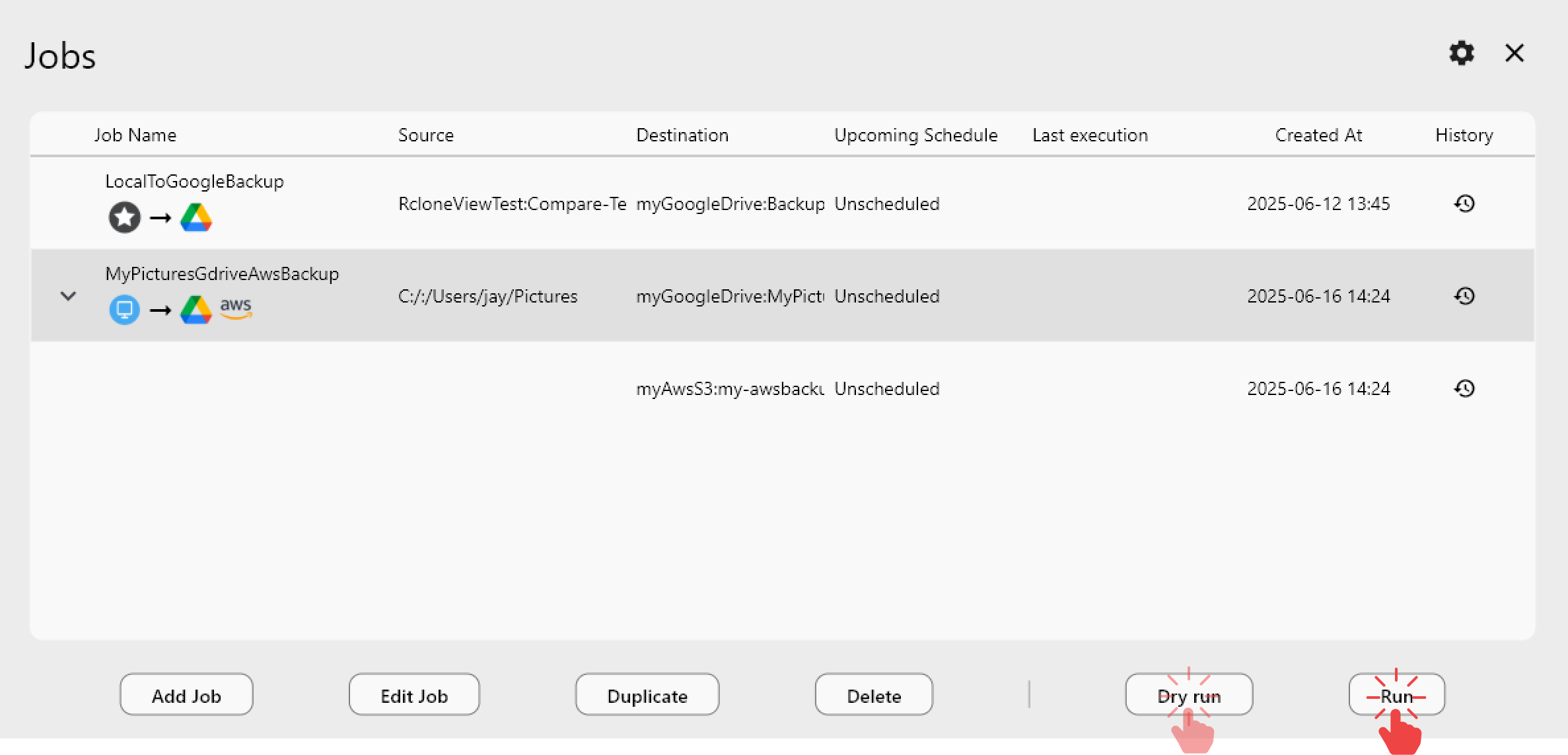
<p>権限が正常に機能していることを確認したら、通常どおり同期ジョブを構築します。ソースとしてローカルフォルダ、宛先としてクラウドリモートを設定し、最初にドライラン(Dry Run)を有効にして転送内容をプレビューします。</p>
<img src="https://rcloneview.com/support/images/en/howto/rcloneview-advanced/create-job-schedule.png" alt="Building a local-to-cloud sync job after fixing macOS permissions" class="img-large img-center">
<h2 class="anchor anchorWithStickyNavbar_LWe7" id="始め方">始め方<a href="https://rcloneview.com/support/ja/blog/fix-macos-empty-folders-permissions-rcloneview#%E5%A7%8B%E3%82%81%E6%96%B9" class="hash-link" aria-label="始め方 への直接リンク" title="始め方 への直接リンク">​</a></h2>
<ol>
<li><a href="https://rcloneview.com/src/download.html" target="_blank" rel="noopener noreferrer">rcloneview.com</a>から<strong>RcloneViewをダウンロード</strong>します。</li>
<li>システム設定 &gt; プライバシーとセキュリティ &gt; ファイルとフォルダを開きます。</li>
<li>RcloneViewのデスクトップ、ドキュメント、ダウンロードへのアクセスを有効にするか、フルディスクアクセスを付与します。</li>
<li>RcloneViewを完全に終了して再起動し、フォルダの内容が正しく読み込まれることを確認します。</li>
</ol>
<p>このパーミッションモデルはmacOS上でユーザーデータを保護するために存在し、一度付与されると、RcloneViewはその後のすべての同期ジョブに対してローカルファイルへの完全で中断のないアクセスを維持します。</p>
<hr>
<p><strong>関連ガイド:</strong></p>
<ul>
<li><a href="https://rcloneview.com/support/blog/fix-macos-too-many-open-files-rcloneview" target="_blank" rel="noopener noreferrer">RcloneViewでmacOSの「開いているファイルが多すぎます」エラーを修正</a></li>
<li><a href="https://rcloneview.com/support/blog/rcloneview-macos-sequoia-cloud-sync" target="_blank" rel="noopener noreferrer">macOS SequoiaでのRcloneView — クラウドストレージ同期</a></li>
<li><a href="https://rcloneview.com/support/blog/fix-cloud-sync-missing-files-after-transfer-rcloneview" target="_blank" rel="noopener noreferrer">転送後にクラウド同期でファイルが失われる問題を修正 — RcloneView</a></li>
</ul>
<section class="py-12 px-4 bg-white rounded-xl shadow-md text-center"><h2 class="text-2xl font-semibold mb-6">対応クラウドプロバイダー</h2><div class="grid grid-cols-2 sm:grid-cols-3 md:grid-cols-4 lg:grid-cols-6 gap-x-4 gap-y-3 justify-items-center leading-none"><div class="flex items-center justify-center h-[48px] overflow-hidden"><img src="https://rcloneview.com/support/icons/cloud-icons/local-files.png" alt="Local Files" title="Local Files" loading="lazy" class="h-full object-contain" style="margin:0"></div><div class="flex items-center justify-center h-[48px] overflow-hidden"><img src="https://rcloneview.com/support/icons/cloud-icons/webdav.png" alt="WebDAV" title="WebDAV" loading="lazy" class="h-full object-contain" style="margin:0"></div><div class="flex items-center justify-center h-[48px] overflow-hidden"><img src="https://rcloneview.com/support/icons/cloud-icons/ftp.png" alt="FTP" title="FTP" loading="lazy" class="h-full object-contain" style="margin:0"></div><div class="flex items-center justify-center h-[48px] overflow-hidden"><img src="https://rcloneview.com/support/icons/cloud-icons/sftp.png" alt="SFTP" title="SFTP" loading="lazy" class="h-full object-contain" style="margin:0"></div><div class="flex items-center justify-center h-[48px] overflow-hidden"><img src="https://rcloneview.com/support/icons/cloud-icons/http.png" alt="HTTP" title="HTTP" loading="lazy" class="h-full object-contain" style="margin:0"></div><div class="flex items-center justify-center h-[48px] overflow-hidden"><img src="https://rcloneview.com/support/icons/cloud-icons/smb-cifs.png" alt="SMB / CIFS" title="SMB / CIFS" loading="lazy" class="h-full object-contain" style="margin:0"></div><div class="flex items-center justify-center h-[48px] overflow-hidden"><img src="https://rcloneview.com/support/icons/cloud-icons/google-drive.png" alt="Google Drive" title="Google Drive" loading="lazy" class="h-full object-contain" style="margin:0"></div><div class="flex items-center justify-center h-[48px] overflow-hidden"><img src="https://rcloneview.com/support/icons/cloud-icons/google-photo.png" alt="Google Photos" title="Google Photos" loading="lazy" class="h-full object-contain" style="margin:0"></div><div class="flex items-center justify-center h-[48px] overflow-hidden"><img src="https://rcloneview.com/support/icons/cloud-icons/google-cloud-storage.png" alt="Google Cloud Storage" title="Google Cloud Storage" loading="lazy" class="h-full object-contain" style="margin:0"></div><div class="flex items-center justify-center h-[48px] overflow-hidden"><img src="https://rcloneview.com/support/icons/cloud-icons/onedrive.png" alt="OneDrive" title="OneDrive" loading="lazy" class="h-full object-contain" style="margin:0"></div><div class="flex items-center justify-center h-[48px] overflow-hidden"><img src="https://rcloneview.com/support/icons/cloud-icons/dropbox.png" alt="Dropbox" title="Dropbox" loading="lazy" class="h-full object-contain" style="margin:0"></div><div class="flex items-center justify-center h-[48px] overflow-hidden"><img src="https://rcloneview.com/support/icons/cloud-icons/box.png" alt="Box" title="Box" loading="lazy" class="h-full object-contain" style="margin:0"></div><div class="flex items-center justify-center h-[48px] overflow-hidden"><img src="https://rcloneview.com/support/icons/cloud-icons/ms-blob-storage.png" alt="MS Azure Blob" title="MS Azure Blob" loading="lazy" class="h-full object-contain" style="margin:0"></div><div class="flex items-center justify-center h-[48px] overflow-hidden"><img src="https://rcloneview.com/support/icons/cloud-icons/ms-file-storage.png" alt="MS File Storage" title="MS File Storage" loading="lazy" class="h-full object-contain" style="margin:0"></div><div class="flex items-center justify-center h-[48px] overflow-hidden"><img src="https://rcloneview.com/support/icons/cloud-icons/s3-compatible.png" alt="S3 Compatible" title="S3 Compatible" loading="lazy" class="h-full object-contain" style="margin:0"></div><div class="flex items-center justify-center h-[48px] overflow-hidden"><img src="https://rcloneview.com/support/icons/cloud-icons/aws-s3.png" alt="Amazon S3" title="Amazon S3" loading="lazy" class="h-full object-contain" style="margin:0"></div><div class="flex items-center justify-center h-[48px] overflow-hidden"><img src="https://rcloneview.com/support/icons/cloud-icons/pcloud.png" alt="pCloud" title="pCloud" loading="lazy" class="h-full object-contain" style="margin:0"></div><div class="flex items-center justify-center h-[48px] overflow-hidden"><img src="https://rcloneview.com/support/icons/cloud-icons/wasabi.png" alt="Wasabi" title="Wasabi" loading="lazy" class="h-full object-contain" style="margin:0"></div><div class="flex items-center justify-center h-[48px] overflow-hidden"><img src="https://rcloneview.com/support/icons/cloud-icons/mega.png" alt="Mega" title="Mega" loading="lazy" class="h-full object-contain" style="margin:0"></div><div class="flex items-center justify-center h-[48px] overflow-hidden"><img src="https://rcloneview.com/support/icons/cloud-icons/backblaze.png" alt="Backblaze B2" title="Backblaze B2" loading="lazy" class="h-full object-contain" style="margin:0"></div><div class="flex items-center justify-center h-[48px] overflow-hidden"><img src="https://rcloneview.com/support/icons/cloud-icons/cloudflare-r2.png" alt="Cloudflare R2" title="Cloudflare R2" loading="lazy" class="h-full object-contain" style="margin:0"></div><div class="flex items-center justify-center h-[48px] overflow-hidden"><img src="https://rcloneview.com/support/icons/cloud-icons/alibaba-oss.png" alt="Alibaba OSS" title="Alibaba OSS" loading="lazy" class="h-full object-contain" style="margin:0"></div><div class="flex items-center justify-center h-[48px] overflow-hidden"><img src="https://rcloneview.com/support/icons/cloud-icons/ceph.png" alt="Ceph" title="Ceph" loading="lazy" class="h-full object-contain" style="margin:0"></div><div class="flex items-center justify-center h-[48px] overflow-hidden"><img src="https://rcloneview.com/support/icons/cloud-icons/swift.png" alt="Swift (OpenStack)" title="Swift (OpenStack)" loading="lazy" class="h-full object-contain" style="margin:0"></div><div class="flex items-center justify-center h-[48px] overflow-hidden"><img src="https://rcloneview.com/support/icons/cloud-icons/ibm-object-storage.png" alt="IBM Cloud Object Storage" title="IBM Cloud Object Storage" loading="lazy" class="h-full object-contain" style="margin:0"></div><div class="flex items-center justify-center h-[48px] overflow-hidden"><img src="https://rcloneview.com/support/icons/cloud-icons/oracle-object-storage.png" alt="Oracle Cloud Object Storage" title="Oracle Cloud Object Storage" loading="lazy" class="h-full object-contain" style="margin:0"></div><div class="flex items-center justify-center h-[48px] overflow-hidden"><img src="https://rcloneview.com/support/icons/cloud-icons/idrive-e2.png" alt="IDrive e2" title="IDrive e2" loading="lazy" class="h-full object-contain" style="margin:0"></div><div class="flex items-center justify-center h-[48px] overflow-hidden"><img src="https://rcloneview.com/support/icons/cloud-icons/minio.png" alt="MinIO" title="MinIO" loading="lazy" class="h-full object-contain" style="margin:0"></div><div class="flex items-center justify-center h-[48px] overflow-hidden"><img src="https://rcloneview.com/support/icons/cloud-icons/storj.png" alt="Storj" title="Storj" loading="lazy" class="h-full object-contain" style="margin:0"></div><div class="flex items-center justify-center h-[48px] overflow-hidden"><img src="https://rcloneview.com/support/icons/cloud-icons/digital-ocean.png" alt="DigitalOcean Spaces" title="DigitalOcean Spaces" loading="lazy" class="h-full object-contain" style="margin:0"></div></div><div class="mt-6"><a href="https://rclone.org/#providers" class="transition font-medium" target="_blank" rel="noopener noreferrer">すべてのプロバイダーを見る →</a></div><div class="mt-8"><a href="https://rcloneview.com/src/download.html" class="inline-block bg-blue-600 text-white font-medium px-6 py-3 rounded-lg shadow hover:bg-blue-700 transition">クラウドを接続する →</a></div></section>]]></content>
        <author>
            <name>Robin</name>
            <uri>https://rcloneview.com</uri>
        </author>
        <category label="RcloneView" term="RcloneView"/>
        <category label="トラブルシューティング" term="トラブルシューティング"/>
        <category label="ヒント" term="ヒント"/>
        <category label="macOS" term="macOS"/>
    </entry>
    <entry>
        <title type="html"><![CDATA[StorjをBackblaze B2に同期 — RcloneViewでクラウドバックアップ]]></title>
        <id>https://rcloneview.com/support/ja/blog/sync-storj-to-backblaze-b2-rcloneview</id>
        <link href="https://rcloneview.com/support/ja/blog/sync-storj-to-backblaze-b2-rcloneview"/>
        <updated>2026-08-02T00:00:00.000Z</updated>
        <summary type="html"><![CDATA[RcloneViewでStorj分散ストレージのファイルをBackblaze B2に同期します。S3互換データの冗長なオフネットワークコピーを保持しましょう。]]></summary>
        <content type="html"><![CDATA[<blockquote>
<p>RcloneViewでStorj分散ストレージデータの冗長で集中管理されたコピーをBackblaze B2に保持しましょう — 1つのジョブで、非常に異なる2つのストレージアーキテクチャを扱います。</p>
</blockquote>
<p>Storjは暗号化されたファイルシャードを独立したノードネットワークに分散させます。これは検閲耐性とコストの面で優れていますが、チームが保護の第二層として従来型の中央ホスト型バックアップを求めることが多いことも意味します。Backblaze B2はその役割をうまく果たします:シンプルな取得が可能な標準のS3互換バケットです。RcloneViewはS3互換リモートサポートを通じて両方に接続し、ローカルのステージングドライブなしで直接データを移動します。</p>
<section class="rv-cta" aria-labelledby="rv-cta-title"><style>
:root{
  --rv-bg:#0b1020; --rv-card:#0f1428; --rv-text:#e9eefb; --rv-muted:#9fb0d1;
  --rv-accent:#7cc3ff; --rv-accent-2:#a8ffcf; --rv-ring:rgba(124,195,255,.4);
}
@media (prefers-color-scheme: light){
  :root{
    --rv-bg:#f7f9fe; --rv-card:#fff; --rv-text:#1a2234; --rv-muted:#5a6b89;
    --rv-accent:#0d6efd; --rv-accent-2:#22c55e; --rv-ring:rgba(13,110,253,.25);
  }
}
.rv-cta{margin:2.5rem auto; padding:clamp(1rem,2vw,1.25rem); max-width:1000px;
  background:
    radial-gradient(1200px 300px at 20% -20%, rgba(124,195,255,.15), transparent 60%),
    radial-gradient(800px 250px at 90% 120%, rgba(168,255,207,.12), transparent 60%);
  border-radius:1.25rem;}
.rv-cta__card{display:grid; grid-template-columns:1.1fr 1fr; gap:1.5rem;
  padding:clamp(1rem,2.5vw,1.5rem); background:var(--rv-card);
  border:1px solid rgba(124,195,255,.18); border-radius:1.25rem;
  box-shadow:0 10px 30px rgba(0,0,0,.18), inset 0 0 0 1px rgba(255,255,255,.02);
  color:var(--rv-text);}
@media (max-width:860px){.rv-cta__card{grid-template-columns:1fr;}}
.rv-cta__media{border-radius:1rem; overflow:hidden;
  background:linear-gradient(180deg, rgba(124,195,255,.15), rgba(168,255,207,.1));
  display:flex; align-items:center; justify-content:center;}
.rv-cta__media img{
  max-width:97%;
  height:auto;
  display:block;
  object-fit:contain; /* 수정됨: cover → contain */
}
.rv-cta__body h2{margin:0 0 .5rem 0; font-size:clamp(1.4rem,2.4vw,2rem); line-height:1.2; letter-spacing:-.01em;}
.rv-cta__subtitle{margin:0 0 .9rem 0; color:var(--rv-muted); font-size:clamp(.96rem,1.2vw,1.02rem);}
.rv-cta__bullets{margin:.6rem 0 1rem 0; padding-left:1.1rem;}
.rv-cta__bullets li{margin:.25rem 0;}
.rv-cta__badges{display:flex; gap:.5rem; flex-wrap:wrap; margin:.8rem 0 1rem 0;}
.rv-badge{font-size:.82rem; padding:.3rem .55rem; border-radius:999px;
  background:rgba(124,195,255,.15); border:1px solid rgba(124,195,255,.35); color:var(--rv-text);}
.rv-button{display:inline-flex; align-items:center; justify-content:center; gap:.5rem;
  padding:.75rem 1.05rem; border-radius:.8rem;
  background:linear-gradient(92deg, var(--rv-accent), var(--rv-accent-2)); color:#0b1020;
  font-weight:700; text-decoration:none; box-shadow:0 8px 24px var(--rv-ring);
  transform:translateZ(0); transition:transform .15s ease, box-shadow .15s ease, opacity .2s ease;}
.rv-button:hover{transform:translateY(-1px); box-shadow:0 12px 28px var(--rv-ring);}
.rv-cta__fineprint{margin:.6rem 0 0 0; font-size:.82rem; color:var(--rv-muted);}
.rv-logos{display:grid; grid-template-columns:repeat(5, minmax(0,1fr)); gap:.5rem;}
@media (max-width:720px){.rv-logos{grid-template-columns:repeat(3, minmax(0,1fr));}}
.rv-logo{display:inline-flex; align-items:center; justify-content:center;
  padding:.55rem .6rem; border-radius:.6rem; background:rgba(124,195,255,.10);
  border:1px dashed rgba(124,195,255,.25); color:var(--rv-text); font-size:.82rem; white-space:nowrap;}
</style><div class="rv-cta__card"><div class="rv-cta__media"><img src="https://rcloneview.com/support/ja/img/rcloneview-preview.png" alt="RcloneViewアプリのプレビュー" loading="lazy"></div><div class="rv-cta__body"><h2 id="rv-cta-title">すべてのクラウドを一か所で管理・同期</h2><p class="rv-cta__subtitle">RcloneViewはrcloneのクロスプラットフォームGUIです。フォルダを比較し、ファイルを転送・同期し、クリーンなビジュアルインターフェースでマルチクラウドのワークフローを自動化できます。</p><ul class="rv-cta__bullets" role="list"><li>ワンクリック操作: コピー · 同期 · 比較</li><li>信頼性の高い自動化のためのスケジューラーと履歴</li><li>Google Drive、OneDrive、Dropbox、S3、WebDAV、SFTPなどに対応</li></ul><div class="rv-cta__badges" aria-label="Supported platforms"><span class="rv-badge">Windows</span><span class="rv-badge">macOS</span><span class="rv-badge">Linux</span></div><a href="https://rcloneview.com/src/download.html" target="_blank" rel="noopener" class="rv-button" aria-label="RcloneViewをダウンロード">無料で始める →</a><p class="rv-cta__fineprint">コア機能は無料。Plusで自動化機能を利用可能。</p></div></div></section>
<h2 class="anchor anchorWithStickyNavbar_LWe7" id="storjとbackblaze-b2の接続">StorjとBackblaze B2の接続<a href="https://rcloneview.com/support/ja/blog/sync-storj-to-backblaze-b2-rcloneview#storj%E3%81%A8backblaze-b2%E3%81%AE%E6%8E%A5%E7%B6%9A" class="hash-link" aria-label="StorjとBackblaze B2の接続 への直接リンク" title="StorjとBackblaze B2の接続 への直接リンク">​</a></h2>
<p>プロジェクトの設定方法に応じて、S3互換ゲートウェイエンドポイントとアクセス許可、またはネイティブのStorjアクセスキーペアを使用して、RcloneViewにStorjをリモートとして追加します。B2コンソールのApplication Key IDとApplication Keyを使用して、Backblaze B2を別途追加します。両方のリモートはExplorerパネルに並んで参照可能なファイルツリーとして表示されるため、同期ジョブを構築する前にバケット構造とオブジェクト数を確認できます。</p>
<p>RcloneViewはWindows、macOS、Linuxの1つのウィンドウから90以上のプロバイダーをマウントおよび同期するため、StorjとB2に使用するのと同じインターフェースで、すでにスタックにある他のクラウドも処理できます。</p>
<img src="https://rcloneview.com/support/images/en/blog/new-remote.png" alt="Adding Storj and Backblaze B2 remotes in RcloneView" class="img-large img-center">
<h2 class="anchor anchorWithStickyNavbar_LWe7" id="同期ジョブの構築">同期ジョブの構築<a href="https://rcloneview.com/support/ja/blog/sync-storj-to-backblaze-b2-rcloneview#%E5%90%8C%E6%9C%9F%E3%82%B8%E3%83%A7%E3%83%96%E3%81%AE%E6%A7%8B%E7%AF%89" class="hash-link" aria-label="同期ジョブの構築 への直接リンク" title="同期ジョブの構築 への直接リンク">​</a></h2>
<p>Storjバケットをソース、Backblaze B2バケットを宛先とする一方向同期ジョブを作成します — 「宛先のみを変更」を選択すると、B2はStorjに書き戻すことのない純粋なミラーとして維持されます。詳細設定(Advanced Settings)のステップでチェックサム比較を有効にすると、ファイルが更新日時だけでなくハッシュとサイズで照合されます。これは、オブジェクトのメタデータが2つの異なるストレージバックエンド間で異なる動作をする場合に重要です。</p>
<p>Storj上に4TBのシャード化されたビデオキャプチャ映像を持つ研究グループのように、分散データセットをアーカイブするチームの場合、フィルタリング(Filtering)ステップを使用すると、ファイルの経過期間や拡張子で初回実行の範囲を指定できるため、全体転送にコミットする前にサブセットでパイプラインを検証できます。初回同期が完了すると、スケジュールされた再実行では新規または変更されたオブジェクトのみが移動します。</p>
<img src="https://rcloneview.com/support/images/en/blog/cloud-to-cloud-transfer-default.png" alt="Syncing a Storj bucket to Backblaze B2 with RcloneView" class="img-large img-center">
<p>まずドライラン(Dry Run)を実行してください。何も転送せずにコピーされるすべてのオブジェクトをリストするため、価格設定と取得特性が異なる2つのプロバイダー間でデータを移動する前に範囲を確認する最も安全な方法です。</p>
<h2 class="anchor anchorWithStickyNavbar_LWe7" id="転送の監視と検証">転送の監視と検証<a href="https://rcloneview.com/support/ja/blog/sync-storj-to-backblaze-b2-rcloneview#%E8%BB%A2%E9%80%81%E3%81%AE%E7%9B%A3%E8%A6%96%E3%81%A8%E6%A4%9C%E8%A8%BC" class="hash-link" aria-label="転送の監視と検証 への直接リンク" title="転送の監視と検証 への直接リンク">​</a></h2>
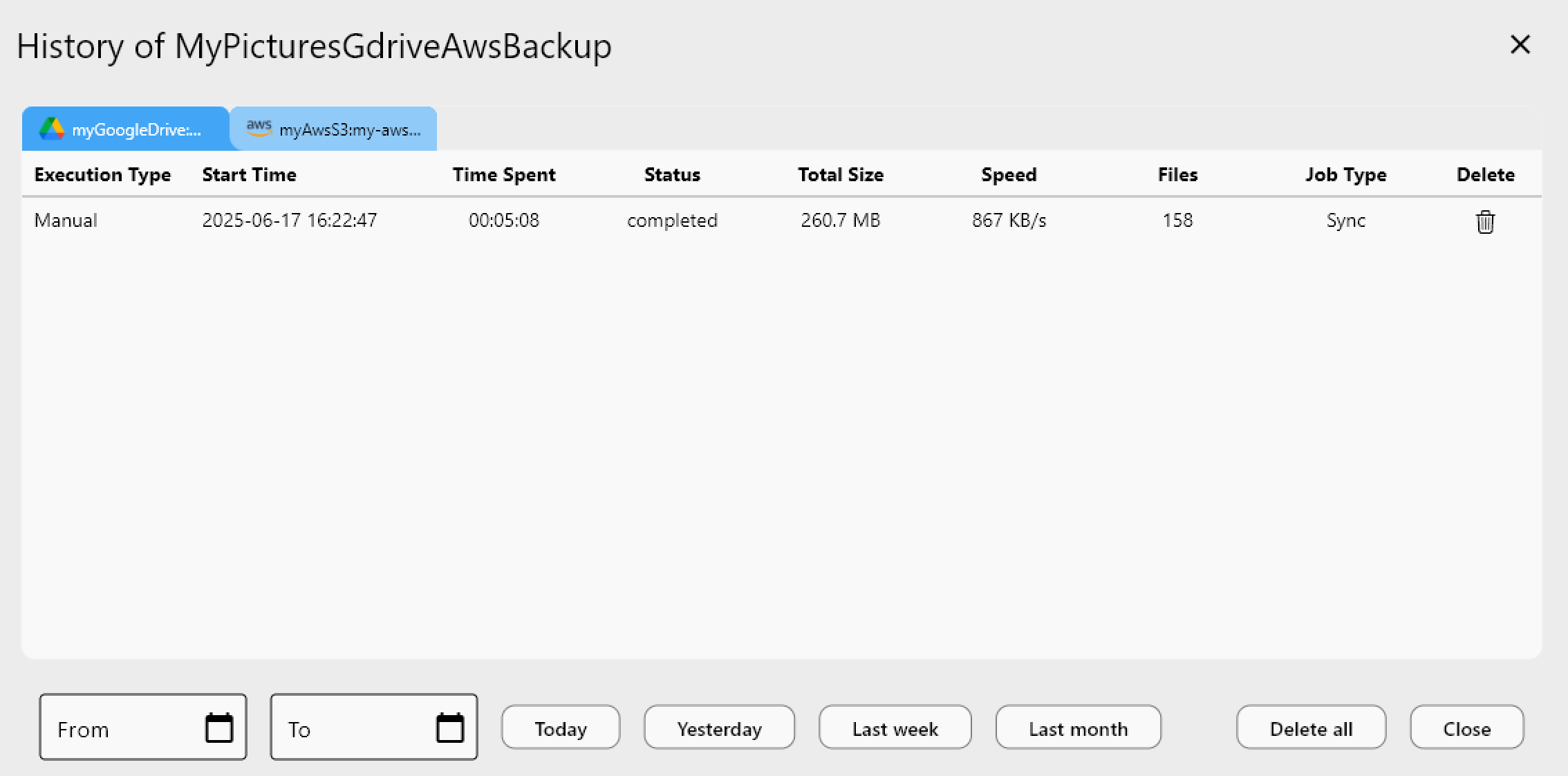
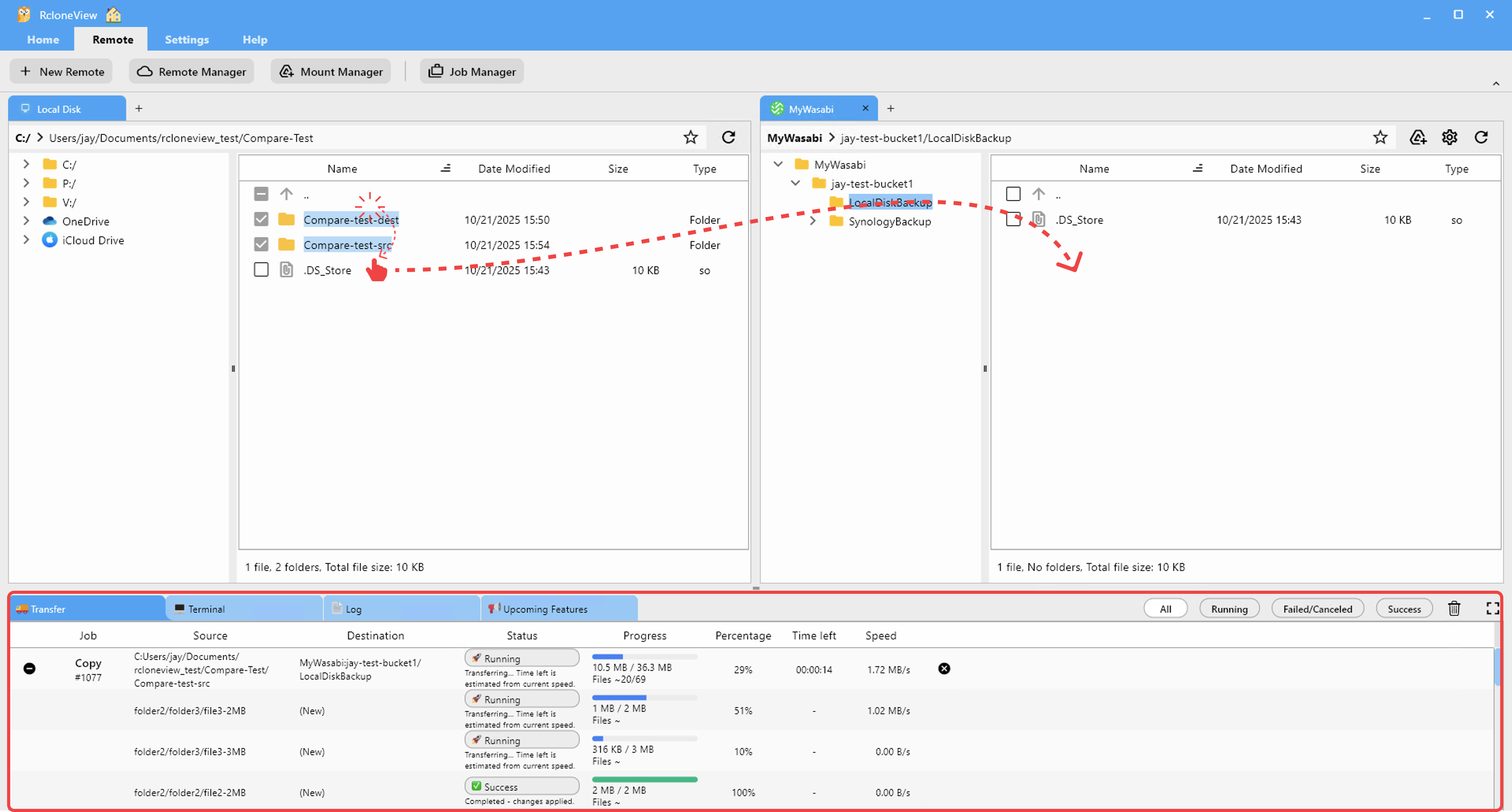
<p>下部の情報ビュー(Info View)の転送(Transferring)タブで進行状況を追跡します — ファイル数、転送速度、完了率が同期の実行中にリアルタイムで更新されます。完了したら、Storjソースとb2宛先の間でフォルダ比較(Folder Compare)を開き、すべてのオブジェクトが到着し、サイズが一致することを確認します。これにより、どちらか側のネットワークの不具合により途中で失敗したオブジェクトを捕捉できます。</p>
<p>ジョブ履歴(Job History)は、各同期実行の期間、移動された総データ量、ステータスを含む永続的な記録を保持するため、B2バックアップが最後にStorjと最新の状態に保たれたのが正確にいつだったかを示す監査証跡が得られます。</p>
<img src="https://rcloneview.com/support/images/en/howto/rcloneview-basic/job-history.png" alt="Reviewing Storj to Backblaze B2 sync job history in RcloneView" class="img-large img-center">
<h2 class="anchor anchorWithStickyNavbar_LWe7" id="始め方">始め方<a href="https://rcloneview.com/support/ja/blog/sync-storj-to-backblaze-b2-rcloneview#%E5%A7%8B%E3%82%81%E6%96%B9" class="hash-link" aria-label="始め方 への直接リンク" title="始め方 への直接リンク">​</a></h2>
<ol>
<li><a href="https://rcloneview.com/src/download.html" target="_blank" rel="noopener noreferrer">rcloneview.com</a>から<strong>RcloneViewをダウンロード</strong>します。</li>
<li>S3互換エンドポイントとアクセス資格情報を使用して、Storjをリモートとして追加します。</li>
<li>Application Key IDとApplication Keyを使用して、Backblaze B2を追加します。</li>
<li>一方向同期ジョブを構築し、ドライランを実行してから実行してStorjをB2にミラーリングします。</li>
</ol>
<p>分散ストレージデータの2つ目の集中ホスト型コピーは、ほとんどのバックアップ戦略における見落としがちなギャップを埋め、RcloneViewはそれを手作業ではなくスケジュール化されたGUI主導のルーチンとして維持することを可能にします。</p>
<hr>
<p><strong>関連ガイド:</strong></p>
<ul>
<li><a href="https://rcloneview.com/support/blog/manage-storj-decentralized-cloud-sync-rcloneview" target="_blank" rel="noopener noreferrer">RcloneViewでStorj分散型クラウド同期を管理</a></li>
<li><a href="https://rcloneview.com/support/blog/migrate-backblaze-b2-to-wasabi-rcloneview" target="_blank" rel="noopener noreferrer">RcloneViewでBackblaze B2からWasabiへ移行</a></li>
<li><a href="https://rcloneview.com/support/blog/fix-storj-upload-errors-rcloneview" target="_blank" rel="noopener noreferrer">RcloneViewでStorjのアップロードエラーを修正</a></li>
</ul>
<section class="py-12 px-4 bg-white rounded-xl shadow-md text-center"><h2 class="text-2xl font-semibold mb-6">対応クラウドプロバイダー</h2><div class="grid grid-cols-2 sm:grid-cols-3 md:grid-cols-4 lg:grid-cols-6 gap-x-4 gap-y-3 justify-items-center leading-none"><div class="flex items-center justify-center h-[48px] overflow-hidden"><img src="https://rcloneview.com/support/icons/cloud-icons/local-files.png" alt="Local Files" title="Local Files" loading="lazy" class="h-full object-contain" style="margin:0"></div><div class="flex items-center justify-center h-[48px] overflow-hidden"><img src="https://rcloneview.com/support/icons/cloud-icons/webdav.png" alt="WebDAV" title="WebDAV" loading="lazy" class="h-full object-contain" style="margin:0"></div><div class="flex items-center justify-center h-[48px] overflow-hidden"><img src="https://rcloneview.com/support/icons/cloud-icons/ftp.png" alt="FTP" title="FTP" loading="lazy" class="h-full object-contain" style="margin:0"></div><div class="flex items-center justify-center h-[48px] overflow-hidden"><img src="https://rcloneview.com/support/icons/cloud-icons/sftp.png" alt="SFTP" title="SFTP" loading="lazy" class="h-full object-contain" style="margin:0"></div><div class="flex items-center justify-center h-[48px] overflow-hidden"><img src="https://rcloneview.com/support/icons/cloud-icons/http.png" alt="HTTP" title="HTTP" loading="lazy" class="h-full object-contain" style="margin:0"></div><div class="flex items-center justify-center h-[48px] overflow-hidden"><img src="https://rcloneview.com/support/icons/cloud-icons/smb-cifs.png" alt="SMB / CIFS" title="SMB / CIFS" loading="lazy" class="h-full object-contain" style="margin:0"></div><div class="flex items-center justify-center h-[48px] overflow-hidden"><img src="https://rcloneview.com/support/icons/cloud-icons/google-drive.png" alt="Google Drive" title="Google Drive" loading="lazy" class="h-full object-contain" style="margin:0"></div><div class="flex items-center justify-center h-[48px] overflow-hidden"><img src="https://rcloneview.com/support/icons/cloud-icons/google-photo.png" alt="Google Photos" title="Google Photos" loading="lazy" class="h-full object-contain" style="margin:0"></div><div class="flex items-center justify-center h-[48px] overflow-hidden"><img src="https://rcloneview.com/support/icons/cloud-icons/google-cloud-storage.png" alt="Google Cloud Storage" title="Google Cloud Storage" loading="lazy" class="h-full object-contain" style="margin:0"></div><div class="flex items-center justify-center h-[48px] overflow-hidden"><img src="https://rcloneview.com/support/icons/cloud-icons/onedrive.png" alt="OneDrive" title="OneDrive" loading="lazy" class="h-full object-contain" style="margin:0"></div><div class="flex items-center justify-center h-[48px] overflow-hidden"><img src="https://rcloneview.com/support/icons/cloud-icons/dropbox.png" alt="Dropbox" title="Dropbox" loading="lazy" class="h-full object-contain" style="margin:0"></div><div class="flex items-center justify-center h-[48px] overflow-hidden"><img src="https://rcloneview.com/support/icons/cloud-icons/box.png" alt="Box" title="Box" loading="lazy" class="h-full object-contain" style="margin:0"></div><div class="flex items-center justify-center h-[48px] overflow-hidden"><img src="https://rcloneview.com/support/icons/cloud-icons/ms-blob-storage.png" alt="MS Azure Blob" title="MS Azure Blob" loading="lazy" class="h-full object-contain" style="margin:0"></div><div class="flex items-center justify-center h-[48px] overflow-hidden"><img src="https://rcloneview.com/support/icons/cloud-icons/ms-file-storage.png" alt="MS File Storage" title="MS File Storage" loading="lazy" class="h-full object-contain" style="margin:0"></div><div class="flex items-center justify-center h-[48px] overflow-hidden"><img src="https://rcloneview.com/support/icons/cloud-icons/s3-compatible.png" alt="S3 Compatible" title="S3 Compatible" loading="lazy" class="h-full object-contain" style="margin:0"></div><div class="flex items-center justify-center h-[48px] overflow-hidden"><img src="https://rcloneview.com/support/icons/cloud-icons/aws-s3.png" alt="Amazon S3" title="Amazon S3" loading="lazy" class="h-full object-contain" style="margin:0"></div><div class="flex items-center justify-center h-[48px] overflow-hidden"><img src="https://rcloneview.com/support/icons/cloud-icons/pcloud.png" alt="pCloud" title="pCloud" loading="lazy" class="h-full object-contain" style="margin:0"></div><div class="flex items-center justify-center h-[48px] overflow-hidden"><img src="https://rcloneview.com/support/icons/cloud-icons/wasabi.png" alt="Wasabi" title="Wasabi" loading="lazy" class="h-full object-contain" style="margin:0"></div><div class="flex items-center justify-center h-[48px] overflow-hidden"><img src="https://rcloneview.com/support/icons/cloud-icons/mega.png" alt="Mega" title="Mega" loading="lazy" class="h-full object-contain" style="margin:0"></div><div class="flex items-center justify-center h-[48px] overflow-hidden"><img src="https://rcloneview.com/support/icons/cloud-icons/backblaze.png" alt="Backblaze B2" title="Backblaze B2" loading="lazy" class="h-full object-contain" style="margin:0"></div><div class="flex items-center justify-center h-[48px] overflow-hidden"><img src="https://rcloneview.com/support/icons/cloud-icons/cloudflare-r2.png" alt="Cloudflare R2" title="Cloudflare R2" loading="lazy" class="h-full object-contain" style="margin:0"></div><div class="flex items-center justify-center h-[48px] overflow-hidden"><img src="https://rcloneview.com/support/icons/cloud-icons/alibaba-oss.png" alt="Alibaba OSS" title="Alibaba OSS" loading="lazy" class="h-full object-contain" style="margin:0"></div><div class="flex items-center justify-center h-[48px] overflow-hidden"><img src="https://rcloneview.com/support/icons/cloud-icons/ceph.png" alt="Ceph" title="Ceph" loading="lazy" class="h-full object-contain" style="margin:0"></div><div class="flex items-center justify-center h-[48px] overflow-hidden"><img src="https://rcloneview.com/support/icons/cloud-icons/swift.png" alt="Swift (OpenStack)" title="Swift (OpenStack)" loading="lazy" class="h-full object-contain" style="margin:0"></div><div class="flex items-center justify-center h-[48px] overflow-hidden"><img src="https://rcloneview.com/support/icons/cloud-icons/ibm-object-storage.png" alt="IBM Cloud Object Storage" title="IBM Cloud Object Storage" loading="lazy" class="h-full object-contain" style="margin:0"></div><div class="flex items-center justify-center h-[48px] overflow-hidden"><img src="https://rcloneview.com/support/icons/cloud-icons/oracle-object-storage.png" alt="Oracle Cloud Object Storage" title="Oracle Cloud Object Storage" loading="lazy" class="h-full object-contain" style="margin:0"></div><div class="flex items-center justify-center h-[48px] overflow-hidden"><img src="https://rcloneview.com/support/icons/cloud-icons/idrive-e2.png" alt="IDrive e2" title="IDrive e2" loading="lazy" class="h-full object-contain" style="margin:0"></div><div class="flex items-center justify-center h-[48px] overflow-hidden"><img src="https://rcloneview.com/support/icons/cloud-icons/minio.png" alt="MinIO" title="MinIO" loading="lazy" class="h-full object-contain" style="margin:0"></div><div class="flex items-center justify-center h-[48px] overflow-hidden"><img src="https://rcloneview.com/support/icons/cloud-icons/storj.png" alt="Storj" title="Storj" loading="lazy" class="h-full object-contain" style="margin:0"></div><div class="flex items-center justify-center h-[48px] overflow-hidden"><img src="https://rcloneview.com/support/icons/cloud-icons/digital-ocean.png" alt="DigitalOcean Spaces" title="DigitalOcean Spaces" loading="lazy" class="h-full object-contain" style="margin:0"></div></div><div class="mt-6"><a href="https://rclone.org/#providers" class="transition font-medium" target="_blank" rel="noopener noreferrer">すべてのプロバイダーを見る →</a></div><div class="mt-8"><a href="https://rcloneview.com/src/download.html" class="inline-block bg-blue-600 text-white font-medium px-6 py-3 rounded-lg shadow hover:bg-blue-700 transition">クラウドを接続する →</a></div></section>]]></content>
        <author>
            <name>Alex</name>
            <uri>https://rcloneview.com</uri>
        </author>
        <category label="RcloneView" term="RcloneView"/>
        <category label="Storj" term="Storj"/>
        <category label="Backblaze B2" term="Backblaze B2"/>
        <category label="クラウド間転送" term="クラウド間転送"/>
        <category label="同期" term="同期"/>
    </entry>
    <entry>
        <title type="html"><![CDATA[博物館とアーカイブのためのクラウドストレージ — RcloneViewによるデジタル保存]]></title>
        <id>https://rcloneview.com/support/ja/blog/cloud-storage-museums-archives-rcloneview</id>
        <link href="https://rcloneview.com/support/ja/blog/cloud-storage-museums-archives-rcloneview"/>
        <updated>2026-08-01T00:00:00.000Z</updated>
        <summary type="html"><![CDATA[デジタル化されたコレクション、アーカイブマスター、保存用コピーを、RcloneViewのチェックサム検証付き同期で複数のクラウドプロバイダーにわたって管理します。]]></summary>
        <content type="html"><![CDATA[<blockquote>
<p>デジタル化されたコレクションには単なるバックアップ以上のものが必要です — RcloneViewはアーカイブマスターを検証し、独立した複数のクラウドプロバイダー間でミラーリングし続けます。</p>
</blockquote>
<p>博物館のデジタル化プロジェクトは、スキャンデータがハードドライブに保存された時点では終わりません。絵画の高解像度TIFF、口述歴史の録音、スキャンされた原稿ページは何十年も残る必要があり、そのためには少なくとも地理的に離れた場所にコピーを1つ用意し、後になってファイルが静かに劣化していないことを証明できる手段が必要です。アーカイブや小規模な博物館のITチームには専用のデジタルアセット管理プラットフォームの予算がないことが多く、その役割をRcloneViewが担います — 保存用マスターをクラウドストレージにプッシュし、整合性を検証し、手作りのスクリプトなしで作業用コピーを同期状態に保つデスクトップGUIです。</p>
<section class="rv-cta" aria-labelledby="rv-cta-title"><style>
:root{
  --rv-bg:#0b1020; --rv-card:#0f1428; --rv-text:#e9eefb; --rv-muted:#9fb0d1;
  --rv-accent:#7cc3ff; --rv-accent-2:#a8ffcf; --rv-ring:rgba(124,195,255,.4);
}
@media (prefers-color-scheme: light){
  :root{
    --rv-bg:#f7f9fe; --rv-card:#fff; --rv-text:#1a2234; --rv-muted:#5a6b89;
    --rv-accent:#0d6efd; --rv-accent-2:#22c55e; --rv-ring:rgba(13,110,253,.25);
  }
}
.rv-cta{margin:2.5rem auto; padding:clamp(1rem,2vw,1.25rem); max-width:1000px;
  background:
    radial-gradient(1200px 300px at 20% -20%, rgba(124,195,255,.15), transparent 60%),
    radial-gradient(800px 250px at 90% 120%, rgba(168,255,207,.12), transparent 60%);
  border-radius:1.25rem;}
.rv-cta__card{display:grid; grid-template-columns:1.1fr 1fr; gap:1.5rem;
  padding:clamp(1rem,2.5vw,1.5rem); background:var(--rv-card);
  border:1px solid rgba(124,195,255,.18); border-radius:1.25rem;
  box-shadow:0 10px 30px rgba(0,0,0,.18), inset 0 0 0 1px rgba(255,255,255,.02);
  color:var(--rv-text);}
@media (max-width:860px){.rv-cta__card{grid-template-columns:1fr;}}
.rv-cta__media{border-radius:1rem; overflow:hidden;
  background:linear-gradient(180deg, rgba(124,195,255,.15), rgba(168,255,207,.1));
  display:flex; align-items:center; justify-content:center;}
.rv-cta__media img{
  max-width:97%;
  height:auto;
  display:block;
  object-fit:contain; /* 수정됨: cover → contain */
}
.rv-cta__body h2{margin:0 0 .5rem 0; font-size:clamp(1.4rem,2.4vw,2rem); line-height:1.2; letter-spacing:-.01em;}
.rv-cta__subtitle{margin:0 0 .9rem 0; color:var(--rv-muted); font-size:clamp(.96rem,1.2vw,1.02rem);}
.rv-cta__bullets{margin:.6rem 0 1rem 0; padding-left:1.1rem;}
.rv-cta__bullets li{margin:.25rem 0;}
.rv-cta__badges{display:flex; gap:.5rem; flex-wrap:wrap; margin:.8rem 0 1rem 0;}
.rv-badge{font-size:.82rem; padding:.3rem .55rem; border-radius:999px;
  background:rgba(124,195,255,.15); border:1px solid rgba(124,195,255,.35); color:var(--rv-text);}
.rv-button{display:inline-flex; align-items:center; justify-content:center; gap:.5rem;
  padding:.75rem 1.05rem; border-radius:.8rem;
  background:linear-gradient(92deg, var(--rv-accent), var(--rv-accent-2)); color:#0b1020;
  font-weight:700; text-decoration:none; box-shadow:0 8px 24px var(--rv-ring);
  transform:translateZ(0); transition:transform .15s ease, box-shadow .15s ease, opacity .2s ease;}
.rv-button:hover{transform:translateY(-1px); box-shadow:0 12px 28px var(--rv-ring);}
.rv-cta__fineprint{margin:.6rem 0 0 0; font-size:.82rem; color:var(--rv-muted);}
.rv-logos{display:grid; grid-template-columns:repeat(5, minmax(0,1fr)); gap:.5rem;}
@media (max-width:720px){.rv-logos{grid-template-columns:repeat(3, minmax(0,1fr));}}
.rv-logo{display:inline-flex; align-items:center; justify-content:center;
  padding:.55rem .6rem; border-radius:.6rem; background:rgba(124,195,255,.10);
  border:1px dashed rgba(124,195,255,.25); color:var(--rv-text); font-size:.82rem; white-space:nowrap;}
</style><div class="rv-cta__card"><div class="rv-cta__media"><img src="https://rcloneview.com/support/ja/img/rcloneview-preview.png" alt="RcloneViewアプリのプレビュー" loading="lazy"></div><div class="rv-cta__body"><h2 id="rv-cta-title">すべてのクラウドを一か所で管理・同期</h2><p class="rv-cta__subtitle">RcloneViewはrcloneのクロスプラットフォームGUIです。フォルダを比較し、ファイルを転送・同期し、クリーンなビジュアルインターフェースでマルチクラウドのワークフローを自動化できます。</p><ul class="rv-cta__bullets" role="list"><li>ワンクリック操作: コピー · 同期 · 比較</li><li>信頼性の高い自動化のためのスケジューラーと履歴</li><li>Google Drive、OneDrive、Dropbox、S3、WebDAV、SFTPなどに対応</li></ul><div class="rv-cta__badges" aria-label="Supported platforms"><span class="rv-badge">Windows</span><span class="rv-badge">macOS</span><span class="rv-badge">Linux</span></div><a href="https://rcloneview.com/src/download.html" target="_blank" rel="noopener" class="rv-button" aria-label="RcloneViewをダウンロード">無料で始める →</a><p class="rv-cta__fineprint">コア機能は無料。Plusで自動化機能を利用可能。</p></div></div></section>
<h2 class="anchor anchorWithStickyNavbar_LWe7" id="独立したプロバイダー間でアーカイブマスターを保存する">独立したプロバイダー間でアーカイブマスターを保存する<a href="https://rcloneview.com/support/ja/blog/cloud-storage-museums-archives-rcloneview#%E7%8B%AC%E7%AB%8B%E3%81%97%E3%81%9F%E3%83%97%E3%83%AD%E3%83%90%E3%82%A4%E3%83%80%E3%83%BC%E9%96%93%E3%81%A7%E3%82%A2%E3%83%BC%E3%82%AB%E3%82%A4%E3%83%96%E3%83%9E%E3%82%B9%E3%82%BF%E3%83%BC%E3%82%92%E4%BF%9D%E5%AD%98%E3%81%99%E3%82%8B" class="hash-link" aria-label="独立したプロバイダー間でアーカイブマスターを保存する への直接リンク" title="独立したプロバイダー間でアーカイブマスターを保存する への直接リンク">​</a></h2>
<p>標準的な保存方法は、マスターファイルのコピーを少なくとも2つの異なるストレージシステムに保管することであり、単一ベンダーの障害やアカウントの問題で両方が同時に失われないよう、理想的には異なるプロバイダーを使うことです。RcloneViewは、小規模なアーカイブチームでもこれを実践できるようにします。Amazon S3やBackblaze B2をマスターのコールドストレージ先として接続し、Google DriveやWasabiなどの2つ目のプロバイダーを独立したミラーとして接続した上で、1つのソースフォルダから両方の宛先へ新しいデジタル化バッチをプッシュする1<!-- -->:N<!-- -->同期ジョブを実行します。Amazon S3、Azure、Backblaze B2はFREEライセンスでも完全な読み書きが可能なので、ストレージ自体の費用以外に追加コストをかけずに2プロバイダー保存戦略を実現できます。</p>
<img src="https://rcloneview.com/support/images/en/blog/cloud-to-cloud-transfer-default.png" alt="Syncing digitized archive files to two cloud providers with RcloneView" class="img-large img-center">
<p>同期ジョブの詳細設定でチェックサム比較を有効にすると、単なるタイムスタンプの一致ではなく、ハッシュとサイズでファイルが検証されます — スキャン用ワークステーションの時計がずれたり、同じ更新日時のまま内容が異なるファイルが再保存されたりする場合に重要です。</p>
<h2 class="anchor anchorWithStickyNavbar_LWe7" id="コマンドラインなしで整合性を検証する">コマンドラインなしで整合性を検証する<a href="https://rcloneview.com/support/ja/blog/cloud-storage-museums-archives-rcloneview#%E3%82%B3%E3%83%9E%E3%83%B3%E3%83%89%E3%83%A9%E3%82%A4%E3%83%B3%E3%81%AA%E3%81%97%E3%81%A7%E6%95%B4%E5%90%88%E6%80%A7%E3%82%92%E6%A4%9C%E8%A8%BC%E3%81%99%E3%82%8B" class="hash-link" aria-label="コマンドラインなしで整合性を検証する への直接リンク" title="コマンドラインなしで整合性を検証する への直接リンク">​</a></h2>
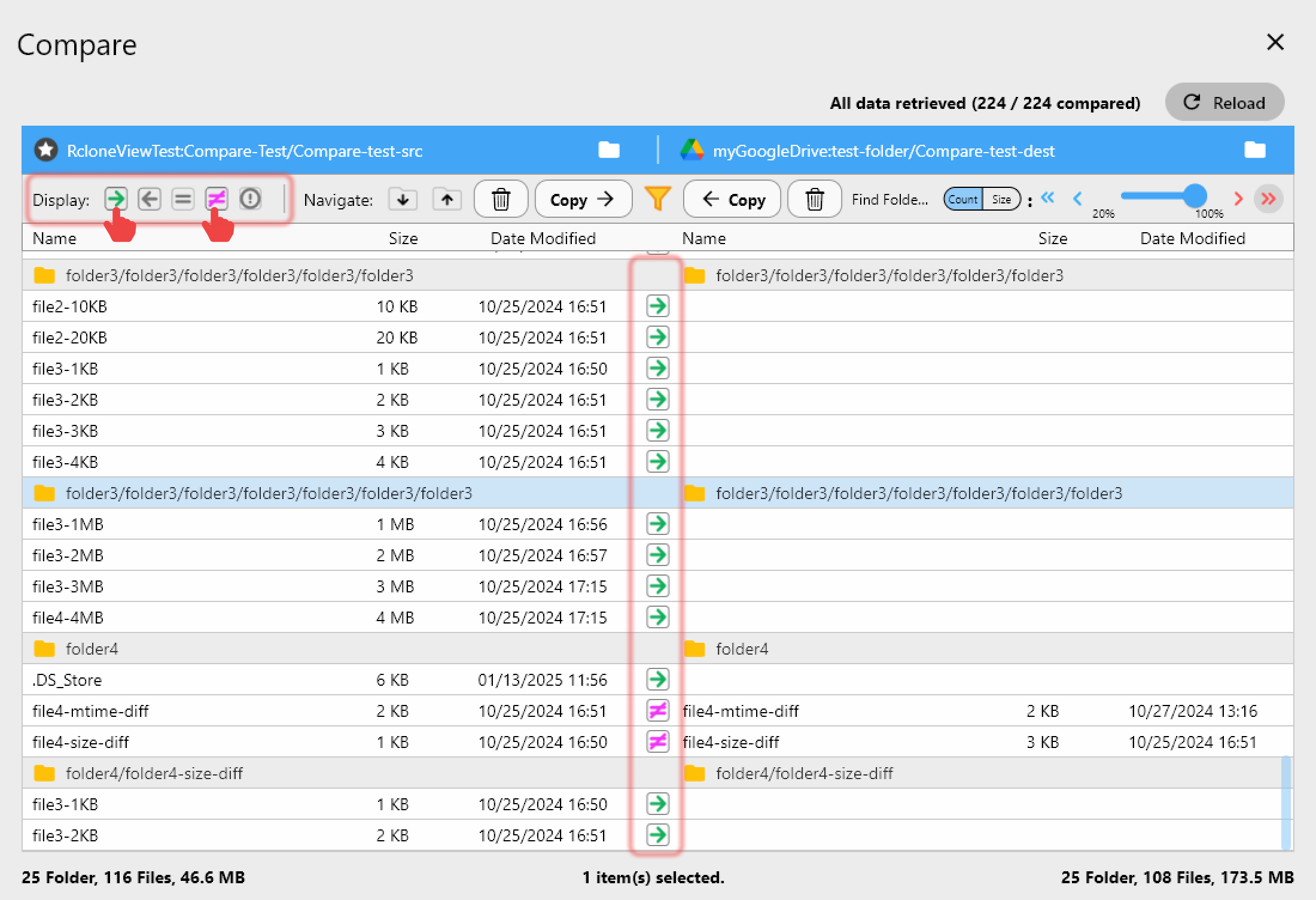
<p>ビットロットとサイレント破損は、あらゆる長期アーカイブにとって目立たない脅威です。RcloneViewのFolder Compareツールを使えば、アーキビストは異なるリモート上の同じコレクション — たとえばメインのS3バケットとBackblazeミラー — に2つのパネルを向け、サイズとハッシュによるファイル単位の差分を確認できます。「Show different files」フィルターは、どの項目が同期からずれたかを正確に表示するため、四半期ごとの整合性チェックが、チェックサムログを解析する作業から5分間の目視確認に変わります。</p>
<img src="https://rcloneview.com/support/images/en/howto/rcloneview-basic/compare-display-select.png" alt="Comparing archival collection integrity between two cloud storage remotes" class="img-large img-center">
<p>新しいデジタル化バッチの最初のチェックでは、Dry Runが実際に転送が行われる前に、どのファイルがコピーまたはフラグ付けされるかをプレビューします — 1つの原稿フォルダが数百ギガバイトになることもあり、間違いをやり直すコストが大きい場合に役立ちます。</p>
<h2 class="anchor anchorWithStickyNavbar_LWe7" id="スキャン用ワークステーションからの取り込みをスケジュールする">スキャン用ワークステーションからの取り込みをスケジュールする<a href="https://rcloneview.com/support/ja/blog/cloud-storage-museums-archives-rcloneview#%E3%82%B9%E3%82%AD%E3%83%A3%E3%83%B3%E7%94%A8%E3%83%AF%E3%83%BC%E3%82%AF%E3%82%B9%E3%83%86%E3%83%BC%E3%82%B7%E3%83%A7%E3%83%B3%E3%81%8B%E3%82%89%E3%81%AE%E5%8F%96%E3%82%8A%E8%BE%BC%E3%81%BF%E3%82%92%E3%82%B9%E3%82%B1%E3%82%B8%E3%83%A5%E3%83%BC%E3%83%AB%E3%81%99%E3%82%8B" class="hash-link" aria-label="スキャン用ワークステーションからの取り込みをスケジュールする への直接リンク" title="スキャン用ワークステーションからの取り込みをスケジュールする への直接リンク">​</a></h2>
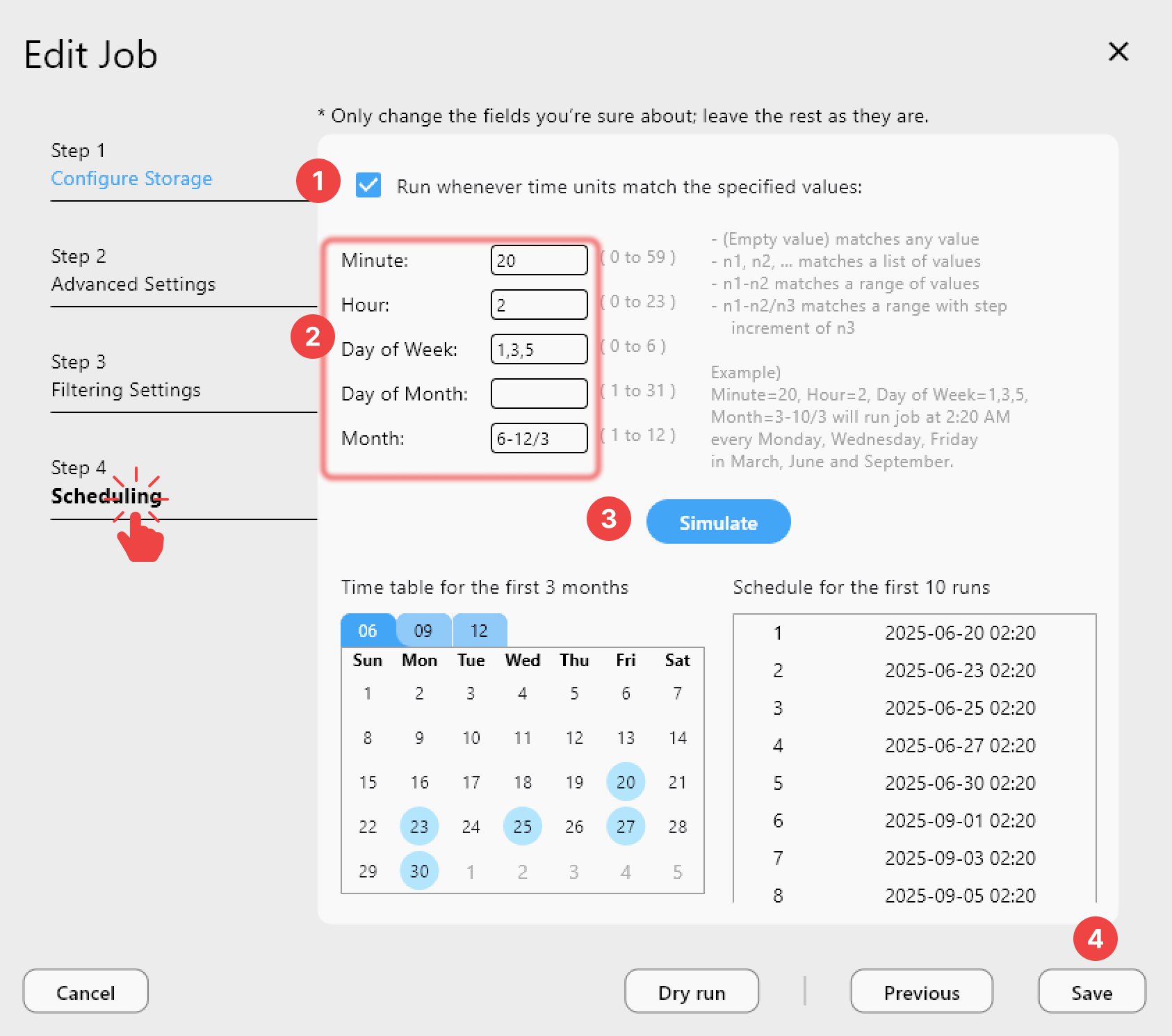
<p>デジタル化作業はバースト的に発生します — ある週にスライドのバッチをスキャンし、次の週にオーディオリールを転送する、といった具合です。セッションごとに手動でアップロードするのを覚えておく代わりに、PLUSライセンスを利用するアーカイブチームはcrontab形式のスケジュールを設定し、ローカルの取り込みフォルダ内の新しいファイルを毎晩自動的にクラウドストレージへ同期させることができ、Job Historyが受け入れ記録用に何がいつ転送されたかを正確に記録します。</p>
<img src="https://rcloneview.com/support/images/en/howto/rcloneview-advanced/create-job-schedule.png" alt="Scheduling automated archive ingest sync in RcloneView" class="img-large img-center">
<h2 class="anchor anchorWithStickyNavbar_LWe7" id="はじめに">はじめに<a href="https://rcloneview.com/support/ja/blog/cloud-storage-museums-archives-rcloneview#%E3%81%AF%E3%81%98%E3%82%81%E3%81%AB" class="hash-link" aria-label="はじめに への直接リンク" title="はじめに への直接リンク">​</a></h2>
<ol>
<li><a href="https://rcloneview.com/src/download.html" target="_blank" rel="noopener noreferrer">rcloneview.com</a>から<strong>RcloneViewをダウンロード</strong>します。</li>
<li>メインのアーカイブストレージリモート（S3、Backblaze B2など）と、冗長性のための2つ目のプロバイダーを接続します。</li>
<li>デジタル化取り込みフォルダに対してチェックサム検証を有効にした1<!-- -->:N<!-- -->同期ジョブを設定します。</li>
<li>メインコピーとミラーコピーの間のずれを検出するため、Folder Compareを定期的に実行します。</li>
</ol>
<p>デジタル化予算はスキャンに使われる分で半分にすぎません — RcloneViewは、それらのファイルが10年後も読めるようにするという、目立たないもう半分を担います。</p>
<hr>
<p><strong>関連ガイド:</strong></p>
<ul>
<li><a href="https://rcloneview.com/support/blog/checksum-verified-cloud-migrations-rcloneview" target="_blank" rel="noopener noreferrer">RcloneViewによるチェックサム検証付きクラウド移行（Drive、Dropbox、S3、R2）</a></li>
<li><a href="https://rcloneview.com/support/blog/sync-internet-archive-cloud-backup-rcloneview" target="_blank" rel="noopener noreferrer">RcloneViewを使ったInternet Archiveコレクションのアップロードと管理方法</a></li>
<li><a href="https://rcloneview.com/support/blog/cloud-storage-research-academia-rcloneview" target="_blank" rel="noopener noreferrer">研究者向けクラウドストレージ — RcloneViewでデータセット、論文、実験室データを管理する</a></li>
</ul>
<section class="py-12 px-4 bg-white rounded-xl shadow-md text-center"><h2 class="text-2xl font-semibold mb-6">対応クラウドプロバイダー</h2><div class="grid grid-cols-2 sm:grid-cols-3 md:grid-cols-4 lg:grid-cols-6 gap-x-4 gap-y-3 justify-items-center leading-none"><div class="flex items-center justify-center h-[48px] overflow-hidden"><img src="https://rcloneview.com/support/icons/cloud-icons/local-files.png" alt="Local Files" title="Local Files" loading="lazy" class="h-full object-contain" style="margin:0"></div><div class="flex items-center justify-center h-[48px] overflow-hidden"><img src="https://rcloneview.com/support/icons/cloud-icons/webdav.png" alt="WebDAV" title="WebDAV" loading="lazy" class="h-full object-contain" style="margin:0"></div><div class="flex items-center justify-center h-[48px] overflow-hidden"><img src="https://rcloneview.com/support/icons/cloud-icons/ftp.png" alt="FTP" title="FTP" loading="lazy" class="h-full object-contain" style="margin:0"></div><div class="flex items-center justify-center h-[48px] overflow-hidden"><img src="https://rcloneview.com/support/icons/cloud-icons/sftp.png" alt="SFTP" title="SFTP" loading="lazy" class="h-full object-contain" style="margin:0"></div><div class="flex items-center justify-center h-[48px] overflow-hidden"><img src="https://rcloneview.com/support/icons/cloud-icons/http.png" alt="HTTP" title="HTTP" loading="lazy" class="h-full object-contain" style="margin:0"></div><div class="flex items-center justify-center h-[48px] overflow-hidden"><img src="https://rcloneview.com/support/icons/cloud-icons/smb-cifs.png" alt="SMB / CIFS" title="SMB / CIFS" loading="lazy" class="h-full object-contain" style="margin:0"></div><div class="flex items-center justify-center h-[48px] overflow-hidden"><img src="https://rcloneview.com/support/icons/cloud-icons/google-drive.png" alt="Google Drive" title="Google Drive" loading="lazy" class="h-full object-contain" style="margin:0"></div><div class="flex items-center justify-center h-[48px] overflow-hidden"><img src="https://rcloneview.com/support/icons/cloud-icons/google-photo.png" alt="Google Photos" title="Google Photos" loading="lazy" class="h-full object-contain" style="margin:0"></div><div class="flex items-center justify-center h-[48px] overflow-hidden"><img src="https://rcloneview.com/support/icons/cloud-icons/google-cloud-storage.png" alt="Google Cloud Storage" title="Google Cloud Storage" loading="lazy" class="h-full object-contain" style="margin:0"></div><div class="flex items-center justify-center h-[48px] overflow-hidden"><img src="https://rcloneview.com/support/icons/cloud-icons/onedrive.png" alt="OneDrive" title="OneDrive" loading="lazy" class="h-full object-contain" style="margin:0"></div><div class="flex items-center justify-center h-[48px] overflow-hidden"><img src="https://rcloneview.com/support/icons/cloud-icons/dropbox.png" alt="Dropbox" title="Dropbox" loading="lazy" class="h-full object-contain" style="margin:0"></div><div class="flex items-center justify-center h-[48px] overflow-hidden"><img src="https://rcloneview.com/support/icons/cloud-icons/box.png" alt="Box" title="Box" loading="lazy" class="h-full object-contain" style="margin:0"></div><div class="flex items-center justify-center h-[48px] overflow-hidden"><img src="https://rcloneview.com/support/icons/cloud-icons/ms-blob-storage.png" alt="MS Azure Blob" title="MS Azure Blob" loading="lazy" class="h-full object-contain" style="margin:0"></div><div class="flex items-center justify-center h-[48px] overflow-hidden"><img src="https://rcloneview.com/support/icons/cloud-icons/ms-file-storage.png" alt="MS File Storage" title="MS File Storage" loading="lazy" class="h-full object-contain" style="margin:0"></div><div class="flex items-center justify-center h-[48px] overflow-hidden"><img src="https://rcloneview.com/support/icons/cloud-icons/s3-compatible.png" alt="S3 Compatible" title="S3 Compatible" loading="lazy" class="h-full object-contain" style="margin:0"></div><div class="flex items-center justify-center h-[48px] overflow-hidden"><img src="https://rcloneview.com/support/icons/cloud-icons/aws-s3.png" alt="Amazon S3" title="Amazon S3" loading="lazy" class="h-full object-contain" style="margin:0"></div><div class="flex items-center justify-center h-[48px] overflow-hidden"><img src="https://rcloneview.com/support/icons/cloud-icons/pcloud.png" alt="pCloud" title="pCloud" loading="lazy" class="h-full object-contain" style="margin:0"></div><div class="flex items-center justify-center h-[48px] overflow-hidden"><img src="https://rcloneview.com/support/icons/cloud-icons/wasabi.png" alt="Wasabi" title="Wasabi" loading="lazy" class="h-full object-contain" style="margin:0"></div><div class="flex items-center justify-center h-[48px] overflow-hidden"><img src="https://rcloneview.com/support/icons/cloud-icons/mega.png" alt="Mega" title="Mega" loading="lazy" class="h-full object-contain" style="margin:0"></div><div class="flex items-center justify-center h-[48px] overflow-hidden"><img src="https://rcloneview.com/support/icons/cloud-icons/backblaze.png" alt="Backblaze B2" title="Backblaze B2" loading="lazy" class="h-full object-contain" style="margin:0"></div><div class="flex items-center justify-center h-[48px] overflow-hidden"><img src="https://rcloneview.com/support/icons/cloud-icons/cloudflare-r2.png" alt="Cloudflare R2" title="Cloudflare R2" loading="lazy" class="h-full object-contain" style="margin:0"></div><div class="flex items-center justify-center h-[48px] overflow-hidden"><img src="https://rcloneview.com/support/icons/cloud-icons/alibaba-oss.png" alt="Alibaba OSS" title="Alibaba OSS" loading="lazy" class="h-full object-contain" style="margin:0"></div><div class="flex items-center justify-center h-[48px] overflow-hidden"><img src="https://rcloneview.com/support/icons/cloud-icons/ceph.png" alt="Ceph" title="Ceph" loading="lazy" class="h-full object-contain" style="margin:0"></div><div class="flex items-center justify-center h-[48px] overflow-hidden"><img src="https://rcloneview.com/support/icons/cloud-icons/swift.png" alt="Swift (OpenStack)" title="Swift (OpenStack)" loading="lazy" class="h-full object-contain" style="margin:0"></div><div class="flex items-center justify-center h-[48px] overflow-hidden"><img src="https://rcloneview.com/support/icons/cloud-icons/ibm-object-storage.png" alt="IBM Cloud Object Storage" title="IBM Cloud Object Storage" loading="lazy" class="h-full object-contain" style="margin:0"></div><div class="flex items-center justify-center h-[48px] overflow-hidden"><img src="https://rcloneview.com/support/icons/cloud-icons/oracle-object-storage.png" alt="Oracle Cloud Object Storage" title="Oracle Cloud Object Storage" loading="lazy" class="h-full object-contain" style="margin:0"></div><div class="flex items-center justify-center h-[48px] overflow-hidden"><img src="https://rcloneview.com/support/icons/cloud-icons/idrive-e2.png" alt="IDrive e2" title="IDrive e2" loading="lazy" class="h-full object-contain" style="margin:0"></div><div class="flex items-center justify-center h-[48px] overflow-hidden"><img src="https://rcloneview.com/support/icons/cloud-icons/minio.png" alt="MinIO" title="MinIO" loading="lazy" class="h-full object-contain" style="margin:0"></div><div class="flex items-center justify-center h-[48px] overflow-hidden"><img src="https://rcloneview.com/support/icons/cloud-icons/storj.png" alt="Storj" title="Storj" loading="lazy" class="h-full object-contain" style="margin:0"></div><div class="flex items-center justify-center h-[48px] overflow-hidden"><img src="https://rcloneview.com/support/icons/cloud-icons/digital-ocean.png" alt="DigitalOcean Spaces" title="DigitalOcean Spaces" loading="lazy" class="h-full object-contain" style="margin:0"></div></div><div class="mt-6"><a href="https://rclone.org/#providers" class="transition font-medium" target="_blank" rel="noopener noreferrer">すべてのプロバイダーを見る →</a></div><div class="mt-8"><a href="https://rcloneview.com/src/download.html" class="inline-block bg-blue-600 text-white font-medium px-6 py-3 rounded-lg shadow hover:bg-blue-700 transition">クラウドを接続する →</a></div></section>]]></content>
        <author>
            <name>Morgan</name>
            <uri>https://rcloneview.com</uri>
        </author>
        <category label="RcloneView" term="RcloneView"/>
        <category label="クラウドストレージ" term="クラウドストレージ"/>
        <category label="業界" term="業界"/>
        <category label="バックアップ" term="バックアップ"/>
        <category label="デジタル保存" term="デジタル保存"/>
    </entry>
    <entry>
        <title type="html"><![CDATA[Leviiaオブジェクトストレージを管理する — RcloneViewでファイルを同期・バックアップ]]></title>
        <id>https://rcloneview.com/support/ja/blog/manage-leviia-cloud-sync-backup-rcloneview</id>
        <link href="https://rcloneview.com/support/ja/blog/manage-leviia-cloud-sync-backup-rcloneview"/>
        <updated>2026-08-01T00:00:00.000Z</updated>
        <summary type="html"><![CDATA[LeviiaのS3互換オブジェクトストレージをRcloneViewに接続して、ドラッグ&ドロップでのファイル管理、スケジュールバックアップ、クラウド間同期を利用できます。]]></summary>
        <content type="html"><![CDATA[<blockquote>
<p>他のあらゆるクラウドに使うのと同じウィンドウから、LeviiaのS3互換オブジェクトストレージを閲覧し、同期し、バックアップします。</p>
</blockquote>
<p>LeviiaはヨーロッパでホストされるS3互換オブジェクトストレージを提供しており、S3ですでに動作するツール群を手放さずにデータレジデンシーの保証を求めるチームによく選ばれています。ただし、S3互換プロバイダーが洗練された独自のデスクトップクライアントを提供することはめったになく、ユーザーはアップロードをスクリプト化するか、素のCLIを使いこなす必要に迫られます。RcloneViewはLeviiaを他のリモートとまったく同じように扱うことで、その手間をなくします — 完全なファイル閲覧、ドラッグ&amp;ドロップ転送、スケジュール同期ジョブまで、コマンド不要です。</p>
<section class="rv-cta" aria-labelledby="rv-cta-title"><style>
:root{
  --rv-bg:#0b1020; --rv-card:#0f1428; --rv-text:#e9eefb; --rv-muted:#9fb0d1;
  --rv-accent:#7cc3ff; --rv-accent-2:#a8ffcf; --rv-ring:rgba(124,195,255,.4);
}
@media (prefers-color-scheme: light){
  :root{
    --rv-bg:#f7f9fe; --rv-card:#fff; --rv-text:#1a2234; --rv-muted:#5a6b89;
    --rv-accent:#0d6efd; --rv-accent-2:#22c55e; --rv-ring:rgba(13,110,253,.25);
  }
}
.rv-cta{margin:2.5rem auto; padding:clamp(1rem,2vw,1.25rem); max-width:1000px;
  background:
    radial-gradient(1200px 300px at 20% -20%, rgba(124,195,255,.15), transparent 60%),
    radial-gradient(800px 250px at 90% 120%, rgba(168,255,207,.12), transparent 60%);
  border-radius:1.25rem;}
.rv-cta__card{display:grid; grid-template-columns:1.1fr 1fr; gap:1.5rem;
  padding:clamp(1rem,2.5vw,1.5rem); background:var(--rv-card);
  border:1px solid rgba(124,195,255,.18); border-radius:1.25rem;
  box-shadow:0 10px 30px rgba(0,0,0,.18), inset 0 0 0 1px rgba(255,255,255,.02);
  color:var(--rv-text);}
@media (max-width:860px){.rv-cta__card{grid-template-columns:1fr;}}
.rv-cta__media{border-radius:1rem; overflow:hidden;
  background:linear-gradient(180deg, rgba(124,195,255,.15), rgba(168,255,207,.1));
  display:flex; align-items:center; justify-content:center;}
.rv-cta__media img{
  max-width:97%;
  height:auto;
  display:block;
  object-fit:contain; /* 수정됨: cover → contain */
}
.rv-cta__body h2{margin:0 0 .5rem 0; font-size:clamp(1.4rem,2.4vw,2rem); line-height:1.2; letter-spacing:-.01em;}
.rv-cta__subtitle{margin:0 0 .9rem 0; color:var(--rv-muted); font-size:clamp(.96rem,1.2vw,1.02rem);}
.rv-cta__bullets{margin:.6rem 0 1rem 0; padding-left:1.1rem;}
.rv-cta__bullets li{margin:.25rem 0;}
.rv-cta__badges{display:flex; gap:.5rem; flex-wrap:wrap; margin:.8rem 0 1rem 0;}
.rv-badge{font-size:.82rem; padding:.3rem .55rem; border-radius:999px;
  background:rgba(124,195,255,.15); border:1px solid rgba(124,195,255,.35); color:var(--rv-text);}
.rv-button{display:inline-flex; align-items:center; justify-content:center; gap:.5rem;
  padding:.75rem 1.05rem; border-radius:.8rem;
  background:linear-gradient(92deg, var(--rv-accent), var(--rv-accent-2)); color:#0b1020;
  font-weight:700; text-decoration:none; box-shadow:0 8px 24px var(--rv-ring);
  transform:translateZ(0); transition:transform .15s ease, box-shadow .15s ease, opacity .2s ease;}
.rv-button:hover{transform:translateY(-1px); box-shadow:0 12px 28px var(--rv-ring);}
.rv-cta__fineprint{margin:.6rem 0 0 0; font-size:.82rem; color:var(--rv-muted);}
.rv-logos{display:grid; grid-template-columns:repeat(5, minmax(0,1fr)); gap:.5rem;}
@media (max-width:720px){.rv-logos{grid-template-columns:repeat(3, minmax(0,1fr));}}
.rv-logo{display:inline-flex; align-items:center; justify-content:center;
  padding:.55rem .6rem; border-radius:.6rem; background:rgba(124,195,255,.10);
  border:1px dashed rgba(124,195,255,.25); color:var(--rv-text); font-size:.82rem; white-space:nowrap;}
</style><div class="rv-cta__card"><div class="rv-cta__media"><img src="https://rcloneview.com/support/ja/img/rcloneview-preview.png" alt="RcloneViewアプリのプレビュー" loading="lazy"></div><div class="rv-cta__body"><h2 id="rv-cta-title">すべてのクラウドを一か所で管理・同期</h2><p class="rv-cta__subtitle">RcloneViewはrcloneのクロスプラットフォームGUIです。フォルダを比較し、ファイルを転送・同期し、クリーンなビジュアルインターフェースでマルチクラウドのワークフローを自動化できます。</p><ul class="rv-cta__bullets" role="list"><li>ワンクリック操作: コピー · 同期 · 比較</li><li>信頼性の高い自動化のためのスケジューラーと履歴</li><li>Google Drive、OneDrive、Dropbox、S3、WebDAV、SFTPなどに対応</li></ul><div class="rv-cta__badges" aria-label="Supported platforms"><span class="rv-badge">Windows</span><span class="rv-badge">macOS</span><span class="rv-badge">Linux</span></div><a href="https://rcloneview.com/src/download.html" target="_blank" rel="noopener" class="rv-button" aria-label="RcloneViewをダウンロード">無料で始める →</a><p class="rv-cta__fineprint">コア機能は無料。Plusで自動化機能を利用可能。</p></div></div></section>
<h2 class="anchor anchorWithStickyNavbar_LWe7" id="leviiaバケットを接続する">Leviiaバケットを接続する<a href="https://rcloneview.com/support/ja/blog/manage-leviia-cloud-sync-backup-rcloneview#leviia%E3%83%90%E3%82%B1%E3%83%83%E3%83%88%E3%82%92%E6%8E%A5%E7%B6%9A%E3%81%99%E3%82%8B" class="hash-link" aria-label="Leviiaバケットを接続する への直接リンク" title="Leviiaバケットを接続する への直接リンク">​</a></h2>
<p>LeviiaはS3プロトコルを話すため、Amazon S3やWasabiを追加するのと同じ方法でRcloneViewに追加できます。新しいリモートを作成し、S3互換プロバイダーのオプションを選択して、アカウントのリージョンに対応するAccess Key、Secret Key、Leviiaのエンドポイント URLを入力します。保存すると、バケットはExplorerパネルに通常のタブとして表示され、すぐに閲覧・転送できるようになります。</p>
<img src="https://rcloneview.com/support/images/en/blog/new-remote.png" alt="Adding a Leviia object storage remote in RcloneView" class="img-large img-center">
<p>RcloneViewは1つのウィンドウで90以上のプロバイダーをマウント・同期でき、Windows、macOS、Linuxで動作するため、Leviiaバケットもツールを切り替えることなく、管理している他のあらゆるクラウドアカウントと並んで扱えます。</p>
<h2 class="anchor anchorWithStickyNavbar_LWe7" id="leviiaストレージを閲覧整理する">Leviiaストレージを閲覧・整理する<a href="https://rcloneview.com/support/ja/blog/manage-leviia-cloud-sync-backup-rcloneview#leviia%E3%82%B9%E3%83%88%E3%83%AC%E3%83%BC%E3%82%B8%E3%82%92%E9%96%B2%E8%A6%A7%E6%95%B4%E7%90%86%E3%81%99%E3%82%8B" class="hash-link" aria-label="Leviiaストレージを閲覧・整理する への直接リンク" title="Leviiaストレージを閲覧・整理する への直接リンク">​</a></h2>
<p>接続後、Leviiaバケットはエクスプローラー内でローカルフォルダとまったく同じように振る舞います。名前、種類、更新日時、サイズで並べ替え、画像でいっぱいのバケットではサムネイル表示に切り替え、Get Sizeであるフォルダがどれだけの容量を消費しているかを確認してから別の場所にアーカイブするか判断できます。Ctrl+ClickまたはShift+Clickによる複数選択で、スクリプトによるループなしに一括ダウンロードや削除に対応します。</p>
<img src="https://rcloneview.com/support/images/en/howto/rcloneview-basic/compare-display-select.png" alt="Browsing Leviia bucket contents in RcloneView" class="img-large img-center">
<h2 class="anchor anchorWithStickyNavbar_LWe7" id="leviiaとの間でバックアップする">Leviiaとの間でバックアップする<a href="https://rcloneview.com/support/ja/blog/manage-leviia-cloud-sync-backup-rcloneview#leviia%E3%81%A8%E3%81%AE%E9%96%93%E3%81%A7%E3%83%90%E3%83%83%E3%82%AF%E3%82%A2%E3%83%83%E3%83%97%E3%81%99%E3%82%8B" class="hash-link" aria-label="Leviiaとの間でバックアップする への直接リンク" title="Leviiaとの間でバックアップする への直接リンク">​</a></h2>
<p>定期的なバックアップには、Leviiaをソースまたは宛先とするSyncジョブを設定します。4ステップのウィザードでは、同時転送数、タイムスタンプだけでなくハッシュとサイズでファイルを比較するチェックサム検証、アーカイブしたくないファイルタイプを除外するフィルタールールを設定できます。本番データが入っているバケットに向けて同期ジョブを実行する前には、まずDry Runで何がコピーまたは削除されるかをプレビューしておく価値があります。</p>
<img src="https://rcloneview.com/support/images/en/howto/rcloneview-advanced/create-job-schedule.png" alt="Scheduling a Leviia backup job in RcloneView" class="img-large img-center">
<h2 class="anchor anchorWithStickyNavbar_LWe7" id="はじめに">はじめに<a href="https://rcloneview.com/support/ja/blog/manage-leviia-cloud-sync-backup-rcloneview#%E3%81%AF%E3%81%98%E3%82%81%E3%81%AB" class="hash-link" aria-label="はじめに への直接リンク" title="はじめに への直接リンク">​</a></h2>
<ol>
<li><a href="https://rcloneview.com/src/download.html" target="_blank" rel="noopener noreferrer">rcloneview.com</a>から<strong>RcloneViewをダウンロード</strong>します。</li>
<li>新しいリモートを作成し、S3互換プロバイダータイプを選択します。</li>
<li>LeviiaのAccess Key、Secret Key、エンドポイントURLを入力します。</li>
<li>Leviiaと他のクラウドリモートの間でファイルを移動するSyncまたはCopyジョブを設定します。</li>
</ol>
<p>LeviiaがRcloneViewに組み込まれると、オブジェクトストレージの管理はスクリプトを書く面倒な作業ではなく、普段のファイル操作の一部になります。</p>
<hr>
<p><strong>関連ガイド:</strong></p>
<ul>
<li><a href="https://rcloneview.com/support/blog/manage-ceph-object-storage-s3-rcloneview" target="_blank" rel="noopener noreferrer">RcloneViewでCephオブジェクトストレージを管理する — Cephクラスター向けS3互換GUI</a></li>
<li><a href="https://rcloneview.com/support/blog/manage-scaleway-object-storage-cloud-sync-rcloneview" target="_blank" rel="noopener noreferrer">Scalewayオブジェクトストレージを管理する — RcloneViewでクラウド同期・バックアップ</a></li>
<li><a href="https://rcloneview.com/support/blog/manage-ionos-object-storage-cloud-sync-rcloneview" target="_blank" rel="noopener noreferrer">IONOSオブジェクトストレージを管理する — RcloneViewでファイルを同期・バックアップ</a></li>
</ul>
<section class="py-12 px-4 bg-white rounded-xl shadow-md text-center"><h2 class="text-2xl font-semibold mb-6">対応クラウドプロバイダー</h2><div class="grid grid-cols-2 sm:grid-cols-3 md:grid-cols-4 lg:grid-cols-6 gap-x-4 gap-y-3 justify-items-center leading-none"><div class="flex items-center justify-center h-[48px] overflow-hidden"><img src="https://rcloneview.com/support/icons/cloud-icons/local-files.png" alt="Local Files" title="Local Files" loading="lazy" class="h-full object-contain" style="margin:0"></div><div class="flex items-center justify-center h-[48px] overflow-hidden"><img src="https://rcloneview.com/support/icons/cloud-icons/webdav.png" alt="WebDAV" title="WebDAV" loading="lazy" class="h-full object-contain" style="margin:0"></div><div class="flex items-center justify-center h-[48px] overflow-hidden"><img src="https://rcloneview.com/support/icons/cloud-icons/ftp.png" alt="FTP" title="FTP" loading="lazy" class="h-full object-contain" style="margin:0"></div><div class="flex items-center justify-center h-[48px] overflow-hidden"><img src="https://rcloneview.com/support/icons/cloud-icons/sftp.png" alt="SFTP" title="SFTP" loading="lazy" class="h-full object-contain" style="margin:0"></div><div class="flex items-center justify-center h-[48px] overflow-hidden"><img src="https://rcloneview.com/support/icons/cloud-icons/http.png" alt="HTTP" title="HTTP" loading="lazy" class="h-full object-contain" style="margin:0"></div><div class="flex items-center justify-center h-[48px] overflow-hidden"><img src="https://rcloneview.com/support/icons/cloud-icons/smb-cifs.png" alt="SMB / CIFS" title="SMB / CIFS" loading="lazy" class="h-full object-contain" style="margin:0"></div><div class="flex items-center justify-center h-[48px] overflow-hidden"><img src="https://rcloneview.com/support/icons/cloud-icons/google-drive.png" alt="Google Drive" title="Google Drive" loading="lazy" class="h-full object-contain" style="margin:0"></div><div class="flex items-center justify-center h-[48px] overflow-hidden"><img src="https://rcloneview.com/support/icons/cloud-icons/google-photo.png" alt="Google Photos" title="Google Photos" loading="lazy" class="h-full object-contain" style="margin:0"></div><div class="flex items-center justify-center h-[48px] overflow-hidden"><img src="https://rcloneview.com/support/icons/cloud-icons/google-cloud-storage.png" alt="Google Cloud Storage" title="Google Cloud Storage" loading="lazy" class="h-full object-contain" style="margin:0"></div><div class="flex items-center justify-center h-[48px] overflow-hidden"><img src="https://rcloneview.com/support/icons/cloud-icons/onedrive.png" alt="OneDrive" title="OneDrive" loading="lazy" class="h-full object-contain" style="margin:0"></div><div class="flex items-center justify-center h-[48px] overflow-hidden"><img src="https://rcloneview.com/support/icons/cloud-icons/dropbox.png" alt="Dropbox" title="Dropbox" loading="lazy" class="h-full object-contain" style="margin:0"></div><div class="flex items-center justify-center h-[48px] overflow-hidden"><img src="https://rcloneview.com/support/icons/cloud-icons/box.png" alt="Box" title="Box" loading="lazy" class="h-full object-contain" style="margin:0"></div><div class="flex items-center justify-center h-[48px] overflow-hidden"><img src="https://rcloneview.com/support/icons/cloud-icons/ms-blob-storage.png" alt="MS Azure Blob" title="MS Azure Blob" loading="lazy" class="h-full object-contain" style="margin:0"></div><div class="flex items-center justify-center h-[48px] overflow-hidden"><img src="https://rcloneview.com/support/icons/cloud-icons/ms-file-storage.png" alt="MS File Storage" title="MS File Storage" loading="lazy" class="h-full object-contain" style="margin:0"></div><div class="flex items-center justify-center h-[48px] overflow-hidden"><img src="https://rcloneview.com/support/icons/cloud-icons/s3-compatible.png" alt="S3 Compatible" title="S3 Compatible" loading="lazy" class="h-full object-contain" style="margin:0"></div><div class="flex items-center justify-center h-[48px] overflow-hidden"><img src="https://rcloneview.com/support/icons/cloud-icons/aws-s3.png" alt="Amazon S3" title="Amazon S3" loading="lazy" class="h-full object-contain" style="margin:0"></div><div class="flex items-center justify-center h-[48px] overflow-hidden"><img src="https://rcloneview.com/support/icons/cloud-icons/pcloud.png" alt="pCloud" title="pCloud" loading="lazy" class="h-full object-contain" style="margin:0"></div><div class="flex items-center justify-center h-[48px] overflow-hidden"><img src="https://rcloneview.com/support/icons/cloud-icons/wasabi.png" alt="Wasabi" title="Wasabi" loading="lazy" class="h-full object-contain" style="margin:0"></div><div class="flex items-center justify-center h-[48px] overflow-hidden"><img src="https://rcloneview.com/support/icons/cloud-icons/mega.png" alt="Mega" title="Mega" loading="lazy" class="h-full object-contain" style="margin:0"></div><div class="flex items-center justify-center h-[48px] overflow-hidden"><img src="https://rcloneview.com/support/icons/cloud-icons/backblaze.png" alt="Backblaze B2" title="Backblaze B2" loading="lazy" class="h-full object-contain" style="margin:0"></div><div class="flex items-center justify-center h-[48px] overflow-hidden"><img src="https://rcloneview.com/support/icons/cloud-icons/cloudflare-r2.png" alt="Cloudflare R2" title="Cloudflare R2" loading="lazy" class="h-full object-contain" style="margin:0"></div><div class="flex items-center justify-center h-[48px] overflow-hidden"><img src="https://rcloneview.com/support/icons/cloud-icons/alibaba-oss.png" alt="Alibaba OSS" title="Alibaba OSS" loading="lazy" class="h-full object-contain" style="margin:0"></div><div class="flex items-center justify-center h-[48px] overflow-hidden"><img src="https://rcloneview.com/support/icons/cloud-icons/ceph.png" alt="Ceph" title="Ceph" loading="lazy" class="h-full object-contain" style="margin:0"></div><div class="flex items-center justify-center h-[48px] overflow-hidden"><img src="https://rcloneview.com/support/icons/cloud-icons/swift.png" alt="Swift (OpenStack)" title="Swift (OpenStack)" loading="lazy" class="h-full object-contain" style="margin:0"></div><div class="flex items-center justify-center h-[48px] overflow-hidden"><img src="https://rcloneview.com/support/icons/cloud-icons/ibm-object-storage.png" alt="IBM Cloud Object Storage" title="IBM Cloud Object Storage" loading="lazy" class="h-full object-contain" style="margin:0"></div><div class="flex items-center justify-center h-[48px] overflow-hidden"><img src="https://rcloneview.com/support/icons/cloud-icons/oracle-object-storage.png" alt="Oracle Cloud Object Storage" title="Oracle Cloud Object Storage" loading="lazy" class="h-full object-contain" style="margin:0"></div><div class="flex items-center justify-center h-[48px] overflow-hidden"><img src="https://rcloneview.com/support/icons/cloud-icons/idrive-e2.png" alt="IDrive e2" title="IDrive e2" loading="lazy" class="h-full object-contain" style="margin:0"></div><div class="flex items-center justify-center h-[48px] overflow-hidden"><img src="https://rcloneview.com/support/icons/cloud-icons/minio.png" alt="MinIO" title="MinIO" loading="lazy" class="h-full object-contain" style="margin:0"></div><div class="flex items-center justify-center h-[48px] overflow-hidden"><img src="https://rcloneview.com/support/icons/cloud-icons/storj.png" alt="Storj" title="Storj" loading="lazy" class="h-full object-contain" style="margin:0"></div><div class="flex items-center justify-center h-[48px] overflow-hidden"><img src="https://rcloneview.com/support/icons/cloud-icons/digital-ocean.png" alt="DigitalOcean Spaces" title="DigitalOcean Spaces" loading="lazy" class="h-full object-contain" style="margin:0"></div></div><div class="mt-6"><a href="https://rclone.org/#providers" class="transition font-medium" target="_blank" rel="noopener noreferrer">すべてのプロバイダーを見る →</a></div><div class="mt-8"><a href="https://rcloneview.com/src/download.html" class="inline-block bg-blue-600 text-white font-medium px-6 py-3 rounded-lg shadow hover:bg-blue-700 transition">クラウドを接続する →</a></div></section>]]></content>
        <author>
            <name>Casey</name>
            <uri>https://rcloneview.com</uri>
        </author>
        <category label="RcloneView" term="RcloneView"/>
        <category label="S3互換" term="S3互換"/>
        <category label="オブジェクトストレージ" term="オブジェクトストレージ"/>
        <category label="クラウドストレージ" term="クラウドストレージ"/>
        <category label="バックアップ" term="バックアップ"/>
    </entry>
    <entry>
        <title type="html"><![CDATA[StackPathオブジェクトストレージを管理する — RcloneViewでファイルを同期・バックアップ]]></title>
        <id>https://rcloneview.com/support/ja/blog/manage-stackpath-cloud-sync-backup-rcloneview</id>
        <link href="https://rcloneview.com/support/ja/blog/manage-stackpath-cloud-sync-backup-rcloneview"/>
        <updated>2026-07-26T00:00:00.000Z</updated>
        <summary type="html"><![CDATA[StackPathオブジェクトストレージをRcloneViewに接続して、ドラッグ&ドロップでのファイル管理、予約バックアップ、クロスクラウド同期を実現します。]]></summary>
        <content type="html"><![CDATA[<blockquote>
<p>他のすべてのクラウドと同じウィンドウから、StackPathのS3互換オブジェクトストレージを閲覧、同期、バックアップできます。</p>
</blockquote>
<p>StackPathオブジェクトストレージはS3互換APIを公開しているため、rcloneベースのツールとは相性が良いものの、専用のデスクトップGUIが付属していることはほとんどありません。結果として、チームはアップロードをスクリプト化したり、バケットの中身を確認するためだけに別のCLIセッションを行き来したりする羽目になります。RcloneViewはStackPathを他のリモートと同じように扱うことでこのギャップを埋め、コマンドを一切書かずに完全なファイル閲覧、ドラッグ&amp;ドロップ転送、スケジュールジョブを提供します。</p>
<section class="rv-cta" aria-labelledby="rv-cta-title"><style>
:root{
  --rv-bg:#0b1020; --rv-card:#0f1428; --rv-text:#e9eefb; --rv-muted:#9fb0d1;
  --rv-accent:#7cc3ff; --rv-accent-2:#a8ffcf; --rv-ring:rgba(124,195,255,.4);
}
@media (prefers-color-scheme: light){
  :root{
    --rv-bg:#f7f9fe; --rv-card:#fff; --rv-text:#1a2234; --rv-muted:#5a6b89;
    --rv-accent:#0d6efd; --rv-accent-2:#22c55e; --rv-ring:rgba(13,110,253,.25);
  }
}
.rv-cta{margin:2.5rem auto; padding:clamp(1rem,2vw,1.25rem); max-width:1000px;
  background:
    radial-gradient(1200px 300px at 20% -20%, rgba(124,195,255,.15), transparent 60%),
    radial-gradient(800px 250px at 90% 120%, rgba(168,255,207,.12), transparent 60%);
  border-radius:1.25rem;}
.rv-cta__card{display:grid; grid-template-columns:1.1fr 1fr; gap:1.5rem;
  padding:clamp(1rem,2.5vw,1.5rem); background:var(--rv-card);
  border:1px solid rgba(124,195,255,.18); border-radius:1.25rem;
  box-shadow:0 10px 30px rgba(0,0,0,.18), inset 0 0 0 1px rgba(255,255,255,.02);
  color:var(--rv-text);}
@media (max-width:860px){.rv-cta__card{grid-template-columns:1fr;}}
.rv-cta__media{border-radius:1rem; overflow:hidden;
  background:linear-gradient(180deg, rgba(124,195,255,.15), rgba(168,255,207,.1));
  display:flex; align-items:center; justify-content:center;}
.rv-cta__media img{
  max-width:97%;
  height:auto;
  display:block;
  object-fit:contain; /* 수정됨: cover → contain */
}
.rv-cta__body h2{margin:0 0 .5rem 0; font-size:clamp(1.4rem,2.4vw,2rem); line-height:1.2; letter-spacing:-.01em;}
.rv-cta__subtitle{margin:0 0 .9rem 0; color:var(--rv-muted); font-size:clamp(.96rem,1.2vw,1.02rem);}
.rv-cta__bullets{margin:.6rem 0 1rem 0; padding-left:1.1rem;}
.rv-cta__bullets li{margin:.25rem 0;}
.rv-cta__badges{display:flex; gap:.5rem; flex-wrap:wrap; margin:.8rem 0 1rem 0;}
.rv-badge{font-size:.82rem; padding:.3rem .55rem; border-radius:999px;
  background:rgba(124,195,255,.15); border:1px solid rgba(124,195,255,.35); color:var(--rv-text);}
.rv-button{display:inline-flex; align-items:center; justify-content:center; gap:.5rem;
  padding:.75rem 1.05rem; border-radius:.8rem;
  background:linear-gradient(92deg, var(--rv-accent), var(--rv-accent-2)); color:#0b1020;
  font-weight:700; text-decoration:none; box-shadow:0 8px 24px var(--rv-ring);
  transform:translateZ(0); transition:transform .15s ease, box-shadow .15s ease, opacity .2s ease;}
.rv-button:hover{transform:translateY(-1px); box-shadow:0 12px 28px var(--rv-ring);}
.rv-cta__fineprint{margin:.6rem 0 0 0; font-size:.82rem; color:var(--rv-muted);}
.rv-logos{display:grid; grid-template-columns:repeat(5, minmax(0,1fr)); gap:.5rem;}
@media (max-width:720px){.rv-logos{grid-template-columns:repeat(3, minmax(0,1fr));}}
.rv-logo{display:inline-flex; align-items:center; justify-content:center;
  padding:.55rem .6rem; border-radius:.6rem; background:rgba(124,195,255,.10);
  border:1px dashed rgba(124,195,255,.25); color:var(--rv-text); font-size:.82rem; white-space:nowrap;}
</style><div class="rv-cta__card"><div class="rv-cta__media"><img src="https://rcloneview.com/support/ja/img/rcloneview-preview.png" alt="RcloneViewアプリのプレビュー" loading="lazy"></div><div class="rv-cta__body"><h2 id="rv-cta-title">すべてのクラウドを一か所で管理・同期</h2><p class="rv-cta__subtitle">RcloneViewはrcloneのクロスプラットフォームGUIです。フォルダを比較し、ファイルを転送・同期し、クリーンなビジュアルインターフェースでマルチクラウドのワークフローを自動化できます。</p><ul class="rv-cta__bullets" role="list"><li>ワンクリック操作: コピー · 同期 · 比較</li><li>信頼性の高い自動化のためのスケジューラーと履歴</li><li>Google Drive、OneDrive、Dropbox、S3、WebDAV、SFTPなどに対応</li></ul><div class="rv-cta__badges" aria-label="Supported platforms"><span class="rv-badge">Windows</span><span class="rv-badge">macOS</span><span class="rv-badge">Linux</span></div><a href="https://rcloneview.com/src/download.html" target="_blank" rel="noopener" class="rv-button" aria-label="RcloneViewをダウンロード">無料で始める →</a><p class="rv-cta__fineprint">コア機能は無料。Plusで自動化機能を利用可能。</p></div></div></section>
<h2 class="anchor anchorWithStickyNavbar_LWe7" id="stackpathバケットを接続する">StackPathバケットを接続する<a href="https://rcloneview.com/support/ja/blog/manage-stackpath-cloud-sync-backup-rcloneview#stackpath%E3%83%90%E3%82%B1%E3%83%83%E3%83%88%E3%82%92%E6%8E%A5%E7%B6%9A%E3%81%99%E3%82%8B" class="hash-link" aria-label="StackPathバケットを接続する への直接リンク" title="StackPathバケットを接続する への直接リンク">​</a></h2>
<p>StackPathはS3プロトコルを使用しているため、Amazon S3やWasabiを追加するのと同じ方法でRcloneViewに追加できます。新しいリモートを作成し、S3互換プロバイダーオプションを選択し、アクセスキー、シークレットキー、そしてリージョンに対応するStackPathエンドポイントURLを入力します。接続が完了すると、バケットはExplorerパネルに通常のタブとして表示されます — 別途の資格情報ファイルも、接続確認のためのターミナルも不要です。</p>
<p>FREEライセンスでもS3、Azure、Backblaze B2にフルの読み書きアクセスで接続できるため、StackPathを別のS3互換アカウントと組み合わせても、ファイル移動を始めるためにアップグレードする必要はありません。</p>
<img src="https://rcloneview.com/support/images/en/blog/new-remote.png" alt="Adding a StackPath object storage remote in RcloneView" class="img-large img-center">
<h2 class="anchor anchorWithStickyNavbar_LWe7" id="日常的なファイルの閲覧と管理">日常的なファイルの閲覧と管理<a href="https://rcloneview.com/support/ja/blog/manage-stackpath-cloud-sync-backup-rcloneview#%E6%97%A5%E5%B8%B8%E7%9A%84%E3%81%AA%E3%83%95%E3%82%A1%E3%82%A4%E3%83%AB%E3%81%AE%E9%96%B2%E8%A6%A7%E3%81%A8%E7%AE%A1%E7%90%86" class="hash-link" aria-label="日常的なファイルの閲覧と管理 への直接リンク" title="日常的なファイルの閲覧と管理 への直接リンク">​</a></h2>
<p>リモートを設定すると、StackPathバケットはRcloneViewのExplorer内でローカルフォルダとまったく同じように動作します。名前、種類、更新日、サイズで並べ替えたり、画像の多いバケットではサムネイル表示に切り替えたり、他の場所にアーカイブするかどうかを判断する前にGet Sizeでアセットフォルダの使用容量を確認したりできます。Ctrl+クリックやShift+クリックによる複数選択はローカルドライブと同じように動作するため、一括削除や一括ダウンロードもスクリプトを書く代わりに数秒で完了します。</p>
<img src="https://rcloneview.com/support/images/en/howto/rcloneview-basic/compare-display-select.png" alt="Comparing StackPath bucket contents in RcloneView" class="img-large img-center">
<h2 class="anchor anchorWithStickyNavbar_LWe7" id="stackpathへからのバックアップ">StackPathへ／からのバックアップ<a href="https://rcloneview.com/support/ja/blog/manage-stackpath-cloud-sync-backup-rcloneview#stackpath%E3%81%B8%E3%81%8B%E3%82%89%E3%81%AE%E3%83%90%E3%83%83%E3%82%AF%E3%82%A2%E3%83%83%E3%83%97" class="hash-link" aria-label="StackPathへ／からのバックアップ への直接リンク" title="StackPathへ／からのバックアップ への直接リンク">​</a></h2>
<p>定期的なバックアップには、StackPathをソースまたは宛先とするSyncジョブを設定します。4ステップのウィザードでは、同時転送数を設定したり、タイムスタンプではなくハッシュでファイルを比較するチェックサム検証を有効にしたり、アーカイブ不要なファイルタイプを除外するフィルターを適用したりできます。転送を実行する前にまずDry Runを実行し、実際に何がコピーまたは削除されるかを正確にプレビューしましょう — バケットに本番アセットが入っている場合に役立つ安全策です。</p>
<img src="https://rcloneview.com/support/images/en/howto/rcloneview-advanced/create-job-schedule.png" alt="Scheduling a StackPath backup job in RcloneView" class="img-large img-center">
<h2 class="anchor anchorWithStickyNavbar_LWe7" id="はじめに">はじめに<a href="https://rcloneview.com/support/ja/blog/manage-stackpath-cloud-sync-backup-rcloneview#%E3%81%AF%E3%81%98%E3%82%81%E3%81%AB" class="hash-link" aria-label="はじめに への直接リンク" title="はじめに への直接リンク">​</a></h2>
<ol>
<li><a href="https://rcloneview.com/src/download.html" target="_blank" rel="noopener noreferrer">rcloneview.com</a>から<strong>RcloneViewをダウンロード</strong>します。</li>
<li>新しいリモートを作成し、S3互換プロバイダータイプを選択します。</li>
<li>StackPathのアクセスキー、シークレットキー、エンドポイントを入力します。</li>
<li>SyncまたはCopyジョブを設定して、StackPathと他のリモート間でファイルを移動します。</li>
</ol>
<p>StackPathをRcloneViewに組み込めば、オブジェクトストレージの管理はもはやスクリプト作業ではなく、普段のファイル操作の一部になります。</p>
<hr>
<p><strong>関連ガイド:</strong></p>
<ul>
<li><a href="https://rcloneview.com/support/blog/manage-ceph-object-storage-s3-rcloneview" target="_blank" rel="noopener noreferrer">Cephオブジェクトストレージを管理する — RcloneViewでファイルを同期・バックアップ</a></li>
<li><a href="https://rcloneview.com/support/blog/manage-scaleway-object-storage-cloud-sync-rcloneview" target="_blank" rel="noopener noreferrer">Scalewayオブジェクトストレージを管理する — RcloneViewでファイルを同期・バックアップ</a></li>
<li><a href="https://rcloneview.com/support/blog/fix-s3-access-denied-permission-errors-rcloneview" target="_blank" rel="noopener noreferrer">S3アクセス拒否を修正する — RcloneViewで権限エラーを解決</a></li>
</ul>
<section class="py-12 px-4 bg-white rounded-xl shadow-md text-center"><h2 class="text-2xl font-semibold mb-6">対応クラウドプロバイダー</h2><div class="grid grid-cols-2 sm:grid-cols-3 md:grid-cols-4 lg:grid-cols-6 gap-x-4 gap-y-3 justify-items-center leading-none"><div class="flex items-center justify-center h-[48px] overflow-hidden"><img src="https://rcloneview.com/support/icons/cloud-icons/local-files.png" alt="Local Files" title="Local Files" loading="lazy" class="h-full object-contain" style="margin:0"></div><div class="flex items-center justify-center h-[48px] overflow-hidden"><img src="https://rcloneview.com/support/icons/cloud-icons/webdav.png" alt="WebDAV" title="WebDAV" loading="lazy" class="h-full object-contain" style="margin:0"></div><div class="flex items-center justify-center h-[48px] overflow-hidden"><img src="https://rcloneview.com/support/icons/cloud-icons/ftp.png" alt="FTP" title="FTP" loading="lazy" class="h-full object-contain" style="margin:0"></div><div class="flex items-center justify-center h-[48px] overflow-hidden"><img src="https://rcloneview.com/support/icons/cloud-icons/sftp.png" alt="SFTP" title="SFTP" loading="lazy" class="h-full object-contain" style="margin:0"></div><div class="flex items-center justify-center h-[48px] overflow-hidden"><img src="https://rcloneview.com/support/icons/cloud-icons/http.png" alt="HTTP" title="HTTP" loading="lazy" class="h-full object-contain" style="margin:0"></div><div class="flex items-center justify-center h-[48px] overflow-hidden"><img src="https://rcloneview.com/support/icons/cloud-icons/smb-cifs.png" alt="SMB / CIFS" title="SMB / CIFS" loading="lazy" class="h-full object-contain" style="margin:0"></div><div class="flex items-center justify-center h-[48px] overflow-hidden"><img src="https://rcloneview.com/support/icons/cloud-icons/google-drive.png" alt="Google Drive" title="Google Drive" loading="lazy" class="h-full object-contain" style="margin:0"></div><div class="flex items-center justify-center h-[48px] overflow-hidden"><img src="https://rcloneview.com/support/icons/cloud-icons/google-photo.png" alt="Google Photos" title="Google Photos" loading="lazy" class="h-full object-contain" style="margin:0"></div><div class="flex items-center justify-center h-[48px] overflow-hidden"><img src="https://rcloneview.com/support/icons/cloud-icons/google-cloud-storage.png" alt="Google Cloud Storage" title="Google Cloud Storage" loading="lazy" class="h-full object-contain" style="margin:0"></div><div class="flex items-center justify-center h-[48px] overflow-hidden"><img src="https://rcloneview.com/support/icons/cloud-icons/onedrive.png" alt="OneDrive" title="OneDrive" loading="lazy" class="h-full object-contain" style="margin:0"></div><div class="flex items-center justify-center h-[48px] overflow-hidden"><img src="https://rcloneview.com/support/icons/cloud-icons/dropbox.png" alt="Dropbox" title="Dropbox" loading="lazy" class="h-full object-contain" style="margin:0"></div><div class="flex items-center justify-center h-[48px] overflow-hidden"><img src="https://rcloneview.com/support/icons/cloud-icons/box.png" alt="Box" title="Box" loading="lazy" class="h-full object-contain" style="margin:0"></div><div class="flex items-center justify-center h-[48px] overflow-hidden"><img src="https://rcloneview.com/support/icons/cloud-icons/ms-blob-storage.png" alt="MS Azure Blob" title="MS Azure Blob" loading="lazy" class="h-full object-contain" style="margin:0"></div><div class="flex items-center justify-center h-[48px] overflow-hidden"><img src="https://rcloneview.com/support/icons/cloud-icons/ms-file-storage.png" alt="MS File Storage" title="MS File Storage" loading="lazy" class="h-full object-contain" style="margin:0"></div><div class="flex items-center justify-center h-[48px] overflow-hidden"><img src="https://rcloneview.com/support/icons/cloud-icons/s3-compatible.png" alt="S3 Compatible" title="S3 Compatible" loading="lazy" class="h-full object-contain" style="margin:0"></div><div class="flex items-center justify-center h-[48px] overflow-hidden"><img src="https://rcloneview.com/support/icons/cloud-icons/aws-s3.png" alt="Amazon S3" title="Amazon S3" loading="lazy" class="h-full object-contain" style="margin:0"></div><div class="flex items-center justify-center h-[48px] overflow-hidden"><img src="https://rcloneview.com/support/icons/cloud-icons/pcloud.png" alt="pCloud" title="pCloud" loading="lazy" class="h-full object-contain" style="margin:0"></div><div class="flex items-center justify-center h-[48px] overflow-hidden"><img src="https://rcloneview.com/support/icons/cloud-icons/wasabi.png" alt="Wasabi" title="Wasabi" loading="lazy" class="h-full object-contain" style="margin:0"></div><div class="flex items-center justify-center h-[48px] overflow-hidden"><img src="https://rcloneview.com/support/icons/cloud-icons/mega.png" alt="Mega" title="Mega" loading="lazy" class="h-full object-contain" style="margin:0"></div><div class="flex items-center justify-center h-[48px] overflow-hidden"><img src="https://rcloneview.com/support/icons/cloud-icons/backblaze.png" alt="Backblaze B2" title="Backblaze B2" loading="lazy" class="h-full object-contain" style="margin:0"></div><div class="flex items-center justify-center h-[48px] overflow-hidden"><img src="https://rcloneview.com/support/icons/cloud-icons/cloudflare-r2.png" alt="Cloudflare R2" title="Cloudflare R2" loading="lazy" class="h-full object-contain" style="margin:0"></div><div class="flex items-center justify-center h-[48px] overflow-hidden"><img src="https://rcloneview.com/support/icons/cloud-icons/alibaba-oss.png" alt="Alibaba OSS" title="Alibaba OSS" loading="lazy" class="h-full object-contain" style="margin:0"></div><div class="flex items-center justify-center h-[48px] overflow-hidden"><img src="https://rcloneview.com/support/icons/cloud-icons/ceph.png" alt="Ceph" title="Ceph" loading="lazy" class="h-full object-contain" style="margin:0"></div><div class="flex items-center justify-center h-[48px] overflow-hidden"><img src="https://rcloneview.com/support/icons/cloud-icons/swift.png" alt="Swift (OpenStack)" title="Swift (OpenStack)" loading="lazy" class="h-full object-contain" style="margin:0"></div><div class="flex items-center justify-center h-[48px] overflow-hidden"><img src="https://rcloneview.com/support/icons/cloud-icons/ibm-object-storage.png" alt="IBM Cloud Object Storage" title="IBM Cloud Object Storage" loading="lazy" class="h-full object-contain" style="margin:0"></div><div class="flex items-center justify-center h-[48px] overflow-hidden"><img src="https://rcloneview.com/support/icons/cloud-icons/oracle-object-storage.png" alt="Oracle Cloud Object Storage" title="Oracle Cloud Object Storage" loading="lazy" class="h-full object-contain" style="margin:0"></div><div class="flex items-center justify-center h-[48px] overflow-hidden"><img src="https://rcloneview.com/support/icons/cloud-icons/idrive-e2.png" alt="IDrive e2" title="IDrive e2" loading="lazy" class="h-full object-contain" style="margin:0"></div><div class="flex items-center justify-center h-[48px] overflow-hidden"><img src="https://rcloneview.com/support/icons/cloud-icons/minio.png" alt="MinIO" title="MinIO" loading="lazy" class="h-full object-contain" style="margin:0"></div><div class="flex items-center justify-center h-[48px] overflow-hidden"><img src="https://rcloneview.com/support/icons/cloud-icons/storj.png" alt="Storj" title="Storj" loading="lazy" class="h-full object-contain" style="margin:0"></div><div class="flex items-center justify-center h-[48px] overflow-hidden"><img src="https://rcloneview.com/support/icons/cloud-icons/digital-ocean.png" alt="DigitalOcean Spaces" title="DigitalOcean Spaces" loading="lazy" class="h-full object-contain" style="margin:0"></div></div><div class="mt-6"><a href="https://rclone.org/#providers" class="transition font-medium" target="_blank" rel="noopener noreferrer">すべてのプロバイダーを見る →</a></div><div class="mt-8"><a href="https://rcloneview.com/src/download.html" class="inline-block bg-blue-600 text-white font-medium px-6 py-3 rounded-lg shadow hover:bg-blue-700 transition">クラウドを接続する →</a></div></section>]]></content>
        <author>
            <name>Jay</name>
            <uri>https://rcloneview.com</uri>
        </author>
        <category label="RcloneView" term="RcloneView"/>
        <category label="オブジェクトストレージ" term="オブジェクトストレージ"/>
        <category label="S3互換" term="S3互換"/>
        <category label="クラウドストレージ" term="クラウドストレージ"/>
        <category label="バックアップ" term="バックアップ"/>
    </entry>
    <entry>
        <title type="html"><![CDATA[pCloudからProton Driveへ移行する — RcloneViewでファイルを転送]]></title>
        <id>https://rcloneview.com/support/ja/blog/migrate-pcloud-to-proton-drive-rcloneview</id>
        <link href="https://rcloneview.com/support/ja/blog/migrate-pcloud-to-proton-drive-rcloneview"/>
        <updated>2026-07-26T00:00:00.000Z</updated>
        <summary type="html"><![CDATA[RcloneViewを使って、ローカルへのダウンロードを経ずにpCloudからProton Driveへ直接ファイルを移動。Dry Runプレビューとチェックサム検証付き。]]></summary>
        <content type="html"><![CDATA[<blockquote>
<p>すべてをまずローカルのハードドライブ経由で回すことなく、プライバシー重視の2つのクラウドプロバイダー間でファイルを直接移動できます。</p>
</blockquote>
<p>pCloudからProton Driveに乗り換えるユーザーの多くは同じ理由からそうしています。プライバシー第一のプロバイダーに紐づいたエンドツーエンド暗号化ストレージが欲しいからです。問題は、両サービスが互いに直接通信できないことです。そのため、デフォルトのやり方はpCloudからすべてをダウンロードしてProton Driveに再アップロードすることになります — 遅い上に、無意味にローカルディスクの使用量が倍になります。RcloneViewは両方のリモートを1つのウィンドウで接続し、クラウド間で直接転送します。</p>
<section class="rv-cta" aria-labelledby="rv-cta-title"><style>
:root{
  --rv-bg:#0b1020; --rv-card:#0f1428; --rv-text:#e9eefb; --rv-muted:#9fb0d1;
  --rv-accent:#7cc3ff; --rv-accent-2:#a8ffcf; --rv-ring:rgba(124,195,255,.4);
}
@media (prefers-color-scheme: light){
  :root{
    --rv-bg:#f7f9fe; --rv-card:#fff; --rv-text:#1a2234; --rv-muted:#5a6b89;
    --rv-accent:#0d6efd; --rv-accent-2:#22c55e; --rv-ring:rgba(13,110,253,.25);
  }
}
.rv-cta{margin:2.5rem auto; padding:clamp(1rem,2vw,1.25rem); max-width:1000px;
  background:
    radial-gradient(1200px 300px at 20% -20%, rgba(124,195,255,.15), transparent 60%),
    radial-gradient(800px 250px at 90% 120%, rgba(168,255,207,.12), transparent 60%);
  border-radius:1.25rem;}
.rv-cta__card{display:grid; grid-template-columns:1.1fr 1fr; gap:1.5rem;
  padding:clamp(1rem,2.5vw,1.5rem); background:var(--rv-card);
  border:1px solid rgba(124,195,255,.18); border-radius:1.25rem;
  box-shadow:0 10px 30px rgba(0,0,0,.18), inset 0 0 0 1px rgba(255,255,255,.02);
  color:var(--rv-text);}
@media (max-width:860px){.rv-cta__card{grid-template-columns:1fr;}}
.rv-cta__media{border-radius:1rem; overflow:hidden;
  background:linear-gradient(180deg, rgba(124,195,255,.15), rgba(168,255,207,.1));
  display:flex; align-items:center; justify-content:center;}
.rv-cta__media img{
  max-width:97%;
  height:auto;
  display:block;
  object-fit:contain; /* 수정됨: cover → contain */
}
.rv-cta__body h2{margin:0 0 .5rem 0; font-size:clamp(1.4rem,2.4vw,2rem); line-height:1.2; letter-spacing:-.01em;}
.rv-cta__subtitle{margin:0 0 .9rem 0; color:var(--rv-muted); font-size:clamp(.96rem,1.2vw,1.02rem);}
.rv-cta__bullets{margin:.6rem 0 1rem 0; padding-left:1.1rem;}
.rv-cta__bullets li{margin:.25rem 0;}
.rv-cta__badges{display:flex; gap:.5rem; flex-wrap:wrap; margin:.8rem 0 1rem 0;}
.rv-badge{font-size:.82rem; padding:.3rem .55rem; border-radius:999px;
  background:rgba(124,195,255,.15); border:1px solid rgba(124,195,255,.35); color:var(--rv-text);}
.rv-button{display:inline-flex; align-items:center; justify-content:center; gap:.5rem;
  padding:.75rem 1.05rem; border-radius:.8rem;
  background:linear-gradient(92deg, var(--rv-accent), var(--rv-accent-2)); color:#0b1020;
  font-weight:700; text-decoration:none; box-shadow:0 8px 24px var(--rv-ring);
  transform:translateZ(0); transition:transform .15s ease, box-shadow .15s ease, opacity .2s ease;}
.rv-button:hover{transform:translateY(-1px); box-shadow:0 12px 28px var(--rv-ring);}
.rv-cta__fineprint{margin:.6rem 0 0 0; font-size:.82rem; color:var(--rv-muted);}
.rv-logos{display:grid; grid-template-columns:repeat(5, minmax(0,1fr)); gap:.5rem;}
@media (max-width:720px){.rv-logos{grid-template-columns:repeat(3, minmax(0,1fr));}}
.rv-logo{display:inline-flex; align-items:center; justify-content:center;
  padding:.55rem .6rem; border-radius:.6rem; background:rgba(124,195,255,.10);
  border:1px dashed rgba(124,195,255,.25); color:var(--rv-text); font-size:.82rem; white-space:nowrap;}
</style><div class="rv-cta__card"><div class="rv-cta__media"><img src="https://rcloneview.com/support/ja/img/rcloneview-preview.png" alt="RcloneViewアプリのプレビュー" loading="lazy"></div><div class="rv-cta__body"><h2 id="rv-cta-title">すべてのクラウドを一か所で管理・同期</h2><p class="rv-cta__subtitle">RcloneViewはrcloneのクロスプラットフォームGUIです。フォルダを比較し、ファイルを転送・同期し、クリーンなビジュアルインターフェースでマルチクラウドのワークフローを自動化できます。</p><ul class="rv-cta__bullets" role="list"><li>ワンクリック操作: コピー · 同期 · 比較</li><li>信頼性の高い自動化のためのスケジューラーと履歴</li><li>Google Drive、OneDrive、Dropbox、S3、WebDAV、SFTPなどに対応</li></ul><div class="rv-cta__badges" aria-label="Supported platforms"><span class="rv-badge">Windows</span><span class="rv-badge">macOS</span><span class="rv-badge">Linux</span></div><a href="https://rcloneview.com/src/download.html" target="_blank" rel="noopener" class="rv-button" aria-label="RcloneViewをダウンロード">無料で始める →</a><p class="rv-cta__fineprint">コア機能は無料。Plusで自動化機能を利用可能。</p></div></div></section>
<h2 class="anchor anchorWithStickyNavbar_LWe7" id="両方のリモートを接続する">両方のリモートを接続する<a href="https://rcloneview.com/support/ja/blog/migrate-pcloud-to-proton-drive-rcloneview#%E4%B8%A1%E6%96%B9%E3%81%AE%E3%83%AA%E3%83%A2%E3%83%BC%E3%83%88%E3%82%92%E6%8E%A5%E7%B6%9A%E3%81%99%E3%82%8B" class="hash-link" aria-label="両方のリモートを接続する への直接リンク" title="両方のリモートを接続する への直接リンク">​</a></h2>
<p>まずpCloudを追加します — OAuthベースのリモートなので、ブラウザウィンドウが開いてログインするとRcloneViewが自動的に接続します。APIキーをコピーする必要はありません。Proton Driveはアカウントのメールアドレスとパスワードが必要で、有効にしていればオプションで2FAも使用できます。両方のリモートを設定すると、Explorerパネルに別々のタブとして表示され、何かを移動する前に分割パネルビューで片側ずつ開いてソースフォルダと宛先フォルダを並べて確認できます。</p>
<img src="https://rcloneview.com/support/images/en/blog/new-remote.png" alt="Connecting pCloud and Proton Drive as remotes in RcloneView" class="img-large img-center">
<h2 class="anchor anchorWithStickyNavbar_LWe7" id="クラウド間でファイルを転送する">クラウド間でファイルを転送する<a href="https://rcloneview.com/support/ja/blog/migrate-pcloud-to-proton-drive-rcloneview#%E3%82%AF%E3%83%A9%E3%82%A6%E3%83%89%E9%96%93%E3%81%A7%E3%83%95%E3%82%A1%E3%82%A4%E3%83%AB%E3%82%92%E8%BB%A2%E9%80%81%E3%81%99%E3%82%8B" class="hash-link" aria-label="クラウド間でファイルを転送する への直接リンク" title="クラウド間でファイルを転送する への直接リンク">​</a></h2>
<p>RcloneViewは1つのウィンドウから90以上のプロバイダーをマウント・同期でき、Windows、macOS、Linuxで動作するため、pCloudからProton Driveへの転送も他のクロスプロバイダー移動とまったく同じように行われます。小規模な単発転送では、2つのパネル間でドラッグ&amp;ドロップするだけです — RcloneViewはこれがクロスリモート操作であることを認識し、移動ではなくコピーを行います。アカウント全体の移行には、代わりにCopyまたはSyncジョブを設定することで、進捗状況の追跡、リトライロジック、そして何が転送されたかの正確な記録が得られます。</p>
<img src="https://rcloneview.com/support/images/en/blog/cloud-to-cloud-transfer-default.png" alt="Transferring files from pCloud to Proton Drive in RcloneView" class="img-large img-center">
<h2 class="anchor anchorWithStickyNavbar_LWe7" id="移行が正しく完了したか確認する">移行が正しく完了したか確認する<a href="https://rcloneview.com/support/ja/blog/migrate-pcloud-to-proton-drive-rcloneview#%E7%A7%BB%E8%A1%8C%E3%81%8C%E6%AD%A3%E3%81%97%E3%81%8F%E5%AE%8C%E4%BA%86%E3%81%97%E3%81%9F%E3%81%8B%E7%A2%BA%E8%AA%8D%E3%81%99%E3%82%8B" class="hash-link" aria-label="移行が正しく完了したか確認する への直接リンク" title="移行が正しく完了したか確認する への直接リンク">​</a></h2>
<p>pCloudを解約する前に、ソースと宛先の間でFolder Compareを実行しましょう。左側だけに存在するファイル、右側だけに存在するファイル、サイズが異なるファイルを表示してくれるので、旧プランをキャンセルする前に転送されなかったものを見逃さず確認できます。大規模なライブラリでは、Sync設定でチェックサム比較を有効にすると、ファイルサイズではなくハッシュで検証されます — 内部のファイル処理方式が異なる2つのプロバイダー間を移動する際には特に重要です。</p>
<img src="https://rcloneview.com/support/images/en/howto/rcloneview-basic/job-history.png" alt="Reviewing migration job history in RcloneView" class="img-large img-center">
<h2 class="anchor anchorWithStickyNavbar_LWe7" id="はじめに">はじめに<a href="https://rcloneview.com/support/ja/blog/migrate-pcloud-to-proton-drive-rcloneview#%E3%81%AF%E3%81%98%E3%82%81%E3%81%AB" class="hash-link" aria-label="はじめに への直接リンク" title="はじめに への直接リンク">​</a></h2>
<ol>
<li><a href="https://rcloneview.com/src/download.html" target="_blank" rel="noopener noreferrer">rcloneview.com</a>から<strong>RcloneViewをダウンロード</strong>します。</li>
<li>pCloudをリモートとして追加し、ブラウザOAuthでサインインします。</li>
<li>アカウントのメールアドレスとパスワードでProton Driveをリモートとして追加します。</li>
<li>Dry Runを実行してから、両リモート間でCopyまたはSyncジョブを実行します。</li>
</ol>
<p>転送が完了したら、Folder Compareで検証することで、何も残さずに旧アカウントを整理する自信を持てます。</p>
<hr>
<p><strong>関連ガイド:</strong></p>
<ul>
<li><a href="https://rcloneview.com/support/blog/manage-pcloud-cloud-sync-backup-rcloneview" target="_blank" rel="noopener noreferrer">pCloudストレージを管理する — RcloneViewでファイルを同期・バックアップ</a></li>
<li><a href="https://rcloneview.com/support/blog/manage-proton-drive-cloud-sync-rcloneview" target="_blank" rel="noopener noreferrer">Proton Driveストレージを管理する — RcloneViewで同期</a></li>
<li><a href="https://rcloneview.com/support/blog/migrate-pcloud-to-onedrive-rcloneview" target="_blank" rel="noopener noreferrer">pCloudからOneDriveへ移行する — RcloneViewでファイルを転送</a></li>
</ul>
<section class="py-12 px-4 bg-white rounded-xl shadow-md text-center"><h2 class="text-2xl font-semibold mb-6">対応クラウドプロバイダー</h2><div class="grid grid-cols-2 sm:grid-cols-3 md:grid-cols-4 lg:grid-cols-6 gap-x-4 gap-y-3 justify-items-center leading-none"><div class="flex items-center justify-center h-[48px] overflow-hidden"><img src="https://rcloneview.com/support/icons/cloud-icons/local-files.png" alt="Local Files" title="Local Files" loading="lazy" class="h-full object-contain" style="margin:0"></div><div class="flex items-center justify-center h-[48px] overflow-hidden"><img src="https://rcloneview.com/support/icons/cloud-icons/webdav.png" alt="WebDAV" title="WebDAV" loading="lazy" class="h-full object-contain" style="margin:0"></div><div class="flex items-center justify-center h-[48px] overflow-hidden"><img src="https://rcloneview.com/support/icons/cloud-icons/ftp.png" alt="FTP" title="FTP" loading="lazy" class="h-full object-contain" style="margin:0"></div><div class="flex items-center justify-center h-[48px] overflow-hidden"><img src="https://rcloneview.com/support/icons/cloud-icons/sftp.png" alt="SFTP" title="SFTP" loading="lazy" class="h-full object-contain" style="margin:0"></div><div class="flex items-center justify-center h-[48px] overflow-hidden"><img src="https://rcloneview.com/support/icons/cloud-icons/http.png" alt="HTTP" title="HTTP" loading="lazy" class="h-full object-contain" style="margin:0"></div><div class="flex items-center justify-center h-[48px] overflow-hidden"><img src="https://rcloneview.com/support/icons/cloud-icons/smb-cifs.png" alt="SMB / CIFS" title="SMB / CIFS" loading="lazy" class="h-full object-contain" style="margin:0"></div><div class="flex items-center justify-center h-[48px] overflow-hidden"><img src="https://rcloneview.com/support/icons/cloud-icons/google-drive.png" alt="Google Drive" title="Google Drive" loading="lazy" class="h-full object-contain" style="margin:0"></div><div class="flex items-center justify-center h-[48px] overflow-hidden"><img src="https://rcloneview.com/support/icons/cloud-icons/google-photo.png" alt="Google Photos" title="Google Photos" loading="lazy" class="h-full object-contain" style="margin:0"></div><div class="flex items-center justify-center h-[48px] overflow-hidden"><img src="https://rcloneview.com/support/icons/cloud-icons/google-cloud-storage.png" alt="Google Cloud Storage" title="Google Cloud Storage" loading="lazy" class="h-full object-contain" style="margin:0"></div><div class="flex items-center justify-center h-[48px] overflow-hidden"><img src="https://rcloneview.com/support/icons/cloud-icons/onedrive.png" alt="OneDrive" title="OneDrive" loading="lazy" class="h-full object-contain" style="margin:0"></div><div class="flex items-center justify-center h-[48px] overflow-hidden"><img src="https://rcloneview.com/support/icons/cloud-icons/dropbox.png" alt="Dropbox" title="Dropbox" loading="lazy" class="h-full object-contain" style="margin:0"></div><div class="flex items-center justify-center h-[48px] overflow-hidden"><img src="https://rcloneview.com/support/icons/cloud-icons/box.png" alt="Box" title="Box" loading="lazy" class="h-full object-contain" style="margin:0"></div><div class="flex items-center justify-center h-[48px] overflow-hidden"><img src="https://rcloneview.com/support/icons/cloud-icons/ms-blob-storage.png" alt="MS Azure Blob" title="MS Azure Blob" loading="lazy" class="h-full object-contain" style="margin:0"></div><div class="flex items-center justify-center h-[48px] overflow-hidden"><img src="https://rcloneview.com/support/icons/cloud-icons/ms-file-storage.png" alt="MS File Storage" title="MS File Storage" loading="lazy" class="h-full object-contain" style="margin:0"></div><div class="flex items-center justify-center h-[48px] overflow-hidden"><img src="https://rcloneview.com/support/icons/cloud-icons/s3-compatible.png" alt="S3 Compatible" title="S3 Compatible" loading="lazy" class="h-full object-contain" style="margin:0"></div><div class="flex items-center justify-center h-[48px] overflow-hidden"><img src="https://rcloneview.com/support/icons/cloud-icons/aws-s3.png" alt="Amazon S3" title="Amazon S3" loading="lazy" class="h-full object-contain" style="margin:0"></div><div class="flex items-center justify-center h-[48px] overflow-hidden"><img src="https://rcloneview.com/support/icons/cloud-icons/pcloud.png" alt="pCloud" title="pCloud" loading="lazy" class="h-full object-contain" style="margin:0"></div><div class="flex items-center justify-center h-[48px] overflow-hidden"><img src="https://rcloneview.com/support/icons/cloud-icons/wasabi.png" alt="Wasabi" title="Wasabi" loading="lazy" class="h-full object-contain" style="margin:0"></div><div class="flex items-center justify-center h-[48px] overflow-hidden"><img src="https://rcloneview.com/support/icons/cloud-icons/mega.png" alt="Mega" title="Mega" loading="lazy" class="h-full object-contain" style="margin:0"></div><div class="flex items-center justify-center h-[48px] overflow-hidden"><img src="https://rcloneview.com/support/icons/cloud-icons/backblaze.png" alt="Backblaze B2" title="Backblaze B2" loading="lazy" class="h-full object-contain" style="margin:0"></div><div class="flex items-center justify-center h-[48px] overflow-hidden"><img src="https://rcloneview.com/support/icons/cloud-icons/cloudflare-r2.png" alt="Cloudflare R2" title="Cloudflare R2" loading="lazy" class="h-full object-contain" style="margin:0"></div><div class="flex items-center justify-center h-[48px] overflow-hidden"><img src="https://rcloneview.com/support/icons/cloud-icons/alibaba-oss.png" alt="Alibaba OSS" title="Alibaba OSS" loading="lazy" class="h-full object-contain" style="margin:0"></div><div class="flex items-center justify-center h-[48px] overflow-hidden"><img src="https://rcloneview.com/support/icons/cloud-icons/ceph.png" alt="Ceph" title="Ceph" loading="lazy" class="h-full object-contain" style="margin:0"></div><div class="flex items-center justify-center h-[48px] overflow-hidden"><img src="https://rcloneview.com/support/icons/cloud-icons/swift.png" alt="Swift (OpenStack)" title="Swift (OpenStack)" loading="lazy" class="h-full object-contain" style="margin:0"></div><div class="flex items-center justify-center h-[48px] overflow-hidden"><img src="https://rcloneview.com/support/icons/cloud-icons/ibm-object-storage.png" alt="IBM Cloud Object Storage" title="IBM Cloud Object Storage" loading="lazy" class="h-full object-contain" style="margin:0"></div><div class="flex items-center justify-center h-[48px] overflow-hidden"><img src="https://rcloneview.com/support/icons/cloud-icons/oracle-object-storage.png" alt="Oracle Cloud Object Storage" title="Oracle Cloud Object Storage" loading="lazy" class="h-full object-contain" style="margin:0"></div><div class="flex items-center justify-center h-[48px] overflow-hidden"><img src="https://rcloneview.com/support/icons/cloud-icons/idrive-e2.png" alt="IDrive e2" title="IDrive e2" loading="lazy" class="h-full object-contain" style="margin:0"></div><div class="flex items-center justify-center h-[48px] overflow-hidden"><img src="https://rcloneview.com/support/icons/cloud-icons/minio.png" alt="MinIO" title="MinIO" loading="lazy" class="h-full object-contain" style="margin:0"></div><div class="flex items-center justify-center h-[48px] overflow-hidden"><img src="https://rcloneview.com/support/icons/cloud-icons/storj.png" alt="Storj" title="Storj" loading="lazy" class="h-full object-contain" style="margin:0"></div><div class="flex items-center justify-center h-[48px] overflow-hidden"><img src="https://rcloneview.com/support/icons/cloud-icons/digital-ocean.png" alt="DigitalOcean Spaces" title="DigitalOcean Spaces" loading="lazy" class="h-full object-contain" style="margin:0"></div></div><div class="mt-6"><a href="https://rclone.org/#providers" class="transition font-medium" target="_blank" rel="noopener noreferrer">すべてのプロバイダーを見る →</a></div><div class="mt-8"><a href="https://rcloneview.com/src/download.html" class="inline-block bg-blue-600 text-white font-medium px-6 py-3 rounded-lg shadow hover:bg-blue-700 transition">クラウドを接続する →</a></div></section>]]></content>
        <author>
            <name>Steve</name>
            <uri>https://rcloneview.com</uri>
        </author>
        <category label="RcloneView" term="RcloneView"/>
        <category label="pCloud" term="pCloud"/>
        <category label="Proton Drive" term="Proton Drive"/>
        <category label="クラウド間転送" term="クラウド間転送"/>
        <category label="移行" term="移行"/>
    </entry>
    <entry>
        <title type="html"><![CDATA[VFSキャッシュのディスク容量不足エラーを解決 — RcloneViewでマウントキャッシュを管理する]]></title>
        <id>https://rcloneview.com/support/ja/blog/fix-vfs-cache-disk-full-errors-rcloneview</id>
        <link href="https://rcloneview.com/support/ja/blog/fix-vfs-cache-disk-full-errors-rcloneview"/>
        <updated>2026-07-25T00:00:00.000Z</updated>
        <summary type="html"><![CDATA[マウントしたクラウドドライブがローカルディスクを圧迫する理由と、RcloneViewのキャッシュ設定を使ってVFSキャッシュのディスク容量不足エラーを解決する方法を解説します。]]></summary>
        <content type="html"><![CDATA[<blockquote>
<p>マウントしたクラウドドライブがローカルディスクを埋め尽くしてしまう場合、たいていはキャッシュモードがワークフローに対して高く設定されすぎています — RcloneViewでの診断と修正方法を紹介します。</p>
</blockquote>
<p>クラウドストレージをローカルドライブとしてマウントすると、読み書きを高速かつ確実にするためにVFS(仮想ファイルシステム)キャッシュが使われますが、このキャッシュはローカルディスク上に置かれ、設定を誤ると気づかないうちに数ギガバイトも消費してしまいます。マウントが書き込みを受け付けなくなったり、クラウドストレージ側には十分な空き容量があるのにOSがディスク容量不足を報告したりする場合、原因はリモートではなくほぼ常にVFSキャッシュです。RcloneViewはマウント設定画面で関連するキャッシュ設定をすべて公開しているため、rcloneの設定ファイルを手動で編集する必要なくこの問題を解決できます。</p>
<section class="rv-cta" aria-labelledby="rv-cta-title"><style>
:root{
  --rv-bg:#0b1020; --rv-card:#0f1428; --rv-text:#e9eefb; --rv-muted:#9fb0d1;
  --rv-accent:#7cc3ff; --rv-accent-2:#a8ffcf; --rv-ring:rgba(124,195,255,.4);
}
@media (prefers-color-scheme: light){
  :root{
    --rv-bg:#f7f9fe; --rv-card:#fff; --rv-text:#1a2234; --rv-muted:#5a6b89;
    --rv-accent:#0d6efd; --rv-accent-2:#22c55e; --rv-ring:rgba(13,110,253,.25);
  }
}
.rv-cta{margin:2.5rem auto; padding:clamp(1rem,2vw,1.25rem); max-width:1000px;
  background:
    radial-gradient(1200px 300px at 20% -20%, rgba(124,195,255,.15), transparent 60%),
    radial-gradient(800px 250px at 90% 120%, rgba(168,255,207,.12), transparent 60%);
  border-radius:1.25rem;}
.rv-cta__card{display:grid; grid-template-columns:1.1fr 1fr; gap:1.5rem;
  padding:clamp(1rem,2.5vw,1.5rem); background:var(--rv-card);
  border:1px solid rgba(124,195,255,.18); border-radius:1.25rem;
  box-shadow:0 10px 30px rgba(0,0,0,.18), inset 0 0 0 1px rgba(255,255,255,.02);
  color:var(--rv-text);}
@media (max-width:860px){.rv-cta__card{grid-template-columns:1fr;}}
.rv-cta__media{border-radius:1rem; overflow:hidden;
  background:linear-gradient(180deg, rgba(124,195,255,.15), rgba(168,255,207,.1));
  display:flex; align-items:center; justify-content:center;}
.rv-cta__media img{
  max-width:97%;
  height:auto;
  display:block;
  object-fit:contain; /* 수정됨: cover → contain */
}
.rv-cta__body h2{margin:0 0 .5rem 0; font-size:clamp(1.4rem,2.4vw,2rem); line-height:1.2; letter-spacing:-.01em;}
.rv-cta__subtitle{margin:0 0 .9rem 0; color:var(--rv-muted); font-size:clamp(.96rem,1.2vw,1.02rem);}
.rv-cta__bullets{margin:.6rem 0 1rem 0; padding-left:1.1rem;}
.rv-cta__bullets li{margin:.25rem 0;}
.rv-cta__badges{display:flex; gap:.5rem; flex-wrap:wrap; margin:.8rem 0 1rem 0;}
.rv-badge{font-size:.82rem; padding:.3rem .55rem; border-radius:999px;
  background:rgba(124,195,255,.15); border:1px solid rgba(124,195,255,.35); color:var(--rv-text);}
.rv-button{display:inline-flex; align-items:center; justify-content:center; gap:.5rem;
  padding:.75rem 1.05rem; border-radius:.8rem;
  background:linear-gradient(92deg, var(--rv-accent), var(--rv-accent-2)); color:#0b1020;
  font-weight:700; text-decoration:none; box-shadow:0 8px 24px var(--rv-ring);
  transform:translateZ(0); transition:transform .15s ease, box-shadow .15s ease, opacity .2s ease;}
.rv-button:hover{transform:translateY(-1px); box-shadow:0 12px 28px var(--rv-ring);}
.rv-cta__fineprint{margin:.6rem 0 0 0; font-size:.82rem; color:var(--rv-muted);}
.rv-logos{display:grid; grid-template-columns:repeat(5, minmax(0,1fr)); gap:.5rem;}
@media (max-width:720px){.rv-logos{grid-template-columns:repeat(3, minmax(0,1fr));}}
.rv-logo{display:inline-flex; align-items:center; justify-content:center;
  padding:.55rem .6rem; border-radius:.6rem; background:rgba(124,195,255,.10);
  border:1px dashed rgba(124,195,255,.25); color:var(--rv-text); font-size:.82rem; white-space:nowrap;}
</style><div class="rv-cta__card"><div class="rv-cta__media"><img src="https://rcloneview.com/support/ja/img/rcloneview-preview.png" alt="RcloneViewアプリのプレビュー" loading="lazy"></div><div class="rv-cta__body"><h2 id="rv-cta-title">すべてのクラウドを一か所で管理・同期</h2><p class="rv-cta__subtitle">RcloneViewはrcloneのクロスプラットフォームGUIです。フォルダを比較し、ファイルを転送・同期し、クリーンなビジュアルインターフェースでマルチクラウドのワークフローを自動化できます。</p><ul class="rv-cta__bullets" role="list"><li>ワンクリック操作: コピー · 同期 · 比較</li><li>信頼性の高い自動化のためのスケジューラーと履歴</li><li>Google Drive、OneDrive、Dropbox、S3、WebDAV、SFTPなどに対応</li></ul><div class="rv-cta__badges" aria-label="Supported platforms"><span class="rv-badge">Windows</span><span class="rv-badge">macOS</span><span class="rv-badge">Linux</span></div><a href="https://rcloneview.com/src/download.html" target="_blank" rel="noopener" class="rv-button" aria-label="RcloneViewをダウンロード">無料で始める →</a><p class="rv-cta__fineprint">コア機能は無料。Plusで自動化機能を利用可能。</p></div></div></section>
<h2 class="anchor anchorWithStickyNavbar_LWe7" id="vfsキャッシュがローカルディスクを圧迫する理由">VFSキャッシュがローカルディスクを圧迫する理由<a href="https://rcloneview.com/support/ja/blog/fix-vfs-cache-disk-full-errors-rcloneview#vfs%E3%82%AD%E3%83%A3%E3%83%83%E3%82%B7%E3%83%A5%E3%81%8C%E3%83%AD%E3%83%BC%E3%82%AB%E3%83%AB%E3%83%87%E3%82%A3%E3%82%B9%E3%82%AF%E3%82%92%E5%9C%A7%E8%BF%AB%E3%81%99%E3%82%8B%E7%90%86%E7%94%B1" class="hash-link" aria-label="VFSキャッシュがローカルディスクを圧迫する理由 への直接リンク" title="VFSキャッシュがローカルディスクを圧迫する理由 への直接リンク">​</a></h2>
<p>RcloneViewのマウントオプションには、off、minimal、writes(デフォルト)、fullという4つのキャッシュモードがあります。「writes」モードでは、変更したファイルがアップロードを完了するまでローカルにキャッシュされます。「full」モードでは、読み取りのために開いただけのファイルもローカルにキャッシュされ、ネットワークに再度アクセスせずに再読み込みできるようになります — パフォーマンス面では優れていますが、マウント経由でアクセスする大規模なメディアライブラリやデータセットが知らないうちにドライブを埋め尽くしてしまう可能性があります。</p>
<img src="https://rcloneview.com/support/images/en/blog/new-remote.png" alt="Mount configuration screen showing VFS cache mode options in RcloneView" class="img-large img-center">
<p>クラウドストレージ自体の使用量統計ではなく、RcloneViewのキャッシュディレクトリがあるドライブでディスク容量が減っている場合、まず確認すべきなのはこの設定です。</p>
<h2 class="anchor anchorWithStickyNavbar_LWe7" id="適切なキャッシュモードを選ぶ">適切なキャッシュモードを選ぶ<a href="https://rcloneview.com/support/ja/blog/fix-vfs-cache-disk-full-errors-rcloneview#%E9%81%A9%E5%88%87%E3%81%AA%E3%82%AD%E3%83%A3%E3%83%83%E3%82%B7%E3%83%A5%E3%83%A2%E3%83%BC%E3%83%89%E3%82%92%E9%81%B8%E3%81%B6" class="hash-link" aria-label="適切なキャッシュモードを選ぶ への直接リンク" title="適切なキャッシュモードを選ぶ への直接リンク">​</a></h2>
<p>日常的な用途のほとんどでは、「writes」モードが適切なバランスです。実際に変更中のものだけをキャッシュするため、ディスク使用量を現在の作業範囲に抑えられます。「full」モードは、マウント経由で直接動画編集を行う場合など、大きなファイルをオフラインで再読み込みする必要が本当にある場合のために取っておき、そのプロジェクトが終わったら「writes」や「minimal」に戻しましょう。「minimal」モードはキャッシュ量が最も少なく、ディスク容量が逼迫している場合に最も安全な選択肢です。</p>
<img src="https://rcloneview.com/support/images/en/blog/cloud-to-cloud-transfer-default.png" alt="Comparing writes and full VFS cache modes for a cloud mount" class="img-large img-center">
<p>RcloneViewは1つのウィンドウでWindows、macOS、Linuxにまたがる90以上のプロバイダーをマウント・同期できるため、どのリモートをマウントしていても同じキャッシュ設定が適用されます。</p>
<h2 class="anchor anchorWithStickyNavbar_LWe7" id="キャッシュ最大サイズと最大保持期間の設定">キャッシュ最大サイズと最大保持期間の設定<a href="https://rcloneview.com/support/ja/blog/fix-vfs-cache-disk-full-errors-rcloneview#%E3%82%AD%E3%83%A3%E3%83%83%E3%82%B7%E3%83%A5%E6%9C%80%E5%A4%A7%E3%82%B5%E3%82%A4%E3%82%BA%E3%81%A8%E6%9C%80%E5%A4%A7%E4%BF%9D%E6%8C%81%E6%9C%9F%E9%96%93%E3%81%AE%E8%A8%AD%E5%AE%9A" class="hash-link" aria-label="キャッシュ最大サイズと最大保持期間の設定 への直接リンク" title="キャッシュ最大サイズと最大保持期間の設定 への直接リンク">​</a></h2>
<p>キャッシュモード自体に加えて、RcloneViewではキャッシュ最大サイズ(バイト単位、無制限は-1)と、キャッシュされたデータが破棄されるまでの有効期間を制御するキャッシュ最大保持期間でキャッシュに上限を設けられます。空きディスク容量より十分に低い具体的な最大サイズを設定しておけば、「full」モードであっても1回の大規模な読み取りセッションでドライブ全体が消費されることを防げます。他の場所で頻繁に変更されるファイルを扱っている場合は、より短い最大保持期間と組み合わせてください。</p>
<img src="https://rcloneview.com/support/images/en/howto/rcloneview-advanced/create-job-schedule.png" alt="Setting cache max size and cache max age for a mount in RcloneView" class="img-large img-center">
<h2 class="anchor anchorWithStickyNavbar_LWe7" id="すでに容量不足になったキャッシュのクリーンアップ">すでに容量不足になったキャッシュのクリーンアップ<a href="https://rcloneview.com/support/ja/blog/fix-vfs-cache-disk-full-errors-rcloneview#%E3%81%99%E3%81%A7%E3%81%AB%E5%AE%B9%E9%87%8F%E4%B8%8D%E8%B6%B3%E3%81%AB%E3%81%AA%E3%81%A3%E3%81%9F%E3%82%AD%E3%83%A3%E3%83%83%E3%82%B7%E3%83%A5%E3%81%AE%E3%82%AF%E3%83%AA%E3%83%BC%E3%83%B3%E3%82%A2%E3%83%83%E3%83%97" class="hash-link" aria-label="すでに容量不足になったキ��ャッシュのクリーンアップ への直接リンク" title="すでに容量不足になったキャッシュのクリーンアップ への直接リンク">​</a></h2>
<p>キャッシュが満杯になってマウントがすでに書き込みを拒否している場合は、Mount Managerからアンマウントしてキャッシュされたデータを解放し、作業を再開する前により低いキャッシュモードまたは明示的な最大サイズで再マウントしてください。事前にDebugレベルのロギングを有効にした上でLogタブを確認すれば、ネットワークや権限のエラーではなく、キャッシュの退避が実際の原因だったかどうかを確認できます。</p>
<img src="https://rcloneview.com/support/images/en/howto/rcloneview-basic/mount-from-mount-manager.png" alt="Unmounting and re-mounting a cloud drive from Mount Manager after a cache disk full error" class="img-large img-center">
<h2 class="anchor anchorWithStickyNavbar_LWe7" id="はじめかた">はじめかた<a href="https://rcloneview.com/support/ja/blog/fix-vfs-cache-disk-full-errors-rcloneview#%E3%81%AF%E3%81%98%E3%82%81%E3%81%8B%E3%81%9F" class="hash-link" aria-label="はじめかた への直接リンク" title="はじめかた への直接リンク">​</a></h2>
<ol>
<li><a href="https://rcloneview.com/src/download.html" target="_blank" rel="noopener noreferrer">rcloneview.com</a>から<strong>RcloneViewをダウンロード</strong>します。</li>
<li>Mount Managerを開き、該当するマウントの設定を編集します。</li>
<li>キャッシュモードを「writes」または「minimal」に切り替え、具体的なキャッシュ最大サイズを設定します。</li>
<li>新しい制限を適用するためにアンマウントして再マウントし、通常使用時のディスク使用量を監視します。</li>
</ol>
<p>キャッシュモードとサイズ設定を数分調整するだけで、予測不能だったディスク容量不足エラーが、期待どおりに動作するマウントへと変わります。</p>
<hr>
<p><strong>関連ガイド:</strong></p>
<ul>
<li><a href="https://rcloneview.com/support/blog/vfs-cache-mount-performance-rcloneview" target="_blank" rel="noopener noreferrer">RcloneViewにおけるVFSキャッシュとマウントパフォーマンス</a></li>
<li><a href="https://rcloneview.com/support/blog/plex-vfs-cache-rcloneview" target="_blank" rel="noopener noreferrer">RcloneViewのVFSキャッシュ調整でPlexのバッファリングを解決</a></li>
<li><a href="https://rcloneview.com/support/blog/fix-cloud-mount-disconnect-drops-rcloneview" target="_blank" rel="noopener noreferrer">RcloneViewでクラウドマウントの切断を解決する</a></li>
</ul>
<section class="py-12 px-4 bg-white rounded-xl shadow-md text-center"><h2 class="text-2xl font-semibold mb-6">対応クラウドプロバイダー</h2><div class="grid grid-cols-2 sm:grid-cols-3 md:grid-cols-4 lg:grid-cols-6 gap-x-4 gap-y-3 justify-items-center leading-none"><div class="flex items-center justify-center h-[48px] overflow-hidden"><img src="https://rcloneview.com/support/icons/cloud-icons/local-files.png" alt="Local Files" title="Local Files" loading="lazy" class="h-full object-contain" style="margin:0"></div><div class="flex items-center justify-center h-[48px] overflow-hidden"><img src="https://rcloneview.com/support/icons/cloud-icons/webdav.png" alt="WebDAV" title="WebDAV" loading="lazy" class="h-full object-contain" style="margin:0"></div><div class="flex items-center justify-center h-[48px] overflow-hidden"><img src="https://rcloneview.com/support/icons/cloud-icons/ftp.png" alt="FTP" title="FTP" loading="lazy" class="h-full object-contain" style="margin:0"></div><div class="flex items-center justify-center h-[48px] overflow-hidden"><img src="https://rcloneview.com/support/icons/cloud-icons/sftp.png" alt="SFTP" title="SFTP" loading="lazy" class="h-full object-contain" style="margin:0"></div><div class="flex items-center justify-center h-[48px] overflow-hidden"><img src="https://rcloneview.com/support/icons/cloud-icons/http.png" alt="HTTP" title="HTTP" loading="lazy" class="h-full object-contain" style="margin:0"></div><div class="flex items-center justify-center h-[48px] overflow-hidden"><img src="https://rcloneview.com/support/icons/cloud-icons/smb-cifs.png" alt="SMB / CIFS" title="SMB / CIFS" loading="lazy" class="h-full object-contain" style="margin:0"></div><div class="flex items-center justify-center h-[48px] overflow-hidden"><img src="https://rcloneview.com/support/icons/cloud-icons/google-drive.png" alt="Google Drive" title="Google Drive" loading="lazy" class="h-full object-contain" style="margin:0"></div><div class="flex items-center justify-center h-[48px] overflow-hidden"><img src="https://rcloneview.com/support/icons/cloud-icons/google-photo.png" alt="Google Photos" title="Google Photos" loading="lazy" class="h-full object-contain" style="margin:0"></div><div class="flex items-center justify-center h-[48px] overflow-hidden"><img src="https://rcloneview.com/support/icons/cloud-icons/google-cloud-storage.png" alt="Google Cloud Storage" title="Google Cloud Storage" loading="lazy" class="h-full object-contain" style="margin:0"></div><div class="flex items-center justify-center h-[48px] overflow-hidden"><img src="https://rcloneview.com/support/icons/cloud-icons/onedrive.png" alt="OneDrive" title="OneDrive" loading="lazy" class="h-full object-contain" style="margin:0"></div><div class="flex items-center justify-center h-[48px] overflow-hidden"><img src="https://rcloneview.com/support/icons/cloud-icons/dropbox.png" alt="Dropbox" title="Dropbox" loading="lazy" class="h-full object-contain" style="margin:0"></div><div class="flex items-center justify-center h-[48px] overflow-hidden"><img src="https://rcloneview.com/support/icons/cloud-icons/box.png" alt="Box" title="Box" loading="lazy" class="h-full object-contain" style="margin:0"></div><div class="flex items-center justify-center h-[48px] overflow-hidden"><img src="https://rcloneview.com/support/icons/cloud-icons/ms-blob-storage.png" alt="MS Azure Blob" title="MS Azure Blob" loading="lazy" class="h-full object-contain" style="margin:0"></div><div class="flex items-center justify-center h-[48px] overflow-hidden"><img src="https://rcloneview.com/support/icons/cloud-icons/ms-file-storage.png" alt="MS File Storage" title="MS File Storage" loading="lazy" class="h-full object-contain" style="margin:0"></div><div class="flex items-center justify-center h-[48px] overflow-hidden"><img src="https://rcloneview.com/support/icons/cloud-icons/s3-compatible.png" alt="S3 Compatible" title="S3 Compatible" loading="lazy" class="h-full object-contain" style="margin:0"></div><div class="flex items-center justify-center h-[48px] overflow-hidden"><img src="https://rcloneview.com/support/icons/cloud-icons/aws-s3.png" alt="Amazon S3" title="Amazon S3" loading="lazy" class="h-full object-contain" style="margin:0"></div><div class="flex items-center justify-center h-[48px] overflow-hidden"><img src="https://rcloneview.com/support/icons/cloud-icons/pcloud.png" alt="pCloud" title="pCloud" loading="lazy" class="h-full object-contain" style="margin:0"></div><div class="flex items-center justify-center h-[48px] overflow-hidden"><img src="https://rcloneview.com/support/icons/cloud-icons/wasabi.png" alt="Wasabi" title="Wasabi" loading="lazy" class="h-full object-contain" style="margin:0"></div><div class="flex items-center justify-center h-[48px] overflow-hidden"><img src="https://rcloneview.com/support/icons/cloud-icons/mega.png" alt="Mega" title="Mega" loading="lazy" class="h-full object-contain" style="margin:0"></div><div class="flex items-center justify-center h-[48px] overflow-hidden"><img src="https://rcloneview.com/support/icons/cloud-icons/backblaze.png" alt="Backblaze B2" title="Backblaze B2" loading="lazy" class="h-full object-contain" style="margin:0"></div><div class="flex items-center justify-center h-[48px] overflow-hidden"><img src="https://rcloneview.com/support/icons/cloud-icons/cloudflare-r2.png" alt="Cloudflare R2" title="Cloudflare R2" loading="lazy" class="h-full object-contain" style="margin:0"></div><div class="flex items-center justify-center h-[48px] overflow-hidden"><img src="https://rcloneview.com/support/icons/cloud-icons/alibaba-oss.png" alt="Alibaba OSS" title="Alibaba OSS" loading="lazy" class="h-full object-contain" style="margin:0"></div><div class="flex items-center justify-center h-[48px] overflow-hidden"><img src="https://rcloneview.com/support/icons/cloud-icons/ceph.png" alt="Ceph" title="Ceph" loading="lazy" class="h-full object-contain" style="margin:0"></div><div class="flex items-center justify-center h-[48px] overflow-hidden"><img src="https://rcloneview.com/support/icons/cloud-icons/swift.png" alt="Swift (OpenStack)" title="Swift (OpenStack)" loading="lazy" class="h-full object-contain" style="margin:0"></div><div class="flex items-center justify-center h-[48px] overflow-hidden"><img src="https://rcloneview.com/support/icons/cloud-icons/ibm-object-storage.png" alt="IBM Cloud Object Storage" title="IBM Cloud Object Storage" loading="lazy" class="h-full object-contain" style="margin:0"></div><div class="flex items-center justify-center h-[48px] overflow-hidden"><img src="https://rcloneview.com/support/icons/cloud-icons/oracle-object-storage.png" alt="Oracle Cloud Object Storage" title="Oracle Cloud Object Storage" loading="lazy" class="h-full object-contain" style="margin:0"></div><div class="flex items-center justify-center h-[48px] overflow-hidden"><img src="https://rcloneview.com/support/icons/cloud-icons/idrive-e2.png" alt="IDrive e2" title="IDrive e2" loading="lazy" class="h-full object-contain" style="margin:0"></div><div class="flex items-center justify-center h-[48px] overflow-hidden"><img src="https://rcloneview.com/support/icons/cloud-icons/minio.png" alt="MinIO" title="MinIO" loading="lazy" class="h-full object-contain" style="margin:0"></div><div class="flex items-center justify-center h-[48px] overflow-hidden"><img src="https://rcloneview.com/support/icons/cloud-icons/storj.png" alt="Storj" title="Storj" loading="lazy" class="h-full object-contain" style="margin:0"></div><div class="flex items-center justify-center h-[48px] overflow-hidden"><img src="https://rcloneview.com/support/icons/cloud-icons/digital-ocean.png" alt="DigitalOcean Spaces" title="DigitalOcean Spaces" loading="lazy" class="h-full object-contain" style="margin:0"></div></div><div class="mt-6"><a href="https://rclone.org/#providers" class="transition font-medium" target="_blank" rel="noopener noreferrer">すべてのプロバイダーを見る →</a></div><div class="mt-8"><a href="https://rcloneview.com/src/download.html" class="inline-block bg-blue-600 text-white font-medium px-6 py-3 rounded-lg shadow hover:bg-blue-700 transition">クラウドを接続する →</a></div></section>]]></content>
        <author>
            <name>Robin</name>
            <uri>https://rcloneview.com</uri>
        </author>
        <category label="RcloneView" term="RcloneView"/>
        <category label="トラブルシューティング" term="トラブルシューティング"/>
        <category label="ヒント" term="ヒント"/>
        <category label="マウント" term="マウント"/>
        <category label="VFS" term="VFS"/>
    </entry>
    <entry>
        <title type="html"><![CDATA[SeaweedFSストレージを管理 — RcloneViewでファイルを同期・バックアップする]]></title>
        <id>https://rcloneview.com/support/ja/blog/manage-seaweedfs-cloud-sync-backup-rcloneview</id>
        <link href="https://rcloneview.com/support/ja/blog/manage-seaweedfs-cloud-sync-backup-rcloneview"/>
        <updated>2026-07-25T00:00:00.000Z</updated>
        <summary type="html"><![CDATA[セルフホストのSeaweedFSオブジェクトストレージをRcloneViewに接続して、CLI不要でクロスプラットフォームのマウント、同期、バックアップを実現。]]></summary>
        <content type="html"><![CDATA[<blockquote>
<p>ターミナルに触れることなく、セルフホストのSeaweedFSクラスターをマウント可能なドライブ兼一級の同期先に変えましょう。</p>
</blockquote>
<p>SeaweedFSはS3互換ゲートウェイを備えた高速な分散ストレージシステムで、パブリッククラウドの料金の代わりに自前のハードウェアでオブジェクトストレージを持ちたいチームに人気の選択肢です。難点は、ほとんどのSeaweedFSデプロイが設定ファイルとCLIコマンドだけで完全に管理されていることです。RcloneViewはSeaweedFSゲートウェイを他のS3互換リモートと同じように扱うことでこのギャップを埋め、既存のクラスターの上に視覚的なファイルブラウザ、ドラッグ&amp;ドロップ転送、スケジュールバックアップを提供します。</p>
<section class="rv-cta" aria-labelledby="rv-cta-title"><style>
:root{
  --rv-bg:#0b1020; --rv-card:#0f1428; --rv-text:#e9eefb; --rv-muted:#9fb0d1;
  --rv-accent:#7cc3ff; --rv-accent-2:#a8ffcf; --rv-ring:rgba(124,195,255,.4);
}
@media (prefers-color-scheme: light){
  :root{
    --rv-bg:#f7f9fe; --rv-card:#fff; --rv-text:#1a2234; --rv-muted:#5a6b89;
    --rv-accent:#0d6efd; --rv-accent-2:#22c55e; --rv-ring:rgba(13,110,253,.25);
  }
}
.rv-cta{margin:2.5rem auto; padding:clamp(1rem,2vw,1.25rem); max-width:1000px;
  background:
    radial-gradient(1200px 300px at 20% -20%, rgba(124,195,255,.15), transparent 60%),
    radial-gradient(800px 250px at 90% 120%, rgba(168,255,207,.12), transparent 60%);
  border-radius:1.25rem;}
.rv-cta__card{display:grid; grid-template-columns:1.1fr 1fr; gap:1.5rem;
  padding:clamp(1rem,2.5vw,1.5rem); background:var(--rv-card);
  border:1px solid rgba(124,195,255,.18); border-radius:1.25rem;
  box-shadow:0 10px 30px rgba(0,0,0,.18), inset 0 0 0 1px rgba(255,255,255,.02);
  color:var(--rv-text);}
@media (max-width:860px){.rv-cta__card{grid-template-columns:1fr;}}
.rv-cta__media{border-radius:1rem; overflow:hidden;
  background:linear-gradient(180deg, rgba(124,195,255,.15), rgba(168,255,207,.1));
  display:flex; align-items:center; justify-content:center;}
.rv-cta__media img{
  max-width:97%;
  height:auto;
  display:block;
  object-fit:contain; /* 수정됨: cover → contain */
}
.rv-cta__body h2{margin:0 0 .5rem 0; font-size:clamp(1.4rem,2.4vw,2rem); line-height:1.2; letter-spacing:-.01em;}
.rv-cta__subtitle{margin:0 0 .9rem 0; color:var(--rv-muted); font-size:clamp(.96rem,1.2vw,1.02rem);}
.rv-cta__bullets{margin:.6rem 0 1rem 0; padding-left:1.1rem;}
.rv-cta__bullets li{margin:.25rem 0;}
.rv-cta__badges{display:flex; gap:.5rem; flex-wrap:wrap; margin:.8rem 0 1rem 0;}
.rv-badge{font-size:.82rem; padding:.3rem .55rem; border-radius:999px;
  background:rgba(124,195,255,.15); border:1px solid rgba(124,195,255,.35); color:var(--rv-text);}
.rv-button{display:inline-flex; align-items:center; justify-content:center; gap:.5rem;
  padding:.75rem 1.05rem; border-radius:.8rem;
  background:linear-gradient(92deg, var(--rv-accent), var(--rv-accent-2)); color:#0b1020;
  font-weight:700; text-decoration:none; box-shadow:0 8px 24px var(--rv-ring);
  transform:translateZ(0); transition:transform .15s ease, box-shadow .15s ease, opacity .2s ease;}
.rv-button:hover{transform:translateY(-1px); box-shadow:0 12px 28px var(--rv-ring);}
.rv-cta__fineprint{margin:.6rem 0 0 0; font-size:.82rem; color:var(--rv-muted);}
.rv-logos{display:grid; grid-template-columns:repeat(5, minmax(0,1fr)); gap:.5rem;}
@media (max-width:720px){.rv-logos{grid-template-columns:repeat(3, minmax(0,1fr));}}
.rv-logo{display:inline-flex; align-items:center; justify-content:center;
  padding:.55rem .6rem; border-radius:.6rem; background:rgba(124,195,255,.10);
  border:1px dashed rgba(124,195,255,.25); color:var(--rv-text); font-size:.82rem; white-space:nowrap;}
</style><div class="rv-cta__card"><div class="rv-cta__media"><img src="https://rcloneview.com/support/ja/img/rcloneview-preview.png" alt="RcloneViewアプリのプレビュー" loading="lazy"></div><div class="rv-cta__body"><h2 id="rv-cta-title">すべてのクラウドを一か所で管理・同期</h2><p class="rv-cta__subtitle">RcloneViewはrcloneのクロスプラットフォームGUIです。フォルダを比較し、ファイルを転送・同期し、クリーンなビジュアルインターフェースでマルチクラウドのワークフローを自動化できます。</p><ul class="rv-cta__bullets" role="list"><li>ワンクリック操作: コピー · 同期 · 比較</li><li>信頼性の高い自動化のためのスケジューラーと履歴</li><li>Google Drive、OneDrive、Dropbox、S3、WebDAV、SFTPなどに対応</li></ul><div class="rv-cta__badges" aria-label="Supported platforms"><span class="rv-badge">Windows</span><span class="rv-badge">macOS</span><span class="rv-badge">Linux</span></div><a href="https://rcloneview.com/src/download.html" target="_blank" rel="noopener" class="rv-button" aria-label="RcloneViewをダウンロード">無料で始める →</a><p class="rv-cta__fineprint">コア機能は無料。Plusで自動化機能を利用可能。</p></div></div></section>
<h2 class="anchor anchorWithStickyNavbar_LWe7" id="seaweedfsをs3互換リモートとして接続する">SeaweedFSをS3互換リモートとして接続する<a href="https://rcloneview.com/support/ja/blog/manage-seaweedfs-cloud-sync-backup-rcloneview#seaweedfs%E3%82%92s3%E4%BA%92%E6%8F%9B%E3%83%AA%E3%83%A2%E3%83%BC%E3%83%88%E3%81%A8%E3%81%97%E3%81%A6%E6%8E%A5%E7%B6%9A%E3%81%99%E3%82%8B" class="hash-link" aria-label="SeaweedFSをS3互換リモートとして接続する への直接リンク" title="SeaweedFSをS3互換リモートとして接続する への直接リンク">​</a></h2>
<p>SeaweedFSのS3ゲートウェイはAmazon S3と同じプロトコルを話すため、RcloneViewは他のS3互換プロバイダーに接続するのと同じ方法で接続します。アクセスキーID、シークレットアクセスキー、そしてゲートウェイのアドレスとポートを指すカスタムエンドポイントです。Remoteタブ &gt; New Remoteを開き、S3互換オプションを選択して、クラスターのゲートウェイURLをエンドポイントとして入力してください。RcloneViewはローカルのRC API経由で通信する内蔵rcloneインスタンスを同梱しているため、別途バイナリや手動で編集する設定ファイルは不要です — UIに入力する認証情報がすべての設定です。</p>
<img src="https://rcloneview.com/support/images/en/blog/new-remote.png" alt="Creating a new S3-compatible remote for a self-hosted SeaweedFS gateway in RcloneView" class="img-large img-center">
<p>このワークフローは、SeaweedFSクラスターがホームサーバー上、コロケーションラック上、あるいは自分で管理するクラウドVM上のどこで動いていても同じように適用されます — RcloneViewはゲートウェイがS3 API呼び出しに応答しさえすれば構いません。</p>
<h2 class="anchor anchorWithStickyNavbar_LWe7" id="seaweedfsと他のクラウド間でデータを同期バックアップする">SeaweedFSと他のクラウド間でデータを同期・バックアップする<a href="https://rcloneview.com/support/ja/blog/manage-seaweedfs-cloud-sync-backup-rcloneview#seaweedfs%E3%81%A8%E4%BB%96%E3%81%AE%E3%82%AF%E3%83%A9%E3%82%A6%E3%83%89%E9%96%93%E3%81%A7%E3%83%87%E3%83%BC%E3%82%BF%E3%82%92%E5%90%8C%E6%9C%9F%E3%83%90%E3%83%83%E3%82%AF%E3%82%A2%E3%83%83%E3%83%97%E3%81%99%E3%82%8B" class="hash-link" aria-label="SeaweedFSと他のクラウド間でデータを同期・バックアップする への直接リンク" title="SeaweedFSと他のクラウド間でデータを同期・バックアップする への直接リンク">​</a></h2>
<p>接続後は、SeaweedFSはRcloneViewのExplorer内の他のパネルと同じように動作するため、同じウィンドウ内でGoogle Drive、OneDrive、Backblaze B2、あるいはローカルディスクとの間でファイルをドラッグできます。継続的な保護のためには、4ステップのSyncウィザードを使ってSeaweedFSバケットから2つ目のリモートへの一方向ジョブを構成し、一時ファイルを除外するフィルターを追加し、まずDry Runを実行して実際にコピーまたは削除されるものを事前に確認できます。</p>
<img src="https://rcloneview.com/support/images/en/blog/cloud-to-cloud-transfer-default.png" alt="Syncing files between a SeaweedFS bucket and another cloud remote in RcloneView" class="img-large img-center">
<p>マウント専用ツールとは異なり、RcloneViewはFREEライセンスでもSeaweedFSと他の対応プロバイダーとの間で同期とフォルダ比較も行えます。</p>
<h2 class="anchor anchorWithStickyNavbar_LWe7" id="seaweedfsをローカルドライブとしてマウントする">SeaweedFSをローカルドライブとしてマウントする<a href="https://rcloneview.com/support/ja/blog/manage-seaweedfs-cloud-sync-backup-rcloneview#seaweedfs%E3%82%92%E3%83%AD%E3%83%BC%E3%82%AB%E3%83%AB%E3%83%89%E3%83%A9%E3%82%A4%E3%83%96%E3%81%A8%E3%81%97%E3%81%A6%E3%83%9E%E3%82%A6%E3%83%B3%E3%83%88%E3%81%99%E3%82%8B" class="hash-link" aria-label="SeaweedFSをローカルドライブとしてマウントする への直接リンク" title="SeaweedFSをローカルドライブとしてマウントする への直接リンク">​</a></h2>
<p>ネイティブアプリケーションがファイルを直接読み書きするワークフローが必要な場合、Mount ManagerでSeaweedFSバケットをWindows、macOS、Linuxのローカルドライブとして接続できます。応答性と安全性のバランスを取るにはVFSキャッシュモードを「writes」に設定し、最近使用したファイルへのオフラインアクセスが必要な場合は「full」に設定してください。</p>
<img src="https://rcloneview.com/support/images/en/howto/rcloneview-basic/mount-from-mount-manager.png" alt="Mounting a SeaweedFS remote as a local drive from Mount Manager" class="img-large img-center">
<h2 class="anchor anchorWithStickyNavbar_LWe7" id="転送とジョブ履歴の監視">転送とジョブ履歴の監視<a href="https://rcloneview.com/support/ja/blog/manage-seaweedfs-cloud-sync-backup-rcloneview#%E8%BB%A2%E9%80%81%E3%81%A8%E3%82%B8%E3%83%A7%E3%83%96%E5%B1%A5%E6%AD%B4%E3%81%AE%E7%9B%A3%E8%A6%96" class="hash-link" aria-label="転送とジョブ履歴の監視 への直接リンク" title="転送とジョブ履歴の監視 への直接リンク">​</a></h2>
<p>SeaweedFSリモートに対するすべての同期またはコピージョブは、進捗、速度、ファイル数とともにTransferringタブにリアルタイムで表示され、完了した各実行は所要時間、合計サイズ、ステータスとともにJob Historyに記録されます。この履歴のおかげで、頼りにする前にスケジュールされたバックアップが実際に実行されたことを簡単に確認できます。</p>
<img src="https://rcloneview.com/support/images/en/howto/rcloneview-basic/job-history.png" alt="Job History showing completed sync runs against a SeaweedFS remote" class="img-large img-center">
<h2 class="anchor anchorWithStickyNavbar_LWe7" id="はじめかた">はじめかた<a href="https://rcloneview.com/support/ja/blog/manage-seaweedfs-cloud-sync-backup-rcloneview#%E3%81%AF%E3%81%98%E3%82%81%E3%81%8B%E3%81%9F" class="hash-link" aria-label="はじめかた への直接リンク" title="はじめかた への直接リンク">​</a></h2>
<ol>
<li><a href="https://rcloneview.com/src/download.html" target="_blank" rel="noopener noreferrer">rcloneview.com</a>から<strong>RcloneViewをダウンロード</strong>します。</li>
<li>SeaweedFSゲートウェイのアクセスキー、シークレットキー、エンドポイントURLを準備します。</li>
<li>RcloneViewで新しいS3互換リモートを作成し、接続をテストします。</li>
<li>同期ジョブまたはマウントを設定して、SeaweedFSと他のリモート間でのデータ移動を開始します。</li>
</ol>
<p>セルフホストのストレージだからといってコマンドライン専用である必要はありません — 適切なGUIがあれば、SeaweedFSも商用クラウドと同じくらい扱いやすくなります。</p>
<hr>
<p><strong>関連ガイド:</strong></p>
<ul>
<li><a href="https://rcloneview.com/support/blog/manage-minio-self-hosted-cloud-sync-rcloneview" target="_blank" rel="noopener noreferrer">MinIOセルフホストストレージを管理 — RcloneViewでクラウド同期・バックアップ</a></li>
<li><a href="https://rcloneview.com/support/blog/centralize-s3-wasabi-r2-with-rcloneview" target="_blank" rel="noopener noreferrer">RcloneViewでS3、Wasabi、R2を一元管理</a></li>
<li><a href="https://rcloneview.com/support/blog/vfs-cache-mount-performance-rcloneview" target="_blank" rel="noopener noreferrer">RcloneViewにおけるVFSキャッシュとマウントパフォーマンス</a></li>
</ul>
<section class="py-12 px-4 bg-white rounded-xl shadow-md text-center"><h2 class="text-2xl font-semibold mb-6">対応クラウドプロバイダー</h2><div class="grid grid-cols-2 sm:grid-cols-3 md:grid-cols-4 lg:grid-cols-6 gap-x-4 gap-y-3 justify-items-center leading-none"><div class="flex items-center justify-center h-[48px] overflow-hidden"><img src="https://rcloneview.com/support/icons/cloud-icons/local-files.png" alt="Local Files" title="Local Files" loading="lazy" class="h-full object-contain" style="margin:0"></div><div class="flex items-center justify-center h-[48px] overflow-hidden"><img src="https://rcloneview.com/support/icons/cloud-icons/webdav.png" alt="WebDAV" title="WebDAV" loading="lazy" class="h-full object-contain" style="margin:0"></div><div class="flex items-center justify-center h-[48px] overflow-hidden"><img src="https://rcloneview.com/support/icons/cloud-icons/ftp.png" alt="FTP" title="FTP" loading="lazy" class="h-full object-contain" style="margin:0"></div><div class="flex items-center justify-center h-[48px] overflow-hidden"><img src="https://rcloneview.com/support/icons/cloud-icons/sftp.png" alt="SFTP" title="SFTP" loading="lazy" class="h-full object-contain" style="margin:0"></div><div class="flex items-center justify-center h-[48px] overflow-hidden"><img src="https://rcloneview.com/support/icons/cloud-icons/http.png" alt="HTTP" title="HTTP" loading="lazy" class="h-full object-contain" style="margin:0"></div><div class="flex items-center justify-center h-[48px] overflow-hidden"><img src="https://rcloneview.com/support/icons/cloud-icons/smb-cifs.png" alt="SMB / CIFS" title="SMB / CIFS" loading="lazy" class="h-full object-contain" style="margin:0"></div><div class="flex items-center justify-center h-[48px] overflow-hidden"><img src="https://rcloneview.com/support/icons/cloud-icons/google-drive.png" alt="Google Drive" title="Google Drive" loading="lazy" class="h-full object-contain" style="margin:0"></div><div class="flex items-center justify-center h-[48px] overflow-hidden"><img src="https://rcloneview.com/support/icons/cloud-icons/google-photo.png" alt="Google Photos" title="Google Photos" loading="lazy" class="h-full object-contain" style="margin:0"></div><div class="flex items-center justify-center h-[48px] overflow-hidden"><img src="https://rcloneview.com/support/icons/cloud-icons/google-cloud-storage.png" alt="Google Cloud Storage" title="Google Cloud Storage" loading="lazy" class="h-full object-contain" style="margin:0"></div><div class="flex items-center justify-center h-[48px] overflow-hidden"><img src="https://rcloneview.com/support/icons/cloud-icons/onedrive.png" alt="OneDrive" title="OneDrive" loading="lazy" class="h-full object-contain" style="margin:0"></div><div class="flex items-center justify-center h-[48px] overflow-hidden"><img src="https://rcloneview.com/support/icons/cloud-icons/dropbox.png" alt="Dropbox" title="Dropbox" loading="lazy" class="h-full object-contain" style="margin:0"></div><div class="flex items-center justify-center h-[48px] overflow-hidden"><img src="https://rcloneview.com/support/icons/cloud-icons/box.png" alt="Box" title="Box" loading="lazy" class="h-full object-contain" style="margin:0"></div><div class="flex items-center justify-center h-[48px] overflow-hidden"><img src="https://rcloneview.com/support/icons/cloud-icons/ms-blob-storage.png" alt="MS Azure Blob" title="MS Azure Blob" loading="lazy" class="h-full object-contain" style="margin:0"></div><div class="flex items-center justify-center h-[48px] overflow-hidden"><img src="https://rcloneview.com/support/icons/cloud-icons/ms-file-storage.png" alt="MS File Storage" title="MS File Storage" loading="lazy" class="h-full object-contain" style="margin:0"></div><div class="flex items-center justify-center h-[48px] overflow-hidden"><img src="https://rcloneview.com/support/icons/cloud-icons/s3-compatible.png" alt="S3 Compatible" title="S3 Compatible" loading="lazy" class="h-full object-contain" style="margin:0"></div><div class="flex items-center justify-center h-[48px] overflow-hidden"><img src="https://rcloneview.com/support/icons/cloud-icons/aws-s3.png" alt="Amazon S3" title="Amazon S3" loading="lazy" class="h-full object-contain" style="margin:0"></div><div class="flex items-center justify-center h-[48px] overflow-hidden"><img src="https://rcloneview.com/support/icons/cloud-icons/pcloud.png" alt="pCloud" title="pCloud" loading="lazy" class="h-full object-contain" style="margin:0"></div><div class="flex items-center justify-center h-[48px] overflow-hidden"><img src="https://rcloneview.com/support/icons/cloud-icons/wasabi.png" alt="Wasabi" title="Wasabi" loading="lazy" class="h-full object-contain" style="margin:0"></div><div class="flex items-center justify-center h-[48px] overflow-hidden"><img src="https://rcloneview.com/support/icons/cloud-icons/mega.png" alt="Mega" title="Mega" loading="lazy" class="h-full object-contain" style="margin:0"></div><div class="flex items-center justify-center h-[48px] overflow-hidden"><img src="https://rcloneview.com/support/icons/cloud-icons/backblaze.png" alt="Backblaze B2" title="Backblaze B2" loading="lazy" class="h-full object-contain" style="margin:0"></div><div class="flex items-center justify-center h-[48px] overflow-hidden"><img src="https://rcloneview.com/support/icons/cloud-icons/cloudflare-r2.png" alt="Cloudflare R2" title="Cloudflare R2" loading="lazy" class="h-full object-contain" style="margin:0"></div><div class="flex items-center justify-center h-[48px] overflow-hidden"><img src="https://rcloneview.com/support/icons/cloud-icons/alibaba-oss.png" alt="Alibaba OSS" title="Alibaba OSS" loading="lazy" class="h-full object-contain" style="margin:0"></div><div class="flex items-center justify-center h-[48px] overflow-hidden"><img src="https://rcloneview.com/support/icons/cloud-icons/ceph.png" alt="Ceph" title="Ceph" loading="lazy" class="h-full object-contain" style="margin:0"></div><div class="flex items-center justify-center h-[48px] overflow-hidden"><img src="https://rcloneview.com/support/icons/cloud-icons/swift.png" alt="Swift (OpenStack)" title="Swift (OpenStack)" loading="lazy" class="h-full object-contain" style="margin:0"></div><div class="flex items-center justify-center h-[48px] overflow-hidden"><img src="https://rcloneview.com/support/icons/cloud-icons/ibm-object-storage.png" alt="IBM Cloud Object Storage" title="IBM Cloud Object Storage" loading="lazy" class="h-full object-contain" style="margin:0"></div><div class="flex items-center justify-center h-[48px] overflow-hidden"><img src="https://rcloneview.com/support/icons/cloud-icons/oracle-object-storage.png" alt="Oracle Cloud Object Storage" title="Oracle Cloud Object Storage" loading="lazy" class="h-full object-contain" style="margin:0"></div><div class="flex items-center justify-center h-[48px] overflow-hidden"><img src="https://rcloneview.com/support/icons/cloud-icons/idrive-e2.png" alt="IDrive e2" title="IDrive e2" loading="lazy" class="h-full object-contain" style="margin:0"></div><div class="flex items-center justify-center h-[48px] overflow-hidden"><img src="https://rcloneview.com/support/icons/cloud-icons/minio.png" alt="MinIO" title="MinIO" loading="lazy" class="h-full object-contain" style="margin:0"></div><div class="flex items-center justify-center h-[48px] overflow-hidden"><img src="https://rcloneview.com/support/icons/cloud-icons/storj.png" alt="Storj" title="Storj" loading="lazy" class="h-full object-contain" style="margin:0"></div><div class="flex items-center justify-center h-[48px] overflow-hidden"><img src="https://rcloneview.com/support/icons/cloud-icons/digital-ocean.png" alt="DigitalOcean Spaces" title="DigitalOcean Spaces" loading="lazy" class="h-full object-contain" style="margin:0"></div></div><div class="mt-6"><a href="https://rclone.org/#providers" class="transition font-medium" target="_blank" rel="noopener noreferrer">すべてのプロバイダーを見る →</a></div><div class="mt-8"><a href="https://rcloneview.com/src/download.html" class="inline-block bg-blue-600 text-white font-medium px-6 py-3 rounded-lg shadow hover:bg-blue-700 transition">クラウドを接続する →</a></div></section>]]></content>
        <author>
            <name>Alex</name>
            <uri>https://rcloneview.com</uri>
        </author>
        <category label="RcloneView" term="RcloneView"/>
        <category label="S3互換" term="S3互換"/>
        <category label="オブジェクトストレージ" term="オブジェクトストレージ"/>
        <category label="セルフホスト" term="セルフホスト"/>
        <category label="クラウド同期" term="クラウド同期"/>
    </entry>
    <entry>
        <title type="html"><![CDATA[Koofr 同期エラーの修正 — RcloneView でトラブルシューティングと解決]]></title>
        <id>https://rcloneview.com/support/ja/blog/fix-koofr-sync-errors-rcloneview</id>
        <link href="https://rcloneview.com/support/ja/blog/fix-koofr-sync-errors-rcloneview"/>
        <updated>2026-07-24T00:00:00.000Z</updated>
        <summary type="html"><![CDATA[ログイン失敗から容量超過、転送の停止まで、RcloneView でよくある Koofr の同期エラーを明確な手順で解決する方法を解説します。]]></summary>
        <content type="html"><![CDATA[<blockquote>
<p>Koofr の同期ジョブが止まる、認証に失敗する、ファイルが静かにスキップされる — そんなときは <strong>RcloneView</strong> が問題を素早く診断し解決するための可視性と操作手段を提供します。</p>
</blockquote>
<p>Koofr は優れたヨーロッパ発のクラウドストレージですが、他のプロバイダーと同様に、同期ジョブで認証の不具合、容量制限、転送エラーが発生し、原因が分からず困ることがあります。RcloneView の Job History、Log タブ、Dry Run ツールを使えば、推測に頼らず原因を的確に特定できます。このガイドでは、よくある Koofr の同期エラーと、RcloneView 内でそれぞれを修正する方法を説明します。</p>
<section class="rv-cta" aria-labelledby="rv-cta-title"><style>
:root{
  --rv-bg:#0b1020; --rv-card:#0f1428; --rv-text:#e9eefb; --rv-muted:#9fb0d1;
  --rv-accent:#7cc3ff; --rv-accent-2:#a8ffcf; --rv-ring:rgba(124,195,255,.4);
}
@media (prefers-color-scheme: light){
  :root{
    --rv-bg:#f7f9fe; --rv-card:#fff; --rv-text:#1a2234; --rv-muted:#5a6b89;
    --rv-accent:#0d6efd; --rv-accent-2:#22c55e; --rv-ring:rgba(13,110,253,.25);
  }
}
.rv-cta{margin:2.5rem auto; padding:clamp(1rem,2vw,1.25rem); max-width:1000px;
  background:
    radial-gradient(1200px 300px at 20% -20%, rgba(124,195,255,.15), transparent 60%),
    radial-gradient(800px 250px at 90% 120%, rgba(168,255,207,.12), transparent 60%);
  border-radius:1.25rem;}
.rv-cta__card{display:grid; grid-template-columns:1.1fr 1fr; gap:1.5rem;
  padding:clamp(1rem,2.5vw,1.5rem); background:var(--rv-card);
  border:1px solid rgba(124,195,255,.18); border-radius:1.25rem;
  box-shadow:0 10px 30px rgba(0,0,0,.18), inset 0 0 0 1px rgba(255,255,255,.02);
  color:var(--rv-text);}
@media (max-width:860px){.rv-cta__card{grid-template-columns:1fr;}}
.rv-cta__media{border-radius:1rem; overflow:hidden;
  background:linear-gradient(180deg, rgba(124,195,255,.15), rgba(168,255,207,.1));
  display:flex; align-items:center; justify-content:center;}
.rv-cta__media img{
  max-width:97%;
  height:auto;
  display:block;
  object-fit:contain; /* 수정됨: cover → contain */
}
.rv-cta__body h2{margin:0 0 .5rem 0; font-size:clamp(1.4rem,2.4vw,2rem); line-height:1.2; letter-spacing:-.01em;}
.rv-cta__subtitle{margin:0 0 .9rem 0; color:var(--rv-muted); font-size:clamp(.96rem,1.2vw,1.02rem);}
.rv-cta__bullets{margin:.6rem 0 1rem 0; padding-left:1.1rem;}
.rv-cta__bullets li{margin:.25rem 0;}
.rv-cta__badges{display:flex; gap:.5rem; flex-wrap:wrap; margin:.8rem 0 1rem 0;}
.rv-badge{font-size:.82rem; padding:.3rem .55rem; border-radius:999px;
  background:rgba(124,195,255,.15); border:1px solid rgba(124,195,255,.35); color:var(--rv-text);}
.rv-button{display:inline-flex; align-items:center; justify-content:center; gap:.5rem;
  padding:.75rem 1.05rem; border-radius:.8rem;
  background:linear-gradient(92deg, var(--rv-accent), var(--rv-accent-2)); color:#0b1020;
  font-weight:700; text-decoration:none; box-shadow:0 8px 24px var(--rv-ring);
  transform:translateZ(0); transition:transform .15s ease, box-shadow .15s ease, opacity .2s ease;}
.rv-button:hover{transform:translateY(-1px); box-shadow:0 12px 28px var(--rv-ring);}
.rv-cta__fineprint{margin:.6rem 0 0 0; font-size:.82rem; color:var(--rv-muted);}
.rv-logos{display:grid; grid-template-columns:repeat(5, minmax(0,1fr)); gap:.5rem;}
@media (max-width:720px){.rv-logos{grid-template-columns:repeat(3, minmax(0,1fr));}}
.rv-logo{display:inline-flex; align-items:center; justify-content:center;
  padding:.55rem .6rem; border-radius:.6rem; background:rgba(124,195,255,.10);
  border:1px dashed rgba(124,195,255,.25); color:var(--rv-text); font-size:.82rem; white-space:nowrap;}
</style><div class="rv-cta__card"><div class="rv-cta__media"><img src="https://rcloneview.com/support/ja/img/rcloneview-preview.png" alt="RcloneViewアプリのプレビュー" loading="lazy"></div><div class="rv-cta__body"><h2 id="rv-cta-title">すべてのクラウドを一か所で管理・同期</h2><p class="rv-cta__subtitle">RcloneViewはrcloneのクロスプラットフォームGUIです。フォルダを比較し、ファイルを転送・同期し、クリーンなビジュアルインターフェースでマルチクラウドのワークフローを自動化できます。</p><ul class="rv-cta__bullets" role="list"><li>ワンクリック操作: コピー · 同期 · 比較</li><li>信頼性の高い自動化のためのスケジューラーと履歴</li><li>Google Drive、OneDrive、Dropbox、S3、WebDAV、SFTPなどに対応</li></ul><div class="rv-cta__badges" aria-label="Supported platforms"><span class="rv-badge">Windows</span><span class="rv-badge">macOS</span><span class="rv-badge">Linux</span></div><a href="https://rcloneview.com/src/download.html" target="_blank" rel="noopener" class="rv-button" aria-label="RcloneViewをダウンロード">無料で始める →</a><p class="rv-cta__fineprint">コア機能は無料。Plusで自動化機能を利用可能。</p></div></div></section>
<h2 class="anchor anchorWithStickyNavbar_LWe7" id="ログインまたは接続の失敗">ログインまたは接続の失敗<a href="https://rcloneview.com/support/ja/blog/fix-koofr-sync-errors-rcloneview#%E3%83%AD%E3%82%B0%E3%82%A4%E3%83%B3%E3%81%BE%E3%81%9F%E3%81%AF%E6%8E%A5%E7%B6%9A%E3%81%AE%E5%A4%B1%E6%95%97" class="hash-link" aria-label="ログインまたは接続の失敗 への直接リンク" title="ログインまたは接続の失敗 への直接リンク">​</a></h2>
<p>Koofr のリモートが突然接続できなくなった場合、保存されている資格情報が期限切れになっているか Koofr 側のアカウントで失効している、あるいは Koofr で変更したパスワードが RcloneView に反映されていない可能性があります。</p>
<p><strong>修正方法:</strong></p>
<p>Remote Manager を開き、Koofr リモートを選択して資格情報を再入力し、接続を更新してください。それでも接続に失敗する場合は、壊れたリモートを編集するのではなく削除し、New Remote ウィザードから新しいリモートとして再度追加してください — クリーンな再認証によって、古いセッションに起因する問題の多くが解消されます。</p>
<img src="https://rcloneview.com/support/images/en/blog/new-remote.png" alt="Adding a new Koofr remote in RcloneView" class="img-large img-center">
<h2 class="anchor anchorWithStickyNavbar_LWe7" id="同期ジョブが途中で失敗する">同期ジョブが途中で失敗する<a href="https://rcloneview.com/support/ja/blog/fix-koofr-sync-errors-rcloneview#%E5%90%8C%E6%9C%9F%E3%82%B8%E3%83%A7%E3%83%96%E3%81%8C%E9%80%94%E4%B8%AD%E3%81%A7%E5%A4%B1%E6%95%97%E3%81%99%E3%82%8B" class="hash-link" aria-label="同期ジョブが途中で失敗する への直接リンク" title="同期ジョブが途中で失敗する への直接リンク">​</a></h2>
<p>一部のファイルをコピーした後に停止する、または Job History に「Errored」ステータスが表示されるジョブは、多くの場合、一時的なネットワークの問題、レート制限、あるいはバッチの残りをブロックしている問題のあるファイル(無効な文字、異常に長いパス、ゼロバイトのロックファイル)が原因です。</p>
<p><strong>修正方法:</strong></p>
<p>Job History を開き、「Errored」でフィルターして、どの実行がいつ失敗したかを正確に確認してください。ジョブウィザードのステップ2にある「Retry entire sync if fails」の回数を増やしてください — デフォルトの3回で、ほとんどの一時的なネットワークの不具合を自動的に処理できます。同じファイルが繰り返し失敗する場合は、ステップ3でカスタムフィルタールールを使って一時的に除外し、残りの同期が問題なく完了することを確認してください。</p>
<img src="https://rcloneview.com/support/images/en/howto/rcloneview-advanced/create-job-schedule.png" alt="Adjusting retry and advanced sync settings in RcloneView" class="img-large img-center">
<h2 class="anchor anchorWithStickyNavbar_LWe7" id="ストレージ容量に達した場合">ストレージ容量に達した場合<a href="https://rcloneview.com/support/ja/blog/fix-koofr-sync-errors-rcloneview#%E3%82%B9%E3%83%88%E3%83%AC%E3%83%BC%E3%82%B8%E5%AE%B9%E9%87%8F%E3%81%AB%E9%81%94%E3%81%97%E3%81%9F%E5%A0%B4%E5%90%88" class="hash-link" aria-label="ストレージ容量に達した場合 への直接リンク" title="ストレージ容量に達した場合 への直接リンク">​</a></h2>
<p>明確なエラーなしで Koofr へのアップロードが同期の途中で止まる場合は、アカウントがストレージの上限に達していないか確認してください。Koofr は他の多くのプロバイダーと同様、容量がいっぱいになると新しい書き込みを単純に拒否します。</p>
<p><strong>修正方法:</strong></p>
<p>組み込みの Rclone Terminal タブで <code>rclone about "koofr:"</code> を実行し、容量に対する現在の使用量を確認してください。空き容量が少ない場合は、Folder Compare のサイズ変化検出ツールを使って最も容量を消費しているフォルダーを見つけ、空き容量を確保するか Koofr のプランをアップグレードしてください。</p>
<h2 class="anchor anchorWithStickyNavbar_LWe7" id="同期後にファイルが一致しない">同期後にファイルが一致しない<a href="https://rcloneview.com/support/ja/blog/fix-koofr-sync-errors-rcloneview#%E5%90%8C%E6%9C%9F%E5%BE%8C%E3%81%AB%E3%83%95%E3%82%A1%E3%82%A4%E3%83%AB%E3%81%8C%E4%B8%80%E8%87%B4%E3%81%97%E3%81%AA%E3%81%84" class="hash-link" aria-label="同期後にファイルが一致しない への直接リンク" title="同期後にファイルが一致しない への直接リンク">​</a></h2>
<p>ファイルはコピーされているように見えるのに、Koofr 側でソースと異なるサイズやタイムスタンプが表示される場合、これは通常 Koofr 固有のバグではなく、同期方向やタイミングの問題です。</p>
<p><strong>修正方法:</strong></p>
<p>実際の同期の前に Dry Run を実行し、何がコピーまたは削除されるかを正確にプレビューしてください — これにより、データに影響が及ぶ前に方向の誤りを発見できます。次に、ソースと Koofr リモートの間で Folder Compare を使い、両者が一致していることを確認してください。RcloneView の同期と Folder Compare ツールはどちらも FREE ライセンスで利用できるため、アプリを離れることなく結果を確認できます。</p>
<img src="https://rcloneview.com/support/images/en/howto/rcloneview-basic/compare-display-select.png" alt="Comparing source and Koofr folders in RcloneView" class="img-large img-center">
<h2 class="anchor anchorWithStickyNavbar_LWe7" id="はじめに">はじめに<a href="https://rcloneview.com/support/ja/blog/fix-koofr-sync-errors-rcloneview#%E3%81%AF%E3%81%98%E3%82%81%E3%81%AB" class="hash-link" aria-label="はじめに への直接リンク" title="はじめに への直接リンク">​</a></h2>
<ol>
<li><a href="https://rcloneview.com/src/download.html" target="_blank" rel="noopener noreferrer">rcloneview.com</a> から <strong>RcloneView をダウンロード</strong>します。</li>
<li>認証が失敗している場合は、期限切れのリモートを編集するのではなく、Koofr リモートを再追加します。</li>
<li>正確な失敗ポイントを確認するために Job History をチェックし、それに応じてリトライやフィルター設定を調整します。</li>
<li>修正後は Dry Run と Folder Compare を実行し、以降の同期がクリーンであることを確認します。</li>
</ol>
<p>Job History でまず確認し、次に Dry Run、そして Compare — このちょっとした診断ルーティンが、コマンドラインを使わずにほとんどの Koofr 同期の問題を解決します。</p>
<hr>
<p><strong>関連ガイド:</strong></p>
<ul>
<li><a href="https://rcloneview.com/support/blog/manage-koofr-cloud-sync-backup-rcloneview" target="_blank" rel="noopener noreferrer">Koofr ストレージの管理 — RcloneView でファイルを同期・バックアップ</a></li>
<li><a href="https://rcloneview.com/support/blog/koofr-multi-cloud-hub-google-drive-onedrive-dropbox-rcloneview" target="_blank" rel="noopener noreferrer">RcloneView で Koofr をマルチクラウドハブとして活用する</a></li>
<li><a href="https://rcloneview.com/support/blog/migrate-koofr-to-google-drive-rcloneview" target="_blank" rel="noopener noreferrer">RcloneView で Koofr から Google Drive へ移行する</a></li>
</ul>
<section class="py-12 px-4 bg-white rounded-xl shadow-md text-center"><h2 class="text-2xl font-semibold mb-6">対応クラウドプロバイダー</h2><div class="grid grid-cols-2 sm:grid-cols-3 md:grid-cols-4 lg:grid-cols-6 gap-x-4 gap-y-3 justify-items-center leading-none"><div class="flex items-center justify-center h-[48px] overflow-hidden"><img src="https://rcloneview.com/support/icons/cloud-icons/local-files.png" alt="Local Files" title="Local Files" loading="lazy" class="h-full object-contain" style="margin:0"></div><div class="flex items-center justify-center h-[48px] overflow-hidden"><img src="https://rcloneview.com/support/icons/cloud-icons/webdav.png" alt="WebDAV" title="WebDAV" loading="lazy" class="h-full object-contain" style="margin:0"></div><div class="flex items-center justify-center h-[48px] overflow-hidden"><img src="https://rcloneview.com/support/icons/cloud-icons/ftp.png" alt="FTP" title="FTP" loading="lazy" class="h-full object-contain" style="margin:0"></div><div class="flex items-center justify-center h-[48px] overflow-hidden"><img src="https://rcloneview.com/support/icons/cloud-icons/sftp.png" alt="SFTP" title="SFTP" loading="lazy" class="h-full object-contain" style="margin:0"></div><div class="flex items-center justify-center h-[48px] overflow-hidden"><img src="https://rcloneview.com/support/icons/cloud-icons/http.png" alt="HTTP" title="HTTP" loading="lazy" class="h-full object-contain" style="margin:0"></div><div class="flex items-center justify-center h-[48px] overflow-hidden"><img src="https://rcloneview.com/support/icons/cloud-icons/smb-cifs.png" alt="SMB / CIFS" title="SMB / CIFS" loading="lazy" class="h-full object-contain" style="margin:0"></div><div class="flex items-center justify-center h-[48px] overflow-hidden"><img src="https://rcloneview.com/support/icons/cloud-icons/google-drive.png" alt="Google Drive" title="Google Drive" loading="lazy" class="h-full object-contain" style="margin:0"></div><div class="flex items-center justify-center h-[48px] overflow-hidden"><img src="https://rcloneview.com/support/icons/cloud-icons/google-photo.png" alt="Google Photos" title="Google Photos" loading="lazy" class="h-full object-contain" style="margin:0"></div><div class="flex items-center justify-center h-[48px] overflow-hidden"><img src="https://rcloneview.com/support/icons/cloud-icons/google-cloud-storage.png" alt="Google Cloud Storage" title="Google Cloud Storage" loading="lazy" class="h-full object-contain" style="margin:0"></div><div class="flex items-center justify-center h-[48px] overflow-hidden"><img src="https://rcloneview.com/support/icons/cloud-icons/onedrive.png" alt="OneDrive" title="OneDrive" loading="lazy" class="h-full object-contain" style="margin:0"></div><div class="flex items-center justify-center h-[48px] overflow-hidden"><img src="https://rcloneview.com/support/icons/cloud-icons/dropbox.png" alt="Dropbox" title="Dropbox" loading="lazy" class="h-full object-contain" style="margin:0"></div><div class="flex items-center justify-center h-[48px] overflow-hidden"><img src="https://rcloneview.com/support/icons/cloud-icons/box.png" alt="Box" title="Box" loading="lazy" class="h-full object-contain" style="margin:0"></div><div class="flex items-center justify-center h-[48px] overflow-hidden"><img src="https://rcloneview.com/support/icons/cloud-icons/ms-blob-storage.png" alt="MS Azure Blob" title="MS Azure Blob" loading="lazy" class="h-full object-contain" style="margin:0"></div><div class="flex items-center justify-center h-[48px] overflow-hidden"><img src="https://rcloneview.com/support/icons/cloud-icons/ms-file-storage.png" alt="MS File Storage" title="MS File Storage" loading="lazy" class="h-full object-contain" style="margin:0"></div><div class="flex items-center justify-center h-[48px] overflow-hidden"><img src="https://rcloneview.com/support/icons/cloud-icons/s3-compatible.png" alt="S3 Compatible" title="S3 Compatible" loading="lazy" class="h-full object-contain" style="margin:0"></div><div class="flex items-center justify-center h-[48px] overflow-hidden"><img src="https://rcloneview.com/support/icons/cloud-icons/aws-s3.png" alt="Amazon S3" title="Amazon S3" loading="lazy" class="h-full object-contain" style="margin:0"></div><div class="flex items-center justify-center h-[48px] overflow-hidden"><img src="https://rcloneview.com/support/icons/cloud-icons/pcloud.png" alt="pCloud" title="pCloud" loading="lazy" class="h-full object-contain" style="margin:0"></div><div class="flex items-center justify-center h-[48px] overflow-hidden"><img src="https://rcloneview.com/support/icons/cloud-icons/wasabi.png" alt="Wasabi" title="Wasabi" loading="lazy" class="h-full object-contain" style="margin:0"></div><div class="flex items-center justify-center h-[48px] overflow-hidden"><img src="https://rcloneview.com/support/icons/cloud-icons/mega.png" alt="Mega" title="Mega" loading="lazy" class="h-full object-contain" style="margin:0"></div><div class="flex items-center justify-center h-[48px] overflow-hidden"><img src="https://rcloneview.com/support/icons/cloud-icons/backblaze.png" alt="Backblaze B2" title="Backblaze B2" loading="lazy" class="h-full object-contain" style="margin:0"></div><div class="flex items-center justify-center h-[48px] overflow-hidden"><img src="https://rcloneview.com/support/icons/cloud-icons/cloudflare-r2.png" alt="Cloudflare R2" title="Cloudflare R2" loading="lazy" class="h-full object-contain" style="margin:0"></div><div class="flex items-center justify-center h-[48px] overflow-hidden"><img src="https://rcloneview.com/support/icons/cloud-icons/alibaba-oss.png" alt="Alibaba OSS" title="Alibaba OSS" loading="lazy" class="h-full object-contain" style="margin:0"></div><div class="flex items-center justify-center h-[48px] overflow-hidden"><img src="https://rcloneview.com/support/icons/cloud-icons/ceph.png" alt="Ceph" title="Ceph" loading="lazy" class="h-full object-contain" style="margin:0"></div><div class="flex items-center justify-center h-[48px] overflow-hidden"><img src="https://rcloneview.com/support/icons/cloud-icons/swift.png" alt="Swift (OpenStack)" title="Swift (OpenStack)" loading="lazy" class="h-full object-contain" style="margin:0"></div><div class="flex items-center justify-center h-[48px] overflow-hidden"><img src="https://rcloneview.com/support/icons/cloud-icons/ibm-object-storage.png" alt="IBM Cloud Object Storage" title="IBM Cloud Object Storage" loading="lazy" class="h-full object-contain" style="margin:0"></div><div class="flex items-center justify-center h-[48px] overflow-hidden"><img src="https://rcloneview.com/support/icons/cloud-icons/oracle-object-storage.png" alt="Oracle Cloud Object Storage" title="Oracle Cloud Object Storage" loading="lazy" class="h-full object-contain" style="margin:0"></div><div class="flex items-center justify-center h-[48px] overflow-hidden"><img src="https://rcloneview.com/support/icons/cloud-icons/idrive-e2.png" alt="IDrive e2" title="IDrive e2" loading="lazy" class="h-full object-contain" style="margin:0"></div><div class="flex items-center justify-center h-[48px] overflow-hidden"><img src="https://rcloneview.com/support/icons/cloud-icons/minio.png" alt="MinIO" title="MinIO" loading="lazy" class="h-full object-contain" style="margin:0"></div><div class="flex items-center justify-center h-[48px] overflow-hidden"><img src="https://rcloneview.com/support/icons/cloud-icons/storj.png" alt="Storj" title="Storj" loading="lazy" class="h-full object-contain" style="margin:0"></div><div class="flex items-center justify-center h-[48px] overflow-hidden"><img src="https://rcloneview.com/support/icons/cloud-icons/digital-ocean.png" alt="DigitalOcean Spaces" title="DigitalOcean Spaces" loading="lazy" class="h-full object-contain" style="margin:0"></div></div><div class="mt-6"><a href="https://rclone.org/#providers" class="transition font-medium" target="_blank" rel="noopener noreferrer">すべてのプロバイダーを見る →</a></div><div class="mt-8"><a href="https://rcloneview.com/src/download.html" class="inline-block bg-blue-600 text-white font-medium px-6 py-3 rounded-lg shadow hover:bg-blue-700 transition">クラウドを接続する →</a></div></section>]]></content>
        <author>
            <name>Morgan</name>
            <uri>https://rcloneview.com</uri>
        </author>
        <category label="RcloneView" term="RcloneView"/>
        <category label="Koofr" term="Koofr"/>
        <category label="トラブルシューティング" term="トラブルシューティング"/>
        <category label="ヒント" term="ヒント"/>
        <category label="クラウド同期" term="クラウド同期"/>
    </entry>
    <entry>
        <title type="html"><![CDATA[Memory リモート — RcloneView の RAM ベース一時ストレージ]]></title>
        <id>https://rcloneview.com/support/ja/blog/memory-remote-ram-temp-storage-rcloneview</id>
        <link href="https://rcloneview.com/support/ja/blog/memory-remote-ram-temp-storage-rcloneview"/>
        <updated>2026-07-24T00:00:00.000Z</updated>
        <summary type="html"><![CDATA[RcloneView の Memory 仮想リモートが、高速なテスト、ステージング、使い捨てのクラウドワークフローのために RAM ベースの一時ストレージをどう活用するかを解説します。]]></summary>
        <content type="html"><![CDATA[<blockquote>
<p>閉じた瞬間に消える作業用スペースが欲しいですか?RcloneView の <strong>Memory</strong> 仮想リモートは、ディスクに触れることなく同期ジョブのテストや転送のステージングを行える RAM ベースのストレージを提供します。</p>
</blockquote>
<p>RcloneView の仮想リモート — Alias、Crypt、Cache、Chunker、Combine、Union、Hasher、Compress — の中でも、Memory は一線を画します。セッションが続く間、データはすべて RAM に保存され、ディスクには何も書き込まれず、終了時には何も残りません。この一時的で痕跡を残さない性質こそが、日常的なストレージではなく、特定のワークフローで役立つ理由です。</p>
<section class="rv-cta" aria-labelledby="rv-cta-title"><style>
:root{
  --rv-bg:#0b1020; --rv-card:#0f1428; --rv-text:#e9eefb; --rv-muted:#9fb0d1;
  --rv-accent:#7cc3ff; --rv-accent-2:#a8ffcf; --rv-ring:rgba(124,195,255,.4);
}
@media (prefers-color-scheme: light){
  :root{
    --rv-bg:#f7f9fe; --rv-card:#fff; --rv-text:#1a2234; --rv-muted:#5a6b89;
    --rv-accent:#0d6efd; --rv-accent-2:#22c55e; --rv-ring:rgba(13,110,253,.25);
  }
}
.rv-cta{margin:2.5rem auto; padding:clamp(1rem,2vw,1.25rem); max-width:1000px;
  background:
    radial-gradient(1200px 300px at 20% -20%, rgba(124,195,255,.15), transparent 60%),
    radial-gradient(800px 250px at 90% 120%, rgba(168,255,207,.12), transparent 60%);
  border-radius:1.25rem;}
.rv-cta__card{display:grid; grid-template-columns:1.1fr 1fr; gap:1.5rem;
  padding:clamp(1rem,2.5vw,1.5rem); background:var(--rv-card);
  border:1px solid rgba(124,195,255,.18); border-radius:1.25rem;
  box-shadow:0 10px 30px rgba(0,0,0,.18), inset 0 0 0 1px rgba(255,255,255,.02);
  color:var(--rv-text);}
@media (max-width:860px){.rv-cta__card{grid-template-columns:1fr;}}
.rv-cta__media{border-radius:1rem; overflow:hidden;
  background:linear-gradient(180deg, rgba(124,195,255,.15), rgba(168,255,207,.1));
  display:flex; align-items:center; justify-content:center;}
.rv-cta__media img{
  max-width:97%;
  height:auto;
  display:block;
  object-fit:contain; /* 수정됨: cover → contain */
}
.rv-cta__body h2{margin:0 0 .5rem 0; font-size:clamp(1.4rem,2.4vw,2rem); line-height:1.2; letter-spacing:-.01em;}
.rv-cta__subtitle{margin:0 0 .9rem 0; color:var(--rv-muted); font-size:clamp(.96rem,1.2vw,1.02rem);}
.rv-cta__bullets{margin:.6rem 0 1rem 0; padding-left:1.1rem;}
.rv-cta__bullets li{margin:.25rem 0;}
.rv-cta__badges{display:flex; gap:.5rem; flex-wrap:wrap; margin:.8rem 0 1rem 0;}
.rv-badge{font-size:.82rem; padding:.3rem .55rem; border-radius:999px;
  background:rgba(124,195,255,.15); border:1px solid rgba(124,195,255,.35); color:var(--rv-text);}
.rv-button{display:inline-flex; align-items:center; justify-content:center; gap:.5rem;
  padding:.75rem 1.05rem; border-radius:.8rem;
  background:linear-gradient(92deg, var(--rv-accent), var(--rv-accent-2)); color:#0b1020;
  font-weight:700; text-decoration:none; box-shadow:0 8px 24px var(--rv-ring);
  transform:translateZ(0); transition:transform .15s ease, box-shadow .15s ease, opacity .2s ease;}
.rv-button:hover{transform:translateY(-1px); box-shadow:0 12px 28px var(--rv-ring);}
.rv-cta__fineprint{margin:.6rem 0 0 0; font-size:.82rem; color:var(--rv-muted);}
.rv-logos{display:grid; grid-template-columns:repeat(5, minmax(0,1fr)); gap:.5rem;}
@media (max-width:720px){.rv-logos{grid-template-columns:repeat(3, minmax(0,1fr));}}
.rv-logo{display:inline-flex; align-items:center; justify-content:center;
  padding:.55rem .6rem; border-radius:.6rem; background:rgba(124,195,255,.10);
  border:1px dashed rgba(124,195,255,.25); color:var(--rv-text); font-size:.82rem; white-space:nowrap;}
</style><div class="rv-cta__card"><div class="rv-cta__media"><img src="https://rcloneview.com/support/ja/img/rcloneview-preview.png" alt="RcloneViewアプリのプレビュー" loading="lazy"></div><div class="rv-cta__body"><h2 id="rv-cta-title">すべてのクラウドを一か所で管理・同期</h2><p class="rv-cta__subtitle">RcloneViewはrcloneのクロスプラットフォームGUIです。フォルダを比較し、ファイルを転送・同期し、クリーンなビジュアルインターフェースでマルチクラウドのワークフローを自動化できます。</p><ul class="rv-cta__bullets" role="list"><li>ワンクリック操作: コピー · 同期 · 比較</li><li>信頼性の高い自動化のためのスケジューラーと履歴</li><li>Google Drive、OneDrive、Dropbox、S3、WebDAV、SFTPなどに対応</li></ul><div class="rv-cta__badges" aria-label="Supported platforms"><span class="rv-badge">Windows</span><span class="rv-badge">macOS</span><span class="rv-badge">Linux</span></div><a href="https://rcloneview.com/src/download.html" target="_blank" rel="noopener" class="rv-button" aria-label="RcloneViewをダウンロード">無料で始める →</a><p class="rv-cta__fineprint">コア機能は無料。Plusで自動化機能を利用可能。</p></div></div></section>
<h2 class="anchor anchorWithStickyNavbar_LWe7" id="memory-リモートの用途">Memory リモートの用途<a href="https://rcloneview.com/support/ja/blog/memory-remote-ram-temp-storage-rcloneview#memory-%E3%83%AA%E3%83%A2%E3%83%BC%E3%83%88%E3%81%AE%E7%94%A8%E9%80%94" class="hash-link" aria-label="Memory リモートの用途 への直接リンク" title="Memory リモートの用途 への直接リンク">​</a></h2>
<p>既存のパスへのショートカットである Alias や、既存のリモートを暗号化する Crypt とは異なり、Memory は実行中の rclone プロセスのメモリ内にのみ存在する独立したストレージバックエンドです。そこにコピーされたものは、組み込みの rclone インスタンスが再起動するか、アプリが終了すると同時に消えます。この一時的で痕跡を残さない性質こそが、日常的なストレージ用途ではなく、特定の一連のワークフローで役立つ理由です。</p>
<p>RcloneView は Windows、macOS、Linux 上で、1つのウィンドウから 90+ のプロバイダーをマウントおよび同期します — Memory リモートは、同じ Remote Manager 内にあるもう一つのエントリにすぎず、実際のクラウド接続と同じ方法で設定・利用できます。</p>
<img src="https://rcloneview.com/support/images/en/blog/cloud-to-cloud-transfer-default.png" alt="Configuring a transfer job in RcloneView" class="img-large img-center">
<h2 class="anchor anchorWithStickyNavbar_LWe7" id="同期ジョブを安全にテストする">同期ジョブを安全にテストする<a href="https://rcloneview.com/support/ja/blog/memory-remote-ram-temp-storage-rcloneview#%E5%90%8C%E6%9C%9F%E3%82%B8%E3%83%A7%E3%83%96%E3%82%92%E5%AE%89%E5%85%A8%E3%81%AB%E3%83%86%E3%82%B9%E3%83%88%E3%81%99%E3%82%8B" class="hash-link" aria-label="同期ジョブを安全にテストする への直接リンク" title="同期ジョブを安全にテストする への直接リンク">​</a></h2>
<p>新しい同期ジョブを本番のクラウドストレージに向ける前に、Memory リモートを作成してまずそこでジョブを実行できます。これにより、宛先側の実データを危険にさらすことなく、ソースの選択、フィルタールール、フォルダー構造が期待どおりに動作するかを確認できます。Dry Run と組み合わせることで、シミュレーションによるプレビューと、コストがかからず何も残さない実際のテストコピーという二重の安全性が得られます。</p>
<img src="https://rcloneview.com/support/images/en/howto/rcloneview-basic/job-run-click.png" alt="Running a test sync job in RcloneView" class="img-large img-center">
<h2 class="anchor anchorWithStickyNavbar_LWe7" id="プロバイダー間での転送のステージング">プロバイダー間での転送のステージング<a href="https://rcloneview.com/support/ja/blog/memory-remote-ram-temp-storage-rcloneview#%E3%83%97%E3%83%AD%E3%83%90%E3%82%A4%E3%83%80%E3%83%BC%E9%96%93%E3%81%A7%E3%81%AE%E8%BB%A2%E9%80%81%E3%81%AE%E3%82%B9%E3%83%86%E3%83%BC%E3%82%B8%E3%83%B3%E3%82%B0" class="hash-link" aria-label="プロバイダー間での転送のステージング への直接リンク" title="プロバイダー間での転送のステージング への直接リンク">​</a></h2>
<p>直接転送が効率的でない2つのクラウドプロバイダー間でファイルを移動する際、Memory リモートは小規模バッチ向けの高速な中継地点として機能します — 複数ステップのバッチ操作を実際にスケジュールする前に検証する際に便利です。Memory にはディスク I/O のオーバーヘッドがないため、小規模なステージング転送が素早く完了し、バッチシーケンスを迅速に反復できます。</p>
<img src="https://rcloneview.com/support/images/en/howto/rcloneview-basic/mount-from-mount-manager.png" alt="Managing remotes in RcloneView's Mount Manager" class="img-large img-center">
<h2 class="anchor anchorWithStickyNavbar_LWe7" id="memory-リモートのセットアップ">Memory リモートのセットアップ<a href="https://rcloneview.com/support/ja/blog/memory-remote-ram-temp-storage-rcloneview#memory-%E3%83%AA%E3%83%A2%E3%83%BC%E3%83%88%E3%81%AE%E3%82%BB%E3%83%83%E3%83%88%E3%82%A2%E3%83%83%E3%83%97" class="hash-link" aria-label="Memory リモートのセットアップ への直接リンク" title="Memory リモートのセットアップ への直接リンク">​</a></h2>
<p>Memory リモートの追加は、RcloneView の他の接続と同じ New Remote のフローに従います。</p>
<p><strong>セットアップ方法:</strong></p>
<ol>
<li>Remote タブを開き、<strong>New Remote</strong> をクリックします。</li>
<li>仮想リモートの種類の一覧から <strong>Memory</strong> を選択します。</li>
<li>保存します — ストレージは実行中の rclone プロセスに完全にローカルなので、資格情報や設定は不要です。</li>
<li>通常のリモートと同じように、Sync、Copy、またはバッチジョブでソースまたは宛先として使用します。</li>
</ol>
<img src="https://rcloneview.com/support/images/en/tutorials/wasabi-drag-and-drop.png" alt="Dragging files into a remote in RcloneView" class="img-large img-center">
<h2 class="anchor anchorWithStickyNavbar_LWe7" id="使用�すべきでない場合">使用すべきでない場合<a href="https://rcloneview.com/support/ja/blog/memory-remote-ram-temp-storage-rcloneview#%E4%BD%BF%E7%94%A8%E3%81%99%E3%81%B9%E3%81%8D%E3%81%A7%E3%81%AA%E3%81%84%E5%A0%B4%E5%90%88" class="hash-link" aria-label="使用すべきでない場合 への直接リンク" title="使用すべきでない場合 への直接リンク">​</a></h2>
<p>Memory ストレージはバックアップ先ではなく、保持しておく必要のあるものを保存してはいけません — rclone またはアプリを再起動すると完全に消去されます。また利用可能なシステム RAM に制約されるため、大規模な転送には向かず、小規模なテストバッチにのみ適しています。</p>
<h2 class="anchor anchorWithStickyNavbar_LWe7" id="はじめに">はじめに<a href="https://rcloneview.com/support/ja/blog/memory-remote-ram-temp-storage-rcloneview#%E3%81%AF%E3%81%98%E3%82%81%E3%81%AB" class="hash-link" aria-label="はじめに への直接リンク" title="はじめに への直接リンク">​</a></h2>
<ol>
<li><a href="https://rcloneview.com/src/download.html" target="_blank" rel="noopener noreferrer">rcloneview.com</a> から <strong>RcloneView をダウンロード</strong>します。</li>
<li>New Remote の Virtual Remotes セクションから Memory リモートを追加します。</li>
<li>実際の宛先に対して同じジョブを実行する前に、テスト用の同期ジョブをそこに向けます。</li>
<li>Job History を使ってテストが期待どおりに動作したことを確認し、実際のクラウドリモートに切り替えます。</li>
</ol>
<p>使い捨ての RAM ベースのリモートは小さな追加機能ですが、新しいワークフローを構築する際に「Dry Run でシミュレーションする」と「本番に反映する」の間にある実際のギャップを埋めてくれます。</p>
<hr>
<p><strong>関連ガイド:</strong></p>
<ul>
<li><a href="https://rcloneview.com/support/blog/virtual-remotes-combine-union-alias-rcloneview" target="_blank" rel="noopener noreferrer">Virtual Remotes — RcloneView における Combine、Union、Alias</a></li>
<li><a href="https://rcloneview.com/support/blog/alias-remote-shortcut-paths-rcloneview" target="_blank" rel="noopener noreferrer">Alias リモート — RcloneView のショートカットパス</a></li>
<li><a href="https://rcloneview.com/support/blog/encrypt-cloud-backups-crypt-remote-guide-rcloneview" target="_blank" rel="noopener noreferrer">クラウドバックアップの暗号化 — RcloneView の Crypt リモートガイド</a></li>
</ul>
<section class="py-12 px-4 bg-white rounded-xl shadow-md text-center"><h2 class="text-2xl font-semibold mb-6">対応クラウドプロバイダー</h2><div class="grid grid-cols-2 sm:grid-cols-3 md:grid-cols-4 lg:grid-cols-6 gap-x-4 gap-y-3 justify-items-center leading-none"><div class="flex items-center justify-center h-[48px] overflow-hidden"><img src="https://rcloneview.com/support/icons/cloud-icons/local-files.png" alt="Local Files" title="Local Files" loading="lazy" class="h-full object-contain" style="margin:0"></div><div class="flex items-center justify-center h-[48px] overflow-hidden"><img src="https://rcloneview.com/support/icons/cloud-icons/webdav.png" alt="WebDAV" title="WebDAV" loading="lazy" class="h-full object-contain" style="margin:0"></div><div class="flex items-center justify-center h-[48px] overflow-hidden"><img src="https://rcloneview.com/support/icons/cloud-icons/ftp.png" alt="FTP" title="FTP" loading="lazy" class="h-full object-contain" style="margin:0"></div><div class="flex items-center justify-center h-[48px] overflow-hidden"><img src="https://rcloneview.com/support/icons/cloud-icons/sftp.png" alt="SFTP" title="SFTP" loading="lazy" class="h-full object-contain" style="margin:0"></div><div class="flex items-center justify-center h-[48px] overflow-hidden"><img src="https://rcloneview.com/support/icons/cloud-icons/http.png" alt="HTTP" title="HTTP" loading="lazy" class="h-full object-contain" style="margin:0"></div><div class="flex items-center justify-center h-[48px] overflow-hidden"><img src="https://rcloneview.com/support/icons/cloud-icons/smb-cifs.png" alt="SMB / CIFS" title="SMB / CIFS" loading="lazy" class="h-full object-contain" style="margin:0"></div><div class="flex items-center justify-center h-[48px] overflow-hidden"><img src="https://rcloneview.com/support/icons/cloud-icons/google-drive.png" alt="Google Drive" title="Google Drive" loading="lazy" class="h-full object-contain" style="margin:0"></div><div class="flex items-center justify-center h-[48px] overflow-hidden"><img src="https://rcloneview.com/support/icons/cloud-icons/google-photo.png" alt="Google Photos" title="Google Photos" loading="lazy" class="h-full object-contain" style="margin:0"></div><div class="flex items-center justify-center h-[48px] overflow-hidden"><img src="https://rcloneview.com/support/icons/cloud-icons/google-cloud-storage.png" alt="Google Cloud Storage" title="Google Cloud Storage" loading="lazy" class="h-full object-contain" style="margin:0"></div><div class="flex items-center justify-center h-[48px] overflow-hidden"><img src="https://rcloneview.com/support/icons/cloud-icons/onedrive.png" alt="OneDrive" title="OneDrive" loading="lazy" class="h-full object-contain" style="margin:0"></div><div class="flex items-center justify-center h-[48px] overflow-hidden"><img src="https://rcloneview.com/support/icons/cloud-icons/dropbox.png" alt="Dropbox" title="Dropbox" loading="lazy" class="h-full object-contain" style="margin:0"></div><div class="flex items-center justify-center h-[48px] overflow-hidden"><img src="https://rcloneview.com/support/icons/cloud-icons/box.png" alt="Box" title="Box" loading="lazy" class="h-full object-contain" style="margin:0"></div><div class="flex items-center justify-center h-[48px] overflow-hidden"><img src="https://rcloneview.com/support/icons/cloud-icons/ms-blob-storage.png" alt="MS Azure Blob" title="MS Azure Blob" loading="lazy" class="h-full object-contain" style="margin:0"></div><div class="flex items-center justify-center h-[48px] overflow-hidden"><img src="https://rcloneview.com/support/icons/cloud-icons/ms-file-storage.png" alt="MS File Storage" title="MS File Storage" loading="lazy" class="h-full object-contain" style="margin:0"></div><div class="flex items-center justify-center h-[48px] overflow-hidden"><img src="https://rcloneview.com/support/icons/cloud-icons/s3-compatible.png" alt="S3 Compatible" title="S3 Compatible" loading="lazy" class="h-full object-contain" style="margin:0"></div><div class="flex items-center justify-center h-[48px] overflow-hidden"><img src="https://rcloneview.com/support/icons/cloud-icons/aws-s3.png" alt="Amazon S3" title="Amazon S3" loading="lazy" class="h-full object-contain" style="margin:0"></div><div class="flex items-center justify-center h-[48px] overflow-hidden"><img src="https://rcloneview.com/support/icons/cloud-icons/pcloud.png" alt="pCloud" title="pCloud" loading="lazy" class="h-full object-contain" style="margin:0"></div><div class="flex items-center justify-center h-[48px] overflow-hidden"><img src="https://rcloneview.com/support/icons/cloud-icons/wasabi.png" alt="Wasabi" title="Wasabi" loading="lazy" class="h-full object-contain" style="margin:0"></div><div class="flex items-center justify-center h-[48px] overflow-hidden"><img src="https://rcloneview.com/support/icons/cloud-icons/mega.png" alt="Mega" title="Mega" loading="lazy" class="h-full object-contain" style="margin:0"></div><div class="flex items-center justify-center h-[48px] overflow-hidden"><img src="https://rcloneview.com/support/icons/cloud-icons/backblaze.png" alt="Backblaze B2" title="Backblaze B2" loading="lazy" class="h-full object-contain" style="margin:0"></div><div class="flex items-center justify-center h-[48px] overflow-hidden"><img src="https://rcloneview.com/support/icons/cloud-icons/cloudflare-r2.png" alt="Cloudflare R2" title="Cloudflare R2" loading="lazy" class="h-full object-contain" style="margin:0"></div><div class="flex items-center justify-center h-[48px] overflow-hidden"><img src="https://rcloneview.com/support/icons/cloud-icons/alibaba-oss.png" alt="Alibaba OSS" title="Alibaba OSS" loading="lazy" class="h-full object-contain" style="margin:0"></div><div class="flex items-center justify-center h-[48px] overflow-hidden"><img src="https://rcloneview.com/support/icons/cloud-icons/ceph.png" alt="Ceph" title="Ceph" loading="lazy" class="h-full object-contain" style="margin:0"></div><div class="flex items-center justify-center h-[48px] overflow-hidden"><img src="https://rcloneview.com/support/icons/cloud-icons/swift.png" alt="Swift (OpenStack)" title="Swift (OpenStack)" loading="lazy" class="h-full object-contain" style="margin:0"></div><div class="flex items-center justify-center h-[48px] overflow-hidden"><img src="https://rcloneview.com/support/icons/cloud-icons/ibm-object-storage.png" alt="IBM Cloud Object Storage" title="IBM Cloud Object Storage" loading="lazy" class="h-full object-contain" style="margin:0"></div><div class="flex items-center justify-center h-[48px] overflow-hidden"><img src="https://rcloneview.com/support/icons/cloud-icons/oracle-object-storage.png" alt="Oracle Cloud Object Storage" title="Oracle Cloud Object Storage" loading="lazy" class="h-full object-contain" style="margin:0"></div><div class="flex items-center justify-center h-[48px] overflow-hidden"><img src="https://rcloneview.com/support/icons/cloud-icons/idrive-e2.png" alt="IDrive e2" title="IDrive e2" loading="lazy" class="h-full object-contain" style="margin:0"></div><div class="flex items-center justify-center h-[48px] overflow-hidden"><img src="https://rcloneview.com/support/icons/cloud-icons/minio.png" alt="MinIO" title="MinIO" loading="lazy" class="h-full object-contain" style="margin:0"></div><div class="flex items-center justify-center h-[48px] overflow-hidden"><img src="https://rcloneview.com/support/icons/cloud-icons/storj.png" alt="Storj" title="Storj" loading="lazy" class="h-full object-contain" style="margin:0"></div><div class="flex items-center justify-center h-[48px] overflow-hidden"><img src="https://rcloneview.com/support/icons/cloud-icons/digital-ocean.png" alt="DigitalOcean Spaces" title="DigitalOcean Spaces" loading="lazy" class="h-full object-contain" style="margin:0"></div></div><div class="mt-6"><a href="https://rclone.org/#providers" class="transition font-medium" target="_blank" rel="noopener noreferrer">すべてのプロバイダーを見る →</a></div><div class="mt-8"><a href="https://rcloneview.com/src/download.html" class="inline-block bg-blue-600 text-white font-medium px-6 py-3 rounded-lg shadow hover:bg-blue-700 transition">クラウドを接続する →</a></div></section>]]></content>
        <author>
            <name>Casey</name>
            <uri>https://rcloneview.com</uri>
        </author>
        <category label="RcloneView" term="RcloneView"/>
        <category label="機能" term="機能"/>
        <category label="ガイド" term="ガイド"/>
        <category label="ヒント" term="ヒント"/>
        <category label="クラウドストレージ" term="クラウドストレージ"/>
    </entry>
    <entry>
        <title type="html"><![CDATA[インテリアデザイン事務所向けクラウドストレージ — RcloneViewでレンダリングとムードボードを整理する]]></title>
        <id>https://rcloneview.com/support/ja/blog/cloud-storage-interior-design-firms-rcloneview</id>
        <link href="https://rcloneview.com/support/ja/blog/cloud-storage-interior-design-firms-rcloneview"/>
        <updated>2026-07-23T00:00:00.000Z</updated>
        <summary type="html"><![CDATA[RcloneViewで複数のクラウドに散らばった3Dレンダリング、ムードボード、ベンダーカタログを管理。インテリアデザイナー向けの無料クロスプラットフォーム同期・マウントツールです。]]></summary>
        <content type="html"><![CDATA[<blockquote>
<p>一つの住宅プロジェクトだけで、クライアントやベンダーが使うさまざまなクラウドに数百点もの高解像度レンダリング、ベンダー仕様書、ムードボード画像が散らばることがあります — RcloneViewはそれらを一つの整理された画面にまとめます。</p>
</blockquote>
<p>インテリアデザインスタジオは、あらゆる方向から届くファイルを扱わなければなりません。フリーランスのビジュアライザーのDropboxにある3Dレンダリング、ベンダーのBoxアカウントにある家具仕様のPDF、Google Drive上のクライアントのムードボード、そしてその日開いていたアプリにアップロードされた現場写真などです。5件の住宅プロジェクトを同時に進行するブティックスタジオでは、それぞれ異なるフォルダ構成を持つ十数個の別々のクラウドアカウントを運用しながら、それらを横断して確認する手段がないことも珍しくありません。RcloneViewは一つのデスクトップアプリからこれらすべてに接続し、プロバイダーごとにブラウザタブを開くことなく、デザイナーがプロジェクトファイルを閲覧・比較・統合できるようにします。</p>
<section class="rv-cta" aria-labelledby="rv-cta-title"><style>
:root{
  --rv-bg:#0b1020; --rv-card:#0f1428; --rv-text:#e9eefb; --rv-muted:#9fb0d1;
  --rv-accent:#7cc3ff; --rv-accent-2:#a8ffcf; --rv-ring:rgba(124,195,255,.4);
}
@media (prefers-color-scheme: light){
  :root{
    --rv-bg:#f7f9fe; --rv-card:#fff; --rv-text:#1a2234; --rv-muted:#5a6b89;
    --rv-accent:#0d6efd; --rv-accent-2:#22c55e; --rv-ring:rgba(13,110,253,.25);
  }
}
.rv-cta{margin:2.5rem auto; padding:clamp(1rem,2vw,1.25rem); max-width:1000px;
  background:
    radial-gradient(1200px 300px at 20% -20%, rgba(124,195,255,.15), transparent 60%),
    radial-gradient(800px 250px at 90% 120%, rgba(168,255,207,.12), transparent 60%);
  border-radius:1.25rem;}
.rv-cta__card{display:grid; grid-template-columns:1.1fr 1fr; gap:1.5rem;
  padding:clamp(1rem,2.5vw,1.5rem); background:var(--rv-card);
  border:1px solid rgba(124,195,255,.18); border-radius:1.25rem;
  box-shadow:0 10px 30px rgba(0,0,0,.18), inset 0 0 0 1px rgba(255,255,255,.02);
  color:var(--rv-text);}
@media (max-width:860px){.rv-cta__card{grid-template-columns:1fr;}}
.rv-cta__media{border-radius:1rem; overflow:hidden;
  background:linear-gradient(180deg, rgba(124,195,255,.15), rgba(168,255,207,.1));
  display:flex; align-items:center; justify-content:center;}
.rv-cta__media img{
  max-width:97%;
  height:auto;
  display:block;
  object-fit:contain; /* 수정됨: cover → contain */
}
.rv-cta__body h2{margin:0 0 .5rem 0; font-size:clamp(1.4rem,2.4vw,2rem); line-height:1.2; letter-spacing:-.01em;}
.rv-cta__subtitle{margin:0 0 .9rem 0; color:var(--rv-muted); font-size:clamp(.96rem,1.2vw,1.02rem);}
.rv-cta__bullets{margin:.6rem 0 1rem 0; padding-left:1.1rem;}
.rv-cta__bullets li{margin:.25rem 0;}
.rv-cta__badges{display:flex; gap:.5rem; flex-wrap:wrap; margin:.8rem 0 1rem 0;}
.rv-badge{font-size:.82rem; padding:.3rem .55rem; border-radius:999px;
  background:rgba(124,195,255,.15); border:1px solid rgba(124,195,255,.35); color:var(--rv-text);}
.rv-button{display:inline-flex; align-items:center; justify-content:center; gap:.5rem;
  padding:.75rem 1.05rem; border-radius:.8rem;
  background:linear-gradient(92deg, var(--rv-accent), var(--rv-accent-2)); color:#0b1020;
  font-weight:700; text-decoration:none; box-shadow:0 8px 24px var(--rv-ring);
  transform:translateZ(0); transition:transform .15s ease, box-shadow .15s ease, opacity .2s ease;}
.rv-button:hover{transform:translateY(-1px); box-shadow:0 12px 28px var(--rv-ring);}
.rv-cta__fineprint{margin:.6rem 0 0 0; font-size:.82rem; color:var(--rv-muted);}
.rv-logos{display:grid; grid-template-columns:repeat(5, minmax(0,1fr)); gap:.5rem;}
@media (max-width:720px){.rv-logos{grid-template-columns:repeat(3, minmax(0,1fr));}}
.rv-logo{display:inline-flex; align-items:center; justify-content:center;
  padding:.55rem .6rem; border-radius:.6rem; background:rgba(124,195,255,.10);
  border:1px dashed rgba(124,195,255,.25); color:var(--rv-text); font-size:.82rem; white-space:nowrap;}
</style><div class="rv-cta__card"><div class="rv-cta__media"><img src="https://rcloneview.com/support/ja/img/rcloneview-preview.png" alt="RcloneViewアプリのプレビュー" loading="lazy"></div><div class="rv-cta__body"><h2 id="rv-cta-title">すべてのクラウドを一か所で管理・同期</h2><p class="rv-cta__subtitle">RcloneViewはrcloneのクロスプラットフォームGUIです。フォルダを比較し、ファイルを転送・同期し、クリーンなビジュアルインターフェースでマルチクラウドのワークフローを自動化できます。</p><ul class="rv-cta__bullets" role="list"><li>ワンクリック操作: コピー · 同期 · 比較</li><li>信頼性の高い自動化のためのスケジューラーと履歴</li><li>Google Drive、OneDrive、Dropbox、S3、WebDAV、SFTPなどに対応</li></ul><div class="rv-cta__badges" aria-label="Supported platforms"><span class="rv-badge">Windows</span><span class="rv-badge">macOS</span><span class="rv-badge">Linux</span></div><a href="https://rcloneview.com/src/download.html" target="_blank" rel="noopener" class="rv-button" aria-label="RcloneViewをダウンロード">無料で始める →</a><p class="rv-cta__fineprint">コア機能は無料。Plusで自動化機能を利用可能。</p></div></div></section>
<h2 class="anchor anchorWithStickyNavbar_LWe7" id="複数クラウドに散らばるレンダリングとベンダーファイルの統合">複数クラウドに散らばるレンダリングとベンダーファイルの統合<a href="https://rcloneview.com/support/ja/blog/cloud-storage-interior-design-firms-rcloneview#%E8%A4%87%E6%95%B0%E3%82%AF%E3%83%A9%E3%82%A6%E3%83%89%E3%81%AB%E6%95%A3%E3%82%89%E3%81%B0%E3%82%8B%E3%83%AC%E3%83%B3%E3%83%80%E3%83%AA%E3%83%B3%E3%82%B0%E3%81%A8%E3%83%99%E3%83%B3%E3%83%80%E3%83%BC%E3%83%95%E3%82%A1%E3%82%A4%E3%83%AB%E3%81%AE%E7%B5%B1%E5%90%88" class="hash-link" aria-label="複数クラウドに散らばるレンダリングとベンダーファイルの統合 への直接リンク" title="複数クラウドに散らばるレンダリングとベンダーファイルの統合 への直接リンク">​</a></h2>
<p>3Dレンダリングソフトウェアは、レンダリングサービスが設定されたクラウドフォルダに直接出力することが多く、多くのフリーランスのビジュアライザーにとってそれはスタジオのアカウントではなく自分のDropboxやGoogle Driveを意味します。すべての協力者に共有アカウントへの再アップロードを求める代わりに、RcloneViewはビジュアライザーのリモートとスタジオのメインストレージを同じウィンドウ内の別々のタブとして接続し、ファイルを並べて確認しながらドラッグ&amp;ドロップでスタジオのマスタープロジェクトフォルダにコピーできるようにします。RcloneViewは一つのウィンドウから90以上のプロバイダーをマウント・同期でき、Windows、macOS、Linuxで動作するため、オフィスではMac、現場ではWindowsノートPCを使うスタジオでも同じワークフローが機能します。</p>
<img src="https://rcloneview.com/support/images/en/blog/new-remote.png" alt="RcloneViewでインテリアデザインプロジェクト用に複数のクラウドアカウントを接続する" class="img-large img-center">
<p>タイルの仕様書、生地サンプル、照明のカットシートといったベンダーカタログは、忙しいスタジオのプロジェクトアーカイブに急速に蓄積していきます。RcloneViewのサムネイル表示モードは、製品画像フォルダを一目で見渡せるビジュアルグリッドに変換し、ファイル名の一覧を一つずつめくるよりも特定の生地サンプルをすばやく見つけられます。</p>
<h2 class="anchor anchorWithStickyNavbar_LWe7" id="複数デバイス間でプロジェクトアーカイブを同期し続ける">複数デバイス間でプロジェクトアーカイブを同期し続ける<a href="https://rcloneview.com/support/ja/blog/cloud-storage-interior-design-firms-rcloneview#%E8%A4%87%E6%95%B0%E3%83%87%E3%83%90%E3%82%A4%E3%82%B9%E9%96%93%E3%81%A7%E3%83%97%E3%83%AD%E3%82%B8%E3%82%A7%E3%82%AF%E3%83%88%E3%82%A2%E3%83%BC%E3%82%AB%E3%82%A4%E3%83%96%E3%82%92%E5%90%8C%E6%9C%9F%E3%81%97%E7%B6%9A%E3%81%91%E3%82%8B" class="hash-link" aria-label="複数デバイス間でプロジェクトアーカイブを同期し続ける への直接リンク" title="複数デバイス間でプロ�ジェクトアーカイブを同期し続ける への直接リンク">​</a></h2>
<p>クライアント先でノートPCを使って作業し、スタジオに戻ってデスクトップで作業を続けるデザイナーには、ファイルを手作業でコピーせずとも同じプロジェクトフォルダが両方の場所で用意されている必要があります。RcloneViewの同期ジョブはこれを自動で処理します。スタジオのクラウドリモート上のプロジェクトフォルダにジョブを指定し、現場訪問前に実行しておけば、ノートPCのローカルコピーが変更内容をそのまま反映します。参照用の画像やPDFのみが現場で必要な場合は、同期ウィザードのステップ3のフィルタリングルールで容量の大きいネイティブデザインファイル形式を除外できます。</p>
<img src="https://rcloneview.com/support/images/en/blog/cloud-to-cloud-transfer-default.png" alt="RcloneViewでスタジオとノートPC間でインテリアデザインプロジェクトフォルダを同期する" class="img-large img-center">
<p>完了したプロジェクトは今後の案件の参考のためにアクセス可能な状態を保つ必要がありますが、アクティブなクラウドストレージに無期限に置いておく必要はありません。PLUSライセンスで利用できるスケジュール同期ジョブを使えば、完了したプロジェクトフォルダをBackblaze B2やWasabiのような低コストのオブジェクトストレージリモートに定期的にアーカイブし、メインの作業スペースを現在進行中の案件に集中させられます。</p>
<h2 class="anchor anchorWithStickyNavbar_LWe7" id="クライアントへ送付する前にリビジョンを比較する">クライアントへ送付する前にリビジョンを比較する<a href="https://rcloneview.com/support/ja/blog/cloud-storage-interior-design-firms-rcloneview#%E3%82%AF%E3%83%A9%E3%82%A4%E3%82%A2%E3%83%B3%E3%83%88%E3%81%B8%E9%80%81%E4%BB%98%E3%81%99%E3%82%8B%E5%89%8D%E3%81%AB%E3%83%AA%E3%83%93%E3%82%B8%E3%83%A7%E3%83%B3%E3%82%92%E6%AF%94%E8%BC%83%E3%81%99%E3%82%8B" class="hash-link" aria-label="クライアントへ送��付する前にリビジョンを比較する への直接リンク" title="クライアントへ送付する前にリビジョンを比較する への直接リンク">​</a></h2>
<p>デザインのリビジョンは速いペースで進み、どのレンダリングセットが実際に承認されたのか見失いがちです。RcloneViewのフォルダ比較ツールは、たとえば今週のレンダリングパスと先週のパスのように二つのフォルダを並べて表示し、どのファイルが変更されたか、追加されたか、あるいはどちらかに欠けているかを正確に示します。これにより、リンクを共有する前に、クライアント向けの納品フォルダに最新の承認済みセットのみが含まれていることを簡単に確認できます。</p>
<img src="https://rcloneview.com/support/images/en/howto/rcloneview-basic/compare-display-select.png" alt="RcloneViewで二つのレンダリングリビジョンフォルダを比較する" class="img-large img-center">
<h2 class="anchor anchorWithStickyNavbar_LWe7" id="はじめに">はじめに<a href="https://rcloneview.com/support/ja/blog/cloud-storage-interior-design-firms-rcloneview#%E3%81%AF%E3%81%98%E3%82%81%E3%81%AB" class="hash-link" aria-label="はじめに への直接リンク" title="はじめに への直接リンク">​</a></h2>
<ol>
<li><a href="https://rcloneview.com/src/download.html" target="_blank" rel="noopener noreferrer">rcloneview.com</a>から<strong>RcloneViewをダウンロード</strong>してください。</li>
<li>プロジェクトに関わる各クラウドアカウントを接続してください — スタジオのメインストレージに加え、ベンダーや協力者のリモートも含めます。</li>
<li>サムネイル表示を使って、ファイル名ではなく視覚的にレンダリングセットやベンダーカタログを閲覧してください。</li>
<li>同期ジョブを設定して、スタジオのアーカイブとモバイル作業用コピーが自動的に一致するようにしてください。</li>
</ol>
<p>すべてのプロジェクトファイルに一つのウィンドウからアクセスできるようになれば、デザインスタジオは正しいクラウドアカウントを探す時間を減らし、クライアントにとって本当に重要な作業により多くの時間を割けるようになります。</p>
<hr>
<p><strong>関連ガイド:</strong></p>
<ul>
<li><a href="https://rcloneview.com/support/blog/cloud-storage-architecture-firms-rcloneview" target="_blank" rel="noopener noreferrer">建築事務所向けクラウドストレージ — RcloneViewでCADとBIMファイルを管理する</a></li>
<li><a href="https://rcloneview.com/support/blog/cloud-storage-creative-agencies-rcloneview" target="_blank" rel="noopener noreferrer">クリエイティブエージェンシー向けクラウドストレージ — RcloneViewでアセット管理する</a></li>
<li><a href="https://rcloneview.com/support/blog/cloud-storage-graphic-designers-rcloneview" target="_blank" rel="noopener noreferrer">グラフィックデザイナー向けクラウドストレージ — RcloneViewでデザインファイルを管理・バックアップする</a></li>
</ul>
<section class="py-12 px-4 bg-white rounded-xl shadow-md text-center"><h2 class="text-2xl font-semibold mb-6">対応クラウドプロバイダー</h2><div class="grid grid-cols-2 sm:grid-cols-3 md:grid-cols-4 lg:grid-cols-6 gap-x-4 gap-y-3 justify-items-center leading-none"><div class="flex items-center justify-center h-[48px] overflow-hidden"><img src="https://rcloneview.com/support/icons/cloud-icons/local-files.png" alt="Local Files" title="Local Files" loading="lazy" class="h-full object-contain" style="margin:0"></div><div class="flex items-center justify-center h-[48px] overflow-hidden"><img src="https://rcloneview.com/support/icons/cloud-icons/webdav.png" alt="WebDAV" title="WebDAV" loading="lazy" class="h-full object-contain" style="margin:0"></div><div class="flex items-center justify-center h-[48px] overflow-hidden"><img src="https://rcloneview.com/support/icons/cloud-icons/ftp.png" alt="FTP" title="FTP" loading="lazy" class="h-full object-contain" style="margin:0"></div><div class="flex items-center justify-center h-[48px] overflow-hidden"><img src="https://rcloneview.com/support/icons/cloud-icons/sftp.png" alt="SFTP" title="SFTP" loading="lazy" class="h-full object-contain" style="margin:0"></div><div class="flex items-center justify-center h-[48px] overflow-hidden"><img src="https://rcloneview.com/support/icons/cloud-icons/http.png" alt="HTTP" title="HTTP" loading="lazy" class="h-full object-contain" style="margin:0"></div><div class="flex items-center justify-center h-[48px] overflow-hidden"><img src="https://rcloneview.com/support/icons/cloud-icons/smb-cifs.png" alt="SMB / CIFS" title="SMB / CIFS" loading="lazy" class="h-full object-contain" style="margin:0"></div><div class="flex items-center justify-center h-[48px] overflow-hidden"><img src="https://rcloneview.com/support/icons/cloud-icons/google-drive.png" alt="Google Drive" title="Google Drive" loading="lazy" class="h-full object-contain" style="margin:0"></div><div class="flex items-center justify-center h-[48px] overflow-hidden"><img src="https://rcloneview.com/support/icons/cloud-icons/google-photo.png" alt="Google Photos" title="Google Photos" loading="lazy" class="h-full object-contain" style="margin:0"></div><div class="flex items-center justify-center h-[48px] overflow-hidden"><img src="https://rcloneview.com/support/icons/cloud-icons/google-cloud-storage.png" alt="Google Cloud Storage" title="Google Cloud Storage" loading="lazy" class="h-full object-contain" style="margin:0"></div><div class="flex items-center justify-center h-[48px] overflow-hidden"><img src="https://rcloneview.com/support/icons/cloud-icons/onedrive.png" alt="OneDrive" title="OneDrive" loading="lazy" class="h-full object-contain" style="margin:0"></div><div class="flex items-center justify-center h-[48px] overflow-hidden"><img src="https://rcloneview.com/support/icons/cloud-icons/dropbox.png" alt="Dropbox" title="Dropbox" loading="lazy" class="h-full object-contain" style="margin:0"></div><div class="flex items-center justify-center h-[48px] overflow-hidden"><img src="https://rcloneview.com/support/icons/cloud-icons/box.png" alt="Box" title="Box" loading="lazy" class="h-full object-contain" style="margin:0"></div><div class="flex items-center justify-center h-[48px] overflow-hidden"><img src="https://rcloneview.com/support/icons/cloud-icons/ms-blob-storage.png" alt="MS Azure Blob" title="MS Azure Blob" loading="lazy" class="h-full object-contain" style="margin:0"></div><div class="flex items-center justify-center h-[48px] overflow-hidden"><img src="https://rcloneview.com/support/icons/cloud-icons/ms-file-storage.png" alt="MS File Storage" title="MS File Storage" loading="lazy" class="h-full object-contain" style="margin:0"></div><div class="flex items-center justify-center h-[48px] overflow-hidden"><img src="https://rcloneview.com/support/icons/cloud-icons/s3-compatible.png" alt="S3 Compatible" title="S3 Compatible" loading="lazy" class="h-full object-contain" style="margin:0"></div><div class="flex items-center justify-center h-[48px] overflow-hidden"><img src="https://rcloneview.com/support/icons/cloud-icons/aws-s3.png" alt="Amazon S3" title="Amazon S3" loading="lazy" class="h-full object-contain" style="margin:0"></div><div class="flex items-center justify-center h-[48px] overflow-hidden"><img src="https://rcloneview.com/support/icons/cloud-icons/pcloud.png" alt="pCloud" title="pCloud" loading="lazy" class="h-full object-contain" style="margin:0"></div><div class="flex items-center justify-center h-[48px] overflow-hidden"><img src="https://rcloneview.com/support/icons/cloud-icons/wasabi.png" alt="Wasabi" title="Wasabi" loading="lazy" class="h-full object-contain" style="margin:0"></div><div class="flex items-center justify-center h-[48px] overflow-hidden"><img src="https://rcloneview.com/support/icons/cloud-icons/mega.png" alt="Mega" title="Mega" loading="lazy" class="h-full object-contain" style="margin:0"></div><div class="flex items-center justify-center h-[48px] overflow-hidden"><img src="https://rcloneview.com/support/icons/cloud-icons/backblaze.png" alt="Backblaze B2" title="Backblaze B2" loading="lazy" class="h-full object-contain" style="margin:0"></div><div class="flex items-center justify-center h-[48px] overflow-hidden"><img src="https://rcloneview.com/support/icons/cloud-icons/cloudflare-r2.png" alt="Cloudflare R2" title="Cloudflare R2" loading="lazy" class="h-full object-contain" style="margin:0"></div><div class="flex items-center justify-center h-[48px] overflow-hidden"><img src="https://rcloneview.com/support/icons/cloud-icons/alibaba-oss.png" alt="Alibaba OSS" title="Alibaba OSS" loading="lazy" class="h-full object-contain" style="margin:0"></div><div class="flex items-center justify-center h-[48px] overflow-hidden"><img src="https://rcloneview.com/support/icons/cloud-icons/ceph.png" alt="Ceph" title="Ceph" loading="lazy" class="h-full object-contain" style="margin:0"></div><div class="flex items-center justify-center h-[48px] overflow-hidden"><img src="https://rcloneview.com/support/icons/cloud-icons/swift.png" alt="Swift (OpenStack)" title="Swift (OpenStack)" loading="lazy" class="h-full object-contain" style="margin:0"></div><div class="flex items-center justify-center h-[48px] overflow-hidden"><img src="https://rcloneview.com/support/icons/cloud-icons/ibm-object-storage.png" alt="IBM Cloud Object Storage" title="IBM Cloud Object Storage" loading="lazy" class="h-full object-contain" style="margin:0"></div><div class="flex items-center justify-center h-[48px] overflow-hidden"><img src="https://rcloneview.com/support/icons/cloud-icons/oracle-object-storage.png" alt="Oracle Cloud Object Storage" title="Oracle Cloud Object Storage" loading="lazy" class="h-full object-contain" style="margin:0"></div><div class="flex items-center justify-center h-[48px] overflow-hidden"><img src="https://rcloneview.com/support/icons/cloud-icons/idrive-e2.png" alt="IDrive e2" title="IDrive e2" loading="lazy" class="h-full object-contain" style="margin:0"></div><div class="flex items-center justify-center h-[48px] overflow-hidden"><img src="https://rcloneview.com/support/icons/cloud-icons/minio.png" alt="MinIO" title="MinIO" loading="lazy" class="h-full object-contain" style="margin:0"></div><div class="flex items-center justify-center h-[48px] overflow-hidden"><img src="https://rcloneview.com/support/icons/cloud-icons/storj.png" alt="Storj" title="Storj" loading="lazy" class="h-full object-contain" style="margin:0"></div><div class="flex items-center justify-center h-[48px] overflow-hidden"><img src="https://rcloneview.com/support/icons/cloud-icons/digital-ocean.png" alt="DigitalOcean Spaces" title="DigitalOcean Spaces" loading="lazy" class="h-full object-contain" style="margin:0"></div></div><div class="mt-6"><a href="https://rclone.org/#providers" class="transition font-medium" target="_blank" rel="noopener noreferrer">すべてのプロバイダーを見る →</a></div><div class="mt-8"><a href="https://rcloneview.com/src/download.html" class="inline-block bg-blue-600 text-white font-medium px-6 py-3 rounded-lg shadow hover:bg-blue-700 transition">クラウドを接続する →</a></div></section>]]></content>
        <author>
            <name>Tayson</name>
            <uri>https://rcloneview.com</uri>
        </author>
        <category label="RcloneView" term="RcloneView"/>
        <category label="クラウドストレージ" term="クラウドストレージ"/>
        <category label="業界" term="業界"/>
        <category label="バックアップ" term="バックアップ"/>
        <category label="ガイド" term="ガイド"/>
    </entry>
    <entry>
        <title type="html"><![CDATA[Windows 10でRcloneViewを使う — クラウドストレージの同期とバックアップ]]></title>
        <id>https://rcloneview.com/support/ja/blog/rcloneview-windows-10-cloud-sync</id>
        <link href="https://rcloneview.com/support/ja/blog/rcloneview-windows-10-cloud-sync"/>
        <updated>2026-07-23T00:00:00.000Z</updated>
        <summary type="html"><![CDATA[Windows 10にRcloneViewをインストールして実行し、90以上のクラウドストレージプロバイダーを1つのデスクトップアプリからマウント、同期、バックアップしましょう。]]></summary>
        <content type="html"><![CDATA[<blockquote>
<p>Windows 11の登場から数年が経った今も、Windows 10は何百万台ものデスクトップで日常的に使われ続けています。RcloneViewはWindows 10でも同じマウント、同期、バックアップ機能を欠けることなく完全に利用できます。</p>
</blockquote>
<p>多くの企業や個人ユーザーが、あえて選んで、ハードウェアの制約から、あるいは単にアップグレードが優先事項ではなかったという理由で、いまだにWindows 10を使い続けています。RcloneViewはWindows 10をレガシー扱いしません — インストーラー、マウントドライバー、機能セット全体がWindows 11ビルドと同一に動作するため、複数のWindowsバージョンを混在させて運用するスタジオでも、古い方の端末で機能が失われることはありません。RcloneViewは1つのウィンドウから90以上のプロバイダーをマウント・同期でき、対応するどのWindowsバージョンにインストールされていてもFREEライセンスで利用できます。</p>
<section class="rv-cta" aria-labelledby="rv-cta-title"><style>
:root{
  --rv-bg:#0b1020; --rv-card:#0f1428; --rv-text:#e9eefb; --rv-muted:#9fb0d1;
  --rv-accent:#7cc3ff; --rv-accent-2:#a8ffcf; --rv-ring:rgba(124,195,255,.4);
}
@media (prefers-color-scheme: light){
  :root{
    --rv-bg:#f7f9fe; --rv-card:#fff; --rv-text:#1a2234; --rv-muted:#5a6b89;
    --rv-accent:#0d6efd; --rv-accent-2:#22c55e; --rv-ring:rgba(13,110,253,.25);
  }
}
.rv-cta{margin:2.5rem auto; padding:clamp(1rem,2vw,1.25rem); max-width:1000px;
  background:
    radial-gradient(1200px 300px at 20% -20%, rgba(124,195,255,.15), transparent 60%),
    radial-gradient(800px 250px at 90% 120%, rgba(168,255,207,.12), transparent 60%);
  border-radius:1.25rem;}
.rv-cta__card{display:grid; grid-template-columns:1.1fr 1fr; gap:1.5rem;
  padding:clamp(1rem,2.5vw,1.5rem); background:var(--rv-card);
  border:1px solid rgba(124,195,255,.18); border-radius:1.25rem;
  box-shadow:0 10px 30px rgba(0,0,0,.18), inset 0 0 0 1px rgba(255,255,255,.02);
  color:var(--rv-text);}
@media (max-width:860px){.rv-cta__card{grid-template-columns:1fr;}}
.rv-cta__media{border-radius:1rem; overflow:hidden;
  background:linear-gradient(180deg, rgba(124,195,255,.15), rgba(168,255,207,.1));
  display:flex; align-items:center; justify-content:center;}
.rv-cta__media img{
  max-width:97%;
  height:auto;
  display:block;
  object-fit:contain; /* 수정됨: cover → contain */
}
.rv-cta__body h2{margin:0 0 .5rem 0; font-size:clamp(1.4rem,2.4vw,2rem); line-height:1.2; letter-spacing:-.01em;}
.rv-cta__subtitle{margin:0 0 .9rem 0; color:var(--rv-muted); font-size:clamp(.96rem,1.2vw,1.02rem);}
.rv-cta__bullets{margin:.6rem 0 1rem 0; padding-left:1.1rem;}
.rv-cta__bullets li{margin:.25rem 0;}
.rv-cta__badges{display:flex; gap:.5rem; flex-wrap:wrap; margin:.8rem 0 1rem 0;}
.rv-badge{font-size:.82rem; padding:.3rem .55rem; border-radius:999px;
  background:rgba(124,195,255,.15); border:1px solid rgba(124,195,255,.35); color:var(--rv-text);}
.rv-button{display:inline-flex; align-items:center; justify-content:center; gap:.5rem;
  padding:.75rem 1.05rem; border-radius:.8rem;
  background:linear-gradient(92deg, var(--rv-accent), var(--rv-accent-2)); color:#0b1020;
  font-weight:700; text-decoration:none; box-shadow:0 8px 24px var(--rv-ring);
  transform:translateZ(0); transition:transform .15s ease, box-shadow .15s ease, opacity .2s ease;}
.rv-button:hover{transform:translateY(-1px); box-shadow:0 12px 28px var(--rv-ring);}
.rv-cta__fineprint{margin:.6rem 0 0 0; font-size:.82rem; color:var(--rv-muted);}
.rv-logos{display:grid; grid-template-columns:repeat(5, minmax(0,1fr)); gap:.5rem;}
@media (max-width:720px){.rv-logos{grid-template-columns:repeat(3, minmax(0,1fr));}}
.rv-logo{display:inline-flex; align-items:center; justify-content:center;
  padding:.55rem .6rem; border-radius:.6rem; background:rgba(124,195,255,.10);
  border:1px dashed rgba(124,195,255,.25); color:var(--rv-text); font-size:.82rem; white-space:nowrap;}
</style><div class="rv-cta__card"><div class="rv-cta__media"><img src="https://rcloneview.com/support/ja/img/rcloneview-preview.png" alt="RcloneViewアプリのプレビュー" loading="lazy"></div><div class="rv-cta__body"><h2 id="rv-cta-title">すべてのクラウドを一か所で管理・同期</h2><p class="rv-cta__subtitle">RcloneViewはrcloneのクロスプラットフォームGUIです。フォルダを比較し、ファイルを転送・同期し、クリーンなビジュアルインターフェースでマルチクラウドのワークフローを自動化できます。</p><ul class="rv-cta__bullets" role="list"><li>ワンクリック操作: コピー · 同期 · 比較</li><li>信頼性の高い自動化のためのスケジューラーと履歴</li><li>Google Drive、OneDrive、Dropbox、S3、WebDAV、SFTPなどに対応</li></ul><div class="rv-cta__badges" aria-label="Supported platforms"><span class="rv-badge">Windows</span><span class="rv-badge">macOS</span><span class="rv-badge">Linux</span></div><a href="https://rcloneview.com/src/download.html" target="_blank" rel="noopener" class="rv-button" aria-label="RcloneViewをダウンロード">無料で始める →</a><p class="rv-cta__fineprint">コア機能は無料。Plusで自動化機能を利用可能。</p></div></div></section>
<h2 class="anchor anchorWithStickyNavbar_LWe7" id="windows-10へのrcloneviewのインストール">Windows 10へのRcloneViewのインストール<a href="https://rcloneview.com/support/ja/blog/rcloneview-windows-10-cloud-sync#windows-10%E3%81%B8%E3%81%AErcloneview%E3%81%AE%E3%82%A4%E3%83%B3%E3%82%B9%E3%83%88%E3%83%BC%E3%83%AB" class="hash-link" aria-label="Windows 10へのRcloneViewのインストール への直接リンク" title="Windows 10へのRcloneViewのインストール への直接リンク">​</a></h2>
<p>Windows版のRcloneViewは、x86-64アーキテクチャ向けにビルドされた単一のInno Setupインストーラー(<code>setup_rclone_view-{version}.exe</code>)として提供され、rcloneview.comの公式ダウンロードページからのみ入手できます — Windowsストアへの掲載やパッケージマネージャーによる配布はありません。インストール前に、そのマシンにVisual C++ 2015-2022 再頒布可能パッケージが入っているか確認してください。多くのWindows 10システムでは他のソフトウェアによってすでに導入済みですが、新規インストールや最小構成の環境では別途追加が必要な場合があります。RcloneView自体のシステム要件ではWindows Vistaが実質的な最低ラインとされているため、きちんとアップデートされたWindows 10環境であれば余裕を持ってその基準をクリアします。</p>
<img src="https://rcloneview.com/support/images/en/blog/new-remote.png" alt="Windows 10デスクトップにRcloneViewをインストールする" class="img-large img-center">
<p>インストールが完了すると、RcloneViewには組み込みのrcloneバイナリが同梱されているため、クラウドアカウントへの接続を始めるために別途rcloneをインストールしたり設定したりする必要はありません。アプリはローカルのループバックアドレス経由で組み込みrcloneインスタンスと通信し、ウィンドウ下部のフッターバーで起動後のrcloneバージョンと接続状態を確認できます。</p>
<h2 class="anchor anchorWithStickyNavbar_LWe7" id="windows-10でのクラウドドライブのマウント">Windows 10でのクラウドドライブのマウント<a href="https://rcloneview.com/support/ja/blog/rcloneview-windows-10-cloud-sync#windows-10%E3%81%A7%E3%81%AE%E3%82%AF%E3%83%A9%E3%82%A6%E3%83%89%E3%83%89%E3%83%A9%E3%82%A4%E3%83%96%E3%81%AE%E3%83%9E%E3%82%A6%E3%83%B3%E3%83%88" class="hash-link" aria-label="Windows 10でのクラウドドライブのマウント への直接リンク" title="Windows 10でのクラウドドライブのマウント への直接リンク">​</a></h2>
<p>Windows 10のエクスプローラーは、RcloneViewのマウントを物理ドライブと同じように扱います。Mount Managerからでも、リモートのパネルツールバーから直接でも、フォルダを選んでMountを選択すると(自動または手動で選んだ)ドライブ文字が割り当てられ、ローカルディスクと同じように参照できるようになります。Windowsでのデフォルトのマウント方式はcmountで、読み取り専用モード、ネットワークドライブ表示、VFSキャッシュモード(off、minimal、writes、full)といったオプションは、Windows 11とまったく同じように利用でき、古いOSだからといって機能が削られることはありません。</p>
<img src="https://rcloneview.com/support/images/en/howto/rcloneview-basic/mount-from-mount-manager.png" alt="Windows 10でクラウドリモートをドライブ文字としてマウントする" class="img-large img-center">
<h2 class="anchor anchorWithStickyNavbar_LWe7" id="windowsタスクスケジューラを使わずにバックアップをスケジュールする">Windowsタスクスケジューラを使わずにバックアップをスケジュールする<a href="https://rcloneview.com/support/ja/blog/rcloneview-windows-10-cloud-sync#windows%E3%82%BF%E3%82%B9%E3%82%AF%E3%82%B9%E3%82%B1%E3%82%B8%E3%83%A5%E3%83%BC%E3%83%A9%E3%82%92%E4%BD%BF%E3%82%8F%E3%81%9A%E3%81%AB%E3%83%90%E3%83%83%E3%82%AF%E3%82%A2%E3%83%83%E3%83%97%E3%82%92%E3%82%B9%E3%82%B1%E3%82%B8%E3%83%A5%E3%83%BC%E3%83%AB%E3%81%99%E3%82%8B" class="hash-link" aria-label="Windowsタスクスケジューラを使わずにバックアップをスケジュールする への直接リンク" title="Windowsタスクスケジューラを使わずにバックアップをスケジュールする への直接リンク">​</a></h2>
<p>Windowsタスクスケジューラとrcloneのコマンドラインフラグを別々に組み合わせる代わりに、RcloneViewのJob Managerはガイド付きウィザードで同期・コピー・バックアップジョブを構築します:ソースと宛先を選び、転送・リトライ設定を行い、ファイルサイズ・経過時間・種類でフィルターを適用し、そしてPLUSライセンスではアプリ内で直接crontab形式のスケジュールを設定できます。Job Historyはその後、実行のたびに状態、転送サイズ、所要時間を記録し続けるため、タスクスケジューラのイベントログを掘り返すよりも監査がしやすくなります。</p>
<img src="https://rcloneview.com/support/images/en/howto/rcloneview-advanced/create-job-schedule.png" alt="Windows 10でRcloneViewを使ってバックアップジョブをスケジュールする" class="img-large img-center">
<p>Windows 10ユーザーに向けて特に注意しておきたい点が一つあります<!-- -->:RcloneView<!-- -->のアプリ内自動アップデートは、現時点ではmacOSのSparkle経由でのみ動作します。Windows 10を含むWindowsでは、アップデートの確認を行うと自動インストールではなくダウンロードページへ案内されるため、定期的にインストーラーを再ダウンロードしてアプリを最新の状態に保つ必要があります。</p>
<h2 class="anchor anchorWithStickyNavbar_LWe7" id="はじめに">はじめに<a href="https://rcloneview.com/support/ja/blog/rcloneview-windows-10-cloud-sync#%E3%81%AF%E3%81%98%E3%82%81%E3%81%AB" class="hash-link" aria-label="はじめに への直接リンク" title="はじめに への直接リンク">​</a></h2>
<ol>
<li><a href="https://rcloneview.com/src/download.html" target="_blank" rel="noopener noreferrer">rcloneview.com</a>からWindows向けの<strong>RcloneViewをダウンロード</strong>してください。</li>
<li>インストーラーを実行し、VC++ 2015-2022 再頒布可能パッケージが導入されているか確認してください。</li>
<li>Remoteタブ &gt; New Remoteからクラウドリモートを追加してください — OAuth対応のプロバイダーは自動的にブラウザのログイン画面を開きます。</li>
<li>リモートをドライブ文字としてマウントするか、Job Managerで最初のSyncジョブを設定してください。</li>
</ol>
<p>Windows 10のマシンだからといってマルチクラウドのワークフローから取り残される必要はありません — RcloneViewは他の対応プラットフォームとまったく同じマウント、同期、バックアップのツールセットをWindows 10にももたらします。</p>
<hr>
<p><strong>関連ガイド:</strong></p>
<ul>
<li><a href="https://rcloneview.com/support/blog/rcloneview-windows-11-cloud-sync-backup" target="_blank" rel="noopener noreferrer">Windows 11でRcloneViewを使う — クラウドストレージの同期とバックアップ</a></li>
<li><a href="https://rcloneview.com/support/blog/rcloneview-on-windows-server-cloud-backup-rcloneview" target="_blank" rel="noopener noreferrer">Windows ServerでRcloneViewを使って自動クラウドバックアップする方法</a></li>
<li><a href="https://rcloneview.com/support/blog/fix-mount-drive-letter-conflict-windows-rcloneview" target="_blank" rel="noopener noreferrer">マウントドライブ文字の競合を解決する — RcloneViewによるWindowsクラウドストレージのトラブルシューティング</a></li>
</ul>
<section class="py-12 px-4 bg-white rounded-xl shadow-md text-center"><h2 class="text-2xl font-semibold mb-6">対応クラウドプロバイダー</h2><div class="grid grid-cols-2 sm:grid-cols-3 md:grid-cols-4 lg:grid-cols-6 gap-x-4 gap-y-3 justify-items-center leading-none"><div class="flex items-center justify-center h-[48px] overflow-hidden"><img src="https://rcloneview.com/support/icons/cloud-icons/local-files.png" alt="Local Files" title="Local Files" loading="lazy" class="h-full object-contain" style="margin:0"></div><div class="flex items-center justify-center h-[48px] overflow-hidden"><img src="https://rcloneview.com/support/icons/cloud-icons/webdav.png" alt="WebDAV" title="WebDAV" loading="lazy" class="h-full object-contain" style="margin:0"></div><div class="flex items-center justify-center h-[48px] overflow-hidden"><img src="https://rcloneview.com/support/icons/cloud-icons/ftp.png" alt="FTP" title="FTP" loading="lazy" class="h-full object-contain" style="margin:0"></div><div class="flex items-center justify-center h-[48px] overflow-hidden"><img src="https://rcloneview.com/support/icons/cloud-icons/sftp.png" alt="SFTP" title="SFTP" loading="lazy" class="h-full object-contain" style="margin:0"></div><div class="flex items-center justify-center h-[48px] overflow-hidden"><img src="https://rcloneview.com/support/icons/cloud-icons/http.png" alt="HTTP" title="HTTP" loading="lazy" class="h-full object-contain" style="margin:0"></div><div class="flex items-center justify-center h-[48px] overflow-hidden"><img src="https://rcloneview.com/support/icons/cloud-icons/smb-cifs.png" alt="SMB / CIFS" title="SMB / CIFS" loading="lazy" class="h-full object-contain" style="margin:0"></div><div class="flex items-center justify-center h-[48px] overflow-hidden"><img src="https://rcloneview.com/support/icons/cloud-icons/google-drive.png" alt="Google Drive" title="Google Drive" loading="lazy" class="h-full object-contain" style="margin:0"></div><div class="flex items-center justify-center h-[48px] overflow-hidden"><img src="https://rcloneview.com/support/icons/cloud-icons/google-photo.png" alt="Google Photos" title="Google Photos" loading="lazy" class="h-full object-contain" style="margin:0"></div><div class="flex items-center justify-center h-[48px] overflow-hidden"><img src="https://rcloneview.com/support/icons/cloud-icons/google-cloud-storage.png" alt="Google Cloud Storage" title="Google Cloud Storage" loading="lazy" class="h-full object-contain" style="margin:0"></div><div class="flex items-center justify-center h-[48px] overflow-hidden"><img src="https://rcloneview.com/support/icons/cloud-icons/onedrive.png" alt="OneDrive" title="OneDrive" loading="lazy" class="h-full object-contain" style="margin:0"></div><div class="flex items-center justify-center h-[48px] overflow-hidden"><img src="https://rcloneview.com/support/icons/cloud-icons/dropbox.png" alt="Dropbox" title="Dropbox" loading="lazy" class="h-full object-contain" style="margin:0"></div><div class="flex items-center justify-center h-[48px] overflow-hidden"><img src="https://rcloneview.com/support/icons/cloud-icons/box.png" alt="Box" title="Box" loading="lazy" class="h-full object-contain" style="margin:0"></div><div class="flex items-center justify-center h-[48px] overflow-hidden"><img src="https://rcloneview.com/support/icons/cloud-icons/ms-blob-storage.png" alt="MS Azure Blob" title="MS Azure Blob" loading="lazy" class="h-full object-contain" style="margin:0"></div><div class="flex items-center justify-center h-[48px] overflow-hidden"><img src="https://rcloneview.com/support/icons/cloud-icons/ms-file-storage.png" alt="MS File Storage" title="MS File Storage" loading="lazy" class="h-full object-contain" style="margin:0"></div><div class="flex items-center justify-center h-[48px] overflow-hidden"><img src="https://rcloneview.com/support/icons/cloud-icons/s3-compatible.png" alt="S3 Compatible" title="S3 Compatible" loading="lazy" class="h-full object-contain" style="margin:0"></div><div class="flex items-center justify-center h-[48px] overflow-hidden"><img src="https://rcloneview.com/support/icons/cloud-icons/aws-s3.png" alt="Amazon S3" title="Amazon S3" loading="lazy" class="h-full object-contain" style="margin:0"></div><div class="flex items-center justify-center h-[48px] overflow-hidden"><img src="https://rcloneview.com/support/icons/cloud-icons/pcloud.png" alt="pCloud" title="pCloud" loading="lazy" class="h-full object-contain" style="margin:0"></div><div class="flex items-center justify-center h-[48px] overflow-hidden"><img src="https://rcloneview.com/support/icons/cloud-icons/wasabi.png" alt="Wasabi" title="Wasabi" loading="lazy" class="h-full object-contain" style="margin:0"></div><div class="flex items-center justify-center h-[48px] overflow-hidden"><img src="https://rcloneview.com/support/icons/cloud-icons/mega.png" alt="Mega" title="Mega" loading="lazy" class="h-full object-contain" style="margin:0"></div><div class="flex items-center justify-center h-[48px] overflow-hidden"><img src="https://rcloneview.com/support/icons/cloud-icons/backblaze.png" alt="Backblaze B2" title="Backblaze B2" loading="lazy" class="h-full object-contain" style="margin:0"></div><div class="flex items-center justify-center h-[48px] overflow-hidden"><img src="https://rcloneview.com/support/icons/cloud-icons/cloudflare-r2.png" alt="Cloudflare R2" title="Cloudflare R2" loading="lazy" class="h-full object-contain" style="margin:0"></div><div class="flex items-center justify-center h-[48px] overflow-hidden"><img src="https://rcloneview.com/support/icons/cloud-icons/alibaba-oss.png" alt="Alibaba OSS" title="Alibaba OSS" loading="lazy" class="h-full object-contain" style="margin:0"></div><div class="flex items-center justify-center h-[48px] overflow-hidden"><img src="https://rcloneview.com/support/icons/cloud-icons/ceph.png" alt="Ceph" title="Ceph" loading="lazy" class="h-full object-contain" style="margin:0"></div><div class="flex items-center justify-center h-[48px] overflow-hidden"><img src="https://rcloneview.com/support/icons/cloud-icons/swift.png" alt="Swift (OpenStack)" title="Swift (OpenStack)" loading="lazy" class="h-full object-contain" style="margin:0"></div><div class="flex items-center justify-center h-[48px] overflow-hidden"><img src="https://rcloneview.com/support/icons/cloud-icons/ibm-object-storage.png" alt="IBM Cloud Object Storage" title="IBM Cloud Object Storage" loading="lazy" class="h-full object-contain" style="margin:0"></div><div class="flex items-center justify-center h-[48px] overflow-hidden"><img src="https://rcloneview.com/support/icons/cloud-icons/oracle-object-storage.png" alt="Oracle Cloud Object Storage" title="Oracle Cloud Object Storage" loading="lazy" class="h-full object-contain" style="margin:0"></div><div class="flex items-center justify-center h-[48px] overflow-hidden"><img src="https://rcloneview.com/support/icons/cloud-icons/idrive-e2.png" alt="IDrive e2" title="IDrive e2" loading="lazy" class="h-full object-contain" style="margin:0"></div><div class="flex items-center justify-center h-[48px] overflow-hidden"><img src="https://rcloneview.com/support/icons/cloud-icons/minio.png" alt="MinIO" title="MinIO" loading="lazy" class="h-full object-contain" style="margin:0"></div><div class="flex items-center justify-center h-[48px] overflow-hidden"><img src="https://rcloneview.com/support/icons/cloud-icons/storj.png" alt="Storj" title="Storj" loading="lazy" class="h-full object-contain" style="margin:0"></div><div class="flex items-center justify-center h-[48px] overflow-hidden"><img src="https://rcloneview.com/support/icons/cloud-icons/digital-ocean.png" alt="DigitalOcean Spaces" title="DigitalOcean Spaces" loading="lazy" class="h-full object-contain" style="margin:0"></div></div><div class="mt-6"><a href="https://rclone.org/#providers" class="transition font-medium" target="_blank" rel="noopener noreferrer">すべてのプロバイダーを見る →</a></div><div class="mt-8"><a href="https://rcloneview.com/src/download.html" class="inline-block bg-blue-600 text-white font-medium px-6 py-3 rounded-lg shadow hover:bg-blue-700 transition">クラウドを接続する →</a></div></section>]]></content>
        <author>
            <name>Kai</name>
            <uri>https://rcloneview.com</uri>
        </author>
        <category label="RcloneView" term="RcloneView"/>
        <category label="Windows" term="Windows"/>
        <category label="クラウド同期" term="クラウド同期"/>
        <category label="インストール" term="インストール"/>
    </entry>
    <entry>
        <title type="html"><![CDATA[サイズ取得 — RcloneViewでクラウドストレージの使用量を即座に計算]]></title>
        <id>https://rcloneview.com/support/ja/blog/get-size-calculate-cloud-storage-usage-rcloneview</id>
        <link href="https://rcloneview.com/support/ja/blog/get-size-calculate-cloud-storage-usage-rcloneview"/>
        <updated>2026-07-22T00:00:00.000Z</updated>
        <summary type="html"><![CDATA[RcloneViewのサイズ取得(Get Size)機能を使って、同期や移行の前に90以上のクラウドプロバイダーにまたがるフォルダや選択項目の合計サイズを計算しましょう。]]></summary>
        <content type="html"><![CDATA[<blockquote>
<p>RcloneViewでフォルダや選択項目を右クリックするだけで、転送全体を待たずに移動するデータ量を即座に確認できます。</p>
</blockquote>
<p>クラウドプロバイダーは、実際にフォルダを移動してみるまでその大きさがどれほどかを分かりにくくしていることがよくあります。ネストされたサブフォルダが数千個ある「Media」フォルダは、同期ジョブが途中で止まったり、転送中に容量警告が表示されたりして初めて明らかになる数ギガバイトのデータを隠している場合があります。RcloneViewのFile Explorerの右クリックメニューにあるサイズ取得(Get Size)コマンドは、同期・マウント・移行を実行する前に、選択したファイルやフォルダの合計サイズをオンデマンドで計算することでこの問題を解決します。</p>
<section class="rv-cta" aria-labelledby="rv-cta-title"><style>
:root{
  --rv-bg:#0b1020; --rv-card:#0f1428; --rv-text:#e9eefb; --rv-muted:#9fb0d1;
  --rv-accent:#7cc3ff; --rv-accent-2:#a8ffcf; --rv-ring:rgba(124,195,255,.4);
}
@media (prefers-color-scheme: light){
  :root{
    --rv-bg:#f7f9fe; --rv-card:#fff; --rv-text:#1a2234; --rv-muted:#5a6b89;
    --rv-accent:#0d6efd; --rv-accent-2:#22c55e; --rv-ring:rgba(13,110,253,.25);
  }
}
.rv-cta{margin:2.5rem auto; padding:clamp(1rem,2vw,1.25rem); max-width:1000px;
  background:
    radial-gradient(1200px 300px at 20% -20%, rgba(124,195,255,.15), transparent 60%),
    radial-gradient(800px 250px at 90% 120%, rgba(168,255,207,.12), transparent 60%);
  border-radius:1.25rem;}
.rv-cta__card{display:grid; grid-template-columns:1.1fr 1fr; gap:1.5rem;
  padding:clamp(1rem,2.5vw,1.5rem); background:var(--rv-card);
  border:1px solid rgba(124,195,255,.18); border-radius:1.25rem;
  box-shadow:0 10px 30px rgba(0,0,0,.18), inset 0 0 0 1px rgba(255,255,255,.02);
  color:var(--rv-text);}
@media (max-width:860px){.rv-cta__card{grid-template-columns:1fr;}}
.rv-cta__media{border-radius:1rem; overflow:hidden;
  background:linear-gradient(180deg, rgba(124,195,255,.15), rgba(168,255,207,.1));
  display:flex; align-items:center; justify-content:center;}
.rv-cta__media img{
  max-width:97%;
  height:auto;
  display:block;
  object-fit:contain; /* 수정됨: cover → contain */
}
.rv-cta__body h2{margin:0 0 .5rem 0; font-size:clamp(1.4rem,2.4vw,2rem); line-height:1.2; letter-spacing:-.01em;}
.rv-cta__subtitle{margin:0 0 .9rem 0; color:var(--rv-muted); font-size:clamp(.96rem,1.2vw,1.02rem);}
.rv-cta__bullets{margin:.6rem 0 1rem 0; padding-left:1.1rem;}
.rv-cta__bullets li{margin:.25rem 0;}
.rv-cta__badges{display:flex; gap:.5rem; flex-wrap:wrap; margin:.8rem 0 1rem 0;}
.rv-badge{font-size:.82rem; padding:.3rem .55rem; border-radius:999px;
  background:rgba(124,195,255,.15); border:1px solid rgba(124,195,255,.35); color:var(--rv-text);}
.rv-button{display:inline-flex; align-items:center; justify-content:center; gap:.5rem;
  padding:.75rem 1.05rem; border-radius:.8rem;
  background:linear-gradient(92deg, var(--rv-accent), var(--rv-accent-2)); color:#0b1020;
  font-weight:700; text-decoration:none; box-shadow:0 8px 24px var(--rv-ring);
  transform:translateZ(0); transition:transform .15s ease, box-shadow .15s ease, opacity .2s ease;}
.rv-button:hover{transform:translateY(-1px); box-shadow:0 12px 28px var(--rv-ring);}
.rv-cta__fineprint{margin:.6rem 0 0 0; font-size:.82rem; color:var(--rv-muted);}
.rv-logos{display:grid; grid-template-columns:repeat(5, minmax(0,1fr)); gap:.5rem;}
@media (max-width:720px){.rv-logos{grid-template-columns:repeat(3, minmax(0,1fr));}}
.rv-logo{display:inline-flex; align-items:center; justify-content:center;
  padding:.55rem .6rem; border-radius:.6rem; background:rgba(124,195,255,.10);
  border:1px dashed rgba(124,195,255,.25); color:var(--rv-text); font-size:.82rem; white-space:nowrap;}
</style><div class="rv-cta__card"><div class="rv-cta__media"><img src="https://rcloneview.com/support/ja/img/rcloneview-preview.png" alt="RcloneViewアプリのプレビュー" loading="lazy"></div><div class="rv-cta__body"><h2 id="rv-cta-title">すべてのクラウドを一か所で管理・同期</h2><p class="rv-cta__subtitle">RcloneViewはrcloneのクロスプラットフォームGUIです。フォルダを比較し、ファイルを転送・同期し、クリーンなビジュアルインターフェースでマルチクラウドのワークフローを自動化できます。</p><ul class="rv-cta__bullets" role="list"><li>ワンクリック操作: コピー · 同期 · 比較</li><li>信頼性の高い自動化のためのスケジューラーと履歴</li><li>Google Drive、OneDrive、Dropbox、S3、WebDAV、SFTPなどに対応</li></ul><div class="rv-cta__badges" aria-label="Supported platforms"><span class="rv-badge">Windows</span><span class="rv-badge">macOS</span><span class="rv-badge">Linux</span></div><a href="https://rcloneview.com/src/download.html" target="_blank" rel="noopener" class="rv-button" aria-label="RcloneViewをダウンロード">無料で始める →</a><p class="rv-cta__fineprint">コア機能は無料。Plusで自動化機能を利用可能。</p></div></div></section>
<h2 class="anchor anchorWithStickyNavbar_LWe7" id="何かを移動する前にフォルダサイズを確認する">何かを移動する前にフォルダサイズを確認する<a href="https://rcloneview.com/support/ja/blog/get-size-calculate-cloud-storage-usage-rcloneview#%E4%BD%95%E3%81%8B%E3%82%92%E7%A7%BB%E5%8B%95%E3%81%99%E3%82%8B%E5%89%8D%E3%81%AB%E3%83%95%E3%82%A9%E3%83%AB%E3%83%80%E3%82%B5%E3%82%A4%E3%82%BA%E3%82%92%E7%A2%BA%E8%AA%8D%E3%81%99%E3%82%8B" class="hash-link" aria-label="何かを移動する前にフォルダサイズを確認する への直接リンク" title="何かを移動する前にフォルダサイズを確認する への直接リンク">​</a></h2>
<p>Explorerパネルで1つ以上のファイルやフォルダを選択し、右クリックしてサイズ取得(Get Size)を選びます。RcloneViewは選択項目をたどって合計サイズを返します。これは、File Listのフッター概要だけではネストされたコンテンツが反映されない、深いサブディレクトリ構造を持つフォルダで特に有用です。これは選択項目がGoogle Drive、Amazon S3、セルフホストのNextcloudインスタンス、ローカルディスクのいずれにあっても同じように動作します — RcloneViewは1つのウィンドウから90以上のプロバイダーをマウントおよび同期できるため、どのリモートを閲覧していても同じ右クリックメニューが適用されます。</p>
<p>サイズ取得(Get Size)は事前チェックとして最も役立ちます。大規模なSyncジョブや2つのクラウド間の一度きりの移行を開始する前に、ソースフォルダの実際のサイズを確認することで、転送時間を見積もり、移行先に十分な空き容量があるかを確認し、ジョブを絞り込むためのフィルタリングルールが必要かどうかを判断できます。</p>
<img src="https://rcloneview.com/support/images/en/howto/rcloneview-basic/compare-display-select.png" alt="Selecting a folder in RcloneView to check its total size" class="img-large img-center">
<h2 class="anchor anchorWithStickyNavbar_LWe7" id="複数のリモートにわたるストレージ使用量の監査">複数のリモートにわたるストレージ使用量の監査<a href="https://rcloneview.com/support/ja/blog/get-size-calculate-cloud-storage-usage-rcloneview#%E8%A4%87%E6%95%B0%E3%81%AE%E3%83%AA%E3%83%A2%E3%83%BC%E3%83%88%E3%81%AB%E3%82%8F%E3%81%9F%E3%82%8B%E3%82%B9%E3%83%88%E3%83%AC%E3%83%BC%E3%82%B8%E4%BD%BF%E7%94%A8%E9%87%8F%E3%81%AE%E7%9B%A3%E6%9F%BB" class="hash-link" aria-label="複数のリモートにわたるストレージ使用量の監査 への直接リンク" title="複数のリモートにわたるストレージ使用量の監査 への直接リンク">​</a></h2>
<p>接続されているすべてのリモート(クラウドでもローカルでも)が同じExplorer内にあるため、サイズ取得(Get Size)はマルチクラウド環境でストレージがどこで消費されているかを素早く監査する手段としても機能します。各リモートのトップレベルフォルダで順番に実行すれば、どのアカウントが上限に近づいているかの大まかな把握ができ、各プロバイダーの個別のWebコンソールにログインして使用量を確認するよりも速く済みます。</p>
<p>特定のフォルダではなくリモート単位でより正確な使用量を知りたい場合は、内蔵のRclone Terminalが<code>rclone about "remote:"</code>をサポートしており、プロバイダーのAPIから直接、使用済みおよび利用可能な合計ストレージを報告します。サイズ取得(Get Size)とターミナルの<code>about</code>コマンドは互いを補完します。一方は特定の選択項目に絞り込み、もう一方はアカウント全体の合計を報告します。</p>
<img src="https://rcloneview.com/support/images/en/blog/new-remote.png" alt="Multiple cloud remotes connected in RcloneView for storage auditing" class="img-large img-center">
<h2 class="anchor anchorWithStickyNavbar_LWe7" id="サイズ確認を使って同期とフィルタルールを計画する">サイズ確認を使って同期とフィルタルールを計画する<a href="https://rcloneview.com/support/ja/blog/get-size-calculate-cloud-storage-usage-rcloneview#%E3%82%B5%E3%82%A4%E3%82%BA%E7%A2%BA%E8%AA%8D%E3%82%92%E4%BD%BF%E3%81%A3%E3%81%A6%E5%90%8C%E6%9C%9F%E3%81%A8%E3%83%95%E3%82%A3%E3%83%AB%E3%82%BF%E3%83%AB%E3%83%BC%E3%83%AB%E3%82%92%E8%A8%88%E7%94%BB%E3%81%99%E3%82%8B" class="hash-link" aria-label="サイズ確認を使って同期とフィルタルールを計画する への直接リンク" title="サイズ確認を使って同期とフィルタルールを計画する への直接リンク">​</a></h2>
<p>フォルダの実際のサイズが分かれば、RcloneViewのSyncウィザードはその情報をもとに行動するためのツールを提供します。ジョブ設定のステップ3には、最大ファイルサイズ、最大ファイル経過期間によるフィルタリングと、メディア・動画・画像・ドキュメントタイプ向けの定義済みフィルタが含まれており、サイズの大きすぎるフォルダを実際に転送が必要なファイルだけに絞り込むことができます。その後Dry Runを実行すると、現在のフィルタ設定の下で実際にコピーまたは削除されるファイルを正確にプレビューでき、実際にデータが移動する前にジョブが想定通りであることを確認できます。</p>
<img src="https://rcloneview.com/support/images/en/howto/rcloneview-advanced/create-job-schedule.png" alt="Configuring sync filters after checking folder size in RcloneView" class="img-large img-center">
<h2 class="anchor anchorWithStickyNavbar_LWe7" id="はじめに">はじめに<a href="https://rcloneview.com/support/ja/blog/get-size-calculate-cloud-storage-usage-rcloneview#%E3%81%AF%E3%81%98%E3%82%81%E3%81%AB" class="hash-link" aria-label="はじめに への直接リンク" title="はじめに への直接リンク">​</a></h2>
<ol>
<li><a href="https://rcloneview.com/src/download.html" target="_blank" rel="noopener noreferrer">rcloneview.com</a>から<strong>RcloneViewをダウンロード</strong>します。</li>
<li>Remoteタブ &gt; New Remoteから監査したいリモートを接続します。</li>
<li>Explorerでフォルダを選択して右クリックし、サイズ取得(Get Size)を選んで合計容量を確認します。</li>
<li>その数値を使って、フルの転送を実行する前にSyncウィザードでフィルタやスケジュールを計画します。</li>
</ol>
<p>正確にどれだけのデータを扱っているかを知ることで、当て推量が計画に変わります。サイズ取得(Get Size)は、その確認をサポートチケットになりかねなかった作業から、ワンクリックで済む習慣へと変えてくれます。</p>
<hr>
<p><strong>関連ガイド:</strong></p>
<ul>
<li><a href="https://rcloneview.com/support/blog/job-history-transfer-logs-monitoring-rcloneview" target="_blank" rel="noopener noreferrer">Job History &amp; 転送ログ — RcloneViewですべての同期を監視する</a></li>
<li><a href="https://rcloneview.com/support/blog/dry-run-preview-cloud-sync-rcloneview" target="_blank" rel="noopener noreferrer">Dry Run プレビュー — RcloneViewで実行前にクラウド同期をシミュレーションする</a></li>
<li><a href="https://rcloneview.com/support/blog/find-remove-duplicate-files-cloud-rcloneview" target="_blank" rel="noopener noreferrer">RcloneViewでクラウドストレージの重複ファイルを見つけて削除する</a></li>
</ul>
<section class="py-12 px-4 bg-white rounded-xl shadow-md text-center"><h2 class="text-2xl font-semibold mb-6">対応クラウドプロバイダー</h2><div class="grid grid-cols-2 sm:grid-cols-3 md:grid-cols-4 lg:grid-cols-6 gap-x-4 gap-y-3 justify-items-center leading-none"><div class="flex items-center justify-center h-[48px] overflow-hidden"><img src="https://rcloneview.com/support/icons/cloud-icons/local-files.png" alt="Local Files" title="Local Files" loading="lazy" class="h-full object-contain" style="margin:0"></div><div class="flex items-center justify-center h-[48px] overflow-hidden"><img src="https://rcloneview.com/support/icons/cloud-icons/webdav.png" alt="WebDAV" title="WebDAV" loading="lazy" class="h-full object-contain" style="margin:0"></div><div class="flex items-center justify-center h-[48px] overflow-hidden"><img src="https://rcloneview.com/support/icons/cloud-icons/ftp.png" alt="FTP" title="FTP" loading="lazy" class="h-full object-contain" style="margin:0"></div><div class="flex items-center justify-center h-[48px] overflow-hidden"><img src="https://rcloneview.com/support/icons/cloud-icons/sftp.png" alt="SFTP" title="SFTP" loading="lazy" class="h-full object-contain" style="margin:0"></div><div class="flex items-center justify-center h-[48px] overflow-hidden"><img src="https://rcloneview.com/support/icons/cloud-icons/http.png" alt="HTTP" title="HTTP" loading="lazy" class="h-full object-contain" style="margin:0"></div><div class="flex items-center justify-center h-[48px] overflow-hidden"><img src="https://rcloneview.com/support/icons/cloud-icons/smb-cifs.png" alt="SMB / CIFS" title="SMB / CIFS" loading="lazy" class="h-full object-contain" style="margin:0"></div><div class="flex items-center justify-center h-[48px] overflow-hidden"><img src="https://rcloneview.com/support/icons/cloud-icons/google-drive.png" alt="Google Drive" title="Google Drive" loading="lazy" class="h-full object-contain" style="margin:0"></div><div class="flex items-center justify-center h-[48px] overflow-hidden"><img src="https://rcloneview.com/support/icons/cloud-icons/google-photo.png" alt="Google Photos" title="Google Photos" loading="lazy" class="h-full object-contain" style="margin:0"></div><div class="flex items-center justify-center h-[48px] overflow-hidden"><img src="https://rcloneview.com/support/icons/cloud-icons/google-cloud-storage.png" alt="Google Cloud Storage" title="Google Cloud Storage" loading="lazy" class="h-full object-contain" style="margin:0"></div><div class="flex items-center justify-center h-[48px] overflow-hidden"><img src="https://rcloneview.com/support/icons/cloud-icons/onedrive.png" alt="OneDrive" title="OneDrive" loading="lazy" class="h-full object-contain" style="margin:0"></div><div class="flex items-center justify-center h-[48px] overflow-hidden"><img src="https://rcloneview.com/support/icons/cloud-icons/dropbox.png" alt="Dropbox" title="Dropbox" loading="lazy" class="h-full object-contain" style="margin:0"></div><div class="flex items-center justify-center h-[48px] overflow-hidden"><img src="https://rcloneview.com/support/icons/cloud-icons/box.png" alt="Box" title="Box" loading="lazy" class="h-full object-contain" style="margin:0"></div><div class="flex items-center justify-center h-[48px] overflow-hidden"><img src="https://rcloneview.com/support/icons/cloud-icons/ms-blob-storage.png" alt="MS Azure Blob" title="MS Azure Blob" loading="lazy" class="h-full object-contain" style="margin:0"></div><div class="flex items-center justify-center h-[48px] overflow-hidden"><img src="https://rcloneview.com/support/icons/cloud-icons/ms-file-storage.png" alt="MS File Storage" title="MS File Storage" loading="lazy" class="h-full object-contain" style="margin:0"></div><div class="flex items-center justify-center h-[48px] overflow-hidden"><img src="https://rcloneview.com/support/icons/cloud-icons/s3-compatible.png" alt="S3 Compatible" title="S3 Compatible" loading="lazy" class="h-full object-contain" style="margin:0"></div><div class="flex items-center justify-center h-[48px] overflow-hidden"><img src="https://rcloneview.com/support/icons/cloud-icons/aws-s3.png" alt="Amazon S3" title="Amazon S3" loading="lazy" class="h-full object-contain" style="margin:0"></div><div class="flex items-center justify-center h-[48px] overflow-hidden"><img src="https://rcloneview.com/support/icons/cloud-icons/pcloud.png" alt="pCloud" title="pCloud" loading="lazy" class="h-full object-contain" style="margin:0"></div><div class="flex items-center justify-center h-[48px] overflow-hidden"><img src="https://rcloneview.com/support/icons/cloud-icons/wasabi.png" alt="Wasabi" title="Wasabi" loading="lazy" class="h-full object-contain" style="margin:0"></div><div class="flex items-center justify-center h-[48px] overflow-hidden"><img src="https://rcloneview.com/support/icons/cloud-icons/mega.png" alt="Mega" title="Mega" loading="lazy" class="h-full object-contain" style="margin:0"></div><div class="flex items-center justify-center h-[48px] overflow-hidden"><img src="https://rcloneview.com/support/icons/cloud-icons/backblaze.png" alt="Backblaze B2" title="Backblaze B2" loading="lazy" class="h-full object-contain" style="margin:0"></div><div class="flex items-center justify-center h-[48px] overflow-hidden"><img src="https://rcloneview.com/support/icons/cloud-icons/cloudflare-r2.png" alt="Cloudflare R2" title="Cloudflare R2" loading="lazy" class="h-full object-contain" style="margin:0"></div><div class="flex items-center justify-center h-[48px] overflow-hidden"><img src="https://rcloneview.com/support/icons/cloud-icons/alibaba-oss.png" alt="Alibaba OSS" title="Alibaba OSS" loading="lazy" class="h-full object-contain" style="margin:0"></div><div class="flex items-center justify-center h-[48px] overflow-hidden"><img src="https://rcloneview.com/support/icons/cloud-icons/ceph.png" alt="Ceph" title="Ceph" loading="lazy" class="h-full object-contain" style="margin:0"></div><div class="flex items-center justify-center h-[48px] overflow-hidden"><img src="https://rcloneview.com/support/icons/cloud-icons/swift.png" alt="Swift (OpenStack)" title="Swift (OpenStack)" loading="lazy" class="h-full object-contain" style="margin:0"></div><div class="flex items-center justify-center h-[48px] overflow-hidden"><img src="https://rcloneview.com/support/icons/cloud-icons/ibm-object-storage.png" alt="IBM Cloud Object Storage" title="IBM Cloud Object Storage" loading="lazy" class="h-full object-contain" style="margin:0"></div><div class="flex items-center justify-center h-[48px] overflow-hidden"><img src="https://rcloneview.com/support/icons/cloud-icons/oracle-object-storage.png" alt="Oracle Cloud Object Storage" title="Oracle Cloud Object Storage" loading="lazy" class="h-full object-contain" style="margin:0"></div><div class="flex items-center justify-center h-[48px] overflow-hidden"><img src="https://rcloneview.com/support/icons/cloud-icons/idrive-e2.png" alt="IDrive e2" title="IDrive e2" loading="lazy" class="h-full object-contain" style="margin:0"></div><div class="flex items-center justify-center h-[48px] overflow-hidden"><img src="https://rcloneview.com/support/icons/cloud-icons/minio.png" alt="MinIO" title="MinIO" loading="lazy" class="h-full object-contain" style="margin:0"></div><div class="flex items-center justify-center h-[48px] overflow-hidden"><img src="https://rcloneview.com/support/icons/cloud-icons/storj.png" alt="Storj" title="Storj" loading="lazy" class="h-full object-contain" style="margin:0"></div><div class="flex items-center justify-center h-[48px] overflow-hidden"><img src="https://rcloneview.com/support/icons/cloud-icons/digital-ocean.png" alt="DigitalOcean Spaces" title="DigitalOcean Spaces" loading="lazy" class="h-full object-contain" style="margin:0"></div></div><div class="mt-6"><a href="https://rclone.org/#providers" class="transition font-medium" target="_blank" rel="noopener noreferrer">すべてのプロバイダーを見る →</a></div><div class="mt-8"><a href="https://rcloneview.com/src/download.html" class="inline-block bg-blue-600 text-white font-medium px-6 py-3 rounded-lg shadow hover:bg-blue-700 transition">クラウドを接続する →</a></div></section>]]></content>
        <author>
            <name>Jay</name>
            <uri>https://rcloneview.com</uri>
        </author>
        <category label="RcloneView" term="RcloneView"/>
        <category label="機能" term="機能"/>
        <category label="クラウドストレージ" term="クラウドストレージ"/>
        <category label="ヒント" term="ヒント"/>
        <category label="ガイド" term="ガイド"/>
    </entry>
    <entry>
        <title type="html"><![CDATA[Zoho WorkDriveをOneDriveに同期 — RcloneViewでクラウドバックアップ]]></title>
        <id>https://rcloneview.com/support/ja/blog/sync-zoho-workdrive-to-onedrive-rcloneview</id>
        <link href="https://rcloneview.com/support/ja/blog/sync-zoho-workdrive-to-onedrive-rcloneview"/>
        <updated>2026-07-22T00:00:00.000Z</updated>
        <summary type="html"><![CDATA[RcloneViewを使ってZoho WorkDriveからMicrosoft OneDriveへファイルを同期し、両方のビジネスストレージアカウントを常にバックアップ済みの最新状態に保ちましょう。]]></summary>
        <content type="html"><![CDATA[<blockquote>
<p>ファイルを手作業でエクスポートしたり、部署ごとに個別の転送ジョブをスクリプト化したりすることなく、Zoho WorkDriveのチームフォルダをMicrosoft OneDrive上に継続的にバックアップしましょう。</p>
</blockquote>
<p>日常の共同作業でZoho WorkDriveを標準採用しているチームでも、Microsoft OneDrive上に存在が必要になることは少なくありません。Microsoftのエコシステムでしか作業しないクライアントのためであったり、合併により2つのストレージプラットフォームが同時に使われることになったり、あるいは単にZohoのインフラの外にビジネスファイルの2つ目のコピーを持ちたいだけの場合もあります。WorkDriveから手動でダウンロードしてOneDriveに再アップロードする方法は、少数のファイルを超えるとスケールせず、何がいつ実行されたかの記録も残りません。RcloneViewは両方のプラットフォームを1つのインターフェースで接続し、この転送を繰り返し可能な同期ジョブに変えます。</p>
<section class="rv-cta" aria-labelledby="rv-cta-title"><style>
:root{
  --rv-bg:#0b1020; --rv-card:#0f1428; --rv-text:#e9eefb; --rv-muted:#9fb0d1;
  --rv-accent:#7cc3ff; --rv-accent-2:#a8ffcf; --rv-ring:rgba(124,195,255,.4);
}
@media (prefers-color-scheme: light){
  :root{
    --rv-bg:#f7f9fe; --rv-card:#fff; --rv-text:#1a2234; --rv-muted:#5a6b89;
    --rv-accent:#0d6efd; --rv-accent-2:#22c55e; --rv-ring:rgba(13,110,253,.25);
  }
}
.rv-cta{margin:2.5rem auto; padding:clamp(1rem,2vw,1.25rem); max-width:1000px;
  background:
    radial-gradient(1200px 300px at 20% -20%, rgba(124,195,255,.15), transparent 60%),
    radial-gradient(800px 250px at 90% 120%, rgba(168,255,207,.12), transparent 60%);
  border-radius:1.25rem;}
.rv-cta__card{display:grid; grid-template-columns:1.1fr 1fr; gap:1.5rem;
  padding:clamp(1rem,2.5vw,1.5rem); background:var(--rv-card);
  border:1px solid rgba(124,195,255,.18); border-radius:1.25rem;
  box-shadow:0 10px 30px rgba(0,0,0,.18), inset 0 0 0 1px rgba(255,255,255,.02);
  color:var(--rv-text);}
@media (max-width:860px){.rv-cta__card{grid-template-columns:1fr;}}
.rv-cta__media{border-radius:1rem; overflow:hidden;
  background:linear-gradient(180deg, rgba(124,195,255,.15), rgba(168,255,207,.1));
  display:flex; align-items:center; justify-content:center;}
.rv-cta__media img{
  max-width:97%;
  height:auto;
  display:block;
  object-fit:contain; /* 수정됨: cover → contain */
}
.rv-cta__body h2{margin:0 0 .5rem 0; font-size:clamp(1.4rem,2.4vw,2rem); line-height:1.2; letter-spacing:-.01em;}
.rv-cta__subtitle{margin:0 0 .9rem 0; color:var(--rv-muted); font-size:clamp(.96rem,1.2vw,1.02rem);}
.rv-cta__bullets{margin:.6rem 0 1rem 0; padding-left:1.1rem;}
.rv-cta__bullets li{margin:.25rem 0;}
.rv-cta__badges{display:flex; gap:.5rem; flex-wrap:wrap; margin:.8rem 0 1rem 0;}
.rv-badge{font-size:.82rem; padding:.3rem .55rem; border-radius:999px;
  background:rgba(124,195,255,.15); border:1px solid rgba(124,195,255,.35); color:var(--rv-text);}
.rv-button{display:inline-flex; align-items:center; justify-content:center; gap:.5rem;
  padding:.75rem 1.05rem; border-radius:.8rem;
  background:linear-gradient(92deg, var(--rv-accent), var(--rv-accent-2)); color:#0b1020;
  font-weight:700; text-decoration:none; box-shadow:0 8px 24px var(--rv-ring);
  transform:translateZ(0); transition:transform .15s ease, box-shadow .15s ease, opacity .2s ease;}
.rv-button:hover{transform:translateY(-1px); box-shadow:0 12px 28px var(--rv-ring);}
.rv-cta__fineprint{margin:.6rem 0 0 0; font-size:.82rem; color:var(--rv-muted);}
.rv-logos{display:grid; grid-template-columns:repeat(5, minmax(0,1fr)); gap:.5rem;}
@media (max-width:720px){.rv-logos{grid-template-columns:repeat(3, minmax(0,1fr));}}
.rv-logo{display:inline-flex; align-items:center; justify-content:center;
  padding:.55rem .6rem; border-radius:.6rem; background:rgba(124,195,255,.10);
  border:1px dashed rgba(124,195,255,.25); color:var(--rv-text); font-size:.82rem; white-space:nowrap;}
</style><div class="rv-cta__card"><div class="rv-cta__media"><img src="https://rcloneview.com/support/ja/img/rcloneview-preview.png" alt="RcloneViewアプリのプレビュー" loading="lazy"></div><div class="rv-cta__body"><h2 id="rv-cta-title">すべてのクラウドを一か所で管理・同期</h2><p class="rv-cta__subtitle">RcloneViewはrcloneのクロスプラットフォームGUIです。フォルダを比較し、ファイルを転送・同期し、クリーンなビジュアルインターフェースでマルチクラウドのワークフローを自動化できます。</p><ul class="rv-cta__bullets" role="list"><li>ワンクリック操作: コピー · 同期 · 比較</li><li>信頼性の高い自動化のためのスケジューラーと履歴</li><li>Google Drive、OneDrive、Dropbox、S3、WebDAV、SFTPなどに対応</li></ul><div class="rv-cta__badges" aria-label="Supported platforms"><span class="rv-badge">Windows</span><span class="rv-badge">macOS</span><span class="rv-badge">Linux</span></div><a href="https://rcloneview.com/src/download.html" target="_blank" rel="noopener" class="rv-button" aria-label="RcloneViewをダウンロード">無料で始める →</a><p class="rv-cta__fineprint">コア機能は無料。Plusで自動化機能を利用可能。</p></div></div></section>
<h2 class="anchor anchorWithStickyNavbar_LWe7" id="zoho-workdriveとonedriveをリモートとして接続する">Zoho WorkDriveとOneDriveをリモートとして接続する<a href="https://rcloneview.com/support/ja/blog/sync-zoho-workdrive-to-onedrive-rcloneview#zoho-workdrive%E3%81%A8onedrive%E3%82%92%E3%83%AA%E3%83%A2%E3%83%BC%E3%83%88%E3%81%A8%E3%81%97%E3%81%A6%E6%8E%A5%E7%B6%9A%E3%81%99%E3%82%8B" class="hash-link" aria-label="Zoho WorkDriveとOneDriveをリモートとして接続する への直接リンク" title="Zoho WorkDriveとOneDriveをリモートとして接続する への直接リンク">​</a></h2>
<p>OneDriveはRcloneViewのNew Remoteウィザードで標準的なブラウザベースのOAuthログインにより接続され、別途APIキーは必要ありません。Zoho WorkDriveは設定時にもう1ステップ必要で、ワークスペースが作成された地域によってZohoがデータを異なる地理的リージョンにホストしているため、アカウントに合った正しいリージョンを選択する必要があります。両方のリモートが追加されると、Explorer内に別々のタブとして表示され、それぞれをローカルフォルダと同じように閲覧、フィルタリング、または相互比較できます。</p>
<img src="https://rcloneview.com/support/images/en/blog/new-remote.png" alt="Connecting Zoho WorkDrive and OneDrive as remotes in RcloneView" class="img-large img-center">
<h2 class="anchor anchorWithStickyNavbar_LWe7" id="2つのプラットフォーム間で同期ジョブを構築する">2つのプラットフォーム間で同期ジョブを構築する<a href="https://rcloneview.com/support/ja/blog/sync-zoho-workdrive-to-onedrive-rcloneview#2%E3%81%A4%E3%81%AE%E3%83%97%E3%83%A9%E3%83%83%E3%83%88%E3%83%95%E3%82%A9%E3%83%BC%E3%83%A0%E9%96%93%E3%81%A7%E5%90%8C%E6%9C%9F%E3%82%B8%E3%83%A7%E3%83%96%E3%82%92%E6%A7%8B%E7%AF%89%E3%81%99%E3%82%8B" class="hash-link" aria-label="2つのプラットフォーム間で同期ジョブを構築する への直接リンク" title="2つのプラットフォーム間で同期ジョブを構築する への直接リンク">​</a></h2>
<p>Syncウィザードのステップ1では、ソース(Zoho WorkDriveフォルダ)と宛先(OneDriveフォルダ)、ジョブ名、同期方向を選択します。宛先のみを変更するOne-way同期は安定した公式モードであり、WorkDriveを正としたバックアップ型ジョブに適した選択です。ステップ2では転送の並列度と同一性チェックを扱い、WorkDriveのAPIが高負荷な並列リクエスト下で応答が遅くなる場合は値を下げると有用です。ステップ3のフィルタリング設定では、ドキュメントやメディア向けの定義済みフィルタや<code>/.tmp/*</code>のようなカスタム除外ルールを使って、実際に重要なフォルダやファイルタイプだけにジョブの範囲を絞り込めます。</p>
<p>Zoho WorkDriveとOneDrive間の同期にはライセンスのアップグレードは不要です。1<!-- -->:N<!-- -->同期と基本的なSync &amp; Job Managementはいずれも FREE ライセンスに含まれているためです。</p>
<img src="https://rcloneview.com/support/images/en/blog/cloud-to-cloud-transfer-default.png" alt="Configuring a sync job from Zoho WorkDrive to OneDrive" class="img-large img-center">
<h2 class="anchor anchorWithStickyNavbar_LWe7" id="転送を確認し自動化する">転送を確認し自動化する<a href="https://rcloneview.com/support/ja/blog/sync-zoho-workdrive-to-onedrive-rcloneview#%E8%BB%A2%E9%80%81%E3%82%92%E7%A2%BA%E8%AA%8D%E3%81%97%E8%87%AA%E5%8B%95%E5%8C%96%E3%81%99%E3%82%8B" class="hash-link" aria-label="転送を確認し自動化する への直接リンク" title="転送を確認し自動化する への直接リンク">​</a></h2>
<p>実データに対してジョブを実行する前に、Dry Runが同期をシミュレーションし、実際にコピーされるファイルを正確にリストアップするため、何かが実際に移動する前に設定ミスのフィルタや意図しないフォルダに気付くことができます。ジョブが問題ないと確認できたらJob Managerに保存し、手動で再実行するか、PLUSライセンスであればcrontab形式のスケジュールに紐付けることで、誰かがトリガーを覚えていなくてもWorkDriveからOneDriveへのバックアップが自動的に実行されるようにできます。</p>
<p>Job Historyはすべての実行の開始時刻、所要時間、ステータス、転送された総ファイル数を記録するため、スケジュールされたバックアップが夜間に静かに失敗することなく実際に完了したかを確認するのに役立ちます。</p>
<img src="https://rcloneview.com/support/images/en/howto/rcloneview-advanced/create-job-schedule.png" alt="Scheduling a recurring sync job from Zoho WorkDrive to OneDrive" class="img-large img-center">
<h2 class="anchor anchorWithStickyNavbar_LWe7" id="はじめに">はじめに<a href="https://rcloneview.com/support/ja/blog/sync-zoho-workdrive-to-onedrive-rcloneview#%E3%81%AF%E3%81%98%E3%82%81%E3%81%AB" class="hash-link" aria-label="はじめに への直接リンク" title="はじめに への直接リンク">​</a></h2>
<ol>
<li><a href="https://rcloneview.com/src/download.html" target="_blank" rel="noopener noreferrer">rcloneview.com</a>から<strong>RcloneViewをダウンロード</strong>します。</li>
<li>Remoteタブ &gt; New RemoteからZoho WorkDrive(正しいリージョンを選択)とOneDrive(OAuthログイン経由)を接続します。</li>
<li>WorkDriveフォルダからOneDriveの宛先へOne-way Syncジョブを作成し、必要に応じてフィルタを適用します。</li>
<li>Dry Runを実行してファイルリストを確認した後、ジョブを保存し、PLUSライセンスであればスケジュールを設定します。</li>
</ol>
<p>両方のプラットフォームが同じウィンドウで接続されれば、Zoho WorkDriveとOneDriveを同期状態に保つことは、繰り返しの手作業ではなくスケジュールされたジョブになります。</p>
<hr>
<p><strong>関連ガイド:</strong></p>
<ul>
<li><a href="https://rcloneview.com/support/blog/manage-zoho-workdrive-cloud-sync-rcloneview" target="_blank" rel="noopener noreferrer">Zoho WorkDriveを管理する — RcloneViewでファイルの同期とバックアップ</a></li>
<li><a href="https://rcloneview.com/support/blog/mount-google-drive-as-local-drive-rcloneview" target="_blank" rel="noopener noreferrer">Google DriveをRcloneViewでローカルドライブとしてマウントする</a></li>
<li><a href="https://rcloneview.com/support/blog/filter-rules-selective-sync-rcloneview" target="_blank" rel="noopener noreferrer">フィルタルール — RcloneViewでの選択的同期</a></li>
</ul>
<section class="py-12 px-4 bg-white rounded-xl shadow-md text-center"><h2 class="text-2xl font-semibold mb-6">対応クラウドプロバイダー</h2><div class="grid grid-cols-2 sm:grid-cols-3 md:grid-cols-4 lg:grid-cols-6 gap-x-4 gap-y-3 justify-items-center leading-none"><div class="flex items-center justify-center h-[48px] overflow-hidden"><img src="https://rcloneview.com/support/icons/cloud-icons/local-files.png" alt="Local Files" title="Local Files" loading="lazy" class="h-full object-contain" style="margin:0"></div><div class="flex items-center justify-center h-[48px] overflow-hidden"><img src="https://rcloneview.com/support/icons/cloud-icons/webdav.png" alt="WebDAV" title="WebDAV" loading="lazy" class="h-full object-contain" style="margin:0"></div><div class="flex items-center justify-center h-[48px] overflow-hidden"><img src="https://rcloneview.com/support/icons/cloud-icons/ftp.png" alt="FTP" title="FTP" loading="lazy" class="h-full object-contain" style="margin:0"></div><div class="flex items-center justify-center h-[48px] overflow-hidden"><img src="https://rcloneview.com/support/icons/cloud-icons/sftp.png" alt="SFTP" title="SFTP" loading="lazy" class="h-full object-contain" style="margin:0"></div><div class="flex items-center justify-center h-[48px] overflow-hidden"><img src="https://rcloneview.com/support/icons/cloud-icons/http.png" alt="HTTP" title="HTTP" loading="lazy" class="h-full object-contain" style="margin:0"></div><div class="flex items-center justify-center h-[48px] overflow-hidden"><img src="https://rcloneview.com/support/icons/cloud-icons/smb-cifs.png" alt="SMB / CIFS" title="SMB / CIFS" loading="lazy" class="h-full object-contain" style="margin:0"></div><div class="flex items-center justify-center h-[48px] overflow-hidden"><img src="https://rcloneview.com/support/icons/cloud-icons/google-drive.png" alt="Google Drive" title="Google Drive" loading="lazy" class="h-full object-contain" style="margin:0"></div><div class="flex items-center justify-center h-[48px] overflow-hidden"><img src="https://rcloneview.com/support/icons/cloud-icons/google-photo.png" alt="Google Photos" title="Google Photos" loading="lazy" class="h-full object-contain" style="margin:0"></div><div class="flex items-center justify-center h-[48px] overflow-hidden"><img src="https://rcloneview.com/support/icons/cloud-icons/google-cloud-storage.png" alt="Google Cloud Storage" title="Google Cloud Storage" loading="lazy" class="h-full object-contain" style="margin:0"></div><div class="flex items-center justify-center h-[48px] overflow-hidden"><img src="https://rcloneview.com/support/icons/cloud-icons/onedrive.png" alt="OneDrive" title="OneDrive" loading="lazy" class="h-full object-contain" style="margin:0"></div><div class="flex items-center justify-center h-[48px] overflow-hidden"><img src="https://rcloneview.com/support/icons/cloud-icons/dropbox.png" alt="Dropbox" title="Dropbox" loading="lazy" class="h-full object-contain" style="margin:0"></div><div class="flex items-center justify-center h-[48px] overflow-hidden"><img src="https://rcloneview.com/support/icons/cloud-icons/box.png" alt="Box" title="Box" loading="lazy" class="h-full object-contain" style="margin:0"></div><div class="flex items-center justify-center h-[48px] overflow-hidden"><img src="https://rcloneview.com/support/icons/cloud-icons/ms-blob-storage.png" alt="MS Azure Blob" title="MS Azure Blob" loading="lazy" class="h-full object-contain" style="margin:0"></div><div class="flex items-center justify-center h-[48px] overflow-hidden"><img src="https://rcloneview.com/support/icons/cloud-icons/ms-file-storage.png" alt="MS File Storage" title="MS File Storage" loading="lazy" class="h-full object-contain" style="margin:0"></div><div class="flex items-center justify-center h-[48px] overflow-hidden"><img src="https://rcloneview.com/support/icons/cloud-icons/s3-compatible.png" alt="S3 Compatible" title="S3 Compatible" loading="lazy" class="h-full object-contain" style="margin:0"></div><div class="flex items-center justify-center h-[48px] overflow-hidden"><img src="https://rcloneview.com/support/icons/cloud-icons/aws-s3.png" alt="Amazon S3" title="Amazon S3" loading="lazy" class="h-full object-contain" style="margin:0"></div><div class="flex items-center justify-center h-[48px] overflow-hidden"><img src="https://rcloneview.com/support/icons/cloud-icons/pcloud.png" alt="pCloud" title="pCloud" loading="lazy" class="h-full object-contain" style="margin:0"></div><div class="flex items-center justify-center h-[48px] overflow-hidden"><img src="https://rcloneview.com/support/icons/cloud-icons/wasabi.png" alt="Wasabi" title="Wasabi" loading="lazy" class="h-full object-contain" style="margin:0"></div><div class="flex items-center justify-center h-[48px] overflow-hidden"><img src="https://rcloneview.com/support/icons/cloud-icons/mega.png" alt="Mega" title="Mega" loading="lazy" class="h-full object-contain" style="margin:0"></div><div class="flex items-center justify-center h-[48px] overflow-hidden"><img src="https://rcloneview.com/support/icons/cloud-icons/backblaze.png" alt="Backblaze B2" title="Backblaze B2" loading="lazy" class="h-full object-contain" style="margin:0"></div><div class="flex items-center justify-center h-[48px] overflow-hidden"><img src="https://rcloneview.com/support/icons/cloud-icons/cloudflare-r2.png" alt="Cloudflare R2" title="Cloudflare R2" loading="lazy" class="h-full object-contain" style="margin:0"></div><div class="flex items-center justify-center h-[48px] overflow-hidden"><img src="https://rcloneview.com/support/icons/cloud-icons/alibaba-oss.png" alt="Alibaba OSS" title="Alibaba OSS" loading="lazy" class="h-full object-contain" style="margin:0"></div><div class="flex items-center justify-center h-[48px] overflow-hidden"><img src="https://rcloneview.com/support/icons/cloud-icons/ceph.png" alt="Ceph" title="Ceph" loading="lazy" class="h-full object-contain" style="margin:0"></div><div class="flex items-center justify-center h-[48px] overflow-hidden"><img src="https://rcloneview.com/support/icons/cloud-icons/swift.png" alt="Swift (OpenStack)" title="Swift (OpenStack)" loading="lazy" class="h-full object-contain" style="margin:0"></div><div class="flex items-center justify-center h-[48px] overflow-hidden"><img src="https://rcloneview.com/support/icons/cloud-icons/ibm-object-storage.png" alt="IBM Cloud Object Storage" title="IBM Cloud Object Storage" loading="lazy" class="h-full object-contain" style="margin:0"></div><div class="flex items-center justify-center h-[48px] overflow-hidden"><img src="https://rcloneview.com/support/icons/cloud-icons/oracle-object-storage.png" alt="Oracle Cloud Object Storage" title="Oracle Cloud Object Storage" loading="lazy" class="h-full object-contain" style="margin:0"></div><div class="flex items-center justify-center h-[48px] overflow-hidden"><img src="https://rcloneview.com/support/icons/cloud-icons/idrive-e2.png" alt="IDrive e2" title="IDrive e2" loading="lazy" class="h-full object-contain" style="margin:0"></div><div class="flex items-center justify-center h-[48px] overflow-hidden"><img src="https://rcloneview.com/support/icons/cloud-icons/minio.png" alt="MinIO" title="MinIO" loading="lazy" class="h-full object-contain" style="margin:0"></div><div class="flex items-center justify-center h-[48px] overflow-hidden"><img src="https://rcloneview.com/support/icons/cloud-icons/storj.png" alt="Storj" title="Storj" loading="lazy" class="h-full object-contain" style="margin:0"></div><div class="flex items-center justify-center h-[48px] overflow-hidden"><img src="https://rcloneview.com/support/icons/cloud-icons/digital-ocean.png" alt="DigitalOcean Spaces" title="DigitalOcean Spaces" loading="lazy" class="h-full object-contain" style="margin:0"></div></div><div class="mt-6"><a href="https://rclone.org/#providers" class="transition font-medium" target="_blank" rel="noopener noreferrer">すべてのプロバイダーを見る →</a></div><div class="mt-8"><a href="https://rcloneview.com/src/download.html" class="inline-block bg-blue-600 text-white font-medium px-6 py-3 rounded-lg shadow hover:bg-blue-700 transition">クラウドを接続する →</a></div></section>]]></content>
        <author>
            <name>Steve</name>
            <uri>https://rcloneview.com</uri>
        </author>
        <category label="RcloneView" term="RcloneView"/>
        <category label="Zoho" term="Zoho"/>
        <category label="OneDrive" term="OneDrive"/>
        <category label="クラウド間転送" term="クラウド間転送"/>
        <category label="同期" term="同期"/>
    </entry>
    <entry>
        <title type="html"><![CDATA[おすすめのCloudMounter代替ソフト — RcloneViewでクロスプラットフォームのクラウドマウントと同期]]></title>
        <id>https://rcloneview.com/support/ja/blog/best-cloudmounter-alternatives-rcloneview</id>
        <link href="https://rcloneview.com/support/ja/blog/best-cloudmounter-alternatives-rcloneview"/>
        <updated>2026-07-21T00:00:00.000Z</updated>
        <summary type="html"><![CDATA[CloudMounterの代替を探していますか?クロスプラットフォームのクラウドマウント、同期、無料のオブジェクトストレージ書き込みアクセスについて、RcloneView、Mountain Duck、ExpanDriveを比較します。]]></summary>
        <content type="html"><![CDATA[<blockquote>
<p>CloudMounterはmacOSとWindowsでクラウドストレージをドライブとしてマウントする、シンプルでセキュリティ重視の方法です。ただし、Linux対応やフォルダ同期、オブジェクトストレージへの無料書き込みアクセスが必要な場合は、代替ソフトを検討する価値があります。</p>
</blockquote>
<p>CloudMounterはMacを中心に据えた設計と、マウントしたドライブに対する強力なクライアント側暗号化により、根強いユーザー層を獲得しています。ただしその範囲は意図的に絞られており、専用の同期・スケジューリングエンジンを持たず、Linuxビルドも提供せず、クラウドおよびFTP/WebDAVの場所をドライブとしてマウントすることに特化しています。本ガイドでは、実際のファイル移動・管理方法に合ったツールを選べるよう、有力なCloudMounter代替ソフトを比較します。</p>
<section class="rv-cta" aria-labelledby="rv-cta-title"><style>
:root{
  --rv-bg:#0b1020; --rv-card:#0f1428; --rv-text:#e9eefb; --rv-muted:#9fb0d1;
  --rv-accent:#7cc3ff; --rv-accent-2:#a8ffcf; --rv-ring:rgba(124,195,255,.4);
}
@media (prefers-color-scheme: light){
  :root{
    --rv-bg:#f7f9fe; --rv-card:#fff; --rv-text:#1a2234; --rv-muted:#5a6b89;
    --rv-accent:#0d6efd; --rv-accent-2:#22c55e; --rv-ring:rgba(13,110,253,.25);
  }
}
.rv-cta{margin:2.5rem auto; padding:clamp(1rem,2vw,1.25rem); max-width:1000px;
  background:
    radial-gradient(1200px 300px at 20% -20%, rgba(124,195,255,.15), transparent 60%),
    radial-gradient(800px 250px at 90% 120%, rgba(168,255,207,.12), transparent 60%);
  border-radius:1.25rem;}
.rv-cta__card{display:grid; grid-template-columns:1.1fr 1fr; gap:1.5rem;
  padding:clamp(1rem,2.5vw,1.5rem); background:var(--rv-card);
  border:1px solid rgba(124,195,255,.18); border-radius:1.25rem;
  box-shadow:0 10px 30px rgba(0,0,0,.18), inset 0 0 0 1px rgba(255,255,255,.02);
  color:var(--rv-text);}
@media (max-width:860px){.rv-cta__card{grid-template-columns:1fr;}}
.rv-cta__media{border-radius:1rem; overflow:hidden;
  background:linear-gradient(180deg, rgba(124,195,255,.15), rgba(168,255,207,.1));
  display:flex; align-items:center; justify-content:center;}
.rv-cta__media img{
  max-width:97%;
  height:auto;
  display:block;
  object-fit:contain; /* 수정됨: cover → contain */
}
.rv-cta__body h2{margin:0 0 .5rem 0; font-size:clamp(1.4rem,2.4vw,2rem); line-height:1.2; letter-spacing:-.01em;}
.rv-cta__subtitle{margin:0 0 .9rem 0; color:var(--rv-muted); font-size:clamp(.96rem,1.2vw,1.02rem);}
.rv-cta__bullets{margin:.6rem 0 1rem 0; padding-left:1.1rem;}
.rv-cta__bullets li{margin:.25rem 0;}
.rv-cta__badges{display:flex; gap:.5rem; flex-wrap:wrap; margin:.8rem 0 1rem 0;}
.rv-badge{font-size:.82rem; padding:.3rem .55rem; border-radius:999px;
  background:rgba(124,195,255,.15); border:1px solid rgba(124,195,255,.35); color:var(--rv-text);}
.rv-button{display:inline-flex; align-items:center; justify-content:center; gap:.5rem;
  padding:.75rem 1.05rem; border-radius:.8rem;
  background:linear-gradient(92deg, var(--rv-accent), var(--rv-accent-2)); color:#0b1020;
  font-weight:700; text-decoration:none; box-shadow:0 8px 24px var(--rv-ring);
  transform:translateZ(0); transition:transform .15s ease, box-shadow .15s ease, opacity .2s ease;}
.rv-button:hover{transform:translateY(-1px); box-shadow:0 12px 28px var(--rv-ring);}
.rv-cta__fineprint{margin:.6rem 0 0 0; font-size:.82rem; color:var(--rv-muted);}
.rv-logos{display:grid; grid-template-columns:repeat(5, minmax(0,1fr)); gap:.5rem;}
@media (max-width:720px){.rv-logos{grid-template-columns:repeat(3, minmax(0,1fr));}}
.rv-logo{display:inline-flex; align-items:center; justify-content:center;
  padding:.55rem .6rem; border-radius:.6rem; background:rgba(124,195,255,.10);
  border:1px dashed rgba(124,195,255,.25); color:var(--rv-text); font-size:.82rem; white-space:nowrap;}
</style><div class="rv-cta__card"><div class="rv-cta__media"><img src="https://rcloneview.com/support/ja/img/rcloneview-preview.png" alt="RcloneViewアプリのプレビュー" loading="lazy"></div><div class="rv-cta__body"><h2 id="rv-cta-title">すべてのクラウドを一か所で管理・同期</h2><p class="rv-cta__subtitle">RcloneViewはrcloneのクロスプラットフォームGUIです。フォルダを比較し、ファイルを転送・同期し、クリーンなビジュアルインターフェースでマルチクラウドのワークフローを自動化できます。</p><ul class="rv-cta__bullets" role="list"><li>ワンクリック操作: コピー · 同期 · 比較</li><li>信頼性の高い自動化のためのスケジューラーと履歴</li><li>Google Drive、OneDrive、Dropbox、S3、WebDAV、SFTPなどに対応</li></ul><div class="rv-cta__badges" aria-label="Supported platforms"><span class="rv-badge">Windows</span><span class="rv-badge">macOS</span><span class="rv-badge">Linux</span></div><a href="https://rcloneview.com/src/download.html" target="_blank" rel="noopener" class="rv-button" aria-label="RcloneViewをダウンロード">無料で始める →</a><p class="rv-cta__fineprint">コア機能は無料。Plusで自動化機能を利用可能。</p></div></div></section>
<h2 class="anchor anchorWithStickyNavbar_LWe7" id="cloudmounter以外を検討する理由">CloudMounter以外を検討する理由<a href="https://rcloneview.com/support/ja/blog/best-cloudmounter-alternatives-rcloneview#cloudmounter%E4%BB%A5%E5%A4%96%E3%82%92%E6%A4%9C%E8%A8%8E%E3%81%99%E3%82%8B%E7%90%86%E7%94%B1" class="hash-link" aria-label="CloudMounter以外を検討する理由 への直接リンク" title="CloudMounter以外を検討する理由 への直接リンク">​</a></h2>
<p>CloudMounterは一つの役割を確実にこなします。クラウド、FTP、WebDAVの場所をローカルドライブとしてマウントすることです。Mac向けの無料版とクライアント側のAES-256暗号化は、正当に評価すべき強みです。2026年6月時点では、macOSとWindowsのみで動作し、Linuxビルドはありません。また、2つの場所を継続的に同期させ続ける専用の同期機能やスケジューラーもありません。価格はMac1台あたりの年間ライセンスで(2026年6月時点でPersonalが約$29.99/年、5台向けTeamプランが$99.99)、買い切りのライフタイムオプションも用意されています。Linuxでマウントしたい、定期的な同期ジョブが必要、追加ツールなしでS3互換ストレージに書き込みたいという人にとっては、これらの制約が重要になってきます。</p>
<img src="https://rcloneview.com/support/images/en/blog/new-remote.png" alt="Adding a new cloud remote in RcloneView" class="img-large img-center">
<h2 class="anchor anchorWithStickyNavbar_LWe7" id="代替ソフトを選ぶ際に確認すべきこと">代替ソフトを選ぶ際に確認すべきこと<a href="https://rcloneview.com/support/ja/blog/best-cloudmounter-alternatives-rcloneview#%E4%BB%A3%E6%9B%BF%E3%82%BD%E3%83%95%E3%83%88%E3%82%92%E9%81%B8%E3%81%B6%E9%9A%9B%E3%81%AB%E7%A2%BA%E8%AA%8D%E3%81%99%E3%81%B9%E3%81%8D%E3%81%93%E3%81%A8" class="hash-link" aria-label="代替ソフトを選ぶ際に確認すべきこと への直接リンク" title="代替ソフトを選ぶ際に確認すべきこと への直接リンク">​</a></h2>
<p>3つの質問で候補を素早く絞り込めます。そのツールはLinuxを含め、実際に使っているすべてのOSで動作するか?ファイルを単にドライブとしてマウントするだけでなく、<em>同期して検証</em>できるか?そして、追加料金や2つ目のアプリなしに、Amazon S3、Azure、Backblaze B2などのS3互換オブジェクトストレージに書き込めるか?</p>
<h2 class="anchor anchorWithStickyNavbar_LWe7" id="rcloneview--すべてのosで無料でマウントと同期">RcloneView — すべてのOSで無料でマウントと同期<a href="https://rcloneview.com/support/ja/blog/best-cloudmounter-alternatives-rcloneview#rcloneview--%E3%81%99%E3%81%B9%E3%81%A6%E3%81%AEos%E3%81%A7%E7%84%A1%E6%96%99%E3%81%A7%E3%83%9E%E3%82%A6%E3%83%B3%E3%83%88%E3%81%A8%E5%90%8C%E6%9C%9F" class="hash-link" aria-label="RcloneView — すべてのOSで無料でマウントと同期 への直接リンク" title="RcloneView — すべてのOSで無料でマウントと同期 への直接リンク">​</a></h2>
<p>RcloneViewはrcloneをベースに構築されたGUIで、Windows、macOS、Linuxで動作します。クラウドストレージをローカルまたは仮想ドライブとしてマウントできる<em>だけでなく</em>、FREEライセンスで一方向同期とフォルダ比較も利用できます。90以上のプロバイダーに接続でき、Amazon S3、Azure、Backblaze B2への読み書きアクセスも無料で、広告も表示されません。マルチパネルのExplorerでは、同じプロバイダーの複数アカウントを並べて開き、比較や移行に利用できます。スケジュール同期、マルチウィンドウ、バッチ操作(ベータ)といった高度な機能はPLUSライセンス限定ですが、マウント・同期・比較は無料のままです。</p>
<img src="https://rcloneview.com/support/images/en/howto/rcloneview-basic/mount-from-mount-manager.png" alt="Mounting cloud storage as a local drive in RcloneView" class="img-large img-center">
<h2 class="anchor anchorWithStickyNavbar_LWe7" id="知っておきたいその他の代替ソフト">知っておきたいその他の代替ソフト<a href="https://rcloneview.com/support/ja/blog/best-cloudmounter-alternatives-rcloneview#%E7%9F%A5%E3%81%A3%E3%81%A6%E3%81%8A%E3%81%8D%E3%81%9F%E3%81%84%E3%81%9D%E3%81%AE%E4%BB%96%E3%81%AE%E4%BB%A3%E6%9B%BF%E3%82%BD%E3%83%95%E3%83%88" class="hash-link" aria-label="知っておきたいその他の代替ソフト への直接リンク" title="知っておきたいその他の代替ソフト への直接リンク">​</a></h2>
<p><strong>Mountain Duck</strong>はCyberduckの系譜を継ぐ、macOSとWindows向けの成熟した軽量なマウントアプリで、幅広いプロトコルに対応し、メジャーバージョンごとの買い切りライセンスで販売されています。<strong>ExpanDrive</strong>はWindows、macOS、Linuxで動作し、現在は個人利用が無料で、マウント機能に高速なマルチスレッドエンジンを組み合わせています — プラットフォームの幅広さではRcloneViewに近いものの、RcloneViewのフォルダ比較機能や90以上のrcloneベースのプロバイダーには及びません。<strong>RaiDrive</strong>は幅広いプロバイダーカタログを持つ強力なWindows専用マウントツールですが、macOSアプリがなく、同期機能もありません。いずれも優れたマウントツールですが、実質的な違いは、RcloneViewが3つのOSすべてで90以上のプロバイダーに対応しながら、マウント・同期・フォルダ比較を一つに統合している点です。</p>
<img src="https://rcloneview.com/support/images/en/howto/rcloneview-basic/compare-display-select.png" alt="Comparing folder contents before syncing in RcloneView" class="img-large img-center">
<h2 class="anchor anchorWithStickyNavbar_LWe7" id="はじめに">はじめに<a href="https://rcloneview.com/support/ja/blog/best-cloudmounter-alternatives-rcloneview#%E3%81%AF%E3%81%98%E3%82%81%E3%81%AB" class="hash-link" aria-label="はじめに への直接リンク" title="はじめに への直接リンク">​</a></h2>
<ol>
<li><a href="https://rcloneview.com/src/download.html" target="_blank" rel="noopener noreferrer">rcloneview.com</a>から<strong>RcloneViewをダウンロード</strong>します。</li>
<li><strong>New Remote</strong>でクラウドまたはオブジェクトストレージを追加します — Google Drive、OneDrive、S3、Azure、Backblaze B2など。</li>
<li>ドライブとしてマウントするか、<strong>同期ジョブ</strong>を設定し、実行前にDry Runで変更内容をプレビューします。</li>
<li>転送後に両側が一致しているかを<strong>Folder Compare</strong>で確認します。</li>
</ol>
<p>自分のプラットフォームとワークフローに合ったツールを選びましょう — MacとWindowsだけでなく、それ以上の環境でマウント<em>と</em>同期が必要なら、RcloneViewはCloudMounterではカバーしきれない範囲をカバーします。</p>
<hr>
<p><strong>関連ガイド:</strong></p>
<ul>
<li><a href="https://rcloneview.com/support/blog/rcloneview-vs-cloudmounter-comparison" target="_blank" rel="noopener noreferrer">RcloneView vs CloudMounter: マルチクラウドマウントとファイル管理の比較</a></li>
<li><a href="https://rcloneview.com/support/blog/rcloneview-vs-mountain-duck-comparison" target="_blank" rel="noopener noreferrer">RcloneView vs Mountain Duck — クラウドストレージのマウントと転送の比較</a></li>
<li><a href="https://rcloneview.com/support/blog/best-raidrive-alternatives-rcloneview" target="_blank" rel="noopener noreferrer">おすすめのRaiDrive代替ソフト — RcloneViewでクロスプラットフォームのクラウドマウントと同期</a></li>
</ul>
<section class="py-12 px-4 bg-white rounded-xl shadow-md text-center"><h2 class="text-2xl font-semibold mb-6">対応クラウドプロバイダー</h2><div class="grid grid-cols-2 sm:grid-cols-3 md:grid-cols-4 lg:grid-cols-6 gap-x-4 gap-y-3 justify-items-center leading-none"><div class="flex items-center justify-center h-[48px] overflow-hidden"><img src="https://rcloneview.com/support/icons/cloud-icons/local-files.png" alt="Local Files" title="Local Files" loading="lazy" class="h-full object-contain" style="margin:0"></div><div class="flex items-center justify-center h-[48px] overflow-hidden"><img src="https://rcloneview.com/support/icons/cloud-icons/webdav.png" alt="WebDAV" title="WebDAV" loading="lazy" class="h-full object-contain" style="margin:0"></div><div class="flex items-center justify-center h-[48px] overflow-hidden"><img src="https://rcloneview.com/support/icons/cloud-icons/ftp.png" alt="FTP" title="FTP" loading="lazy" class="h-full object-contain" style="margin:0"></div><div class="flex items-center justify-center h-[48px] overflow-hidden"><img src="https://rcloneview.com/support/icons/cloud-icons/sftp.png" alt="SFTP" title="SFTP" loading="lazy" class="h-full object-contain" style="margin:0"></div><div class="flex items-center justify-center h-[48px] overflow-hidden"><img src="https://rcloneview.com/support/icons/cloud-icons/http.png" alt="HTTP" title="HTTP" loading="lazy" class="h-full object-contain" style="margin:0"></div><div class="flex items-center justify-center h-[48px] overflow-hidden"><img src="https://rcloneview.com/support/icons/cloud-icons/smb-cifs.png" alt="SMB / CIFS" title="SMB / CIFS" loading="lazy" class="h-full object-contain" style="margin:0"></div><div class="flex items-center justify-center h-[48px] overflow-hidden"><img src="https://rcloneview.com/support/icons/cloud-icons/google-drive.png" alt="Google Drive" title="Google Drive" loading="lazy" class="h-full object-contain" style="margin:0"></div><div class="flex items-center justify-center h-[48px] overflow-hidden"><img src="https://rcloneview.com/support/icons/cloud-icons/google-photo.png" alt="Google Photos" title="Google Photos" loading="lazy" class="h-full object-contain" style="margin:0"></div><div class="flex items-center justify-center h-[48px] overflow-hidden"><img src="https://rcloneview.com/support/icons/cloud-icons/google-cloud-storage.png" alt="Google Cloud Storage" title="Google Cloud Storage" loading="lazy" class="h-full object-contain" style="margin:0"></div><div class="flex items-center justify-center h-[48px] overflow-hidden"><img src="https://rcloneview.com/support/icons/cloud-icons/onedrive.png" alt="OneDrive" title="OneDrive" loading="lazy" class="h-full object-contain" style="margin:0"></div><div class="flex items-center justify-center h-[48px] overflow-hidden"><img src="https://rcloneview.com/support/icons/cloud-icons/dropbox.png" alt="Dropbox" title="Dropbox" loading="lazy" class="h-full object-contain" style="margin:0"></div><div class="flex items-center justify-center h-[48px] overflow-hidden"><img src="https://rcloneview.com/support/icons/cloud-icons/box.png" alt="Box" title="Box" loading="lazy" class="h-full object-contain" style="margin:0"></div><div class="flex items-center justify-center h-[48px] overflow-hidden"><img src="https://rcloneview.com/support/icons/cloud-icons/ms-blob-storage.png" alt="MS Azure Blob" title="MS Azure Blob" loading="lazy" class="h-full object-contain" style="margin:0"></div><div class="flex items-center justify-center h-[48px] overflow-hidden"><img src="https://rcloneview.com/support/icons/cloud-icons/ms-file-storage.png" alt="MS File Storage" title="MS File Storage" loading="lazy" class="h-full object-contain" style="margin:0"></div><div class="flex items-center justify-center h-[48px] overflow-hidden"><img src="https://rcloneview.com/support/icons/cloud-icons/s3-compatible.png" alt="S3 Compatible" title="S3 Compatible" loading="lazy" class="h-full object-contain" style="margin:0"></div><div class="flex items-center justify-center h-[48px] overflow-hidden"><img src="https://rcloneview.com/support/icons/cloud-icons/aws-s3.png" alt="Amazon S3" title="Amazon S3" loading="lazy" class="h-full object-contain" style="margin:0"></div><div class="flex items-center justify-center h-[48px] overflow-hidden"><img src="https://rcloneview.com/support/icons/cloud-icons/pcloud.png" alt="pCloud" title="pCloud" loading="lazy" class="h-full object-contain" style="margin:0"></div><div class="flex items-center justify-center h-[48px] overflow-hidden"><img src="https://rcloneview.com/support/icons/cloud-icons/wasabi.png" alt="Wasabi" title="Wasabi" loading="lazy" class="h-full object-contain" style="margin:0"></div><div class="flex items-center justify-center h-[48px] overflow-hidden"><img src="https://rcloneview.com/support/icons/cloud-icons/mega.png" alt="Mega" title="Mega" loading="lazy" class="h-full object-contain" style="margin:0"></div><div class="flex items-center justify-center h-[48px] overflow-hidden"><img src="https://rcloneview.com/support/icons/cloud-icons/backblaze.png" alt="Backblaze B2" title="Backblaze B2" loading="lazy" class="h-full object-contain" style="margin:0"></div><div class="flex items-center justify-center h-[48px] overflow-hidden"><img src="https://rcloneview.com/support/icons/cloud-icons/cloudflare-r2.png" alt="Cloudflare R2" title="Cloudflare R2" loading="lazy" class="h-full object-contain" style="margin:0"></div><div class="flex items-center justify-center h-[48px] overflow-hidden"><img src="https://rcloneview.com/support/icons/cloud-icons/alibaba-oss.png" alt="Alibaba OSS" title="Alibaba OSS" loading="lazy" class="h-full object-contain" style="margin:0"></div><div class="flex items-center justify-center h-[48px] overflow-hidden"><img src="https://rcloneview.com/support/icons/cloud-icons/ceph.png" alt="Ceph" title="Ceph" loading="lazy" class="h-full object-contain" style="margin:0"></div><div class="flex items-center justify-center h-[48px] overflow-hidden"><img src="https://rcloneview.com/support/icons/cloud-icons/swift.png" alt="Swift (OpenStack)" title="Swift (OpenStack)" loading="lazy" class="h-full object-contain" style="margin:0"></div><div class="flex items-center justify-center h-[48px] overflow-hidden"><img src="https://rcloneview.com/support/icons/cloud-icons/ibm-object-storage.png" alt="IBM Cloud Object Storage" title="IBM Cloud Object Storage" loading="lazy" class="h-full object-contain" style="margin:0"></div><div class="flex items-center justify-center h-[48px] overflow-hidden"><img src="https://rcloneview.com/support/icons/cloud-icons/oracle-object-storage.png" alt="Oracle Cloud Object Storage" title="Oracle Cloud Object Storage" loading="lazy" class="h-full object-contain" style="margin:0"></div><div class="flex items-center justify-center h-[48px] overflow-hidden"><img src="https://rcloneview.com/support/icons/cloud-icons/idrive-e2.png" alt="IDrive e2" title="IDrive e2" loading="lazy" class="h-full object-contain" style="margin:0"></div><div class="flex items-center justify-center h-[48px] overflow-hidden"><img src="https://rcloneview.com/support/icons/cloud-icons/minio.png" alt="MinIO" title="MinIO" loading="lazy" class="h-full object-contain" style="margin:0"></div><div class="flex items-center justify-center h-[48px] overflow-hidden"><img src="https://rcloneview.com/support/icons/cloud-icons/storj.png" alt="Storj" title="Storj" loading="lazy" class="h-full object-contain" style="margin:0"></div><div class="flex items-center justify-center h-[48px] overflow-hidden"><img src="https://rcloneview.com/support/icons/cloud-icons/digital-ocean.png" alt="DigitalOcean Spaces" title="DigitalOcean Spaces" loading="lazy" class="h-full object-contain" style="margin:0"></div></div><div class="mt-6"><a href="https://rclone.org/#providers" class="transition font-medium" target="_blank" rel="noopener noreferrer">すべてのプロバイダーを見る →</a></div><div class="mt-8"><a href="https://rcloneview.com/src/download.html" class="inline-block bg-blue-600 text-white font-medium px-6 py-3 rounded-lg shadow hover:bg-blue-700 transition">クラウドを接続する →</a></div></section>]]></content>
        <author>
            <name>Robin</name>
            <uri>https://rcloneview.com</uri>
        </author>
        <category label="RcloneView" term="RcloneView"/>
        <category label="比較" term="比較"/>
        <category label="クラウドストレージ" term="クラウドストレージ"/>
        <category label="macOS" term="macOS"/>
        <category label="マウント" term="マウント"/>
    </entry>
    <entry>
        <title type="html"><![CDATA[Selectelストレージを管理 — RcloneViewでファイルを同期・バックアップ]]></title>
        <id>https://rcloneview.com/support/ja/blog/manage-selectel-cloud-sync-backup-rcloneview</id>
        <link href="https://rcloneview.com/support/ja/blog/manage-selectel-cloud-sync-backup-rcloneview"/>
        <updated>2026-07-21T00:00:00.000Z</updated>
        <summary type="html"><![CDATA[RcloneViewにSelectel Object Storageを接続し、Windows、macOS、LinuxでS3互換のファイル閲覧、同期、マウント、バックアップを行いましょう。]]></summary>
        <content type="html"><![CDATA[<blockquote>
<p>設定ファイルにS3の認証情報を手入力するのではなく、グラフィカルなインターフェースからSelectel Object Storageのバケットを閲覧、同期、バックアップしましょう。</p>
</blockquote>
<p>Selectel Object Storageはrcloneが提供するS3互換プロトコル経由でアクセスするため、接続にはアクセスキー、シークレットキー、エンドポイントを最初から正しく入力する必要があります。RcloneViewはこの設定作業をガイド付きフォームに変え、フルファイルエクスプローラー、同期エンジン、ジョブスケジューラーを組み合わせて提供するため、すでにSelectelにデータを保存しているチームも、他のあらゆるリモートと同じ方法で一元的に管理できます。</p>
<section class="rv-cta" aria-labelledby="rv-cta-title"><style>
:root{
  --rv-bg:#0b1020; --rv-card:#0f1428; --rv-text:#e9eefb; --rv-muted:#9fb0d1;
  --rv-accent:#7cc3ff; --rv-accent-2:#a8ffcf; --rv-ring:rgba(124,195,255,.4);
}
@media (prefers-color-scheme: light){
  :root{
    --rv-bg:#f7f9fe; --rv-card:#fff; --rv-text:#1a2234; --rv-muted:#5a6b89;
    --rv-accent:#0d6efd; --rv-accent-2:#22c55e; --rv-ring:rgba(13,110,253,.25);
  }
}
.rv-cta{margin:2.5rem auto; padding:clamp(1rem,2vw,1.25rem); max-width:1000px;
  background:
    radial-gradient(1200px 300px at 20% -20%, rgba(124,195,255,.15), transparent 60%),
    radial-gradient(800px 250px at 90% 120%, rgba(168,255,207,.12), transparent 60%);
  border-radius:1.25rem;}
.rv-cta__card{display:grid; grid-template-columns:1.1fr 1fr; gap:1.5rem;
  padding:clamp(1rem,2.5vw,1.5rem); background:var(--rv-card);
  border:1px solid rgba(124,195,255,.18); border-radius:1.25rem;
  box-shadow:0 10px 30px rgba(0,0,0,.18), inset 0 0 0 1px rgba(255,255,255,.02);
  color:var(--rv-text);}
@media (max-width:860px){.rv-cta__card{grid-template-columns:1fr;}}
.rv-cta__media{border-radius:1rem; overflow:hidden;
  background:linear-gradient(180deg, rgba(124,195,255,.15), rgba(168,255,207,.1));
  display:flex; align-items:center; justify-content:center;}
.rv-cta__media img{
  max-width:97%;
  height:auto;
  display:block;
  object-fit:contain; /* 수정됨: cover → contain */
}
.rv-cta__body h2{margin:0 0 .5rem 0; font-size:clamp(1.4rem,2.4vw,2rem); line-height:1.2; letter-spacing:-.01em;}
.rv-cta__subtitle{margin:0 0 .9rem 0; color:var(--rv-muted); font-size:clamp(.96rem,1.2vw,1.02rem);}
.rv-cta__bullets{margin:.6rem 0 1rem 0; padding-left:1.1rem;}
.rv-cta__bullets li{margin:.25rem 0;}
.rv-cta__badges{display:flex; gap:.5rem; flex-wrap:wrap; margin:.8rem 0 1rem 0;}
.rv-badge{font-size:.82rem; padding:.3rem .55rem; border-radius:999px;
  background:rgba(124,195,255,.15); border:1px solid rgba(124,195,255,.35); color:var(--rv-text);}
.rv-button{display:inline-flex; align-items:center; justify-content:center; gap:.5rem;
  padding:.75rem 1.05rem; border-radius:.8rem;
  background:linear-gradient(92deg, var(--rv-accent), var(--rv-accent-2)); color:#0b1020;
  font-weight:700; text-decoration:none; box-shadow:0 8px 24px var(--rv-ring);
  transform:translateZ(0); transition:transform .15s ease, box-shadow .15s ease, opacity .2s ease;}
.rv-button:hover{transform:translateY(-1px); box-shadow:0 12px 28px var(--rv-ring);}
.rv-cta__fineprint{margin:.6rem 0 0 0; font-size:.82rem; color:var(--rv-muted);}
.rv-logos{display:grid; grid-template-columns:repeat(5, minmax(0,1fr)); gap:.5rem;}
@media (max-width:720px){.rv-logos{grid-template-columns:repeat(3, minmax(0,1fr));}}
.rv-logo{display:inline-flex; align-items:center; justify-content:center;
  padding:.55rem .6rem; border-radius:.6rem; background:rgba(124,195,255,.10);
  border:1px dashed rgba(124,195,255,.25); color:var(--rv-text); font-size:.82rem; white-space:nowrap;}
</style><div class="rv-cta__card"><div class="rv-cta__media"><img src="https://rcloneview.com/support/ja/img/rcloneview-preview.png" alt="RcloneViewアプリのプレビュー" loading="lazy"></div><div class="rv-cta__body"><h2 id="rv-cta-title">すべてのクラウドを一か所で管理・同期</h2><p class="rv-cta__subtitle">RcloneViewはrcloneのクロスプラットフォームGUIです。フォルダを比較し、ファイルを転送・同期し、クリーンなビジュアルインターフェースでマルチクラウドのワークフローを自動化できます。</p><ul class="rv-cta__bullets" role="list"><li>ワンクリック操作: コピー · 同期 · 比較</li><li>信頼性の高い自動化のためのスケジューラーと履歴</li><li>Google Drive、OneDrive、Dropbox、S3、WebDAV、SFTPなどに対応</li></ul><div class="rv-cta__badges" aria-label="Supported platforms"><span class="rv-badge">Windows</span><span class="rv-badge">macOS</span><span class="rv-badge">Linux</span></div><a href="https://rcloneview.com/src/download.html" target="_blank" rel="noopener" class="rv-button" aria-label="RcloneViewをダウンロード">無料で始める →</a><p class="rv-cta__fineprint">コア機能は無料。Plusで自動化機能を利用可能。</p></div></div></section>
<h2 class="anchor anchorWithStickyNavbar_LWe7" id="selectelをs3互換リモートとして接続する">SelectelをS3互換リモートとして接続する<a href="https://rcloneview.com/support/ja/blog/manage-selectel-cloud-sync-backup-rcloneview#selectel%E3%82%92s3%E4%BA%92%E6%8F%9B%E3%83%AA%E3%83%A2%E3%83%BC%E3%83%88%E3%81%A8%E3%81%97%E3%81%A6%E6%8E%A5%E7%B6%9A%E3%81%99%E3%82%8B" class="hash-link" aria-label="SelectelをS3互換リモートとして接続する への直接リンク" title="SelectelをS3互換リモートとして接続する への直接リンク">​</a></h2>
<p>RcloneViewでSelectelを追加する手順は、他のS3互換サービスと同じ認証情報入力フローに従います。Remoteタブ &gt; New Remoteを開き、S3互換オプションを選択して、アクセスキーID、シークレットアクセスキー、Selectelのエンドポイントを入力します。すでにサーバー上の共有rcloneデーモン経由でSelectel連携が動いている場合、Connect Managerを使えば、内蔵rcloneの代わりに外部のrcloneインスタンスをRcloneViewから参照させることもできます。</p>
<p>保存すると、そのリモートは既に設定済みの他のクラウドやローカルストレージと並んで、Explorerパネル内に独自のタブとして表示されます。Aliasリモートを使えば、階層の深いバケットパスを短い名前に置き換えて、日常的な閲覧を簡単にできます。</p>
<img src="https://rcloneview.com/support/images/en/blog/new-remote.png" alt="Adding a Selectel S3-compatible remote in RcloneView" class="img-large img-center">
<h2 class="anchor anchorWithStickyNavbar_LWe7" id="selectelのデータを閲覧同期バックアップする">Selectelのデータを閲覧・同期・バックアップする<a href="https://rcloneview.com/support/ja/blog/manage-selectel-cloud-sync-backup-rcloneview#selectel%E3%81%AE%E3%83%87%E3%83%BC%E3%82%BF%E3%82%92%E9%96%B2%E8%A6%A7%E5%90%8C%E6%9C%9F%E3%83%90%E3%83%83%E3%82%AF%E3%82%A2%E3%83%83%E3%83%97%E3%81%99%E3%82%8B" class="hash-link" aria-label="Selectelのデータを閲覧・同期・バックアップする への直接リンク" title="Selectelのデータを閲覧・同期・バックアップする への直接リンク">​</a></h2>
<p>リモートを接続すると、File Explorerのデュアルペインレイアウトにより、Selectel上のデータをローカルフォルダや別のクラウドリモートと横並びで比較できます。異なるリモート間でファイルをドラッグするとコピーが実行され、右クリックメニューでは名前変更、削除、サイズ確認、ダウンロード/アップロードといった日常的なファイル操作を行えます。</p>
<p>定期的なバックアップには、Syncウィザードが4つのステップで送信元・送信先、転送並列数、フィルタリングルールを案内し、メディアやドキュメント種別向けの定義済みフィルターや最大ファイル経過時間などのオプションも用意されています。SelectelのようなS3互換サービスには、FREEライセンスのままフルの読み書きアクセスで接続できます — バケットへの書き込みのためにアップグレードは不要です。1<!-- -->:N<!-- -->同期を使えば、同じSelectelバケットを1つのジョブで複数の送信先にミラーリングでき、バックアップをローカルドライブと2つ目のクラウドリモートの両方に置きたい場合に役立ちます。</p>
<img src="https://rcloneview.com/support/images/en/blog/cloud-to-cloud-transfer-default.png" alt="Configuring a sync job between Selectel storage and another remote" class="img-large img-center">
<h2 class="anchor anchorWithStickyNavbar_LWe7" id="selectelの定期バックアップを自動化する">Selectelの定期バックアップを自動化する<a href="https://rcloneview.com/support/ja/blog/manage-selectel-cloud-sync-backup-rcloneview#selectel%E3%81%AE%E5%AE%9A%E6%9C%9F%E3%83%90%E3%83%83%E3%82%AF%E3%82%A2%E3%83%83%E3%83%97%E3%82%92%E8%87%AA%E5%8B%95%E5%8C%96%E3%81%99%E3%82%8B" class="hash-link" aria-label="Selectelの定期バックアップを自動化する への直接リンク" title="Selectelの定期バックアップを自動化する への直接リンク">​</a></h2>
<p>Job Managerはすべての同期・コピー・移動ジョブを1つのリストで管理し、各実行はステータス、転送サイズ、ファイル数とともにJob Historyに記録されます。Dry Runは実際の転送を実行する前に、どのファイルがコピーまたは削除されるかを正確にプレビューできる機能で、新しいSelectelバケットへの最初の大規模同期の前に確認しておく価値があります。</p>
<p>PLUSライセンスのユーザーは、ジョブにcrontab形式のスケジュールを設定でき、Selectelのバックアップを定期的な間隔で自動実行できます。スケジュールを保存する前に、次回以降の実行時刻をプレビューするシミュレーション機能も利用できます。</p>
<img src="https://rcloneview.com/support/images/en/howto/rcloneview-advanced/create-job-schedule.png" alt="Scheduling a recurring backup job for Selectel storage" class="img-large img-center">
<h2 class="anchor anchorWithStickyNavbar_LWe7" id="selectelをローカルドライブとしてマウントする">Selectelをローカルドライブとしてマウントする<a href="https://rcloneview.com/support/ja/blog/manage-selectel-cloud-sync-backup-rcloneview#selectel%E3%82%92%E3%83%AD%E3%83%BC%E3%82%AB%E3%83%AB%E3%83%89%E3%83%A9%E3%82%A4%E3%83%96%E3%81%A8%E3%81%97%E3%81%A6%E3%83%9E%E3%82%A6%E3%83%B3%E3%83%88%E3%81%99%E3%82%8B" class="hash-link" aria-label="Selectelをローカルドライブとしてマウントする への直接リンク" title="Selectelをローカルドライブとしてマウントする への直接リンク">​</a></h2>
<p>Selectelストレージは仮想ドライブとしてもマウントでき、他のデスクトップアプリケーションからバケットの内容をローカルファイルのように読み書きできます。マウント設定にはVFSキャッシュモード(デフォルト<!-- -->:writes<!-- -->)、キャッシュサイズの上限、読み取り専用モードが含まれ、マウントはリモートのパネルツールバーまたは専用のMount Managerから開始できます。</p>
<img src="https://rcloneview.com/support/images/en/howto/rcloneview-basic/mount-from-mount-manager.png" alt="Mounting a Selectel bucket as a local drive in RcloneView" class="img-large img-center">
<h2 class="anchor anchorWithStickyNavbar_LWe7" id="はじめに">はじめに<a href="https://rcloneview.com/support/ja/blog/manage-selectel-cloud-sync-backup-rcloneview#%E3%81%AF%E3%81%98%E3%82%81%E3%81%AB" class="hash-link" aria-label="はじめに への直接リンク" title="はじめに への直接リンク">​</a></h2>
<ol>
<li><a href="https://rcloneview.com/src/download.html" target="_blank" rel="noopener noreferrer">rcloneview.com</a>から<strong>RcloneViewをダウンロード</strong>します。</li>
<li>Remoteタブ &gt; New Remoteを開き、S3互換オプションを選択してSelectelの認証情報とエンドポイントを入力します。</li>
<li>Folder Compareまたはドラッグ&amp;ドロップを使い、既存のデータをSelectelに移してから、継続的なバックアップ用のSyncジョブを設定します。</li>
<li>ジョブをJob Managerに追加し、PLUSでは手動操作なしでバックアップが実行されるようスケジュールを設定します。</li>
</ol>
<p>リモートを設定すれば、SelectelストレージはRcloneView内の他の接続と同様に扱えます — 閲覧・同期・マウントが可能で、スケジュールに沿ったバックアップの準備も整います。</p>
<hr>
<p><strong>関連ガイド:</strong></p>
<ul>
<li><a href="https://rcloneview.com/support/blog/manage-ionos-object-storage-cloud-sync-rcloneview" target="_blank" rel="noopener noreferrer">IONOS Object Storageを管理 — RcloneViewでファイルを同期・バックアップ</a></li>
<li><a href="https://rcloneview.com/support/blog/manage-vultr-object-storage-cloud-sync-backup-rcloneview" target="_blank" rel="noopener noreferrer">Vultr Object Storageを管理 — RcloneViewでファイルを同期・バックアップ</a></li>
<li><a href="https://rcloneview.com/support/blog/manage-linode-object-storage-cloud-sync-backup-rcloneview" target="_blank" rel="noopener noreferrer">Linode Object Storageを管理 — RcloneViewでファイルを同期・バックアップ</a></li>
</ul>
<section class="py-12 px-4 bg-white rounded-xl shadow-md text-center"><h2 class="text-2xl font-semibold mb-6">対応クラウドプロバイダー</h2><div class="grid grid-cols-2 sm:grid-cols-3 md:grid-cols-4 lg:grid-cols-6 gap-x-4 gap-y-3 justify-items-center leading-none"><div class="flex items-center justify-center h-[48px] overflow-hidden"><img src="https://rcloneview.com/support/icons/cloud-icons/local-files.png" alt="Local Files" title="Local Files" loading="lazy" class="h-full object-contain" style="margin:0"></div><div class="flex items-center justify-center h-[48px] overflow-hidden"><img src="https://rcloneview.com/support/icons/cloud-icons/webdav.png" alt="WebDAV" title="WebDAV" loading="lazy" class="h-full object-contain" style="margin:0"></div><div class="flex items-center justify-center h-[48px] overflow-hidden"><img src="https://rcloneview.com/support/icons/cloud-icons/ftp.png" alt="FTP" title="FTP" loading="lazy" class="h-full object-contain" style="margin:0"></div><div class="flex items-center justify-center h-[48px] overflow-hidden"><img src="https://rcloneview.com/support/icons/cloud-icons/sftp.png" alt="SFTP" title="SFTP" loading="lazy" class="h-full object-contain" style="margin:0"></div><div class="flex items-center justify-center h-[48px] overflow-hidden"><img src="https://rcloneview.com/support/icons/cloud-icons/http.png" alt="HTTP" title="HTTP" loading="lazy" class="h-full object-contain" style="margin:0"></div><div class="flex items-center justify-center h-[48px] overflow-hidden"><img src="https://rcloneview.com/support/icons/cloud-icons/smb-cifs.png" alt="SMB / CIFS" title="SMB / CIFS" loading="lazy" class="h-full object-contain" style="margin:0"></div><div class="flex items-center justify-center h-[48px] overflow-hidden"><img src="https://rcloneview.com/support/icons/cloud-icons/google-drive.png" alt="Google Drive" title="Google Drive" loading="lazy" class="h-full object-contain" style="margin:0"></div><div class="flex items-center justify-center h-[48px] overflow-hidden"><img src="https://rcloneview.com/support/icons/cloud-icons/google-photo.png" alt="Google Photos" title="Google Photos" loading="lazy" class="h-full object-contain" style="margin:0"></div><div class="flex items-center justify-center h-[48px] overflow-hidden"><img src="https://rcloneview.com/support/icons/cloud-icons/google-cloud-storage.png" alt="Google Cloud Storage" title="Google Cloud Storage" loading="lazy" class="h-full object-contain" style="margin:0"></div><div class="flex items-center justify-center h-[48px] overflow-hidden"><img src="https://rcloneview.com/support/icons/cloud-icons/onedrive.png" alt="OneDrive" title="OneDrive" loading="lazy" class="h-full object-contain" style="margin:0"></div><div class="flex items-center justify-center h-[48px] overflow-hidden"><img src="https://rcloneview.com/support/icons/cloud-icons/dropbox.png" alt="Dropbox" title="Dropbox" loading="lazy" class="h-full object-contain" style="margin:0"></div><div class="flex items-center justify-center h-[48px] overflow-hidden"><img src="https://rcloneview.com/support/icons/cloud-icons/box.png" alt="Box" title="Box" loading="lazy" class="h-full object-contain" style="margin:0"></div><div class="flex items-center justify-center h-[48px] overflow-hidden"><img src="https://rcloneview.com/support/icons/cloud-icons/ms-blob-storage.png" alt="MS Azure Blob" title="MS Azure Blob" loading="lazy" class="h-full object-contain" style="margin:0"></div><div class="flex items-center justify-center h-[48px] overflow-hidden"><img src="https://rcloneview.com/support/icons/cloud-icons/ms-file-storage.png" alt="MS File Storage" title="MS File Storage" loading="lazy" class="h-full object-contain" style="margin:0"></div><div class="flex items-center justify-center h-[48px] overflow-hidden"><img src="https://rcloneview.com/support/icons/cloud-icons/s3-compatible.png" alt="S3 Compatible" title="S3 Compatible" loading="lazy" class="h-full object-contain" style="margin:0"></div><div class="flex items-center justify-center h-[48px] overflow-hidden"><img src="https://rcloneview.com/support/icons/cloud-icons/aws-s3.png" alt="Amazon S3" title="Amazon S3" loading="lazy" class="h-full object-contain" style="margin:0"></div><div class="flex items-center justify-center h-[48px] overflow-hidden"><img src="https://rcloneview.com/support/icons/cloud-icons/pcloud.png" alt="pCloud" title="pCloud" loading="lazy" class="h-full object-contain" style="margin:0"></div><div class="flex items-center justify-center h-[48px] overflow-hidden"><img src="https://rcloneview.com/support/icons/cloud-icons/wasabi.png" alt="Wasabi" title="Wasabi" loading="lazy" class="h-full object-contain" style="margin:0"></div><div class="flex items-center justify-center h-[48px] overflow-hidden"><img src="https://rcloneview.com/support/icons/cloud-icons/mega.png" alt="Mega" title="Mega" loading="lazy" class="h-full object-contain" style="margin:0"></div><div class="flex items-center justify-center h-[48px] overflow-hidden"><img src="https://rcloneview.com/support/icons/cloud-icons/backblaze.png" alt="Backblaze B2" title="Backblaze B2" loading="lazy" class="h-full object-contain" style="margin:0"></div><div class="flex items-center justify-center h-[48px] overflow-hidden"><img src="https://rcloneview.com/support/icons/cloud-icons/cloudflare-r2.png" alt="Cloudflare R2" title="Cloudflare R2" loading="lazy" class="h-full object-contain" style="margin:0"></div><div class="flex items-center justify-center h-[48px] overflow-hidden"><img src="https://rcloneview.com/support/icons/cloud-icons/alibaba-oss.png" alt="Alibaba OSS" title="Alibaba OSS" loading="lazy" class="h-full object-contain" style="margin:0"></div><div class="flex items-center justify-center h-[48px] overflow-hidden"><img src="https://rcloneview.com/support/icons/cloud-icons/ceph.png" alt="Ceph" title="Ceph" loading="lazy" class="h-full object-contain" style="margin:0"></div><div class="flex items-center justify-center h-[48px] overflow-hidden"><img src="https://rcloneview.com/support/icons/cloud-icons/swift.png" alt="Swift (OpenStack)" title="Swift (OpenStack)" loading="lazy" class="h-full object-contain" style="margin:0"></div><div class="flex items-center justify-center h-[48px] overflow-hidden"><img src="https://rcloneview.com/support/icons/cloud-icons/ibm-object-storage.png" alt="IBM Cloud Object Storage" title="IBM Cloud Object Storage" loading="lazy" class="h-full object-contain" style="margin:0"></div><div class="flex items-center justify-center h-[48px] overflow-hidden"><img src="https://rcloneview.com/support/icons/cloud-icons/oracle-object-storage.png" alt="Oracle Cloud Object Storage" title="Oracle Cloud Object Storage" loading="lazy" class="h-full object-contain" style="margin:0"></div><div class="flex items-center justify-center h-[48px] overflow-hidden"><img src="https://rcloneview.com/support/icons/cloud-icons/idrive-e2.png" alt="IDrive e2" title="IDrive e2" loading="lazy" class="h-full object-contain" style="margin:0"></div><div class="flex items-center justify-center h-[48px] overflow-hidden"><img src="https://rcloneview.com/support/icons/cloud-icons/minio.png" alt="MinIO" title="MinIO" loading="lazy" class="h-full object-contain" style="margin:0"></div><div class="flex items-center justify-center h-[48px] overflow-hidden"><img src="https://rcloneview.com/support/icons/cloud-icons/storj.png" alt="Storj" title="Storj" loading="lazy" class="h-full object-contain" style="margin:0"></div><div class="flex items-center justify-center h-[48px] overflow-hidden"><img src="https://rcloneview.com/support/icons/cloud-icons/digital-ocean.png" alt="DigitalOcean Spaces" title="DigitalOcean Spaces" loading="lazy" class="h-full object-contain" style="margin:0"></div></div><div class="mt-6"><a href="https://rclone.org/#providers" class="transition font-medium" target="_blank" rel="noopener noreferrer">すべてのプロバイダーを見る →</a></div><div class="mt-8"><a href="https://rcloneview.com/src/download.html" class="inline-block bg-blue-600 text-white font-medium px-6 py-3 rounded-lg shadow hover:bg-blue-700 transition">クラウドを接続する →</a></div></section>]]></content>
        <author>
            <name>Alex</name>
            <uri>https://rcloneview.com</uri>
        </author>
        <category label="RcloneView" term="RcloneView"/>
        <category label="S3互換" term="S3互換"/>
        <category label="オブジェクトストレージ" term="オブジェクトストレージ"/>
        <category label="クラウドストレージ" term="クラウドストレージ"/>
        <category label="バックアップ" term="バックアップ"/>
    </entry>
    <entry>
        <title type="html"><![CDATA[Outscaleストレージを管理 — RcloneViewでファイルを同期・バックアップ]]></title>
        <id>https://rcloneview.com/support/ja/blog/manage-outscale-cloud-sync-backup-rcloneview</id>
        <link href="https://rcloneview.com/support/ja/blog/manage-outscale-cloud-sync-backup-rcloneview"/>
        <updated>2026-07-12T00:00:00.000Z</updated>
        <summary type="html"><![CDATA[Outscale Object StorageをRcloneViewに接続して、Windows、macOS、LinuxでS3互換のファイル閲覧、同期、バックアップを実現します。]]></summary>
        <content type="html"><![CDATA[<blockquote>
<p>コマンドラインで生のS3認証情報を扱う代わりに、グラフィカルなインターフェースからOutscale Object Storageのバケットを閲覧、同期、バックアップできます。</p>
</blockquote>
<p>Outscale Object Storageはrcloneが提供するS3互換プロトコルを通じてアクセスします。つまりセットアップにはAccess Key、Secret Key、エンドポイントが必要で、これらは設定ファイルに手入力する際にタイプミスしやすい項目です。RcloneViewはこのセットアップをガイド付きフォームでラップし、さらにフル機能のファイルエクスプローラー、同期エンジン、ジョブスケジューラーを追加します。これにより、すでにOutscaleにデータを保存しているチームも、他のリモートと同じ方法でデータを管理できます。</p>
<section class="rv-cta" aria-labelledby="rv-cta-title"><style>
:root{
  --rv-bg:#0b1020; --rv-card:#0f1428; --rv-text:#e9eefb; --rv-muted:#9fb0d1;
  --rv-accent:#7cc3ff; --rv-accent-2:#a8ffcf; --rv-ring:rgba(124,195,255,.4);
}
@media (prefers-color-scheme: light){
  :root{
    --rv-bg:#f7f9fe; --rv-card:#fff; --rv-text:#1a2234; --rv-muted:#5a6b89;
    --rv-accent:#0d6efd; --rv-accent-2:#22c55e; --rv-ring:rgba(13,110,253,.25);
  }
}
.rv-cta{margin:2.5rem auto; padding:clamp(1rem,2vw,1.25rem); max-width:1000px;
  background:
    radial-gradient(1200px 300px at 20% -20%, rgba(124,195,255,.15), transparent 60%),
    radial-gradient(800px 250px at 90% 120%, rgba(168,255,207,.12), transparent 60%);
  border-radius:1.25rem;}
.rv-cta__card{display:grid; grid-template-columns:1.1fr 1fr; gap:1.5rem;
  padding:clamp(1rem,2.5vw,1.5rem); background:var(--rv-card);
  border:1px solid rgba(124,195,255,.18); border-radius:1.25rem;
  box-shadow:0 10px 30px rgba(0,0,0,.18), inset 0 0 0 1px rgba(255,255,255,.02);
  color:var(--rv-text);}
@media (max-width:860px){.rv-cta__card{grid-template-columns:1fr;}}
.rv-cta__media{border-radius:1rem; overflow:hidden;
  background:linear-gradient(180deg, rgba(124,195,255,.15), rgba(168,255,207,.1));
  display:flex; align-items:center; justify-content:center;}
.rv-cta__media img{
  max-width:97%;
  height:auto;
  display:block;
  object-fit:contain; /* 수정됨: cover → contain */
}
.rv-cta__body h2{margin:0 0 .5rem 0; font-size:clamp(1.4rem,2.4vw,2rem); line-height:1.2; letter-spacing:-.01em;}
.rv-cta__subtitle{margin:0 0 .9rem 0; color:var(--rv-muted); font-size:clamp(.96rem,1.2vw,1.02rem);}
.rv-cta__bullets{margin:.6rem 0 1rem 0; padding-left:1.1rem;}
.rv-cta__bullets li{margin:.25rem 0;}
.rv-cta__badges{display:flex; gap:.5rem; flex-wrap:wrap; margin:.8rem 0 1rem 0;}
.rv-badge{font-size:.82rem; padding:.3rem .55rem; border-radius:999px;
  background:rgba(124,195,255,.15); border:1px solid rgba(124,195,255,.35); color:var(--rv-text);}
.rv-button{display:inline-flex; align-items:center; justify-content:center; gap:.5rem;
  padding:.75rem 1.05rem; border-radius:.8rem;
  background:linear-gradient(92deg, var(--rv-accent), var(--rv-accent-2)); color:#0b1020;
  font-weight:700; text-decoration:none; box-shadow:0 8px 24px var(--rv-ring);
  transform:translateZ(0); transition:transform .15s ease, box-shadow .15s ease, opacity .2s ease;}
.rv-button:hover{transform:translateY(-1px); box-shadow:0 12px 28px var(--rv-ring);}
.rv-cta__fineprint{margin:.6rem 0 0 0; font-size:.82rem; color:var(--rv-muted);}
.rv-logos{display:grid; grid-template-columns:repeat(5, minmax(0,1fr)); gap:.5rem;}
@media (max-width:720px){.rv-logos{grid-template-columns:repeat(3, minmax(0,1fr));}}
.rv-logo{display:inline-flex; align-items:center; justify-content:center;
  padding:.55rem .6rem; border-radius:.6rem; background:rgba(124,195,255,.10);
  border:1px dashed rgba(124,195,255,.25); color:var(--rv-text); font-size:.82rem; white-space:nowrap;}
</style><div class="rv-cta__card"><div class="rv-cta__media"><img src="https://rcloneview.com/support/ja/img/rcloneview-preview.png" alt="RcloneViewアプリのプレビュー" loading="lazy"></div><div class="rv-cta__body"><h2 id="rv-cta-title">すべてのクラウドを一か所で管理・同期</h2><p class="rv-cta__subtitle">RcloneViewはrcloneのクロスプラットフォームGUIです。フォルダを比較し、ファイルを転送・同期し、クリーンなビジュアルインターフェースでマルチクラウドのワークフローを自動化できます。</p><ul class="rv-cta__bullets" role="list"><li>ワンクリック操作: コピー · 同期 · 比較</li><li>信頼性の高い自動化のためのスケジューラーと履歴</li><li>Google Drive、OneDrive、Dropbox、S3、WebDAV、SFTPなどに対応</li></ul><div class="rv-cta__badges" aria-label="Supported platforms"><span class="rv-badge">Windows</span><span class="rv-badge">macOS</span><span class="rv-badge">Linux</span></div><a href="https://rcloneview.com/src/download.html" target="_blank" rel="noopener" class="rv-button" aria-label="RcloneViewをダウンロード">無料で始める →</a><p class="rv-cta__fineprint">コア機能は無料。Plusで自動化機能を利用可能。</p></div></div></section>
<h2 class="anchor anchorWithStickyNavbar_LWe7" id="outscaleをs3互換リモートとして接続する">OutscaleをS3互換リモートとして接続する<a href="https://rcloneview.com/support/ja/blog/manage-outscale-cloud-sync-backup-rcloneview#outscale%E3%82%92s3%E4%BA%92%E6%8F%9B%E3%83%AA%E3%83%A2%E3%83%BC%E3%83%88%E3%81%A8%E3%81%97%E3%81%A6%E6%8E%A5%E7%B6%9A%E3%81%99%E3%82%8B" class="hash-link" aria-label="OutscaleをS3互換リモートとして接続する への直接リンク" title="OutscaleをS3互換リモートとして接続する への直接リンク">​</a></h2>
<p>RcloneViewでOutscaleを追加する手順は、他のS3互換サービスと同じ認証情報入力フローに従います。Remoteタブ &gt; New Remoteを開き、S3-compatibleタイプを選択して、Access Key ID、Secret Access Key、Outscaleのエンドポイントを入力します。Connect Managerを使えば、すでにサーバー上の共有rcloneデーモンを通じてOutscale連携を運用している場合に、RcloneViewを外部のrcloneインスタンスに向けることもできます。</p>
<p>リモートが保存されると、Explorerパネル内に独立したタブとして表示され、すでに設定済みの他のクラウドやローカルストレージと並んで表示されます。Aliasリモートを使って接続に名前を付ければ、深くネストしたバケットパスを日々のナビゲーションで扱いやすい表記に短縮できます。</p>
<img src="https://rcloneview.com/support/images/en/blog/new-remote.png" alt="Adding an Outscale S3-compatible remote in RcloneView" class="img-large img-center">
<h2 class="anchor anchorWithStickyNavbar_LWe7" id="outscaleデータの閲覧同期バックアップ">Outscaleデータの閲覧、同期、バックアップ<a href="https://rcloneview.com/support/ja/blog/manage-outscale-cloud-sync-backup-rcloneview#outscale%E3%83%87%E3%83%BC%E3%82%BF%E3%81%AE%E9%96%B2%E8%A6%A7%E5%90%8C%E6%9C%9F%E3%83%90%E3%83%83%E3%82%AF%E3%82%A2%E3%83%83%E3%83%97" class="hash-link" aria-label="Outscaleデータの閲覧、同期、バックアップ への直接リンク" title="Outscaleデータの閲覧、同期、バックアップ への直接リンク">​</a></h2>
<p>リモートを接続すると、File ExplorerはOutscale上のデータをローカルフォルダや別のクラウドリモートと比較できるデュアルペインビューを提供します。異なる2つのリモート間でドラッグアンドドロップを行うとコピーがトリガーされ、右クリックメニューには名前変更、削除、サイズ取得、ダウンロード/アップロードなど日常的なファイル操作が用意されています。</p>
<p>定期的なバックアップには、Syncウィザードが4ステップで転送元と転送先、転送の並列数、フィルタリングルールを設定します。最大ファイル経過時間や、メディア・文書タイプ用の定義済みフィルターなどのオプションも含まれます。OutscaleのようなS3互換サービスは、FREEライセンスでも完全な読み書きアクセスで接続できます。バケットへのデータ書き込みのためだけにアップグレードする必要はありません。1<!-- -->:N<!-- -->同期を使えば、同じOutscaleバケットを1つのジョブで複数の転送先にミラーリングでき、バックアップをローカルドライブと第2のクラウドリモートの両方に配置したい場合に便利です。</p>
<img src="https://rcloneview.com/support/images/en/blog/cloud-to-cloud-transfer-default.png" alt="Configuring a sync job between Outscale storage and another remote" class="img-large img-center">
<h2 class="anchor anchorWithStickyNavbar_LWe7" id="outscaleの定期バックアップを自動化する">Outscaleの定期バックアップを自動化する<a href="https://rcloneview.com/support/ja/blog/manage-outscale-cloud-sync-backup-rcloneview#outscale%E3%81%AE%E5%AE%9A%E6%9C%9F%E3%83%90%E3%83%83%E3%82%AF%E3%82%A2%E3%83%83%E3%83%97%E3%82%92%E8%87%AA%E5%8B%95%E5%8C%96%E3%81%99%E3%82%8B" class="hash-link" aria-label="Outscaleの定期バックアップを自動化する への直接リンク" title="Outscaleの定期バックアップを自動化する への直接リンク">​</a></h2>
<p>Job Managerは、作成したすべての同期、コピー、移動ジョブを1つのリストで管理し、各実行はJob Historyにステータス、転送サイズ、ファイル数とともに記録されます。Dry Runを使えば、実際に転送を実行する前に、コピーまたは削除されるファイルを正確にプレビューできます。新しいOutscaleバケットへの大規模な初回同期の前に安全確認として役立ちます。</p>
<p>PLUSライセンスユーザーは、ジョブにcrontab形式のスケジュールを設定できるため、Outscaleのバックアップを定期的に自動実行できます。保存前に次回の実行時刻をプレビューするシミュレートオプションも利用できます。</p>
<img src="https://rcloneview.com/support/images/en/howto/rcloneview-advanced/create-job-schedule.png" alt="Scheduling a recurring backup job for Outscale storage" class="img-large img-center">
<h2 class="anchor anchorWithStickyNavbar_LWe7" id="outscaleをローカルドライブとしてマウントする">Outscaleをローカルドライブとしてマウントする<a href="https://rcloneview.com/support/ja/blog/manage-outscale-cloud-sync-backup-rcloneview#outscale%E3%82%92%E3%83%AD%E3%83%BC%E3%82%AB%E3%83%AB%E3%83%89%E3%83%A9%E3%82%A4%E3%83%96%E3%81%A8%E3%81%97%E3%81%A6%E3%83%9E%E3%82%A6%E3%83%B3%E3%83%88%E3%81%99%E3%82%8B" class="hash-link" aria-label="Outscaleをローカルドライブとしてマウントする への直接リンク" title="Outscaleをローカルドライブとしてマウントする への直接リンク">​</a></h2>
<p>Outscaleストレージは仮想ドライブとしてマウントすることもでき、他のデスクトップアプリケーションがバケットの内容をローカルファイルのように読み書きできます。マウント設定にはVFSキャッシュモード（デフォルト: writes）、キャッシュサイズの上限、読み取り専用モードが含まれ、マウントはリモートのパネルツールバーまたは専用のMount Managerから直接開始できます。</p>
<img src="https://rcloneview.com/support/images/en/howto/rcloneview-basic/mount-from-remote-explorer.png" alt="Mounting an Outscale bucket as a local drive in RcloneView" class="img-large img-center">
<h2 class="anchor anchorWithStickyNavbar_LWe7" id="はじめに">はじめに<a href="https://rcloneview.com/support/ja/blog/manage-outscale-cloud-sync-backup-rcloneview#%E3%81%AF%E3%81%98%E3%82%81%E3%81%AB" class="hash-link" aria-label="はじめに への直接リンク" title="はじめに への直接リンク">​</a></h2>
<ol>
<li><a href="https://rcloneview.com/src/download.html" target="_blank" rel="noopener noreferrer">rcloneview.com</a>から<strong>RcloneViewをダウンロード</strong>します。</li>
<li>Remoteタブ &gt; New Remoteを開き、S3-compatibleオプションを選択してOutscaleの認証情報とエンドポイントを入力します。</li>
<li>Folder Compareまたはドラッグアンドドロップを使って既存のデータをOutscaleに移行し、継続的なバックアップ用にSyncジョブを設定します。</li>
<li>ジョブをJob Managerに追加し、PLUSではスケジュールを設定して手動操作なしでバックアップが実行されるようにします。</li>
</ol>
<p>リモートの設定が完了すると、Outscaleストレージは RcloneView内の他の接続と同様に動作します。閲覧、同期が可能で、スケジュールに沿ってバックアップできる状態になります。</p>
<hr>
<p><strong>関連ガイド:</strong></p>
<ul>
<li><a href="https://rcloneview.com/support/blog/manage-wasabi-cloud-sync-backup-rcloneview" target="_blank" rel="noopener noreferrer">Wasabi ストレージの管理 — RcloneView でファイルを同期・バックアップ</a></li>
<li><a href="https://rcloneview.com/support/blog/manage-scaleway-object-storage-cloud-sync-rcloneview" target="_blank" rel="noopener noreferrer">Scaleway オブジェクトストレージの管理 — RcloneView でクラウド同期</a></li>
<li><a href="https://rcloneview.com/support/blog/manage-hetzner-object-storage-cloud-sync-rcloneview" target="_blank" rel="noopener noreferrer">Hetzner オブジェクトストレージの管理 — RcloneView でクラウド同期</a></li>
</ul>
<section class="py-12 px-4 bg-white rounded-xl shadow-md text-center"><h2 class="text-2xl font-semibold mb-6">対応クラウドプロバイダー</h2><div class="grid grid-cols-2 sm:grid-cols-3 md:grid-cols-4 lg:grid-cols-6 gap-x-4 gap-y-3 justify-items-center leading-none"><div class="flex items-center justify-center h-[48px] overflow-hidden"><img src="https://rcloneview.com/support/icons/cloud-icons/local-files.png" alt="Local Files" title="Local Files" loading="lazy" class="h-full object-contain" style="margin:0"></div><div class="flex items-center justify-center h-[48px] overflow-hidden"><img src="https://rcloneview.com/support/icons/cloud-icons/webdav.png" alt="WebDAV" title="WebDAV" loading="lazy" class="h-full object-contain" style="margin:0"></div><div class="flex items-center justify-center h-[48px] overflow-hidden"><img src="https://rcloneview.com/support/icons/cloud-icons/ftp.png" alt="FTP" title="FTP" loading="lazy" class="h-full object-contain" style="margin:0"></div><div class="flex items-center justify-center h-[48px] overflow-hidden"><img src="https://rcloneview.com/support/icons/cloud-icons/sftp.png" alt="SFTP" title="SFTP" loading="lazy" class="h-full object-contain" style="margin:0"></div><div class="flex items-center justify-center h-[48px] overflow-hidden"><img src="https://rcloneview.com/support/icons/cloud-icons/http.png" alt="HTTP" title="HTTP" loading="lazy" class="h-full object-contain" style="margin:0"></div><div class="flex items-center justify-center h-[48px] overflow-hidden"><img src="https://rcloneview.com/support/icons/cloud-icons/smb-cifs.png" alt="SMB / CIFS" title="SMB / CIFS" loading="lazy" class="h-full object-contain" style="margin:0"></div><div class="flex items-center justify-center h-[48px] overflow-hidden"><img src="https://rcloneview.com/support/icons/cloud-icons/google-drive.png" alt="Google Drive" title="Google Drive" loading="lazy" class="h-full object-contain" style="margin:0"></div><div class="flex items-center justify-center h-[48px] overflow-hidden"><img src="https://rcloneview.com/support/icons/cloud-icons/google-photo.png" alt="Google Photos" title="Google Photos" loading="lazy" class="h-full object-contain" style="margin:0"></div><div class="flex items-center justify-center h-[48px] overflow-hidden"><img src="https://rcloneview.com/support/icons/cloud-icons/google-cloud-storage.png" alt="Google Cloud Storage" title="Google Cloud Storage" loading="lazy" class="h-full object-contain" style="margin:0"></div><div class="flex items-center justify-center h-[48px] overflow-hidden"><img src="https://rcloneview.com/support/icons/cloud-icons/onedrive.png" alt="OneDrive" title="OneDrive" loading="lazy" class="h-full object-contain" style="margin:0"></div><div class="flex items-center justify-center h-[48px] overflow-hidden"><img src="https://rcloneview.com/support/icons/cloud-icons/dropbox.png" alt="Dropbox" title="Dropbox" loading="lazy" class="h-full object-contain" style="margin:0"></div><div class="flex items-center justify-center h-[48px] overflow-hidden"><img src="https://rcloneview.com/support/icons/cloud-icons/box.png" alt="Box" title="Box" loading="lazy" class="h-full object-contain" style="margin:0"></div><div class="flex items-center justify-center h-[48px] overflow-hidden"><img src="https://rcloneview.com/support/icons/cloud-icons/ms-blob-storage.png" alt="MS Azure Blob" title="MS Azure Blob" loading="lazy" class="h-full object-contain" style="margin:0"></div><div class="flex items-center justify-center h-[48px] overflow-hidden"><img src="https://rcloneview.com/support/icons/cloud-icons/ms-file-storage.png" alt="MS File Storage" title="MS File Storage" loading="lazy" class="h-full object-contain" style="margin:0"></div><div class="flex items-center justify-center h-[48px] overflow-hidden"><img src="https://rcloneview.com/support/icons/cloud-icons/s3-compatible.png" alt="S3 Compatible" title="S3 Compatible" loading="lazy" class="h-full object-contain" style="margin:0"></div><div class="flex items-center justify-center h-[48px] overflow-hidden"><img src="https://rcloneview.com/support/icons/cloud-icons/aws-s3.png" alt="Amazon S3" title="Amazon S3" loading="lazy" class="h-full object-contain" style="margin:0"></div><div class="flex items-center justify-center h-[48px] overflow-hidden"><img src="https://rcloneview.com/support/icons/cloud-icons/pcloud.png" alt="pCloud" title="pCloud" loading="lazy" class="h-full object-contain" style="margin:0"></div><div class="flex items-center justify-center h-[48px] overflow-hidden"><img src="https://rcloneview.com/support/icons/cloud-icons/wasabi.png" alt="Wasabi" title="Wasabi" loading="lazy" class="h-full object-contain" style="margin:0"></div><div class="flex items-center justify-center h-[48px] overflow-hidden"><img src="https://rcloneview.com/support/icons/cloud-icons/mega.png" alt="Mega" title="Mega" loading="lazy" class="h-full object-contain" style="margin:0"></div><div class="flex items-center justify-center h-[48px] overflow-hidden"><img src="https://rcloneview.com/support/icons/cloud-icons/backblaze.png" alt="Backblaze B2" title="Backblaze B2" loading="lazy" class="h-full object-contain" style="margin:0"></div><div class="flex items-center justify-center h-[48px] overflow-hidden"><img src="https://rcloneview.com/support/icons/cloud-icons/cloudflare-r2.png" alt="Cloudflare R2" title="Cloudflare R2" loading="lazy" class="h-full object-contain" style="margin:0"></div><div class="flex items-center justify-center h-[48px] overflow-hidden"><img src="https://rcloneview.com/support/icons/cloud-icons/alibaba-oss.png" alt="Alibaba OSS" title="Alibaba OSS" loading="lazy" class="h-full object-contain" style="margin:0"></div><div class="flex items-center justify-center h-[48px] overflow-hidden"><img src="https://rcloneview.com/support/icons/cloud-icons/ceph.png" alt="Ceph" title="Ceph" loading="lazy" class="h-full object-contain" style="margin:0"></div><div class="flex items-center justify-center h-[48px] overflow-hidden"><img src="https://rcloneview.com/support/icons/cloud-icons/swift.png" alt="Swift (OpenStack)" title="Swift (OpenStack)" loading="lazy" class="h-full object-contain" style="margin:0"></div><div class="flex items-center justify-center h-[48px] overflow-hidden"><img src="https://rcloneview.com/support/icons/cloud-icons/ibm-object-storage.png" alt="IBM Cloud Object Storage" title="IBM Cloud Object Storage" loading="lazy" class="h-full object-contain" style="margin:0"></div><div class="flex items-center justify-center h-[48px] overflow-hidden"><img src="https://rcloneview.com/support/icons/cloud-icons/oracle-object-storage.png" alt="Oracle Cloud Object Storage" title="Oracle Cloud Object Storage" loading="lazy" class="h-full object-contain" style="margin:0"></div><div class="flex items-center justify-center h-[48px] overflow-hidden"><img src="https://rcloneview.com/support/icons/cloud-icons/idrive-e2.png" alt="IDrive e2" title="IDrive e2" loading="lazy" class="h-full object-contain" style="margin:0"></div><div class="flex items-center justify-center h-[48px] overflow-hidden"><img src="https://rcloneview.com/support/icons/cloud-icons/minio.png" alt="MinIO" title="MinIO" loading="lazy" class="h-full object-contain" style="margin:0"></div><div class="flex items-center justify-center h-[48px] overflow-hidden"><img src="https://rcloneview.com/support/icons/cloud-icons/storj.png" alt="Storj" title="Storj" loading="lazy" class="h-full object-contain" style="margin:0"></div><div class="flex items-center justify-center h-[48px] overflow-hidden"><img src="https://rcloneview.com/support/icons/cloud-icons/digital-ocean.png" alt="DigitalOcean Spaces" title="DigitalOcean Spaces" loading="lazy" class="h-full object-contain" style="margin:0"></div></div><div class="mt-6"><a href="https://rclone.org/#providers" class="transition font-medium" target="_blank" rel="noopener noreferrer">すべてのプロバイダーを見る →</a></div><div class="mt-8"><a href="https://rcloneview.com/src/download.html" class="inline-block bg-blue-600 text-white font-medium px-6 py-3 rounded-lg shadow hover:bg-blue-700 transition">クラウドを接続する →</a></div></section>]]></content>
        <author>
            <name>Morgan</name>
            <uri>https://rcloneview.com</uri>
        </author>
        <category label="RcloneView" term="RcloneView"/>
        <category label="S3互換" term="S3互換"/>
        <category label="オブジェクトストレージ" term="オブジェクトストレージ"/>
        <category label="クラウドストレージ" term="クラウドストレージ"/>
        <category label="バックアップ" term="バックアップ"/>
    </entry>
    <entry>
        <title type="html"><![CDATA[Box から Wasabi への移行 — RcloneView でファイルを転送]]></title>
        <id>https://rcloneview.com/support/ja/blog/migrate-box-to-wasabi-rcloneview</id>
        <link href="https://rcloneview.com/support/ja/blog/migrate-box-to-wasabi-rcloneview"/>
        <updated>2026-07-12T00:00:00.000Z</updated>
        <summary type="html"><![CDATA[RcloneView を使ってフォルダ比較、同期ジョブ、ドライランで、Box から Wasabi のホットクラウドストレージへ安全にファイルを移行します。]]></summary>
        <content type="html"><![CDATA[<blockquote>
<p>Box アカウントのファイルとフォルダを、まずローカルディスクを経由することなく、Wasabi の S3 互換ホットストレージへ直接移動します。</p>
</blockquote>
<p>ドキュメントのコラボレーションのために Box を導入したチームでも、長期保存の用途では手狭になることがあり、S3 互換のオブジェクトストレージである Wasabi が、アーカイブ、メディアライブラリ、バックアップセットの次の保存先になります。RcloneView は同じウィンドウから両方のサービスに接続できるため、この移行はローカルマシンを経由した遅いダウンロード後アップロードのサイクルではなく、クラウド間の直接転送になります。</p>
<section class="rv-cta" aria-labelledby="rv-cta-title"><style>
:root{
  --rv-bg:#0b1020; --rv-card:#0f1428; --rv-text:#e9eefb; --rv-muted:#9fb0d1;
  --rv-accent:#7cc3ff; --rv-accent-2:#a8ffcf; --rv-ring:rgba(124,195,255,.4);
}
@media (prefers-color-scheme: light){
  :root{
    --rv-bg:#f7f9fe; --rv-card:#fff; --rv-text:#1a2234; --rv-muted:#5a6b89;
    --rv-accent:#0d6efd; --rv-accent-2:#22c55e; --rv-ring:rgba(13,110,253,.25);
  }
}
.rv-cta{margin:2.5rem auto; padding:clamp(1rem,2vw,1.25rem); max-width:1000px;
  background:
    radial-gradient(1200px 300px at 20% -20%, rgba(124,195,255,.15), transparent 60%),
    radial-gradient(800px 250px at 90% 120%, rgba(168,255,207,.12), transparent 60%);
  border-radius:1.25rem;}
.rv-cta__card{display:grid; grid-template-columns:1.1fr 1fr; gap:1.5rem;
  padding:clamp(1rem,2.5vw,1.5rem); background:var(--rv-card);
  border:1px solid rgba(124,195,255,.18); border-radius:1.25rem;
  box-shadow:0 10px 30px rgba(0,0,0,.18), inset 0 0 0 1px rgba(255,255,255,.02);
  color:var(--rv-text);}
@media (max-width:860px){.rv-cta__card{grid-template-columns:1fr;}}
.rv-cta__media{border-radius:1rem; overflow:hidden;
  background:linear-gradient(180deg, rgba(124,195,255,.15), rgba(168,255,207,.1));
  display:flex; align-items:center; justify-content:center;}
.rv-cta__media img{
  max-width:97%;
  height:auto;
  display:block;
  object-fit:contain; /* 수정됨: cover → contain */
}
.rv-cta__body h2{margin:0 0 .5rem 0; font-size:clamp(1.4rem,2.4vw,2rem); line-height:1.2; letter-spacing:-.01em;}
.rv-cta__subtitle{margin:0 0 .9rem 0; color:var(--rv-muted); font-size:clamp(.96rem,1.2vw,1.02rem);}
.rv-cta__bullets{margin:.6rem 0 1rem 0; padding-left:1.1rem;}
.rv-cta__bullets li{margin:.25rem 0;}
.rv-cta__badges{display:flex; gap:.5rem; flex-wrap:wrap; margin:.8rem 0 1rem 0;}
.rv-badge{font-size:.82rem; padding:.3rem .55rem; border-radius:999px;
  background:rgba(124,195,255,.15); border:1px solid rgba(124,195,255,.35); color:var(--rv-text);}
.rv-button{display:inline-flex; align-items:center; justify-content:center; gap:.5rem;
  padding:.75rem 1.05rem; border-radius:.8rem;
  background:linear-gradient(92deg, var(--rv-accent), var(--rv-accent-2)); color:#0b1020;
  font-weight:700; text-decoration:none; box-shadow:0 8px 24px var(--rv-ring);
  transform:translateZ(0); transition:transform .15s ease, box-shadow .15s ease, opacity .2s ease;}
.rv-button:hover{transform:translateY(-1px); box-shadow:0 12px 28px var(--rv-ring);}
.rv-cta__fineprint{margin:.6rem 0 0 0; font-size:.82rem; color:var(--rv-muted);}
.rv-logos{display:grid; grid-template-columns:repeat(5, minmax(0,1fr)); gap:.5rem;}
@media (max-width:720px){.rv-logos{grid-template-columns:repeat(3, minmax(0,1fr));}}
.rv-logo{display:inline-flex; align-items:center; justify-content:center;
  padding:.55rem .6rem; border-radius:.6rem; background:rgba(124,195,255,.10);
  border:1px dashed rgba(124,195,255,.25); color:var(--rv-text); font-size:.82rem; white-space:nowrap;}
</style><div class="rv-cta__card"><div class="rv-cta__media"><img src="https://rcloneview.com/support/ja/img/rcloneview-preview.png" alt="RcloneViewアプリのプレビュー" loading="lazy"></div><div class="rv-cta__body"><h2 id="rv-cta-title">すべてのクラウドを一か所で管理・同期</h2><p class="rv-cta__subtitle">RcloneViewはrcloneのクロスプラットフォームGUIです。フォルダを比較し、ファイルを転送・同期し、クリーンなビジュアルインターフェースでマルチクラウドのワークフローを自動化できます。</p><ul class="rv-cta__bullets" role="list"><li>ワンクリック操作: コピー · 同期 · 比較</li><li>信頼性の高い自動化のためのスケジューラーと履歴</li><li>Google Drive、OneDrive、Dropbox、S3、WebDAV、SFTPなどに対応</li></ul><div class="rv-cta__badges" aria-label="Supported platforms"><span class="rv-badge">Windows</span><span class="rv-badge">macOS</span><span class="rv-badge">Linux</span></div><a href="https://rcloneview.com/src/download.html" target="_blank" rel="noopener" class="rv-button" aria-label="RcloneViewをダウンロード">無料で始める →</a><p class="rv-cta__fineprint">コア機能は無料。Plusで自動化機能を利用可能。</p></div></div></section>
<h2 class="anchor anchorWithStickyNavbar_LWe7" id="box-と-wasabi-をリモートとして接続する">Box と Wasabi をリモートとして接続する<a href="https://rcloneview.com/support/ja/blog/migrate-box-to-wasabi-rcloneview#box-%E3%81%A8-wasabi-%E3%82%92%E3%83%AA%E3%83%A2%E3%83%BC%E3%83%88%E3%81%A8%E3%81%97%E3%81%A6%E6%8E%A5%E7%B6%9A%E3%81%99%E3%82%8B" class="hash-link" aria-label="Box と Wasabi をリモートとして接続する への直接リンク" title="Box と Wasabi をリモートとして接続する への直接リンク">​</a></h2>
<p>Box は OAuth 経由で追加されます。Remote タブで New Remote をクリックすると、アカウントログイン用のブラウザウィンドウが開き、認証が完了すると RcloneView が自動的に接続します。企業全体のビューが必要なビジネスアカウントでは、設定時に <code>box_sub_type = enterprise</code> を指定できます。Wasabi は S3 互換リモートタイプとして追加し、Access Key、Secret Key、対象リージョンの Wasabi エンドポイントを使用します。</p>
<p>両方のリモートを設定すると、Explorer 内に別々のタブとして表示され、一方のパネルで Box を、もう一方で Wasabi を開いて、何かを移動する前に両方のファイルツリーを並べて確認できます。</p>
<img src="https://rcloneview.com/support/images/en/blog/new-remote.png" alt="Adding Box and Wasabi remotes in RcloneView" class="img-large img-center">
<h2 class="anchor anchorWithStickyNavbar_LWe7" id="転送前に比較する">転送前に比較する<a href="https://rcloneview.com/support/ja/blog/migrate-box-to-wasabi-rcloneview#%E8%BB%A2%E9%80%81%E5%89%8D%E3%81%AB%E6%AF%94%E8%BC%83%E3%81%99%E3%82%8B" class="hash-link" aria-label="転送前に比較する への直接リンク" title="転送前に比較する への直接リンク">​</a></h2>
<p>Folder Compare は Box の転送元フォルダと Wasabi の転送先フォルダを並べて表示し、それぞれの側で不足しているもの、すでに同一のもの、サイズが異なるものを示します。初めての移行では、これが一括同期を実行する前に Box ライブラリ全体が揃っていることを確認する最速の方法であり、転送完了後の検証パスとしても機能します。コピー後もまだ「left-only」とマークされているファイルは再確認が必要です。</p>
<p>Folder Compare 内からのコピーでは、転送先にまだ存在しないファイルやサイズが異なるファイルのみが対象になるため、途中で終わった移行を、すでに Wasabi にコピー済みのファイルを再コピーすることなく再開できます。</p>
<img src="https://rcloneview.com/support/images/en/howto/rcloneview-basic/compare-display-select.png" alt="Comparing Box and Wasabi folders before migration" class="img-large img-center">
<h2 class="anchor anchorWithStickyNavbar_LWe7" id="sync-で移行を実行する">Sync で移行を実行する<a href="https://rcloneview.com/support/ja/blog/migrate-box-to-wasabi-rcloneview#sync-%E3%81%A7%E7%A7%BB%E8%A1%8C%E3%82%92%E5%AE%9F%E8%A1%8C%E3%81%99%E3%82%8B" class="hash-link" aria-label="Sync で移行を実行する への直接リンク" title="Sync で移行を実行する への直接リンク">​</a></h2>
<p>一括転送では、Sync ウィザードの4つのステップで転送元/転送先の選択、転送の並行数、フィルタリングを処理します。フィルタリングは、Box の一時的なコラボレーションファイルなど、Wasabi に持ち込みたくないファイルタイプを除外するのに便利です。Dry Run では、実際に何かが移動する前に、コピーされるファイルを正確にプレビューできます。これは、Box ライブラリに数年分のコンテンツが蓄積している場合や、ミスの取り消しにコストがかかる場合に重要です。</p>
<p>RcloneView は Windows、macOS、Linux 上の1つのウィンドウから90以上のプロバイダーにわたるマウントと同期を行えるため、ここで Box と Wasabi に使ったのと同じワークフローを、新しいツールを覚えることなく他のリモートの組み合わせにも適用できます。同期ジョブを Job Manager に保存すると、そのステータス、転送サイズ、所要時間などの履歴が後から参照できるようになります。</p>
<img src="https://rcloneview.com/support/images/en/blog/cloud-to-cloud-transfer-default.png" alt="Running a sync job from Box to Wasabi in RcloneView" class="img-large img-center">
<h2 class="anchor anchorWithStickyNavbar_LWe7" id="はじめに">はじめに<a href="https://rcloneview.com/support/ja/blog/migrate-box-to-wasabi-rcloneview#%E3%81%AF%E3%81%98%E3%82%81%E3%81%AB" class="hash-link" aria-label="はじめに への直接リンク" title="はじめに への直接リンク">​</a></h2>
<ol>
<li><a href="https://rcloneview.com/src/download.html" target="_blank" rel="noopener noreferrer">rcloneview.com</a> から <strong>RcloneView をダウンロード</strong> します。</li>
<li>Remote Manager で OAuth ログインにより Box を、S3 互換の認証情報により Wasabi を追加します。</li>
<li>Box の転送元と Wasabi の転送先の間で Folder Compare を実行し、転送前に対象範囲を確認します。</li>
<li>まず Dry Run を有効にして Sync ジョブを作成し、その後実際に実行して Transferring タブで進行状況を追跡します。</li>
</ol>
<p>同じエクスプローラー内で両方のリモートが表示されることで、Box のライブラリを Wasabi へ移動する作業は、複数のツールを使う手間のかかる作業ではなく、単一のガイド付きワークフローになります。</p>
<hr>
<p><strong>関連ガイド:</strong></p>
<ul>
<li><a href="https://rcloneview.com/support/blog/manage-box-cloud-sync-backup-rcloneview" target="_blank" rel="noopener noreferrer">Box ストレージを管理する — RcloneView でファイルを同期・バックアップ</a></li>
<li><a href="https://rcloneview.com/support/blog/manage-wasabi-cloud-sync-backup-rcloneview" target="_blank" rel="noopener noreferrer">Wasabi ストレージを管理する — RcloneView でファイルを同期・バックアップ</a></li>
<li><a href="https://rcloneview.com/support/blog/migrate-box-to-google-drive-rcloneview" target="_blank" rel="noopener noreferrer">Box から Google Drive への移行 — RcloneView でファイルを転送</a></li>
</ul>
<section class="py-12 px-4 bg-white rounded-xl shadow-md text-center"><h2 class="text-2xl font-semibold mb-6">対応クラウドプロバイダー</h2><div class="grid grid-cols-2 sm:grid-cols-3 md:grid-cols-4 lg:grid-cols-6 gap-x-4 gap-y-3 justify-items-center leading-none"><div class="flex items-center justify-center h-[48px] overflow-hidden"><img src="https://rcloneview.com/support/icons/cloud-icons/local-files.png" alt="Local Files" title="Local Files" loading="lazy" class="h-full object-contain" style="margin:0"></div><div class="flex items-center justify-center h-[48px] overflow-hidden"><img src="https://rcloneview.com/support/icons/cloud-icons/webdav.png" alt="WebDAV" title="WebDAV" loading="lazy" class="h-full object-contain" style="margin:0"></div><div class="flex items-center justify-center h-[48px] overflow-hidden"><img src="https://rcloneview.com/support/icons/cloud-icons/ftp.png" alt="FTP" title="FTP" loading="lazy" class="h-full object-contain" style="margin:0"></div><div class="flex items-center justify-center h-[48px] overflow-hidden"><img src="https://rcloneview.com/support/icons/cloud-icons/sftp.png" alt="SFTP" title="SFTP" loading="lazy" class="h-full object-contain" style="margin:0"></div><div class="flex items-center justify-center h-[48px] overflow-hidden"><img src="https://rcloneview.com/support/icons/cloud-icons/http.png" alt="HTTP" title="HTTP" loading="lazy" class="h-full object-contain" style="margin:0"></div><div class="flex items-center justify-center h-[48px] overflow-hidden"><img src="https://rcloneview.com/support/icons/cloud-icons/smb-cifs.png" alt="SMB / CIFS" title="SMB / CIFS" loading="lazy" class="h-full object-contain" style="margin:0"></div><div class="flex items-center justify-center h-[48px] overflow-hidden"><img src="https://rcloneview.com/support/icons/cloud-icons/google-drive.png" alt="Google Drive" title="Google Drive" loading="lazy" class="h-full object-contain" style="margin:0"></div><div class="flex items-center justify-center h-[48px] overflow-hidden"><img src="https://rcloneview.com/support/icons/cloud-icons/google-photo.png" alt="Google Photos" title="Google Photos" loading="lazy" class="h-full object-contain" style="margin:0"></div><div class="flex items-center justify-center h-[48px] overflow-hidden"><img src="https://rcloneview.com/support/icons/cloud-icons/google-cloud-storage.png" alt="Google Cloud Storage" title="Google Cloud Storage" loading="lazy" class="h-full object-contain" style="margin:0"></div><div class="flex items-center justify-center h-[48px] overflow-hidden"><img src="https://rcloneview.com/support/icons/cloud-icons/onedrive.png" alt="OneDrive" title="OneDrive" loading="lazy" class="h-full object-contain" style="margin:0"></div><div class="flex items-center justify-center h-[48px] overflow-hidden"><img src="https://rcloneview.com/support/icons/cloud-icons/dropbox.png" alt="Dropbox" title="Dropbox" loading="lazy" class="h-full object-contain" style="margin:0"></div><div class="flex items-center justify-center h-[48px] overflow-hidden"><img src="https://rcloneview.com/support/icons/cloud-icons/box.png" alt="Box" title="Box" loading="lazy" class="h-full object-contain" style="margin:0"></div><div class="flex items-center justify-center h-[48px] overflow-hidden"><img src="https://rcloneview.com/support/icons/cloud-icons/ms-blob-storage.png" alt="MS Azure Blob" title="MS Azure Blob" loading="lazy" class="h-full object-contain" style="margin:0"></div><div class="flex items-center justify-center h-[48px] overflow-hidden"><img src="https://rcloneview.com/support/icons/cloud-icons/ms-file-storage.png" alt="MS File Storage" title="MS File Storage" loading="lazy" class="h-full object-contain" style="margin:0"></div><div class="flex items-center justify-center h-[48px] overflow-hidden"><img src="https://rcloneview.com/support/icons/cloud-icons/s3-compatible.png" alt="S3 Compatible" title="S3 Compatible" loading="lazy" class="h-full object-contain" style="margin:0"></div><div class="flex items-center justify-center h-[48px] overflow-hidden"><img src="https://rcloneview.com/support/icons/cloud-icons/aws-s3.png" alt="Amazon S3" title="Amazon S3" loading="lazy" class="h-full object-contain" style="margin:0"></div><div class="flex items-center justify-center h-[48px] overflow-hidden"><img src="https://rcloneview.com/support/icons/cloud-icons/pcloud.png" alt="pCloud" title="pCloud" loading="lazy" class="h-full object-contain" style="margin:0"></div><div class="flex items-center justify-center h-[48px] overflow-hidden"><img src="https://rcloneview.com/support/icons/cloud-icons/wasabi.png" alt="Wasabi" title="Wasabi" loading="lazy" class="h-full object-contain" style="margin:0"></div><div class="flex items-center justify-center h-[48px] overflow-hidden"><img src="https://rcloneview.com/support/icons/cloud-icons/mega.png" alt="Mega" title="Mega" loading="lazy" class="h-full object-contain" style="margin:0"></div><div class="flex items-center justify-center h-[48px] overflow-hidden"><img src="https://rcloneview.com/support/icons/cloud-icons/backblaze.png" alt="Backblaze B2" title="Backblaze B2" loading="lazy" class="h-full object-contain" style="margin:0"></div><div class="flex items-center justify-center h-[48px] overflow-hidden"><img src="https://rcloneview.com/support/icons/cloud-icons/cloudflare-r2.png" alt="Cloudflare R2" title="Cloudflare R2" loading="lazy" class="h-full object-contain" style="margin:0"></div><div class="flex items-center justify-center h-[48px] overflow-hidden"><img src="https://rcloneview.com/support/icons/cloud-icons/alibaba-oss.png" alt="Alibaba OSS" title="Alibaba OSS" loading="lazy" class="h-full object-contain" style="margin:0"></div><div class="flex items-center justify-center h-[48px] overflow-hidden"><img src="https://rcloneview.com/support/icons/cloud-icons/ceph.png" alt="Ceph" title="Ceph" loading="lazy" class="h-full object-contain" style="margin:0"></div><div class="flex items-center justify-center h-[48px] overflow-hidden"><img src="https://rcloneview.com/support/icons/cloud-icons/swift.png" alt="Swift (OpenStack)" title="Swift (OpenStack)" loading="lazy" class="h-full object-contain" style="margin:0"></div><div class="flex items-center justify-center h-[48px] overflow-hidden"><img src="https://rcloneview.com/support/icons/cloud-icons/ibm-object-storage.png" alt="IBM Cloud Object Storage" title="IBM Cloud Object Storage" loading="lazy" class="h-full object-contain" style="margin:0"></div><div class="flex items-center justify-center h-[48px] overflow-hidden"><img src="https://rcloneview.com/support/icons/cloud-icons/oracle-object-storage.png" alt="Oracle Cloud Object Storage" title="Oracle Cloud Object Storage" loading="lazy" class="h-full object-contain" style="margin:0"></div><div class="flex items-center justify-center h-[48px] overflow-hidden"><img src="https://rcloneview.com/support/icons/cloud-icons/idrive-e2.png" alt="IDrive e2" title="IDrive e2" loading="lazy" class="h-full object-contain" style="margin:0"></div><div class="flex items-center justify-center h-[48px] overflow-hidden"><img src="https://rcloneview.com/support/icons/cloud-icons/minio.png" alt="MinIO" title="MinIO" loading="lazy" class="h-full object-contain" style="margin:0"></div><div class="flex items-center justify-center h-[48px] overflow-hidden"><img src="https://rcloneview.com/support/icons/cloud-icons/storj.png" alt="Storj" title="Storj" loading="lazy" class="h-full object-contain" style="margin:0"></div><div class="flex items-center justify-center h-[48px] overflow-hidden"><img src="https://rcloneview.com/support/icons/cloud-icons/digital-ocean.png" alt="DigitalOcean Spaces" title="DigitalOcean Spaces" loading="lazy" class="h-full object-contain" style="margin:0"></div></div><div class="mt-6"><a href="https://rclone.org/#providers" class="transition font-medium" target="_blank" rel="noopener noreferrer">すべてのプロバイダーを見る →</a></div><div class="mt-8"><a href="https://rcloneview.com/src/download.html" class="inline-block bg-blue-600 text-white font-medium px-6 py-3 rounded-lg shadow hover:bg-blue-700 transition">クラウドを接続する →</a></div></section>]]></content>
        <author>
            <name>Casey</name>
            <uri>https://rcloneview.com</uri>
        </author>
        <category label="RcloneView" term="RcloneView"/>
        <category label="Box" term="Box"/>
        <category label="Wasabi" term="Wasabi"/>
        <category label="クラウド間転送" term="クラウド間転送"/>
        <category label="移行" term="移行"/>
    </entry>
    <entry>
        <title type="html"><![CDATA[Combine リモート — RcloneViewで複数のクラウドフォルダを1つのツリーに統合]]></title>
        <id>https://rcloneview.com/support/ja/blog/combine-remote-merge-cloud-folders-rcloneview</id>
        <link href="https://rcloneview.com/support/ja/blog/combine-remote-merge-cloud-folders-rcloneview"/>
        <updated>2026-07-09T00:00:00.000Z</updated>
        <summary type="html"><![CDATA[RcloneViewのCombineリモートを使って、異なるクラウドプロバイダーのフォルダを1つの仮想フォルダツリーに統合する方法。]]></summary>
        <content type="html"><![CDATA[<blockquote>
<p>5つのリモートタブを行き来するのはもうやめましょう。RcloneViewのCombineリモートは、異なるクラウドプロバイダーのフォルダを1つの仮想フォルダツリーに結合します。</p>
</blockquote>
<p>生の映像素材をGoogle Driveに、プロジェクトファイルをDropboxに、完成したレンダリング結果をBackblaze B2に保存している映像制作スタジオを想像してください。それぞれのリモートは単体では問題なく機能しますが、「プロジェクトXのマスター編集はどこ?」という疑問に答えるには、毎回3つのタブを確認する必要があります。RcloneViewのCombineリモート——rcloneの仮想リモートラッパーの1つ——は、複数のアップストリームフォルダを1つの仮想リモート内の名前付きサブディレクトリとして表示することでこれを解決します。これにより、制作物全体が1つのルートの下に収まり、実際にファイルを移動することはありません。</p>
<section class="rv-cta" aria-labelledby="rv-cta-title"><style>
:root{
  --rv-bg:#0b1020; --rv-card:#0f1428; --rv-text:#e9eefb; --rv-muted:#9fb0d1;
  --rv-accent:#7cc3ff; --rv-accent-2:#a8ffcf; --rv-ring:rgba(124,195,255,.4);
}
@media (prefers-color-scheme: light){
  :root{
    --rv-bg:#f7f9fe; --rv-card:#fff; --rv-text:#1a2234; --rv-muted:#5a6b89;
    --rv-accent:#0d6efd; --rv-accent-2:#22c55e; --rv-ring:rgba(13,110,253,.25);
  }
}
.rv-cta{margin:2.5rem auto; padding:clamp(1rem,2vw,1.25rem); max-width:1000px;
  background:
    radial-gradient(1200px 300px at 20% -20%, rgba(124,195,255,.15), transparent 60%),
    radial-gradient(800px 250px at 90% 120%, rgba(168,255,207,.12), transparent 60%);
  border-radius:1.25rem;}
.rv-cta__card{display:grid; grid-template-columns:1.1fr 1fr; gap:1.5rem;
  padding:clamp(1rem,2.5vw,1.5rem); background:var(--rv-card);
  border:1px solid rgba(124,195,255,.18); border-radius:1.25rem;
  box-shadow:0 10px 30px rgba(0,0,0,.18), inset 0 0 0 1px rgba(255,255,255,.02);
  color:var(--rv-text);}
@media (max-width:860px){.rv-cta__card{grid-template-columns:1fr;}}
.rv-cta__media{border-radius:1rem; overflow:hidden;
  background:linear-gradient(180deg, rgba(124,195,255,.15), rgba(168,255,207,.1));
  display:flex; align-items:center; justify-content:center;}
.rv-cta__media img{
  max-width:97%;
  height:auto;
  display:block;
  object-fit:contain; /* 수정됨: cover → contain */
}
.rv-cta__body h2{margin:0 0 .5rem 0; font-size:clamp(1.4rem,2.4vw,2rem); line-height:1.2; letter-spacing:-.01em;}
.rv-cta__subtitle{margin:0 0 .9rem 0; color:var(--rv-muted); font-size:clamp(.96rem,1.2vw,1.02rem);}
.rv-cta__bullets{margin:.6rem 0 1rem 0; padding-left:1.1rem;}
.rv-cta__bullets li{margin:.25rem 0;}
.rv-cta__badges{display:flex; gap:.5rem; flex-wrap:wrap; margin:.8rem 0 1rem 0;}
.rv-badge{font-size:.82rem; padding:.3rem .55rem; border-radius:999px;
  background:rgba(124,195,255,.15); border:1px solid rgba(124,195,255,.35); color:var(--rv-text);}
.rv-button{display:inline-flex; align-items:center; justify-content:center; gap:.5rem;
  padding:.75rem 1.05rem; border-radius:.8rem;
  background:linear-gradient(92deg, var(--rv-accent), var(--rv-accent-2)); color:#0b1020;
  font-weight:700; text-decoration:none; box-shadow:0 8px 24px var(--rv-ring);
  transform:translateZ(0); transition:transform .15s ease, box-shadow .15s ease, opacity .2s ease;}
.rv-button:hover{transform:translateY(-1px); box-shadow:0 12px 28px var(--rv-ring);}
.rv-cta__fineprint{margin:.6rem 0 0 0; font-size:.82rem; color:var(--rv-muted);}
.rv-logos{display:grid; grid-template-columns:repeat(5, minmax(0,1fr)); gap:.5rem;}
@media (max-width:720px){.rv-logos{grid-template-columns:repeat(3, minmax(0,1fr));}}
.rv-logo{display:inline-flex; align-items:center; justify-content:center;
  padding:.55rem .6rem; border-radius:.6rem; background:rgba(124,195,255,.10);
  border:1px dashed rgba(124,195,255,.25); color:var(--rv-text); font-size:.82rem; white-space:nowrap;}
</style><div class="rv-cta__card"><div class="rv-cta__media"><img src="https://rcloneview.com/support/ja/img/rcloneview-preview.png" alt="RcloneViewアプリのプレビュー" loading="lazy"></div><div class="rv-cta__body"><h2 id="rv-cta-title">すべてのクラウドを一か所で管理・同期</h2><p class="rv-cta__subtitle">RcloneViewはrcloneのクロスプラットフォームGUIです。フォルダを比較し、ファイルを転送・同期し、クリーンなビジュアルインターフェースでマルチクラウドのワークフローを自動化できます。</p><ul class="rv-cta__bullets" role="list"><li>ワンクリック操作: コピー · 同期 · 比較</li><li>信頼性の高い自動化のためのスケジューラーと履歴</li><li>Google Drive、OneDrive、Dropbox、S3、WebDAV、SFTPなどに対応</li></ul><div class="rv-cta__badges" aria-label="Supported platforms"><span class="rv-badge">Windows</span><span class="rv-badge">macOS</span><span class="rv-badge">Linux</span></div><a href="https://rcloneview.com/src/download.html" target="_blank" rel="noopener" class="rv-button" aria-label="RcloneViewをダウンロード">無料で始める →</a><p class="rv-cta__fineprint">コア機能は無料。Plusで自動化機能を利用可能。</p></div></div></section>
<h2 class="anchor anchorWithStickyNavbar_LWe7" id="combineリモートが実際に行うこと">Combineリモートが実際に行うこと<a href="https://rcloneview.com/support/ja/blog/combine-remote-merge-cloud-folders-rcloneview#combine%E3%83%AA%E3%83%A2%E3%83%BC%E3%83%88%E3%81%8C%E5%AE%9F%E9%9A%9B%E3%81%AB%E8%A1%8C%E3%81%86%E3%81%93%E3%81%A8" class="hash-link" aria-label="Combineリモートが実際に行うこと への直接リンク" title="Combineリモートが実際に行うこと への直接リンク">​</a></h2>
<p>Combineは、複数のソースを1つの統合ビューにマージし、ファイルが単一のディレクトリを共有しているように見せるUnionとは異なります。Combineは代わりに、各アップストリームリモート(またはその中の特定のサブフォルダ)を、結果として得られる仮想ツリー内の名前付きサブディレクトリに割り当てます。そのため<code>footage:</code>と<code>renders:</code>は、1つのリモートの下で<code>production/footage</code>と<code>production/renders</code>として表示され、完全に分離されながらも一緒に閲覧できます。何もコピーや複製はされません。RcloneViewは読み取りと書き込みをリアルタイムで元のリモートに直接ルーティングします。</p>
<img src="https://rcloneview.com/support/images/en/blog/new-remote.png" alt="Creating a Combine virtual remote in RcloneView" class="img-large img-center">
<h2 class="anchor anchorWithStickyNavbar_LWe7" id="rcloneviewでcombineリモートを設定する">RcloneViewでCombineリモートを設定する<a href="https://rcloneview.com/support/ja/blog/combine-remote-merge-cloud-folders-rcloneview#rcloneview%E3%81%A7combine%E3%83%AA%E3%83%A2%E3%83%BC%E3%83%88%E3%82%92%E8%A8%AD%E5%AE%9A%E3%81%99%E3%82%8B" class="hash-link" aria-label="RcloneViewでCombineリモートを設定する への直接リンク" title="RcloneViewでCombineリモートを設定する への直接リンク">​</a></h2>
<p>Remoteタブから、Remote Managerを開き、タイプがCombineの新しいリモートを作成します。各アップストリームリモート(またはremote<!-- -->:path<!-- -->)を、結合されたツリー内で表示させたいサブディレクトリ名にマッピングし、保存します。結果は他のリモートと同様にExplorerパネルに表示されます。展開すると、マッピングされた各ソースがそれぞれ独立したトップレベルフォルダとして表示され、ネイティブリモートで使うのと同じコピー、移動、ドラッグ&amp;ドロップ操作がすぐに行えます。RcloneViewは90以上のプロバイダーを1つのウィンドウからマウント・同期でき、Windows、macOS、Linuxで動作します。そのため、Google Drive、Dropbox、B2のフォルダから構築されたCombineリモートは、どのOSで実行していても同じように動作します。</p>
<img src="https://rcloneview.com/support/images/en/blog/cloud-to-cloud-transfer-default.png" alt="Browsing a Combine remote's merged folder structure" class="img-large img-center">
<h2 class="anchor anchorWithStickyNavbar_LWe7" id="実践的なユースケース">実践的なユースケース<a href="https://rcloneview.com/support/ja/blog/combine-remote-merge-cloud-folders-rcloneview#%E5%AE%9F%E8%B7%B5%E7%9A%84%E3%81%AA%E3%83%A6%E3%83%BC%E3%82%B9%E3%82%B1%E3%83%BC%E3%82%B9" class="hash-link" aria-label="実践的なユースケース への直接リンク" title="実践的なユースケース への直接リンク">​</a></h2>
<p>映像制作以外にも、Combineリモートは自然にクラウドアカウントが増えてしまった人に適しています。例えば、古いDropboxプランと新しいS3バケットにRAWファイルが分散している写真スタジオや、契約書はSharePointに、請求書はGoogle Driveにあるという小規模チームなどです。両方を1つのCombineリモートでラップすれば、単一のFolder CompareジョブやSyncジョブでプロバイダーごとに別々のジョブを実行する代わりに、論理構造全体を対象にすることができ、Job Historyも複数の断片的なログではなく、1つに統合された履歴として表示されます。</p>
<img src="https://rcloneview.com/support/images/en/howto/rcloneview-advanced/create-job-schedule.png" alt="Scheduling a sync job against a Combine remote" class="img-large img-center">
<h2 class="anchor anchorWithStickyNavbar_LWe7" id="combineと他の仮想リモートの比較">Combineと他の仮想リモートの比較<a href="https://rcloneview.com/support/ja/blog/combine-remote-merge-cloud-folders-rcloneview#combine%E3%81%A8%E4%BB%96%E3%81%AE%E4%BB%AE%E6%83%B3%E3%83%AA%E3%83%A2%E3%83%BC%E3%83%88%E3%81%AE%E6%AF%94%E8%BC%83" class="hash-link" aria-label="Combineと他の仮想リモートの比較 への直接リンク" title="Combineと他の仮想リモートの比較 への直接リンク">​</a></h2>
<p>間違ったラッパーを選んでしまうのは簡単なことです。Aliasは深くネストされたパスに短い名前を付けるだけで、マージは行いません。Unionは複数のソースを1つの共有フォルダのように見せるようブレンドし、無料ストレージ容量をまとめて使う際に便利です。Cryptは既存のリモートの上にファイルとフォルダ名を暗号化します。Combineは、異なるソースを分離したまま、1つのルートから閲覧可能にしたい場合に特に選ぶべきものです。</p>
<img src="https://rcloneview.com/support/images/en/howto/rcloneview-basic/mount-from-mount-manager.png" alt="Mounting a Combine remote from Mount Manager" class="img-large img-center">
<h2 class="anchor anchorWithStickyNavbar_LWe7" id="はじめに">はじめに<a href="https://rcloneview.com/support/ja/blog/combine-remote-merge-cloud-folders-rcloneview#%E3%81%AF%E3%81%98%E3%82%81%E3%81%AB" class="hash-link" aria-label="はじめに への直接リンク" title="はじめに への直接リンク">​</a></h2>
<ol>
<li>まだの場合は、<a href="https://rcloneview.com/src/download.html" target="_blank" rel="noopener noreferrer">rcloneview.com</a>から<strong>RcloneViewをダウンロード</strong>してください。</li>
<li>まだ設定していない場合は、結合したい個々のリモートを追加します(Remoteタブ &gt; New Remote)。</li>
<li>Remote Managerで新しいCombineリモートを作成し、各アップストリームソースをサブディレクトリ名にマッピングします。</li>
<li>Explorerパネルで結合されたツリーを閲覧し、最初のCompareジョブまたはSyncジョブを実行します。</li>
</ol>
<p>散らばったクラウドアカウントが1つのCombineリモートの下にまとまれば、フォルダ構造はファイルを探すたびに払わなければならない負担ではなくなります。</p>
<hr>
<p><strong>関連ガイド:</strong></p>
<ul>
<li><a href="https://rcloneview.com/support/blog/union-remote-combine-free-storage-rcloneview" target="_blank" rel="noopener noreferrer">Union リモート — RcloneViewでプロバイダー間の無料ストレージを結合</a></li>
<li><a href="https://rcloneview.com/support/blog/virtual-remotes-combine-union-alias-rcloneview" target="_blank" rel="noopener noreferrer">仮想リモート — Combine、Union、Aliasの解説</a></li>
<li><a href="https://rcloneview.com/support/blog/alias-remote-shortcut-paths-rcloneview" target="_blank" rel="noopener noreferrer">Alias リモート — RcloneViewのショートカットパス</a></li>
</ul>
<section class="py-12 px-4 bg-white rounded-xl shadow-md text-center"><h2 class="text-2xl font-semibold mb-6">対応クラウドプロバイダー</h2><div class="grid grid-cols-2 sm:grid-cols-3 md:grid-cols-4 lg:grid-cols-6 gap-x-4 gap-y-3 justify-items-center leading-none"><div class="flex items-center justify-center h-[48px] overflow-hidden"><img src="https://rcloneview.com/support/icons/cloud-icons/local-files.png" alt="Local Files" title="Local Files" loading="lazy" class="h-full object-contain" style="margin:0"></div><div class="flex items-center justify-center h-[48px] overflow-hidden"><img src="https://rcloneview.com/support/icons/cloud-icons/webdav.png" alt="WebDAV" title="WebDAV" loading="lazy" class="h-full object-contain" style="margin:0"></div><div class="flex items-center justify-center h-[48px] overflow-hidden"><img src="https://rcloneview.com/support/icons/cloud-icons/ftp.png" alt="FTP" title="FTP" loading="lazy" class="h-full object-contain" style="margin:0"></div><div class="flex items-center justify-center h-[48px] overflow-hidden"><img src="https://rcloneview.com/support/icons/cloud-icons/sftp.png" alt="SFTP" title="SFTP" loading="lazy" class="h-full object-contain" style="margin:0"></div><div class="flex items-center justify-center h-[48px] overflow-hidden"><img src="https://rcloneview.com/support/icons/cloud-icons/http.png" alt="HTTP" title="HTTP" loading="lazy" class="h-full object-contain" style="margin:0"></div><div class="flex items-center justify-center h-[48px] overflow-hidden"><img src="https://rcloneview.com/support/icons/cloud-icons/smb-cifs.png" alt="SMB / CIFS" title="SMB / CIFS" loading="lazy" class="h-full object-contain" style="margin:0"></div><div class="flex items-center justify-center h-[48px] overflow-hidden"><img src="https://rcloneview.com/support/icons/cloud-icons/google-drive.png" alt="Google Drive" title="Google Drive" loading="lazy" class="h-full object-contain" style="margin:0"></div><div class="flex items-center justify-center h-[48px] overflow-hidden"><img src="https://rcloneview.com/support/icons/cloud-icons/google-photo.png" alt="Google Photos" title="Google Photos" loading="lazy" class="h-full object-contain" style="margin:0"></div><div class="flex items-center justify-center h-[48px] overflow-hidden"><img src="https://rcloneview.com/support/icons/cloud-icons/google-cloud-storage.png" alt="Google Cloud Storage" title="Google Cloud Storage" loading="lazy" class="h-full object-contain" style="margin:0"></div><div class="flex items-center justify-center h-[48px] overflow-hidden"><img src="https://rcloneview.com/support/icons/cloud-icons/onedrive.png" alt="OneDrive" title="OneDrive" loading="lazy" class="h-full object-contain" style="margin:0"></div><div class="flex items-center justify-center h-[48px] overflow-hidden"><img src="https://rcloneview.com/support/icons/cloud-icons/dropbox.png" alt="Dropbox" title="Dropbox" loading="lazy" class="h-full object-contain" style="margin:0"></div><div class="flex items-center justify-center h-[48px] overflow-hidden"><img src="https://rcloneview.com/support/icons/cloud-icons/box.png" alt="Box" title="Box" loading="lazy" class="h-full object-contain" style="margin:0"></div><div class="flex items-center justify-center h-[48px] overflow-hidden"><img src="https://rcloneview.com/support/icons/cloud-icons/ms-blob-storage.png" alt="MS Azure Blob" title="MS Azure Blob" loading="lazy" class="h-full object-contain" style="margin:0"></div><div class="flex items-center justify-center h-[48px] overflow-hidden"><img src="https://rcloneview.com/support/icons/cloud-icons/ms-file-storage.png" alt="MS File Storage" title="MS File Storage" loading="lazy" class="h-full object-contain" style="margin:0"></div><div class="flex items-center justify-center h-[48px] overflow-hidden"><img src="https://rcloneview.com/support/icons/cloud-icons/s3-compatible.png" alt="S3 Compatible" title="S3 Compatible" loading="lazy" class="h-full object-contain" style="margin:0"></div><div class="flex items-center justify-center h-[48px] overflow-hidden"><img src="https://rcloneview.com/support/icons/cloud-icons/aws-s3.png" alt="Amazon S3" title="Amazon S3" loading="lazy" class="h-full object-contain" style="margin:0"></div><div class="flex items-center justify-center h-[48px] overflow-hidden"><img src="https://rcloneview.com/support/icons/cloud-icons/pcloud.png" alt="pCloud" title="pCloud" loading="lazy" class="h-full object-contain" style="margin:0"></div><div class="flex items-center justify-center h-[48px] overflow-hidden"><img src="https://rcloneview.com/support/icons/cloud-icons/wasabi.png" alt="Wasabi" title="Wasabi" loading="lazy" class="h-full object-contain" style="margin:0"></div><div class="flex items-center justify-center h-[48px] overflow-hidden"><img src="https://rcloneview.com/support/icons/cloud-icons/mega.png" alt="Mega" title="Mega" loading="lazy" class="h-full object-contain" style="margin:0"></div><div class="flex items-center justify-center h-[48px] overflow-hidden"><img src="https://rcloneview.com/support/icons/cloud-icons/backblaze.png" alt="Backblaze B2" title="Backblaze B2" loading="lazy" class="h-full object-contain" style="margin:0"></div><div class="flex items-center justify-center h-[48px] overflow-hidden"><img src="https://rcloneview.com/support/icons/cloud-icons/cloudflare-r2.png" alt="Cloudflare R2" title="Cloudflare R2" loading="lazy" class="h-full object-contain" style="margin:0"></div><div class="flex items-center justify-center h-[48px] overflow-hidden"><img src="https://rcloneview.com/support/icons/cloud-icons/alibaba-oss.png" alt="Alibaba OSS" title="Alibaba OSS" loading="lazy" class="h-full object-contain" style="margin:0"></div><div class="flex items-center justify-center h-[48px] overflow-hidden"><img src="https://rcloneview.com/support/icons/cloud-icons/ceph.png" alt="Ceph" title="Ceph" loading="lazy" class="h-full object-contain" style="margin:0"></div><div class="flex items-center justify-center h-[48px] overflow-hidden"><img src="https://rcloneview.com/support/icons/cloud-icons/swift.png" alt="Swift (OpenStack)" title="Swift (OpenStack)" loading="lazy" class="h-full object-contain" style="margin:0"></div><div class="flex items-center justify-center h-[48px] overflow-hidden"><img src="https://rcloneview.com/support/icons/cloud-icons/ibm-object-storage.png" alt="IBM Cloud Object Storage" title="IBM Cloud Object Storage" loading="lazy" class="h-full object-contain" style="margin:0"></div><div class="flex items-center justify-center h-[48px] overflow-hidden"><img src="https://rcloneview.com/support/icons/cloud-icons/oracle-object-storage.png" alt="Oracle Cloud Object Storage" title="Oracle Cloud Object Storage" loading="lazy" class="h-full object-contain" style="margin:0"></div><div class="flex items-center justify-center h-[48px] overflow-hidden"><img src="https://rcloneview.com/support/icons/cloud-icons/idrive-e2.png" alt="IDrive e2" title="IDrive e2" loading="lazy" class="h-full object-contain" style="margin:0"></div><div class="flex items-center justify-center h-[48px] overflow-hidden"><img src="https://rcloneview.com/support/icons/cloud-icons/minio.png" alt="MinIO" title="MinIO" loading="lazy" class="h-full object-contain" style="margin:0"></div><div class="flex items-center justify-center h-[48px] overflow-hidden"><img src="https://rcloneview.com/support/icons/cloud-icons/storj.png" alt="Storj" title="Storj" loading="lazy" class="h-full object-contain" style="margin:0"></div><div class="flex items-center justify-center h-[48px] overflow-hidden"><img src="https://rcloneview.com/support/icons/cloud-icons/digital-ocean.png" alt="DigitalOcean Spaces" title="DigitalOcean Spaces" loading="lazy" class="h-full object-contain" style="margin:0"></div></div><div class="mt-6"><a href="https://rclone.org/#providers" class="transition font-medium" target="_blank" rel="noopener noreferrer">すべてのプロバイダーを見る →</a></div><div class="mt-8"><a href="https://rcloneview.com/src/download.html" class="inline-block bg-blue-600 text-white font-medium px-6 py-3 rounded-lg shadow hover:bg-blue-700 transition">クラウドを接続する →</a></div></section>]]></content>
        <author>
            <name>Alex</name>
            <uri>https://rcloneview.com</uri>
        </author>
        <category label="RcloneView" term="RcloneView"/>
        <category label="機能" term="機能"/>
        <category label="マルチクラウド" term="マルチクラウド"/>
        <category label="クラウドストレージ" term="クラウドストレージ"/>
        <category label="ガイド" term="ガイド"/>
    </entry>
    <entry>
        <title type="html"><![CDATA[macOS Ventura で RcloneView を使う — クラウドストレージの同期とバックアップ]]></title>
        <id>https://rcloneview.com/support/ja/blog/rcloneview-macos-ventura-cloud-sync</id>
        <link href="https://rcloneview.com/support/ja/blog/rcloneview-macos-ventura-cloud-sync"/>
        <updated>2026-07-09T00:00:00.000Z</updated>
        <summary type="html"><![CDATA[RcloneView を macOS Ventura で実行し、90以上のクラウドプロバイダーを1つのネイティブデスクトップアプリからマウント、同期、バックアップ。]]></summary>
        <content type="html"><![CDATA[<blockquote>
<p>Homebrew formula もターミナルも不要。1つのネイティブ Flutter アプリから、macOS Ventura 上で90以上のクラウドストレージプロバイダーをマウント、同期、バックアップ。</p>
</blockquote>
<p>Google Drive、Dropbox、OneDrive、そして S3 バケットを同時に使い分けている Ventura ユーザーは、たいてい Finder のサイドバーが個別の同期クライアントだらけになり、それぞれに独自のログイン画面と独自のクセを抱えることになります。RcloneView はそうした乱立を1つのウィンドウに置き換えます。任意のリモートをローカルボリュームとしてマウントし、スケジュールされたバックアップを実行し、フォルダを並べて比較する — これらすべてを同じ Ventura 環境で行えます。署名・公証済みの Universal バイナリとしてインストールされるため、同じダウンロードファイルが Intel Mac と Apple Silicon Mac の両方でネイティブに動作します。</p>
<section class="rv-cta" aria-labelledby="rv-cta-title"><style>
:root{
  --rv-bg:#0b1020; --rv-card:#0f1428; --rv-text:#e9eefb; --rv-muted:#9fb0d1;
  --rv-accent:#7cc3ff; --rv-accent-2:#a8ffcf; --rv-ring:rgba(124,195,255,.4);
}
@media (prefers-color-scheme: light){
  :root{
    --rv-bg:#f7f9fe; --rv-card:#fff; --rv-text:#1a2234; --rv-muted:#5a6b89;
    --rv-accent:#0d6efd; --rv-accent-2:#22c55e; --rv-ring:rgba(13,110,253,.25);
  }
}
.rv-cta{margin:2.5rem auto; padding:clamp(1rem,2vw,1.25rem); max-width:1000px;
  background:
    radial-gradient(1200px 300px at 20% -20%, rgba(124,195,255,.15), transparent 60%),
    radial-gradient(800px 250px at 90% 120%, rgba(168,255,207,.12), transparent 60%);
  border-radius:1.25rem;}
.rv-cta__card{display:grid; grid-template-columns:1.1fr 1fr; gap:1.5rem;
  padding:clamp(1rem,2.5vw,1.5rem); background:var(--rv-card);
  border:1px solid rgba(124,195,255,.18); border-radius:1.25rem;
  box-shadow:0 10px 30px rgba(0,0,0,.18), inset 0 0 0 1px rgba(255,255,255,.02);
  color:var(--rv-text);}
@media (max-width:860px){.rv-cta__card{grid-template-columns:1fr;}}
.rv-cta__media{border-radius:1rem; overflow:hidden;
  background:linear-gradient(180deg, rgba(124,195,255,.15), rgba(168,255,207,.1));
  display:flex; align-items:center; justify-content:center;}
.rv-cta__media img{
  max-width:97%;
  height:auto;
  display:block;
  object-fit:contain; /* 수정됨: cover → contain */
}
.rv-cta__body h2{margin:0 0 .5rem 0; font-size:clamp(1.4rem,2.4vw,2rem); line-height:1.2; letter-spacing:-.01em;}
.rv-cta__subtitle{margin:0 0 .9rem 0; color:var(--rv-muted); font-size:clamp(.96rem,1.2vw,1.02rem);}
.rv-cta__bullets{margin:.6rem 0 1rem 0; padding-left:1.1rem;}
.rv-cta__bullets li{margin:.25rem 0;}
.rv-cta__badges{display:flex; gap:.5rem; flex-wrap:wrap; margin:.8rem 0 1rem 0;}
.rv-badge{font-size:.82rem; padding:.3rem .55rem; border-radius:999px;
  background:rgba(124,195,255,.15); border:1px solid rgba(124,195,255,.35); color:var(--rv-text);}
.rv-button{display:inline-flex; align-items:center; justify-content:center; gap:.5rem;
  padding:.75rem 1.05rem; border-radius:.8rem;
  background:linear-gradient(92deg, var(--rv-accent), var(--rv-accent-2)); color:#0b1020;
  font-weight:700; text-decoration:none; box-shadow:0 8px 24px var(--rv-ring);
  transform:translateZ(0); transition:transform .15s ease, box-shadow .15s ease, opacity .2s ease;}
.rv-button:hover{transform:translateY(-1px); box-shadow:0 12px 28px var(--rv-ring);}
.rv-cta__fineprint{margin:.6rem 0 0 0; font-size:.82rem; color:var(--rv-muted);}
.rv-logos{display:grid; grid-template-columns:repeat(5, minmax(0,1fr)); gap:.5rem;}
@media (max-width:720px){.rv-logos{grid-template-columns:repeat(3, minmax(0,1fr));}}
.rv-logo{display:inline-flex; align-items:center; justify-content:center;
  padding:.55rem .6rem; border-radius:.6rem; background:rgba(124,195,255,.10);
  border:1px dashed rgba(124,195,255,.25); color:var(--rv-text); font-size:.82rem; white-space:nowrap;}
</style><div class="rv-cta__card"><div class="rv-cta__media"><img src="https://rcloneview.com/support/ja/img/rcloneview-preview.png" alt="RcloneViewアプリのプレビュー" loading="lazy"></div><div class="rv-cta__body"><h2 id="rv-cta-title">すべてのクラウドを一か所で管理・同期</h2><p class="rv-cta__subtitle">RcloneViewはrcloneのクロスプラットフォームGUIです。フォルダを比較し、ファイルを転送・同期し、クリーンなビジュアルインターフェースでマルチクラウドのワークフローを自動化できます。</p><ul class="rv-cta__bullets" role="list"><li>ワンクリック操作: コピー · 同期 · 比較</li><li>信頼性の高い自動化のためのスケジューラーと履歴</li><li>Google Drive、OneDrive、Dropbox、S3、WebDAV、SFTPなどに対応</li></ul><div class="rv-cta__badges" aria-label="Supported platforms"><span class="rv-badge">Windows</span><span class="rv-badge">macOS</span><span class="rv-badge">Linux</span></div><a href="https://rcloneview.com/src/download.html" target="_blank" rel="noopener" class="rv-button" aria-label="RcloneViewをダウンロード">無料で始める →</a><p class="rv-cta__fineprint">コア機能は無料。Plusで自動化機能を利用可能。</p></div></div></section>
<h2 class="anchor anchorWithStickyNavbar_LWe7" id="ventura-への-rcloneview-インストール">Ventura への RcloneView インストール<a href="https://rcloneview.com/support/ja/blog/rcloneview-macos-ventura-cloud-sync#ventura-%E3%81%B8%E3%81%AE-rcloneview-%E3%82%A4%E3%83%B3%E3%82%B9%E3%83%88%E3%83%BC%E3%83%AB" class="hash-link" aria-label="Ventura への RcloneView インストール への直接リンク" title="Ventura への RcloneView インストール への直接リンク">​</a></h2>
<p>RcloneView は rcloneview.com からの <code>.dmg</code> ディスクイメージとしてのみ提供されています — Homebrew cask も App Store 掲載もないため、マウントしたイメージから Applications へドラッグ&amp;ドロップするのが正しいインストール方法です。macOS Ventura(ドキュメント上の最小要件は 12.7 以降で、Ventura、Sonoma、Sequoia すべてで動作確認済み)は Sparkle ベースのアプリ内自動アップデーターに対応しているため、一度インストールすれば、毎回ディスクイメージを再ダウンロードすることなくアップデート通知を受け取れます。マウント専用のツールとは異なり、RcloneView は同期とフォルダ比較にも対応しており、FREE ライセンスでバックアップジョブ用の別アプリを用意する必要はありません。</p>
<img src="https://rcloneview.com/support/images/en/blog/new-remote.png" alt="Adding a new cloud remote in RcloneView on macOS" class="img-large img-center">
<h2 class="anchor anchorWithStickyNavbar_LWe7" id="ventura-でのクラウドドライブのマウント">Ventura でのクラウドドライブのマウント<a href="https://rcloneview.com/support/ja/blog/rcloneview-macos-ventura-cloud-sync#ventura-%E3%81%A7%E3%81%AE%E3%82%AF%E3%83%A9%E3%82%A6%E3%83%89%E3%83%89%E3%83%A9%E3%82%A4%E3%83%96%E3%81%AE%E3%83%9E%E3%82%A6%E3%83%B3%E3%83%88" class="hash-link" aria-label="Ventura でのクラウドドライブのマウント への直接リンク" title="Ventura でのクラウドドライブのマウント への直接リンク">​</a></h2>
<p>macOS では既定で <code>nfsmount</code> を使用し、選択したリモート — Google Drive、Backblaze B2 バケット、SFTP サーバーなど — に対応した、Finder 上で確認できるボリュームを提供します。カスタムのマウントポイントを設定し、VFS キャッシュモード(既定は writes で、応答性と信頼性のバランスを取ります)を選べば、フォルダパスを期待するどのアプリからもそのドライブはローカルストレージのように振る舞います。Remote Explorer パネルのツールバーから一時的にマウントするか、常に利用できるようにしたい場合は Mount Manager に登録しておきます。</p>
<img src="https://rcloneview.com/support/images/en/howto/rcloneview-basic/mount-from-remote-explorer.png" alt="Mounting a cloud remote from the Remote Explorer panel" class="img-large img-center">
<h2 class="anchor anchorWithStickyNavbar_LWe7" id="ventura-特有の権限とファイル上限の問題を解決する">Ventura 特有の権限とファイル上限の問題を解決する<a href="https://rcloneview.com/support/ja/blog/rcloneview-macos-ventura-cloud-sync#ventura-%E7%89%B9%E6%9C%89%E3%81%AE%E6%A8%A9%E9%99%90%E3%81%A8%E3%83%95%E3%82%A1%E3%82%A4%E3%83%AB%E4%B8%8A%E9%99%90%E3%81%AE%E5%95%8F%E9%A1%8C%E3%82%92%E8%A7%A3%E6%B1%BA%E3%81%99%E3%82%8B" class="hash-link" aria-label="Ventura 特有の権限とファイル上限の問題を解決する への直接リンク" title="Ventura 特有の権限とファイル上限の問題を解決する への直接リンク">​</a></h2>
<p>Ventura 特有の問題として、新規ユーザーがつまずきやすい点が2つあります。まず、システム設定 &gt; プライバシーとセキュリティ &gt; ファイルとフォルダでアクセスを許可(または RcloneView をフルディスクアクセスに追加)してアプリを再起動するまで、Desktop、Documents、Downloads が RcloneView 内で空に見えることがあります。次に、macOS の既定のファイルディスクリプタ上限(256〜1024)が大容量転送時にエラーを引き起こします。ソフト・ハード両方の上限を 524288 に引き上げるには、<code>/Library/LaunchDaemons/limit.maxfiles.plist</code> に LaunchDaemon の plist を作成して再起動する必要があります。どちらも RcloneView 固有の問題ではありませんが、最初の大規模な同期ジョブを実行する前に対処しておく価値はあります。</p>
<img src="https://rcloneview.com/support/images/en/howto/rcloneview-basic/job-history.png" alt="Reviewing job history after a sync on macOS Ventura" class="img-large img-center">
<h2 class="anchor anchorWithStickyNavbar_LWe7" id="はじめに">はじめに<a href="https://rcloneview.com/support/ja/blog/rcloneview-macos-ventura-cloud-sync#%E3%81%AF%E3%81%98%E3%82%81%E3%81%AB" class="hash-link" aria-label="はじめに への直接リンク" title="はじめに への直接リンク">​</a></h2>
<ol>
<li><a href="https://rcloneview.com/src/download.html" target="_blank" rel="noopener noreferrer">rcloneview.com</a> から <strong>RcloneView をダウンロード</strong> — Universal <code>.dmg</code> を取得します。</li>
<li>RcloneView を Applications にドラッグし、macOS からプロンプトが表示されたら Files &amp; Folders へのアクセスを許可します。</li>
<li>最初のリモートを追加(Remote タブ &gt; New Remote)し、マウントするか一度だけ同期を実行して、すべてが正しく読み込まれることを確認します。</li>
<li>パスと権限を確認したら、定期的なバックアップジョブを設定します。</li>
</ol>
<p>権限とファイル上限の設定さえ済ませてしまえば、Ventura 上の RcloneView はどのネイティブ Mac アプリとも変わらないスムーズさで動作します — クラウドストレージはもう別作業のようには感じなくなります。</p>
<hr>
<p><strong>関連ガイド:</strong></p>
<ul>
<li><a href="https://rcloneview.com/support/blog/rcloneview-macos-sonoma-cloud-sync" target="_blank" rel="noopener noreferrer">macOS Sonoma で RcloneView を使う — クラウドストレージの同期とバックアップ</a></li>
<li><a href="https://rcloneview.com/support/blog/rcloneview-macos-sequoia-cloud-sync" target="_blank" rel="noopener noreferrer">macOS Sequoia で RcloneView を使う — クラウドストレージの同期とバックアップ</a></li>
<li><a href="https://rcloneview.com/support/blog/mount-cloud-storage-local-drive-guide-rcloneview" target="_blank" rel="noopener noreferrer">クラウドストレージをローカルドライブとしてマウントする — 完全ガイド</a></li>
</ul>
<section class="py-12 px-4 bg-white rounded-xl shadow-md text-center"><h2 class="text-2xl font-semibold mb-6">対応クラウドプロバイダー</h2><div class="grid grid-cols-2 sm:grid-cols-3 md:grid-cols-4 lg:grid-cols-6 gap-x-4 gap-y-3 justify-items-center leading-none"><div class="flex items-center justify-center h-[48px] overflow-hidden"><img src="https://rcloneview.com/support/icons/cloud-icons/local-files.png" alt="Local Files" title="Local Files" loading="lazy" class="h-full object-contain" style="margin:0"></div><div class="flex items-center justify-center h-[48px] overflow-hidden"><img src="https://rcloneview.com/support/icons/cloud-icons/webdav.png" alt="WebDAV" title="WebDAV" loading="lazy" class="h-full object-contain" style="margin:0"></div><div class="flex items-center justify-center h-[48px] overflow-hidden"><img src="https://rcloneview.com/support/icons/cloud-icons/ftp.png" alt="FTP" title="FTP" loading="lazy" class="h-full object-contain" style="margin:0"></div><div class="flex items-center justify-center h-[48px] overflow-hidden"><img src="https://rcloneview.com/support/icons/cloud-icons/sftp.png" alt="SFTP" title="SFTP" loading="lazy" class="h-full object-contain" style="margin:0"></div><div class="flex items-center justify-center h-[48px] overflow-hidden"><img src="https://rcloneview.com/support/icons/cloud-icons/http.png" alt="HTTP" title="HTTP" loading="lazy" class="h-full object-contain" style="margin:0"></div><div class="flex items-center justify-center h-[48px] overflow-hidden"><img src="https://rcloneview.com/support/icons/cloud-icons/smb-cifs.png" alt="SMB / CIFS" title="SMB / CIFS" loading="lazy" class="h-full object-contain" style="margin:0"></div><div class="flex items-center justify-center h-[48px] overflow-hidden"><img src="https://rcloneview.com/support/icons/cloud-icons/google-drive.png" alt="Google Drive" title="Google Drive" loading="lazy" class="h-full object-contain" style="margin:0"></div><div class="flex items-center justify-center h-[48px] overflow-hidden"><img src="https://rcloneview.com/support/icons/cloud-icons/google-photo.png" alt="Google Photos" title="Google Photos" loading="lazy" class="h-full object-contain" style="margin:0"></div><div class="flex items-center justify-center h-[48px] overflow-hidden"><img src="https://rcloneview.com/support/icons/cloud-icons/google-cloud-storage.png" alt="Google Cloud Storage" title="Google Cloud Storage" loading="lazy" class="h-full object-contain" style="margin:0"></div><div class="flex items-center justify-center h-[48px] overflow-hidden"><img src="https://rcloneview.com/support/icons/cloud-icons/onedrive.png" alt="OneDrive" title="OneDrive" loading="lazy" class="h-full object-contain" style="margin:0"></div><div class="flex items-center justify-center h-[48px] overflow-hidden"><img src="https://rcloneview.com/support/icons/cloud-icons/dropbox.png" alt="Dropbox" title="Dropbox" loading="lazy" class="h-full object-contain" style="margin:0"></div><div class="flex items-center justify-center h-[48px] overflow-hidden"><img src="https://rcloneview.com/support/icons/cloud-icons/box.png" alt="Box" title="Box" loading="lazy" class="h-full object-contain" style="margin:0"></div><div class="flex items-center justify-center h-[48px] overflow-hidden"><img src="https://rcloneview.com/support/icons/cloud-icons/ms-blob-storage.png" alt="MS Azure Blob" title="MS Azure Blob" loading="lazy" class="h-full object-contain" style="margin:0"></div><div class="flex items-center justify-center h-[48px] overflow-hidden"><img src="https://rcloneview.com/support/icons/cloud-icons/ms-file-storage.png" alt="MS File Storage" title="MS File Storage" loading="lazy" class="h-full object-contain" style="margin:0"></div><div class="flex items-center justify-center h-[48px] overflow-hidden"><img src="https://rcloneview.com/support/icons/cloud-icons/s3-compatible.png" alt="S3 Compatible" title="S3 Compatible" loading="lazy" class="h-full object-contain" style="margin:0"></div><div class="flex items-center justify-center h-[48px] overflow-hidden"><img src="https://rcloneview.com/support/icons/cloud-icons/aws-s3.png" alt="Amazon S3" title="Amazon S3" loading="lazy" class="h-full object-contain" style="margin:0"></div><div class="flex items-center justify-center h-[48px] overflow-hidden"><img src="https://rcloneview.com/support/icons/cloud-icons/pcloud.png" alt="pCloud" title="pCloud" loading="lazy" class="h-full object-contain" style="margin:0"></div><div class="flex items-center justify-center h-[48px] overflow-hidden"><img src="https://rcloneview.com/support/icons/cloud-icons/wasabi.png" alt="Wasabi" title="Wasabi" loading="lazy" class="h-full object-contain" style="margin:0"></div><div class="flex items-center justify-center h-[48px] overflow-hidden"><img src="https://rcloneview.com/support/icons/cloud-icons/mega.png" alt="Mega" title="Mega" loading="lazy" class="h-full object-contain" style="margin:0"></div><div class="flex items-center justify-center h-[48px] overflow-hidden"><img src="https://rcloneview.com/support/icons/cloud-icons/backblaze.png" alt="Backblaze B2" title="Backblaze B2" loading="lazy" class="h-full object-contain" style="margin:0"></div><div class="flex items-center justify-center h-[48px] overflow-hidden"><img src="https://rcloneview.com/support/icons/cloud-icons/cloudflare-r2.png" alt="Cloudflare R2" title="Cloudflare R2" loading="lazy" class="h-full object-contain" style="margin:0"></div><div class="flex items-center justify-center h-[48px] overflow-hidden"><img src="https://rcloneview.com/support/icons/cloud-icons/alibaba-oss.png" alt="Alibaba OSS" title="Alibaba OSS" loading="lazy" class="h-full object-contain" style="margin:0"></div><div class="flex items-center justify-center h-[48px] overflow-hidden"><img src="https://rcloneview.com/support/icons/cloud-icons/ceph.png" alt="Ceph" title="Ceph" loading="lazy" class="h-full object-contain" style="margin:0"></div><div class="flex items-center justify-center h-[48px] overflow-hidden"><img src="https://rcloneview.com/support/icons/cloud-icons/swift.png" alt="Swift (OpenStack)" title="Swift (OpenStack)" loading="lazy" class="h-full object-contain" style="margin:0"></div><div class="flex items-center justify-center h-[48px] overflow-hidden"><img src="https://rcloneview.com/support/icons/cloud-icons/ibm-object-storage.png" alt="IBM Cloud Object Storage" title="IBM Cloud Object Storage" loading="lazy" class="h-full object-contain" style="margin:0"></div><div class="flex items-center justify-center h-[48px] overflow-hidden"><img src="https://rcloneview.com/support/icons/cloud-icons/oracle-object-storage.png" alt="Oracle Cloud Object Storage" title="Oracle Cloud Object Storage" loading="lazy" class="h-full object-contain" style="margin:0"></div><div class="flex items-center justify-center h-[48px] overflow-hidden"><img src="https://rcloneview.com/support/icons/cloud-icons/idrive-e2.png" alt="IDrive e2" title="IDrive e2" loading="lazy" class="h-full object-contain" style="margin:0"></div><div class="flex items-center justify-center h-[48px] overflow-hidden"><img src="https://rcloneview.com/support/icons/cloud-icons/minio.png" alt="MinIO" title="MinIO" loading="lazy" class="h-full object-contain" style="margin:0"></div><div class="flex items-center justify-center h-[48px] overflow-hidden"><img src="https://rcloneview.com/support/icons/cloud-icons/storj.png" alt="Storj" title="Storj" loading="lazy" class="h-full object-contain" style="margin:0"></div><div class="flex items-center justify-center h-[48px] overflow-hidden"><img src="https://rcloneview.com/support/icons/cloud-icons/digital-ocean.png" alt="DigitalOcean Spaces" title="DigitalOcean Spaces" loading="lazy" class="h-full object-contain" style="margin:0"></div></div><div class="mt-6"><a href="https://rclone.org/#providers" class="transition font-medium" target="_blank" rel="noopener noreferrer">すべてのプロバイダーを見る →</a></div><div class="mt-8"><a href="https://rcloneview.com/src/download.html" class="inline-block bg-blue-600 text-white font-medium px-6 py-3 rounded-lg shadow hover:bg-blue-700 transition">クラウドを接続する →</a></div></section>]]></content>
        <author>
            <name>Robin</name>
            <uri>https://rcloneview.com</uri>
        </author>
        <category label="RcloneView" term="RcloneView"/>
        <category label="macOS" term="macOS"/>
        <category label="クラウド同期" term="クラウド同期"/>
        <category label="インストール" term="インストール"/>
        <category label="プラットフォーム" term="プラットフォーム"/>
    </entry>
</feed>